Blue plane in chest room after finishing a mission
Playing on low graphics settings. This graphics bug appeared after I finished the Creepy Crypt mission.
Linked Issues
is duplicated by6
 MCD-1200Visual Glitch, Grey flat surface intersecting Chest during Mission Ending Reward ScreenDuplicateMCD-1226Ground glitch in chest opening screenDuplicateMCD-1567Chest opening bottom is filled with grey box after reconnect.DuplicateMCD-2447Grey 'fog' in end of level chest roomIncompleteMCD-3262Graphic glitch of gray layer or "fog" overclipping the level completion reward chestDuplicateMCD-3280Reward chest in ground after level completionDuplicate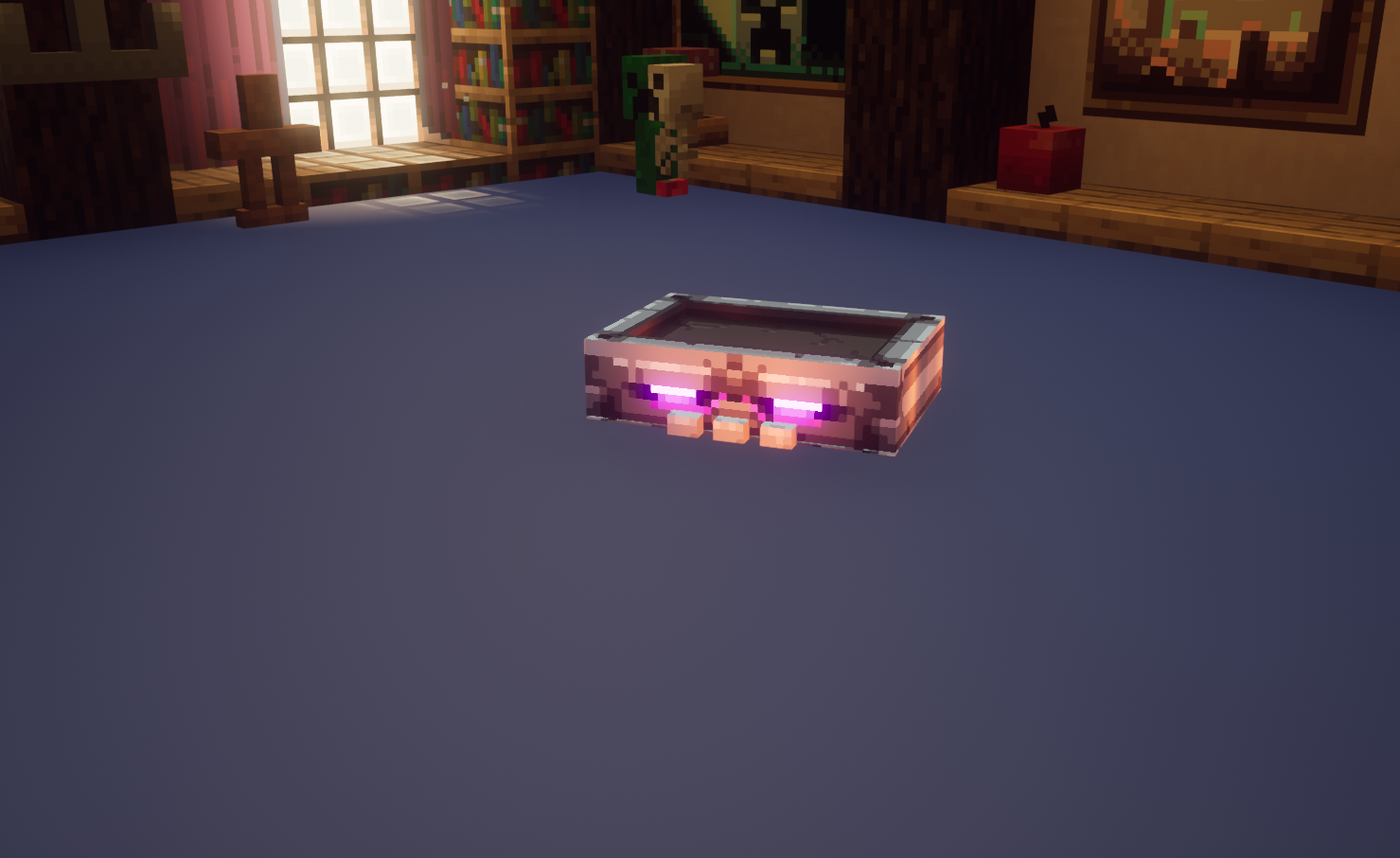



Created Issue:
Blue plane in chest room after finishing Creepy Crypt mission
Playing on low graphics settings. This graphics bug appeared after I finished the Creepy Crypt mission.
Attachments1
![[Mod] violine1101](../../../data/avatars/users/92858.png)
Blue plane in chest room after finishingCreepy CryptmissionBlue plane in chest room after finishing a mission
is duplicated by


is duplicated by
is duplicated by
![[Mojang] Mega_Spud (Jay Wells)](../../../data/avatars/users/92696.png)
Thank you for your report!
We're tracking this issue in MCD-1149, so this ticket is being resolved and linked as a duplicate.
If you would like to add a vote and any extra information to the main ticket it would be appreciated.
If you haven't already, you might like to make use of the search feature in the future to see if the issue has already been reported.
Quick Links:
📓 Issue Guidelines – 💬 Community Support – 📧 Customer Support – ✍️ Feedback and Suggestions – 📖 Game Wiki – 📖 FAQs
Thank you for your report!
We're tracking this issue in MCD-1149, so this ticket is being resolved and linked as a duplicate.
If you would like to add a vote and any extra information to the main ticket it would be appreciated.
If you haven't already, you might like to make use of the search feature in the future to see if the issue has already been reported.
Quick Links:
📓 Issue Guidelines – 💬 Community Support – 📧 Customer Support – ✍️ Feedback and Suggestions – 📖 Game Wiki – 📖 FAQs
Thank you for your report!
We're tracking this issue in MCD-1149, so this ticket is being resolved and linked as a duplicate.
If you would like to add a vote and any extra information to the main ticket it would be appreciated.
If you haven't already, you might like to make use of the search feature in the future to see if the issue has already been reported.
Quick Links:
📓 Issue Guidelines – 💬 Community Support – 📧 Customer Support – ✍️ Feedback and Suggestions – 📖 Game Wiki – 📖 FAQs
Thank you for your report!
We're tracking this issue in MCD-1149, so this ticket is being resolved and linked as a duplicate.
If you would like to add a vote and any extra information to the main ticket it would be appreciated.
If you haven't already, you might like to make use of the search feature in the future to see if the issue has already been reported.
Quick Links:
📓 Issue Guidelines – 💬 Community Support – 📧 Customer Support – ✍️ Feedback and Suggestions – 📖 Game Wiki – 📖 FAQs
![[Bot] Arisa](../../../data/avatars/users/43007.png)
Thank you for your report!
We're tracking this issue in MCD-1149, so this ticket is being resolved and linked as a duplicate.
If you would like to add a vote and any extra information to the main ticket it would be appreciated.
If you haven't already, you might like to make use of the search feature to see if the issue has already been mentioned.
Quick Links:
📓 Issue Guidelines – 💬 Community Support – 📧 Customer Support – ✍️ Feedback and Suggestions – 📖 Game Wiki – 📖 FAQs
– I am a bot. This action was performed automagically! Please report any issues in Discord or Reddit
Thank you for your report!
We're tracking this issue in MCD-1149, so this ticket is being resolved and linked as a duplicate.
If you would like to add a vote and any extra information to the main ticket it would be appreciated.
If you haven't already, you might like to make use of the search feature in the future to see if the issue has already been reported.
Quick Links:
📓 Issue Guidelines – 💬 Community Support – 📧 Customer Support – ✍️ Feedback and Suggestions – 📖 Game Wiki – 📖 FAQs
What are your system specs?
Computer: Lenovo All-in-One
Ram: 8GB
Graphics card: Intel HD 4600
Processor: Intel Core i5-4430 CPU 3.00 GHz
OS: Windows 8.1 64 bits
Memory: HD 1TB
Thank you for your report!
However, this issue is Invalid.
Your computer does not meet the minimum system requirements needed to play Minecraft Dungeons.
Quick Links:
📓 Issue Guidelines – 💬 Community Support – 📧 Customer Support – ✍️ Feedback and Suggestions – 📖 Game Wiki – 📖 FAQs
Finished game, experienced same issue 2~3 times, here is my system Specs
Intel Core i5-2500K
ASUS P8Z68-V PRO
AMD Radeon R9 290x VRAM 4GB
RAM: 16GB
Microsoft Windows 10 Pro Version 10.0.19631 Build 19631
Just ran into the same issue. Nothing noteworthy context wise other than that I rejoined a coop session after randomly losing connection to it.
Specs:
I'm on the default graphics settings (medium all, 144fps cap, no vsync).
Where: The "reward room"
What: Reward chest is half-way covered up by a gray layer of sorts.
When: After online game timeout from being out of the game (reporting another bug)
This bug does not happen often for me. I have completed most of the game levels (except the final boss level), without experiencing this.
More info
After completing Desert Temple again on hardest level difficulty on first game difficulty.
Reward was Torment Quiver, item level 37, common.
CPU: Intel Core i7 920 @ 2,67 GHz
Graphics card: ASUS NVIDIA GeForce GTX 970 (4 GB RAM, GPU clock: 1111 Mhz)
RAM: 14 GB, mixed vendors.
Display mode: Borderless windowed, resolution: 1680 x 1050 @ 60 (59) Hz
Windows 10 Version 2004
Version of Minecraft Dungeons: 1.1.1.0
In-game settings: Fanciest + V-sync: ON
For the record, thicket was reopened since also players with hardware above minimum requirements reported this bug.
Thank you for your report!
However, this issue has been temporarily closed as Awaiting Response
Is this still an issue in the latest version? If it is, please try and include steps to reproduce the issue of possible:
If your ticket does not look like the example given here, then it's likely to be closed as incomplete.
This ticket will automatically reopen when you reply.
Quick Links:
📓 Issue Guidelines – 💬 Mojang Support – 📧 Suggestions – 📖 Minecraft Wiki
Cleaning up old tickets: This ticket had been set to 'Awaiting Response', but has not received a response from the reporter (~3 months+) so is being closed as Incomplete. If you feel this is still a valid issue then please comment, or create a new ticket following the Issue Guidelines which includes steps to reproduce the problem.
For any account or purchasing related issues, please contact Minecraft Customer Support directly, as we cannot assist with those here at the bug tracker.
Quick Links:
📓 Issue Guidelines – 💬 Mojang Support – 📧 Suggestions – 📖 Minecraft Wiki