 MCL-21626
The Realms profanity filter announcement displayed within the Launcher is untranslatable
The Bug:
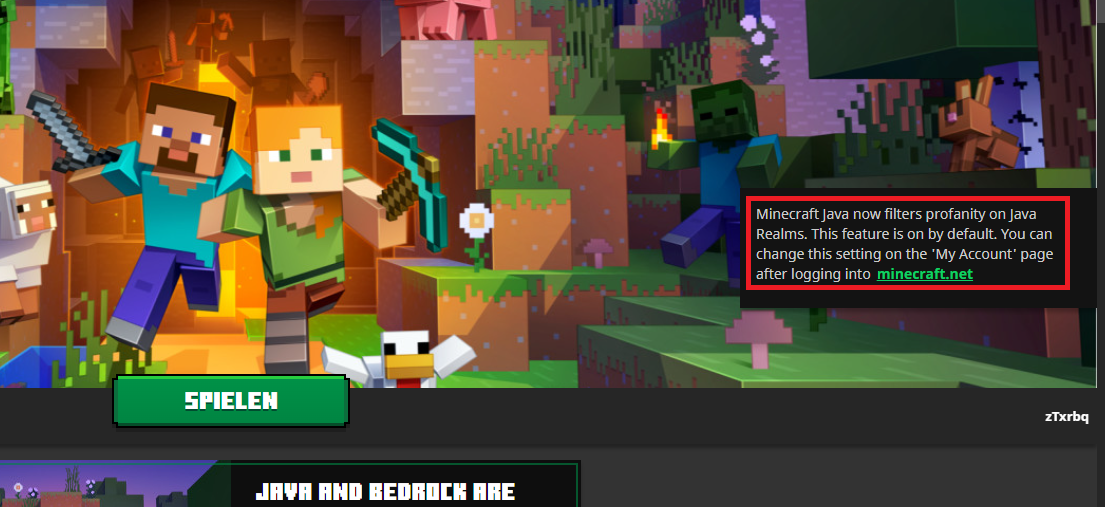
The string of text “Minecraft Java now filters profanity on Java Realms. This feature is on by default. You can change this setting on the 'My Account' page after logging into minecraft.net” displayed within the Launcher is untranslatable.
Steps to Reproduce:
- Open the Launcher in the version stated.
- Observe the Realms profanity filter announcement pop-up.
→  It should say “Minecraft Java now filters profanity on Java Realms. This feature is on by default. You can change this setting on the 'My Account' page after logging into minecraft.net”, regardless of the language selected.
- Set the language to something that is not English (Settings).
- Notice the Realms profanity filter announcement, which is again displayed on the right side of the main page.
→ It should say “Minecraft Java now filters profanity on Java Realms. This feature is on by default. You can change this setting on the 'My Account' page after logging into minecraft.net”, regardless of the language selected.
Observed Behavior:
This string of text is untranslatable.
Expected Behavior:
This string of text would be translatable.
Notes:
- Attempt to search for the existence of this string by using this search filter on the official Minecraft Launcher project on Crowdin.
- Take note as to whether or not the string of text “Minecraft Java now filters profanity on Java Realms. This feature is on by default. You can change this setting on the 'My Account' page after logging into minecraft.net” is untranslatable.

![[Mod] turbo](../../../data/avatars/users/92867.png)

Created Issue:
The Realms profanity filter announcement displayed within the Launcher is untranslatable
The Bug:
The string of text “Minecraft Java now filters profanity on Java Realms. This feature is on by default. You can change this setting on the 'My Account' page after logging into minecraft.net” displayed within the Launcher is untranslatable.
Steps to Reproduce:
- Open the Launcher in the version stated.
- Observe the Realms profanity filter announcement pop-up.
- Set the language to something that is not English (Settings).
- Notice the Realms profanity filter announcement, which is again displayed on the right side of the main page.
- It should say “Minecraft Java now filters profanity on Java Realms. This feature is on by default. You can change this setting on the 'My Account' page after logging into minecraft.net”, regardless of the language selected.
Observed Behavior:
This string of text is untranslatable.
Expected Behavior:
This string of text would be translatable.
Notes:
- Attempt to search for the existence of this string by using this search filter on the official Minecraft Launcher project on Crowdin.
- Take note as to whether or not the string of text “Minecraft Java now filters profanity on Java Realms. This feature is on by default. You can change this setting on the 'My Account' page after logging into minecraft.net” is untranslatable.
Attachments3


The Bug:
The string of text “Minecraft Java now filters profanity on Java Realms. This feature is on by default. You can change this setting on the 'My Account' page after logging into minecraft.net” displayed within the Launcher is untranslatable.
Steps to Reproduce:
- Open the Launcher in the version stated.
- Observe the Realms profanity filter announcement pop-up.
- Set the language to something that is not English (Settings).
- Notice the Realms profanity filter announcement, which is again displayed on the right side of the main page.
It should say “Minecraft Java now filters profanity on Java Realms. This feature is on by default. You can change this setting on the 'My Account' page after logging into minecraft.net”, regardless of the language selected.Observed Behavior:
This string of text is untranslatable.
Expected Behavior:
This string of text would be translatable.
Notes:
- Attempt to search for the existence of this string by using this search filter on the official Minecraft Launcher project on Crowdin.
- Take note as to whether or not the string of text “Minecraft Java now filters profanity on Java Realms. This feature is on by default. You can change this setting on the 'My Account' page after logging into minecraft.net” is untranslatable.
The Bug:
The string of text “Minecraft Java now filters profanity on Java Realms. This feature is on by default. You can change this setting on the 'My Account' page after logging into minecraft.net” displayed within the Launcher is untranslatable.
Steps to Reproduce:
- Open the Launcher in the version stated.
- Observe the Realms profanity filter announcement pop-up.
→
- Set the language to something that is not English (Settings).
- Notice the Realms profanity filter announcement, which is again displayed on the right side of the main page.
→
Observed Behavior:
This string of text is untranslatable.
Expected Behavior:
This string of text would be translatable.
Notes:
- Attempt to search for the existence of this string by using this search filter on the official Minecraft Launcher project on Crowdin.
- Take note as to whether or not the string of text “Minecraft Java now filters profanity on Java Realms. This feature is on by default. You can change this setting on the 'My Account' page after logging into minecraft.net” is untranslatable.
screenshot4.png
![[Mod] markderickson](../../../data/avatars/users/18946.svg)
Can confirm.
This issue has been fixed.
I can also confirm that this issue has been fixed. This string can now be found on crowdin at https://crowdin.com/translate/minecraft-launcher/9420/en-engb#5296176
Cannot reproduce the issue as the pop-up no longer exists. Closing the ticket as "Invalid".
The pop-up still exists, it just popped up for me. So the ticket should not be "Invalid", but "Fixed".
I don't believe the screenshot showcases the issue – did you possibly add an incorrect attachment, [Mod] turbo?
Yes, thank you, my bad. I have attached the correct screenshot.