 MCL-23665
Minecraft Legends lacks UnsupportedPlatformMessage and IncompatibleDeviceAlert on Linux (and Mac)
The Bug:
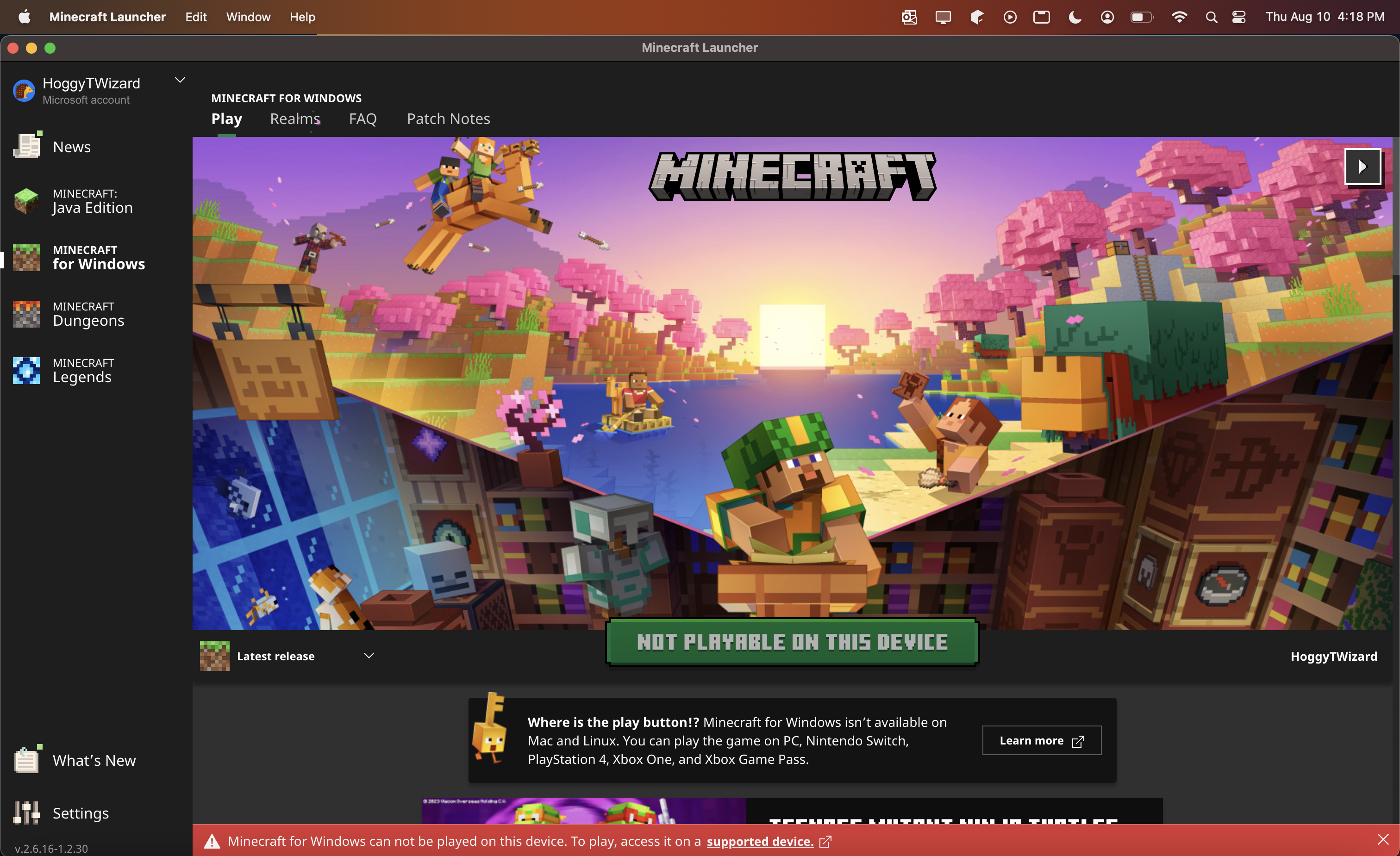
On Linux (and Mac), and possibly on Windows 10 Arm-based PCs, Minecraft Legends is missing the UnsupportedPlatformMessage with the panicking key golem and the IncompatibleDeviceAlert (red banner at the bottom of the launcher).
Steps to Reproduce:
- Open the Launcher in the version stated.
- Compare the Minecraft Legends tab to the Minecraft for Windows and Minecraft Dungeons tab.
→  The Minecraft Legends tab does not have an UnsupportedPlatformMessage with more information, nor does it have an IncompatibleDeviceAlert, unlike the other game tabs.
Observed Behavior:
The Minecraft Legends tab does not have an UnsupportedPlatformMessage with more information, nor does it have an IncompatibleDeviceAlert, unlike the other game tabs.
Expected Behavior:
The Minecraft Legends tab has an UnsupportedPlatformMessage with more information and the IncompatibleDeviceAlert, just like the other game tabs.
Linked Issues

![[Mod] turbo](../../../data/avatars/users/92867.png)



Created Issue:
Minecraft Legends lacks UnsupportedPlatformMessage on Linux (and Mac)
The Bug:
On Linux (and Mac), and possibly on Windows 10 Arm-based PCs, Minecraft Legends is missing the UnsupportedPlatformMessage with the panicking key golem.
Steps to Reproduce:
- Open the Launcher in the version stated.
- Compare the Minecraft Legends tab to the Minecraft for Windows and Minecraft Dungeons tab.
→
Observed Behavior:
The Minecraft Legends tab does not have an UnsupportedPlatformMessage with more information, unlike the other game tabs.
Expected Behavior:
The Minecraft Legends tab has an UnsupportedPlatformMessage with more information, just like the other game tabs.
Attachments3
Screenshot_20230810_164812.png
The Bug:
On Linux (and Mac), and possibly on Windows 10 Arm-based PCs, Minecraft Legends is missing the UnsupportedPlatformMessage with the panicking key golem and the IncompatibleDeviceAlert (red banner at the bottom of the launcher).
Steps to Reproduce:
- Open the Launcher in the version stated.
- Compare the Minecraft Legends tab to the Minecraft for Windows and Minecraft Dungeons tab.
→
Observed Behavior:
The Minecraft Legends tab does not have an UnsupportedPlatformMessage with more information, nor does it have an IncompatibleDeviceAlert, unlike the other game tabs.
Expected Behavior:
The Minecraft Legends tab has an UnsupportedPlatformMessage with more information and the IncompatibleDeviceAlert, just like the other game tabs.
Minecraft Legends lacks UnsupportedPlatformMessage and IncompatibleDeviceAlert on Linux (and Mac)
![[MCQA] Zgajak](../../../data/avatars/users/10122.svg)
![[Mod] markderickson](../../../data/avatars/users/18946.svg)
relates to
![[Mojang] Donuts1000](../../../data/avatars/users/18949.svg)
Relates to / Is (partially) blocked by MCL-23665.
The Bug:
The UnsupportedPlatformMessage is showing outdated info ("<strong>Where is the buy button!?</strong> %1$s isn’t available on Mac and Linux. You can play the game on PC, Nintendo Switch, PlayStation 4, Xbox One, and Xbox Game Pass.").
While this message is completely missing from Minecraft Legends (refer to MCL-23665), as per https://www.minecraft.net/about-legends PlayStation 5, Steam, PC Game Pass, Xbox Series X|S (and Xbox Cloud Gaming) would still need to be added.
For Minecraft Dungeons, Steam and Xbox Series X|S should at least be added to the message per https://www.minecraft.net/about-dungeons.
In fact, as per https://www.minecraft.net/about-minecraft, Minecraft: Bedrock Edition is also available on Chromebook, Amazon Fire, iOS, and Android. This information is completely withheld.
Steps to Reproduce:
- Open the Launcher in the version stated.
- Navigate to the Minecraft Dungeons (or Legends) tab.
- Check if the information below the play button is up-to-date and consistent with the information on the website.
→ The information in the launcher is not up-to-date and does not match the website.
Observed Behavior:
The information in the UnsupportedPlatformMessage in the launcher is not up-to-date and does not match the website, displaying outdated information and not all information.
Expected Behavior:
The information in the UnsupportedPlatformMessage in the launcher is up-to-date and displays all current information.