 MCLG-111
I can't enter the game - stuck on Mojang screen with syncing data message
Summary:
The game gets stuck on the red Mojang Studios screen with the message Syncing Data
Steps to Reproduce:
- Attempt to load the game
Observed Results:
The game gets stuck on the red Mojang Studios screen with the message Syncing Data
Expected Results:
The game launches successfully
Screenshots/Videos attached: Yes
Notes:
Original Description:
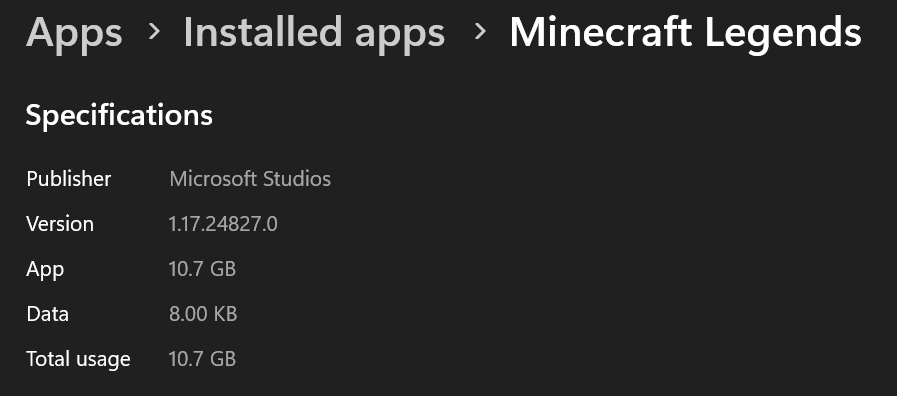
Comment from reporter: I use windows 11. I just get stuck on the loading screen. I tried repairing and reinstalling. But the ending hasn't changed

Linked Issues




Created Issue:
i can't enter the game
Linked Issues
is duplicated by1
TRASH-61259
Attachments1
![[MCQA] Kinga Izdebska](../../../data/avatars/users/18949.svg)
![[Bot] Arisa](../../../data/avatars/users/43007.png)
![[Mojang] Mega_Spud (Jay Wells)](../../../data/avatars/users/92696.png)
Summary:
The game gets stuck on the red Mojang Studios screen with the message Syncing DataSteps to Reproduce:
- Attempt to load the game
Observed Results:
The game gets stuck on the red Mojang Studios screen with the message Syncing DataExpected Results:
The game launches successfullyScreenshots/Videos attached: Yes
Notes:
Original Description:
ican't enter the gameI can't enter the game - stuck on Mojang screen with syncing data message
Summary:
The game gets stuck on the red Mojang Studios screen with the message Syncing DataSteps to Reproduce:
- Attempt to load the game
Observed Results:
The game gets stuck on the red Mojang Studios screen with the message Syncing DataExpected Results:
The game launches successfullyScreenshots/Videos attached: Yes
Notes:
Original Description:
Summary:
The game gets stuck on the red Mojang Studios screen with the message Syncing DataSteps to Reproduce:
- Attempt to load the game
Observed Results:
The game gets stuck on the red Mojang Studios screen with the message Syncing DataExpected Results:
The game launches successfullyScreenshots/Videos attached: Yes
Notes:
Original Description:
Comment from reporter: I use windows 11. I just get stuck on the loading screen. I tried repairing and reinstalling. But the ending hasn't changed
is duplicated by
is duplicated by
![[Mojang] Big Beak](../../../data/avatars/users/88062.png)
![[Mod] Greymagic27](../../../data/avatars/users/92875.png)
is duplicated by
is duplicated by

Thank you for your report!
We're tracking this issue in MCLG-111, so this ticket is being resolved and linked as a duplicate.
If you would like to add a vote and any extra information to the main ticket it would be appreciated.
If you haven't already, you might like to make use of the search feature to see if the issue has already been mentioned.
Quick Links:
📓 Bug Tracker Guidelines – 💬 Community Support – 📧 Mojang Support
📓 Project Summary – ✍️ Feedback and Suggestions – 📖 Game Wiki – 📖 FAQs
– I am a bot. This action was performed automatically! The ticket was resolved by one of our moderators, and I left this message to give more information to you.
Thank you for your report!
We're tracking this issue in MCLG-111, so this ticket is being resolved and linked as a duplicate.
That ticket has already been resolved as invalid, which means this is a technical support issue. Please take a look at the parent ticket (MCLG-111) and see if a solution is provided there.
If you need additional help to fix this problem, please contact Community Support and refer to this ticket by providing a link.
If you haven't already, you might like to make use of the search feature to see if the issue has already been mentioned.
Quick Links:
📓 Bug Tracker Guidelines – 💬 Community Support – 📧 Mojang Support
📓 Project Summary – ✍️ Feedback and Suggestions – 📖 Game Wiki – 📖 FAQs
Thank you for your report!
We're tracking this issue in MCLG-111, so this ticket is being resolved and linked as a duplicate.
That ticket has already been resolved as Fixed. Please check the Fix Version/s field in that ticket to see in which version this behavior was or will be fixed.
If you haven't already, you might like to make use of the search feature to see if the issue has already been mentioned.
Quick Links:
📓 Bug Tracker Guidelines – 💬 Community Support – 📧 Mojang Support
📓 Project Summary – ✍️ Feedback and Suggestions – 📖 Game Wiki – 📖 FAQs
What do you mean? aAre you able to see attached screen and nothing else? What is happening thae?
What plaform/device are you using?
This ticket will automatically reopen when you reply.
I use windons 11
I just get stuck on the loading screen
I tried repairing and reinstalling
But the ending hasn't changed
+1, experiencing the same issue. Stalls on 'Syncing data...' and can not proceed further.
Regarding
MCLG-144, It seems that Windows 11 is the cause.I have the same issue. It shows that it is loading, but it is just stuck.
Im also Win11.
And i also want to ask, when will there be an fix?
Mine4Arts → Mojang will fix the issue ASAP. The bug report is in 'Community Consensus,' (confirmed by others members that mods/helpers).
Hi Lunarian, how long does ASAP mean? Im a bit anoyed, because i bought the game and played it a day and then i couldn't play it again until now. I'm sorry if I annoy you.
Dont worry! But I dont know.. Mojang working on several issues rn. You can add a vote to the issue.
Hi everyone, i think i found a solution. Reinstall the xbox game services, how to do that is explaind there: https://support.xbox.com/de-DE/help/games-apps/troubleshooting/troubleshoot-games-windows-10 . Just visite the site an under "Problems launching from the xbox app" look for reinstalling the gaming services. After reinstalling open Minecraft legends and then ther should be 2 windows, in the grey one click on "Play offline". That should be it. It worked for me, i hope for you to.
Can confirm the workaround by @Mine4Arts works!
start ms-windows-store://pdp/?productid=9MWPM2CQNLHNThanks for sharing, Mine4Arts!
Thanks to everyone who reported. I'm closing this as it's not an issue with the game but with making sure Game Services are updated in Windows.
https://support.xbox.com/en-US/help/games-apps/troubleshooting/troubleshoot-games-windows-10