 MCLG-393
Completely Invulnerable Nether Portal - after destroying protection
After destroying every single other building (including the 3 portal protection forcefield things) – I'm still unable to destroy the Nether Portal itself. 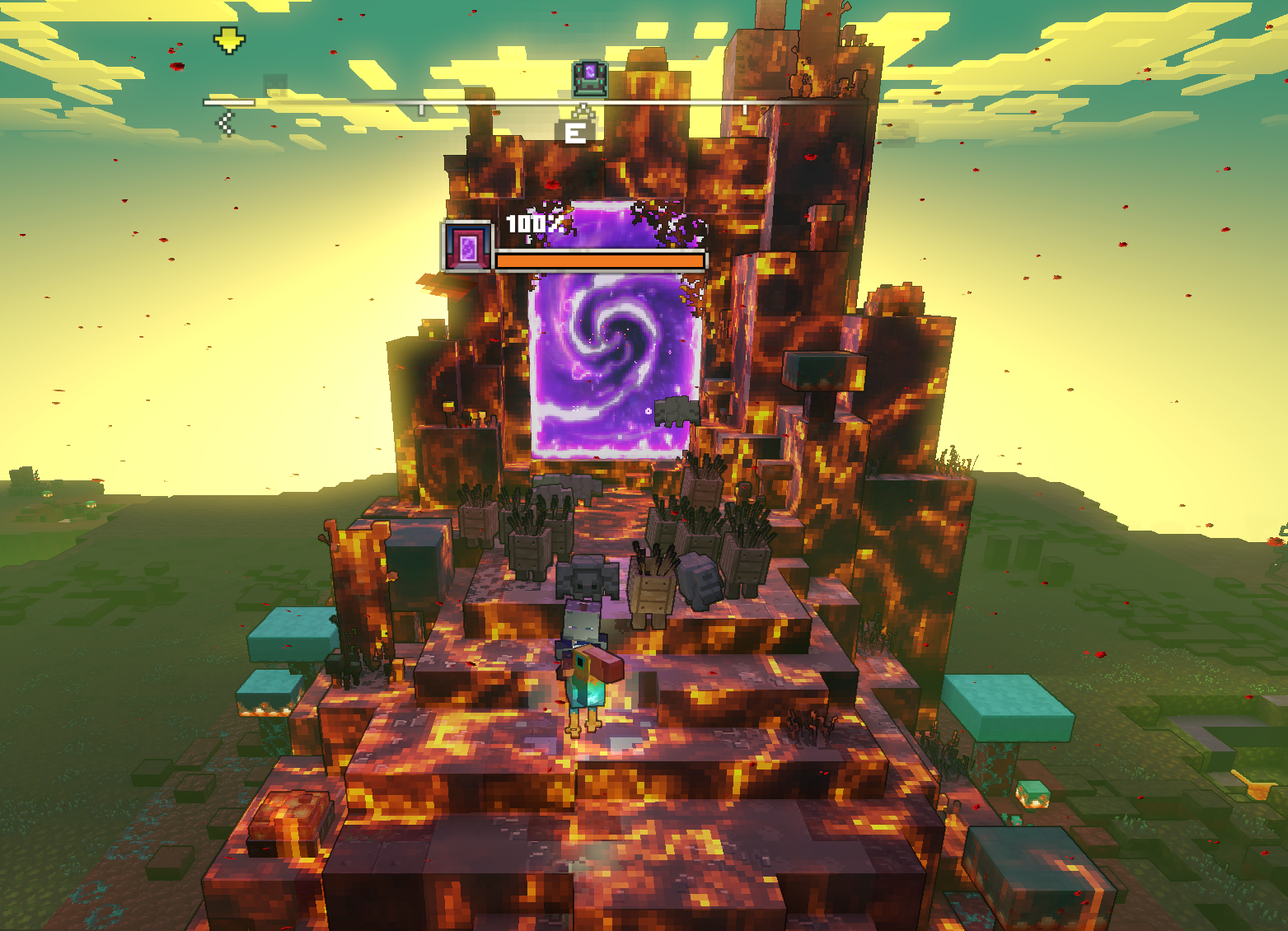
Linked Issues


Created Issue:
Completely Invulnerable Nether Portal - after destroying protection
After destroying every single other building (including the 3 portal protection forcefield things) – I'm still unable to destroy the Nether Portal itself.
Attachments1
![[Bot] Arisa](../../../data/avatars/users/43007.png)
After destroying every single other building (including the 3 portal protection forcefield things) – I'm still unable to destroy the Nether Portal itself.
After destroying every single other building (including the 3 portal protection forcefield things) – I'm still unable to destroy the Nether Portal itself.
is duplicated by
![[Mod] turbo](../../../data/avatars/users/92867.png)
![[Mod] Greymagic27](../../../data/avatars/users/92875.png)
is duplicated by
![[MCQA] Kinga Izdebska](../../../data/avatars/users/18949.svg)
Thank you for your report!
We're tracking this issue in MCLG-393, so this ticket is being resolved and linked as a duplicate.
If you would like to add a vote and any extra information to the main ticket it would be appreciated.
If you haven't already, you might like to make use of the search feature to see if the issue has already been mentioned.
Quick Links:
📓 Bug Tracker Guidelines – 💬 Community Support – 📧 Mojang Support
📓 Project Summary – ✍️ Feedback and Suggestions – 📖 Game Wiki – 📖 FAQs
– I am a bot. This action was performed automatically! The ticket was resolved by one of our moderators, and I left this message to give more information to you.

Thank you for your report!
We're tracking this issue in MCLG-393, so this ticket is being resolved and linked as a duplicate.
If you would like to add a vote and any extra information to the main ticket it would be appreciated.
If you haven't already, you might like to make use of the search feature to see if the issue has already been mentioned.
Quick Links:
📓 Bug Tracker Guidelines – 💬 Community Support – 📧 Mojang Support
📓 Project Summary – ✍️ Feedback and Suggestions – 📖 Game Wiki – 📖 FAQs
– I am a bot. This action was performed automatically! The ticket was resolved by one of our moderators, and I left this message to give more information to you.
Same bug encontered here. 3 protection pillar detroyed but the portal remains invulnerable, which prevents the game from continuing. Please fix this bug because it will cause bad savefile where players cannot beat the game.
Steam platform. build number 15452163. Exe version 1.17.31319.0
The last pillar was destroyed by artillery (redstone cannon) when nobody is inside the portal zone, maybe the updater fails due to the lack of present players.
I have this issue as well (on xbox). Seems pretty urgent to me, as its blocking progression. Restarting the game did not help.
Same bug encountered with two Nether Portals, in both cases I used a Redstone Launcher to destroy at least one Lava Coil on the Piglin base. In both cases after I destroyed all Lava Coils, the game went to the cut scene that should indicate the Nether Portal was vulnerable. The life bar for these two Nether Portals started showing a percentage but remained purple.
For other Piglin bases where I destroyed all Lava Coils with golems, I did not run into this problem.
Unfortunately I cannot advance in the game because these two Nether Portals remain (one for Horde of the Spore, one for Horde of the Bastion).
I destroyed the pillar with golems, but I died and was not there when it was actually destroyed. So I think you might be on to something
I have the same problem on my kids PC. He is frustrated as he cannot progress further in the game. There are no other structurers nearby other than walls and the horde of the bastion portal itself, and health bar of the portal stays on 100%.
I have completely reinstalled whole PC from the scratch, I have removed all the partitions from all disks, so completely new start. After downloading all the updates, I have downloaded Minecraft Legends as a sole game. Then I have pasted backup save folder from previous OS installation, and guess what? Still there is a problem with invulnerable Bastion of the Horde portal. So it;s not OS issue. Can someone send me a save just before the attack on the Bastion of the Horde? Unfortunately I cant go back with my saves, as there are only 5 autosaves and all of them bring me back to time when I already destroyed all structures and only one left is the Portal (which stays at 100% health). This is becoming so annyoing, as I bought Game Pass just for this game, and we are nearing the end of the subscription.
Is there any solution to this problem i have it too?
Hi, this seems to still be an issue on Xbox. Is there a resolution in sight? I'd say it is quite critical as it blocks the progress of the game.
Resolved? Cannot reproduce? There has been no contact from anyone to people who have this issue. If I can reproduce it simply by restoring save game on a fresh installed system, than surely you can do it too. Probably You (Mod) didn't do it. I want a full refund for this game.
zwrk is this still an issue for you then? You're welcome to contact Microsoft and see what they can do to sort out a refund but you may have run out of time.
If this is still an issue for you could you attach a video so some more information about the issue can be collected?
If you are on Windows, you can use Windows+Alt+R to open a built-in app for recording game footage.
If you are on Mac (Mojave or later), you can use Shift+Command+5 to open a built-in app for recording your screen.
In case you don't have a program to record videos, we recommend using the free recording software OBS.
In case the resulting video file is too large to be uploaded to the bug tracker directly, please upload it elsewhere (e.g. as unlisted video on YouTube) and link to it here.
I've also changed the resolution of this report now as this may be able to reproduced again with further information.
Quick Links:
📓 Bug Tracker Guidelines – 💬 Community Support – 📧 Mojang Support (Technical Issues) – 📧 Microsoft Support (Account Issues)
📓 Project Summary – ✍️ Feedback and Suggestions – 📖 Game Wiki – 📖 FAQs
This is not at all resolved. I still have a save game where this is an issue.
Please see my comment. If this is still an issue please attach a video showcasing it.
Those screenshots clearly show it's invulnerable because it has the lava texture and there are no lava towers being shown to destroy.
Your system is limited to a maximum file size of 10MB so it is quite difficult to attach a video as you asked. Here is a link to a video I just took as this just happened to me today. https://drive.google.com/file/d/1Uy7XDxD7BnNkNBGPdJbL_U7__aE-qTiU/view?usp=sharing
Let me know if you need anything else to re-open this unresolved issue.
Hope this video is clear enough:
https://drive.google.com/file/d/1I8M-YiH04PERdvU4O5eAE5OYAQxq4mh-/view?usp=sharing
Thank you for taking the time to report this issue. However, we are resolving the remaining open issues in this project.
More information can be found here: aka.ms/LegendsJanuaryUpdates.
You can still discuss the game on the Minecraft Legends Discord server at discord.gg/MinecraftLegends. If you need technical support for the game, please visit help.minecraft.net