Red triangle shows on hud display using UI texture packs
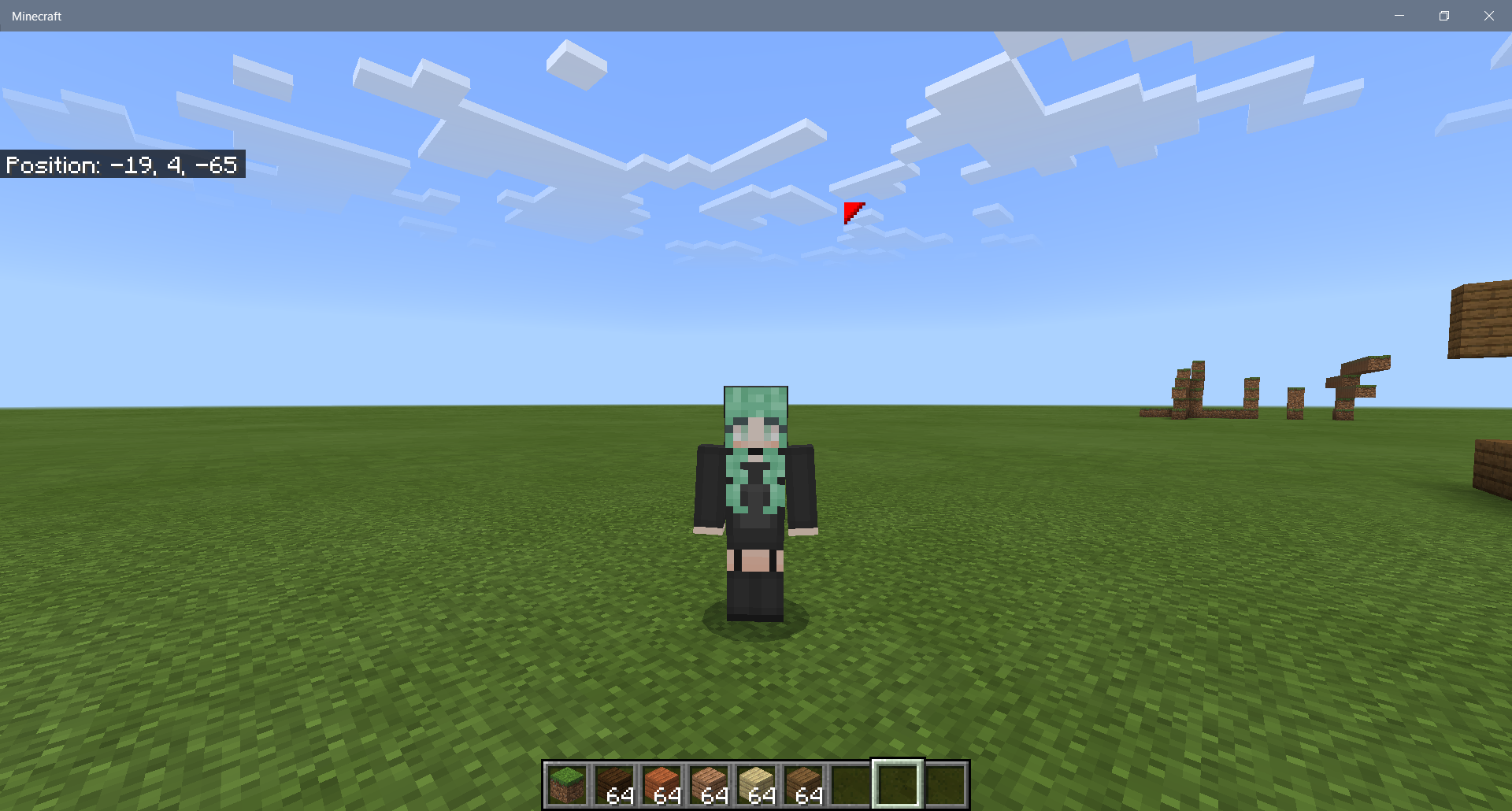
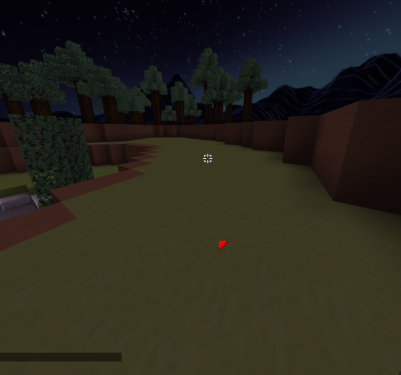
Whenever you apply specific resource packs with UI, an annoying red or yellow triangle will appear on the HUD screen. Additionally, whenever you open your inventory and then move your cursor, the triangle will shift to where your cursor was positioned before you closed inventory,
This issue was present in the beta, was fixed in a later beta, but somehow made its way into the full release. The bug appears to be referencing the item lock textures for the inventory introduced in this update.
Linked Issues
is duplicated by22
 BDS-9901Red triangle (bug?)DuplicateBDS-9960There is a triangle on my screenDuplicateBDS-10084Small red triangel on the screenDuplicate
 MCPE-104731Red arrow appears on screen when using data packs not purchased on the marketplaceDuplicateMCPE-105959Weird Red Cursor On My Screen?!?DuplicateMCPE-106225Red cursor visible when playing with a controllerDuplicateMCPE-106231red arrow on the screenDuplicateMCPE-106268Minecraft displays a red marker when certain packs are appliedDuplicateMCPE-106321Red Triangle In New 1.16.100 UpdateDuplicateMCPE-106338Red triangleDuplicateMCPE-106478There is a Red triangle on my screen near where my cursor isDuplicateMCPE-106651Orange CursorDuplicateMCPE-106815Red triangle above mouse - Minecraft Java UI packDuplicateMCPE-106882A red triangle cursor shownig up on screen with these 3 resource packs.DuplicateMCPE-107202Tiny red triangle shown where i point my fingerDuplicateMCPE-108062Random Cursor in the middle of the screenDuplicateMCPE-108879When using java ui resource pack theres a red thing near the crosshair.DuplicateMCPE-109796Flashing arrow that appears wherever the cursor is left after closing the inventory tabDuplicateMCPE-110322A small triangle appears on my screen DuplicateMCPE-115905Small bug in touch screen textureDuplicateMCPE-117729When touched, a yellow spot appears.DuplicateMCPE-120893Red Triangle On ScreenDuplicate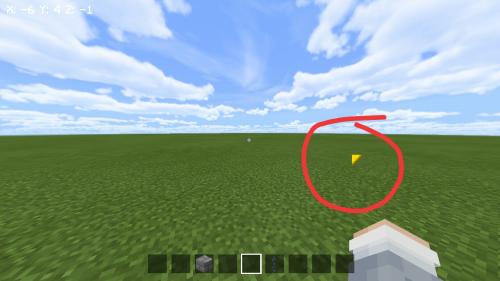




Created Issue:
Red triangle shows on hud display using UI texture packs
Whenever you apply specific resource packs with UI, an annoying red or yellow triangle will appear on the hud screen. Whenever you open your inventory and then move your cursor, the triangle will shift to where your cursor was before you closed inventory,
This issue was present in the beta, was fixed in a later beta, but somehow made its way into the full release. The bug appears to be referencing the item lock textures for the inventory introduced in this update.
Whenever you apply specific resource packs with UI, an annoying red or yellow triangle will appear on the hud screen. Whenever you open your inventory and then move your cursor, the triangle will shift to where your cursor was before you closed inventory,
This issue was present in the beta, was fixed in a later beta, but somehow made its way into the full release. The bug appears to be referencing the item lock textures for the inventory introduced in this update.
Whenever you apply specific resource packs with UI, an annoying red or yellow triangle will appear on the hud screen. Whenever you open your inventory and then move your cursor, the triangle will shift to where your cursor was before you closed
inventory,This issue was present in the beta, was fixed in a later beta, but somehow made its way into the full release. The bug appears to be referencing the item lock textures for the inventory introduced in this update.
Whenever you apply specific resource packs with UI, an annoying red or yellow triangle will appear on the hud screen. Whenever you open your inventory and then move your cursor, the triangle will shift to where your cursor was positioned before you closed inventory,
This issue was present in the beta, was fixed in a later beta, but somehow made its way into the full release. The bug appears to be referencing the item lock textures for the inventory introduced in this update.
Whenever you apply specific resource packs with UI, an annoying red or yellow triangle will appear on the
hudscreen.Whenever you open your inventory and then move your cursor, the triangle will shift to where your cursor was positioned before you closed inventory,This issue was present in the beta, was fixed in a later beta, but somehow made its way into the full release. The bug appears to be referencing the item lock textures for the inventory introduced in this update.
Whenever you apply specific resource packs with UI, an annoying red or yellow triangle will appear on the HUD screen. Additionally, whenever you open your inventory and then move your cursor, the triangle will shift to where your cursor was positioned before you closed inventory,
This issue was present in the beta, was fixed in a later beta, but somehow made its way into the full release. The bug appears to be referencing the item lock textures for the inventory introduced in this update.
![[Mod] OcelotOnesie](../../../data/avatars/users/43220.png)
is duplicated by
![[Mod] tryashtar](../../../data/avatars/users/41963.png)
![[Mod] Umija5895M](../../../data/avatars/users/10122.svg)
is duplicated by
is duplicated by
is duplicated by
is duplicated by
is duplicated by
is duplicated by
is duplicated by

Issue didn't occur for myself until updated to latest release. Confirm that this only happens when resource packs are added. Creating a clean test world with no resource packs does not reproduce the issue.
![[MCQA] Kinga Izdebska](../../../data/avatars/users/18949.svg)
is duplicated by
is duplicated by
is duplicated by
is duplicated by
Screenshot 2020-11-20 162709.png
is duplicated by
is duplicated by
is duplicated by
![[Bot] Arisa](../../../data/avatars/users/43007.png)
is duplicated by
is duplicated by
MCPE-108215
is duplicated by
is duplicated by
![[Mojang] Mega_Spud (Jay Wells)](../../../data/avatars/users/92696.png)
is duplicated by
relates to
is duplicated by
is duplicated by
is duplicated by
Thank you for your report!
We're actually already tracking this issue at MCPE-105882, so I will resolve and link this ticket as a duplicate.
If you would like to add a vote and any extra information to the main ticket it would be appreciated.
If you haven't already, you might like to make use of the search feature to see if the issue has already been mentioned.
Quick Links:
📓 Bug Tracker Guidelines – 💬 Community Support – 📧 Mojang Support
📓 Project Summary – ✍️ Feedback and Suggestions – 📖 Game Wiki

Appears to be using a Dark Mode resource pack, thus same bug as MCPE-105882. That bug already has a CHK (but no ADO) and appears to describe the bug better
Thank you for your report!
We're tracking this issue in MCPE-105882, so this ticket is being resolved and linked as a duplicate.
If you would like to add a vote and any extra information to the main ticket it would be appreciated.
Quick Links:
📓 Bug Tracker Guidelines – 💬 Community Support – 📧 Mojang Support
📓 Project Summary – ✍️ Feedback and Suggestions – 📖 Game Wiki
Thank you for your report!
We're actually already tracking this issue at MCPE-105882, so I will resolve and link this ticket as a duplicate.
If you would like to add a vote and any extra information to the main ticket it would be appreciated.
If you haven't already, you might like to make use of the search feature to see if the issue has already been mentioned.
Quick Links:
📓 Bug Tracker Guidelines – 💬 Community Support – 📧 Mojang Support
📓 Project Summary – ✍️ Feedback and Suggestions – 📖 Game Wiki
Thank you for your report!
We're actually already tracking this issue at MCPE-105882, so I will resolve and link this ticket as a duplicate.
If you would like to add a vote and any extra information to the main ticket it would be appreciated.
If you haven't already, you might like to make use of the search feature to see if the issue has already been mentioned.
Quick Links:
📓 Bug Tracker Guidelines – 💬 Community Support – 📧 Mojang Support
📓 Project Summary – ✍️ Feedback and Suggestions – 📖 Game Wiki
Thank you for your report!
We're actually already tracking this issue at MCPE-105882, so I will resolve and link this ticket as a duplicate.
If you would like to add a vote and any extra information to the main ticket it would be appreciated.
If you haven't already, you might like to make use of the search feature to see if the issue has already been mentioned.
Quick Links:
📓 Bug Tracker Guidelines – 💬 Community Support – 📧 Mojang Support
📓 Project Summary – ✍️ Feedback and Suggestions – 📖 Game Wiki
Thank you for your report!
We're actually already tracking this issue at MCPE-105882, so I will resolve and link this ticket as a duplicate.
If you would like to add a vote and any extra information to the main ticket it would be appreciated.
If you haven't already, you might like to make use of the search feature to see if the issue has already been mentioned.
Quick Links:
📓 Bug Tracker Guidelines – 💬 Community Support – 📧 Mojang Support
📓 Project Summary – ✍️ Feedback and Suggestions – 📖 Game Wiki
Thank you for your report!
We're actually already tracking this issue at MCPE-105882, so I will resolve and link this ticket as a duplicate.
If you would like to add a vote and any extra information to the main ticket it would be appreciated.
If you haven't already, you might like to make use of the search feature to see if the issue has already been mentioned.
Quick Links:
📓 Bug Tracker Guidelines – 💬 Community Support – 📧 Mojang Support
📓 Project Summary – ✍️ Feedback and Suggestions – 📖 Game Wiki
Thank you for your report!
We're actually already tracking this issue at MCPE-105882, so I will resolve and link this ticket as a duplicate.
If you would like to add a vote and any extra information to the main ticket it would be appreciated.
If you haven't already, you might like to make use of the search feature to see if the issue has already been mentioned.
Quick Links:
📓 Bug Tracker Guidelines – 💬 Community Support – 📧 Mojang Support
📓 Project Summary – ✍️ Feedback and Suggestions – 📖 Game Wiki
Thank you for your report!
We're tracking this issue in MCPE-105882, so this ticket is being resolved and linked as a duplicate.
If you would like to add a vote and any extra information to the main ticket it would be appreciated.
If you haven't already, you might like to make use of the search feature to see if the issue has already been mentioned.
Quick Links:
📓 Bug Tracker Guidelines – 💬 Community Support – 📧 Mojang Support
📓 Project Summary – ✍️ Feedback and Suggestions – 📖 Game Wiki
Thank you for your report!
We're actually already tracking this issue at MCPE-105882, so I will resolve and link this ticket as a duplicate.
If you would like to add a vote and any extra information to the main ticket it would be appreciated.
If you haven't already, you might like to make use of the search feature to see if the issue has already been mentioned.
Quick Links:
📓 Bug Tracker Guidelines – 💬 Community Support – 📧 Mojang Support
📓 Project Summary – ✍️ Feedback and Suggestions – 📖 Game Wiki
Thank you for your report!
We're tracking this issue in MCPE-105882, so this ticket is being resolved and linked as a duplicate.
If you would like to add a vote and any extra information to the main ticket it would be appreciated.
If you haven't already, you might like to make use of the search feature to see if the issue has already been mentioned.
Quick Links:
📓 Bug Tracker Guidelines – 💬 Community Support – 📧 Mojang Support
📓 Project Summary – ✍️ Feedback and Suggestions – 📖 Game Wiki
Thank you for your report!
We're tracking this issue in MCPE-105882, so this ticket is being resolved and linked as a duplicate.
If you would like to add a vote and any extra information to the main ticket it would be appreciated.
If you haven't already, you might like to make use of the search feature to see if the issue has already been mentioned. For example, searching for "red triangle" would list that ticket.
Quick Links:
📓 Bug Tracker Guidelines – 💬 Community Support – 📧 Mojang Support
📓 Project Summary – ✍️ Feedback and Suggestions – 📖 Game Wiki
Thank you for your report!
We're tracking this issue in MCPE-105882, so this ticket is being resolved and linked as a duplicate.
If you would like to add a vote and any extra information to the main ticket it would be appreciated.
If you haven't already, you might like to make use of the search feature to see if the issue has already been mentioned. For example, searching for "red triangle" would list the previous report.
Quick Links:
📓 Bug Tracker Guidelines – 💬 Community Support – 📧 Mojang Support
📓 Project Summary – ✍️ Feedback and Suggestions – 📖 Game Wiki
Thank you for your report!
We're actually already tracking this issue at MCPE-105882, so I will resolve and link this ticket as a duplicate.
If you would like to add a vote and any extra information to the main ticket it would be appreciated.
If you haven't already, you might like to make use of the search feature to see if the issue has already been mentioned.
Quick Links:
📓 Bug Tracker Guidelines – 💬 Community Support – 📧 Mojang Support
📓 Project Summary – ✍️ Feedback and Suggestions – 📖 Game Wiki
Thank you for your report!
We're actually already tracking this issue at MCPE-105882, so I will resolve and link this ticket as a duplicate.
If you would like to add a vote and any extra information to the main ticket it would be appreciated.
If you haven't already, you might like to make use of the search feature to see if the issue has already been mentioned.
Quick Links:
📓 Bug Tracker Guidelines – 💬 Community Support – 📧 Mojang Support
📓 Project Summary – ✍️ Feedback and Suggestions – 📖 Game Wiki
Thank you for your report!
We're actually already tracking this issue at MCPE-105882, so I will resolve and link this ticket as a duplicate.
If you would like to add a vote and any extra information to the main ticket it would be appreciated.
If you haven't already, you might like to make use of the search feature to see if the issue has already been mentioned.
Quick Links:
📓 Bug Tracker Guidelines – 💬 Community Support – 📧 Mojang Support
📓 Project Summary – ✍️ Feedback and Suggestions – 📖 Game Wiki
This may not be the only cause but I have found that the reason I am getting this error is because when the player tries to join the realm, it asks to download a resource pack (in this case I had added a new one after the update to remove the result of MCPE-105882 by replacing the texture with a blank one), however shortly after this the game decides the popup box is actually a wifi issue and shows the 'unable to connect to world' screen.
A temporary fix in this case would be to remove any resource packs from the realm OR spam the button you would usually use to press ok whilst joining (on PC have the cursor where the download and join button would appear)
Thank you for your report!
We're tracking this issue in MCPE-105882, so this ticket is being resolved and linked as a duplicate.
If you would like to add a vote and any extra information to the main ticket it would be appreciated.
If you haven't already, you might like to make use of the search feature to see if the issue has already been mentioned.
Quick Links:
📓 Bug Tracker Guidelines – 💬 Community Support – 📧 Mojang Support
📓 Project Summary – ✍️ Feedback and Suggestions – 📖 Game Wiki
– I am a bot. This action was performed automatically! Please report any issues on Discord or Reddit
Thank you for your report!
We're actually already tracking this issue at MCPE-105882, so I will resolve and link this ticket as a duplicate.
If you would like to add a vote and any extra information to the main ticket it would be appreciated.
If you haven't already, you might like to make use of the search feature to see if the issue has already been mentioned.
Quick Links:
📓 Bug Tracker Guidelines – 💬 Community Support – 📧 Mojang Support
📓 Project Summary – ✍️ Feedback and Suggestions – 📖 Game Wiki
Does MCPE-105882 describe this issue?
This is an issue with the resource pack, see MCPE-105882.
This is an issue with the resource pack you're using, see MCPE-105882. You will need to contact the creator of the pack or you can try fixing it yourself.
See MCPE-105882 for information on how to fix this issue.
Could you please attach the texture packs you're using to this ticket?
The issue is that many UI texture packs now are throwing tons of log errors due to the update, so I feared that it would automatically invalidate the bug report. But believe me, this issue is widespread and has been documented by many people i've spoken with. This is just the one that I used in my screenshots: http://www.mediafire.com/file/aa6st9zn4iq1efy/VDX_-_Java_UI_v1.10.mcpack/file
I attached a resource pack that makes the textures for these item lock icons invisible as a temporary solution.
This bug just happened too on Windows 10 today. Yesterday everything seemed to work just fine.
I use FoxyNoTail's resource pack (v3.1.0), and have the red arrow too. SilentWisperer has pointed this out many times in the beta bug review, and it still happens. It is really silly.
Facing the same issue on windows 10 using my redstone texture pack. If I disable both global and map specific texture packs the arrow is gone.
I'm also experiencing the same problem. I have a port of Technoblade's texture pack, and 9 other overlay texture packs including FoxyNoTail ones. I was playing today, when I realized there was a new update! So I went to the Microsoft Store to download it, and when I returned, that distracting little arrow was there! I thought it was one of my texture packs auto updating, but I checked, and it happened for all of them.
If this was fixed in a later beta does that refer to the 1.16.200 betas?
Thank you for your report!
However, this issue has been closed as Invalid.
For feedback or issues with third party content, please contact the content creators directly.
The issue here appears to be that screens have been copied entirely. The resource pack is overriding "hud_screen.json" with the 1.16 version of the same file so it was causing this issue.
Specifically this line (without the spaces beside the @) should be removed from the custom resource pack "hud_screen.json" file to remove the red triangle, but due to differences with the current version of the file there might be other problems happening:
{ "inventory_selected_icon_button @ common.inventory_selected_icon_button": {} }Quick Links:
📓 Issue Guidelines – 💬 Mojang Support – 📧 Suggestions – 📖 Minecraft Wiki
@Mega_Spud, this fixed it. Thank you!
https://mcpedl.com/dragon-zahf22-addon/
The bug still exists for this pack.
I expect for there not to be a red cursor 24/7 but there is one.
Please contact the addon creator directly to fix it
You may also fix it yourself using an app such as notepad++
Do you know where it would appear?
how its that solved if i have this on mc 1.19 but whit a golden square that is pointing anywhere is my cursor, i checked every texture and i tried to edit but is still show . i hope you understand what i want to say , sorry for my bad english