 ambient
- ambient
- JIRAUSER556245
- Europe/Stockholm
- Yes
- No
 MCPE-108207
 BDS-10357MCPE-120323










Description: The 1.16 update has made it so that when clicking "e" to open the inventory (or any other button on different devices) the client needs affirmation from the server before the inventory can be opened. On higher-ping servers and multiplayer games, this causes a noticeable, even sometimes substantial delay. It is incredibly annoying to want to open your inventory to quickly move items, due to this issue, that is no longer possible to do swiftly because of the delay. PVP has been made very difficult and infuriating because of this unintended consequence of porting inventory to the server side.
If you try to open your inventory too many times, the inventory will not open in correspondence with the amount of times you attempted to open your inventory. Sometimes, the inventory will open and instantly close, or even crash the game.
See [
MCPE-83980
]The bug report above relates to this issue, but note that this report is not a duplicate.Expected behavior: When attempting to open the inventory, it opens instantly and has no delay, and does not crash the game in rare instances.
Actual Behavior: Opening the inventory in multiplayer games and servers causes an annoying delay, sometimes the inventory does not open, or the game sometimes crashes your game entirely.
https://www.youtube.com/watch?v=5TaVQVfaJN4
See the video above. Notice how my inventory opens and instantly closes on its own.
Description: The 1.16 update has made it so that when clicking "e" to open the inventory (or any other button on different devices), the client needs affirmation from the server before the inventory can be opened. On higher-ping servers and multiplayer games, this causes a noticeable, even sometimes substantial delay. It is incredibly annoying to want to open your inventory to quickly move items, due to this issue, that is no longer possible to do swiftly because of the delay. PVP has been made very difficult and infuriating because of this unintended consequence of porting inventory to the server side.
If you try to open your inventory too many times in a certain interval, the inventory will not open in correspondence with the amount of times you attempted to open your inventory. Sometimes, the inventory will open and instantly close, or even crash the game.
See [
MCPE-83980The bug report above relates to this issue, but note that this report is not a duplicate.
Expected behavior: When attempting to open the inventory, it opens instantly and has no delay, and does not crash the game in rare instances.
Actual Behavior: Opening the inventory in multiplayer games and servers causes an annoying delay, sometimes the inventory does not open, or the game sometimes crashes your game entirely.
https://www.youtube.com/watch?v=5TaVQVfaJN4
See the video above. Notice how my inventory opens and instantly closes on its own.
Description: The 1.16 update has made it so that when clicking "e" to open the inventory (or any other button on different devices), the client needs affirmation from the server before the inventory can be opened. On higher-ping servers and multiplayer games, this causes a noticeable, even sometimes substantial delay. It is incredibly annoying to want to open your inventory to quickly move items, due to this issue, that is no longer possible to do swiftly because of the delay. PVP has been made very difficult and infuriating because of this unintended consequence of porting inventory to the server side.
If you try to open your inventory too many times in a certain interval, the inventory will not open in correspondence with the amount of times you attempted to open your inventory. Sometimes, the inventory will open and instantly close, or even crash the game.
See
[MCPE-83980The bug report above relates to this issue, but note that this report is not a duplicate.
Expected behavior: When attempting to open the inventory, it opens instantly and has no delay, and does not crash the game in rare instances.
Actual Behavior: Opening the inventory in multiplayer games and servers causes an annoying delay, sometimes the inventory does not open, or the game sometimes crashes your game entirely.
https://www.youtube.com/watch?v=5TaVQVfaJN4
See the video above. Notice how my inventory opens and instantly closes on its own.
Description: The 1.16 update has made it so that when clicking "e" to open the inventory (or any other button on different devices), the client needs affirmation from the server before the inventory can be opened. On higher-ping servers and multiplayer games, this causes a noticeable, even sometimes substantial delay. It is incredibly annoying to want to open your inventory to quickly move items, due to this issue, that is no longer possible to do swiftly because of the delay. PVP has been made very difficult and infuriating because of this unintended consequence of porting inventory to the server side.
If you try to open your inventory too many times in a certain interval, the inventory will not open in correspondence with the amount of times you attempted to open your inventory. Sometimes, the inventory will open and instantly close, or even crash the game
.See
MCPE-83980The bug report above relates to this issue, but note that this report is not a duplicate.
Expected behavior: When attempting to open the inventory, it opens instantly and has no delay, and does not crash the game in rare instances.
Actual Behavior: Opening the inventory in multiplayer games and servers causes an annoying delay, sometimes the inventory does not open, or the game sometimes crashes your game entirely.
https://www.youtube.com/watch?v=5TaVQVfaJN4
See the video above. Notice how my inventory opens and instantly closes on its own.
Description: The 1.16 update has made it so that when clicking "e" to open the inventory (or any other button on different devices), the client needs affirmation from the server before the inventory can be opened. On higher-ping servers and multiplayer games, this causes a noticeable, even sometimes substantial delay. It is incredibly annoying to want to open your inventory to quickly move items, due to this issue, that is no longer possible to do swiftly because of the delay. PVP has been made very difficult and infuriating because of this unintended consequence of porting inventory to the server side.
If you try to open your inventory too many times in a certain interval, the inventory will not open in correspondence with the amount of times you attempted to open your inventory. Sometimes, the inventory will open and instantly close, or even crash the game (I am aware that the crashing has been reported, but It correlates to this issue).
See
MCPE-83980Note that this report is not a duplicate, but rather referring to the delay and unresponsiveness to inventory opening itself.
Expected behavior: When attempting to open the inventory, it opens instantly and has no delay, and does not crash the game in rare instances.
Actual Behavior: Opening the inventory in multiplayer games and servers causes an annoying delay, sometimes the inventory does not open, or the game sometimes crashes your game entirely.
https://www.youtube.com/watch?v=5TaVQVfaJN4
See the video above. Notice how my inventory opens and instantly closes on its own.
Description: The 1.16 update has made it so that when clicking "e" to open the inventory (or any other button on different devices), the client needs affirmation from the server before the inventory can be opened. On higher-ping servers and multiplayer games, this causes a noticeable, even sometimes substantial delay. It is incredibly annoying to want to open your inventory to quickly move items, due to this issue, that is no longer possible to do swiftly because of the delay. PVP has been made very difficult and infuriating because of this unintended consequence of porting inventory to the server side.
If you try to open your inventory too many times in a certain interval, the inventory will not open in correspondence with the amount of times you attempted to open your inventory. Sometimes, the inventory will open and instantly close, or even crash the game (I am aware that the crashing has been reported, but It correlates to this issue).
See
MCPE-83980Note that this report is not a duplicate, but rather referring to the delay and unresponsiveness to inventory opening itself.
Expected behavior: When attempting to open the inventory, it opens instantly and has no delay, and does not crash the game in rare instances.
Actual Behavior: Opening the inventory in multiplayer games and servers causes an annoying delay, sometimes the inventory does not open, or
the gamesometimes crashes your game entirely.https://www.youtube.com/watch?v=5TaVQVfaJN4
See the video above. Notice how my inventory opens and instantly closes on its own.
Description: The 1.16 update has made it so that when clicking "e" to open the inventory (or any other button on different devices), the client needs affirmation from the server before the inventory can be opened. On higher-ping servers and multiplayer games, this causes a noticeable, even sometimes substantial delay. It is incredibly annoying to want to open your inventory to quickly move items, due to this issue, that is no longer possible to do swiftly because of the delay. PVP has been made very difficult and infuriating because of this unintended consequence of porting inventory to the server side.
If you try to open your inventory too many times in a certain interval, the inventory will not open in correspondence with the amount of times you attempted to open your inventory. Sometimes, the inventory will open and instantly close, or even crash the game.
See
MCPE-83980The bug report above relates to this issue, but note that this report is not a duplicate.
Expected behavior: When attempting to open the inventory, it opens instantly and has no delay, and does not crash the game in rare instances.
Actual Behavior: Opening the inventory in multiplayer games and servers causes an annoying delay, sometimes the inventory does not open, or sometimes crashes your game entirely.
https://www.youtube.com/watch?v=5TaVQVfaJN4
See the video above. Notice how my inventory opens and instantly closes on its own.
Description: The 1.16 update has made it so that when clicking "e" to open the inventory (or any other button on different devices), the client needs affirmation from the server before the inventory can be opened. On higher-ping servers and multiplayer games, this causes a noticeable, even sometimes substantial
delay. It is incredibly annoying to want to open your inventory to quickly move items, due to this issue, that is no longer possible to do swiftly because of the delay. PVP has been made very difficult and infuriating because of this unintended consequence of porting inventory to the server side.If you try to open your inventory too many times in a certain interval, the inventory will not open in correspondence with the amount of times you attempted to open your inventory. Sometimes, the inventory will open and instantly close, or even crash the game.
See
MCPE-83980The bug report above relates to this issue, but note that this report is not a duplicate.
Expected behavior: When attempting to open the inventory, it opens instantly and has no delay, and does not crash the game in rare instances.
Actual Behavior: Opening the inventory in multiplayer games and servers causes an annoying delay, sometimes the inventory does not open, or sometimes crashes your game entirely.
https://www.youtube.com/watch?v=5TaVQVfaJN4
See the video above. Notice how my inventory opens and instantly closes on its own.
Description: The 1.16 update has made it so that when clicking "e" to open the inventory (or any other button on different devices), the client needs affirmation from the server before the inventory can be opened. On higher-ping servers and multiplayer games, this causes a noticeable, even sometimes substantial latency. It is incredibly annoying to want to open your inventory to quickly move items, due to this issue, that is no longer possible to do swiftly because of the delay. PVP has been made very difficult and infuriating because of this unintended consequence of porting inventory to the server side.
If you try to open your inventory too many times in a certain interval, the inventory will not open in correspondence with the amount of times you attempted to open your inventory. Sometimes, the inventory will open and instantly close, or even crash the game.
See
MCPE-83980The bug report above relates to this issue, but note that this report is not a duplicate.
Expected behavior: When attempting to open the inventory, it opens instantly and has no delay, and does not crash the game in rare instances.
Actual Behavior: Opening the inventory in multiplayer games and servers causes an annoying delay, sometimes the inventory does not open, or sometimes crashes your game entirely.
https://www.youtube.com/watch?v=5TaVQVfaJN4
See the video above. Notice how my inventory opens and instantly closes on its own.
Expected Behavior: when giving yourself an item with the following command:
`/give @s diamond_helmet 1 0 {"minecraft:item_lock":{ "mode": "lock_in_inventory" }}`,
`/give @s iron_leggings 1 0 {"minecraft:item_lock":{ "mode": "lock_in_inventory" }}`
``/give @s elytra 1 0 {"minecraft:item_lock":{ "mode": "lock_in_inventory" }}`etc,etc
you should be able to put the helmet on your head from within your inventory. However this does not work unless you armor swap from the hotbar or put the helmet on your head using /replaceitem with nbt component.
Actual Behavior: You cannot shift click items that go into the armor slots (all armor types, carved pumpkin, mob skull, elytra, turtle helmet, etc) into their respective armor slots if the item has the lock_in_inventory NBT component. You can, however, armor swap for armor pieces (+ turtle helmet and elytra) from the hotbar just fine. /replaceitem also works.
The attached video showcases the bug: https://youtu.be/Bg2qmq22GOs
Expected Behavior: when giving yourself an item with the following command:
`/give @s diamond_helmet 1 0 {"minecraft:item_lock":{ "mode": "lock_in_inventory" }}`,
`/give @s iron_leggings 1 0 {"minecraft:item_lock":{ "mode": "lock_in_inventory" }}``/give @s elytra 1 0 {"minecraft:item_lock":{ "mode": "lock_in_inventory" }}`
etc,etc
you should be able to put the helmet on your head from within your inventory. However this does not work unless you armor swap from the hotbar or put the helmet on your head using /replaceitem with nbt component.
Actual Behavior: You cannot shift click items that go into the armor slots (all armor types, carved pumpkin, mob skull, elytra, turtle helmet, etc) into their respective armor slots if the item has the lock_in_inventory NBT component. You can, however, armor swap for armor pieces (+ turtle helmet and elytra) from the hotbar just fine. /replaceitem also works.
The attached video showcases the bug: https://youtu.be/Bg2qmq22GOs
The client sends the incorrect packets and the server has to correct them. Some servers like the hive do a really good job of fixing this error but the vanilla server does not, coupled with the client error, it accounts for a very poor inventory/hotbar system on the bedrock engine.
This has been an issue with minecraft bedrock for a very long time now.
Placing and unplacing water + lava in the bedrock edition of the game is extremely buggy and unreliable, and this instability could lead to possible exploits within the game.
There are 2 separate (but potentially intertwined) issues I have noticed on a regular basis, but for the sake of practicality, I will combine both issues into 1 report.
The first issue being placement of water and lava when falling from a high velocity, often referred to as "MLG" or "bucket clutch", when a player places water (or even lava) below him or herself to prevent fall damage from a high place. After placing the water or lava (the initial placement is always reliable), more often than not, the liquid will pick up by itself without right clicking a second time. Whether or not the player takes fall damage seems to be completely random. Please note that I have tested this issue on multiple mice and I know it is not an issue with my input/double clicking accidentally.
The video above showcases the issue. This bug is incredibly frustrating because this feature of the game is well known in the technical survival java community, and bedrock edition players are unable to experience it.
The second issue has to deal with attempting to pick water/lava up a few ticks after it starts flowing (as opposed to a solid water "block"). If the player attempts to pick up the water/lava within this duration (a short number of ticks after the liquid starts to spread), the hotbar will register the lava being picked up for a split second but then will flash back to the empty bucket. The server does not detect the client picking up the liquid either. Notice my hotbar turn into a bucket of lava/water for a quick flash before being corrected by the server to an empty bucket.
The
video above showcases the issue. It is unfortunate that this is such a frequent issue because a result of this is that a lot of my maps which involve "MLG"ing have been broken and PVP is a lot less reliable due to the bug.Additionally, I would like to add what I believe is causing this issue. For whatever reason, the bedrock server engine converts the solid liquid into flowing liquid for a few ticks to allow the solid liquid to start flowing, and then quickly converts the source block to a liquid "block", which can be picked up with a bucket. Of course, flowing water or lava cannot be picked up with a b
lock, so I think this is the culprit. This issue is not at all prevalent on the Java edition, and I think a rework of water and lava calculations may be necessary.Please upvote if you have also experienced this bug. It is fairly easy to reproduce.
This has been an issue with minecraft bedrock for a very long time now.
Placing and unplacing water + lava in the bedrock edition of the game is extremely buggy and unreliable, and this instability could lead to possible exploits within the game.
There are 2 separate (but potentially intertwined) issues I have noticed on a regular basis, but for the sake of practicality, I will combine both issues into 1 report.
The first issue being placement of water and lava when falling from a high velocity, often referred to as "MLG" or "bucket clutch", when a player places water (or even lava) below him or herself to prevent fall damage from a high place. After placing the water or lava (the initial placement is always reliable), more often than not, the liquid will pick up by itself without right clicking a second time. Whether or not the player takes fall damage seems to be completely random. Please note that I have tested this issue on multiple mice and I know it is not an issue with my input/double clicking accidentally.
The video above showcases the issue. This bug is incredibly frustrating because this feature of the game is well known in the technical survival java community, and bedrock edition players are unable to experience it. It is unfortunate that this happens because due to this bug, my maps which involve MLGing have been broken and PVP is a lot less reliable due to the bug.
Something else I noticed with trying to "MLG" or place water below you to prevent fall damage is that holding down right click is always reliable, as opposed to clicking it once.
-------------------------------------------------------------------------
The second issue has to deal with attempting to pick water/lava up a few ticks after it starts flowing (as opposed to a solid water "block"). If the player attempts to pick up the water/lava within this duration (a short number of ticks after the liquid starts to spread), the hotbar will register the lava being picked up for a split second but then will flash back to the empty bucket. The server does not detect the client picking up the liquid either. Notice my hotbar turn into a bucket of lava/water for a quick flash before being corrected by the server to an empty bucket.
[https://youtu.be/Ygn1sc0Uje4
]
Additionally, I would like to add what I believe is causing this issue. For whatever reason, the bedrock server engine converts the solid liquid into flowing liquid for a few ticks to allow the solid liquid to start flowing, and then quickly converts the source block back to a liquid "block", which then can be picked up with a bucket. Of course, flowing water or lava cannot be picked up with a bucket, so I think this is the culprit. This issue is not at all prevalent on the Java edition, and I think a rework of water and lava calculations may be necessary.
Please upvote if you have also experienced this bug. It is fairly easy to reproduce.
This has been an issue with minecraft bedrock for a very long time now.
Placing and unplacing water + lava in the bedrock edition of the game is extremely buggy and unreliable, and this instability could lead to possible exploits within the game.
There are 2 separate (but potentially intertwined) issues I have noticed on a regular basis, but for the sake of practicality, I will combine both issues into 1 report.
The first issue being placement of water and lava when falling from a high velocity, often referred to as "MLG" or "bucket clutch", when a player places water (or even lava) below him or herself to prevent fall damage from a high place. After placing the water or lava (the initial placement is always reliable), more often than not, the liquid will pick up by itself without right clicking a second time. Whether or not the player takes fall damage seems to be completely random. Please note that I have tested this issue on multiple mice and I know it is not an issue with my input/double clicking accidentally.
The video above showcases the issue. This bug is incredibly frustrating because this feature of the game is well known in the technical survival java community, and bedrock edition players are unable to experience it. It is unfortunate that this happens because due to this bug, my maps which involve MLGing have been broken and PVP is a lot less reliable due to the bug.
Something else I noticed with trying to "MLG" or place water below you to prevent fall damage is that holding down right click
is always reliable, as opposed to clicking it once.-------------------------------------------------------------------------
The second issue has to deal with attempting to pick water/lava up a few ticks after it starts flowing (as opposed to a solid water "block"). If the player attempts to pick up the water/lava within this duration (a short number of ticks after the liquid starts to spread), the hotbar will register the lava being picked up for a split second but then will flash back to the empty bucket. The server does not detect the client picking up the liquid either. Notice my hotbar turn into a bucket of lava/water for a quick flash before being corrected by the server to an empty bucket.
[https://youtu.be/Ygn1sc0Uje4
]
Additionally, I would like to add what I believe is causing this issue. For whatever reason, the bedrock server engine converts the solid liquid into flowing liquid for a few ticks to allow the solid liquid to start flowing, and then quickly converts the source block back to a liquid "block", which then can be picked up with a bucket. Of course, flowing water or lava cannot be picked up with a bucket, so I think this is the culprit. This issue is not at all prevalent on the Java edition, and I think a rework of water and lava calculations may be necessary.
Please upvote if you have also experienced this bug. It is fairly easy to reproduce.
This has been an issue with minecraft bedrock for a very long time now.
Placing and unplacing water + lava in the bedrock edition of the game is extremely buggy and unreliable, and this instability could lead to possible exploits within the game.
There are 2 separate (but potentially intertwined) issues I have noticed on a regular basis, but for the sake of practicality, I will combine both issues into 1 report.
The first issue being placement of water and lava when falling from a high velocity, often referred to as "MLG" or "bucket clutch", when a player places water (or even lava) below him or herself to prevent fall damage from a high place. After placing the water or lava (the initial placement is always reliable), more often than not, the liquid will pick up by itself without right clicking a second time. Whether or not the player takes fall damage seems to be completely random. Please note that I have tested this issue on multiple mice and I know it is not an issue with my input/double clicking accidentally.
The video above showcases the issue. This bug is incredibly frustrating because this feature of the game is well known in the technical survival java community, and bedrock edition players are unable to experience it. It is unfortunate that this happens because due to this bug, my maps which involve MLGing have been broken and PVP is a lot less reliable due to the bug.
Something else I noticed with trying to "MLG" or place water below you to prevent fall damage is that holding down right click the entire time from falling to landing is always reliable in preventing fall damage, as opposed to clicking right click to place the water when you are within reach distance of the surface you fall on.
-------------------------------------------------------------------------
The second issue has to deal with attempting to pick water/lava up a few ticks after it starts flowing (as opposed to a solid water "block"). If the player attempts to pick up the water/lava within this duration (a short number of ticks after the liquid starts to spread), the hotbar will register the lava being picked up for a split second but then will flash back to the empty bucket. The server does not detect the client picking up the liquid either. Notice my hotbar turn into a bucket of lava/water for a quick flash before being corrected by the server to an empty bucket.
[https://youtu.be/Ygn1sc0Uje4
]
Additionally, I would like to add what I believe is causing this issue. For whatever reason, the bedrock server engine converts the solid liquid into flowing liquid for a few ticks to allow the solid liquid to start flowing, and then quickly converts the source block back to a liquid "block", which then can be picked up with a bucket. Of course, flowing water or lava cannot be picked up with a bucket, so I think this is the culprit. This issue is not at all prevalent on the Java edition, and I think a rework of water and lava calculations may be necessary.
Please upvote if you have also experienced this bug. It is fairly easy to reproduce.
This has been an issue with minecraft bedrock for a very long time now.
Placing and unplacing water + lava in the bedrock edition of the game is extremely buggy and unreliable, and this instability could lead to possible exploits within the game.
There are 2 separate (but potentially intertwined) issues I have noticed on a regular basis, but for the sake of practicality, I will combine both issues into 1 report.
The first issue being placement of water and lava when falling from a high velocity, often referred to as "MLG" or "bucket clutch", when a player places water (or even lava) below him or herself to prevent fall damage from a high place. After placing the water or lava (the initial placement is always reliable), more often than not, the liquid will pick up by itself without right clicking a second time. Whether or not the player takes fall damage seems to be completely random. Please note that I have tested this issue on multiple mice and I know it is not an issue with my input/double clicking accidentally.
The video above showcases the issue. This bug is incredibly frustrating because this feature of the game is well known in the technical survival java community, and bedrock edition players are unable to experience it. It is unfortunate that this happens because due to this bug, my maps which involve MLGing have been broken and PVP is a lot less reliable due to the bug.
Something else I noticed with trying to "MLG" or place water below you to prevent fall damage is that holding down right click the entire time from falling to landing is always reliable in preventing fall damage, as opposed to clicking right click to place the water when you are within reach distance of the surface you fall on.
-------------------------------------------------------------------------
The second issue has to deal with attempting to pick water/lava up a few ticks after it starts flowing (as opposed to a solid water "block"). If the player attempts to pick up the water/lava within this duration (a short number of ticks after the liquid starts to spread), the hotbar will register the lava being picked up for a split second but then will flash back to the empty bucket. The server does not detect the client picking up the liquid either. Notice my hotbar turn into a bucket of lava/water for a quick flash before being corrected by the server to an empty bucket.
[https://youtu.be/Ygn1sc0Uje4
]
Additionally, I would like to add what I believe is causing this issue. For whatever reason, the bedrock server engine converts the solid liquid into flowing liquid for a few ticks to allow the solid liquid to start flowing, and then quickly converts the source block back to a liquid "block", which then can be picked up with a bucket. Of course, flowing water or lava cannot be picked up with a bucket, so I think this is the culprit. This issue is not at all prevalent on the Java edition, and I think a rework of water and lava calculations may be necessary.
Please upvote if you have also experienced this bug. It is fairly easy to reproduce.
This has been an issue with minecraft bedrock for a very long time now.
Placing and unplacing water + lava in the bedrock edition of the game is extremely buggy and unreliable, and this instability could lead to possible exploits within the game.
There are 2 separate (but potentially intertwined) issues I have noticed on a regular basis, but for the sake of practicality, I will combine both issues into 1 report.
The first issue being placement of water and lava when falling from a high velocity, often referred to as "MLG" or "bucket clutch", when a player places water (or even lava) below him or herself to prevent fall damage from a high place. After placing the water or lava (the initial placement is always reliable), more often than not, the liquid will pick up by itself without right clicking a second time. Whether or not the player takes fall damage seems to be completely random. Please note that I have tested this issue on multiple mice and I know it is not an issue with my input/double clicking accidentally.
The video above showcases the issue. This bug is incredibly frustrating because this feature of the game is well known in the technical survival java community, and bedrock edition players are unable to experience it. It is unfortunate that this happens because due to this bug, my maps which involve MLGing have been broken and PVP is a lot less reliable due to the bug.
Something else I noticed with trying to "MLG" or place water below you to prevent fall damage is that holding down right click the entire time from falling to landing is always reliable in preventing fall damage, as opposed to clicking right click to place the water when you are within reach distance of the surface you fall on. The caveat to this is that holding down right click with a bucket in hand if you are falling from very high distances such as 100 blocks in the air does not work using this method.
-------------------------------------------------------------------------
The second issue has to deal with attempting to pick water/lava up a few ticks after it starts flowing (as opposed to a solid water "block"). If the player attempts to pick up the water/lava within this duration (a short number of ticks after the liquid starts to spread), the hotbar will register the lava being picked up for a split second but then will flash back to the empty bucket. The server does not detect the client picking up the liquid either. Notice my hotbar turn into a bucket of lava/water for a quick flash before being corrected by the server to an empty bucket.
[https://youtu.be/Ygn1sc0Uje4
]
Additionally, I would like to add what I believe is causing this issue. For whatever reason, the bedrock server engine converts the solid liquid into flowing liquid for a few ticks to allow the solid liquid to start flowing, and then quickly converts the source block back to a liquid "block", which then can be picked up with a bucket. Of course, flowing water or lava cannot be picked up with a bucket, so I think this is the culprit. This issue is not at all prevalent on the Java edition, and I think a rework of water and lava calculations may be necessary.
Please upvote if you have also experienced this bug. It is fairly easy to reproduce.
This has been an issue with minecraft bedrock for a very long time now.
Placing and unplacing water + lava in the bedrock edition of the game is extremely buggy and unreliable, and this instability could lead to possible exploits within the game.
There are 2 separate (but potentially intertwined) issues I have noticed on a regular basis, but for the sake of practicality, I will combine both issues into 1 report.
The first issue being placement of water and lava when falling from a high velocity, often referred to as "MLG" or "bucket clutch", when a player places water (or even lava) below him or herself to prevent fall damage from a high place. After placing the water or lava (the initial placement is always reliable), more often than not, the liquid will pick up by itself without right clicking a second time. Whether or not the player takes fall damage seems to be completely random. Please note that I have tested this issue on multiple mice and I know it is not an issue with my input/double clicking accidentally.
The video above showcases the issue. This bug is incredibly frustrating because this feature of the game is well known in the technical survival java community, and bedrock edition players are unable to experience it. It is unfortunate that this happens because due to this bug, my maps which involve MLGing have been broken and PVP is a lot less reliable due to the bug.
Something else I noticed with trying to "MLG" or place water below you to prevent fall damage is that holding down right click the entire time from falling to landing is always reliable in preventing fall damage, as opposed to clicking right click to place the water when you are within reach distance of the surface you fall on. The caveat to this is that
holding down right click witha bucket in hand if you are falling from very high distances such as 100 blocks in the air does not work using this method.-------------------------------------------------------------------------
The second issue has to deal with attempting to pick water/lava up a few ticks after it starts flowing (as opposed to a solid water "block"). If the player attempts to pick up the water/lava within this duration (a short number of ticks after the liquid starts to spread), the hotbar will register the lava being picked up for a split second but then will flash back to the empty bucket. The server does not detect the client picking up the liquid either. Notice my hotbar turn into a bucket of lava/water for a quick flash before being corrected by the server to an empty bucket.
[https://youtu.be/Ygn1sc0Uje4
]
Additionally, I would like to add what I believe is causing this issue. For whatever reason, the bedrock server engine converts the solid liquid into flowing liquid for a few ticks to allow the solid liquid to start flowing, and then quickly converts the source block back to a liquid "block", which then can be picked up with a bucket. Of course, flowing water or lava cannot be picked up with a bucket, so I think this is the culprit. This issue is not at all prevalent on the Java edition, and I think a rework of water and lava calculations may be necessary.
Please upvote if you have also experienced this bug. It is fairly easy to reproduce.
This has been an issue with minecraft bedrock for a very long time now.
Placing and unplacing water + lava in the bedrock edition of the game is extremely buggy and unreliable, and this instability could lead to possible exploits within the game.
There are 2 separate (but potentially intertwined) issues I have noticed on a regular basis, but for the sake of practicality, I will combine both issues into 1 report.
The first issue being placement of water and lava when falling from a high velocity, often referred to as "MLG" or "bucket clutch", when a player places water (or even lava) below him or herself to prevent fall damage from a high place. After placing the water or lava (the initial placement is always reliable), more often than not, the liquid will pick up by itself without right clicking a second time. Whether or not the player takes fall damage seems to be completely random. Please note that I have tested this issue on multiple mice and I know it is not an issue with my input/double clicking accidentally.
The video above showcases the issue. This bug is incredibly frustrating because this feature of the game is well known in the technical survival java community, and bedrock edition players are unable to experience it. It is unfortunate that this happens because due to this bug, my maps which involve MLGing have been broken and PVP is a lot less reliable due to the bug.
Something else I noticed with trying to "MLG" or place water below you to prevent fall damage is that holding down right click the entire time from falling to landing is always reliable in preventing fall damage, as opposed to clicking right click to place the water when you are within reach distance of the surface you fall on. The caveat to this is that doing this method wutg a bucket in hand if you are falling from very high distances such as 100 blocks in the air does not work using this method. (lower distances such as 50 blocks work fine).
-------------------------------------------------------------------------
The second issue has to deal with attempting to pick water/lava up a few ticks after it starts flowing (as opposed to a solid water "block"). If the player attempts to pick up the water/lava within this duration (a short number of ticks after the liquid starts to spread), the hotbar will register the lava being picked up for a split second but then will flash back to the empty bucket. The server does not detect the client picking up the liquid either. Notice my hotbar turn into a bucket of lava/water for a quick flash before being corrected by the server to an empty bucket.
[https://youtu.be/Ygn1sc0Uje4
]
Additionally, I would like to add what I believe is causing this issue. For whatever reason, the bedrock server engine converts the solid liquid into flowing liquid for a few ticks to allow the solid liquid to start flowing, and then quickly converts the source block back to a liquid "block", which then can be picked up with a bucket. Of course, flowing water or lava cannot be picked up with a bucket, so I think this is the culprit. This issue is not at all prevalent on the Java edition, and I think a rework of water and lava calculations may be necessary.
Please upvote if you have also experienced this bug. It is fairly easy to reproduce.
This issue only seems to be prevalent in the 1.16.100.59 beta and other betas that featured the render dragon engine.
The mouse and keyboard delay is upwards of an entire second, and this is further amplified if you have the "Vsync" toggled on.
Clicking, typing, orbiting, and navigating menus all has proven to be extremely difficult to do efficiently and accurately because of this lag.
The 1.15.100.59 beta has made it so that the host's performance is intertwined with the server tick rate. If you give your device an especially taxing load, lets say cranking the render distance to max, you will notice that the server tick rate severely dips in your own world. You will also notice that worse FPS results in the game "slowing down". See the video attached. It is recorded in 30fps and is NOT slowed down. You can notice that my projectiles throw very slowly, there is input lag, my hotbar slots are glitchy, my food doesnt eat, etc etc. My game also looks like its going in slow motion at some points. You can also see in my debug UI that the server time averages between 75-100ms, roughy equating to 10-12 TPS.
https://www.youtube.com/watch?v=k6F-mWeIRrk
I think this issue is caused by the fact that the logic loop (tps) is somehow dependent on the render loop (client fps), and the server is not taking priority.
Critical- Logic loop and render loop not separateCRITICAL - Logic loop and render loop not separate
The 1.15.100.59 beta has made it so that the host's performance is intertwined with the server tick rate. If you give your device an especially taxing load, lets say cranking the render distance to max, you will notice that the server tick rate severely dips in your own world. You will also notice that worse FPS results in the game "slowing down". See the video attached. It is recorded in 30fps and is NOT slowed down. You can notice that my projectiles throw very slowly, there is input lag, my hotbar slots are glitchy, my food doesnt eat, etc etc. My game also looks like its going in slow motion at some points. You can also see in my debug UI that the server time averages between 75-100ms, roughy equating to 10-1
2TPS.https://www.youtube.com/watch?v=k6F-mWeIRrk
I think this issue is caused by the fact that the logic loop (tps) is somehow dependent on the render loop (client fps), and the server is not taking priority.
The 1.15.100.59 beta has made it so that the host's performance is intertwined with the server tick rate. If you give your device an especially taxing load, lets say cranking the render distance to max, you will notice that the server tick rate severely dips in your own world. You will also notice that worse FPS results in the game "slowing down". See the video attached. It is recorded in 30fps and is NOT slowed down. You can notice that my projectiles throw very slowly, there is input lag, my hotbar slots are glitchy, my food doesnt eat, etc etc. My game also looks like its going in slow motion at some points. You can also see in my debug UI that the server time averages between 75-100ms, roughy equating to 10-13 TPS.
https://www.youtube.com/watch?v=k6F-mWeIRrk
I think this issue is caused by the fact that the logic loop (tps) is somehow dependent on the render loop (client fps), and the server is not taking priority.
The 1.15.100.59 beta has made it so that the host's performance is intertwined with the server tick rate. If you give your device an especially taxing load, lets say cranking the render distance to max, you will notice that the server tick rate severely dips in your own world. You will also notice that worse FPS results in the game "slowing down". See the video attached. It is recorded in 30fps and is NOT slowed down. You can notice that my projectiles throw very slowly, there is input lag, my hotbar slots are glitchy, my food doesnt eat, etc etc. My game also looks like its going in slow motion at some points. You can also see in my debug UI that the server time averages between 75-100ms,
roughy equating to 10-13 TPS.https://www.youtube.com/watch?v=k6F-mWeIRrk
I think this issue is caused by the fact that the logic loop (tps) is somehow dependent on the render loop (client fps), and the server is not taking priority.
The 1.15.100.59 beta has made it so that the host's performance is intertwined with the server tick rate. If you give your device an especially taxing load, lets say cranking the render distance to max, you will notice that the server tick rate severely dips in your own world. You will also notice that worse FPS results in the game "slowing down". See the video attached. It is recorded in 30fps and is NOT slowed down. You can notice that my projectiles throw very slowly, there is input lag, my hotbar slots are glitchy, my food doesnt eat, etc etc. My game also looks like its going in slow motion at some points. You can also see in my debug UI that the server time averages between 75-100ms, but the number in infinite worlds can exceed higher values.
https://www.youtube.com/watch?v=k6F-mWeIRrk
I think this issue is caused by the fact that the logic loop (tps) is somehow dependent on the render loop (client fps), and the server is not taking priority.
CRITICAL- Logic loop and render loop not separateCritical - Logic loop and render loop not separate
The 1.15.100.59 beta has made it so that the host's performance is intertwined with the server tick rate. If you give your device an especially taxing load, lets say cranking the render distance to max, you will notice that the server tick rate severely dips in your own world. You will also notice that worse FPS results in the game "slowing down". See the video attached. It is recorded in 30fps and is NOT slowed down. You can notice that my projectiles throw very slowly, there is input lag, my hotbar slots are glitchy, my food doesnt eat, etc etc. My game also looks like its going in slow motion at some points. You can also see in my debug UI that the server time averages between 75-100ms, but the number in infinite worlds can exceed higher values.
https://www.youtube.com/watch?v=k6F-mWeIRrk
I think this issue is caused by the fact that the logic loop (tps) is somehow dependent on the render loop (client fps), and the server is not taking priority.
I am 99% sure this has to do with the render dragon.
If you attempt to hotkey to another hotbar slot using a keybind or the scroll wheel directly after interacting with the item in your current slot, the item that is switched will sometimes switch to the item in your original hotbar slot for a brief second (but will revert shortly after, although this takes a manual correction). This is especially prevalent on multiplayer worlds and realms.
Minecraft 2020-05-14 22-24-10_Trim.mp4
Minecraft 2020-03-22 19-19-54_Trim.mp4Minecraft 2020-05-14 23-46-42_Trim.mp4
In the 1st clip (from version 1.14.60), after shooting the bow you will notice that the sword (the item switched to) plays the use animation (as if I swung it and it hit an entity or broke a block with it). Note that I did not click the hotkey to switch back to my bow slot after selecting the sword item, it was switched back automatically. In the 2nd clip (from version 1.14.6), you will notice that the golden apple switches slots temporarily. The 3rd clip showcases the same idea except the hotbar slot doesnt automatically correct itself or flicker back. Notice that I have a fishing rod in my hand selected and you can hear the bobber being cast but the golden apple still shows in my hand. I have been told by friends who use the scroll wheel to switch items that they still have the issue, particularly on high ping worlds and servers. Hotbar lag does not exist on the java edition either. Switching items should in theory be client-side, and affirmed by the server after the client sends switching packets.
-----------------------------------------------UPDATE: version 1.16 has changed the inventory system, but the issues still persist. I attached some more videos to prove that this is still a huge problem.
https://youtu.be/DGt6o-YELvsIn the video above, I attempt to switch to the golden apple after placing blocks. If you look closely, my hotbar slot switches to the golden apple but instantly flickers back to the blocks. The client attempts to switch to the golden apple but the server attempts to correct this by switching back to the blocks. I believe this is because the client is sending hotbar switching packets out of order, or sends a separate packet for using an item and switching items, allowing for a desync to occur.
In this next video above, I give the same input to replicate the bug, but the server doesnt correct my hotbar slot instantly. Instead, it delays switching my hotbar slot back to the blocks but I am still holding a golden apple, given by the fact that it renders as an item on my screen.
On a separate, yet related note, this issue is also quite apparent when placing either water or lava. One may frequently find their lava /water to place and instantly unplace, or disappear in general.
1.16: UPDATE: version 1.16 has changed the inventory system, but the issues still persist. I attached some more videos to prove that this is still a huge problem.
How to reproduce:
There are many ways to reproduce this bug. However, I find that the easiest and most efficient way to replicate this bug is to do the following:-give yourself a food item, such as a golden apple.
-give yourself an interactable item such as a fishing rod
-eat the golden apple, but as soon as you eat it, hotkey to your fishing rod while still holding down right click.
-> the desync occurs, you can cast a fishing rod while holding a golden apple.The video below shows me doing the example. I have successfully duped some items in my hotbar while taking advantage of this bug, and I think it is important to be fixed.
Other examples/ways to reproduce the bug:
In the video above, I attempt to switch to the golden apple after placing blocks. If you look closely, my hotbar slot switches to the golden apple but instantly flickers back to the blocks. The client attempts to switch to the golden apple but the server attempts to correct this by switching back to the blocks. I believe this is because the client is sending hotbar switching packets out of order, or sends a separate packet for using an item and switching items, allowing for a desync to occur.
In this next video above, I give the same input to replicate the bug, but the server doesnt correct my hotbar slot instantly. Instead, it delays switching my hotbar slot back to the blocks but I am still holding a golden apple, given by the fact that it renders as an item on my screen.
--------------------------------------------------------------------------------------
1.13-1.14 issues (obsolete): If you attempt to hotkey to another hotbar slot using a keybind or the scroll wheel directly after interacting with the item in your current slot, the item that is switched will sometimes switch to the item in your original hotbar slot for a brief second (but will revert shortly after, although this takes a manual correction). This is especially prevalent on multiplayer worlds and realms. The following are old clips I gathered from 1.14, which had a different inventory system and can probably be considered obsolete now.
Minecraft 2020-05-14 22-24-10_Trim.mp4
Minecraft 2020-03-22 19-19-54_Trim.mp4

1.16: UPDATE: version 1.16 has changed the inventory system, but the issues still persist. I attached some more videos to prove that this is still a huge problem.
How to reproduce:
There are many ways to reproduce this bug. However, I find that the easiest and most efficient way to replicate this bug is to do the following:-give yourself a food item, such as a golden apple.
-give yourself an interactable item such as a fishing rod
-eat the golden apple, but as soon as you eat it, hotkey to your fishing rod while still holding down right click.
-> the desync occurs, you can cast a fishing rod while holding a golden apple.The video below shows me doing the example. I have successfully duped some items in my hotbar while taking advantage of this bug, and I think it is important to be fixed.
Other examples/ways to reproduce the bug:
In the video above, I attempt to switch to the golden apple after placing blocks. If you look closely, my hotbar slot switches to the golden apple but instantly flickers back to the blocks. The client attempts to switch to the golden apple but the server attempts to correct this by switching back to the blocks. I believe this is because the client is sending hotbar switching packets out of order, or sends a separate packet for using an item and switching items, allowing for a desync to occur.
In this next video above, I give the same input to replicate the bug, but the server doesnt correct my hotbar slot instantly. Instead, it delays switching my hotbar slot back to the blocks but I am still holding a golden apple, given by the fact that it renders as an item on my screen.
--------------------------------------------------------------------------------------
1.13-1.14 issues (obsolete): If you attempt to hotkey to another hotbar slot using a keybind or the scroll wheel directly after interacting with the item in your current slot, the item that is switched will sometimes switch to the item in your original hotbar slot for a brief second (but will revert shortly after, although this takes a manual correction). This is especially prevalent on multiplayer worlds and realms. The
followingare old clips I gathered from 1.14, which had a different inventory system and can probably be considered obsolete now.Minecraft 2020-05-14 22-24-10_Trim.mp4
Minecraft 2020-03-22 19-19-54_Trim.mp4
1.16: UPDATE: version 1.16 has changed the inventory system, but the issues still persist. I attached some more videos to prove that this is still a huge problem.
How to reproduce:
There are many ways to reproduce this bug. However, I find that the easiest and most efficient way to replicate this bug is to do the following:-give yourself a food item, such as a golden apple.
-give yourself an interactable item such as a fishing rod
-eat the golden apple, but as soon as you eat it, hotkey to your fishing rod while still holding down right click.
-> the desync occurs, you can cast a fishing rod while holding a golden apple.The video below shows me doing the example. I have successfully duped some items in my hotbar while taking advantage of this bug, and I think it is important to be fixed.
Other examples/ways to reproduce the bug:
In the video above, I attempt to switch to the golden apple after placing blocks. If you look closely, my hotbar slot switches to the golden apple but instantly flickers back to the blocks. The client attempts to switch to the golden apple but the server attempts to correct this by switching back to the blocks. I believe this is because the client is sending hotbar switching packets out of order, or sends a separate packet for using an item and switching items, allowing for a desync to occur.
In this next video above, I give the same input to replicate the bug, but the server doesnt correct my hotbar slot instantly. Instead, it delays switching my hotbar slot back to the blocks but I am still holding a golden apple, given by the fact that it renders as an item on my screen.
--------------------------------------------------------------------------------------
1.13-1.14 issues (obsolete): If you attempt to hotkey to another hotbar slot using a keybind or the scroll wheel directly after interacting with the item in your current slot, the item that is switched will sometimes switch to the item in your original hotbar slot for a brief second (but will revert shortly after, although this takes a manual correction). This is especially prevalent on multiplayer worlds and realms. The attached videos are old clips I gathered from 1.14, which had a different inventory system and can probably be considered obsolete now.
1.16: UPDATE: version 1.16 has changed the inventory system, but the issues still persist. I attached some more videos to prove that this is still a huge problem.
How to reproduce:
There are many ways to reproduce this bug. However, I find that the easiest and most efficient way to replicate this bug is to do the following:-give yourself a food item, such as a golden apple.
-give yourself an interactable item such as a fishing rod
-eat the golden apple, but as soon as you eat it, hotkey to your fishing rod while still holding down right click.
-> the desync occurs, you can cast a fishing rod while holding a golden apple.The video below shows me doing the example. I have successfully duped some items in my hotbar while taking advantage of this bug, and I think it is important to be fixed.
Other examples/ways to reproduce the bug:
In the video above, I attempt to switch to the golden apple after placing blocks. If you look closely, my hotbar slot switches to the golden apple but instantly flickers back to the blocks. The client attempts to switch to the golden apple but the server attempts to correct this by switching back to the blocks. I believe this is because the client is sending hotbar switching packets out of order, or sends a separate packet for using an item and switching items, allowing for a desync to occur.
In this next video above, I give the same input to replicate the bug, but the server doesnt correct my hotbar slot instantly. Instead, it delays switching my hotbar slot back to the blocks but I am still holding a golden apple, given by the fact that it renders as an item on my screen.
--------------------------------------------------------------------------------------
1.13-1.14 issues (obsolete): If you attempt to hotkey to another hotbar slot using a keybind or the scroll wheel directly after interacting with the item in your current slot, the item that is switched will sometimes switch to the item in your original hotbar slot for a brief second (but will revert shortly after, although this takes a manual correction). This is especially prevalent on multiplayer worlds and realms. The attached videos are old clips I gathered from 1.14, which had a different inventory system and can probably be considered obsolete now.
1.16: UPDATE: version 1.16 has changed the inventory system, but the issues still persist. I attached some more videos to prove that this is still a huge problem.
Expected Behavior: when using hotkeys or switching items rapidly, the transition between using items is seamless and the item held in hand and hotbar selected match. No desync occurs as it does on the java edition
Actual behavior: Particularly when switching between items that can be used or interacted with, switching hotbar slots as soon as an item is used can cause a critical desync to occur, often leading to hotbar "flickering", switching back to the original slot, having a delayed server-side correction, or even duping of items in very rare instances.
How to reproduce:
There are many ways to reproduce this bug. However, I find that the easiest and most efficient way to replicate this bug is to do the following:-give yourself a food item, such as a golden apple.
-give yourself an interactable item such as a fishing rod
-eat the golden apple, but as soon as you eat it, hotkey to your fishing rod while still holding down right click.
-> the desync occurs, you can cast a fishing rod while holding a golden apple.The video below shows me doing the example. I have successfully duped some items in my hotbar while taking advantage of this bug, and I think it is important to be fixed.
Other examples/ways to reproduce the bug:
In the video above, I attempt to switch to the golden apple after placing blocks. If you look closely, my hotbar slot switches to the golden apple but instantly flickers back to the blocks. The client attempts to switch to the golden apple but the server attempts to correct this by switching back to the blocks. I believe this is because the client is sending hotbar switching packets out of order, or sends a separate packet for using an item and switching items, allowing for a desync to occur.
In this next video above, I give the same input to replicate the bug, but the server doesnt correct my hotbar slot instantly. Instead, it delays switching my hotbar slot back to the blocks but I am still holding a golden apple, given by the fact that it renders as an item on my screen.
--------------------------------------------------------------------------------------
1.13-1.14 issues (obsolete): If you attempt to hotkey to another hotbar slot using a keybind or the scroll wheel directly after interacting with the item in your current slot, the item that is switched will sometimes switch to the item in your original hotbar slot for a brief second (but will revert shortly after, although this takes a manual correction). This is especially prevalent on multiplayer worlds and realms. The attached videos are old clips I gathered from 1.14, which had a different inventory system and can probably be considered obsolete now.
1.16: UPDATE: version 1.16 has changed the inventory system, but the issues still persist. I attached some more videos to prove that this is still a huge problem.
Expected Behavior: when using hotkeys or switching items rapidly, the transition between using items is seamless and the item held in hand and hotbar selected match. No desync occurs
as it doeson the java editionActual behavior: Particularly when switching between items that can be used or interacted with, switching hotbar slots as soon as an item is used can cause a critical desync to occur, often leading to hotbar "flickering", switching back to the original slot, having a delayed server-side correction, or even duping of items in very rare instances.
How to reproduce:
There are many ways to reproduce this bug. However, I find that the easiest and most efficient way to replicate this bug is to do the following:-give yourself a food item, such as a golden apple.
-give yourself an interactable item such as a fishing rod
-eat the golden apple, but as soon as you eat it, hotkey to your fishing rod while still holding down right click.
-> the desync occurs, you can cast a fishing rod while holding a golden apple.The video below shows me doing the example. I have successfully duped some items in my hotbar while taking advantage of this bug, and I think it is important to be fixed.
Other examples/ways to reproduce the bug:
In the video above, I attempt to switch to the golden apple after placing blocks. If you look closely, my hotbar slot switches to the golden apple but instantly flickers back to the blocks. The client attempts to switch to the golden apple but the server attempts to correct this by switching back to the blocks. I believe this is because the client is sending hotbar switching packets out of order, or sends a separate packet for using an item and switching items, allowing for a desync to occur.
In this next video above, I give the same input to replicate the bug, but the server doesnt correct my hotbar slot instantly. Instead, it delays switching my hotbar slot back to the blocks but I am still holding a golden apple, given by the fact that it renders as an item on my screen.
--------------------------------------------------------------------------------------
1.13-1.14 issues (obsolete): If you attempt to hotkey to another hotbar slot using a keybind or the scroll wheel directly after interacting with the item in your current slot, the item that is switched will sometimes switch to the item in your original hotbar slot for a brief second (but will revert shortly after, although this takes a manual correction). This is especially prevalent on multiplayer worlds and realms. The attached videos are old clips I gathered from 1.14, which had a different inventory system and can probably be considered obsolete now.
1.16: UPDATE: version 1.16 has changed the inventory system, but the issues still persist. I attached some more videos to prove that this is still a huge problem.
Expected Behavior: when using hotkeys or switching items rapidly, the transition between using items is seamless and the item held in hand and hotbar selected match. No desync occurs , similar to the superior inventory system on the java edition
Actual behavior: Particularly when switching between items that can be used or interacted with, switching hotbar slots as soon as an item is used can cause a critical desync to occur, often leading to hotbar "flickering", switching back to the original slot, having a delayed server-side correction, or even duping of items in very rare instances.
How to reproduce:
There are many ways to reproduce this bug. However, I find that the easiest and most efficient way to replicate this bug is to do the following:-give yourself a food item, such as a golden apple.
-give yourself an interactable item such as a fishing rod
-eat the golden apple, but as soon as you eat it, hotkey to your fishing rod while still holding down right click.
-> the desync occurs, you can cast a fishing rod while holding a golden apple.The video below shows me doing the example. I have successfully duped some items in my hotbar while taking advantage of this bug, and I think it is important to be fixed.
Other examples/ways to reproduce the bug:
In the video above, I attempt to switch to the golden apple after placing blocks. If you look closely, my hotbar slot switches to the golden apple but instantly flickers back to the blocks. The client attempts to switch to the golden apple but the server attempts to correct this by switching back to the blocks. I believe this is because the client is sending hotbar switching packets out of order, or sends a separate packet for using an item and switching items, allowing for a desync to occur.
In this next video above, I give the same input to replicate the bug, but the server doesnt correct my hotbar slot instantly. Instead, it delays switching my hotbar slot back to the blocks but I am still holding a golden apple, given by the fact that it renders as an item on my screen.
--------------------------------------------------------------------------------------
1.13-1.14 issues (obsolete): If you attempt to hotkey to another hotbar slot using a keybind or the scroll wheel directly after interacting with the item in your current slot, the item that is switched will sometimes switch to the item in your original hotbar slot for a brief second (but will revert shortly after, although this takes a manual correction). This is especially prevalent on multiplayer worlds and realms. The attached videos are old clips I gathered from 1.14, which had a different inventory system and can probably be considered obsolete now.
1.16:
UPDATE: version 1.16 haschanged the inventory system, but the issues still persist. I attached some more videos to prove that this is still a huge problem.
Expected Behavior:when using hotkeys or switching items rapidly, the transition between using itemsis seamless and the item held in hand and hotbar selected match. Nodesync occurs , similar to the superior inventory system on the java editionActual behavior: Particularly when switching between items that can be used or interacted with, switching hotbar slots as soon as an item is used can cause a critical desync to occur, often leading to hotbar "flickering", switching back to the original slot, having a delayed server-side correction, or even duping of items in very rare instances.
How to reproduce:
There are many ways to reproduce this bug. However, I find that the easiest and most efficient way to replicate this bug is to do the following:-give yourself a food item, such as a golden apple.
-give yourself an interactable item such as a fishing rod
-eat the golden apple, but as soon as you eat it, hotkey to your fishing rod while still holding down right click.
-> the desync occurs, you can cast a fishing rod while holding a golden apple.The video below shows me doing the example. I have successfully duped some items in my hotbar while taking advantage of this bug, and I think it is important to be fixed.
Other examples/ways to reproduce the bug:
In the video above, I attempt to switch to the golden apple after placing blocks. If you look closely, my hotbar slot switches to the golden apple but instantly flickers back to the blocks. The client attempts to switch to the golden apple but the server attempts to correct this by switching back to the blocks. I believe this is because the client is sending hotbar switching packets out of order, or sends a separate packet for using an item and switching items, allowing for a desync to occur.
In this next video above, I give the same input to replicate the bug, but the server doesnt correct my hotbar slot instantly. Instead, it delays switching my hotbar slot back to the blocks but I am still holding a golden apple, given by the fact that it renders as an item on my screen.
--------------------------------------------------------------------------------------
1.13-1.14 issues (obsolete): If you attempt to hotkey to another hotbar slot using a keybind or the scroll wheel directly after interacting with the item in your current slot, the item that is switched will sometimes switch to the item in your original hotbar slot for a brief second (but will revert shortly after, although this takes a manual correction). This is especially prevalent on multiplayer worlds and realms. The attached videos are old clips I gathered from 1.14, which had a different inventory system and can probably be considered obsolete now.
Expected Behavior: when using hotkeys or switching items rapidly, the transition between using items is seamless and the item held in hand and hotbar selected match. No desync occurs , similar to the superior inventory system on the java edition
Actual behavior: Particularly when switching between items that can be used or interacted with, switching hotbar slots as soon as an item is used can cause a desync to occur, often leading to hotbar "flickering", causing the server to update the clients inventory to the slot previously selected, and canceling the transaction.
The root cause of this issue is the client sending the MobEquipmentPacket after it sends the ItemStackRequestPacket (or inventoryTransactionPacket if ItemStackNetManager is disabled, issue still occurs). The server then reads this transaction as an InventoryTransactionError type SlotMismatch and treats it as such.
There are 2 ways this issue can be fixed. The first way is of course to change the ordering of the MobEquipmentPacket being sent so its done in the proper order. The second way, (which I tested and works fine) would be serverside, but it requires the server to trust the slot that the client uses. Here is some pseudocode:
InventoryTransactionError ItemUseInventoryTransaction::handle(ItemUseInventoryTransaction *transaction, Player *player, bool isSenderAuthority) { if (transaction->mSlot != player->getInventory().mSelectedSlot) { setHotbarSlot(player, transaction->mSlot); } // rest of function }the same process would need to be done for ItemUseOnActorInventoryTransaction::handle
How to reproduce:
There are many ways to reproduce this bug. However, I find that the easiest and most efficient way to replicate this bug is to do the following:-give yourself a food item, such as a golden apple.
-give yourself an interactable item such as a fishing rod
-eat the golden apple, but as soon as you eat it, hotkey to your fishing rod while still holding down right click.
-> the desync occurs, you can cast a fishing rod while holding a golden apple.The video below shows me doing the example. I have successfully duped some items in my hotbar while taking advantage of this bug, and I think it is important to be fixed.
Other examples/ways to reproduce the bug:
In the video above, I attempt to switch to the golden apple after placing blocks. If you look closely, my hotbar slot switches to the golden apple but instantly flickers back to the blocks. The client attempts to switch to the golden apple but the server attempts to correct this by switching back to the blocks. I believe this is because the client is sending hotbar switching packets out of order, or sends a separate packet for using an item and switching items, allowing for a desync to occur.
In this next video above, I give the same input to replicate the bug, but the server doesnt correct my hotbar slot instantly. Instead, it delays switching my hotbar slot back to the blocks but I am still holding a golden apple, given by the fact that it renders as an item on my screen.
The 1.16 update introduced the ability to use molang statements in the data parameter of recipe input and outputs. However, the molang is only calculated upon entering the world as opposed to when the recipe is crafted.
In terms of vanilla parity, this doesnt make much sense. Chest loot tables are calculated when opened (as of 1.16.
40 due to requests from community + marketplace partners), but not recipes when crafted. This issue is severely limiting for add-on creativity for a variety of reasons.1) recipe input/output cannot be dynamically randomized/altered.
2) global queries such as query.time_stamp cannot be accurately referenced, will always return the same number in any given world session.Attached is a sample pack to craft a dye output with a data value from 0-4 (ingredient is 1 diamond). Notice that the type of dye crafted will always be the same unless you leave and rejoin the world.
The 1.16 update introduced the ability to use molang statements in the data parameter of recipe input and outputs. However, the molang is only calculated upon entering the world as opposed to when the recipe is crafted.
In terms of vanilla parity, this doesnt make much sense. Chest loot tables are calculated when opened (as of 1.16.20 due to requests from community + marketplace partners), but not recipes when crafted. This issue is severely limiting for add-on creativity for a variety of reasons.
1) recipe input/output cannot be dynamically randomized/altered.
2) global queries such as query.time_stamp cannot be accurately referenced, will always return the same number in any given world session.Attached is a sample pack to craft a dye output with a data value from 0-4 (ingredient is 1 diamond). Notice that the type of dye crafted will always be the same unless you leave and rejoin the world.
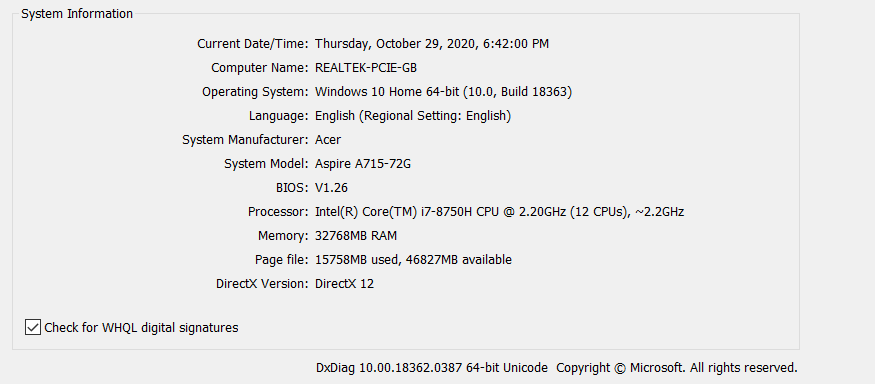
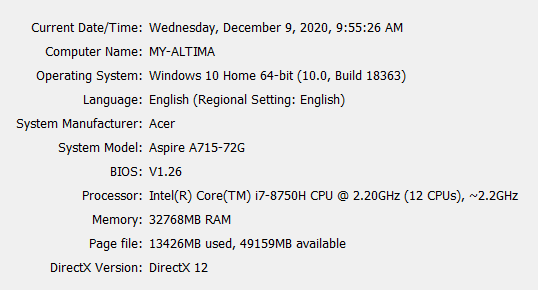
Ever since the release of version 1.16.0+, I have been experiencing a lot of issues with performance on my laptop. My specs are: 6 core, 12 thread intel i7 8750h @3.7-3.9ghz when charged, 32gb ram @2667mhz, and a geforce 1050ti. My CPU cache has jumped up in usage, by quite a significant factor. My laptop fans are always on in v1.16, but they arent spinning that fast in the previous release. Additionally, I have my laptop propped up on a stand to increase airflow.
Below, I attached some images to compare how the game performs in each version. I tested version 1.14.1 (which runs good) and 1.16.20 and 1.16.40 (which runs very poorly), respectively. *note, I am using no resource/behavior packs in these tests.
In the image "1.14_generating_chunks-1", my cpu usage is at 39% when generating chunks at a 16 chunk render distance and 50 particle render distance, and no anti-aliasing.
In the image "1.16_generating_chunks", my cpu usage is at 86% when generating chunks at a 16 chunk render distance and 50 particle render distance, and no anti-aliasing. That is a massive dip in performance. Chunk loading is very slow. My cpu L3 cache is 9mb.The effects of this noticeable dip in performance can even be seen in instances as simple as the main menu.
See the screenshot "1.14_idle_in_menu.png", my cpu usage is at only 19.2% when idle in the main menu. My fans are not even audible.
Now see the screenshot "1.16_idle_in_menu.png", my cpu usage is over DOUBLE, at 42.2%. My fans kick in on the MENU. Not to mention the game in just the menu is using 73.4% of my GPU. Why is the performance in this update such an issue? I dont understand, please fix this.
EDIT: I attached a screenshot (called "cpu_temperatures") of cpu temperature readings for each core, 1-6. Core 1 is first, core 6 is last, read them left to right. 87 C is absurd. I took this screenshot when I was IDLE in my own world with 16 chunk render distance. 87 C is ridiculous for a game as simple as minecraft, without any shaders or extremely high settings.
In the beta (I believe 1.16.100.54), the render dragon engine was introduced for supposedly better performance on PC. HOWEVER, I see no noticeable improvement in FPS, and although average CPU usage is lower, it is still quite a decent bit higher than 1.14.1 testing in IDLE mode.Generating chunks in the most recent beta still causes upwards of 90% usage.
In short, the problem still persists in the most recent beta and stable release
, of course.I used to be able to turn my render distance up much higher in previous versions, but with every successive update, performance has only gotten exponentially worse.
Ever since the release of version 1.16.0+, I have been experiencing a lot of issues with performance on my laptop. My specs are: 6 core, 12 thread intel i7 8750h @3.7-3.9ghz when charged, 32gb ram @2667mhz, and a geforce 1050ti. My CPU cache has jumped up in usage, by quite a significant factor. My laptop fans are always on in v1.16, but they arent spinning that fast in the previous release. Additionally, I have my laptop propped up on a stand to increase airflow.
UPDATE: The new render dragon engine brought back in 1.16.100.59 is WORSE for performance! As a consequence of the game auto-detecting the minimum amount of chunks the player is allowed to generate, I am forced to render no more than 32 chunks. The result? A CONSTANT 100% cpu usage when walking around generating chunks, 60-70% usage when idle, lower FPS, and a strange side effect also being that my GPU is hardly being used. This may be what is causing the issue, im not sure. See 1.16.100.59_render_dragon image below.
-----------------------------------------------------------------------------
Below, I attached some images to compare how the game performs in each version. I tested version 1.14.1 (which runs good) and 1.16.20 and 1.16.40 (which runs very poorly), respectively. *note, I am using no resource/behavior packs in these tests.
In the image "1.14_generating_chunks-1", my cpu usage is at 39% when generating chunks at a 16 chunk render distance and 50 particle render distance, and no anti-aliasing.
In the image "1.16_generating_chunks", my cpu usage is at 86% when generating chunks at a 16 chunk render distance and 50 particle render distance, and no anti-aliasing. That is a massive dip in performance. Chunk loading is very slow. My cpu L3 cache is 9mb.The effects of this noticeable dip in performance can even be seen in instances as simple as the main menu.
See the screenshot "1.14_idle_in_menu.png", my cpu usage is at only 19.2% when idle in the main menu. My fans are not even audible.
Now see the screenshot "1.16_idle_in_menu.png", my cpu usage is over DOUBLE, at 42.2%. My fans kick in on the MENU. Not to mention the game in just the menu is using 73.4% of my GPU. Why is the performance in this update such an issue? I dont understand, please fix this.
EDIT: I attached a screenshot (called "cpu_temperatures") of cpu temperature readings for each core, 1-6. Core 1 is first, core 6 is last, read them left to right. 87 C is absurd. I took this screenshot when I was IDLE in my own world with 16 chunk render distance. 87 C is ridiculous for a game as simple as minecraft, without any shaders or extremely high settings.
Generating chunks in the most recent beta still causes upwards of 90% usage in the stable (1.16.40), and always is at 100% in the beta 1.16.100.59 with render dragon.
In short, the problem still persists in the most recent beta and stable release. The render dragon as of 1.16.100.59 has made the CPU usage worse.
I used to be able to turn my render distance up much higher in previous versions, but with every successive update, performance has only gotten exponentially worse.
Ever since the release of version 1.16.0+, I have been experiencing a lot of issues with performance on my laptop. My specs are: 6 core, 12 thread intel i7 8750h @3.7-3.9ghz when charged, 32gb ram @2667mhz, and a geforce 1050ti. My CPU cache has jumped up in usage, by quite a significant factor. My laptop fans are always on in v1.16, but they arent spinning that fast in the previous release. Additionally, I have my laptop propped up on a stand to increase airflow.
UPDATE: The new render dragon engine brought back in 1.16.100.59 is WORSE for performance! As a consequence of the game auto-detecting the minimum amount of chunks the player is allowed to generate, I am forced to render no more than 32 chunks. The result? A CONSTANT 100% cpu usage when walking around generating chunks, 60-70% usage when idle, lower FPS, and a strange side effect also being that my GPU is hardly being used. This may be what is causing the issue, im not sure. See 1.16.100.59_render_dragon image below.
-----------------------------------------------------------------------------
Below, I attached some images to compare how the game performs in each version. I tested version 1.14.1 (which runs good) and 1.16.20 and 1.16.40 (which runs very poorly), respectively. *note, I am using no resource/behavior packs in these tests.
In the image "1.14_generating_chunks-1", my cpu usage is at 39% when generating chunks at a 16 chunk render distance and 50 particle render distance, and no anti-aliasing.
In the image "1.16_generating_chunks", my cpu usage is at 86% when generating chunks at a 16 chunk render distance and 50 particle render distance, and no anti-aliasing. That is a massive dip in performance. Chunk loading is very slow. My cpu L3 cache is 9mb.The effects of this noticeable dip in performance can even be seen in instances as simple as the main menu.
See the screenshot "1.14_idle_in_menu.png", my cpu usage is at only 19.2% when idle in the main menu. My fans are not even audible.
Now see the screenshot "1.16_idle_in_menu.png", my cpu usage is over DOUBLE, at 42.2%. My fans kick in on the MENU. Not to mention the game in just the menu is using 73.4% of my GPU. Why is the performance in this update such an issue? I dont understand, please fix this.
EDIT: I attached a screenshot (called "cpu_temperatures") of cpu temperature readings for each core, 1-6. Core 1 is first, core 6 is last, read them left to right. 87 C is absurd. I took this screenshot when I was IDLE in my own world with 16 chunk render distance. 87 C is ridiculous for a game as simple as minecraft, without any shaders or extremely high settings.
Generating chunks in the most recent beta still causes upwards of 90% usage in the stable (1.16.40), and always is at 100% in the beta 1.16.100.59 with render dragon.
In short, the problem still persists in the most recent beta and stable release. The render dragon as of 1.16.100.59 has made the CPU usage worse.
I used to be able to turn my render distance up much higher in previous versions, but with every successive update, performance has only gotten exponentially worse.
Ever since the release of version 1.16.0+, I have been experiencing a lot of issues with performance on my laptop. My specs are: 6 core, 12 thread intel i7 8750h @3.7-3.9ghz when charged, 32gb ram @2667mhz, and a geforce 1050ti. My CPU cache has jumped up in usage, by quite a significant factor. My laptop fans are always on in v1.16, but they arent spinning that fast in the previous release. Additionally, I have my laptop propped up on a stand to increase airflow.
UPDATE, 1.16.100: I noticed that CPU usage is a decent bit less now, but not by much. Overall performance is still worse, as noted by a myriad of other bug reports. This issue seems to be related to vsync being turned on. Capping the FPS seems to be exponentially less strenuous on my cpu, but of course that brings input lag.
----------------------------------------------------------------------------------
RENDER DRAGON BETA: The new render dragon engine brought back in 1.16.100.59 is WORSE for performance! As a consequence of the game auto-detecting the minimum amount of chunks the player is allowed to generate, I am forced to render no more than 32 chunks. The result? A CONSTANT 100% cpu usage when walking around generating chunks, 60-70% usage when idle, lower FPS, and a strange side effect also being that my GPU is hardly being used. This may be what is causing the issue, im not sure. See 1.16.100.59_render_dragon image below.
----------------------------------------------------------------------------------
Below, I attached some images to compare how the game performs in each version. I tested version 1.14.1 (which runs good) and 1.16.20 and 1.16.40 (which runs very poorly), respectively. *note, I am using no resource/behavior packs in these tests.
In the image "1.14_generating_chunks-1", my cpu usage is at 39% when generating chunks at a 16 chunk render distance and 50 particle render distance, and no anti-aliasing.
In the image "1.16_generating_chunks", my cpu usage is at 86% when generating chunks at a 16 chunk render distance and 50 particle render distance, and no anti-aliasing. That is a massive dip in performance. Chunk loading is very slow. My cpu L3 cache is 9mb.The effects of this noticeable dip in performance can even be seen in instances as simple as the main menu.
See the screenshot "1.14_idle_in_menu.png", my cpu usage is at only 19.2% when idle in the main menu. My fans are not even audible.
Now see the screenshot "1.16_idle_in_menu.png", my cpu usage is over DOUBLE, at 42.2%. My fans kick in on the MENU. Not to mention the game in just the menu is using 73.4% of my GPU. Why is the performance in this update such an issue? I dont understand, please fix this.
EDIT: I attached a screenshot (called "cpu_temperatures") of cpu temperature readings for each core, 1-6. Core 1 is first, core 6 is last, read them left to right. 87 C is absurd. I took this screenshot when I was IDLE in my own world with 16 chunk render distance. 87 C is ridiculous for a game as simple as minecraft, without any shaders or extremely high settings.
Generating chunks in the most recent beta still causes upwards of 90% usage in the stable (1.16.40), and always is at 100% in the beta 1.16.100.59 with render dragon.
In short, the problem still persists in the most recent beta and stable release. The render dragon as of 1.16.100.59 has made the CPU usage worse.
I used to be able to turn my render distance up much higher in previous versions, but with every successive update, performance has only gotten exponentially worse.
Ever since the release of version 1.16.0+, I have been experiencing a lot of issues with performance on my laptop. My specs are: 6 core, 12 thread intel i7 8750h @3.7-3.9ghz when charged, 32gb ram @2667mhz, and a geforce 1050ti. My CPU cache has jumped up in usage, by quite a significant factor. My laptop fans are always on in v1.16, but they arent spinning that fast in the previous release. Additionally, I have my laptop propped up on a stand to increase airflow.
UPDATE, 1.16.100
: I noticed that CPU usage is a decent bit less now, but not by much. Overall performance is still worse, as noted by a myriad of other bug reports. This issue seems to be related to vsync being turned on. Capping the FPS seems to be exponentially less strenuous on my cpu, but of course that brings input lag.----------------------------------------------------------------------------------
RENDER DRAGON BETA: The new render dragon engine brought back in 1.16.100.59 is WORSE for performance! As a consequence of the game auto-detecting the minimum amount of chunks the player is allowed to generate, I am forced to render no more than 32 chunks. The result? A CONSTANT 100% cpu usage when walking around generating chunks, 60-70% usage when idle, lower FPS, and a strange side effect also being that my GPU is hardly being used. This may be what is causing the issue, im not sure. See 1.16.100.59_render_dragon image below.
----------------------------------------------------------------------------------
Below, I attached some images to compare how the game performs in each version. I tested version 1.14.1 (which runs good) and 1.16.20 and 1.16.40 (which runs very poorly), respectively. *note, I am using no resource/behavior packs in these tests.
In the image "1.14_generating_chunks-1", my cpu usage is at 39% when generating chunks at a 16 chunk render distance and 50 particle render distance, and no anti-aliasing.
In the image "1.16_generating_chunks", my cpu usage is at 86% when generating chunks at a 16 chunk render distance and 50 particle render distance, and no anti-aliasing. That is a massive dip in performance. Chunk loading is very slow. My cpu L3 cache is 9mb.The effects of this noticeable dip in performance can even be seen in instances as simple as the main menu.
See the screenshot "1.14_idle_in_menu.png", my cpu usage is at only 19.2% when idle in the main menu. My fans are not even audible.
Now see the screenshot "1.16_idle_in_menu.png", my cpu usage is over DOUBLE, at 42.2%. My fans kick in on the MENU. Not to mention the game in just the menu is using 73.4% of my GPU. Why is the performance in this update such an issue? I dont understand, please fix this.
EDIT: I attached a screenshot (called "cpu_temperatures") of cpu temperature readings for each core, 1-6. Core 1 is first, core 6 is last, read them left to right. 87 C is absurd. I took this screenshot when I was IDLE in my own world with 16 chunk render distance. 87 C is ridiculous for a game as simple as minecraft, without any shaders or extremely high settings.
Generating chunks in the most recent beta still causes upwards of 90% usage in the stable (1.16.40), and always is at 100% in the beta 1.16.100.59 with render dragon.
In short, the problem still persists in the most recent betaandstable release. The render dragon as of 1.16.100.59 has made the CPU usage worse.I used to be able to turn my render distance up much higher in previous versions, but with every successive update, performance has only gotten exponentially worse.
Ever since the release of version 1.16.0+, I have been experiencing a lot of issues with performance on my laptop. My specs are: 6 core, 12 thread intel i7 8750h @3.7-3.9ghz when charged, 32gb ram @2667mhz, and a geforce 1050ti. My CPU cache has jumped up in usage, by quite a significant factor. My laptop fans are always on in v1.16, but they arent spinning that fast in the previous release. Additionally, I have my laptop propped up on a stand to increase airflow.
UPDATE, 1.16.200: CPU usage is at an all time high. Overall performance is still much worse, as noted by a myriad of other bug reports spanning since 1.16.100. This issue seems to be related to vsync being turned on. Capping the FPS seems to be exponentially less strenuous on my cpu, but of course that brings input lag.
----------------------------------------------------------------------------------
RENDER DRAGON BETA: The new render dragon engine brought back in 1.16.100.59 is WORSE for performance! As a consequence of the game auto-detecting the minimum amount of chunks the player is allowed to generate, I am forced to render no more than 32 chunks. The result? A CONSTANT 100% cpu usage when walking around generating chunks, 60-70% usage when idle, lower FPS, and a strange side effect also being that my GPU is hardly being used. This may be what is causing the issue, im not sure. See 1.16.100.59_render_dragon image below.
----------------------------------------------------------------------------------
Below, I attached some images to compare how the game performs in each version. I tested version 1.14.1 (which runs good) and 1.16.20 and 1.16.40 (which runs very poorly), respectively. *note, I am using no resource/behavior packs in these tests.
In the image "1.14_generating_chunks-1", my cpu usage is at 39% when generating chunks at a 16 chunk render distance and 50 particle render distance, and no anti-aliasing.
In the image "1.16_generating_chunks", my cpu usage is at 86% when generating chunks at a 16 chunk render distance and 50 particle render distance, and no anti-aliasing. That is a massive dip in performance. Chunk loading is very slow. My cpu L3 cache is 9mb.The effects of this noticeable dip in performance can even be seen in instances as simple as the main menu.
See the screenshot "1.14_idle_in_menu.png", my cpu usage is at only 19.2% when idle in the main menu. My fans are not even audible.
Now see the screenshot "1.16_idle_in_menu.png", my cpu usage is over DOUBLE, at 42.2%. My fans kick in on the MENU. Not to mention the game in just the menu is using 73.4% of my GPU. Why is the performance in this update such an issue? I dont understand, please fix this.
EDIT: I attached a screenshot (called "cpu_temperatures") of cpu temperature readings for each core, 1-6. Core 1 is first, core 6 is last, read them left to right. 87 C is absurd. I took this screenshot when I was IDLE in my own world with 16 chunk render distance. 87 C is ridiculous for a game as simple as minecraft, without any shaders or extremely high settings.
I used to be able to turn my render distance up much higher in previous versions, but with every successive update, performance has only gotten exponentially worse.
Ever since the release of version 1.16.0+, I have been experiencing a lot of issues with performance on my laptop. My specs are: 6 core, 12 thread intel i7 8750h @3.7-3.9ghz when charged, 32gb ram @2667mhz, and a geforce 1050ti. My CPU cache has jumped up in usage, by quite a significant factor. My laptop
fansare always on in v1.16, but they arent spinningthatfast in the previous release. Additionally, I have my laptop propped up on a stand to increase airflow.UPDATE, 1.16.200: CPU usage is at an all time high
.Overall performance is still much worse, as noted by a myriad of other bug reports spanning since 1.16.100. This issue seems to be related to vsync being turned on.Capping the FPS seems to be exponentially less strenuous on my cpu, but of course that brings input lag.----------------------------------------------------------------------------------
RENDER DRAGON BETA: The new render dragon engine brought back in 1.16.100.59 is WORSE for performance
!As a consequence of the game auto-detecting the minimum amount of chunks the player is allowed to generate, I am forced to render no more than 32 chunks. The result? ACONSTANT 100% cpu usage when walking around generating chunks, 60-70% usage when idle, lower FPS, and a strange side effect also being that my GPU is hardly being used. This may be what is causing the issue, im not sure. See 1.16.100.59_render_dragon image below.----------------------------------------------------------------------------------
Below, I attached some images to compare how the game performs in each version. I tested version 1.14.1 (which runs good) and 1.16.20 and 1.16.40 (which runs very poorly), respectively. *note, I am using no resource/behavior packs in these tests.
In the image "1.14_generating_chunks-1", my cpu usage is at 39% when generating chunks at a 16 chunk render distance and 50 particle render distance, and no anti-aliasing.
In the image "1.16_generating_chunks", my cpu usage is at 86% when generating chunks at a 16 chunk render distance and 50 particle render distance, and no anti-aliasing. That is a massive dip in performance. Chunk loading is very slow. My cpu L3 cache is 9mb.The effects of this noticeable dip in performance can even be seen in instances as simple as the main menu.
See the screenshot "1.14_idle_in_menu.png", my cpu usage is at only 19.2% when idle in the main menu. My fans are not even audible.
Now see the screenshot "1.16_idle_in_menu.png", my cpu usage is over DOUBLE, at 42.2%. My fans kick in on the MENU. Not to mention the game in just the menu is using 73.4% of my GPU. Why is the performance in this update such an issue? I dont understand, please fix this.
EDIT: I attached a screenshot (called "cpu_temperatures") of cpu temperature readings for each core, 1-6. Core 1 is first, core 6 is last, read them left to right. 87 C is absurd. I took this screenshot when I was IDLE in my own world with 16 chunk render distance. 87 C is ridiculous for a game as simple as minecraft, without any shaders or extremely high settings.
I used to be able to turn my render distance up much higher in previous versions, but with every successive update, performance has only gotten exponentially worse.
Ever since the release of version 1.16.0+, I have been experiencing a lot of issues with performance on my laptop. My specs are: 6 core, 12 thread intel i7 8750h @3.7-3.9ghz when charged, 32gb ram @2667mhz, and a geforce 1050ti. My CPU cache has jumped up in usage, by quite a significant factor. My laptop runs extremely hot and the fans always kick into max speed.
Overall performance is still much worse, as noted by a myriad of other performance related bug reports spanning since 1.16.100 betas and into 1.16.200. This CPU issue seems to be related to vsync being turned on. However, capping the FPS seems to be exponentially less strenuous on my cpu, but of course that brings severe input lag (see
MCPE-98861). Simply telling players to cap their framerate is not the proper solution...Minecraft Bedrock was inadvertently advertised as the version that performs better due to the compiled language and being able to run on lower-specced devices, however that no longer seems to be the case.----------------------------------------------------------------------------------
RENDER DRAGON BETA: The new render dragon engine brought back in 1.16.100.59 is worse ** for performance. As a consequence of the game auto-detecting the minimum amount of chunks the player is allowed to generate, I am forced to render no more than 32 chunks. The result is a constant 100% cpu usage when walking around generating chunks, 60-70% usage when idle, lower FPS, and a strange side effect also being that my GPU is hardly being used. This may be what is causing the issue, but I'm not sure. See 1.16.100.59_render_dragon image below.
----------------------------------------------------------------------------------
Below, I attached some images to compare how the game performs in each version. I tested version 1.14.1 (which runs good) and 1.16.20 and 1.16.40 (which runs very poorly in terms of CPU usage), respectively. *note, I am using no resource/behavior packs in these tests.
In the image "1.14_generating_chunks-1", my cpu usage is at 39% when generating chunks at a 16 chunk render distance and 50 particle render distance, and no anti-aliasing.
In the image "1.16_generating_chunks", my cpu usage is at 86% when generating chunks at a 16 chunk render distance and 50 particle render distance, and no anti-aliasing. That is a massive dip in performance. Chunk loading is very slow. My cpu L3 cache is 9mb.The effects of this noticeable dip in performance can even be seen in instances as simple as the main menu.
See the screenshot "1.14_idle_in_menu.png", my cpu usage is at only 19.2% when idle in the main menu. My fans are not even audible.
Now see the screenshot "1.16_idle_in_menu.png", my cpu usage is over double, at 42.2%. My fans kick in on the menu. Not to mention the game in just the menu is using 73.4% of my GPU.
EDIT: I attached a screenshot (called "cpu_temperatures") of cpu temperature readings for each core, 1-6. Core 1 is first, core 6 is last, read them left to right. 87 C is absurd. I took this screenshot when I was idle in my own world with 16 chunk render distance. 87 C is ridiculous for a game as simple as minecraft, without any shaders or extremely high settings.
I used to be able to turn my render distance up much higher in previous versions, but with every successive update, performance has only gotten exponentially worse.
Overall, resources dont seem to be used effectively in this game anymore, and it mainly seems to be attributed to render dragon, and yet Mojang insists that all devices should have it. CPU usage can be way too high, but the cores are not yielding better performance.
using the new query.health query in 1.16, it does not accurately report the health value of the entity if he or she has absorption.
how to reproduce:
1) download the sample pack I have attached and apply it to a new world
2) give yourself the absorption effect, with any amplifier3) take damage, either by taking fall damage, shooting yourself with an arrow, etc. anything works
4) compare this to taking damage without the absorption effect, without the effect it works just fine
You will notice that the health value displayed from the /tellraw doesn't change even though you are losing hearts that were originally gained by the absorption effect (I have a /tellraw command displaying the health to play whenever the health of the player changes). I have these commands set up for up to 36 health (18 hearts). Also, I applied these commands to run if a player takes damage, as thats how I have it set up.
I
cannot attach the file directly because it says there is a "missing token", but download from the link:https://drive.google.com/open?id=158S7vqmgWtIj_l31EfrGiqQYB_YhDEj5
using the new query.health query in 1.16, it does not accurately report the health value of the entity if he or she has absorption.
how to reproduce:
1) download the sample pack I have attached and apply it to a new world
2) give yourself the absorption effect, with any amplifier3) take damage, either by taking fall damage, shooting yourself with an arrow, etc. anything works
4) compare this to taking damage without the absorption effect, without the effect it works just fine
You will notice that the health value displayed from the /tellraw doesn't change even though you are losing hearts that were originally gained by the absorption effect (I have a /tellraw command displaying the health to play whenever the health of the player changes). I have these commands set up for up to 36 health (18 hearts). Also, I applied these commands to run if a player takes damage, as thats how I have it set up.
I think it would be extremely useful to have a query such as query.absorption and we can add the values of query.absorption + query.health to get the real health with status effects
Below I attached an example pack for you to test this.
Health Query does notfunction properly if the entity has absorptionHealth Query does not add absorption hearts to entity
Health Query does notaddabsorption hearts to entityHealth Query does not factor in absorption hearts to entity
Whenever you apply specific resource packs with UI, an annoying red or yellow triangle will appear on the hud screen. Whenever you open your inventory and then move your cursor, the triangle will shift to where your cursor was before you closed inventory,
This issue was present in the beta, was fixed in a later beta, but somehow made its way into the full release. The bug appears to be referencing the item lock textures for the inventory introduced in this update.
Whenever you apply specific resource packs with UI, an annoying red or yellow triangle will appear on the hud screen. Whenever you open your inventory and then move your cursor, the triangle will shift to where your cursor was before you closed
inventory,This issue was present in the beta, was fixed in a later beta, but somehow made its way into the full release. The bug appears to be referencing the item lock textures for the inventory introduced in this update.
Whenever you apply specific resource packs with UI, an annoying red or yellow triangle will appear on the hud screen. Whenever you open your inventory and then move your cursor, the triangle will shift to where your cursor was positioned before you closed inventory,
This issue was present in the beta, was fixed in a later beta, but somehow made its way into the full release. The bug appears to be referencing the item lock textures for the inventory introduced in this update.
Whenever you apply specific resource packs with UI, an annoying red or yellow triangle will appear on the
hudscreen.Whenever you open your inventory and then move your cursor, the triangle will shift to where your cursor was positioned before you closed inventory,This issue was present in the beta, was fixed in a later beta, but somehow made its way into the full release. The bug appears to be referencing the item lock textures for the inventory introduced in this update.
Whenever you apply specific resource packs with UI, an annoying red or yellow triangle will appear on the HUD screen. Additionally, whenever you open your inventory and then move your cursor, the triangle will shift to where your cursor was positioned before you closed inventory,
This issue was present in the beta, was fixed in a later beta, but somehow made its way into the full release. The bug appears to be referencing the item lock textures for the inventory introduced in this update.
Description: The query.armor_color_slot query, when used in any animation, entity file, render controller, etc outside of vanilla instances, will immediately crash the game when a player uses a resource pack with it and attempts to load into a world. This has been an issue since 1.16.100.51 and made its way to the full release. This needs to be fixed asap!
Below I have attached a sample resource pack to showcase the bug. I added an overlay color to the alpha channel set to return a value based on this query. Another instance in which I used it in the sample resource pack is to tell a cape render controller to render from the player entity file
Expected Results: using the query.armor_color_slot query with its additional arguments works properly in resource packs. It worked fine in 1.16.40.
Actual Results: any instance in which query.armor_color_slot is used in a resource pack, the game immediately hard crashes/
Description: The query.armor_color_slot query, when used in any animation, entity file, render controller, etc outside of vanilla instances, will immediately crash the game when a player uses a resource pack with it and attempts to load into a world. This has been an issue since 1.16.100.51 and made its way to the full release. This needs to be fixed asap!
Below I have attached a sample resource pack to showcase the bug. I added an overlay color to the alpha channel set to return a value based on this query. Another instance in which I used it in the sample resource pack is to tell a cape render controller to render from the player entity file
Expected Results: using the query.armor_color_slot query with its additional arguments works properly in resource packs. It worked fine in 1.16.40.
Actual Results: any instance in which query.armor_color_slot is used in a resource pack, the game immediately hard crashes
/Description: The query.armor_color_slot query, when used in any animation, entity file, render controller, etc outside of vanilla instances, will immediately crash the game when a player uses a resource pack with it and attempts to load into a world. This has been an issue since 1.16.100.51 and made its way to the full release. This needs to be fixed asap!
Below I have attached a sample resource pack to showcase the bug. I added an overlay color to the alpha channel set to return a value based on this query. Another instance in which I used it in the sample resource pack is to tell a cape render controller to render from the player entity file
Expected Results: using the query.armor_color_slot query with its additional arguments works properly in resource packs. It worked fine in 1.16.40.
Actual Results: any instance in which query.armor_color_slot is used in a resource pack, the game immediately hard crashes.
This seems to be fixed in the 1.16.200.57 beta, but NOT the 1.16.210.50 beta.
Description: The query.armor_color_slot query, when used in any animation, entity file, render controller, etc outside of vanilla instances, will immediately crash the game when a player uses a resource pack with it and attempts to load into a world. This has been an issue since 1.16.100.51 and made its way to the full release. This needs to be fixed asap!
Below I have attached a sample resource pack to showcase the bug. I added an overlay color to the alpha channel set to return a value based on this query. Another instance in which I used it in the sample resource pack is to tell a cape render controller to render from the player entity file
Expected Results: using the query.armor_color_slot query with its additional arguments works properly in resource packs. It worked fine in 1.16.40.
Actual Results: any instance in which query.armor_color_slot is used in a resource pack, the game immediately hard crashes.
This seems to be fixed in the 1.16.200.57 beta, but NOT the 1.16.210.50 beta.
Description: The query.armor_color_slot query, when used in any animation, entity file, render controller, etc outside of vanilla instances, will immediately crash the game when a player uses a resource pack with it and attempts to load into a world. This has been an issue since 1.16.100.51 and made its way to the full release. This needs to be fixed asap!
Below I have attached a sample resource pack to showcase the bug. I added an overlay color to the alpha channel set to return a value based on this query. Another instance in which I used it in the sample resource pack is to tell a cape render controller to render from the player entity file
Expected Results: using the query.armor_color_slot query with its additional arguments works properly in resource packs. It worked fine in 1.16.40.
Actual Results: any instance in which query.armor_color_slot is used in a resource pack, the game immediately hard crashes.
This seems to be fixed in the 1.16.200.57 beta, but NOT the 1.16.210.50 beta.
Nevermind, it happens in both betas.
In a recent beta, context variables were introduced into the game to use in tandem with the arrow operator (->) to query entities marked as what seems to be the built-in subjects (self, other, target, parent, player, holder?, etc). However, these variables do not exist in game. Use of them will throw a log error. Even though, documentation for how these work is very vague.
The beta documentation states that context.variable_name is "(EXPERIMENTAL) Read-only storage provided by the game in certain scenarios", implying that we do not have to initialize and define them for use.
+Where is the documentation for how this works?
+
The 1.16.100.56 beta changelog gives us an example of its use in a custom item in the "Items" subheader, however the variables still are not usable in addons.
https://feedback.minecraft.net/hc/en-us/articles/360049825031-Minecraft-Beta-1-16-100-56-Xbox-One-Windows-10-Android-This bug report may relate to:
MCPE-101702
context variables are not registered by the game + insufficient documentation
In a recent beta, context variables were introduced into the game to use in tandem with the arrow operator (->) to query entities marked as what seems to be the built-in subjects (self, other, target, parent, player, holder?, etc). However, these variables do not exist in game. Use of them will throw a log error. Even though, documentation for how these work is very vague.
The beta documentation states that context.variable_name is "(EXPERIMENTAL) Read-only storage provided by the game in certain scenarios", implying that we do not have to initialize and define them for use.
+Where is the documentation for how this works?
+The 1.16.100.56 beta changelog gives us an example of its use in a custom item in the "Items" subheader, however the variables still are not usable in addons.
https://feedback.minecraft.net/hc/en-us/articles/360049825031-Minecraft-Beta-1-16-100-56-Xbox-One-Windows-10-Android-This bug report may relate to:
MCPE-101702In a recent beta, context variables were introduced into the game to use in tandem with the arrow operator (->) to query entities marked as what seems to be the built-in subjects (self, other, target, parent, player, holder?, etc). However, these variables do not exist in game. Use of them will throw a log error. Even though, documentation for how these work is very vague.
The beta documentation states that context.variable_name is "(EXPERIMENTAL) Read-only storage provided by the game in certain scenarios", implying that we do not have to initialize and define them for use.
Where is the documentation for how this works?
The 1.16.100.56 beta changelog gives us an example of its use in a custom item in the "Items" subheader, however the variables still are not usable in addons.
https://feedback.minecraft.net/hc/en-us/articles/360049825031-Minecraft-Beta-1-16-100-56-Xbox-One-Windows-10-Android-This bug report may relate to:
MCPE-101702
works fine in items and blocks (experimental gameplay toggled in world, exported, then applied to BDS), but not entities.
works fine in items and blocks (experimental gameplay toggled in world, exported, then applied to BDS), but not entities. This property is experimental, however the fact that it is isnt the issue, since like I mentioned, it works in items and blocks. Other experimental features work like they do in normal worlds as well.
Title. The game is noticeably laggier in general. Average FPS has dropped quite substantially for me, chunk loading is only slightly better than it was in 1.16.100 (but is still terrible compared to 1.14 and older). This engine is evidently NOT ready to be released in stable (input lag, just to name 1 big flaw) but mojang did it anyway. Shame on them. The game needs massive performance improvements ASAP.
treatment_packs.1.16.0-.40_fix.zip
the cape animation in bedrock edition does not match java edition. Here is a video example:
https://youtu.be/vI9lfKiUHXcyou can see that moving side to side, strafing backwards, jumping up and down all have an affect on the cape's movement. it even oscillates a bit when moving.
bedrock edition's cape animation, on the other hand, is very sloppy and lazily made.
https://youtu.be/xZt8iCFRqVMyou can see the difference between the two. player movement only changes the cape's rotation when going forward. After doing some testing, the main query responsible for the cape's animation is `query.cape_flap_amount' which only returns nonzero when the player is moving forward on a relative axis.
Here is an animation that attempts to correct the animation for the capes to be in parity with java. It looks near identical, but its not perfect:
{"format_version": "1.8.0","animations": {"animation.player.cape": {"loop": true,"bones": {"cape": {"position": [0.0, "query.get_root_locator_offset('armor_offset.default_neck', 1)", 0.0],"rotation": [ "math.clamp(-31.0* (query.cape_flap_amount *math.sin(60) * 4.4) - math.sin(query.modified_distance_moved * 55.0) * 3.1 - 5.0, -180.0, -7.0)",0.0,"query.modified_move_speed* math.sin(-(query.body_y_rotation - query.head_y_rotation(0)))* 36.5"]}}}} }//made by blobking and ambientthe cape animation in bedrock edition does not match java edition. Here is a video example:
https://youtu.be/vI9lfKiUHXcyou can see that moving side to side, strafing backwards, jumping up and down all have an affect on the cape's movement. it even oscillates a bit when moving.
bedrock edition's cape animation, on the other hand, is very sloppy and lazily made.
https://youtu.be/xZt8iCFRqVMyou can see the difference between the two. player movement only changes the cape's rotation when going forward. After doing some testing, the main query responsible for the cape's animation is `query.cape_flap_amount' which only returns nonzero when the player is moving forward on a relative axis.
Here is an animation that attempts to correct the animation for the capes to be in parity with java. It looks near identical, but its not perfect:
{ "format_version": "1.8.0", "animations": { "animation.player.cape": { "loop": true, "bones": { "cape": { "position": [ 0, "query.get_root_locator_offset('armor_offset.default_neck', 1)", 0 ], "rotation": [ "math.clamp(-31.5 * (query.cape_flap_amount * 4.0) - math.sin(query.modified_distance_moved * 50.0) * 3.1 - 5.0, -180.0, -7.4)", "query.is_in_ui ? 0.0 : (query.modified_move_speed - query.cape_flap_amount) * math.sin(query.body_y_rotation - query.head_y_rotation(0)) * 38.0", "query.is_in_ui ? 0.0 : (query.modified_move_speed - query.cape_flap_amount) * math.sin(query.body_y_rotation - query.head_y_rotation(0)) * -31.5" ] } } } } }
The linux version of the bedrock dedicated server for 1.17.0 now lacks debug symbols, which were instrumental in allowing 3rd party servers softwares such as nukkit, pocketmine, and even BDS modloaders to develop. Essentially now, the removal of linux debug symbols may kill off entire BDS modding communities for linux, and at the very least make 3rd party server development much more difficult.
The reason I am making a bug report about this and not a suggestion for its reimplementation is that mojang gave server owners no word about this upcoming change, and with no foreseeable reason. it is still unclear whether this change was intentional or not, but
god forbidit was just a release mistake.Mojang has shown a tendency ever since 2019 to remove more and more debug information from public releases. While doing this for the client is debatable, as I said above there is no viable reason for this being done in the bedrock dedicated server. Hacked clients will not cease to exist! First, runtime type information (RTTI) was removed in 1.16.100, now symbols entirely. Mojang needs to consider all the communities and server developers out there when they remove this information from the server. Custom bedrock server development cannot thrive if all mojang wants to do is make it harder and harder for others to learn from how the vanilla server operates.
I will not be posting any screenshots of decompiled code as evidence because that is likely not in Mojang's interest. Mojang developers working on BDS should be aware of the fact of the debug symbols' absence in linux. The best evidence I can provide now is a tweet by the lead PocketMine developer confirming it
https://twitter.com/dktapps/status/1402308504484974592The linux version of the bedrock dedicated server for 1.17.0 now lacks debug symbols, which were instrumental in allowing 3rd party servers softwares such as nukkit, pocketmine, and even BDS modloaders to develop. Essentially now, the removal of linux debug symbols may kill off entire BDS modding communities for linux, and at the very least make 3rd party server development much more difficult.
The reason I am making a bug report about this and not a suggestion for its reimplementation is that mojang gave server owners no word about this upcoming change, and with no foreseeable reason. it is still unclear whether this change was intentional or not, but many people including myself hope it was just a release mistake.
Mojang has shown a tendency ever since 2019 to remove more and more debug information from public releases. While doing this for the client is debatable, as I said above there is no viable reason for this being done in the bedrock dedicated server. Hacked clients will not cease to exist! First, runtime type information (RTTI) was removed in 1.16.100, now symbols entirely. Mojang needs to consider all the communities and server developers out there when they remove this information from the server. Custom bedrock server development cannot thrive if all mojang wants to do is make it harder and harder for others to learn from how the vanilla server operates.
I will not be posting any screenshots of decompiled code as evidence because that is likely not in Mojang's interest. Mojang developers working on BDS should be aware of the fact of the debug symbols' absence in linux. The best evidence I can provide now is a tweet by the lead PocketMine developer confirming it
https://twitter.com/dktapps/status/1402308504484974592
The linux version of the bedrock dedicated server for 1.17.0 now lacks debug symbols, which were instrumental in allowing 3rd party servers softwares such as nukkit, pocketmine, and even BDS modloaders to develop. Essentially now, the removal of linux debug symbols may kill off entire BDS modding communities for linux, and at the very least make 3rd party server development much more difficult.
The reason I am making a bug report about this and not a suggestion for its reimplementation is that mojang gave server owners no word about this upcoming change, and with no foreseeable reason.
it is still unclear whether this change was intentional or not, but many people including myself hope it was just a release mistake.Mojang has shown a tendency ever since 2019 to remove more and more debug information from public releases. While doing this for the client is debatable, as I said above there is no viable reason for this being done in the bedrock dedicated server. Hacked clients will not cease to exist! First, runtime type information (RTTI) was removed in 1.16.100, now symbols entirely. Mojang needs to consider all the communities and server developers out there when they remove this information from the server. Custom bedrock server development cannot thrive if all mojang wants to do is make it harder and harder for others to learn from how the vanilla server operates.
I will not be posting any screenshots of decompiled code as evidence because that is likely not in Mojang's interest. Mojang developers working on BDS should be aware of the fact of the debug symbols' absence in linux. The best evidence I can provide now is a tweet by the lead PocketMine developer confirming it
https://twitter.com/dktapps/status/1402308504484974592The linux version of the bedrock dedicated server for 1.17.0 now lacks debug symbols, which were instrumental in allowing 3rd party servers softwares such as nukkit, pocketmine, and even BDS modloaders to develop. Essentially now, the removal of linux debug symbols may kill off entire BDS modding communities for linux, and at the very least make 3rd party server development much more difficult.
The reason I am making a bug report about this and not a suggestion for its reimplementation is that mojang gave server owners no word about this upcoming change, and with no foreseeable reason. Additionally, why would mojang include it for the windows release, but not linux? It seems pointless to remove one and not the other. It is still unclear whether this change was intentional or not, but many people including myself hope it was just a release mistake.
Mojang has shown a tendency ever since 2019 to remove more and more debug information from public releases. While doing this for the client is debatable, as I said above there is no viable reason for this being done in the bedrock dedicated server. Hacked clients will not cease to exist! First, runtime type information (RTTI) was removed in 1.16.100, now symbols entirely. Mojang needs to consider all the communities and server developers out there when they remove this information from the server. Custom bedrock server development cannot thrive if all mojang wants to do is make it harder and harder for others to learn from how the vanilla server operates.
I will not be posting any screenshots of decompiled code as evidence because that is likely not in Mojang's interest. Mojang developers working on BDS should be aware of the fact of the debug symbols' absence in linux. The best evidence I can provide now is a tweet by the lead PocketMine developer confirming it
https://twitter.com/dktapps/status/1402308504484974592
knowing how mojang likes to treat bedrock players like babies, I wouldn't be surprised if this change was intentional. Furthermore, a temporary workaround for this is to send specific players an unexpected packet via a behavior pack. This can be done in numerous ways, such as adding the "minecraft:instant_despawn" component to the player in question, transforming them into any other entity, or setting them to explode via the "minecraft:explode" component. Untested, but destroyEntity via the scripting API might work also.
crash whensetblock air when player has paired double chest container opencrash with /setblock air when player has paired double chest container open
seems to have been in the game for a long time. Confirmed this all the way back as 1.16.40 and of course, 1.17.41. Also happens in BDS.
explanation of issue:
when trying to use the setblock command, if you remove the base chest of a double chest while the player has the container open AND there is an item in the 28+ slot, the game will crash. this is a bit niche and hard to explain so heres a video. The tests before the crash show that it seems to work properly in those instances.expected results:
when using the setblock (or fill) command, the game wont crash when the player has the paired double chest openactual results:
game crashescall stack:
at void ChestBlockActor::serverInitItemStackIds[int,int,class std::function<void >] (UnknownFile:?) at void ChestBlockActor::serverInitItemStackIds[int,int,class std::function<void >] (UnknownFile:?) at void ServerPlayer::slotChanged[class IContainerManager &,class Container &,int,class ItemStack const &,class ItemStack const &,bool] (UnknownFile:?) at void LevelContainerManagerModel::broadcastChanges[void] (UnknownFile:?) at void ServerPlayer::normalTick[void] (UnknownFile:?) at PostInit (UnknownFile:?) at bool Actor::tick[class BlockSource &] (UnknownFile:?) at int Player::tickWorld[struct Tick const &] (UnknownFile:?) at int ServerPlayer::tickWorld[struct Tick const &] (UnknownFile:?) at struct std::_List_node<struct std::pair<struct ActorUniqueID const ,class std::unique_ptr<class MapItemSavedData,struct std::default_delete<class MapItemSavedData> > >,void *> * std::_List_buy<struct std::pair<struct ActorUniqueID const ,class std::unique_ptr<class MapItemSavedData,struct std::default_delete<class MapItemSavedData> > >,class std::allocator<struct std::pair<struct ActorUniqueID const ,class std::unique_ptr<class MapItemSavedData,struct std::default_delete<class MapItemSavedData> > > > >::_Buynode<struct ActorUniqueID const &,class std::unique_ptr<class MapItemSavedData,struct std::default_delete<class MapItemSavedData> > >[struct std::_List_node<struct std::pair<struct ActorUniqueID const ,class std::unique_ptr<class MapItemSavedData,struct std::default_delete<class MapItemSavedData> > >,void *> *,struct std::_List_node<struct std::pair<struct ActorUniqueID const ,class std::unique_ptr<class MapItemSavedData,struct std::default_delete<class MapItemSavedData> > >,void *> *,struct ActorUniqueID const &,class std::unique_ptr<class MapItemSavedData,struct std::default_delete<class MapItemSavedData> > &&] (UnknownFile:?) at void Level::forEachPlayer[class std::function<bool >] (UnknownFile:?) at void Level::tick[void] (UnknownFile:?) at void ServerLevel::tick[void] (UnknownFile:?) at bool Minecraft::update[void] (UnknownFile:?) at void ServerInstance::_update[void] (UnknownFile:?) at void ServerInstance::startServerThread[void] (UnknownFile:?) at bool SPSCQueue<class std::function<void >,512>::inner_enqueue<0,class std::function<void > >[class std::function<void > &&] (UnknownFile:?) at unsigned int std::_Pad::_Call_func[void *] (UnknownFile:?) at configthreadlocale (UnknownFile:?) at BaseThreadInitThunk (UnknownFile:?) at RtlUserThreadStart (UnknownFile:?)
@latelag, actually it is. I should have said to add the head rotation, not add it though. And query.head_x_rotation acts identically to query.target_x_rotation for players so it doesnt make a difference.
I made a pack that fixes this (but by keyframing the animation instead of using math), heres the specific animation:
"animation.player.attack.rotations_rightarm": { "animation.player.attack.rotations_rightarm": { "loop": true, "animation_length": 0.3, "anim_time_update": "variable.attack_time * 0.3", "bones": { "rightArm": { "rotation": { "0.0": [0, 0, 0], "0.023": ["-58 + (query.head_x_rotation(0) * 0.42)", "28.5 + (query.head_x_rotation(0) * 0.22)", -4], "0.045": ["-69 + (query.head_x_rotation(0) * 0.42)", "18.5 + (query.head_x_rotation(0) * 0.2)", -6], "0.08": ["-87.5 + (query.head_x_rotation(0) * 0.41)", "12 + (query.head_x_rotation(0) * 0.18)", -11], "0.12": ["-58 + (query.head_x_rotation(0) * 0.4)", "-14.5 + (query.head_x_rotation(0) * 0.14)", -22], "0.17": ["-39 + (query.head_x_rotation(0) * 0.37)", "-26.5 + (query.head_x_rotation(0) * 0.1)", -21.5], "0.22": ["-25.5 + (query.head_x_rotation(0) * 0.34)", "-21.5 + (query.head_x_rotation(0) * 0.08)", -20], "0.26": ["-12.5 + (query.head_x_rotation(0) * 0.27)", "-14 + (query.head_x_rotation(0) * 0.06)", -7], "0.28": ["-5 + (query.head_x_rotation(0) * 0.24)", "-5 + (query.head_x_rotation(0) * 0.04)", -3.5], "0.3": [0, 0, 0] } } } }
The issue is that the attack animation does not use "query.head_x_rotation(0)" to offset the x positioning of the right arm bone. A fix for this is to multiply the whole x axis rotation expression with (query.head_x_rotation(0) * 0.4), or something similar.
@jay personally, I think it affects gameplay, aesthetically speaking. Java edition has had very smooth player animations since pretty much the dawn of the game. Bedrock 1.13 gave addon creators access to modify player animations, and as a consequence of that the developers had to use the math functions in the addon engine to recreate all the animations. You can definitely notice a difference between 1.12 and 1.13 animations, and the 1.13 version is much choppier and less polished than what we see on the java edition and bedrock 1.12. But this is a low priority issue at the moment if im being honest. Just fix the lag and broken addon features in 1.16.100.
I am not writing this comment with the intent to self promote, but I made a resource pack some time ago that includes a fix for the sprint jump bug. It includes some other animation tweaks that might not be everyone's cup of tea though. (The developers should not use my code as a reference to fix the bug though, since I had to do a lot of unintuitive and messy workarounds to get it to work properly) https://mcpedl.com/java-1-7-animations/
affects 1.16.210.50 beta. Also, to pinpoint the root cause of this as it relates to the variable.tcos0 animation, it is because of the return value of query.modified_move_speed when holding down the spacebar. It returns 0.35 when sprinting and jumping holding down the space bar, and 1.0 when sprinting. Obviously, this query should return about 1.0 when sprinting and jumping. This seems like a pretty easy fix but for some reason its taken so long. Also "user" brings up a good point about query.is_jumping. It seems like the root cause of this is intertwined with their comment.
here, ill give a softball to the molang dev(s) since they clearly never bothered to even look at bedrock 1.12 or java edition's code for reference when porting the player animations over to molang in 1.13.
// v.attack_body_rot_y = math.sin(math.sqrt(v.attack_time) * 360.0) * 11.4591559026;" // v.attack_time updates non-linearly in bedrock, so use math.pow(v.attack_time, 0.85) for rightarm instead of v.attack_time "animation.player.attack.rotations": { "loop": true, "bones": { "body": { "rotation": [ 0, "v.attack_body_rot_y", "q.is_sneaking ? -0.4" ] }, "leftarm": { "rotation": [ "v.attack_body_rot_y", 0, 0 ] }, "rightarm": { "rotation": [ "math.sin(1 - (math.pow(1 - math.pow(v.attack_time, 0.85), 3)) * 180.0) * 68.7549354157 + math.sin(math.pow(v.attack_time, 0.85) * 180) * (q.head_x_rotation(0) - 40.1070456592) * 0.75", "v.attack_body_rot_y * 2.0", "math.sin(v.attack_time * 180.0) * -22.9183118052" ] } } }
As of 1.21.0, it seems like we are unable to see other players emoting in-game in select scenarios. I only observe this behavior the other player uses an emote which I have not downloaded locally.
The bug was observed on a realm, and an online world (The client implementation of fetching emotes suggests that there is no discernable difference between these environments).
Steps to reproduce:
1) Person A restarts game, joins an online world (i.e. realm) with person B. It's important that person A doesn't attempt to open their emote menu or dressing room at any point in this process. More about why this is important below.
2) Person B plays an emote that person A doesn't own. For example, person B may use a paid emote that person A does not own.
3) Person A will never observe person B emoting in-game, even after waiting for several minutes.Implementation-level analysis:
When we enter the dressing room screen and navigate to the emotes tab, the client will fetch all available emotes from the Marketplace and download them if not already present locally (currently owned emotes are already downloaded upon client load). The new, unowned emotes get loaded into the client persona repository as expected, and for the rest of the game session, they are immediately available to play when someone else uses them in a game.
However, if we do not enter the emotes tab (all the emotes would correctly cache on the client this way), the client uses an alternative download mechanism to cache an emote to play immediately after downloading (see the ClientNetworkHandler::handle specialization for EmotePacket/EmoteListPacket). PersonaService::validatePersonaEmotes will correctlyfetch the relevant product ID for a given emote, then the client attempts to download the product via PersonaRepository::downloadAndLoadPieces. The problem lies with the resultantPersonaRepository::PendingPieceDownloadBatch object, its DlcBatchModel will forever hang in an importing state and never actually downloads. To be specific, DlcBatchModel::isDownloadingOrImporting indefinitely returns true where it is queried in PersonaRepository::update. Over time, this will cause the import queue to build up.I hope this issue can be prioritized because people who own
edpaid emotes currently do not receive their product as promised. When marketplace-related bugs arise, it affects partners' bottom lines and is bad PR for the marketplace's economy.As of 1.21.0, it seems like we are unable to see other players emoting in-game in select scenarios. I only observe this behavior the other player uses an emote which I have not downloaded locally.
The bug was observed on a realm, and an online world (The client implementation of fetching emotes suggests that there is no discernable difference between these environments).
Steps to reproduce:
1) Person A restarts game, joins an online world (i.e. realm) with person B. It's important that person A doesn't attempt to open their emote menu or dressing room at any point in this process. More about why this is important below.
2) Person B plays an emote that person A doesn't own. For example, person B may use a paid emote that person A does not own.
3) Person A will never observe person B emoting in-game, even after waiting for several minutesImplementation-level analysis:
Regarding reproduction step 3, based on my observations with caching via initially opening the emotes tab in the persona dressing room, all available emotes (hundreds) can be downloaded in a matter of seconds. Of course, I imagine a single emote can be downloaded and available in a fraction of that time.When we enter the dressing room screen and navigate to the emotes tab, the client will fetch all available emotes from the Marketplace and download them if not already present locally (currently owned emotes are already downloaded upon client load). The new, unowned emotes get loaded into the client persona repository as expected, and for the rest of the client session, they are immediately available to play when someone else uses them in a game.
However, if we do not enter the emotes tab (all the emotes would correctly cache on the client this way), the client uses an alternative download mechanism to cache an emote to play immediately after downloading (see the ClientNetworkHandler::handle overloads for EmotePacket/EmoteListPacket). PersonaService::validatePersonaEmotes will correctly fetch the relevant product ID for a given emote, then the client attempts to download the product via PersonaRepository::downloadAndLoadPieces. The problem lies with the resultant PersonaRepository::PendingPieceDownloadBatch object, its DlcBatchModel will forever hang in an importing state and never actually downloads. To be specific, DlcBatchModel::isDownloadingOrImporting indefinitely returns true where it is queried in PersonaRepository::update. Over time, this will cause the import queue to build up.
I hope this issue can be prioritized because people who own paid emotes currently do not receive their product as promised. When marketplace-related bugs arise, it affects partners' bottom lines and is bad PR for the marketplace's economy.
As of 1.21.0, it seems like we are unable to see other players emoting in-game in select scenarios. I only observe this behavior the other player uses an emote which I have not downloaded locally.
The bug was observed on a realm, and an online world (The client implementation of fetching emotes suggests that there is no discernable difference between these environments).
Steps to reproduce:
1) Person A restarts game, joins an online world (i.e. realm) with person B. It's important that person A doesn't attempt to open their emote menu or dressing room at any point in this process. More about why this is important below.
2) Person B plays an emote that person A doesn't own. For example, person B may use a paid emote that person A does not own.
3) Person A will never observe person B emoting in-game, even after waiting for several minutesImplementation-level analysis:
Regarding reproduction step 3,based on my observations with caching via initially opening the emotes tab in the persona dressing room, all available emotes (hundreds) can be downloaded in a matter of seconds. Of course, I imagine a single emote can be downloaded and available in a fraction of that time.When we enter the dressing room screen and navigate to the emotes tab, the client will fetch all available emotes from the Marketplace and download them if not already present locally (currently owned emotes are already downloaded upon client load). The new, unowned emotes get loaded into the client persona repository as expected, and for the rest of the client session, they are immediately available to play when someone else uses them in a game.
However, if we do not enter the emotes tab (all the emotes would correctly cache on the client this way), the client uses an alternative download mechanism to cache an emote to play immediately after downloading (see the ClientNetworkHandler::handle overloads for EmotePacket/EmoteListPacket). PersonaService::validatePersonaEmotes will correctly fetch the relevant product ID for a given emote, then the client attempts to download the product via PersonaRepository::downloadAndLoadPieces. The problem lies with the resultant PersonaRepository::PendingPieceDownloadBatch object, its DlcBatchModel will forever hang in an importing state and never actually downloads. To be specific, DlcBatchModel::isDownloadingOrImporting indefinitely returns true where it is queried in PersonaRepository::update. Over time, this will cause the import queue to build up.
I hope this issue can be prioritized because people who own paid emotes currently do not receive their product as promised. When marketplace-related bugs arise, it affects partners' bottom lines and is bad PR for the marketplace's economy.
As of 1.21.0, it seems like we are unable to see other players emoting in-game in select scenarios. I only observe this behavior the other player uses an emote which I have not downloaded locally.
The bug was observed on a realm, and an online world (The client implementation of fetching emotes suggests that there is no discernable difference between these environments).
Steps to reproduce:
1) Person A restarts game, joins an online world (i.e. realm) with person B. It's important that person A doesn't attempt to open their emote menu or dressing room at any point in this process. More about why this is important below.
2) Person B plays an emote that person A doesn't own. For example, person B may use a paid emote that person A does not own.
3) Person A will never observe person B emoting in-game, even after waiting for several minutesImplementation-level analysis:
Regarding reproduction step 3: based on my observations with caching via initially opening the emotes tab in the persona dressing room, all available emotes (hundreds) can be downloaded in a matter of seconds. Of course, I'd imagine a single emote can be downloaded and available in a fraction of that time, in the event someone else in a world uses an emote I don't have downloaded. This eliminates any possible internet connectivity issues.When we enter the dressing room screen and navigate to the emotes tab, the client will fetch all available emotes from the Marketplace and download them if not already present locally (currently owned emotes are already downloaded upon client load). The new, unowned emotes get loaded into the client persona repository as expected, and for the rest of the client session, they are immediately available to play when someone else uses them in a game.
However, if we do not enter the emotes tab (all the emotes would correctly cache on the client this way), the client uses an alternative download mechanism to cache an emote to play immediately after downloading (see the ClientNetworkHandler::handle overloads for EmotePacket/EmoteListPacket). PersonaService::validatePersonaEmotes will correctly fetch the relevant product ID for a given emote, then the client attempts to download the product via PersonaRepository::downloadAndLoadPieces. The problem lies with the resultant PersonaRepository::PendingPieceDownloadBatch object, its DlcBatchModel will forever hang in an importing state and never actually downloads. To be specific, DlcBatchModel::isDownloadingOrImporting indefinitely returns true where it is queried in PersonaRepository::update. Over time, this will cause the import queue to build up.
I hope this issue can be prioritized because people who own paid emotes currently do not receive their product as promised. When marketplace-related bugs arise, it affects partners' bottom lines and is bad PR for the marketplace's economy.
![[MCPE Mod] Auldrick](../../../data/avatars/users/10122.svg)
ambient: I guess you mean you don't think RAM is an issue for you. My suggestion wasn't addressed to anyone in particular, and knowing how much RAM somebody has is important in gauging what kind of performance can be expected on their device.
Keep in mind that, as I've said before, it doesn't make sense for the devs to do a lot of work tuning a beta release, for several reasons. They do want reports about poor performance in beta releases, so if a major problem is introduced they can address it immediately, but you shouldn't normally expect to see a lot of performance improvement while it's still in beta. Of course, the only way they can know whether a performance problem is major is by comparing the performance you're getting to what can be reasonably expected on your device, and for that they need the specific details I was talking about.
And yes, RenderDragon is expected to eventually improve performance, but being new it probably still needs/can benefit from more tuning whereas the old engine has been tuned to exhaustion, so we won't necessarily see a huge improvement with RD in its first live release.
Edit for clarification: When I say "it doesn't make sense to tune while still in beta releases", I don't mean they wait until after the regular release before they start concentrating on improving performance. Rather, they do that as they get closer to the end of the beta phase, because the feature work is mostly done by then and won't interfere with performance measurement.
![[Helper] lillybeacon](../../../data/avatars/users/93893.png)
ambient This is because it only affect character creators skin, since you can change your sizes, hence the armor will glitched out, this isn't only affecting netherite leggings, in fact it affects all types of leggings.
![[Mod] EVGENSYPERPRO](../../../data/avatars/users/92853.png)
I totally agree with you! However, then describe your problem better as an error, and not as parity with Java) Perhaps this error will be corrected (I will be glad), however, for better success, it is better to indicate it not as parity but as an error)
Good find, I sincerely hope this gets addressed, the lag is unbearable in this update
there were definitely some fatal bumps with this component being introduced, but it has gotten a lot better since then. I'm certainly in favor of having this looked further into, though.
yeah it touches over the same issue but it isnt described very well
I can confirm that the inventory opening delay is an issue. Similar to MCPE-101969
happens in 1.16.40/1.16.50/1,16.100.58
I believe this is caused by the `"minecraft:conditional_bandwidth_optimization"` component, which "makes sure level event packets only broadcast locally", which drops ticks for better server side performance.
https://bedrock.dev/docs/beta/Entities#minecraft%3Aconditional_bandwidth_optimization
I do notice the choppiness though, so I will upvote.
happens in 1.16.40
should be part of BDS bug report type though
relates to
MCPE-101717I can confirm this happens in the beta, along with the delay. In 1.16.40, there is a noticeable delay when clicking play/navigating settings/world generation menu, but no flickering. Both stable and beta have issues
Even with vsync off, there is still input delay. Vsync does improve the issue but does not completely fix it.
no. This relates to how client side performance affects server performance for the host machine. Those other reports just refer to client side performance.
by the way thats not my alt just coincidence ^
I think this works as intended because it is supposed to be run from entities
can confirm
personally I find this feature to be quite useful for disabling entities from dealing damage. Weakness 255 does not work if you are holding a high sharpness diamond sword, for example. I hope this doesnt get fixed, it doesnt negatively affect gameplay either. Strength 20 is plenty.
another fix for this is to set the positioning for left and right arm to 0.0 for all axes in the first person walking animation. Both the animation controller method and this work, but the former is more simplistic.
"animation.player.first_person.walk" : { "loop" : true, "bones" : { "leftarm" : { "position" : [ 0.0, 0.0, 0.0 ] }, "rightarm" : { "position" : [ 0.0, 0.0, 0.0 ] } } }The unfortunate part about this is that the issue mainly persists in all normal worlds, which have forced server authoritative movement. the BDS changelog states that server authoritative movement is recommended to be turned off as it is still buggy. I believe this same framework for movement is enabled by default on normal worlds.
this because the query.get_equipped_item_name and (maybe) the query.is_using_item query doesnt work properly on BDS. I think a beta mentioned something vague about this issue but it was unclear whether it was for BDS specifically or not (since it only is problematic on BDS)
1.16.200.51
I believe this happens because the server will only send data to the client if the client needs it (to display the scoreboard). So it is only accessible this way.
I honestly dont understand how the team can mess something like this up twice. The fix should be very straight-forward
@Jay.
The problem has been identical with all betas that have included the render dragon.
I should also note that this bug occurs for vanilla items and custom ones. Yes, the custom items have been defined in the Lang file.
How is this a bug exactly? Seems like WAI
"the MoLang query query.get_ride functions correctly for me in the recent beta version. You must use the Arrow Operator (->) to refer the variable/query. Also, the way you to query the ride's identifier is this: query.is_riding ? (query.get_ride -> query.owner_identifier) == 'minecraft:horse'"
-zarkmend zan
affects 1.16.40, 1.16.200.53
yes, still a pretty severe issue
@auldrick I don't think ram is the issue here if you have enough. I am on WIndows 10, 32gb of ram, 1050ti, and an i7 8750H, and I am experiencing lower FPS. The ram usage is a tad higher than with the original minecraft renderer, hence why the lower end devices are struggling. But for me, a PC user with plenty of ram, I am getting around 300-400 fps in the beta as opposed to 500-600 in 1.16.40. Comparatively, there is little difference but the numbers speak for themselves. The effects of this dip can certainly be felt on console and mobile. The render dragon is introduced to improve performance, not hinder it.
this has made its way into the full release, hope it gets fixed asap
affects 1.16.100, needs a fix asap
still broken in 1.16.100
The issue is that many UI texture packs now are throwing tons of log errors due to the update, so I feared that it would automatically invalidate the bug report. But believe me, this issue is widespread and has been documented by many people i've spoken with. This is just the one that I used in my screenshots: http://www.mediafire.com/file/aa6st9zn4iq1efy/VDX_-_Java_UI_v1.10.mcpack/file
I attached a resource pack that makes the textures for these item lock icons invisible as a temporary solution.
pretty much
Yup, PC user here and definitely noticing worse performance in terms of fps and chunk loading. How does microsoft expect marketplace teams to make maps that perform adequately? This is a mess.
you can fix this by changing the billboard animation for projectiles. Here is what I used to correct the issue. To explain, this is only visual. The scale doesn't seem to be incrementally decreasing the longer the projectile lives in the vanilla resource pack, so this function decreases the scale the longer the projectile lives to give the illusion that its traveling faster, similar to how it looked in 1.14.
{ "format_version": "1.8.0", "animations": { "animation.actor.billboard": { "loop": true, "bones": { "body": { "rotation": [ "query.camera_rotation(0)", "query.camera_rotation(1)", 0.0 ], "position": [ 0.0, 0.0, 1.0 ], "scale": "math.clamp(-0.13 * math.ln(query.anim_time) + 0.6, 0.5, 1.5)" } } } } }affects 1.16.100. It seems that this also locally affects item sprites before they hit the ground. They appear very jittery while in motion in 1.16.100, but this does not happen in 1.16.40.
block placement used to be so good in 1.12. It is garbage now. Please fix
I dont understand why people want this "fixed". It doesnt impact gameplay at all and I would argue its a neat feature.
I can confirm that item sprites, when thrown out of one's inventory, are very jittery and laggy. Not really sure what the cause of this is, but it may be from the "entity movement prediction" added in this update, which I guess also applies to item entities. Hope this gets fixed, its super annoying and an eye-sore.
1.16.100 too
I was about to say considering the render distance, 70% is not all that bad. But then I remembered that the L3 cache on a 3800x is 32mb. Still seems pretty high.
needs a fix asap. ruining lots of creative maps and addons
bedrock cant even say its optimized anymore. I just want to go back to the old days of 1.10 or 1.12 when my fps was good and there werent a ton of game breaking bugs. Please mojang just fix your game and stop adding new content we dont care if we cant even run the game
duplicates MCPE-101969
can confirm, other examples include pistons and bookshelves
I can confirm. All my servers show 1000 ping exactly. didnt happen in 1.16.40
@jay do you mean 1.16.200.57?
I get this too. I thought it was my device. It seems to occur randomly and im unsure how to reproduce it.
can confirm, this is happening on my server too. Seems to happen in normal worlds though as well
affects 1.16.200.57
can confirm
also, the render distance slider does not seem to have any affect in the nether. Im setting it to my max (56 chunks) but it is locked at 8 in the nether.
apparently this is resolved in the 1.16.210.50 beta but we have no way of checking
bedrock has a very poor inventory system that needs to be fixed. I detail this well in https://bugs.mojang.com/browse/MCPE-78355
(duplicate / relates to), you should add this image to it
the amount of cache my cpu uses fluctuates quite substantially between beta releases due to the developers tweaking the render dragon
resolved because it was removed in .200
affects 1.16.200. If youre fortunate enough to be able to uncap your fps, youll be okay at the expense of a computer that sounds like its about to explode due to the impact on performance uncapping your fps does, ironically enough.
something else worth noting is that the VSYNC option in the general_section.json UI no longer works when the binding is activated in resource packs. Putting the slider to unlimited does not affect your max fps at all in this update.
Also, on a general note, shame on mojang for releasing 1.16.200 knowing full well that this was a bug and it would have a widespread effect on PC users. The gameplay is awful if you cant uncap your fps.
I can confirm that the bobbing animation has changed vastly between 1.12 and 1.13+, for not much of an apparent reason though. Camera JSON files were added to the game in 1.13 and newer, yet the math equations that create this bobbing are not present in the files. I would like to see these animations become data driven with molang, as the current animations are way too bouncy and nauseating. It would help map makers a lot as well.
I am fortunate enough to have a decent computer and the ability to turn vsync off. But still, the performance drop is the biggest its ever been in any bedrock update. Now this might seem like a first world problem when I go into the statistics, but its more about the principle that trickles down to mobile players and people with lower end devices in general. Average fps in 1.16.40: 600. 1.16.100: 500. 1.16.200: 350. Pathetic.
something Interesting I noticed with how minecraft uses my gpu. Just installed ALL optional updates and updated my nvidia driver.
https://youtu.be/vuR27nSdYW0
you can see my gpu usage is at a solid 25-35% then drops to 0 for a couple seconds. fps seems to be relatively stagnant, albeit noticeably lower than 1.16.40 and even 1.16.100 (super laggy).
i can confirm, it seems to be inverted
for me, performance impact has been noticeable since 1.16.0. Compared to what it is now, I had it good in 1.16.40. Needs a fix asap, people are already quitting bedrock because of this.
by returning true, that would mean any nonzero number. For these queries, thats always going to happen unless you give it some sort of operator or the rotation is precisely 0.0. How are you using it in the code?
adding onto what tryashtar said, it seems like the animation is being applied twice. Animations in the addons are additive, perhaps this is the cause.
I feel like people havent pointed out the severe lag issues with UI loading. Buttons take forever to load, marketplace takes forever to load. Clicking the play button sometimes takes several seconds to load, servers take upwards of 15 seconds to establish a connection (if at all, and if none of the featured servers connect, I literally have to restart my game, not present in old versions). Its just lag everywhere even in the menus. clicking the pause button has noticeable delay. I am on a desktop with a wired connection. even the UI in 1.14 was much, much better.
Looking at the UI code, ive been told that having a #ignored feature in UI will vastly improve performance. Not really sure how that may be implemented, but in any case, the UI performance irks me almost just as much as the severe performance drop with the render dragon engine (many people still prefer the old engine due to the problems currently, among other things such as being able to make shaders).
@EVGENSYPERPRO I consider it a bug. the animation doesnt make sense physically. moving from side to side should cause the cape to sway the opposite motion. Here I have presented a quite literally copy-and-pasteable animation fix for the bug. even if it doesnt meet "java parity" criteria (which I did not specifically class this as), it takes 1 second to fix if developers are content with the animation I have presented.
@evgensyperpro you dont need to touch the geometry. just put this in a file in a folder called "animations" at the root of a resource pack
after quite a bit of research, I realized the first unplacing issue is due to the fact that the client is constantly sending inventory transaction packets when holding right click on a block with an item in hand. The server rejects the water placed before fall damage is calculated because the packets are being spammed. A reasonable solution would be for the server to reject these packets if looking at the same block with the same item in hand after a couple ticks. A human click will usually last 1-2 ticks, so even though you click 1 time as a single input, the server registers it as multiple "clicks" (in the form of packets sent) in a very short duration because the human hand cant make that short of a click. I affirmed this theory with a single click right click macro, and the MLG worked fine.
it was my understanding that this query can only be referenced from an item. It does not assume that the target is the item even if an entity is holding it. This doesnt seem like a bug, although it would be nice if it could be run from the holding entity.
treatment_packs.1.16.0-.40_fix.zip
this is caused by a treatment pack which isnt compatible with the 1.16.40 hummingbird UI. A fix for this is attached. Go to this directory if youre on PC:
C:/Users/<USER>/AppData/Local/Packages/Microsoft.MinecraftUWP_8wekyb3d8bbwe/LocalState/treatments/treatment_packs2
delete everything in it, and replace with the contents of the zip I provided. I removed everything in each treatment pack except for the manifests. This may offer a small performance boost because the game will not have to load all the code and images fetched everytime you boot up the game. I suggest mojang reevaluate their demographics in terms of what players still play 1.16.40 and below. Mind you, the 1.16.40 community is still quite active due to numerous bugs and performance issues in the recent version. Anyways, this solution worked for me, hope it helps.
this is because block breaking is now server authoritative; server is canceling the block break packet the client sends. Nothing you can do about it unless mojang fixes. If youre on BDS, theres a setting to fix in the server.properties. Realms get the short end of the stick here, and this probably wont be fixed any time soon because mojang usually doesnt revert these types of changes.
At least for entity textures, you can replicate the pink glitch by removing the textures array from its respective render controller.
I fixed this via a dll with the bedrock dedicated server. The fix basically resends the transaction with solid liquid (mStaticLava / mStaticWater) at the blocksource, as opposed to mDynamicLava / mDynamicWater. Its technically a workaround but I have no problems with it whatsoever. if the devs want to be lazy, this is a potential solution.
The symbol of the function in question is "?handle@ItemUseInventoryTransaction@@UEBA?AW4InventoryTransactionError@@AEAVPlayer@@_N@Z" , and the transaction error type is 2 / BalanceMismatch
linux bds doesnt load chakra engine which the scripting API uses. Mojang probably will never fix it because they are essentially abandoning the api in exchange for gametest
this issue seemed to fix itself for a few weeks, but then came back starting a few days ago. I have previously identified the cause to be a treatment pack thats incompatible with the vanilla ui for certain versions, but its not as simple as deleting the packs. They will repeatedly refresh themselves every few days and then the bug comes back again. This is quite ridiculous because you quite literally cannot exit the game unless you close the entire application. Ironically enough, treatment packs are designed to promote marketplace content, yet this bug prevents the marketplace button in the pause menu from being accessible. If that doesnt get mojang's attention, im not sure what will. This needs to be fixed ASAP, particularly because of the record number of people playing on legacy versions such as 1.16.40.
affects the 1.17.1 bds but I cannot choose this version in the report
That's amazing news @Jay. Would you happen to know if said upcoming release also includes RTTI?
actually sprinting knockback is applied in the x-z axis, but it lacks the y component. It should be a very simple fix here.
forcing render distance doesnt work via options.txt. Its hardcoded despite what that text file suggests. Although, I would really like to see it editable regardless.
I dont really understand why this jitteriness happens...why cant item entities have the same server gravity properties as mobs? Mobs have never had issues with jittery movement.
this seems to be caused by a mismatch with the client's entity gravity and the server's. Similar to experience orbs, item entities use clientside gravity calculations but my guess is that the jitteriness is caused by the server correcting/rubber banding the item entity's position while its falling.
1.17.10 does in fact include the symbols, and the technical bedrock community is very thankful for that, and fortunate enough to have a bug report make an impact. Although, it seems like the DWARF file only includes symbols and nothing else, such as class structures, variable names, or RTTI. We thought asking for these might sound greedy, but beggars cant be choosers. Perhaps you can relay this to the team, Jay. Thanks.
why hasnt this issue been fixed? Its honestly ridiculous. Can we please get an update on the matter?
whats even the point of reporting these fall damage related bugs. The source of these problems are just the fact that fall damage is server authoritative and the misplace is terrible with server-authoritative movement. Mojang, do everyone a favor and add back the actorFallPacket. Its caused so many problems since fall damage became server auth. Presumably this change was brought about to eliminate the possibility of noFall hacks, but its a pretty harmless hack compared to literally being able to give yourself items and the server just accepting the transaction. NOTIMPLEMENTEDTODO
please close, this issue was fixed sometime recently and I falsely assumed it was in latest because no patch note was mentioned
bug was actually NOT fully fixed. I can still reproduce for 1.18.0+ on 32 bit / x86 releases. I experience no crash on the x64 / Render Dragon engine though.
@Maciej Piornik, with all due respect, what makes you think it could potentially not still be a problem? Has anything been done to optimize the game engine since it came out? People are flocking to the 32 bit version of the game now. We don't care about RTX, as if most of us even could get our hands on, much less afford such a graphics card. We are seeing performance degrade with each successive update. So yes, this is still very much an issue. My computer seriously struggles to run this game now on x64, and not even my beefy specs seem to improve performance that much. Its not our devices, its your engine. RIP android players in 1.18.20.
enchanted bows appear translucent regardless of dimension on 32 bit win10
The 1.18.10 bug seems to be completely separate from what this report describes. Servers used to be able to send MovePlayerPackets back to the client to report movement just fine up until 1.13. Starting from 1.13.0, the game changed how the client interpolated raw positional movement when receiving this packet, causing it to look choppy and discontinuous, as if they were teleporting to a new position every tick. Servers got around this by sending the same packet that normally gets sent when mobs move (MoveActorAbsolutePacket), and that solution has worked very well, up until this update.
Apparently, people are relating this bug report to the performance degradation of render dragon / recent versions. While it is true that the performance of later versions is absolutely horrendous, I actually do not experience a drastic CPU usage spike while running the render dragon version of the game. I noticed that render dragon seems to use less CPU than versions preceding 1.16.200. Note that I don't mean for this to come off as a good thing; as I said the game performs terribly. Not even my 3060 and 8 core processor can match my display refresh rate on low settings anymore in moderate loads. Ideally I'd love to see Mojang remove all the bloat and terribly slow systems they put in place over the last couple major versions and actually focus on what the community is saying. It has gotten out of hand and at this point, Mojang is only riding off of Minecraft Java's popularity (mainly in 3rd party content) and the legacy that old bedrock (when it was more stable) has created.
please fix this, its such an eyesore to look at now
affects 1.18.12 and every version since 1.16.210. why hasnt this bug been fixed?
Affects 1.18.30. This update is special because now, nobody has a choice. Windows 10 players cannot use x86 in order to take advantage of the stability and better performance of the older engine.
This bug was referenced in the 1.18.31 hotfix changelog. Performance is still more or less the same (poor) with the Render Dragon engine, even in with the hotfix. So just want to reiterate that this still affects 1.18.31.
It turns out that switching to Dx11 with a render dragon build increases performance immensely, at least on Minecraft for Windows. Why does Mojang insist Dx12 be used when it was implemented so poorly on bedrock? Is it possible for the developers to introduce a toggle to switch to Dx11 for a future build of Minecraft for Windows? From what I can see, Dx11 is still supported on the client, it just needs to be activated.
Flying around and generating new chunks with my iPhone 12 is absurdly slow. This is a top-of-the-line phone and the game seems to struggle. Considerably longer world load times as well. Opening the chat window for the first time in a session freezes the game for approximately 10 seconds.
I attached some images comparing idling in a flat world between 1.18.12 x86 and 1.18.12 x64. I had to test in 1.18.12 because it was the last version that included the old engine in its x86 builds. The results are as follows:
1.18.12 x86:
1.18.12 x64:
I have a rtx 3060 with 6gb of vram, 32gb of 3200mhz ddr4 ram, a ryzen 7 5800h cpu with 16mb cache running at ~ 3.9ghz
The graphical settings I had on for this test were 10 chunk render distance, all anti aliasing off/all the way down, smooth lighting, and fancy graphics on. I am running windows 10 build 19044 and a dx12 capable device
I attached a pack that seems to fix this issue. I just played around with the depth bias for some relevant name/nametag materials and it seems to now behave as it did in 1.19.63.
This is most likely intentional, to mitigate performance loss; the lava texture you see outside a certain radius is most likely the first frame of the flowing lava flipbook. It would be wasteful for all those textures to animate from so far out as you wouldn't notice it as much.
Moreover, based on your screenshot, I don't really notice any blurriness per-se. Regardless, I'm pretty sure that this would also be caused by a performance improvement technique called mipmapping (without mipmapping, all textures far away would look extremely grainy).
RTTI symbols are important for BDS mod developers to auto generate headers and link exported symbols, such as for LeviLamina (https://github.com/LiteLDev/LeviLamina). Without them, important tooling used for updating and maintaining LeviLamina (and similar modloaders) breaks. Additionally, enabling (but not using) RTTI has practically no overhead either, so I can't think of any justifiable reason for this change.
Maciej, this ticket pertains to the Linux BDS, NOT the Windows BDS, unlike
BDS-15530(although additional information should be added to the descriptions of both). I'm not sure if that is a meaningful enough distinction to be considered a non-duplicate ofBDS-15530though.The requested videos have been attached.
The following videos were taken in a friend Xbox Live world in 1.21.0.3. Each of the 4 emotes are paid, and the spectator is the world host. The spectator never opened the Emote Menu or persona screen throughout the entirety of the Minecraft being open.
[Mod] EVGENSYPERPRO seriously?