 MCPE-118728
Block textures appear when toggling fullscreen (F11)
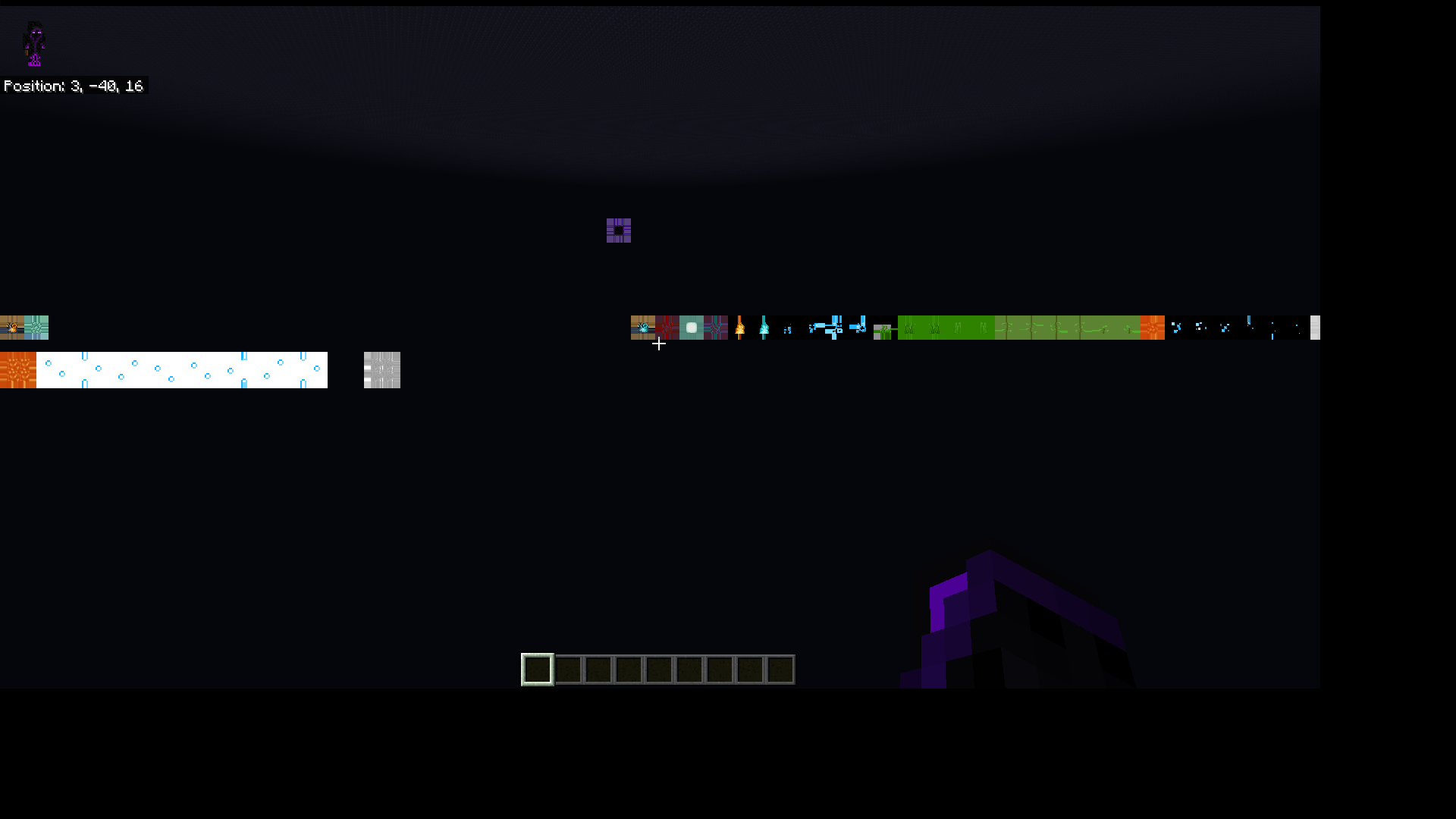
When full screening either with WIN + SHIFT + ENTER or F11, the screen flickers red black (was red in previous 1.17 versions with the white loading screen).
There is also a seemingly random chance that a random block texture will appear: https://imgur.com/7WdzXko
The image above was taken the exact moment I fullscreened.
Linked Issues
![[Mod] EVGENSYPERPRO](../../../data/avatars/users/92853.png)



Created Issue:
Block textures apper when fullscreening
When using the Windows default UWP app fullscreen shortcut (WIN + SHIFT + ENTER), the screen flickers red, and when you can see the GUI, there is a chance that a random block texture will appear. It took me a lot of tries to capture this at the right moment: https://imgur.com/7WdzXko
The image you see above is when I un-fullscreened using the Windows UWP app fullscreen shortcut and then timed my screenshot perfectly.
![[MCQA] Kinga Izdebska](../../../data/avatars/users/18949.svg)
![[MCQA] v-magwar](../../../data/avatars/users/18935.svg)
![[Mod] OcelotOnesie](../../../data/avatars/users/43220.png)
is duplicated by
![[Bot] Arisa](../../../data/avatars/users/43007.png)
is duplicated by
![[Helper] lillybeacon](../../../data/avatars/users/93893.png)
Block textures apper when fullscreeningBlock textures appear when toggling fullscreen (F11)
When using the Windows default UWP app fullscreen shortcut (WIN + SHIFT + ENTER), the screen flickers red, and when you can see the GUI, there is a chance that a random block texture will appear. It took me a lot of tries to capture this at the right moment: https://imgur.com/7WdzXko
The image
you see above is when I un-fullscreened using the Windows UWP app fullscreen shortcut and then timed my screenshot perfectly.When full screening either with WIN + SHIFT + ENTER or F11, the screen flickers red black (was red in previous 1.17 versions with the white loading screen).
There is also a seemingly random chance that a random block texture will appear: https://imgur.com/7WdzXko
The image above was taken the exact moment I fullscreened.
is duplicated by
is duplicated by
is duplicated by
Thank you for your report!
We're tracking this issue in MCPE-118728, so this ticket is being resolved and linked as a duplicate.
If you would like to add a vote and any extra information to the main ticket it would be appreciated.
If you haven't already, you might like to make use of the search feature to see if the issue has already been mentioned.
Quick Links:
📓 Bug Tracker Guidelines – 📧 Mojang Support
📓 Project Summary – ✍️ Feedback and Suggestions – 📖 Game Wiki
It seems to be a duplicate MCPE-118728
Thank you for your report!
We're tracking this issue in MCPE-118728, so this ticket is being resolved and linked as a duplicate.
If you would like to add a vote and any extra information to the main ticket it would be appreciated.
If you haven't already, you might like to make use of the search feature to see if the issue has already been mentioned.
Quick Links:
📓 Bug Tracker Guidelines – 💬 Community Support – 📧 Mojang Support
📓 Project Summary – ✍️ Feedback and Suggestions – 📖 Game Wiki
– I am a bot. This action was performed automatically! If you think it was incorrect, please notify us on Discord or Reddit
Thank you for your report!
We're tracking this issue in MCPE-118728, so this ticket is being resolved and linked as a duplicate.
If you would like to add a vote and any extra information to the main ticket it would be appreciated.
If you haven't already, you might like to make use of the search feature to see if the issue has already been mentioned.
Quick Links:
📓 Bug Tracker Guidelines – 💬 Community Support – 📧 Mojang Support
📓 Project Summary – ✍️ Feedback and Suggestions – 📖 Game Wiki
Thank you for your report!
We're tracking this issue in MCPE-118728, so this ticket is being resolved and linked as a duplicate.
If you would like to add a vote and any extra information to the main ticket it would be appreciated.
If you haven't already, you might like to make use of the search feature to see if the issue has already been mentioned.
Quick Links:
📓 Bug Tracker Guidelines – 💬 Community Support – 📧 Mojang Support
📓 Project Summary – ✍️ Feedback and Suggestions – 📖 Game Wiki
Thank you for your report!
We're tracking this issue in MCPE-118728, so this ticket is being resolved and linked as a duplicate.
If you would like to add a vote and any extra information to the main ticket it would be appreciated.
If you haven't already, you might like to make use of the search feature to see if the issue has already been mentioned.
Quick Links:
📓 Bug Tracker Guidelines – 📧 Mojang Support
📓 Project Summary – ✍️ Feedback and Suggestions – 📖 Game Wiki
It's actually every time you change your game to fullscreen, whether you use the shortcut mentioned above or just f11.
The difference is - you need to look at the horizon at a certain angle to see certain textures flashing.
Works very well with the F11 button. In the video, I press F11 very quickly. In normal play (when you press F11 not so hard), this appears for a split second.
Only visible through not loaded areas. (best to test under bedrock).
Can confirm for 1.17 on Windows 10 PC
Used to flash redIt now flashes black, indicating direct correlation between the loading screen colors and this.
This bug seems to have been resolved in 1.18. Requires further testing for full confirmation.