 MCPE-152609
Cannot equip Mario skins on switch
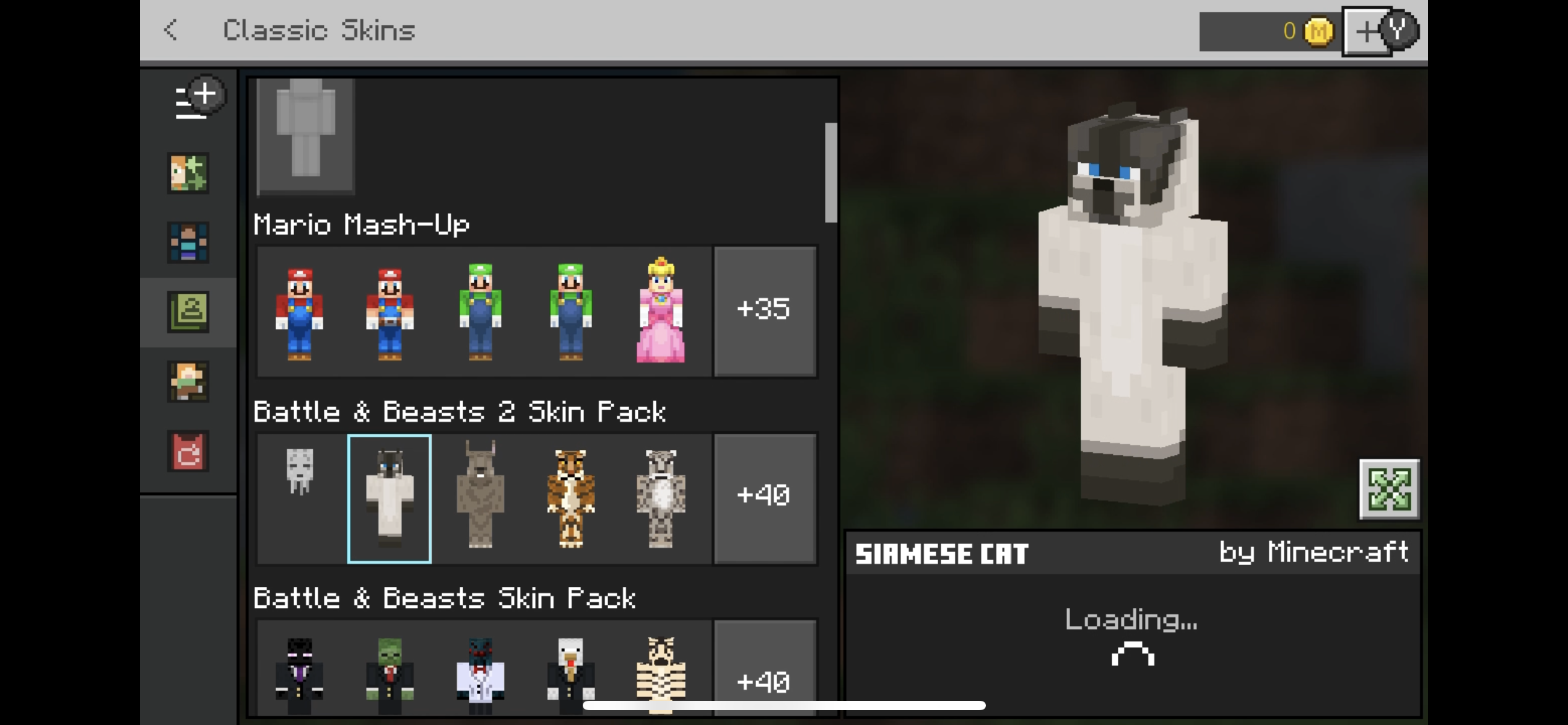
Equipping Mario skins from the mashup is not possible on my switch. We have another switch in our house, and do not have this problem on that switch. The other skins are available to equip, but Mario skins don’t show an equip icon, they just load indefinitely. Mario skins are also not available in the store. There is just no option of using them and I’ve tried everything.
I tried online play, offline play, logged into Microsoft account, logged out of Microsoft account, single player, multiplayer, uninstalled Minecraft from my switch entirely, even tried to delete cloud data, but apparently, there is no option to erase it from the cloud.
Linked Issues
is duplicated by3
Attachments8



Created Issue:
Cannot equip Mario skins on switch
Equipping Mario skins from the mashup is not possible on my switch. We have another switch in our house, and do not have this problem on that switch. The other skins are available to equip, but Mario skins don’t show an equip icon, they just load indefinitely. Mario skins are also not available in the store. There is just no option of using them and I’ve tried everything.
I tried online play, offline play, logged into Microsoft account, logged out of Microsoft account, single player, multiplayer, uninstalled Minecraft from my switch entirely, even tried to delete cloud data, but apparently, there is no option to erase it from the cloud.
Attachments6
![[Mod] OcelotOnesie](../../../data/avatars/users/43220.png)
relates to
![[MCQA] v-weszaj](../../../data/avatars/users/18941.svg)
![[Mojang] Mega_Spud (Jay Wells)](../../../data/avatars/users/92696.png)
relates to
is duplicated by
is duplicated by
So it will be fixed next update I'm assuming.
Still not able to access the mario skins. I bought the physical game on a card and Downloaded the update to v1.19.73.
Cannot use the Skins, deleted the software and reinstall, sign out and in to my nintendo and ms account, tried the posted solutions without any success.
![[Bot] Arisa](../../../data/avatars/users/43007.png)
Thank you for your report!
We're tracking this issue in MCPE-152609, so this ticket is being resolved and linked as a duplicate.
If you would like to add a vote and any extra information to the main ticket it would be appreciated.
If you haven't already, you might like to make use of the search feature to see if the issue has already been mentioned.
Quick Links:
📓 Bug Tracker Guidelines – 💬 Community Support – 📧 Mojang Support
📓 Project Summary – ✍️ Feedback and Suggestions – 📖 Game Wiki
Thank you for your report!
We're tracking this issue in MCPE-152609, so this ticket is being resolved and linked as a duplicate.
If you would like to add a vote and any extra information to the main ticket it would be appreciated.
If you haven't already, you might like to make use of the search feature to see if the issue has already been mentioned.
Quick Links:
📓 Bug Tracker Guidelines – 💬 Community Support – 📧 Mojang Support
📓 Project Summary – ✍️ Feedback and Suggestions – 📖 Game Wiki
Thank you for your report!
We're tracking this issue in MCPE-152259 and MCPE-152609, so this ticket is being resolved and linked as a duplicate.
If you would like to add a vote and any extra information to the main tickets it would be appreciated.
If you haven't already, you might like to make use of the search feature to see if the issue has already been mentioned.
Quick Links:
📓 Bug Tracker Guidelines – 💬 Community Support – 📧 Mojang Support
📓 Project Summary – ✍️ Feedback and Suggestions – 📖 Game Wiki
This also affects skins from Super Mario Mash-up Pack (MCPE-152609), that is currently exclusive on Nintendo Switch (but may not include LittleBigPlanet Mash-up Pack on PlayStation as I can search for it in Minecraft Marketplace Catalog, I don't have a PlayStation console so I only know there's an optional mash-up pack that could be purchased for) because it seemed to not be available in Minecraft Marketplace catalog. I just found a workaround to the issue.
However for PC and mobile, imported skin-packs do appear. So despite them not being available in Minecraft Marketplace, no workaround is required and can be applied as-is.
You know what I would do if this happened with a bad plan...?
I don't know if it was to fight gate-keeping or a phase-out, Developers, reply to me, I want to know what happened.
Does Minecraft on your other Switch have the new Dressing Room UI or the old one?
@OcelotOnesie I don’t know how to tell. The video shows what I’m using I thought.
Is there any development on fixing this bug?
Yeah this bug seriously needs to fixed.
This ticket has been confirmed and forwarded to the developers, so the bug should get fixed at some point.
This is still a problem. Please fix this ASAP.
Idk why this is a bug in the first place and the fact it's been 2 months worries me that it will never be fixed.
This ^.
1.18.30 fixed this for me
If you still can't change skins after 1.18.30 all you need to do is delete the software and reinstall it then after it's done downloading again sign out of your Microsoft account and sign back in and it should work.
It's fixed now! Yay! For those reading this that are still having this problem after the update, just do what is mentioned above by Swordking, and hopefully it should fix it. Otherwise, I'm sure you know what to do, in case you don't, it's this: just type it here. Which leads me to this: thanks, dude. Had I not done this I wouldn't have been able to do anything regarding skins at all, as prior to deleting and redownloading after the update, it wouldn't even let me change skins in any degree as the whole menu system for the skins was bugging out.
No problem I was confused at first too why nothing was working.
Affects Release 1.20.80
This time classic (custom) skins in Dressing Room won't even load the skin-pack when entered via "Classic Skins" button, thus being completely disappeared, workaround of
MCPE-180885may work as this works around by first pressing "Classic Skins" icon, to set the character as the skin, then return to Dressing Room menu, and clicking "Change Skin" after that (this will go to last good UI instead of the broken one).Update: seemed to be fixed thanks to the backend change.
I don't know if this is due to a UI change on the skin selection screen, but in version 1.21.1 Mario skins are not displayed in the list and cannot be equipped.
6/23 We have confirmed that the solution using the old UI does not respond when pressing the changing room button immediately after startup. This made the workaround no longer available.
It seems that the problem that occurred in
MCPE-152216where imported skin packs cannot be equipped on a PC or smartphone does not occur.6/25 I confirmed that it was fixed by updating the server side or without any Minecraft client updates. Thank you for your response.