 MCPE-152734
Large Map Wall Crashes game(96 x 48)
A major Bug when viewing a large number of maps placed on item frames/glow_frames. Appears to be an issue only on Windows.
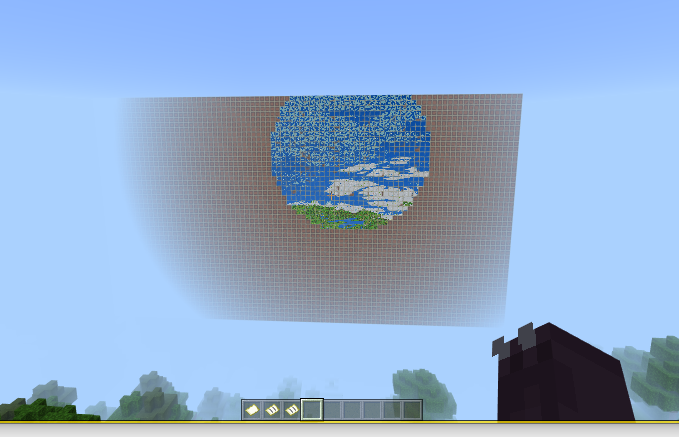
Things start to turn pink, at some angles everything starts to flicker and/or the game crashes, No matter what you can not save and quit without Minecraft crashing.
Here is a test world 38MB https://ibase.me/maptest.mcworld,
This Appears to Only affect Windows 10 version, I have this same issue with an older Windows 10 PC.
Graphic drivers Updates or GPU changes Did Not Help.
Would Like Windows to work as it does not have the issue on the Nintendo switch and my phone, screenshots are below.
The preview version appears even worse, Minecraft just closes/ crashes.
Appears all Versions have this issue with windows.
Also Appears that similar issues happen if you view approx 2500 maps within any gaming session,
I just tested this and can confirm that once you have viewed about 2k maps new maps will render pink that isn't already loaded, This also turns your item inventory menus pink.
Linked Issues
Attachments11




Created Issue:
My 96 x 48 Large Map Wall Crashes my game.
So is no way to Enjoy this map in the game. I just turn things pink things flicker and then the game crash.
Sois no way to Enjoy this map in the game. I just turn things pink things flicker and then the game crash.there is no way to Enjoy this map in the game. I just turn things pink things flicker and then the game crash.
there is no way to Enjoy this map in the game. I just turn things pink things flicker and then the game crash. I have a 38MB world with the map if that helps,
there is no way to Enjoy this map in the game. I just turn things pink things flicker and then the game crash. I have a 38MB world with the map if that helps,
there is no way to Enjoy this map in the game. I just turn things pink things flicker and then the game crash. I have a 38MB world with the map if that helps, https://ibase.me/maptest.mcworld its here
there is no way to Enjoy this map in the game. I just turn things pink things flicker and then the game crash. I have a 38MB world with the map if that helps, https://ibase.me/maptest.mcworld its here
there is no way to Enjoy this map in the game. I just turn things pink things flicker and then the game crash. I have a 38MB world with the map if that helps, https://ibase.me/maptest.mcworld its here , Does not effect phone, Only windows 10 version
there is no way to Enjoy this map in the game. I just turn things pink things flicker and then the game crash. I have a 38MB world with the map if that helps, https://ibase.me/maptest.mcworld i
ts here, Does noteffect phone, Only windows 10 versionthere is no way to Enjoy this map in the game. I just turn things pink things flicker and then the game crash. I have a 38MB world with the map if that helps, https://ibase.me/maptest.mcworld is here, Does not affect the phone, Only windows 10 version, I updated my graphic drivers, even tried the intel gpu.
there is no way to Enjoy this map in the game. I just turn things pink things flicker and then the game crash. I have a 38MB world with the map if that helps, https://ibase.me/maptest.mcworld is here, Does not affect the phone, Only windows 10 version, I updated my graphic drivers, even tried the intel
gpu.there is no way to Enjoy this map in the game. I just turn things pink things flicker and then the game crash. I have a 38MB world with the map if that helps, https://ibase.me/maptest.mcworld is here, Does not affect the phone, Only windows 10 version, I updated my RTX graphic drivers, even tried the intel GPU.
there is no way to Enjoy this map in the game. I just turn things pink things flicker and then the game crash. I have a 38MB world with the map if that helps, https://ibase.me/maptest.mcworld is here, Does not affect the phone, Only windows 10 version, I updated my RTX graphic drivers, even tried the intel GPU. also loads and works on Nintendo switch.
there is no way to Enjoy this map
in the game. I just turn things pink things flicker and then the game crash. I have a 38MB world with the map if that helps, https://ibase.me/maptest.mcworld is here, Does not affect the phone, Only windows 10 version, I updated my RTX graphic drivers, even tried the intel GPU. also loads and works on Nintendo switch.there is no way to Enjoy this map on windows 10. I just turn things pink things flicker and then the game crash. I have a 38MB world with the map if that helps, https://ibase.me/maptest.mcworld is here, Does not affect the phone, Only windows 10 version, I updated my RTX graphic drivers, even tried the intel GPU. also loads and works on Nintendo switch.
there is no way to Enjoy this map on windows 10. I just turn things pink things flicker and then the game crash. I have a 38MB world with the map if that helps, https://ibase.me/maptest.mcworld is here, Does not affect
thephone, Only windows 10 version, I updated my RTX graphic drivers, even tried the intel GPU. also loads and works on Nintendo switch.there is no way to Enjoy this map on windows 10. It just turn things pink things flicker and then the game crash. I have a 38MB world with the map if that helps, https://ibase.me/maptest.mcworld is here, Does not affect my phone, Only windows 10 version, I updated my RTX graphic drivers, even tried the intel GPU. also loads and works on Nintendo switch. Also does the same nasty thing on my older windows 10 PC.
My 96 x 48Large Map Wall Crashesmygame.Large Map Wall Crashes game(96 x 48).
there is no way to Enjoy this map on windows 10. It just turn things pink things flicker and then the game crash. I have a 38MB world with the map if that helps, https://ibase.me/maptest.mcworld is here,
Does not affect my phone, Onlywindows 10version,I updated my RTX graphic drivers, even tried the intel GPU.also loads and works on Nintendo switch. Also does the same nasty thing on my older windows 10 PC.there is no way to Enjoy this map on windows 10. It just turns things pink things flicker and then the game crash. I have a 38MB world with the map if that helps, https://ibase.me/maptest.mcworld is here, Appears to Only affect Windows 10 version, I have this same issue with older windows 10 PC. I updated my RTX graphic drivers, even tried the intel GPU. Works fine on the Nintendo switch and my phone, screenshots are below.
there is no way to Enjoy this map on windows 10. It just turns things pink things flicker and then the game crash. I have a 38MB world with the map if that helps, https://ibase.me/maptest.mcworld is here, Appears to Only affect Windows 10 version, I have this same issue with older windows 10 PC. I updated my RTX graphic drivers, even tried the intel GPU. Works fine on the Nintendo switch and my phone, screenshots are below. Update in the preview version it appears even worse, Minecraft just closes/ crashes .
there is no way to Enjoy thismap on windows 10.It just turns things pink thingsflicker and then thegame crash. I have a 38MB world with the map if that helps, https://ibase.me/maptest.mcworld is here, Appears to Only affect Windows 10 version, I have this same issue with older windows 10 PC. I updated my RTX graphic drivers, even tried the intel GPU. Works fine on the Nintendo switch and my phone, screenshots are below. Update in the preview version it appears even worse, Minecraft just closes/ crashes.A major issue with maps on large item frame/glow_frame wall, when attempting to view maps on windows 10. Things start to turn pink, at some angles everything starts to flicker and/or the game crashes, No matter what you can not save and quit without Minecraft crashing. I have a 38MB world with the map if that helps, https://ibase.me/maptest.mcworld is here, Appears to Only affect Windows 10 version, I have this same issue with older windows 10 PC. I updated my RTX graphic drivers, even tried the intel GPU. Works fine on the Nintendo switch and my phone, screenshots are below. Update in the preview version it appears even worse, Minecraft just closes/ crashes.
A major issue with maps on large item frame/glow_frame wall, when attempting to view maps on windows 10. Things start to turn pink, at some angles everything starts to flicker and/or the game crashes, No matter what you can not save and quit without Minecraft crashing.
I have a 38MB world with the mapif that helps, https://ibase.me/maptest.mcworldis here,Appears to Only affect Windows 10 version, I have this same issue with older windows 10 PC. I updated my RTX graphic drivers, even tried the intel GPU. Works fine on the Nintendo switch and my phone, screenshots are below. Update in the preview version it appears even worse, Minecraft just closes/ crashes.A major issue with maps on large item frame/glow_frame wall, when attempting to view maps on windows 10. Things start to turn pink, at some angles everything starts to flicker and/or the game crashes, No matter what you can not save and quit without Minecraft crashing. Here is a test world 38MB if that helps, https://ibase.me/maptest.mcworld , which Appears to Only affect Windows 10 version, I have this same issue with older windows 10 PC. I updated my RTX graphic drivers, even tried the intel GPU. Works fine on the Nintendo switch and my phone, screenshots are below. Update in the preview version it appears even worse, Minecraft just closes/ crashes.
A major issue with maps on large item frame/glow_frame wall, when attempting to view maps on windows 10. Things start to turn pink, at some angles everything starts to flicker and/or the game crashes, No matter what you can not save and quit without Minecraft crashing. Here is a test world 38MB
if that helps,https://ibase.me/maptest.mcworld , which Appears to Only affect Windows 10 version, I have this same issue with older windows 10 PC. I updated my RTX graphic drivers, even tried the intel GPU. Works fine on the Nintendo switch and my phone, screenshots are below. Update in the preview version it appears even worse, Minecraft just closes/ crashes.A major issue with maps on large item frame/glow_frame wall, when attempting to view maps on windows 10. Things start to turn pink, at some angles everything starts to flicker and/or the game crashes, No matter what you can not save and quit without Minecraft crashing. Here is a test world 38MB https://ibase.me/maptest.mcworld , which Appears to Only affect Windows 10 version, I have this same issue with older windows 10 PC. I updated my RTX graphic drivers, even tried the intel GPU. Works fine on the Nintendo switch and my phone, screenshots are below. Update in the preview version it appears even worse, Minecraft just closes/ crashes.
A major issue with maps on large item frame/glow_frame wall, when attempting to view maps on windows 10. Things start to turn pink, at some angles everything starts to flicker and/or the game crashes, No matter what you can not save and quit without Minecraft crashing. Here is a test world 38MB https://ibase.me/maptest.mcworld ,
whichAppears to Only affect Windows 10 version, I have this same issue with older windows 10 PC. I updated my RTX graphic drivers, even tried the intel GPU. Works fine on the Nintendo switch and my phone, screenshots are below. Update in the preview version it appears even worse, Minecraft just closes/ crashes.A major issue with maps on large item frame/glow_frame wall, when attempting to view maps on windows 10. Things start to turn pink, at some angles everything starts to flicker and/or the game crashes, No matter what you can not save and quit without Minecraft crashing. Here is a test world 38MB https://ibase.me/maptest.mcworld , This Appears to Only affect Windows 10 version, I have this same issue with an older windows 10 PC. I updated my RTX graphic drivers, even tried the intel GPU. Works fine on the Nintendo switch and my phone, screenshots are below. Update in the preview version it appears even worse, Minecraft just closes/ crashes.
A major issue with maps on large item frame/glow_frame wall, when attempting to view maps on windows 10. Things start to turn pink, at some angles everything starts to flicker and/or the game crashes, No matter what you can not save and quit without Minecraft crashing. Here is a test world 38MB https://ibase.me/maptest.mcworld , This Appears to Only affect Windows 10 version, I have this same issue with an older
windows 10 PC.I updated my RTX graphic drivers, even tried the intel GPU. Works fine on the Nintendo switch and my phone, screenshots are below. Update in the preview version it appears even worse, Minecraft just closes/ crashes.A major issue with maps on large item frame/glow_frame wall, when attempting to view maps on windows 10. Things start to turn pink, at some angles everything starts to flicker and/or the game crashes, No matter what you can not save and quit without Minecraft crashing. Here is a test world 38MB https://ibase.me/maptest.mcworld , This Appears to Only affect Windows 10 version, I have this same issue with an older Windows 10 PC. Graphic drivers Updates or GPU changes had no effect. Works fine on the Nintendo switch and my phone, screenshots are below. Update in the preview version it appears even worse, Minecraft just closes/ crashes.
A major issue with maps on large item frame/glow_frame wall, when attempting to view maps on windows 10. Things start to turn pink, at some angles everything starts to flicker and/or the game crashes, No matter what you can not save and quit without Minecraft crashing. Here is a test world 38MB https://ibase.me/maptest.mcworld , This Appears to Only affect Windows 10 version, I have this same issue with an older Windows 10 PC. Graphic drivers Updates or GPU changes
had no effect. Works fine on the Nintendo switch and my phone, screenshots are below. Update in the preview version it appears even worse, Minecraft just closes/ crashes.A major issue with maps on large item frame/glow_frame wall, when attempting to view maps on windows 10. Things start to turn pink, at some angles everything starts to flicker and/or the game crashes, No matter what you can not save and quit without Minecraft crashing. Here is a test world 38MB https://ibase.me/maptest.mcworld , This Appears to Only affect Windows 10 version, I have this same issue with an older Windows 10 PC. Graphic drivers Updates or GPU changes Did Help. Would Like Widows to work as it works fine on the Nintendo switch and my phone, screenshots are below. Update in the preview version it appears even worse, Minecraft just closes/ crashes. Appears all Versions have this issue.
A major issue with maps on large item frame/glow_frame wall, when attempting to view maps on windows 10. Things start to turn pink, at some angles everything starts to flicker and/or the game crashes, No matter what you can not save and quit without Minecraft crashing. Here is a test world 38MB https://ibase.me/maptest.mcworld , This Appears to Only affect Windows 10 version, I have this same issue with an older Windows 10 PC. Graphic drivers Updates or GPU changes Did Help. Would Like Widows to work as it works fine on the Nintendo switch and my phone, screenshots are below. Update in the preview version it appears even worse, Minecraft just closes/ crashes. Appears all Versions have this issue.
A major issue with maps on large item frame/glow_frame wall, when attempting to view maps on windows 10.
Things start to turn pink, at some angles everything starts to flicker and/or the game crashes, No matter what you can not save and quit without Minecraft crashing.
Here is a test world 38MB https://ibase.me/maptest.mcworld ,
This Appears to Only affect Windows 10 version, I have this same issue with an older Windows 10 PC.
Graphic drivers Updates or GPU changes Did Help.
Would Like Widows to work as it does not have the issue on the Nintendo switch and my phone, screenshots are below.
The preview version appears even worse, Minecraft just closes/ crashes.
Appears all Versions have this issue with windows.
A major issue with maps on large item frame/glow_frame wall, when attempting to view maps on windows 10.
Things start to turn pink, at some angles everything starts to flicker and/or the game crashes, No matter what you can not save and quit without Minecraft crashing.
Here is a test world 38MB https://ibase.me/maptest.mcworld,
This Appears to Only affect Windows 10 version, I have this same issue with an older Windows 10 PC.
Graphic drivers Updates or GPU changes Did Not Help.
Would Like Widows to work as it does not have the issue on the Nintendo switch and my phone, screenshots are below.
The preview version appears even worse, Minecraft just closes/ crashes.
Appears all Versions have this issue with windows.
A major
issue with maps on largeitem frame/glow_framewall, when attempting to view mapsonwindows10.Things start to turn pink, at some angles everything starts to flicker and/or the game crashes, No matter what you can not save and quit without Minecraft crashing.
Here is a test world 38MB https://ibase.me/maptest.mcworld,
This Appears to Only affect Windows 10 version, I have this same issue with an older Windows 10 PC.
Graphic drivers Updates or GPU changes Did Not Help.
Would Like Widows to work as it does not have the issue on the Nintendo switch and my phone, screenshots are below.
The preview version appears even worse, Minecraft just closes/ crashes.
Appears all Versions have this issue with windows.
A major Bug when viewing a large number of maps placed on item frames/glow_frames. Appears to be an issue only on Windows.
Things start to turn pink, at some angles everything starts to flicker and/or the game crashes, No matter what you can not save and quit without Minecraft crashing.
Here is a test world 38MB https://ibase.me/maptest.mcworld,
This Appears to Only affect Windows 10 version, I have this same issue with an older Windows 10 PC.
Graphic drivers Updates or GPU changes Did Not Help.
Would Like Widows to work as it does not have the issue on the Nintendo switch and my phone, screenshots are below.
The preview version appears even worse, Minecraft just closes/ crashes.
Appears all Versions have this issue with windows.
A major Bug when viewing a large number of maps placed on item frames/glow_frames. Appears to be an issue only on Windows.
Things start to turn pink, at some angles everything starts to flicker and/or the game crashes, No matter what you can not save and quit without Minecraft crashing.
Here is a test world 38MB https://ibase.me/maptest.mcworld,
This Appears to Only affect Windows 10 version, I have this same issue with an older Windows 10 PC.
Graphic drivers Updates or GPU changes Did Not Help.
Would Like Windows to work as it does not have the issue on the Nintendo switch and my phone, screenshots are below.
The preview version appears even worse, Minecraft just closes/ crashes.
Appears all Versions have this issue with windows.
A major Bug when viewing a large number of maps placed on item frames/glow_frames. Appears to be an issue only on Windows.
Things start to turn pink, at some angles everything starts to flicker and/or the game crashes, No matter what you can not save and quit without Minecraft crashing.
Here is a test world 38MB https://ibase.me/maptest.mcworld,
This Appears to Only affect Windows 10 version, I have this same issue with an older Windows 10 PC.
Graphic drivers Updates or GPU changes Did Not Help.
Would Like Windows to work as it does not have the issue on the Nintendo switch and my phone, screenshots are below.
The preview version appears even worse, Minecraft just closes/ crashes.
Appears all Versions have this issue with windows.
Also Appears to happen if you view approx 3000 maps within any gaming session,
A major Bug when viewing a large number of maps placed on item frames/glow_frames. Appears to be an issue only on Windows.
Things start to turn pink, at some angles everything starts to flicker and/or the game crashes, No matter what you can not save and quit without Minecraft crashing.
Here is a test world 38MB https://ibase.me/maptest.mcworld,
This Appears to Only affect Windows 10 version, I have this same issue with an older Windows 10 PC.
Graphic drivers Updates or GPU changes Did Not Help.
Would Like Windows to work as it does not have the issue on the Nintendo switch and my phone, screenshots are below.
The preview version appears even worse, Minecraft just closes/ crashes.
Appears all Versions have this issue with windows.
Also Appears t
ohappen if you view approx 3000 maps within any gaming session,A major Bug when viewing a large number of maps placed on item frames/glow_frames. Appears to be an issue only on Windows.
Things start to turn pink, at some angles everything starts to flicker and/or the game crashes, No matter what you can not save and quit without Minecraft crashing.
Here is a test world 38MB https://ibase.me/maptest.mcworld,
This Appears to Only affect Windows 10 version, I have this same issue with an older Windows 10 PC.
Graphic drivers Updates or GPU changes Did Not Help.
Would Like Windows to work as it does not have the issue on the Nintendo switch and my phone, screenshots are below.
The preview version appears even worse, Minecraft just closes/ crashes.
Appears all Versions have this issue with windows.
Also Appears that similar issues happen if you view approx 3000 maps within any gaming session,
This may be part of the cause for issue
MCPE-105487.
A major Bug when viewing a large number of maps placed on item frames/glow_frames. Appears to be an issue only on Windows.
Things start to turn pink, at some angles everything starts to flicker and/or the game crashes, No matter what you can not save and quit without Minecraft crashing.
Here is a test world 38MB https://ibase.me/maptest.mcworld,
This Appears to Only affect Windows 10 version, I have this same issue with an older Windows 10 PC.
Graphic drivers Updates or GPU changes Did Not Help.
Would Like Windows to work as it does not have the issue on the Nintendo switch and my phone, screenshots are below.
The preview version appears even worse, Minecraft just closes/ crashes.
Appears all Versions have this issue with windows.
Also Appears that similar issues happen if you view approx 3000 maps within any gaming session,
This may be part of the cause for issue
MCPE-105487.A major Bug when viewing a large number of maps placed on item frames/glow_frames. Appears to be an issue only on Windows.
Things start to turn pink, at some angles everything starts to flicker and/or the game crashes, No matter what you can not save and quit without Minecraft crashing.
Here is a test world 38MB https://ibase.me/maptest.mcworld,
This Appears to Only affect Windows 10 version, I have this same issue with an older Windows 10 PC.
Graphic drivers Updates or GPU changes Did Not Help.
Would Like Windows to work as it does not have the issue on the Nintendo switch and my phone, screenshots are below.
The preview version appears even worse, Minecraft just closes/ crashes.
Appears all Versions have this issue with windows.
Also Appears that similar issues happen if you view approx 3000 maps within any gaming session,
A major Bug when viewing a large number of maps placed on item frames/glow_frames. Appears to be an issue only on Windows.
Things start to turn pink, at some angles everything starts to flicker and/or the game crashes, No matter what you can not save and quit without Minecraft crashing.
Here is a test world 38MB https://ibase.me/maptest.mcworld,
This Appears to Only affect Windows 10 version, I have this same issue with an older Windows 10 PC.
Graphic drivers Updates or GPU changes Did Not Help.
Would Like Windows to work as it does not have the issue on the Nintendo switch and my phone, screenshots are below.
The preview version appears even worse, Minecraft just closes/ crashes.
Appears all Versions have this issue with windows.
Also Appears that similar issues happen if you view approx
3000 maps within any gaming session,
A major Bug when viewing a large number of maps placed on item frames/glow_frames. Appears to be an issue only on Windows.
Things start to turn pink, at some angles everything starts to flicker and/or the game crashes, No matter what you can not save and quit without Minecraft crashing.
Here is a test world 38MB https://ibase.me/maptest.mcworld,
This Appears to Only affect Windows 10 version, I have this same issue with an older Windows 10 PC.
Graphic drivers Updates or GPU changes Did Not Help.
Would Like Windows to work as it does not have the issue on the Nintendo switch and my phone, screenshots are below.
The preview version appears even worse, Minecraft just closes/ crashes.
Appears all Versions have this issue with windows.
Also Appears that similar issues happen if you view approx 2500 maps within any gaming session,
I just tested this and can confirm that once you have viewed about 2k maps new maps will render pink that isn't already loaded, This also turns your item inventory menus pink.
![[Mod] tryashtar](../../../data/avatars/users/41963.png)
![[Mod] OcelotOnesie](../../../data/avatars/users/43220.png)
is duplicated by
![[Bot] Arisa](../../../data/avatars/users/43007.png)
![[Mod] Greymagic27](../../../data/avatars/users/92875.png)
Large Map Wall Crashes game(96 x 48).
Thank you for your report!
We're tracking this issue in MCPE-152734, so this ticket is being resolved and linked as a duplicate.
If you would like to add a vote and any extra information to the main ticket it would be appreciated.
If you haven't already, you might like to make use of the search feature to see if the issue has already been mentioned.
Quick Links:
📓 Bug Tracker Guidelines – 💬 Community Support – 📧 Mojang Support
📓 Project Summary – ✍️ Feedback and Suggestions – 📖 Game Wiki

There is a limit to how many frames you can have before the game glitches (see MCPE-152734). If the lag doesn't crash the game, the max amount of frames will glitch it.
Yeah, this should be 100% logged as a bug, I just placed about 2 maybe 3k maps in my world and the same issue occurred on windows in the (1.18.12) hotfix release.
Same issue occurred for me in Windows 10.
Also tested in Windows 11 and this occurs.
Using a Bedrock server and this occurs there too.
I'm thinking there is a limit that is hard-coded.
Can we update this to say that this bug affects the current releases?
This also occurs in the latest 1.20.72 release.
Thanks for updating this report last time mods.
@Dan Martin, have you found a workaround?
This issue is really annoying. Trying to build a custom map for my friends and it uses maps to import images and make graphics.
Just hit the 3500 mark, and this exact issue started.
Please fix this Mojang!!
@Sam I tried with the Java edition and this does not happen there; but the Java edition has a limited color palette, which translates the custom maps into a downsampled image. I'm hoping this bug gets fixed soon; it's been 2 years.
@ThinkerMaker interesting. I'm pretty sure Image Map (software I'm using to add them to the game) downsamples them automatically, so I'm not sure if this is directly related but it's worth noting! Yeah let's hope it gets addressed sometime soon
@Sam You are talking about tryashtar's Image Map (https://github.com/tryashtar/image-map)? I use that to add maps to the game. It helped me understand the NBT format.
Mods, can you update the affected versions to include versions up to and including the latest 1.20.81.1 release? Please and thank you .
.
Any update on this issue? Can this be fixed? Thanks.
Bump. Any update on this bug? It still occurs in the 1.21 (Tricky Trials) update.
Its better, it no longer crashes but there is a lot of flickering and missing maps. Progress see video
@Dan Martin Have you tried turning on the "Remove Texture Limit" in the video settings before you load your world? This allowed my world to load all my maps without any pink tiles being rendered.
I have to turn on "Remove Texture Limit" every time I launch Minecraft. My world works now, but I think it still crashes when I save and quit.
It is great to see that you are still checking in on this issue. Can you also update the affected versions to include the latest releases?