Item frames cause lag / huge FPS drops when rendered
Playing on a singleplayer map I made a room with almost every space of the walls having an item frame on it.
Whenever I turn to the direction of the item frame room my FPS lags itself to death.
Very debilitating as I essentially can't look in that direction and work - my FPS isn't very good as it is.
Here is an example of the lag in 1.6.4 using a 1.2.5 launcher
http://www.youtube.com/watch?v=ktBUQwDY0G8
Here is an example of the lag in 1.8.1-pre4 using a 1.5.3 launcher
https://www.youtube.com/watch?v=CueUB8Z2DAw&
Seems to be worse with animated items in frames.
Linked Issues
is duplicated by13
 MC-9886Maps in item frames cause un-necessary lag DuplicateMC-11442Performance issues with item framesDuplicateMC-12353Entities causing massive FPS dropDuplicateMC-42255FPS down near maps in frames + Slow Map loadingDuplicateMC-44196Item Frames Destroy FPSDuplicateMC-45694Few Item Frames causes lots of lagDuplicateMC-45713Old Item Frames in 'spawn chunks' cause huge fps dropDuplicateMC-45791Lag and maps in item framesDuplicateMC-49423Items like Stone causes FPS drop while in Item FrameDuplicateMC-61687item frames destroy framerate DuplicateMC-107178Extreme lag when item frames are on screenDuplicateMC-160583Larger Amounts of Maps in Item Frames cause extreme amount of LagDuplicateMC-173127Item Frame lagsDuplicate
relates to6
MC-5417Large amount of chests and shulker boxes creates FPS drop NormalMC-1958322000+ Maps in Item Frames rendered at the same time cause lagNormalMC-7895Large amount of fences impact performanceNormalMC-5169Huge FPS drop in areas with a lot of signs and hanging signsNormalMC-14983Massive Lag when looking into direction of hoppersAwaiting ResponseMC-252693Huge FPS drop in areas with a lot of honey blocks and slime blocksWon't Fix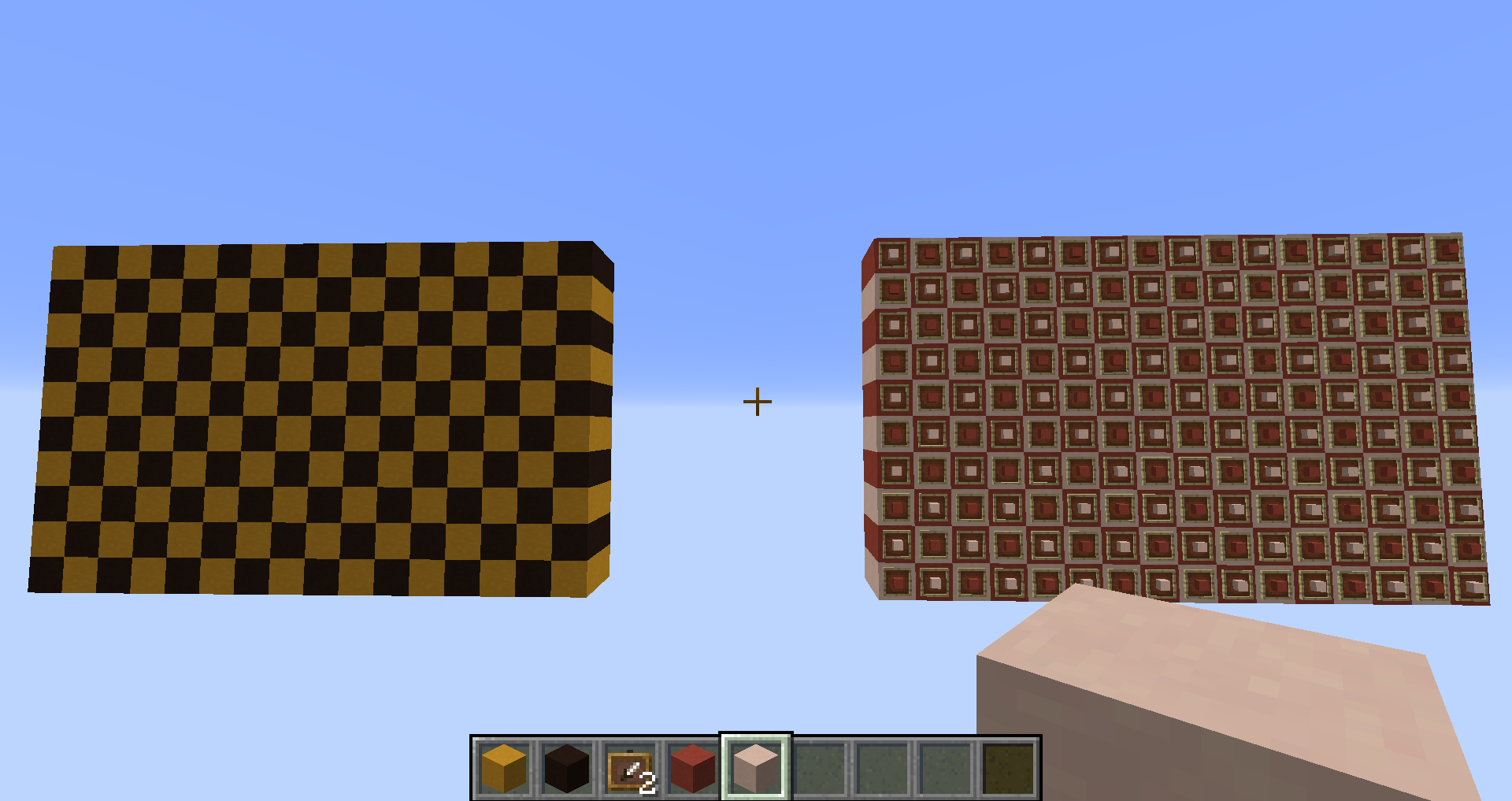




Created Issue:
Having a lot of item frames in a single room causes a crapload of lag when ever you point in the direction of that room.
Playing on a singleplayer map i made a room with almost every space of the walls having an item frame on it. Went to work on other parts of this map and whenever i turn to the direction of the item frame room my fps lags itself to death.
Very debilitating as i essentially can't look in that direction and work - my fps isn't very good as it is.


![[Mod] CubeTheThird](../../../data/assets/gravatar/cubethethird.jpeg)
is duplicated by

relates to
is duplicated by
is duplicated by
is duplicated by

Having a lot of item frames in a single room causes acraploadof lag when ever you point in the direction of that room.Having a lot of item frames in a single room causes a lot of lag when ever you point in the direction of that room.
using launcher 1.2.5 for minecraft 1.6.4
Playing on a singleplayer map i made a room with almost every space of the walls having an item frame on it. Went to work on other parts of this map and whenever i turn to the direction of the item frame room my fps lags itself to death.
Very debilitating as i essentially can't look in that direction and work - my fps isn't very good as it is.Here is an example of the lag in 1.6.4 using a 1.2.5 launcher
http://www.unblocker.yt/watch?v=ktBUQwDY0G8
Playing on a singleplayer map i made a room with almost every space of the walls having an item frame on it. Went to work on other parts of this map and whenever i turn to the direction of the item frame room my fps lags itself to death.
Very debilitating as i essentially can't look in that direction and work - my fps isn't very good as it is.Here is an example of the lag in 1.6.4 using a 1.2.5 launcher
http://www.unblocker.yt/watch?v=ktBUQwDY0G8Playing on a singleplayer map i made a room with almost every space of the walls having an item frame on it. Went to work on other parts of this map and whenever i turn to the direction of the item frame room my fps lags itself to death.
Very debilitating as i essentially can't look in that direction and work - my fps isn't very good as it is.Here is an example of the lag in 1.6.4 using a 1.2.5 launcher
http://www.youtube.com/watch?v=ktBUQwDY0G8
using launcher 1.2.5 for minecraft 1.6.4
Windows 7 (64 bit)
is duplicated by
is duplicated by
relates to
is duplicated by
is duplicated by
Having a lot of item frames in a single room causes a lot of lag when ever you point in the direction of that room.Item frames cause lag when rendered
is duplicated by

A comment with security level 'global-moderators' was removed.
Playing on a singleplayer map i made a room with almost every space of the walls having an item frame on it. Went to work on other parts of this map and whenever i turn to the direction of the item frame room my fps lags itself to death.
Very debilitating as i essentially can't look in that direction and work - my fps isn't very good as it is.Here is an example of the lag in 1.6.4 using a 1.2.5 launcher
http://www.youtube.com/watch?v=ktBUQwDY0G8Here is an example of the lag in 1.8.1-pre4 using a 1.5.3 launcher
Windows 7 (64 bit), Windows 7 (32 bit)
Playing on a singleplayer map i made a room with almost every space of the walls having an item frame on it. Went to work on other parts of this map and whenever i turn to the direction of the item frame room my fps lags itself to death.
Very debilitating as i essentially can't look in that direction and work - my fps isn't very good as it is.Here is an example of the lag in 1.6.4 using a 1.2.5 launcher
http://www.youtube.com/watch?v=ktBUQwDY0G8Here is an example of the lag in 1.8.1-pre4 using a 1.5.3 launcher
Playing on a singleplayer map i made a room with almost every space of the walls having an item frame on it. Went to work on other parts of this map and whenever i turn to the direction of the item frame room my fps lags itself to death.
Very debilitating as i essentially can't look in that direction and work - my fps isn't very good as it is.Here is an example of the lag in 1.6.4 using a 1.2.5 launcher
http://www.youtube.com/watch?v=ktBUQwDY0G8Here is an example of the lag in 1.8.1-pre4 using a 1.5.3 launcher
https://www.youtube.com/watch?v=CueUB8Z2DAw&
Seems to be worse with animated items in frames.
1.10.2 confirmed too.
Also I held test. I created empty world and built two walls 10x16x2. One of them filled by item frames with blocks. After that I flew to the back of walls. And looked on the each wall separately. You can see difference between the FPS on screenshots. I don't know should item frame is rendered if player doesn't see it. But when I look to the direction where exists some buildings where placed item frames inside I get a FPS drop down.
01.png

![[Mod] Neko](../../../data/avatars/users/92901.png)
is duplicated by

![[Mod] Michael Wobst](../../../data/avatars/users/37868.png)
Playing on a singleplayer map
imade a room with almost every space of the walls having an item frame on it.Went to work on other parts of this map and whenever i turn to the direction of the item frame room my fps lags itself to death.
Very debilitating as i essentially can't look inthatdirectionand work - my fps isn't very good as it is.Here is an example of the lag in 1.6.4 using a 1.2.5 launcher
http://www.youtube.com/watch?v=ktBUQwDY0G8Here is an example of the lag in 1.8.1-pre4 using a 1.5.3 launcher
https://www.youtube.com/watch?v=CueUB8Z2DAw&
Seems to be worse with animated items in frames.Playing on a singleplayer map I made a room with almost every space of the walls having an item frame on it.
Whenever I turn to the direction of the item frame room my FPS lags itself to death.
Very debilitating as I essentially can't look in that direction and work - my FPS isn't very good as it is.Here is an example of the lag in 1.6.4 using a 1.2.5 launcher
http://www.youtube.com/watch?v=ktBUQwDY0G8Here is an example of the lag in 1.8.1-pre4 using a 1.5.3 launcher
https://www.youtube.com/watch?v=CueUB8Z2DAw&Seems to be worse with animated items in frames.
Windows 7 (64 bit), Windows 7 (32 bit)
Item frames cause lag / huge FPS drops when rendered

relates to

![[Mojang] Nathan Adams](../../../data/assets/gravatar/dinnerbone.png)
![[Mod] violine1101](../../../data/avatars/users/92858.png)
is duplicated by
![[Mojang] Adrian Östergård](../../../data/assets/gravatar/nighter.jpeg) Normal
Normalis duplicated by
relates to
![[Mod] Les3awe](../../../data/avatars/users/79847.png)
relates to
Duplicate of MC-1138. Please use the search function to check before posting in the future.
Duplicate of MC-1138, please use the search function to see if your bug has already been submitted. Currently over 53% of tickets are being closed as duplicate.
Duplicate of MC-1138. Please use the search function to check before posting in the future.
And I don't think it's a Duplicate of MC-1138 because that one is related to the amount of entities, not really related to mine, because, for me, it doesn't happen with a big amount of just entities.
Relates to MC-1138
Relates to MC-1138
Thank you for your report!
We're actually already tracking this issue in MC-1138, so I resolved and linked this ticket as a duplicate.
If you would like to add a vote and any extra information to the main ticket it would be appreciated.
If you haven't already, you might like to make use of the search feature in the future to see if the issue has already been reported.
Quick Links:
📓 Issue Guidelines – 💬 Community Support – 📧 Customer Support – 📖 Game Wiki
Item frames, like paintings and minecarts count as entities. If you have a lot of item frames, it's like having a lot of pigs or any other mob, creating a lot of lag. I hope that helped.
While I know these are entities, there has to be a way around it. There really isnt any point in having static items like paintings and item frames as an entity.
For example, we have signs, they have custom text on them, are less than 1/4th the size of a block, and break off instantly when the attaching block is destroyed (if on wall).
A small room such as this: http://i.imgur.com/HqWLB.jpg lags the entire area of the server, with very few item frames. With the 1.4.6 update adding 3D items, I have also noticed z-fighting within the item frames items suggesting the possibility of duplicate entities within the same location, but that is unconfirmed.
This does need to be fixed or changed, because it renders a lot of uses for the item frames useless. It nearly makes a particular part of the world unplayable.
Item frames have features (turning items, 3D representations of blocks and items) that no block could ever have. Lag is not a bug, as much as it is annoying.
This is a room where the number of item frames causes lag
Sure they could, for one, you've got corner stairs the update when stairs are placed next to it to another shape or model. You also had plugins for bukkit which allow for editing signs. An entity doesn't have to be updated every tick (more or less a guess) like they have now, which is causing all of the lag. These should be set into some sort of new entity class that only updates when a player is within that chunk, or most preferably interacts with it via clicking or block update.
In addition to that, that small amount of entities still should not cause that much lag no matter what. There are plenty of other games which have higher entity counts on screen. We all know that minecraft is fairly unoptimized with its single core CPU usage and next to no GPU usage.
This is just BAD, item frames shouldn't cause this much lag. No need to update them every tick for every kind of item inside.
The problem is not the updating but the rendering of the item frames which has to be done apart from the rendering of the normal Blocks. There is not much wich can be done about that.
I had this problem too and it's a PITA. Maybe change it to a block like signs?
Affects 1.5.1
Temporary workaround until Mojang does something about it, like in
MC-8824:http://youtu.be/MOMlrK2-e94
still no fix
would be awesome if Mohjang could just implement Kabo's fix
probably as another graphic option: item frames -> fast/fancy
(because he says that there are probably something like 2 Pixels different for each frame (but you normally don't see a difference))
Is this still a concern in the current Minecraft version 1.6.4 / Launcher version 1.2.5 ? If so, please update the affected versions in order to best aid Mojang ensuring bugs are still valid in the latest releases/pre-releases.
Updated the affected versions and added a link in the description to a video i've made that shows the lag taking place.
I am having this issue in 1.7.4.
have in 1.7.2
An issue that would appreciate being addressed, since item frames has a popular use amongst players and create immense lag on servers.
Affects snapshot 14w11b.
Etho's point of view on item frames:
https://www.youtube.com/watch?v=v6HCy9bvG-c&t=975
Three of us are having this issue on a multi-player server in 14w21b.
Updated the affected versions and added a second link in the description to a video i've made that shows the lag taking place in 1.8.1-pre4 using a 1.5.3 launcher. Seems to be worse with animated items in frames.
I have discovered this yesterday the hard way (using lots of flying around and OptiFine's thread inspector). Item frames use a lot of time in scene renderer. I have an underground storage system containing tens of item frames, and together with a bunch of horses nearby, a total of 130 entities causes my Core 2 Duo 8400 @ 2.8Ghz, 550Ti, 8GB RAM and SSD drive to drop the framerate to 25-30ish compared to 120-160 FPS I get when I face the other direction.
I have experimented around with killing the horses and removing item frames (and combination of those), and it would seem that a single item frame has a similar impact to performance as a horse. And while it would be understandable that hundreds of horses would cause a drop in performance, it's easy to imagine a storage facility with tens or hundreds of item frames being build, and they suck FPS like a small child candy, while basically doing nothing.
I have hard time understanding why item frames use so much CPU (surely their geometry is not that complex, and besides, it apparently doesn't matter if they have items inside or not).
Ljubomir,
it's invalid as you're using unsupported modifications.
Sure. If you think it's necessary I'm willing to go back and reproduce everything using 100% vanilla tools. But honestly, given the number of similar reports of this issue and their similarity to the behavior I'm experiencing, I'm reluctant to blame the debug tools I use for measuring the issue, for the issue itself. Everyone on my server experiences the slowdown near the storage room.
But again, if you think it will make my comment more valid, I can go and reproduce the issue on unmodified client.
I've created a new flat world, peaceful dificulty, set mobs not to spawn (gamerule doMobSpawn false) killed all entities besides me (kill @e[type=!Player])
and built two 4x4x25 corridors on the opposite side of the spawn point. One has empty item frames on the walls, the other has empty walls. There are no other blocks nor entities on the world besides the ground.
When facing the empty walls I have 0 entities and 250 FPS (that's my maxfps). When facing the corridor with item frames, I have 400 entities and 36 FPS. Adding a few more item frames would easily kill my FPS even more. There are no chunk updates, nothing going on besides rendering item frames. There's not even anything inside the frames themselves! If that's not poor perfomance I don't know what is.
Thats on Core 2 Duo @ 2.8GHz, 550Ti and 8GB RAM.
Pure unmodified vanilla Minecraft 1.8.2-pre1, no mods, just a texture pack. If you're curious I can re-test with a texture pack off.
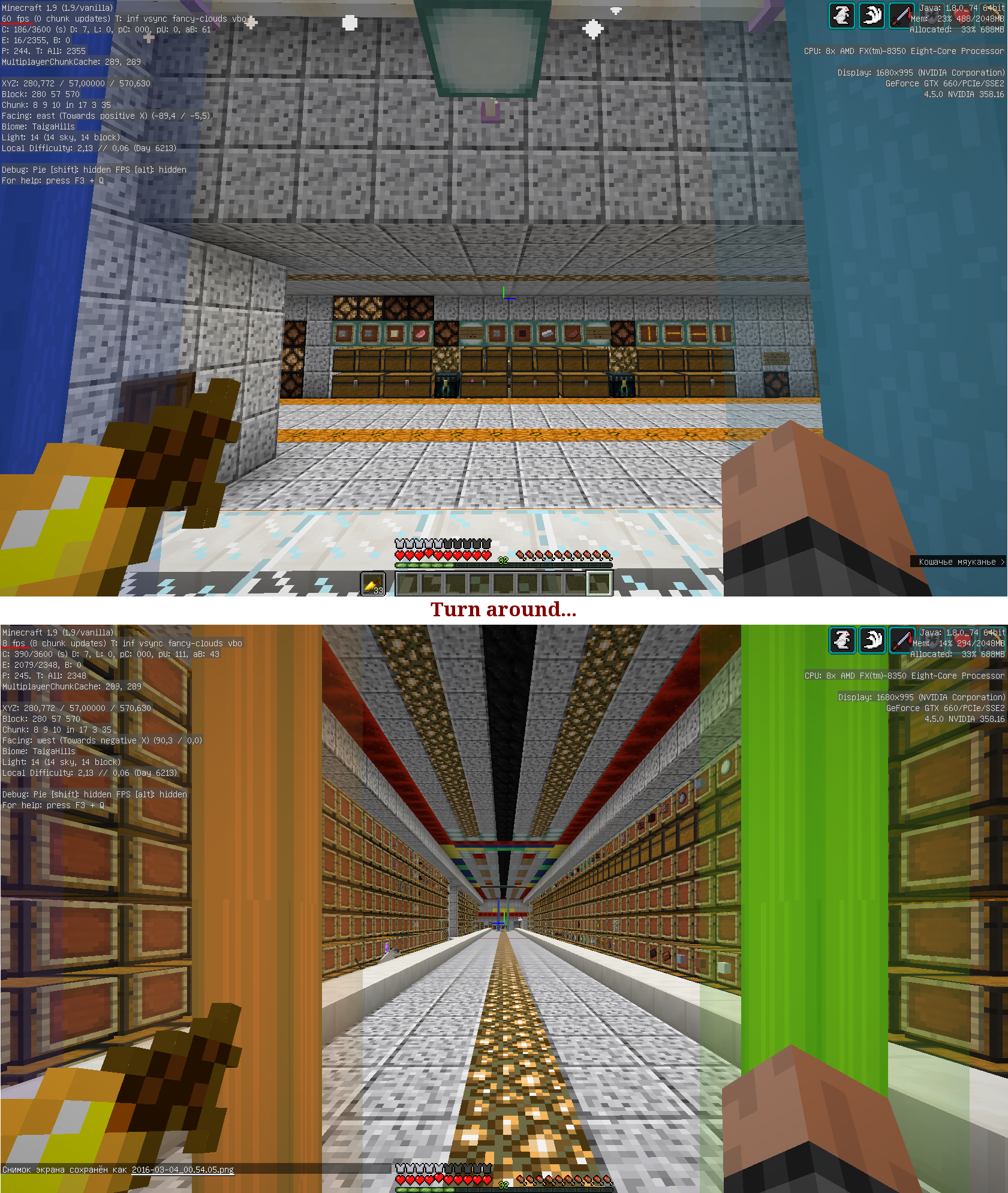
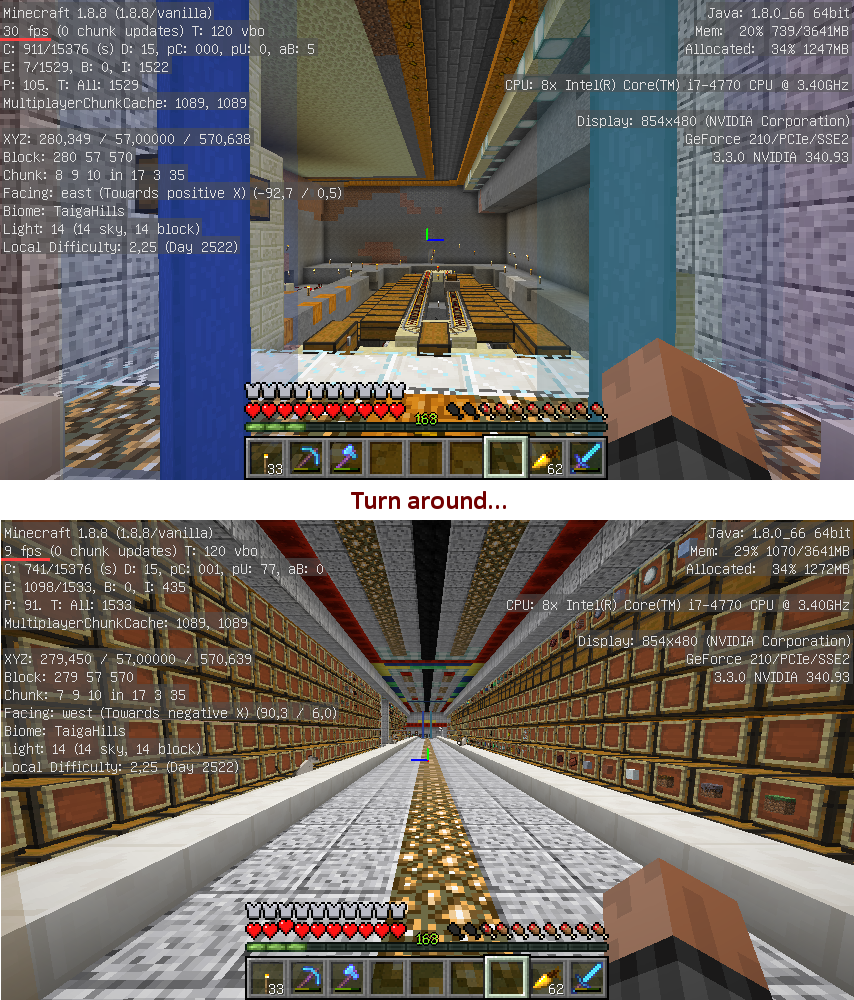
Screenshots: http://imgur.com/a/okeX8
Minecraft 1.9 confirmed
1.9.3 confirmed
This could be related to MC-5417 and MC-5169. But those are block object data and item frames are entities, so maybe it's not related.
1.10.2 confirmed too.
Also I held test. I created empty world and built two walls 10x16x2. One of them filled by item frames with blocks. After that I flew to the back of walls. And looked on the each wall separately. You can see difference between the FPS on screenshots (01.png, 02.png, 03.png). I don't know should item frame is rendered if player doesn't see it. But when I look to the direction where exists some buildings where placed item frames inside I get a FPS drop down.
Confirmed for 16w41a. Conducted a similar test as Maxim's above. Max framerate was 60 fps. With no item frames, frame rate dipped below 50 fps once. With item frames, frame rate was below 50 at least 50% of the time. Run with 1.6 GHz i5, 8GB RAM.
It's 2017 and seems like this issue will never go away. A select few including the devs likely have no problems with large amounts of entities due to their top shelf hardware. My Xeon W3520 4C/8T CPU even overclocked to 3.5Ghz tanks to 10fps in an area with just over 500 rendered item frame entities, changing any settings with or without optifine has next to no effect.
I'd like to request options for tweaking entity render distance and amount especially for item frames. I'm sure the vast majority of players would greatly benefit from this whether they themselves build large storage areas with many item frames or encounter similar set ups while visiting servers.
First: Please no complaining in big reports, please.
Second: You mentioned Optifine. If you want to help fixing this bug, contact Optifine, ask them to fix this bug in their mod and when they did and it works for you notify us in this report and if you can, point out the code changes they made to fix it.
First: If you'd try to actually help rather than writing me off as just a whiner then you'd notice the part "with OR WITHOUT optifine". I only mentioned it in case someone would suggest using that mod as a possible solution to this issue.
Or in other words. Clean Minecraft install with no mods has poor performance when rendering a large number of item frames. Changing settings has no noticeable effect. At present the only solution is not to use item frames defeating the purpose of this item existing in the game.
I noticed it. That's why I suggested you to ask them for a fix in one of their next versions. That way you can play with item frames as long as you have Optifine AND there's code available to fix it in Vanilla later.
Some issues might seem easy to fix, but they're not; this is not an item frame specific issue, but a issue in the entity rendering in general.
Place as many villagers with no ai in a room, and render them all, you'll see the same performance drop (maybe more, but you get the gist of it).
Does this also affect the server performance? Someone just told me that he had removed 30-50 item frames from spawn on a server that lagged extremely before and that the lag is now gone.
I don't play on a SMP currently, but logically, the more entities there are in the spawn chunks, the possibly worse/higher risk of lag.
I know that for certain regarding Villagers and Horses piled up at Spawn, and I know that (an albeit huge amount of) chests as well as item frames should preferrably be NOT at Spawn (a smaller amount is fine), as well as (usually unrelated, but still good to know) any redstone contraptions that could cause it neither.
I don't know how the SMP of the person you spoke with, [~FaRoGaming], is set up, Vanilla, plugins, situation at spawn with entities and redstone etc., but it could be a variety of "no-no's" that they do/did in their spawn chunks, and are they 100% sure it's server lag, not their own personal lag? and is it reproducable or a "temporary fluke" due to other things happening on the server?
Did that person express the "server lag" FPS- or TPS-wise? As in e.g. are redstone machines slowed down, mobs jitter, player don't seem to move, but next second they are in a completely different space already, or similar? Are there many chunks loaded at the same time/chunk updates? If incidentally other players caused anything at the very same time to trigger either the lag or the absence of it, this could falsify the results with the item frames.
It sounds like TPS, but it's always good to know the whole situation, to figure out if the "problem" is really on the server's side, or rather player-side/FPS due to one's own computer and settings, mods, resource packs, shaders etc. (and maybe even something like Latency/Ping).
You can experience a "lag hell" on a server, but the server itself could still run at 20 TPS.
[discussion moved to YouTube private messages]
TLDR: It would be great if someone here of the watchers with access to a server could verify this on a purely "Vanilla" server
Verify = reproducable as well, of course.
I completely understand from a developers viewpoint that entities are different and there's not necessarily a good fix, but why is the FPS drop still there even if you are looking at an opaque wall with entities behind it? You'd think it would be possible to to do a cull of the obscured entities so they don't impact performance unless you're in the room with them.
As it is right now even if you cover something entirely and look in its direction you are going to take a massive FPS hit, and then you turn your back on the wall (or whatever) and you instantly gain all your FPS again.
So the entity rendering is based on the view (ray casting?) but doesn't take into account opaque blocks from what I can tell...
@bnm12 @Benjamin Kristensen
I'm suspecting entity handling is distance based (and not culled), otherwise some other expected behavior would not work. For example if sheep were loaded only when you had a clear sight of them they would very rarely regrow wool, as no entity updates (movement, calculations, tracking, behavior) would happen while you're not looking at them.
Back until July 2014 there was an "Advanced OpenGL" option in the Vanilla client which got removed (see Searge's tweet here), which didn't work for everyone though and also could cause bugs like e.g. "black holes" in the world and whatnot, so while it was great for some, performance-wise, others also could experience performance-decrease and worse.
If I recall correctly, it made use of "occlusion culling", so basically the game didn't render anything that was not in the player's view.
It's now 3 years ago, I got no idea if still not all GPUs would support it and if still such bugs as they occured back then would appear again if they were to reimplement anything like that, but just wanted to mention it anyways.
You can see FPS decrease due to rendering of "invisible things" also with animated block textures, e.g. if you use hidden lighting where you can't see the light-emitting block and you have to chose between glowstone and sealantern, definitely take the glowstone, as, although the sealantern can't really be "seen" with the player's eyes, it still is more "expensive" on the player's performance than glowstone.
Back in ~1.7'ish, when you set ArmorStand's Marker-tag to true, it would not only render them invisible, but it also removed them from the overall entity count which increased your performance sometimes dramatically! Now, any ArmorStand within a range of 64 blocks (if they didn't change that number) will be rendered, no matter if you can see it or not, and no matter whether or not your Marker-tag is true or false; same goes also for AEC, and that at the very least doesn't seem to be intended, from how I conclude what I read from a MC Developer a while back.
I'm pretty sure that that's not true. This is based off of my understanding so it may be wrong, especially since I'm only backing up the existence of systems based off of where those systems are broken. 1.8 introduced builtin chunk culling which replaced the graphics card version (and you can see this breaking in
MC-63020andMC-63070). And entities are culled too (which you can see breaking byMC-1058- which is, in fact, about item frames being culled too aggressively).Glowstone and sea lanterns shouldn't behave differently. Animated textures are based off of a bound texture, and the texture itself is, based off of my understanding from some super horrible graphical glitches, constantly updated regardless as to whether one of those blocks is on screen. The game doesn't calculate what frame the animation is on each time it starts drawing one - it's already chosen the frame of the texture for all blocks, and uses that to render.
EDIT: Oh, I think I understand better what you're talking about. Entities are culled when they're off camera, but I don't think they're culled when they're behind walls/in chunks that don't need to render (but the rendering code is not my area of expertise, so this may be completely wrong)
Yes that last edit hits the nail on the head, they are culled correctly as soon as you look away, but placing a solid wall between you and the entity does nothing, FPS stays the exact same.
I haven't experienced any particular issues with animated textures, and those blocks seems to be culled normally as they are "blocks"
Edit: As far as I can tell there's no distance based culling, it seems to be purely based on render distance
There is some distance based culling (two types, actually - one where the server untracks the entity from the client, and one where the client just stops rendering it), but both are very generous - IIRC 64 blocks for most entities, and even more for some.
My issue isn't even related to mobs, I don't know if they need special handling to function (Though from a code point of view they should be able to function just fine without getting actually rendered.
My problem is a lot simpler: I just have a few chunks covered with a layer of minecart tracks (and fence gates though I'm unsure about the impact of those) underground and anyone getting near is lagging like crazy, even though there's no reason for the game to even render them. for all intents and purposes they are static unless manipulated.
If you want to test out culling of blocks, an almost-accurate way of doing so is to use the 2016 april fools build 1.RV-Pre1, which has the "reality vision" item which actually accurately displays culling. Add the version JSON to your launcher's versions folder (look at others for examples), create a new profile in the launcher (make sure to set a different game directory), and try your tests there.
IIRC block culling happens on a chunk section basis, not a per-block basis, so keep that in mind.
I don't know if fence gates got the same issues like fences, but there's an also old lag issue with them, see MC-7895, but it doesn't mention whether this also occurs if the fences cannot be seen.
I'll see sometime if I can reproduce the texture animation FPS issues I had a while back, doesn't matter for here anyway though
Still in 1.12.2
I encountered this bug bigtime when I started setting up my storage system in a multifloor building. Basically, I have a building with a 7 floor deep bunker all the way down to bedrock underground. The three bottom floors are all storage, with the top two being for bulk storage (414 chests each floor in a 6 tall by 69 wide U shape) and the bottom being an individual chest sorted storage system (allowing multiple items per chest; total of 324 chests in a 6 high u-shape arrangement). All floors are seperated by a glass floor with lighting in it for a depth effect. Visually and practically speaking, Item frames with item visuals in them are the prettiest and most practical labeling system. After putting item frames on just one bulk level though (69 frames), I was finding that the frames w/ contents were dropping my FPS massively (from about 150 to 40), even from ground level outside the building. I've thought about switching to signs only on it, but it gets pretty ugly when trying to label the bottom individual chest sorter system, and it takes a lot longer in the bulk storage system to find what I'm looking for.
Item Frames are quite a unique item in terms of what they do and how they display. I just wish there was a way to make them less laggy. They're a great asset, but the amount of lag they produce makes them impractical to actually use in situations like this where they would be excellent to use otherwise. There's got to be some way to lower their lag. I'd give up Item Rotation, for example, if it meant they lagged out less.
I get frame rate drops in my testing world, I have a wall for testing textures with 100s of items in item frames.
If you look the opposite direction I get over 100fps but looking in the direction of the item frames drops the frame rate to 20fps or less.
Even if the item frames are in a direction where you cannot see them (like a cave) the frame rate still drops, I'm guessing the item frames are still rendered even though you cannot see them.
This also effects the 1.13 pre-releases.
Can a mod please update the affected version to 1.13.2? Thank you!
I have the same problem. I have a wall with a big map on it and whenever I even look in that direction, wether I can see the map or not, the lag is horrendous
Well, the Bug still exists 7 YEARS LATER in 1.14.4!
I tried to build a large cinema screen with custom maps but it was unplayable with this amount of lag!
I did some experiments in 1.15 and 20w07a and I cannot experience significantly worse framerate looking at item frames.
All measurements in ms per frame while looking downwards:
At a flat ground: 11mspf
At 300 item frames filled with items: 19mspf
At 200 pigs with no ai: 24mspf
At 200 armor stands: 23mspf
At a forest: 20mspf
So it is true that item frames cause some FPS drop, it is not different than looking at any complex part of the world. The results above show that item frames are not significantly worse than other entities. In fact, they are better than most other entities. I think what gave the impression of item frames being so bad is that they are often used in huge amounts.
So I believe this bug can be closed.
I'm using Mac OS and I've been doing some testing with maps and here are my results:
Default FPS: ~110-120 512
Item Frames: ~100-110 512
Maps (Max Scaling): ~4-5 FPS
Item frames don't show any amount of considerable lag despite the large amount of them however with fully scaled out maps, the game slows to a halt.
Jake Gearhart, seeing as there is a clear distinction between the item frames themselves, and maps inside them, can you create a new separate report for the maps specifically? I know that this has been done in the past, but now that 1.15 has addressed various performance issues, the developers have requested that such reports address specific problems.
New report for maps inside item frames is MC-195832.
This is still a problem in 1.18.1. Having many item frames in view causes serious framerate drop.
There is a limit to how many frames you can have before the game glitches (see MCPE-152734). If the lag doesn't crash the game, the max amount of frames will glitch it.