 Helen Zbihlyj
- HelenAngel
- helenangel
- America/Los_Angeles
- Yes
- No
 MCPE-20644
 MC-127330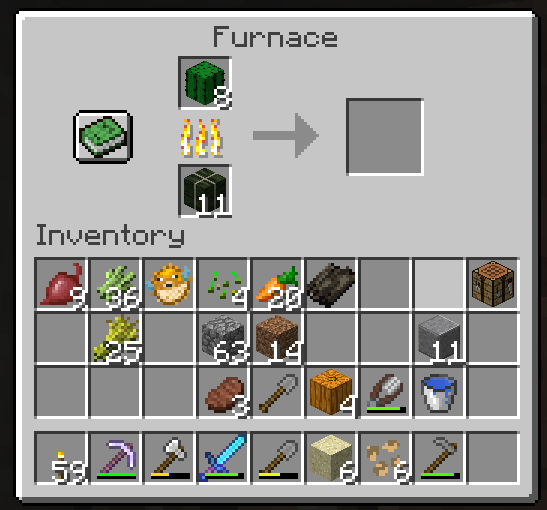
Kelp blocks & coal cannot smelt cacti into green dye
Summary: When a kelp block or coal is placed in a furnace, even if it is activated as a fuel with another item that it will smelt, it will not smelt cacti into green dye
Actual Behavior: Kelp blocks and coal will not smelt cacti into green dye.
Expected Behavior: Kelp blocks and coal are a fuel sources and thus should be able to smelt cacti into green dye.
Notes: This is a regression as coal could previously smelt cacti into green dye.
Update on this issue:Update 16th Apr 2018:
The 1.2.15 update for iOS was put in place to fix the underlying issue with purchases going missing, but there is ongoing work to restore everyone's accounts to where they should be.
Please refer to the comment by Helen Zbihlyj:
We
are trying to get a hotfix out for this ASAP. I am also getting a list together of folks on here that have run into this issueso we can make sure you haven't lost anything after the hotfix. This is a top priority for us to get fixed.
Hi,
my son is using minecraft PE for an iPad with IOS.
With the PE update from today, 4th April 2018, (delivered by Apple App Store) we encountered a critical problem:
1. My sons minecraft coins purchased in-app and via AppStore are set to 0 with the new Version 1.2.13. Before there where 80 coins in.
2. All his bought world template, textures etc., purchased by his minecraft coins, are locked. The worlds he created by the bought templates are locked and cannot opened. A dialog appears and says he has to pay ...
Using the "Wiederherstellen" button in the in-app-store of Minecraft does not help. Shortly after pushing the button, a dialog appears and gives the friendly message, that the done purchases will be recreated - but nothing happenend.
My son (10 y) spend a lot of money and feels a great loss ...
Our Android driven Nexus7 has no problems after the update - bought stuff can be used.
A tip: searching in the web for a solution shows me, there are some another users with the same problem.
I.E. https://www.product-reviews.net/down/minecraft-pe-app-problems/ (look the Comments)Thanks for your help!
Greetings,
MartinUpdate on this issue:Update 16th Apr 2018:
The 1.2.15 update for iOS was put in place to fix the underlying issue with purchases going missing, but there is ongoing work to restore everyone's accounts to where they should be.
Please refer to the comment by Helen Zbihlyj:
We now have a hotfix in place and going forward this should not be an issue. We are continuing to run scripts on the backend to resolve this. If you would like to be expedited, please feel free to email directly at helenzy @ microsoft . com and I will personally ensure that we make things right for you. Once again, we apologize for this error and have put additional safeguards in place to ensure this doesn't happen again.
Hi,
my son is using minecraft PE for an iPad with IOS.
With the PE update from today, 4th April 2018, (delivered by Apple App Store) we encountered a critical problem:
1. My sons minecraft coins purchased in-app and via AppStore are set to 0 with the new Version 1.2.13. Before there where 80 coins in.
2. All his bought world template, textures etc., purchased by his minecraft coins, are locked. The worlds he created by the bought templates are locked and cannot opened. A dialog appears and says he has to pay ...
Using the "Wiederherstellen" button in the in-app-store of Minecraft does not help. Shortly after pushing the button, a dialog appears and gives the friendly message, that the done purchases will be recreated - but nothing happenend.
My son (10 y) spend a lot of money and feels a great loss ...
Our Android driven Nexus7 has no problems after the update - bought stuff can be used.
A tip: searching in the web for a solution shows me, there are some another users with the same problem.
I.E. https://www.product-reviews.net/down/minecraft-pe-app-problems/ (look the Comments)Thanks for your help!
Greetings,
Martin
Update on this issue:Update 16th Apr 2018:
The 1.2.15 update for iOS was put in place to fix the underlying issue with purchases going missing, but there is ongoing work to restore everyone's accounts to where they should be.
Please refer to the
commentbyHelen Zbihlyj:We now have a hotfix in place and going forward this should not be an issue. We are continuing to run scripts on the backend to resolve
this. If you would like to be expedited, please feel free to email directly at helenzy @ microsoft . com and I will personally ensure that we make things right for you. Once again, we apologize for this error and have put additional safeguards in place to ensure this doesn't happen again.
Hi,
my son is using minecraft PE for an iPad with IOS.
With the PE update from today, 4th April 2018, (delivered by Apple App Store) we encountered a critical problem:
1. My sons minecraft coins purchased in-app and via AppStore are set to 0 with the new Version 1.2.13. Before there where 80 coins in.
2. All his bought world template, textures etc., purchased by his minecraft coins, are locked. The worlds he created by the bought templates are locked and cannot opened. A dialog appears and says he has to pay ...
Using the "Wiederherstellen" button in the in-app-store of Minecraft does not help. Shortly after pushing the button, a dialog appears and gives the friendly message, that the done purchases will be recreated - but nothing happenend.
My son (10 y) spend a lot of money and feels a great loss ...
Our Android driven Nexus7 has no problems after the update - bought stuff can be used.
A tip: searching in the web for a solution shows me, there are some another users with the same problem.
I.E. https://www.product-reviews.net/down/minecraft-pe-app-problems/ (look the Comments)Thanks for your help!
Greetings,
MartinUpdate on this issue:Update 16th Apr 2018:
The 1.2.15 update for iOS was put in place to fix the underlying issue with purchases going missing, but there is ongoing work to restore everyone's accounts to where they should be.
Please refer to the comment by Helen Zbihlyj:
We now have a hotfix in place and going forward this should hopefully not be an issue for new purchases. We are continuing to run scripts on the backend to resolve people already affected. If you would like to be expedited, please feel free to email me directly at helenzy @ microsoft . com and I will personally ensure that we make things right for you. Once again, we apologize for this error and have put additional safeguards in place to ensure this doesn't happen again.
Hi,
my son is using minecraft PE for an iPad with IOS.
With the PE update from today, 4th April 2018, (delivered by Apple App Store) we encountered a critical problem:
1. My sons minecraft coins purchased in-app and via AppStore are set to 0 with the new Version 1.2.13. Before there where 80 coins in.
2. All his bought world template, textures etc., purchased by his minecraft coins, are locked. The worlds he created by the bought templates are locked and cannot opened. A dialog appears and says he has to pay ...
Using the "Wiederherstellen" button in the in-app-store of Minecraft does not help. Shortly after pushing the button, a dialog appears and gives the friendly message, that the done purchases will be recreated - but nothing happenend.
My son (10 y) spend a lot of money and feels a great loss ...
Our Android driven Nexus7 has no problems after the update - bought stuff can be used.
A tip: searching in the web for a solution shows me, there are some another users with the same problem.
I.E. https://www.product-reviews.net/down/minecraft-pe-app-problems/ (look the Comments)Thanks for your help!
Greetings,
Martin
It should be fixed in the latest beta. Had a Turkish player confirm.
![[Mojang] Mega_Spud (Jay Wells)](../../../data/avatars/users/92696.png)
@Helen Zbihlyj:
I've updated the ticket description which should hopefully make it easier to reproduce the issue, and I've emphasised the blocks that break parity with the Java version.
Also, please find attached a copy of the test world which should help to see the problem in a working situation.

Update 16th Apr 2018:
The 1.2.15 update for iOS was put in place to fix the underlying issue with purchases going missing, but there is ongoing work to restore everyone's accounts to where they should be.
Please refer to the comment by Helen Zbihlyj:
We now have a hotfix in place and going forward this should hopefully not be an issue for new purchases. We are continuing to run scripts on the backend to resolve people already affected. If you would like to be expedited, please feel free to email me directly at helenzy @ microsoft . com and I will personally ensure that we make things right for you. Once again, we apologize for this error and have put additional safeguards in place to ensure this doesn't happen again.
Hi,
my son is using minecraft PE for an iPad with IOS.
With the PE update from today, 4th April 2018, (delivered by Apple App Store) we encountered a critical problem:
1. My sons minecraft coins purchased in-app and via AppStore are set to 0 with the new Version 1.2.13. Before there where 80 coins in.
2. All his bought world template, textures etc., purchased by his minecraft coins, are locked. The worlds he created by the bought templates are locked and cannot opened. A dialog appears and says he has to pay ...
Using the "Wiederherstellen" button in the in-app-store of Minecraft does not help. Shortly after pushing the button, a dialog appears and gives the friendly message, that the done purchases will be recreated - but nothing happenend.
My son (10 y) spend a lot of money and feels a great loss ...
Our Android driven Nexus7 has no problems after the update - bought stuff can be used.
A tip: searching in the web for a solution shows me, there are some another users with the same problem.
I.E. https://www.product-reviews.net/down/minecraft-pe-app-problems/ (look the Comments)
Thanks for your help!
Greetings,
Martin
Information about joining or leaving the beta can be found here (the article includes some troubleshooting tips also):
How to Join (and leave) the Minecraft Beta.
Some people have had success with the procedure described in this comment, contributed by Community Manager Helen Zbihlyj.
Please bear in mind that when trying to opt out of the beta on Windows 10, all users will need to opt out of the beta in order for the correct version to be downloaded from the store.
Issues related to the Xbox Insider Hub need to be taken up with Xbox directly.
For help or support please get in touch with the following:
Original Description:
I can't leave the update program,
I tried all solution on internet, sign out and unenroll hub xbox insider, restart my computer etc, uninstall minecraft but every time I try to re install it it automaticly install it in 1.5.1 and I don't want this version anymore, I want to play in the vanilla Minecraft which is not full bugged !
Pls dev help me fix this problem, I try to leave the beta for more than 2h with still same issue
Thanks
![[Mod] violine1101](../../../data/avatars/users/92858.png)
@N F: We (mods and helpers) can't give any progress reports, as we aren't Mojang employees, but rather normal Minecraft players who volunteer to help managing this bug tracker. However, I can quote this tweet by Helen Zbihlyj:
Hopefully we’ll have a hotfix out for you soon! 👍

Well that was a pointless exercise. Here's what I got when I attempted to get a refund through the link Helen Zbihlyj posted:
"Hello Brian,
I'm sorry to hear that you're having problems with your purchase.
Please note that Mojang support can't make refunds for purchases made from Amazon. If you need help with a refund for this type of purchase you can contact your app store:
Amazon: https://www.amazon.com/gp/help/customer
Best regards,
Jake"
I've been trying repeatedly for months to get shot of the Beta version. I've gone through the "Solution A B and C" about a dozen times, done reinstalls about 40 times now. Tried the "Helen Zbihlyj" fix (which is just Solution C anyway). Tried completely shutting down and recreating my Insider account. I've only got one user account. I am so fed up with this. I'm a software developer for 20 years now and NEVER have I seen such a shambles as not being able to play the commercial product because a BETA keeps getting reinstalled instead of the normal game. Come on - why can I not at least select which version I want to install - or at least have BETA and PRODUCTION installed side-by-side like any other software would allow. Can't get any direct call support either which just rubs salt into the wombs. Bring back traditional installs (appwiz.cpl) for Windows 10 - this xbox stuff is such a step backwards.
So this has happened on your Realm? Has it happened since the 1.0 launch?
Hi! Can you please upload one of your worlds with the texture pack so our testers can take a look? Thanks!
This was fixed and then reverted because fixing this breaks parity with Java. We are sending this back to the design team so they can tell us if this is actually a bug or by design.
This is fixed in 1.1 beta build 3.
Fixed! One of the bugs that was resolved with the overall mobs despawning bug.
But it doesn't matter if it's water or lava- lava will suffocate you just like water will. There's no air in lava.
Hi! Have you tried going to the store, scrolling down to the bottom & pressing the Restore Purchases button?
This bug is a little too vague so it's making it hard for our teams to repro and fix. Can you please explain more about which hitboxes are too large & how it affects the game? Some of these may be by design so as much detail you can give, the better. Thanks so much!
Hi! Just letting you know that we're taking a look at this. Thanks for reporting it!
Workaround until we get this bug fixed: if you place the door first, then place the redstone block, it will work. It just doesn't work the other way for some reason.
This should be fixed in 1.1
Confirmed by Minecraft test team.
Hi folks! The devs would like some feedback on how the community would like to see this work going forward in the future. Can someone please comment with some specific ways here? Thanks so much!
Hi! If anyone could help us get more information about this bug, specifically getting their worlds to us, that would be wonderful. You would need to have access to a Mac of some sort (in addition to the Apple TV) and installing a 3rd party file browser on the Mac to access the world file. Then just link us to where you've uploaded it (OneDrive, iCloud, Dropbox, etc.) so we can take a look. Thanks so much for any help you can provide!
This was closed by the design team as works as intended.
Explanation below:
"It takes exactly 2 rTicks to retract, but because the pulling piston starts retracting (toggleMechanismTiming example) at that same tick, the ticking order is scrambled (as designed) therefore the result is undefined."
Devs reported back that this works as intended.
Explanation:
1 tick for updating the torch.
1 tick for updating the hoppers. (arguably this could take a tick longer)
1 tick for updating the comparator.
Reported by original poster that issue is now resolved.
Original poster reported issue as resolved.
Original poster reported issue as resolved.
Original poster reported issue as resolved.
We have reported this to the dev teams and will be investigating this issue.
Fixed in beta build 5
Reporter says this is fixed on 1.2.0.15 (or 1.2 beta build 5)
Poster confirmed it is fixed in 1.2.0.15
It is Works As Intended for now. Given the amount of leaves produced in a jungle and how transparency performs (or rather, doesn't perform) on older devices, jungle leaves do not have transparency.
Hello! Can you please let us know if this is just recent on this latest build? Also, does it happen every time? What message do you receive instead? Any screenshots you could get would also help us. Thanks!
We are looking into this. Thanks!
We are investigating this. Thanks!
We are investigating this issue but so far have not had any luck reproducing this issue.
Hi! I just wanted to update to let you know that we're working on fixes to this. Some of the fixes are already in affect so you should see an improvement already.
Hi! I agree- this needs to be fixed. Just letting you know I'm working on it.
Did you notice this happened when you entered a game after having just played on a server? If you restarted the game, did you get the ability to craft maps back?
We are working on fixing the mob spawners next- just didn't quite make it in for 1.2.1 but it's coming!
Please provide your gamertag so I can fix this- thanks!
This should now be fixed. If you are still affected, please open a bug with your gamertag so I can look into it. Thanks!
You and the other folks shown in the screenshot should be fixed now. We are working on a slider that will let you decide if you want filtering on your Realm or not.
Can you please tell us a little bit more about this bug? What texture packs/resource packs are you using on the Realm? Did you receive any sort of message other than being disconnected? Are you on wifi or ethernet? If you're on wifi, could you please run a speed test for us and provide us with the results? (download speed, upload speed)
This is part of the hard-coded chat filter and will be removed in a future release.
Can you please provide me the gamertags of all folks affected? And yes, in the future we will have an option where you can turn filtering on and off on Realms.
All fixed!
Hello! I just wanted to give you an update that I'm still working on this- it's been a bit more tricky than most but I'm determined to get this resolved for you. Just wanted to let you know it's still one of my priorities. Thanks!
All fixed!
Hi! I've fixed the gamertag in the ticket above. I would mark it as resolved but I can't. The way you get this bug resolved is to file a bug with your gamertag & put the chat-filter label on it & I fix it!
¡está arreglado!
All fixed!
Hello! I'm so sorry I didn't see this before- I wasn't looking in the Realms project. You are both fixed now and hopefully shouldn't have any further issues.
Fixed!
All fixed! Everyone should be typing normally now.
@cbether - Please make a new ticket with your gamertag so we can get it fixed for you.
@andre dascalu - Is this fixed now? Please let us know! If you type the word just by itself with no context it will filter it out but when put with other words in Romanian in context it should be fine. Let me know if you see a context instance where it isn't good.
This bug should be completely fixed in 1.2
Hi folks! Unfortunately we have been told that this is not actually a bug with our game but it is a bug on the Xbox platform team. We aren't able to fix it if it's not actually something in Minecraft.
Fixed! Yes, the long-term plan is to make a toggle. In the meantime, I can fix you manually. Feel free to reopen if this happens to you again.
We are working on a toggle for the chat filter. In the meantime, if it is filtering out a Czec word incorrectly, PLEASE let us know so we can fix it. And the gamertag mentioned is fixed.
All fixed!
This is by design. You have your Xbox Live settings set where you can only see messages from friends. You will need to go into your Xbox Live settings and change this. If you have a child account, your parent will need to enable messages from non-friends.
All fixed!
Fixed!
All fixed!
All gamertags fixed! And yes, the toggle for the filter should be in a future release... hopefully sooner rather than later... or I will be sad.
Fixed!
You simply ran out of f#### to give. Fixed.
I don't know what your gamertag is which is why I had to ask. All fixed!
Can you give me an example of how it is censored? Is it censored with *** or with ###? If it's ***, sadly, that is the hard-coded filter and there is nothing I can do about that.
Alex & Misda ji - The gamertags you provided are all fixed!
We are looking into this.
All fixed!
Fixed!
Everyone all fixed!
All fixed!
Everyone on this thread is fixed! Also, it's not blocking stuff at random. On Realms, you only have so many f****s to give before you run out. So maybe try reducing the number of f-bombs you drop into chat.
Issue resolved!
Please provide the affected gamertag(s) so we can resolve this. Thanks!
FIxed!
All fixed!
Fixed!
Fixed!
Fixed!
Fixed!
Fixed!
Fixed!
Fixed!
Everyone is all fixed!
Please provide the gamertag so we can resolve this issue. Thanks!
Fixed!
Fixed!
Fixed!
All fixed!
FIxed!
Just letting you know that we're looking into this.
We are looking into this!
We are looking into this!
Fixed!
Fixed!
Fixed!
Fixed!
Fixed!
Fixed!
Fixed!
Fixed!
All fixed!
Hey, can you please check your gamertag for me? That's coming up as an invalid gamertag. Thanks!
Fixed!
Fixed!
Fixed!
Fixed!
Already fixed!
Question- are any of you playing with child accounts or XBL accounts with restricted settings?
Fixed!
Fixed!
We are looking into this- thanks!
Fixed!
Fixed them all! So sorry for the wait- I actually don't know what gamertags are affected until they get reported to me. I did notice one word was filtered that shouldn't have been so I've fixed it so hopefully this won't be an issue again. Also hopefully we'll get an option soon to turn this off and on in Realms.
All fixed! So sorry about that! It turns out that what flagged you was something that the tool took out-of-context so I fixed it so that won't happen again.
Fixed!
Everyone in the comments too- all fixed! We are working on a way for Realms owners to be able to toggle it off and on so that you don't have to have it enabled if you don't want it enabled. It just takes time to get these things implemented.
Fixed! We are working on a toggle so that Realms owners will be able to turn it off and on.
Fixed!
No, this was a glitch on our part. Everyone has now been fixed. Sorry about that!
Fixed!
All fixed!
Ah! So I see. Well hopefully someone will merge this into the main one. My apologies to the wonderful Mojira moderators/admins.
Hi! I just wanted to let you know that we are looking into this right now. I'll update this ticket again when I know more. Thank you so much for bringing this to our attention!
Hi folks!
I just wanted to let you all know that I've escalated this issue to our store team. By any chance were any of them logged into Microsoft accounts or just Apple accounts? Any further information you can give would be great as we try to get your stuff restored. Thanks so much!
Also, regarding the outdated world, that actually should be correct as you need both games to be on the same version. If another game is on a previous version of the game it won't be able to connect because the new version has new content.
We are trying to get a hotfix out for this ASAP. I am also getting a list together of folks on here that have run into this issue so we can make sure you haven't lost anything after the hotfix. This is a top priority for us to get fixed.
Hello! We are working on getting a fix out for this ASAP. Thank you for your patience!
Thanks so much for the update. We are working to get this resolved ASAP. This is a top priority for us.
Hi folks! We are hoping to get out another update in the next day or so. Thank you so much for your patience and we are working hard to get everyone's accounts fixed on the backend. We are also putting steps in place to ensure that this never happens again. After the next update, if you are still not credited, go ahead and just email me directly at helenzy @ microsoft.com and I will see what I can do personally to assist you. Once again, our sincerest apologies.
Also - Darren Cambridge - I have internally emailed the head of Xbox Live Support to tell him about what happened to you so the person who told you this can be given the proper information & all support agents can be reminded of how to handle iOS.
Hello! I do not want any of you to go away- in fact, we absolutely need to know if this issue isn't resolved for you so we can make it right. Please feel free to email me directly at helenzy @ microsoft.com and I will ask you for some information so we can get this resolved for you ASAP. I had some issues with some emails being sent to spam but I am now checking my spam folder every day and I check my email multiple times per day. Please let us help you resolve this. Due to security reasons, I can't have you post the information I need here and your safety & security is of the utmost importance to us.
Hi Misty! You emailed me on Friday afternoon. I had a sick child and was out-of-the-office and this weekend I was volunteering for a charity event which is why I did not respond sooner. My apologies for not getting back to you until today. Silvja- I responded to you today and will continue to do so. You are of course welcome to try to resolve this with Apple but in the meantime we will continue to work on your accounts.
I am doing my best to respond to everyone in a timely manner. Please remember that I am just one person and I am offering for folks to contact me directly because I genuinely care about the Minecraft community. I still have to do my regular daily work for my job even though I am making this my top priority. Thank you all so much for your patience and understanding.
Hi Starr!
Thanks so much for your feedback. I can reassure you that we are reading this and also passing along the feedback to the rest of the studio. Mob spawning on Bedrock has been tweaked multiple times and we are in the process of rewriting all the code. It is difficult to find a "sweet spot" where PC players think there's enough spawning without mobile players saying there is too much spawning. With the Update Aquatic, we are already getting complaints from multiple mobile players that the spawn rate for aquatic creatures is way too high and introduces lag. On the flipside, we are getting complaints from PC players that the spawn rates aren't high enough. One of the solutions we are considering is a slider so individual players can control mob spawning rates but this is something we would have to write entirely from scratch. Hopefully you can understand that this is a nuanced bug without an easy fix and one we are continuing to work on with every release.
Thanks!
Are you able to log in to the Xbox app on your phone?
Marcus - so you don't have that world at all, not the copy or the original?
Endermen by design will teleport away before the potion hits them.
Bug closed as won't fix.
Hi! I just wanted to comment that we have marked this bug as a higher priority due to community feedback and what we thought fixed this issue did not actually fix the issue. We will update you when we have more news. Thank you!
Hey folks!
You’re always welcome to contact Jay & myself on here. We’re also both very active on Twitter.
We have been working on fixing iOS crashes for a while & continue to do so. We have engineers who are working hard to get fixes out & to you as soon as we’re able (as we have to go through certification & such). Thanks so much for the extra information some of you have provided as well - it’s sometimes difficult for us to determine where the crashes are coming from or why they’re happening. We really appreciate it & we’ll keep watching this thread. (I can’t personally fix it because I am not a software developer.)
No need to uninstall the game, in fact we do not recommend uninstalling the game if you are on Win 10, Android, iOS- we are fixing this on the backend. If you are still seeing this, please contact our support team at http://help.minecraft.net
You can also try this. This was passed along to us:
I’m trying to leave the beta on my Windows 10 PC, but the beta still installs even after following the steps to leave?
Very rarely this can occur on Windows 10 PCs when multiple accounts have signed in and played the game. In these circumstances, try the following steps:
From the Search bar on your Windows 10 PC, type “Command Prompt“
From the search results, right click on “Command Prompt (Desktop app)“
From the context menu, select Run as Administrator.
Select “Yes” if you are prompted with “Do you want to allow this app to make changes to your device?”
In the Administrator: Command Prompt window, type powershell and press Enter.
In the Administrator: Command Prompt window, type
and press Enter
Hi folks! I sincerely apologize for not reaching out sooner as I wasn't aware people were running into this issue. Please be aware that our studio was off for the Memorial Day weekend. We are currently investigating why this is happening. We have test teams who go through content before it's launched on the Marketplace- sometimes because we have so many platforms there are issues that don't come to light until it's out in production. If you would like a refund, which we are happy to provide, please fill out the form here: https://help.minecraft.net/hc/en-us/requests/new
Your concern is of the utmost important to us. Please don't hesitate to reach out to me directly as I'm happy to help as much as I can.
Hi folks! Wanted to let you all know that we are actively working on a fix for this issue.