Certain blocks have incorrectly aligned textures and warp strangely depending on angle viewed
There exist a select few blocks whose textures are incorrectly aligned on the block, which can manifest itself as a row of pixels that are half as thick as the other rows, and weird curvature of the texture. With a few of these blocks, it is also possible to make the alignment of the texture on the block change simply by observing it from a different angle.
List of blocks which appear to be affected by this:
- Top half of all doors*
Oak trapdoor* (not iron)1.5 fixedAll stained glass panes (non-stained unaffected, though)1.5 fixedIron bars*1.5 fixedMonster spawner*1.4.3 fixedStone brick stairs* (all other stairs unaffected, oddly enough)1.2.13 fixed
A * indicates that I was able to get the texture to warp itself by viewing it differently.
Linked Issues
is duplicated by10
 MCPE-31021Texture on Stone Brick Stairs misaligned by half a pixelDuplicateMCPE-31024The texture on the top of iron bars is slightly offsetDuplicateMCPE-31109Model of Stone Brick Stairs slightly changes depending on viewDuplicateMCPE-31508Top texture of stained glass panes does not line up correctlyDuplicateMCPE-50273Strange texture stretching bug with the doors in mcpeDuplicateMCPE-133003Opened doors have incorrect texture, when you look at themDuplicateMCPE-133490When up against door, side texture weirdly bendsDuplicateMCPE-135722Door Visual BugDuplicateMCPE-136436The door texture is broken if I look up or downDuplicateMCPE-136933new theme with doorsDuplicate
Attachments11




Created Issue:
Certain blocks have incorrectly aligned textures and warp strangely depending on angle viewed
There exist a select few blocks whose textures are incorrectly aligned on the block, which can manifest itself as a row of pixels that are half as thick as the other rows, and weird curvature of the texture. With a few of these blocks, it is also possible to make the alignment of the texture on the block change simply by observing it from a different angle.
List of blocks which appear to be affected by this:
- Top half of all doors*
- Oak trapdoor* (not iron)
- All stained glass panes (non-stained unaffected, though)
- Iron bars*
- Monster spawner*
- Stone brick stairs* (all other stairs unaffected, oddly enough)
A * indicates that I was able to get the texture to warp itself by viewing it differently.
Attachments7
![[Mojang] Mega_Spud (Jay Wells)](../../../data/avatars/users/92696.png)
is duplicated by
There exist a select few blocks whose textures are incorrectly aligned on the block, which can manifest itself as a row of pixels that are half as thick as the other rows, and weird curvature of the texture. With a few of these blocks, it is also possible to make the alignment of the texture on the block change simply by observing it from a different angle.
List of blocks which appear to be affected by this:
- Top half of all doors*
- Oak trapdoor* (not iron)
- All stained glass panes (non-stained unaffected, though)
- Iron bars*
- Monster spawner*
- Stone brick stairs* (all other stairs unaffected, oddly enough)
A * indicates that I was able to get the texture to warp itself by viewing it differently.
There exist a select few blocks whose textures are incorrectly aligned on the block, which can manifest itself as a row of pixels that are half as thick as the other rows, and weird curvature of the texture. With a few of these blocks, it is also possible to make the alignment of the texture on the block change simply by observing it from a different angle.
List of blocks which appear to be affected by this:
- Top half of all doors*
- Oak trapdoor* (not iron)
- All stained glass panes (non-stained unaffected, though)
- Iron bars*
- Monster spawner*
Stone brick stairs* (all other stairs unaffected, oddly enough)1.2.13 fixedA * indicates that I was able to get the texture to warp itself by viewing it differently.
relates to
There exist a select few blocks whose textures are incorrectly aligned on the block, which can manifest itself as a row of pixels that are half as thick as the other rows, and weird curvature of the texture. With a few of these blocks, it is also possible to make the alignment of the texture on the block change simply by observing it from a different angle.
List of blocks which appear to be affected by this:
- Top half of all doors*
- Oak trapdoor* (not iron)
- All stained glass panes (non-stained unaffected, though)
- Iron bars*
- Monster spawner*
Stone brick stairs* (all other stairs unaffected, oddly enough)1.2.13 fixedA * indicates that I was able to get the texture to warp itself by viewing it differently.
There exist a select few blocks whose textures are incorrectly aligned on the block, which can manifest itself as a row of pixels that are half as thick as the other rows, and weird curvature of the texture. With a few of these blocks, it is also possible to make the alignment of the texture on the block change simply by observing it from a different angle.
List of blocks which appear to be affected by this:
- Top half of all doors*
- Oak trapdoor* (not iron)
- All stained glass panes (non-stained unaffected, though)
- Iron bars*
Monster spawner*1.4.3 fixedStone brick stairs* (all other stairs unaffected, oddly enough)1.2.13 fixedA * indicates that I was able to get the texture to warp itself by viewing it differently.
There exist a select few blocks whose textures are incorrectly aligned on the block, which can manifest itself as a row of pixels that are half as thick as the other rows, and weird curvature of the texture. With a few of these blocks, it is also possible to make the alignment of the texture on the block change simply by observing it from a different angle.
List of blocks which appear to be affected by this:
- Top half of all doors*
- Oak trapdoor* (not iron)
- All stained glass panes (non-stained unaffected, though)
- Iron bars*
Monster spawner*1.4.3 fixedStone brick stairs* (all other stairs unaffected, oddly enough)1.2.13 fixedA * indicates that I was able to get the texture to warp itself by viewing it differently.
There exist a select few blocks whose textures are incorrectly aligned on the block, which can manifest itself as a row of pixels that are half as thick as the other rows, and weird curvature of the texture. With a few of these blocks, it is also possible to make the alignment of the texture on the block change simply by observing it from a different angle.
List of blocks which appear to be affected by this:
- Top half of all doors*
Oak trapdoor* (not iron)1.5 fixedAll stained glass panes (non-stained unaffected, though)1.5 fixedIron bars*1.5 fixedMonster spawner*1.4.3 fixedStone brick stairs* (all other stairs unaffected, oddly enough)1.2.13 fixedA * indicates that I was able to get the texture to warp itself by viewing it differently.
![[Mod] tryashtar](../../../data/avatars/users/41963.png)
![[Mod] OcelotOnesie](../../../data/avatars/users/43220.png)
is duplicated by
is duplicated by
![[Bot] Arisa](../../../data/avatars/users/43007.png)
is duplicated by
is duplicated by
is duplicated by
MCPE-135206
relates to
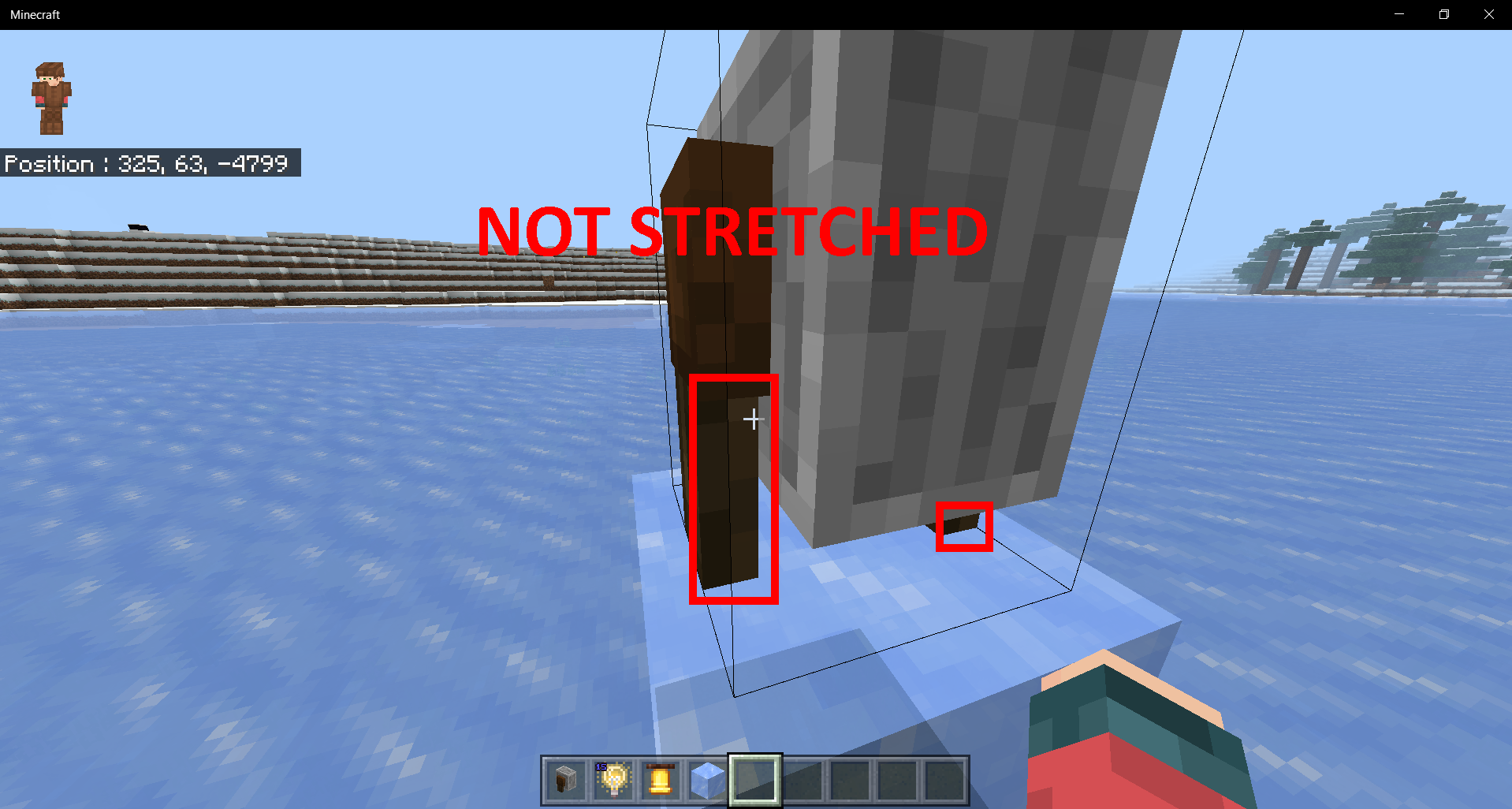
 not stretched-1.png
Admittedly this bug is seriously nitpicky and not in dire need of attention, but it's still unintended behaviour, so I reported it anyway.
A microscopic, one-dimensional array of blackish dots appears on the top of Iron Bars blocks. Their presence seems to be due to the block's model intersecting itself at this place, causing it to Z-fight with the texture. MCPE-31752 makes this bug much easier to see.
To reproduce:
- Place a horizontal line of Iron Bars blocks
- Look extremely closely
Mark as duplicate of MCPE-31752; I have provided more detail there, as this glitch affects more blocks than stone brick stairs.
Mark as duplicate of MCPE-31752, as this is a pretty broad glitch.
Duplicate of MCPE-31752
Duplicate of MCPE-31752. This is now known to affect many blocks.
Affects 1.2.13. Seems to be closely linked with MCPE-31752.
Thank you for your report!
We're actually already tracking this issue at MCPE-31752, so I resolved and linked this ticket as a duplicate.
If you would like to add a vote and any extra information to the main ticket it would be appreciated.
If you haven't already, you might like to make use of the search feature to see if the issue has already been mentioned.
Quick Links:
📓 Issue Guidelines – 💬 Community Support – 📧 Customer Support – 📖 Game Wiki
Thank you for your report!
We're tracking this issue in MCPE-31752, so this ticket is being resolved and linked as a duplicate.
If you would like to add a vote and any extra information to the main ticket it would be appreciated.
If you haven't already, you might like to make use of the search feature to see if the issue has already been mentioned.
Quick Links:
📓 Bug Tracker Guidelines – 💬 Community Support – 📧 Mojang Support
📓 Project Summary – ✍️ Feedback and Suggestions – 📖 Game Wiki
– I am a bot. This action was performed automatically! If you think it was incorrect, please notify us on Discord or Reddit
Thank you for your report!
We're tracking this issue in MCPE-31752, so this ticket is being resolved and linked as a duplicate.
If you would like to add a vote and any extra information to the main ticket it would be appreciated.
If you haven't already, you might like to make use of the search feature to see if the issue has already been mentioned.
Quick Links:
📓 Bug Tracker Guidelines – 💬 Community Support – 📧 Mojang Support
📓 Project Summary – ✍️ Feedback and Suggestions – 📖 Game Wiki
– I am a bot. This action was performed automatically! If you think it was incorrect, please notify us on Discord or Reddit
Thank you for your report!
We're tracking this issue in MCPE-31752, so this ticket is being resolved and linked as a duplicate.
If you would like to add a vote and any extra information to the main ticket it would be appreciated.
If you haven't already, you might like to make use of the search feature to see if the issue has already been mentioned.
Quick Links:
📓 Bug Tracker Guidelines – 💬 Community Support – 📧 Mojang Support
📓 Project Summary – ✍️ Feedback and Suggestions – 📖 Game Wiki
– I am a bot. This action was performed automatically! The ticket was resolved by one of our moderators, and I left this message to give more information to you.
Thank you for your report!
We're tracking this issue in MCPE-31752, so this ticket is being resolved and linked as a duplicate.
If you would like to add a vote and any extra information to the main ticket it would be appreciated.
If you haven't already, you might like to make use of the search feature to see if the issue has already been mentioned.
Quick Links:
📓 Bug Tracker Guidelines – 💬 Community Support – 📧 Mojang Support
📓 Project Summary – ✍️ Feedback and Suggestions – 📖 Game Wiki
– I am a bot. This action was performed automatically! The ticket was resolved by one of our moderators, and I left this message to give more information to you.
Thank you for your report!
We're tracking this issue in MCPE-31752, so this ticket is being resolved and linked as a duplicate.
If you would like to add a vote and any extra information to the main ticket it would be appreciated.
If you haven't already, you might like to make use of the search feature to see if the issue has already been mentioned.
Quick Links:
📓 Bug Tracker Guidelines – 💬 Community Support – 📧 Mojang Support
📓 Project Summary – ✍️ Feedback and Suggestions – 📖 Game Wiki
– I am a bot. This action was performed automatically! The ticket was resolved by one of our moderators, and I left this message to give more information to you.
Appears to have been fixed for stone bricks stairs in 1.2.13, but affects all remaining blocks.
Affects 1.2.14
Affects 1.2.15
Affects 1.2.16
Affects 1.4
Cleaning up old tickets: This ticket has not been updated recently (~1 year+) so is being closed as Cannot Reproduce. If you feel this is still a valid issue then please comment, or create a new ticket following the Issue Guidelines.
Quick Links:
📓 Issue Guidelines – 💬 Mojang Support – 📧 Suggestions – 📖 Minecraft Wiki
Can reproduce with doors in 1.13.2
Reopened
Does not seem to occur anymore in 1.16.40never mind, an iPad user should check thisThis also happens on torches. Just look straight at it.
This bug is still there. Spare some time fixing these. Thanks
1.18.0
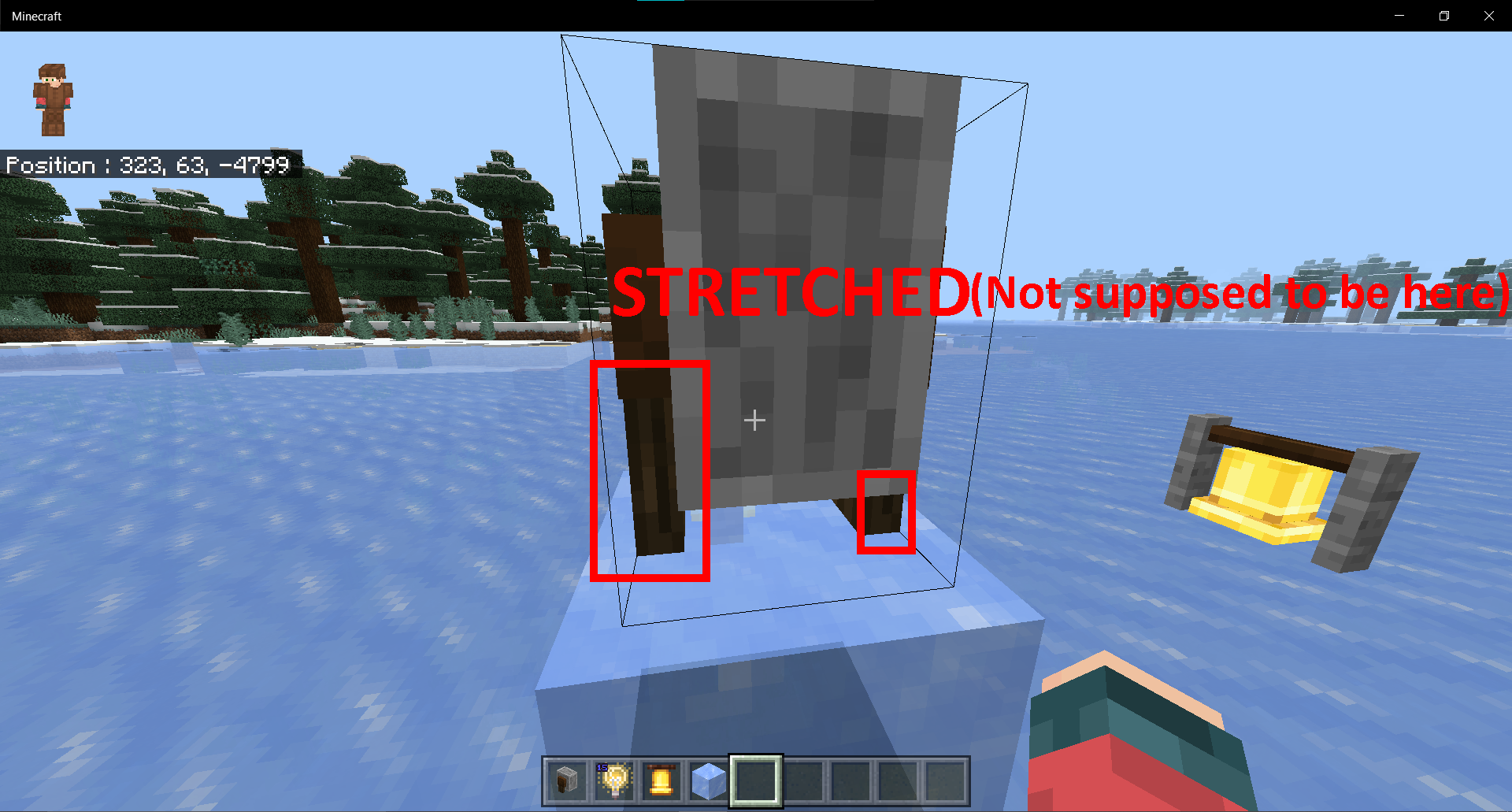
Still here for Grindstone "dark oak" part in 1.18.31 and 1.19.0.29
Still here for Grindstone "dark oak" part in 1.19.11 and 1.19.20.24
All of the blocks listed in the report appear to have been fixed, so I am closing this report. For grindstones, please see MCPE-152405.