 Asadefa
- Asadefa
- asadefa
- Europe/Stockholm
- Yes
- No
 WEB-1164
 Low
Low![[Mojang] Cory Scheviak](../../../data/avatars/users/92893.png)
 MC-144374










Sometimes light passes through solid blocks and beds do not
Sometimes light passes through solid blocks and beds do not match
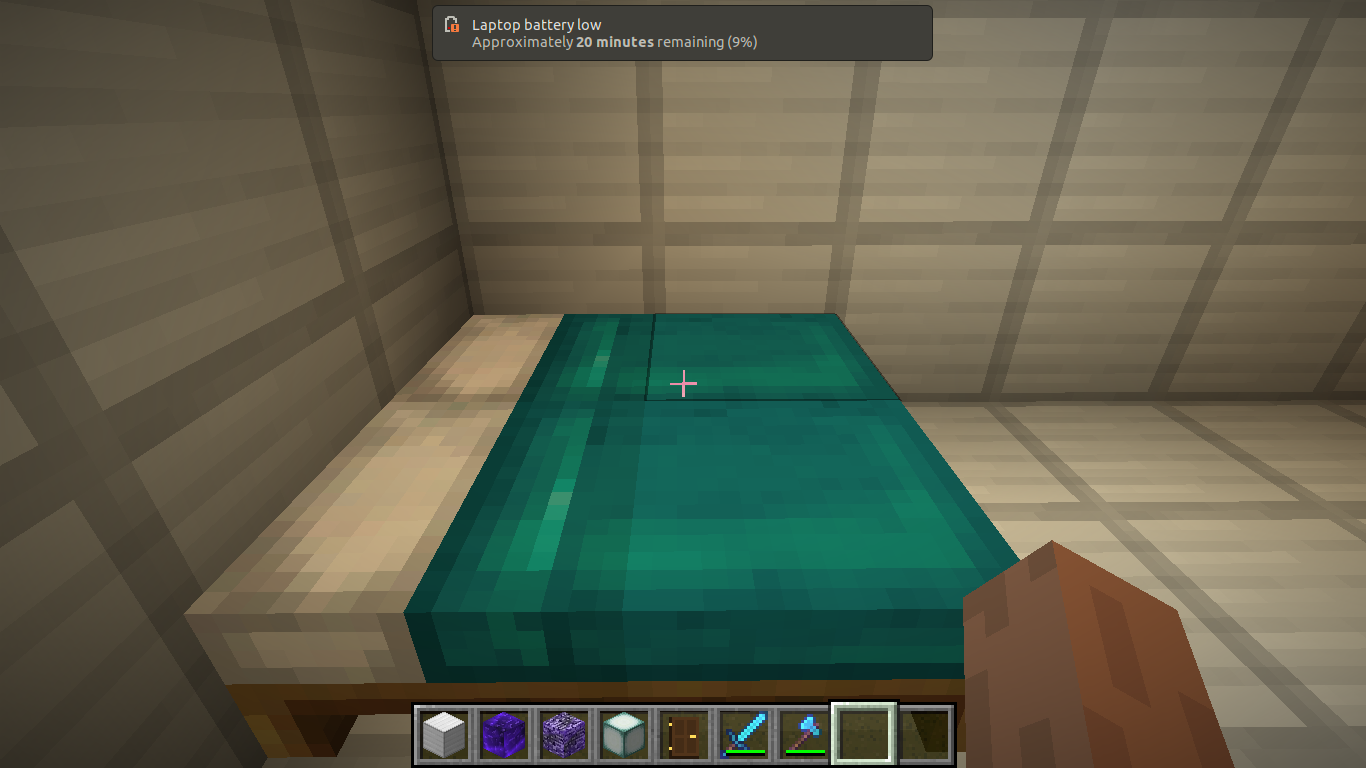
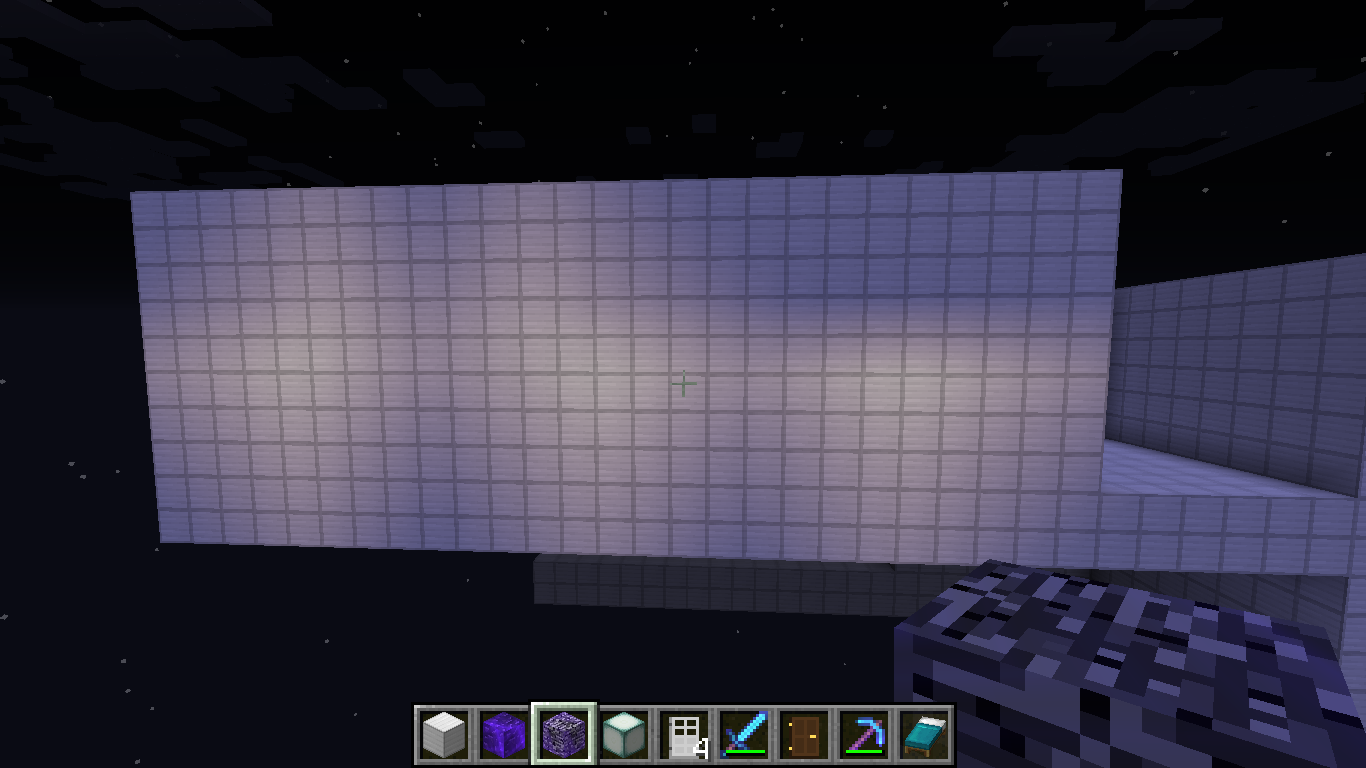
Sometimes I see light through solid blocks. My favorite solid block example is iron blocks, as shown in one of the screenshots below. It looks as of light sources are placed on the shown wall, but I assure you that there are no invisible light sources on front of the wall. There are only lights in the rooms behind. Also, to make two issues in one, I have noticed that the top and bottom halves of beds do not match. I think this is also a lighting bug. I have searched for lighting and I found no others, so this is not a duplicate. I have seen other bed glitch reports but the colors slightly being off have not been reported.
Sometimes I see light through solid blocks. My favorite solid block example is iron blocks, as shown in one of the screenshots below. It looks as of light sources are placed on the shown wall, but I assure you that there are no invisible light sources on front of the wall. There are only lights in the rooms behind. Also, to make two issues in one, I have noticed that the top and bottom halves of beds do not match. I think this is also a lighting bug. I have searched for lighting and I found no others, so this is not a duplicate. My example uses cyan beds but this also applies to the other bed colors too, although it is less noticeable on certain colors like black. I have seen other bed glitch reports but the colors slightly being off have not been reported.
Sometimes I see light through solid blocks. My favorite solid block example
isiron blocks, as shown in one of the screenshots below. It looks as of light sources are placed on the shown wall, but I assure you that there are no invisible light sources on front of the wall. There are only lights in the rooms behind. Also, to make two issues in one, I have noticed that the top and bottom halves of beds do not match. I think this is also a lighting bug. I have searched for lighting and I found no others, so this is not a duplicate. My example uses cyan beds but this also applies to the other bed colors too, although it is less noticeable on certain colors like black. I have seen other bed glitch reports but the colors slightly being off have not been reported.Sometimes I see light through solid blocks. My favorite solid block example are the iron blocks, as shown in one of the screenshots below. It looks as of light sources are placed on the shown wall, but I assure you that there are no invisible light sources on front of the wall. There are only lights in the rooms behind. Also, to make two issues in one, I have noticed that the top and bottom halves of beds do not match. I think this is also a lighting bug. I have searched for lighting and I found no others, so this is not a duplicate. My example uses cyan beds but this also applies to the other bed colors too, although it is less noticeable on certain colors like black. I have seen other bed glitch reports but the colors slightly being off have not been reported.
I cannot trade with villagers! I click on them, and instead of trading,
thewater particle effect appears!That is weird.I cannot trade with villagers! I click on them, and instead of trading, a water splash particle effect appears. That is weird. You cannot trade with villagers anymore.
I cannot trade with villagers! I click on them, and instead of trading, a water splash particle effect appears. That is weird. You cannot trade with villagers anymore, as shown in the screenshot below.
I cannot trade with villagers! I click on them, and instead of trading, a water splash particle effect appears. That is weird. You cannot trade with villagers anymore, as shown in the screenshot below. I tried this in a different world with no raids, but I still could not trade, and the villager was not a green one. I already know that you cannot trade with green ones, but now you cannot trade with ANY!
I cannot trade with villagers! I click on them, and instead of trading, a water splash particle effect appears. That is weird. You cannot trade with villagers anymore, as shown in the screenshot below.* I tried this in a different world with no raids, but I still could not trade, and the villager was not a green one. I already know that you cannot trade with green ones, but now you cannot trade with ANY!*
I cannot trade with villagers! I click on them, and instead of trading, a water splash particle effect appears. That is weird. You cannot trade with villagers anymore, as shown in the screenshot below.* I tried this in a different world with no raids, but I still could not trade, and the villager was not a green one. I already know that you cannot trade with green ones, but now you cannot trade with ANY!*
I cannot trade with villagers! I click on them, and instead of trading, a water splash particle effect appears. That is weird. You cannot trade with villagers anymore, as shown in the screenshot below. I tried this in a different world with no raids, but I still could not trade, and the villager was not a green one. I already know that you cannot trade with green ones, but now you cannot trade with ANY!
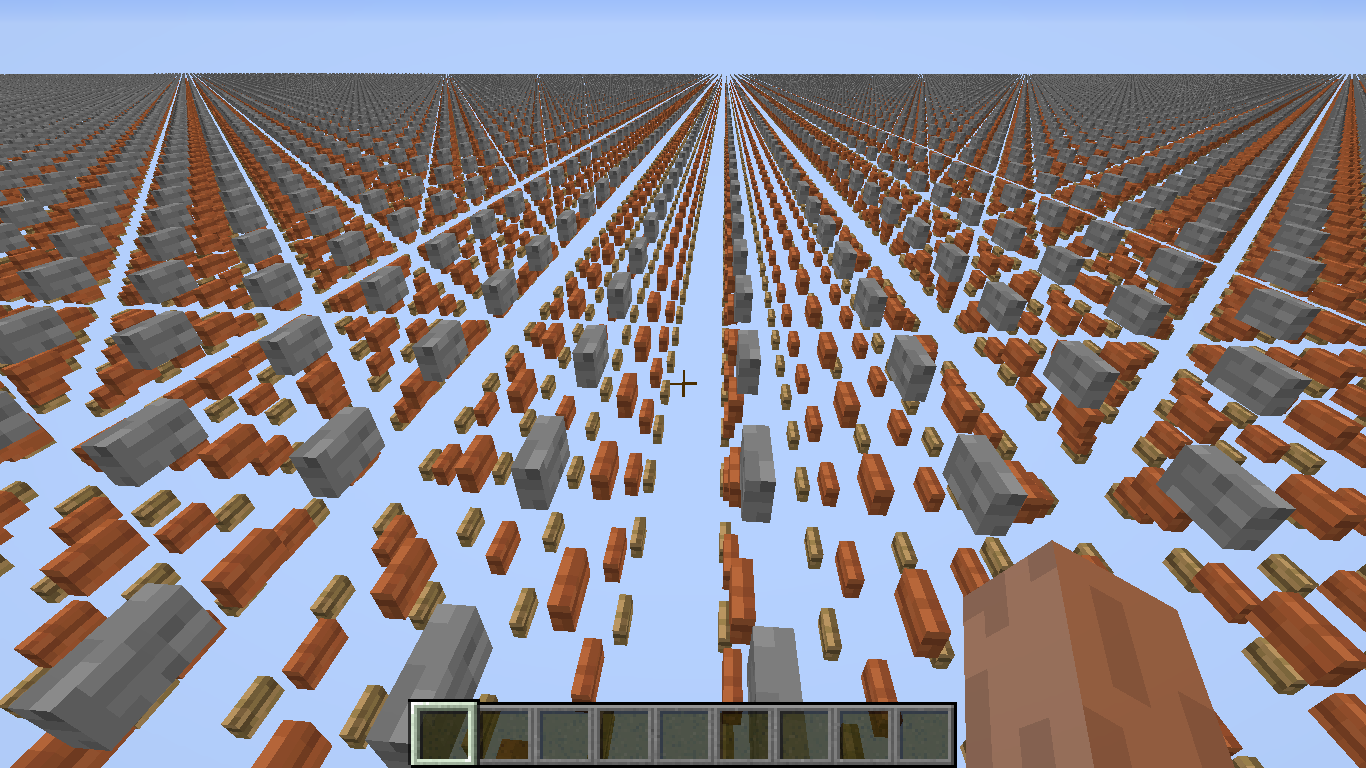
I create a custom superflat world using specific non solid blocks. Non solid blocks can cause problems. My example below uses various buttons. The problem is as soon as there is an update, such as me pressing a button, a bunch of other buttons break and a few seconds later there is a game crash. There is
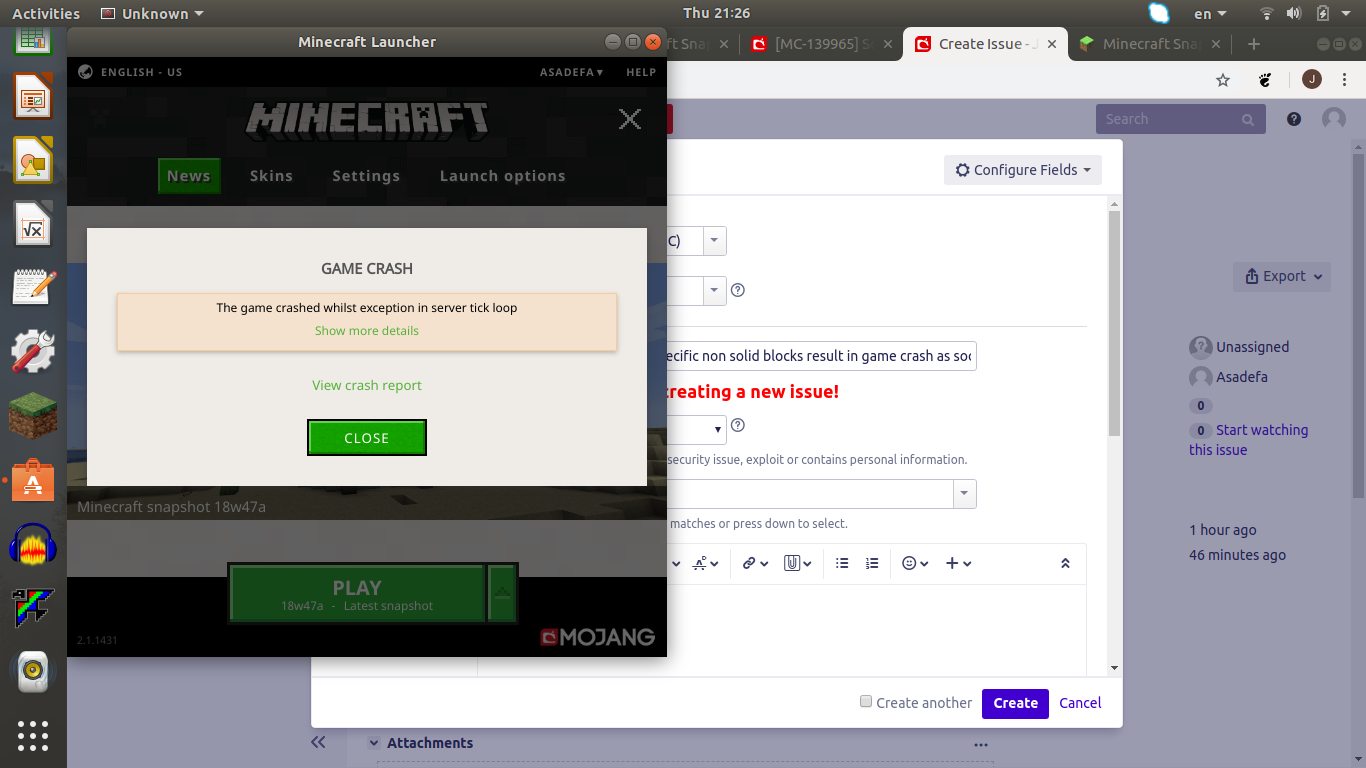
nocrash report associated with the crash caused by making superflats out of non solid blocksI create a custom superflat world using specific non solid blocks. Non solid blocks can cause problems. My example below uses various buttons. The problem is as soon as there is an update, such as me pressing a button, a bunch of other buttons break and a few seconds later there is a game crash. There is a crash report associated with the crash caused by making superflats out of non solid blocks. Here is some of it:
---- Minecraft Crash Report ----
// Don't be sad. I'll do better next time, I promise!Time: 11/22/18, 9:26 PM
Description: Exception in server tick loopjava.lang.StackOverflowError: Exception in server tick loop
A detailed walkthrough of the error, its code path and all known details is as follows:
---------------------------------------------------------------------------------------– System Details –
Details:
Minecraft Version: 18w47a
Operating System: Linux (amd64) version 4.15.0-39-generic
Java Version: 10.0.2, Oracle Corporation
Java VM Version: OpenJDK 64-Bit Server VM (mixed mode), Oracle Corporation
Memory: 421880432 bytes (402 MB) / 1006632960 bytes (960 MB) up to 2147483648 bytes (2048 MB)
JVM Flags: 8 total; -Xss1M -Xmx2G -XX:+UnlockExperimentalVMOptions -XX:+UseG1GC -XX:G1NewSizePercent=20 -XX:G1ReservePercent=20 -XX:MaxGCPauseMillis=50 -XX:G1HeapRegionSize=32M
Player Count: 1 / 8; [ui ['Asadefa'/294, l='World', x=-79.58, y=3.84, z=-74.35] ]
Data Packs: vanilla
Type: Integrated Server (map_client.txt)
Is Modded: Probably not. Jar signature remains and both client + server brands are untouched.Note: I cannot give the whole crash report because it is too long.
I create a custom superflat world using specific non solid blocks. Non solid blocks can cause problems. My example below uses various buttons. The problem is as soon as there is an update, such as me pressing a button, a bunch of other buttons break and a few seconds later there is a game crash. There is a crash report associated with the crash caused by making superflats out of non solid blocks. Here is some of it:
---- Minecraft Crash Report ----
// Don't be sad. I'll do better next time, I promise!Time: 11/22/18, 9:26 PM
Description: Exception in server tick loopjava.lang.StackOverflowError: Exception in server tick loop
...
A detailed walkthrough of the error, its code path and all known details is as follows:
---------------------------------------------------------------------------------------– System Details –
Details:
Minecraft Version: 18w47a
Operating System: Linux (amd64) version 4.15.0-39-generic
Java Version: 10.0.2, Oracle Corporation
Java VM Version: OpenJDK 64-Bit Server VM (mixed mode), Oracle Corporation
Memory: 421880432 bytes (402 MB) / 1006632960 bytes (960 MB) up to 2147483648 bytes (2048 MB)
JVM Flags: 8 total; -Xss1M -Xmx2G -XX:+UnlockExperimentalVMOptions -XX:+UseG1GC -XX:G1NewSizePercent=20 -XX:G1ReservePercent=20 -XX:MaxGCPauseMillis=50 -XX:G1HeapRegionSize=32M
Player Count: 1 / 8; [ui['Asadefa'/294, l='World', x=-79.58, y=3.84, z=-74.35]]
Data Packs: vanilla
Type: Integrated Server (map_client.txt)
Is Modded: Probably not. Jar signature remains and both client + server brands are untouched.Note: I cannot give the whole crash report because it is too long.
I create a custom superflat world using specific non solid blocks. Non solid blocks can cause problems. My example below uses various buttons. The problem is as soon as there is an update, such as me pressing a button, a bunch of other buttons break and a few seconds later there is a game crash. There is a crash report associated with the crash caused by making superflats out of non solid blocks. Here is some of it:
---- Minecraft Crash Report ----
// Don't be sad. I'll do better next time, I promise!Time: 11/22/18, 9:26 PM
Description: Exception in server tick loopjava.lang.StackOverflowError: Exception in server tick loop
...
A detailed walkthrough of the error, its code path and all known details is as follows:
---------------------------------------------------------------------------------------– System Details –
Details:
Minecraft Version: 18w47a
Operating System: Linux (amd64) version 4.15.0-39-generic
Java Version: 10.0.2, Oracle Corporation
Java VM Version: OpenJDK 64-Bit Server VM (mixed mode), Oracle Corporation
Memory: 421880432 bytes (402 MB) / 1006632960 bytes (960 MB) up to 2147483648 bytes (2048 MB)
JVM Flags: 8 total; -Xss1M -Xmx2G -XX:+UnlockExperimentalVMOptions -XX:+UseG1GC -XX:G1NewSizePercent=20 -XX:G1ReservePercent=20 -XX:MaxGCPauseMillis=50 -XX:G1HeapRegionSize=32M
Player Count: 1 / 8; [ui['Asadefa'/294, l='World', x=-79.58, y=3.84, z=-74.35]]
Data Packs: vanilla
Type: Integrated Server (map_client.txt)
Is Modded: Probably not. Jar signature remains and both client + server brands are untouched.Note: I cannot give the whole crash report because it is too long. Probably the part about "java.lang.StackOverflowError: Exception in server tick loop: is the most important.
I create a custom superflat world using specific non solid blocks. Non solid blocks can cause problems. My example below uses various buttons. The problem is as soon as there is an update, such as me pressing a button, a bunch of other buttons break and a few seconds later there is a game crash. There is a crash report associated with the crash caused by making superflats out of non solid blocks. Here is some of it:
---- Minecraft Crash Report ----
// Don't be sad. I'll do better next time, I promise!Time: 11/22/18, 9:26 PM
Description: Exception in server tick loopjava.lang.StackOverflowError: Exception in server tick loop
...
A detailed walkthrough of the error, its code path and all known details is as follows:
---------------------------------------------------------------------------------------– System Details –
Details:
Minecraft Version: 18w47a
Operating System: Linux (amd64) version 4.15.0-39-generic
Java Version: 10.0.2, Oracle Corporation
Java VM Version: OpenJDK 64-Bit Server VM (mixed mode), Oracle Corporation
Memory: 421880432 bytes (402 MB) / 1006632960 bytes (960 MB) up to 2147483648 bytes (2048 MB)
JVM Flags: 8 total; -Xss1M -Xmx2G -XX:+UnlockExperimentalVMOptions -XX:+UseG1GC -XX:G1NewSizePercent=20 -XX:G1ReservePercent=20 -XX:MaxGCPauseMillis=50 -XX:G1HeapRegionSize=32M
Player Count: 1 / 8; [ui['Asadefa'/294, l='World', x=-79.58, y=3.84, z=-74.35]]
Data Packs: vanilla
Type: Integrated Server (map_client.txt)
Is Modded: Probably not. Jar signature remains and both client + server brands are untouched.Note: I cannot give the whole crash report because it is too long. Probably the part about "java.lang.StackOverflowError: Exception in server tick loop
:is the most important.I create a custom superflat world using specific non solid blocks. Non solid blocks can cause problems. My example below uses various buttons. The problem is as soon as there is an update, such as me pressing a button, a bunch of other buttons break and a few seconds later there is a game crash. There is a crash report associated with the crash caused by making superflats out of non solid blocks. Here is some of it:
---- Minecraft Crash Report ----
// Don't be sad. I'll do better next time, I promise!Time: 11/22/18, 9:26 PM
Description: Exception in server tick loopjava.lang.StackOverflowError: Exception in server tick loop
...
A detailed walkthrough of the error, its code path and all known details is as follows:
---------------------------------------------------------------------------------------– System Details –
Details:
Minecraft Version: 18w47a
Operating System: Linux (amd64) version 4.15.0-39-generic
Java Version: 10.0.2, Oracle Corporation
Java VM Version: OpenJDK 64-Bit Server VM (mixed mode), Oracle Corporation
Memory: 421880432 bytes (402 MB) / 1006632960 bytes (960 MB) up to 2147483648 bytes (2048 MB)
JVM Flags: 8 total; -Xss1M -Xmx2G -XX:+UnlockExperimentalVMOptions -XX:+UseG1GC -XX:G1NewSizePercent=20 -XX:G1ReservePercent=20 -XX:MaxGCPauseMillis=50 -XX:G1HeapRegionSize=32M
Player Count: 1 / 8; [ui['Asadefa'/294, l='World', x=-79.58, y=3.84, z=-74.35]]
Data Packs: vanilla
Type: Integrated Server (map_client.txt)
Is Modded: Probably not. Jar signature remains and both client + server brands are untouched.Note: I cannot give the whole crash report because it is too long. Probably the part about "java.lang.StackOverflowError: Exception in server tick loop" is the most important.
I create a custom superflat world using specific non solid blocks. Non solid blocks can cause problems. My example below uses various buttons. The problem is as soon as there is an update, such as me pressing a button, a bunch of other buttons break and a few seconds later there is a game crash. There is a crash report associated with the crash caused by making superflats out of non solid blocks. Here is some of it:
---- Minecraft Crash Report ----
// Don't be sad. I'll do better next time, I promise!Time: 11/22/18, 9:26 PM
Description: Exception in server tick loopjava.lang.StackOverflowError: Exception in server tick loop
...
A detailed walkthrough of the error, its code path and all known details is as follows:
---------------------------------------------------------------------------------------– System Details –
Details:
Minecraft Version: 18w47a
Operating System: Linux (amd64) version 4.15.0-39-generic
Java Version: 10.0.2, Oracle Corporation
Java VM Version: OpenJDK 64-Bit Server VM (mixed mode), Oracle Corporation
Memory: 421880432 bytes (402 MB) / 1006632960 bytes (960 MB) up to 2147483648 bytes (2048 MB)
JVM Flags: 8 total; -Xss1M -Xmx2G -XX:+UnlockExperimentalVMOptions -XX:+UseG1GC -XX:G1NewSizePercent=20 -XX:G1ReservePercent=20 -XX:MaxGCPauseMillis=50 -XX:G1HeapRegionSize=32M
Player Count: 1 / 8; [ui['Asadefa'/294, l='World', x=-79.58, y=3.84, z=-74.35]]
Data Packs: vanilla
Type: Integrated Server (map_client.txt)
Is Modded: Probably not. Jar signature remains and both client + server brands are untouched.Note: I cannot give the whole crash report because it is too long. Probably the part about "java.lang.StackOverflowError: Exception in server tick loop" is the most important.
ev.class
Please use correct grammar and spelling in future reports
lol
When I load a world from a newer version, game crashes. It just says that an unexpected issue had occurred and no crash report was provided.
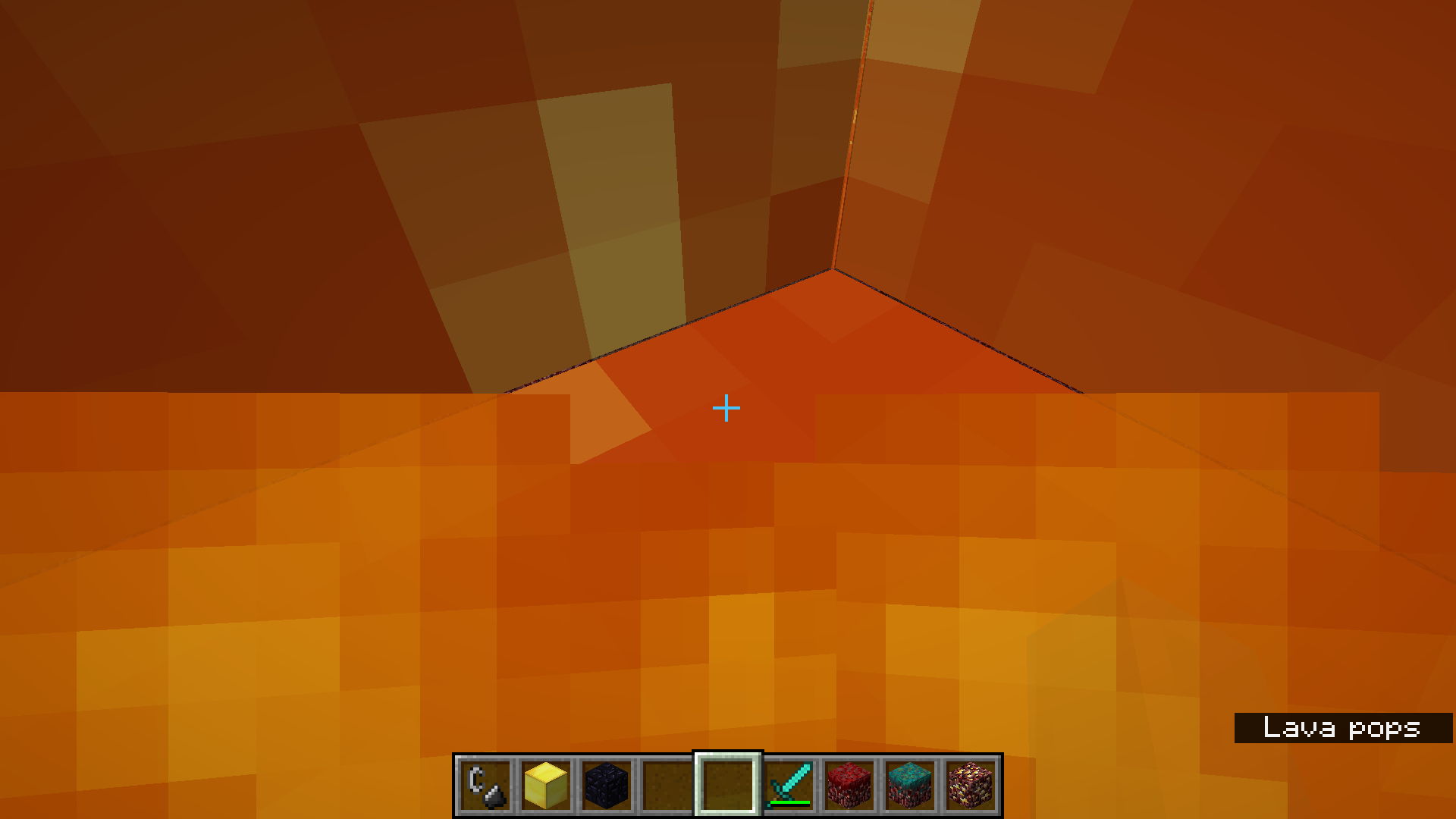
When the player dies from a campfire, it acts just like the magma block and does not make sense. How on earth is standing in a campfire making a breakthrough discovery about the floor being lava? Don't copy and paste code!
When the player dies from a campfire, it acts just like the magma block and does not make sense. How on earth is standing in a campfire making a breakthrough discovery about the floor being lava? That is rather odd, I must say. Don't copy and paste code!
When the player dies from a campfire, it acts just like the magma block and does not make sense. How on earth is standing in a campfire making a breakthrough discovery about the floor being lava? That is rather odd, I must say
. Don't copy and paste code!When the player dies from a campfire, it acts just like the magma block and does not make sense. How on earth is standing in a campfire making a breakthrough discovery about the floor being lava? That is rather odd, I must say, as campfires are not magma. In general, it is a bad idea to copy and paste code, or use other shortcuts! It is worth the extra time!
When the player dies from a campfire, it acts just like the magma block and does not make sense. How on earth is standing in a campfire even remotely related to making a breakthrough discovery about the floor being lava? That is rather odd, I must say, as campfires are not magma. In general, it is a bad idea to copy and paste code, or use other shortcuts! It is worth the extra time!
When the player dies from a campfire, it acts just like the magma block and does not make sense. How on earth is standing in a campfire even remotely related to making a breakthrough discovery about the floor being lava? That is rather odd, I must say, as campfires are not magma. In general,
it is a bad idea tocopy and pastecode,or use other shortcuts! It is worth the extra time!When the player dies from a campfire, it acts just like the magma block and does not make sense. How on earth is standing in a campfire even remotely related to making a breakthrough discovery about the floor being lava? That is rather odd, I must say, as campfires are not magma. In general, certain programming practices such as copying and pasting code, are best avoided.
When the player dies from a campfire, it acts just like the magma block and does not make sense. How on earth is standing in a campfire even remotely related to making a breakthrough discovery about the floor being lava? That is rather odd, I must say, as campfires are not magma. In general, certain programming practices, such as copying and pasting code, are best avoided.
I try the following command:
{Lore:["The lore should show below the name"]}
_/give @p diamond_sword{display:,Enchantments:[
{id:unbreaking,lvl:3}]} 1
_This command is correct, but if I try to add a custom lore, it does not appear.
I try the following command:
"/give @p diamond_sword{display:
{Lore:["The lore should show below the name"]},Enchantments:[
{id:unbreaking,lvl:3}]} 1"
This command is correct, but if I try to add a custom lore, it does not appear.
I try the following command:
{Lore:["The lore should show below the name"]}
"/give @p diamond_sword{display:,Enchantments:[
{id:unbreaking,lvl:3}]} 1"
This command is correct, but if I try to add a custom lore, it does not appear.
I try the following command:
_/give @p diamond_sword{display:
{Lore:["The lore should show below the name"]},Enchantments:[\{id:unbreaking,lvl:3}]} 1_
This command is correct, but if I try to add a custom lore, it does not appear.
I try the following command:
{Lore:["The lore should show below the name"]}
_/give @p diamond_sword{display:,Enchantments:
[\{id:unbreaking,lvl:3}]} 1_This command is correct, but if I try to add a custom lore, it does not appear.
I try the following command:
/give @p diamond_sword{display:
{Lore:["The lore should show below the name"]},Enchantments:[
{id:unbreaking,lvl:3}]} 1
This command is correct, but if I try to add a custom lore, it does not appear.
There are some issues on the site, such as the markdown formatting. for example this should be in italics +and this should be underlined +
and this should be bold. They are not as you can see, (well, I cannot see the formatting)Also, I try to type a minecraft command in a different report and all over the command random new lines are inserted. as shown in the image
There are some issues on the site, such as the markdown formatting. for example this should be in italics +and this should be underlined +. They are not as you can see, (well, I cannot see the formatting)
Also, I try to type a minecraft command in a different report and all over the command random new lines are inserted. as shown in the image
There are some issues on the site, such as the markdown formatting. for example this should be in italics
+and this should be underlined +. They are not as you can see, (well, I cannot see the formatting)Also, I try to type a minecraft command in a different report and all over the command random new lines are inserted. as shown in the image
There are some issues on the site, such as the markdown formatting. for example this should be in italics . They are not as you can see, (well, I cannot see the formatting)
Also, I try to type a minecraft command in a different report and all over the command random new lines are inserted. as shown in the image
There are some issues on the site, such as the markdown formatting. for example this should be in italics . They are not as you can see, (well, I cannot see the formatting)
Also, I try to type a minecraft command in a different report and all over the command random new lines are inserted. as shown in the image
There are some issues on the site, such as the markdown formatti . They are not as you can see, (well, I cannot see the formatting)
Also, I try to type a minecraft command in a different report and all over the command random new lines are inserted. as shown in the image
There are some issues on the site, such as the markdown formatti
. They are not as you can see, (well, I cannot see the formatting)Also, I try to type a minecraft command in a different report and all over the command random new lines are inserted. as shown in the image
There are some issues on the site, such as the markdown formatting. Sometimes it works and sometimes it does not
Also, I try to type a minecraft command in a different report and all over the command random new lines are inserted. as shown in the image
There are some issues on the site, such as the markdown formatting. Sometimes it works and sometimes it does not
Also, I try to type a minecraft command in a different report and all over the command random new lines are inserted. as shown in the image
There are some issues on the site, such as the markdown formatting. Sometimes it works and sometimes it does not like here
Also, I try to type a minecraft command in a different report and all over the command random new lines are inserted. as shown in the image
There are some issues on the site, such as the markdown formatting. Sometimes it works and sometimes it does not like here
Also, I try to type a minecraft command in a different report and all over the command random new lines are inserted. as shown in the image
There are some issues on the site, such as the markdown formatting. Sometimes it works and sometimes it does not like here it works but in the past it did not
Also, I try to type a minecraft command in a different report and all over the command random new lines are inserted. as shown in the image
There are some issues on the site, such as the markdown formatting. Sometimes it works and sometimes it does not
like here it works but in thepast it did notAlso, I try to type a minecraft command in a different report and all over the command random new lines are inserted. as shown in the image
There are some issues on the site, such as the markdown formatting. Sometimes it works and sometimes it does not _like here it works but in the
past it did not_Also, I try to type a minecraft command in a different report and all over the command random new lines are inserted. as shown in the image
There are some issues on the site, such as the markdown formatting. Sometimes it works and sometimes it does not
_like here it works but in thepast it did not_Also, I try to type a minecraft command in a different report and all over the command random new lines are inserted. as shown in the image
There are some issues on the site, such as the markdown formatting. Sometimes it works and sometimes it does not if it is a single line it works but _if there is a paragraph
it does not_
Also, I try to type a minecraft command in a different report and all over the command random new lines are inserted. as shown in the image
Markdown formatting partially broken, and it inserts newlines in places I don't mean to
sistem windows 7
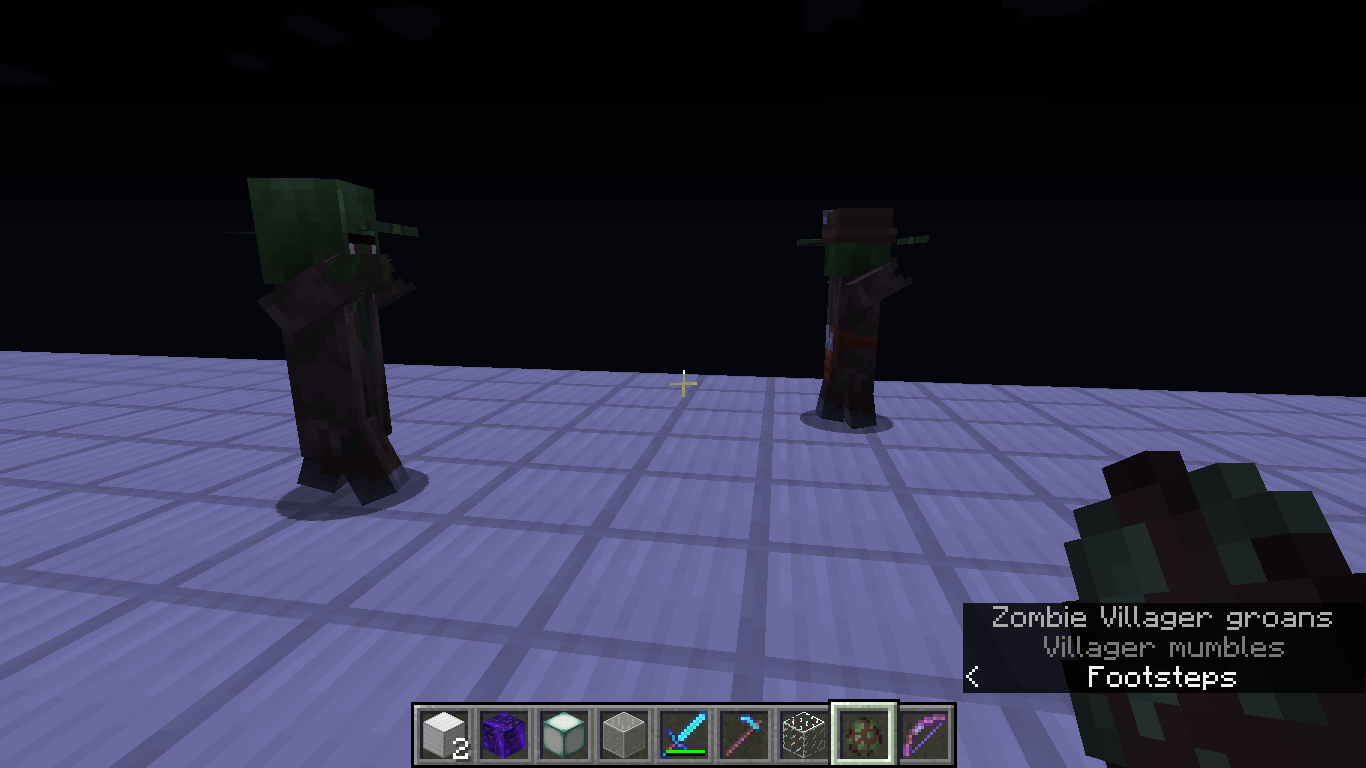
zombie vilager hes don't have hands
sistem windows 7
zombie vilager hes don't have hands
Wandering vilager hes don't have subtitlessistem Windows 7
wandering vilager hes don't have subtitles
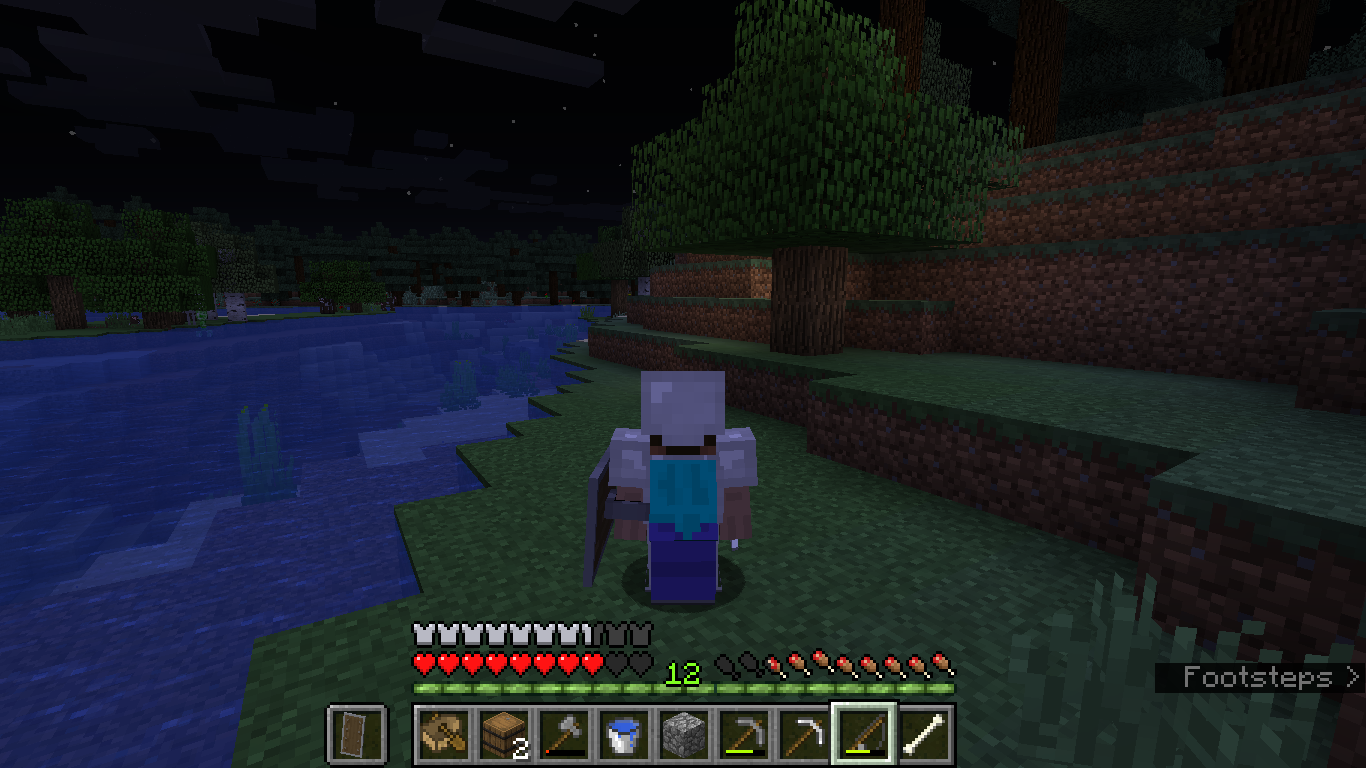
Wandering traders turn invisible for no reason. They appear to just drink invisibility potions immediatly
Operating system (Windows 7, XP, IOS) and Java version if you know it hereoperating system (Windows 7, Windows XP, IOS) and Java version if you know it here
The splash screen doesn't play any music.When first entering the splash screen, no music will play.
Furnace fuel left fireappears full when quitting and rejoining worl1The fire icon in the furnace GUI appears full when quitting and rejoining worl1
loading
sscreen hes takes more timeloading screen hes takes more time then back in teh good ol days withou a load screen
loading screen
hestakes more time then back in teh good ol days withou a load screenloading screen takes more time then back in the good old days without a load screen. It appears to be loading, but it is taking much longer than it should. Maybe it just says it is loading, but it is just wasting my time.
Campfires do not cook stuff anymore. I waited a long time. They used to in 19w07a but not in 19w08a. I can place it on the campfire, but it just sits there for ever and never gets cooked!
Campfire does not cookfood anymoreCampfire does not cook in 19w08a
Campfires do not cook stuff anymore. I waited a long time. They used to in 19w07a but not in 19w08a. I can place it on the campfire, but it just sits there for ever and never gets cooked!
Just the title
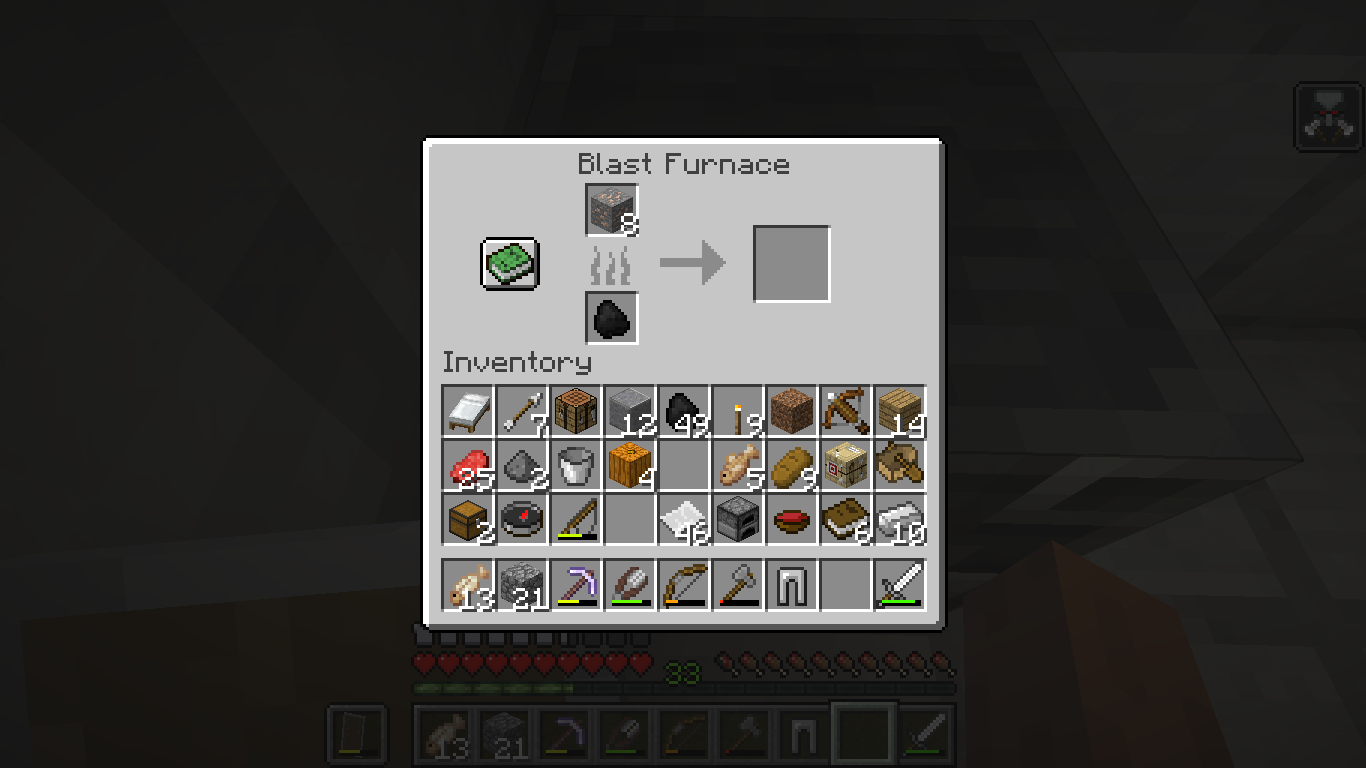
The blast furnace will not smelt anything anymore
Blast furnace/smoker will not smelt anymore
The blast furnace will not smelt anything anymore, and neither will the smoker!
Blast furnace/smoker will not smelt/cook anymore
The blast furnace will not smelt anything anymore, and neither will the smoker! However, the original furnace WILL.
The blast furnace will not smelt anything anymore, and neither will the smoker
!However, the original furnace WILL.The blast furnace will not smelt anything anymore, and neither will the smoker, the first time I join the latest snapshot. However, the original furnace WILL.
The blast furnace will not smelt anything anymore, and neither will the smoker, the first time I join the latest snapshot. However, the original furnace WILL. But for some reason, when I quit and rejoin, it is fixed
Zombie villager hands don't quite render correctly while using Programmer Art texture pack
The bug
The hands of zombie villagers are not rendering correctly while using the Programmer Art texture pack, they render around the head. The problem is that Jappa's new textures use a different format than Programmer art. It is not compatible with programmer art. Please make it. Don't encourage the use of the new textures over the use of the old ones, as some of us are not fans of them
Zombie villagerhands don't quite render correctly while using Programmer Art texture packZombie villager fists don't quite render correctly while using Programmer Art texture pack
The bug
The hands of zombie villagers are not rendering correctly while using the Programmer Art texture pack, they render around the head. The problem is that Jappa's new textures use a different format than Programmer art. It is not compatible with programmer art. Please make it. Don't encourage the use of the new textures over the use of the old ones, as some of us are not fans of them (at all).
The bug
The hands of zombie villagers are not rendering correctly while using the Programmer Art texture pack, they render around the head. The problem is that Jappa's new textures use a different format than Programmer art. It is not compatible with programmer art. Please make it. Don't encourage the use of the new textures over the use of the old ones, as some of us are not fans of them (at all).
in other words
zombie vilager hes don't have hands
The bug
The hands of zombie villagers are not rendering correctly while using the Programmer Art texture pack, they render around the head. The problem is that Jappa's new textures use a different format than Programmer art. It is not compatible with programmer art. Please make it. Don't encourage the use of the new textures over the use of the old ones, as some of us are not fans of them (at all).
in other words
zombie vilager hes don't have hands
The bug
The hands of zombie villagers are not rendering correctly while using the Programmer Art texture pack, they render around the head. The problem is that Jappa's new textures use a different format than Programmer art. It is not compatible with programmer art. Please make it. Don't encourage the use of the new textures over the use of the old ones, as some of us are not fans of them (at all). I don't want to have to put up with rendering bugs in order to use the classic textures instead of the new, odd ones.
Campfire, blast furnace, smoker, and the traditional furnacesometimesdo not workCampfire, blast furnace, smoker, and the traditional furnace SOMETIMES do not work
The blocks specified in the title sometimes don't smelt anything. Yes, they sometimes do work properly, but SOMETIMES don't work. Because of this, it will be hard to reproduce . Rejoining the world will often fix it. Again, this occurs at unpredictable times, so it WILL be hard to reproduce
Ubuntu
The blocks specified in the title sometimes don't smelt anything. Yes, they sometimes do work properly, but SOMETIMES don't work. Because of this, it will be hard to reproduce . Rejoining the world will often fix it. Again, this occurs at unpredictable times, so it WILL be hard to reproduce. At some point I will try to identify the cause.
The blocks specified in the title sometimes don't smelt anything. Yes, they sometimes do work properly, but SOMETIMES don't work. Because of this, it will be hard to reproduce . Rejoining the world will often fix it. Again, this occurs at unpredictable times, so it WILL be hard to reproduce. At some point I will try to identify the cause, if there is a specific one.
The blocks specified in the title sometimes don't smelt anything. Yes, they sometimes do work properly, but SOMETIMES don't work. Because of this, it will be hard to reproduce . Rejoining the world will often fix it. Again, this occurs at unpredictable times, so it WILL be hard to reproduce. At some point I will try to identify the cause, if there is a specific one. I have only experienced this behavior on 19w08a
The blocks specified in the title sometimes don't smelt anything. Yes, they sometimes do work properly, but SOMETIMES don't work. Because of this, it will be hard to reproduce . Rejoining the world will often fix it. Again, this occurs at unpredictable times, so it WILL be hard to reproduce. At some point I will try to identify the cause, if there is a specific one. I have only experienced this behavior on 19w08a, and 19w08b . The "duplicate" really has NOTHING to do with this report.
The blocks specified in the title sometimes don't smelt anything. Yes, they sometimes do work properly, but SOMETIMES don't work. Because of this, it will be hard to reproduce . Rejoining the world will often fix it. Again, this occurs at unpredictable times, so it WILL be hard to reproduce. At some point I will try to identify the cause, if there is a specific one. I have only experienced this behavior on 19w08a, and 19w08b . The "duplicate" really has NOTHING to do with this report.
The blocks specified in the title sometimes don't smelt anything. Yes, they sometimes do work properly, but SOMETIMES don't work. Because of this, it will be hard to reproduce . Rejoining the world will often fix it. Again, this occurs at unpredictable times, so it WILL be hard to reproduce. At some point I will try to identify the cause, if there is a specific one. I have only experienced this behavior on 19w08a, and 19w08b .
VillagerbrokenEntities broken
Villager wont move or trade or get spawned
Villager won't move or trade or get spawned, neither will other mobs, and dropped items are instantly destroyed, and /kill does not work
Just what the title sayd
When I quit the world, it says saving world for ever. I needed to force quit. I cannot click the "x".
Now, I have seen villagers unable to move, trade, or die. When I drop an item, it is removed from my inventory but no drop. It is as if that the entity part of the world cannot be changed. No odd behavior upon launching and blocks behave fine, but it is as if the entities are frozen
Now, I have seen villagers unable to move, trade, or die. When I drop an item, it is removed from my inventory but no drop. It is as if that the entity part of the world cannot be changed. No odd behavior upon launching and blocks behave fine, but it is as if the entities are frozen. But I have attached the launcher log upon request.
When I press escape save and quit, I see the saving world screen for ever. It never seems to go away. The x button on the window does not work either. I had to run killall java in the terminal to quit. It seems that the game becomes frozen while trying to save the world.
When I press escape save and quit, I see the saving world screen for ever. It never seems to go away. The x button on the window does not work either. I had to run killall java in the terminal to quit. It seems that the game becomes frozen while trying to save the world.
When I press escape save and quit, I see the saving world screen for ever. It never seems to go away. The x button on the window does not work either. I had to run killall java in the terminal to quit. It seems that the game becomes frozen while trying to save the world.
For more detail: This only appears to happen with worlds that I created in old versions and upgraded
Ubuntu laptop
Ubuntu laptop, connected to a server on Mac. Other person also on mac experiences same issue
Ubuntu laptop, connected to a server on Mac. Other person also on mac experiences same issue, after upgrading from 1.14.2
Villagers will wander away from the village, resulting in them getting eaten by zombies, and they sometimes don't know to seek shelter. They also leave their house at night. They don't seek shelter during the raids.
Villagers will wander away fromthe village,resulting in them getting eaten by zombies, and they sometimes don't knowto seek shelter. They also leave their house at night. They don't seek shelter during the raids.Even if they don't leave their village, they fail to seek shelter. They also leave their house at night. They don't seek shelter during the raids.
VillagerAI brokenVillagers don't seek shelter from hostiles
Even if they don't leave their village, they fail to seek shelter. They also leave their house at night. They don't seek shelter during the raids. This report is totally different
Soon after the upgrade, everyone's popularity have reset completely
What is popularity? How much the villagers like you
Popularity is reset when upgrading from 1.14.2 to 1.14.3 in all villages
Soon after the upgrade, everyone's popularity have reset completely
What is popularity? How much the villagers like you.
So now, the cured zombie villagers I cured are offering me the normal deals instead of awsome deals and the villagers that I accidentally punched like me the average amount again
If I drink a potion of harming (instant damage), and it finishes me off, the glass bottle of the potion that killed me vanishes. I guess no one else reported this because I am the only one who would drink a potion of instant damage in survival no cheats.
I
set repeating block to always active, the command is valid, when I click done nothing happens.I placed a command block in 1.14.2, typed a command, but when I try to activate it with redstone nothing happened.
The exact command I used doesn't matter because the previous output was blank. If it where an error command or a real command, the previous output would not be blank. But in case you want to know, the command was:
kill @a
(Command blocks don't require a slash)
The bug is basically command blocks don't work.
Repeating command block don't workCommand block don't work
I placed a command block in 1.14.2, typed a command, but when I try to activate it with redstone nothing happened.
The exact command I used doesn't matter because the previous output was blank. If it where an error command or a real command, the previous output would not be blank. But in case you want to know, the command was:
kill @a
(Command blocks don't require a slash)
The bug is basically command blocks don't work.
This bug applies to all types (Chain, repeating, and regular)
I placed a command block in 1.14.2, typed a command, but when I try to activate it with redstone nothing happened.
The exact command I used doesn't matter because the previous output was blank. If it where an error command or a real command, the previous output would not be blank. But in case you want to know, the command was:
"kill @a"
(Command blocks don't require a slash, and the quotes are not included)
The bug is basically command blocks don't work.
This bug applies to all types (Chain, repeating, and regular)
I placed a command block in 1.14.2, typed a command, but when I try to activate it with redstone nothing happened.
The exact command I used doesn't matter because the previous output was blank. If it where an error command or a real command, the previous output would not be blank. But in case you want to know, the command was:
"kill @a"
(Command blocks don't require a slash, and the quotes are not included)
The bug is basically command blocks don't work.
This bug applies to all types (Chain, repeating, and regular)
MC-86846does not describe the issue, because I tried repowering multiple times and still, same results.
I placed a command block in 1.14.2, typed a command, but when I try to activate it with redstone nothing happened.
The exact command I used doesn't matter because the previous output was blank. If it where an error command or a real command, the previous output would not be blank. But in case you want to know, the command was:
"kill @a"
(Command blocks don't require a slash, and the quotes are not included)
The bug is basically command blocks don't work.
This bug applies to all types (Chain, repeating, and regular)
MC-86846does not describe the issue, because I tried repowering multiple times and still, same results.I placed a command block in 1.14.2, typed a command, but when I try to activate it with redstone nothing happened.
The exact command I used doesn't matter because the previous output was blank. If it where an error command or a real command, the previous output would not be blank. But in case you want to know, the command was:
"kill @e[type=item]"
(Command blocks don't require a slash, and the quotes are not included)
The bug is basically command blocks don't work.
This bug applies to all types (Chain, repeating, and regular)
MC-86846does not describe the issue, because I tried repowering multiple times and still, same results.I also tried toggling all the options, clicking done, then toggling them again and I still get the same result.
Very large "The Void" world, 1.14.2, that have existed since 1.13 and have been through many of the snapshots. Not a server, though this world has been opened to LAN a few times in the past.
I placed a command block in 1.14.2, typed a command, but when I try to activate it with redstone nothing happened.
The exact command I used doesn't matter because the previous output was blank. If it where an error command or a real command, the previous output would not be blank. But in case you want to know, the command was:
"kill @e[type=item]"
(Command blocks don't require a slash, and the quotes are not included)
The bug is basically command blocks don't work.
This bug applies to all types (Chain, repeating, and regular)
MC-86846does not describe the issue, because I tried repowering multiple times and still, same results.I also tried toggling all the options (Needs redstone/always active, conditional/unconditional), clicking done, then toggling them again and I still get the same result.
I placed a command block in 1.14.2, typed a command, but when I try to activate it with redstone nothing happened.
The exact command I used doesn't matter because the previous output was blank. If it where an error command or a real command, the previous output would not be blank. But in case you want to know, the command was:
"kill @e[type=item]"
(Command blocks don't require a slash, and the quotes are not included)
The bug is basically command blocks don't work.
This bug applies to all types (Chain, repeating, and regular)
MC-86846does not describe the issue, because I tried repowering multiple times and still, same results.I also tried toggling all the options (Needs redstone/always active, conditional/unconditional), clicking done, then toggling them again and I still get the same result. Ones I placed earlier still work though.
The title is simple enough.
I place a TNT, ignite it, stand close while facing it, while blocking with my shield. I take damage, and the shield has no decreased durability.
I place a TNT, ignite it, stand close while facing it, while blocking with my shield. I take damage, and the shield has no decreased durability.
h3 Steps to reproduce.
Get a shield, TNT, and flint and steel.
Set gamemode to survival.
Place the TNT on front of you.
Activate it.
Block with the shield.
You will still take explosion damage.
I place a TNT, ignite it, stand close while facing it, while blocking with my shield. I take damage, and the shield has no decreased durability.
h3 Steps to reproduce.
Get a shield, TNT, and flint and steel.
Set gamemode to survival.
Place the TNT on front of you.
Activate it.
Block with the shield.
You will still take explosion damage.
I place a TNT, ignite it, stand close while facing it, while blocking with my shield. I take damage, and the shield has no decreased durability.
Steps to reproduce.
- Get a shield, TNT, and flint and steel.
- Set gamemode to survival.
- Place the TNT on front of you.
- Activate it.
- Block with the shield.
- You will still take explosion damage.
I place a TNT, ignite it, stand close while facing it, while blocking with my shield. I take damage, and the shield has no decreased durability.
Steps to reproduce.
- Get a shield, TNT, and flint and steel.
- Set gamemode to survival.
- Place the TNT on front of you.
- Activate it.
- Block with the shield.
- You will still take explosion damage.
Two emeralds... er I mean shields don't block TNT damageShields don't block TNT damage
Survival, Java edition
because Bedrock is stupidSurvival mode, Java edition
Survival mode, Java edition, Operating system Ubuntu
The bug
TNT explosions cannot be blocked using a shield. When blocking while TNT explodes, the shield does not take any durability and does not protect the player from any damage. Creeper explosions, however, can be completely blocked using a shield.
Steps to reproduce
- Get a shield, TNT, and flint and steel
- Set gamemode to survival
- Place the TNT on front of you
- Activate it
- Block with the shield
→You will still take explosion damage
I am exploring in a boat, the teacher is coming so I quickly quit Minecraft. When he leaves, I try to get back on but the game crashes as soon as I load the world. It shows me in the boat then crashes. Do not say anything about karma. This only happens when I immediately open the game menu when joining
Here is the crash report:
---- Minecraft Crash Report ----
// Hey, that tickles! Hehehe!Time: 9/9/19, 8:35 AM
Description: Exception generating new chunkjava.util.ConcurrentModificationException
at java.base/java.util.HashMap.computeIfAbsent(HashMap.java:1134)
at cjg.b(SourceFile:67)
at cjg.a(SourceFile:57)
at cii$a.a(SourceFile:101)
at cii$a.<init>(SourceFile:81)
at cii.a(SourceFile:66)
at cdw$a.a(SourceFile:64)
at bwz.a(SourceFile:187)
at bxd.d(SourceFile:52)
at bxd.a(SourceFile:217)
at us.a(SourceFile:542)
at com.mojang.datafixers.util.Either$Left.map(Either.java:38)
at us.a(SourceFile:536)
at java.base/java.util.concurrent.CompletableFuture$UniCompose.tryFire(CompletableFuture.java:1072)
at java.base/java.util.concurrent.CompletableFuture$Completion.run(CompletableFuture.java:478)
at uu.b(SourceFile:57)
at agn.e(SourceFile:83)
at agn.a(SourceFile:123)
at agn.run(SourceFile:91)
at java.base/java.util.concurrent.ForkJoinTask$RunnableExecuteAction.exec(ForkJoinTask.java:1426)
at java.base/java.util.concurrent.ForkJoinTask.doExec(ForkJoinTask.java:290)
at java.base/java.util.concurrent.ForkJoinPool$WorkQueue.topLevelExec(ForkJoinPool.java:1020)
at java.base/java.util.concurrent.ForkJoinPool.scan(ForkJoinPool.java:1656)
at java.base/java.util.concurrent.ForkJoinPool.runWorker(ForkJoinPool.java:1594)
at java.base/java.util.concurrent.ForkJoinWorkerThread.run(ForkJoinWorkerThread.java:177)A detailed walkthrough of the error, its code path and all known details is as follows:
---------------------------------------------------------------------------------------– Head –
Thread: Server thread
Stacktrace:
at java.base/java.util.HashMap.computeIfAbsent(HashMap.java:1134)
at cjg.b(SourceFile:67)
at cjg.a(SourceFile:57)
at cii$a.a(SourceFile:101)
at cii$a.<init>(SourceFile:81)
at cii.a(SourceFile:66)
at cdw$a.a(SourceFile:64)
at bwz.a(SourceFile:187)
at bxd.d(SourceFile:52)
at bxd.a(SourceFile:217)– Chunk to be generated –
Details:
Location: 115,6
Position hash: 25769803891
Generator: byw@717a6f2b
Stacktrace:
at us.a(SourceFile:542)
at com.mojang.datafixers.util.Either$Left.map(Either.java:38)
at us.a(SourceFile:536)
at java.base/java.util.concurrent.CompletableFuture$UniCompose.tryFire(CompletableFuture.java:1072)
at java.base/java.util.concurrent.CompletableFuture$Completion.run(CompletableFuture.java:478)
at uu.b(SourceFile:57)– Player being ticked –
Details:
Entity Type: minecraft:player (vh)
Entity ID: 57
Entity Name: Asadefa
Entity's Exact location: 1706.81, 62.07, -132.13
Entity's Block location: World: (1706,62,-133), Chunk: (at 10,3,11 in 106,-9; contains blocks 1696,0,-144 to 1711,255,-129), Region: (3,-1; contains chunks 96,-32 to 127,-1, blocks 1536,0,-512 to 2047,255,-1)
Entity's Momentum: 0.00, 0.00, 0.00
Entity's Passengers: []
Entity's Vehicle: axo['Boat'/59, l='Ultra Survive', x=1706.81, y=62.52, z=-132.13]
Stacktrace:
at vh.i(SourceFile:446)
at vy.b(SourceFile:196)
at ja.a(SourceFile:243)
at vx.c(SourceFile:171)
at net.minecraft.server.MinecraftServer.b(SourceFile:842)
at net.minecraft.server.MinecraftServer.a(SourceFile:764)
at dxk.a(SourceFile:128)
at net.minecraft.server.MinecraftServer.run(SourceFile:632)
at java.base/java.lang.Thread.run(Thread.java:834)– Ticking connection –
Details:
Connection: ja@2a523e2b– System Details –
Details:
Minecraft Version: 1.14.2
Operating System: Linux (amd64) version 4.15.0-60-generic
Java Version: 11.0.4, Ubuntu
Java VM Version: OpenJDK 64-Bit Server VM (mixed mode, sharing), Ubuntu
Memory: 748597080 bytes (713 MB) / 1174405120 bytes (1120 MB) up to 2147483648 bytes (2048 MB)
JVM Flags: 8 total; -Xss1M -Xmx2G -XX:+UnlockExperimentalVMOptions -XX:+UseG1GC -XX:G1NewSizePercent=20 -XX:G1ReservePercent=20 -XX:MaxGCPauseMillis=50 -XX:G1HeapRegionSize=32M
Player Count: 1 / 8; [vh['Asadefa'/57, l='Ultra Survive', x=1706.81, y=62.07, z=-132.13]]
Data Packs: vanilla
Type: Integrated Server (map_client.txt)
Is Modded: Probably not. Jar signature remains and both client + server brands are untouched.
Instant game crash whenplaying worldInstant game crash when joining world while paused
The issue is, mobs seem to only notice other mobs if they are moving. Also if there is a wooden door separating me from a zombie the zombie simply will not notice me so they won't break down the door.
The picture shows FIRE FLOATING WHEN BURNING SLABS. HOW IS THIS NOT A BUG. I don't care about the inner workings of the game, it should at least make sense.
sistem windows 7
minecraft Java version 1.12.2
Go to a giant jungle tree, cause an update next to the top leaves, and they will begin to decay forming an natural shape.
This has been the case for a while
nowbut /gamemode would abruptly stop any music playing. WHY CAN'T I JUST USE /gamemode TO MAKE THE MUSIC THAT ONLY PLAYS IN CREATIVE TO PLAY IN SURVIVAL?This has been the case for a while like since I first learned about /gamemode but /gamemode would abruptly stop any music playing. WHY CAN'T I JUST USE /gamemode TO MAKE THE MUSIC THAT ONLY PLAYS IN CREATIVE TO PLAY IN SURVIVAL?
Use of mods/texture packs can bring out this issue better, but this also is the case for vanilla stairs, such as quartz stairs when you look closely.
Side face of inventory icon for stairs is shifted half a block to the side, resulting in a line down the middle for blocks that have borders
Use of mods/texture packs can bring out this issue better, but this also is the case for vanilla stairs, such as quartz stairs when you look closely. This results in an ugly line down the middle if the block that the stairs are based off of have a border as part of their texture.
Operating system (Windows 7, Windows XP, i
os) and Java version if you know it hereOperating system (Windows 7, Windows XP, iOS) and Java version if you know it here
sistem windows 7
So I made a grindstone for a Weaponsmith. I leveled up the Weaponsmith to Journeyman. I later went to the exact same grindstone which was definitely the Journeymans workstation and instead found a novice. I had thought the Journeyman has died but I later found them alive in some stupid place in the village instead of their original grindstone. The link from a villager to their job site block is weak, and unemployed villagers sometimes 'steal' job site blocks.
This later happened with a cartographer. There is only one cartography table in the village but an old cartographer is now doing nothing during work time and a new cartographer displaced them, effectively stealing their job site block.
Operating system (Windows 7, Windows XP,
iOS) and Java version if you know it hereOperating system (Windows 7, Windows XP, OSX) and Java version if you know it here
Title explains most of it. Try exploring a jungle without quitting the game in a newly generated world. And then try again but quitting and reloading the world after spawning and waiting for some of it to generate, and then exploring. In the first case everything will be fine, but in the latter case you will see some artifacts.
P.S. This is not related to the failing to generate decorations on random quarter chunks bug.
Mine is different.
NOOOOOOOOO! DONT FIX THIS GLITCH
This is the full report:
crash-2018-11-22_21.26.12-server.txt
I think 18w46a, but in 18w47a I saw nothing about fixing any sort of lighting glitch
Read the second part. I said that even without a raid, I am still unable.
What does confirmation status mean?
tryashtar no but I only found out about the bugtracker recently and thought this was worth letting you guys know about
How is that not a bug?
Don't worry, I have looked at my report that this issue is duplicating, and it will probably be fixed soon
I don't care. What is wrong with progress.working
They drink invisability poshins for no reason
sorry.
@Yellow01 what do you mean
Which version?
Hi, u forgot to resolve as duplicate
Still they should fix because this is being mean to beople who are not fans of Jappa's textures like me
How do I add more information to the other one
I did
Duplicate of mine
---- Minecraft Crash Report ----
// You should try our sister game, Minceraft!
Time: 4/15/19 5:03 PM
Description: Manually triggered debug crash
java.lang.Throwable
at cuz.b(SourceFile:528)
at cvb.n(SourceFile:1466)
at cvb.d(SourceFile:917)
at cvb.b(SourceFile:410)
at net.minecraft.client.main.Main.main(SourceFile:154)
A detailed walkthrough of the error, its code path and all known details is as follows:
---------------------------------------------------------------------------------------
– Head –
Thread: Client thread
Stacktrace:
at cuz.b(SourceFile:528)
– Affected level –
Details:
Level name: MpServer
All players: 1 total; [djo['Asadefa'/25, l='MpServer', x=16.64, y=7.00, z=19.25]]
Chunk stats: MultiplayerChunkCache: 529, 361
Level seed: 0
Level generator: ID 01 - flat, ver 0. Features enabled: false
Level generator options: {}
Level spawn location: World: (19,7,17), Chunk: (at 3,0,1 in 1,1; contains blocks 16,0,16 to 31,255,31), Region: (0,0; contains chunks 0,0 to 31,31, blocks 0,0,0 to 511,255,511)
Level time: 4500570 game time, 41826 day time
Level dimension: 0
Level storage version: 0x00000 - Unknown?
Level weather: Rain time: 0 (now: false), thunder time: 0 (now: false)
Level game mode: Game mode: survival (ID 0). Hardcore: false. Cheats: false
Server brand: vanilla
Server type: Integrated singleplayer server
Stacktrace:
at dhe.a(SourceFile:420)
at cvb.b(SourceFile:1912)
at cvb.b(SourceFile:418)
at net.minecraft.client.main.Main.main(SourceFile:154)
– System Details –
Details:
Minecraft Version: 1.14 Pre-Release 2
Operating System: Mac OS X (x86_64) version 10.13.6
Java Version: 1.8.0_74, Oracle Corporation
Java VM Version: Java HotSpot(TM) 64-Bit Server VM (mixed mode), Oracle Corporation
Memory: 1446720760 bytes (1379 MB) / 1845493760 bytes (1760 MB) up to 2147483648 bytes (2048 MB)
JVM Flags: 8 total; -Xss1M -Xmx2G -XX:+UnlockExperimentalVMOptions -XX:+UseG1GC -XX:G1NewSizePercent=20 -XX:G1ReservePercent=20 -XX:MaxGCPauseMillis=50 -XX:G1HeapRegionSize=32M
Launched Version: 1.14 Pre-Release 2
LWJGL: 3.2.1 build 12
OpenGL: NVIDIA GeForce GT 640M OpenGL Engine GL version 2.1 NVIDIA-10.32.0 355.11.10.10.40.102, NVIDIA Corporation
GL Caps: Using GL 1.3 multitexturing.
Using GL 1.3 texture combiners.
Using framebuffer objects because ARB_framebuffer_object is supported and separate blending is supported.
Shaders are available because OpenGL 2.1 is supported.
VBOs are available because OpenGL 1.5 is supported.
Using VBOs: Yes
Is Modded: Probably not. Jar signature remains and client brand is untouched.
Type: Client (map_client.txt)
Resource Packs: vanilla, programer_art
Current Language: English (US)
CPU: 4x Intel(R) Core(TM) i5-3330S CPU @ 2.70GHz
NOT FIXED HAPPENS IN 1.13.1
In other words, zombie vilager hes don't have hands
I don't like the new textures. I mean look at them, they're horrible!
I like diamond blocks and emerald blocks having the metal sounds
Anyone who sees this make it well known to all. I want this to be fixed. I hate the new textures. I mean look at them, they're horrible. But I also don't want buggy textures just for using the old textures.
I did
Plus, look at the screenshots
I included plenty of info
Done
Even though you cannot reproduce it, it still happens to me and should be fixed
No don't fix. We need them to be more common
What? DO NOT FIX THIS!
Try to get underneath it
Who deleted it?
It might be unhelpful, but it is not spam. I am not promoting any product or service. If anything it has been deleted for being rude or abusive
Is there any way to delete my bug reports?
Thanks. Could you please delete this one: https://bugs.mojang.com/browse/MC-160472
Thanks
Another one I want deleted please: https://bugs.mojang.com/browse/MC-156951?filter=-2
Why can't I delete my own reports? I want to be able to delete them, even though I can still ask moderators to delete them myself
Could you please delete:
https://bugs.mojang.com/browse/MC-160485
Could you please delete:
https://bugs.mojang.com/browse/WEB-1428
This behavior occurred in 1.14.
No. I just tried /kill @e[type=sheep] and it said no entity was found, though it still persists. It seems blocks are getting broken out of nothing
I think this should not be fixed because falling blocks are still supposed to be blocks. If blocks cant glow why should falling blocks? it srsly makes no sense.
This should be fixed, as we don't want the new textures
I try to have no search parameters
I wish I could have this bug because I hate the nether biomes
Is your computer on mute?
How on earth would not stopping elytra players crash the server?
The ones on top look so much better. The 1.14 textures suck, make no mistake.
What no
Survival mode music can play in creative, but not the other way around.
Yeah great no one is online anywhere.
Oh no that's why it looks correct to you I guess it was fixed a long time ago I am using a very old version, 1.7.10. However, I can say with certainty that this bug is not caused by malfunctioning resource packs or modifications, I presume this bug already exists since it's been fixed between now and 1.7.10, where is the original bug report?
But before you resolve it, it might apply to the dropped item on the side face that isn't visible in the inventory.
Works as intended, even non-flammable blocks like stone will burn in fire.
Access denied? That's stupid, why would it deny access?
Why am this invalid
Yes
Why is this "Won't Fix?" Is it really that hard to change the sound effects?
What comment was that? I for got.
Nope. I described the difference.