 Tavis
Tavis
- blueravengt
- blueravengt
- Europe/Stockholm
- Yes
- No
 MC-108
![[Mojang] Nathan Adams](../../../data/assets/gravatar/dinnerbone.png)


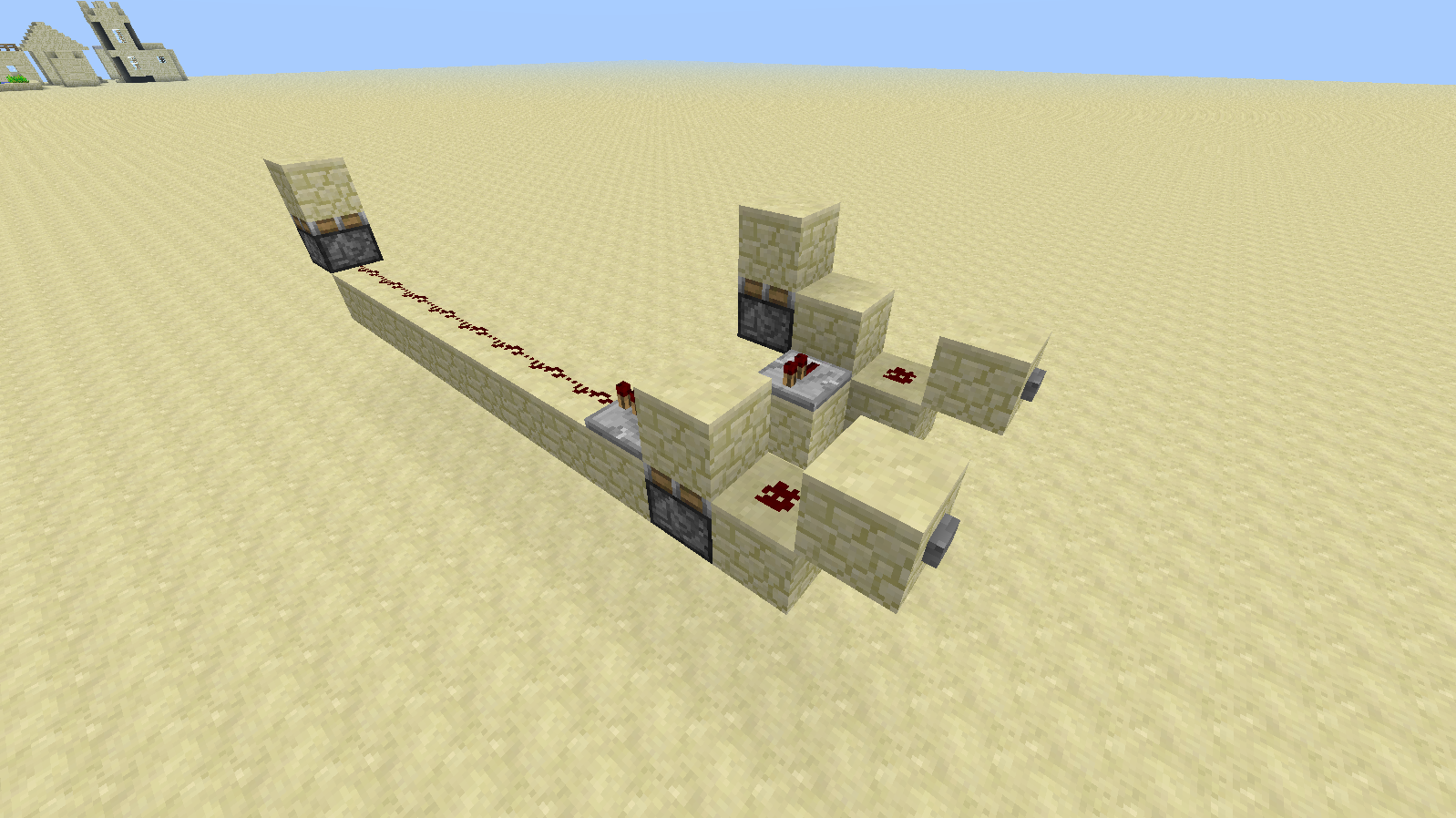


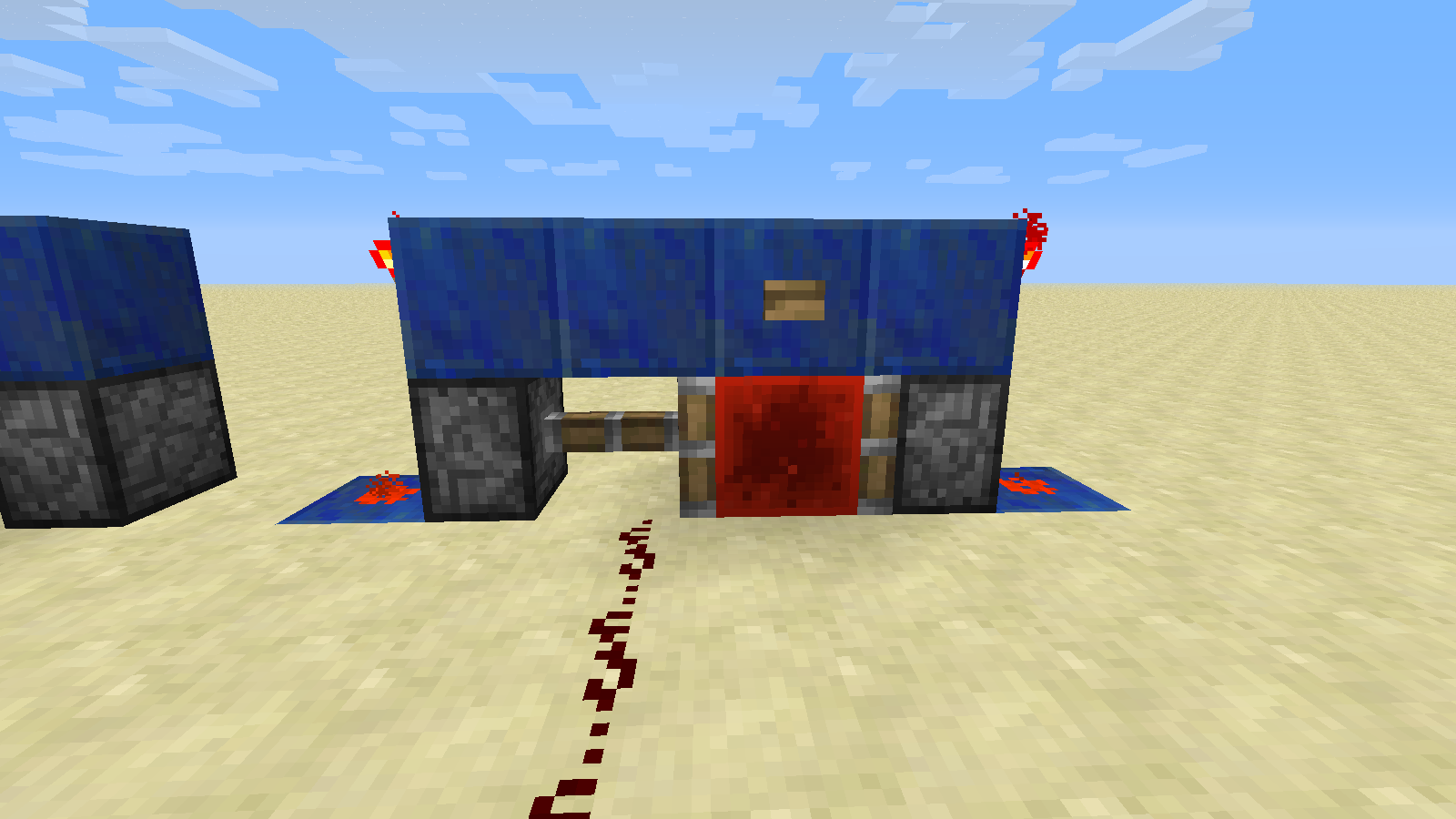
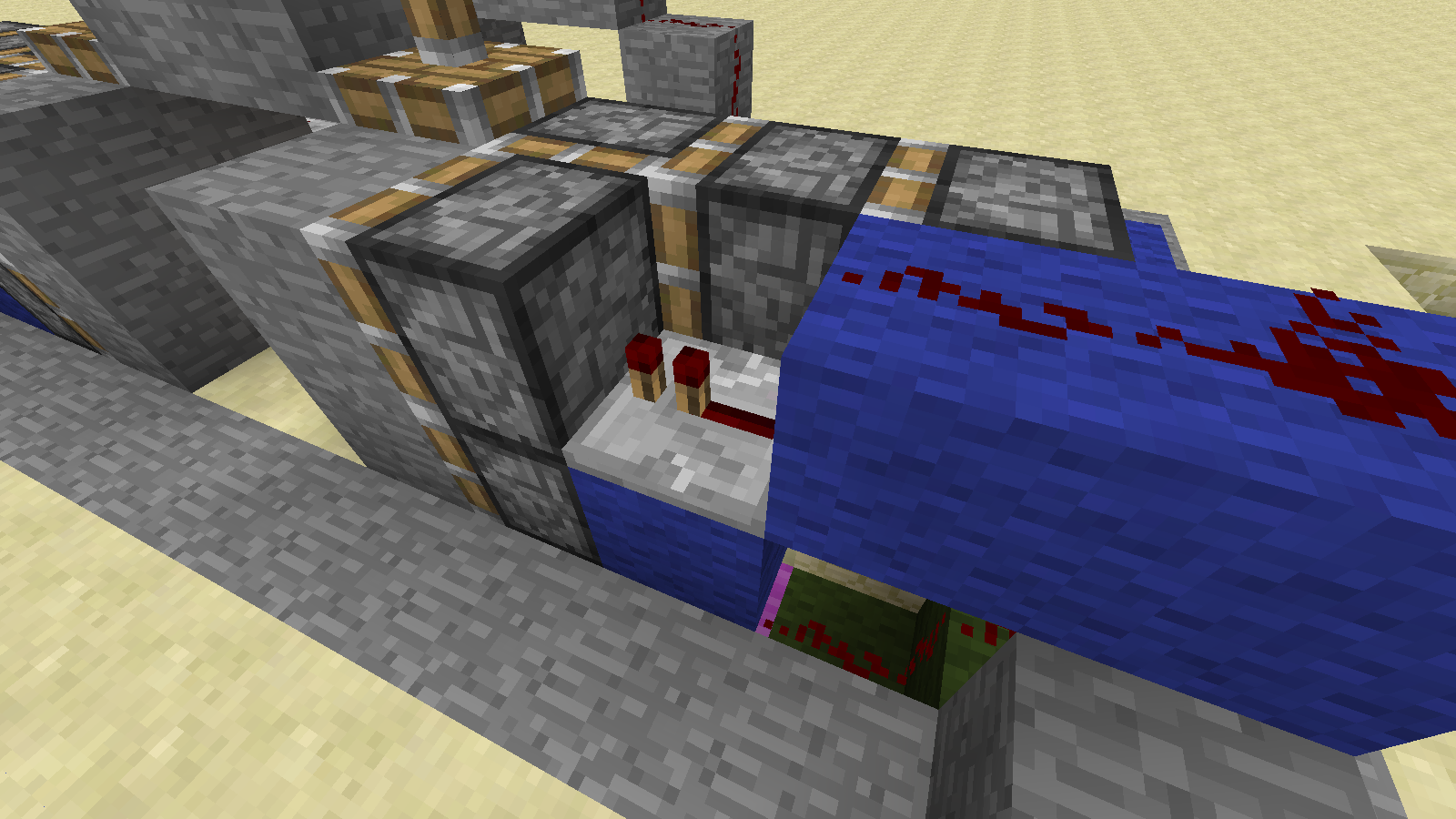

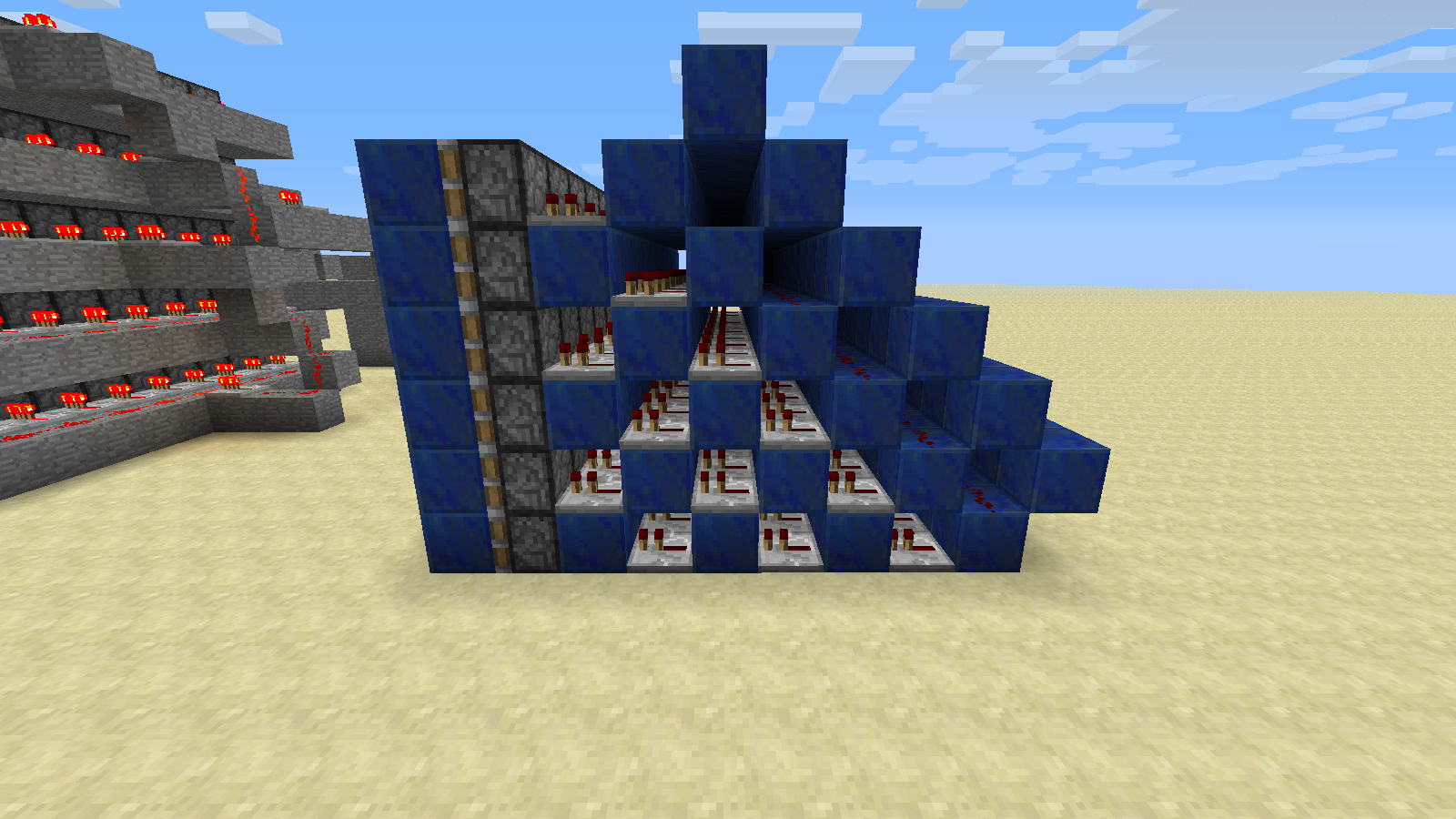
Pistons can be powered by blocks above blocks adjacent to them that do not update the piston when (de)powered. This can result in unexpected and unintuitive behavior that occurs when multiple seemingly unrelated conditions are met. (Example: [1] )
This behavior is intended to allow piston walls to be built, however the check for power should only look for blocks that will update blocks that are adjacent to the block below them, such as Redstone Torches, Redstone Repeaters, and Redstone Wires. This behavior is not needed for buttons or levers, as they can only be toggled by hand and can be placed adjacent to each other.
Piston walls will still be possible, but will require the use of redstone torches and repeaters. (Redstone Wire only powers blocks below it and blocks it is facing)Pistons can be powered by blocks above blocks adjacent to them that do not update the piston when (de)powered. This can result in unexpected and unintuitive behavior that occurs when multiple seemingly unrelated conditions are met. (Example: [1] )
This behavior is intended to allow piston walls to be built, however the check for power should only look for blocks that will update will actually update the piston, such as Redstone Torches, Redstone Repeaters, and Redstone Wires. This behavior is not needed for buttons or levers, as they can only be toggled by hand and can be placed adjacent to each other.
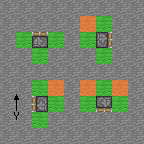
In the following image, pistons should accept any power from the green blocks, and check to see if the orange blocks would update it before accepting power from them.

Piston walls will not work with Redstone Wire (Redstone Wire only powers blocks below it and blocks it is facing), but that is difficult to get working anyway and it will still work with Redstone Torches and Repeaters.
Pistons can be powered by blocks above blocks adjacent to them that do not update the piston when (de)powered. This can result in unexpected and unintuitive behavior that occurs when multiple seemingly unrelated conditions are met. (Example: [1])
This behavior is intended to allow piston walls to be built, however the check for power should only look for blocks that will update will actually update the piston, such as Redstone Torches, Redstone Repeaters, and Redstone Wires. This behavior is not needed for buttons or levers, as they can only be toggled by hand and can be placed adjacent to each other.
In the following image, pistons should accept any power from the green blocks, and check to see if the orange blocks would update it before accepting power from them.
Piston walls will not work with Redstone Wire (Redstone Wire only powers blocks below it and blocks it is facing), but that is difficult to get working anyway
and it will still work with Redstone Torches and Repeaters.Pistons can be powered by blocks above blocks adjacent to them that do not update the piston when (de)powered. This can result in unexpected and unintuitive behavior that occurs when multiple seemingly unrelated conditions are met. (Example: [1])
This behavior is intended to allow piston walls to be built, however the check for power should only look for blocks that will update will actually update the piston, such as Redstone Torches, Redstone Repeaters, and Redstone Wires. This behavior is not needed for buttons or levers, as they can only be toggled by hand and can be placed adjacent to each other.
In the following image, pistons should accept any power from the green blocks, and check to see if the orange blocks would update it before accepting power from them.
Piston walls will not work with Redstone Wire (Redstone Wire only powers blocks below it and blocks it is facing), but that is difficult to get working anyway. It will still work with Redstone Torches and Repeaters.
Pistons can be powered by blocks above blocks adjacent to them that do not update the piston when (de)powered. This can result in unexpected and unintuitive behavior that occurs when multiple seemingly unrelated conditions are met. (
Example:[1])This behavior is intended to allow piston walls to be built, however the check for power should only look for blocks that will update will actually update the piston, such as Redstone Torches, Redstone Repeaters, and Redstone Wires. This behavior is not needed for buttons or levers, as they can only be toggled by hand and can be placed adjacent to each other.
In the following image, pistons should accept any power from the green blocks, and check to see if the orange blocks would update it before accepting power from them.
Piston walls will not work with Redstone Wire (Redstone Wire only powers blocks below it and blocks it is facing), but that is difficult to get working anyway. It will still work with Redstone Torches and Repeaters.
Pistons can be powered by blocks above blocks adjacent to them that do not update the piston when (de)powered. This can result in unexpected and unintuitive behavior that occurs when multiple seemingly unrelated conditions are met. (Example)
This behavior is intended to allow piston walls to be built, however the check for power should only look for blocks that will update will actually update the piston, such as Redstone Torches, Redstone Repeaters, and Redstone Wires. This behavior is not needed for buttons or levers, as they can only be toggled by hand and can be placed adjacent to each other.
In the following image, pistons should accept any power from the green blocks, and check to see if the orange blocks would update it before accepting power from them.
Piston walls will not work with Redstone Wire (Redstone Wire only powers blocks below it and blocks it is facing), but that is difficult to get working anyway. It will still work with Redstone Torches and Repeaters.
Pistons can be powered by blocks above blocks adjacent to them that do not update the piston when (de)powered. This can result in unexpected and unintuitive behavior that occurs when multiple seemingly unrelated conditions are met. (Example)
This behavior is intended to allow piston walls to be built, however the check for power should only look for blocks that will update will actually update the piston, such as Redstone Torches, Redstone Repeaters, and Redstone Wires. This behavior is not needed for buttons or levers, as they can only be toggled by hand and can be placed adjacent to each other.
In the following image, pistons should accept any power from the green blocks, and check to see if the orange blocks would update it before accepting power from them.
Piston walls will not work with Redstone Wire (Redstone Wire only powers blocks below it and blocks it is facing), but that is difficult to get working anyway. It will still work with Redstone Torches and Repeaters.
pistons.png
Pistons can be powered by blocksaboveblocks adjacent to them that do not update the pistonwhen(de)powered. This can result in unexpected and unintuitive behavior that occurs when multiple seemingly unrelated conditions are met. (Example)
This behavior is intended to allow piston walls to be built, however the check for power should only look for blocks that will update will actually update the piston, such as Redstone Torches, Redstone Repeaters, and Redstone Wires. This behavior is not needed for buttons or levers, as they can only be toggled by hand and can be placed adjacent to each other.In the following image, pistons should accept any power from the green blocks, and check to see if the orange blocks would update it before accepting power from them.
Piston walls will not work with Redstone Wire (Redstone Wire only powers blocks below it and blocks it is facing), but that is difficult to get working anyway. It will still work with Redstone Torches and Repeaters.
What I expected to happen was...:
Pistons should only extend when powered by a block that updates them.In this image, the pistons should accept any power from the green blocks, but check to see if the orange blocks would notify it before accepting power from them:
What actually happened was...:
Pistons extend when blocks are providing power to the block above them, even if they don't update the piston. In this case, the piston must be updated by another method in order to extend or retract.Example of odd effects this has: http://www.youtube.com/watch?v=JqU0Kmb_bFA
Steps to Reproduce:
1. Place a piston.
2. Put a block on top of it.
3. Put another block on any exposed face of that block.
4. Put a lever on the block you just placed and flip it.
5. Notice that the piston doesn't extend.
6. Place or break any block directly next to the piston.
7. Notice that the piston extends.
8. Flip the lever off.
9. Notice that the piston did not retract.
10. Place or break another block directly next to the piston.
11. Notice that the piston retracts.
What I expected to happen was...:
Pistons should only extend when powered by a block that updates them.In this image, the pistons should accept any power from the green blocks,
butcheck to see if the orange blocks would notify it before accepting power from them:
What actually happened was...:
Pistons extend when blocks are providing power to the block above them, even if they don't update the piston. In this case, the piston must be updated by another method in order to extend or retract.Example of odd effects this has: http://www.youtube.com/watch?v=JqU0Kmb_bFA
Steps to Reproduce:
1. Place a piston.
2. Put a block on top of it.
3. Put another block on any exposed face of that block.
4. Put a lever on the block you just placed and flip it.
5. Notice that the piston doesn't extend.
6. Place or break any block directly next to the piston.
7. Notice that the piston extends.
8. Flip the lever off.
9. Notice that the piston did not retract.
10. Place or break another block directly next to the piston.
11. Notice that the piston retracts.What I expected to happen was...:
Pistons should only extend when powered by a block that updates them. Blocks that are not touching the piston should not power it (touching diagonally is OK).In this image, the pistons should accept any power from the green blocks, check to see if the orange blocks would notify it before accepting power from them, and not accept power from any of the stone blocks:
What actually happened was...:
Pistons extend when blocks are providing power to the block above them, even if they don't update the piston. In this case, the piston must be updated by another method in order to extend or retract.Example of odd effects this has: http://www.youtube.com/watch?v=JqU0Kmb_bFA
Steps to Reproduce:
1. Place a piston.
2. Put a block on top of it.
3. Put another block on any exposed face of that block.
4. Put a lever on the block you just placed and flip it.
5. Notice that the piston doesn't extend.
6. Place or break any block directly next to the piston.
7. Notice that the piston extends.
8. Flip the lever off.
9. Notice that the piston did not retract.
10. Place or break another block directly next to the piston.
11. Notice that the piston retracts.
What I expected to happen was...:
Pistons should only extend when powered by a block that updates them. Blocks that are not touching the piston should not power it (touching diagonally is OK).In this image, the pistons should accept any power from the green blocks, check to see if the orange blocks would notify it before accepting power from them, and not accept power from any of the stone blocks:
What actually happened was...:
Pistons extend when blocks are providing power to the block above them, even if they don't update the piston. In this case, the piston must be updated by another method in order to extend or retract.Example of odd effects this has: http://www.youtube.com/watch?v=JqU0Kmb_bFA
Steps to Reproduce:
1. Place a piston.
2. Put a block on top of it.
3. Put another block on any exposed face of that block.
4. Put a lever on the block you just placed and flip it.
5. Notice that the piston doesn't extend.
6. Place or break any block directly next to the piston.
7. Notice that the piston extends.
8. Flip the lever off.
9. Notice that the piston did not retract.
10. Place or break another block directly next to the piston.
11. Notice that the piston retracts.
Edit: Image now allows for more interesting new types of redstone components and less invasive implementation.
Original:
What I expected to happen was...:
Flowing water with two adjacent source blocks and above another source block should make a new source block.What actually happened was...:
Water does not create a source block when above another source block. This results in currents in oceans that are annoying to try to fix and makes it difficult to fill in lakes or pools that are more than one block deep.Steps to Reproduce:
1. Dig a 3x3 hole two blocks deep
2. Fill the bottom with water
3. Place water on all sides of the top layer
4. Notice that water is still flowing towards the centerOR
1. Find a
n oceanthat is more than one block deep
2. Take a bucket of water from the area that is more than one block deep
3. Notice that there are now currents flowing toward the block of water you tookWhat I expected to happen was...:
Flowing water with two adjacent source blocks and above another source block should make a new source block.What actually happened was...:
Water does not create a source block when above another source block. This results in currents in oceans that are annoying to try to fix and makes it difficult to fill in lakes or pools that are more than one block deep.Steps to Reproduce:
1. Dig a 3x3 hole two blocks deep
2. Fill the bottom with water
3. Place water on all sides of the top layer
4. Notice that water is still flowing towards the centerOR
1. Find a body of water that is more than one block deep
2. Take a bucket of water from the area that is more than one block deep
3. Notice that there are now currents flowing toward the block of water you took
What I expected to happen was...:
Flowing water with two adjacent source blocks and above another source block should make a new source block.What actually happened was...:
Water does not create a source block when above another source block. This results in currents in oceans that are annoying to try to fix and makes it difficult to fill in lakes or pools that are more than one block deep.Steps to Reproduce:
1. Dig a 3x3 hole two blocks deep
2. Fill the bottom with water
3. Place water on all sides of the top layer
4. Notice that water is still flowing towards the centerOR
1. Find a body of water that is more than one block deep
2. Take a bucket of water from the area that is more than one block deep
3. Notice that there are now currents flowing toward the block of water you tookWhat I expected to happen was...:
Flowing water with two adjacent source blocks and above another source block should make a new source block.What actually happened was...:
Water does not create a source block when above another source block. This results in currents in oceans that are annoying to try to fix and makes it difficult to fill in lakes or pools that are more than one block deep.Steps to Reproduce:
1. Dig a 3x3 hole two blocks deep
2. Fill the bottom with water
3. Place water on all sides of the top layer
4. Notice that water is still flowing towards the centerOR
1. Find a body of water that is more than one block deep
2. Take a bucket of water from the area that is more than one block deep
3. Notice that there are now currents flowing toward the block of water you tookNOTES:
Fixed and tested with MCP 7.19:--- a/src/minecraft/net/minecraft/src/BlockFlowing.java +++ b/src/minecraft/net/minecraft/src/BlockFlowing.java @@ -93,7 +93,7 @@ public class BlockFlowing extends BlockFluid { var10 = 0; } - else if (par1World.getBlockMaterial(par2, par3 - 1, par4) == this.blockMaterial && par1World.getBlockMetadata(par2, par3, par4) == 0) + else if (par1World.getBlockMaterial(par2, par3 - 1, par4) == this.blockMaterial && par1World.getBlockMetadata(par2, par3 - 1, par4) == 0) { var10 = 0; }
What I expected to happen was...:
Players to be able to place water buckets in the spawn area if the server doesn't have an op.
Increasing the spawn protection radius to increase the area in which players can NOT place water buckets.What actually happened was...:
If there is no op (or spawn protection radius is lower than default) players can place blocks in spawn, but cannot place water buckets.
If the spawn protection radius is increased, players can still place water buckets but cannot place blocks.Steps to Reproduce:
1. Get a bucket of water
2. /deop all ops
3. Find spawn
4. Place dirt or something to verify that spawn protection is actually disabled
5. Place water bucket
6. Water disappears immediately. Right clicking anywhere or relogging refills bucket.OR
1. Find spawn
2. Set spawn radius to 50000
3. Get a bucket of water
4. /op dinnerbone
5. Move several chunks away from spawn
6. Place blocks to verify that spawn protection is enabled
7. Place bucket of water
8. Waterdisappears immediately. Right clicking anywhere or relogging refills bucket.What I expected to happen was...:
Players to be able to place water buckets in the spawn area if the server doesn't have an op.
Increasing the spawn protection radius to increase the area in which players can NOT place water buckets.What actually happened was...:
If there is no op (or spawn protection radius is lower than default) players can place blocks in spawn, but cannot place water buckets.
If the spawn protection radius is increased, players can still place water buckets but cannot place blocks.Steps to Reproduce:
1. Get a bucket of water
2. /deop all ops
3. Find spawn
4. Place dirt or something to verify that spawn protection is actually disabled
5. Place water bucket
6. Water disappears immediately. Right clicking anywhere or relogging refills bucket.OR
1. Find spawn
2. Set spawn radius to 50000
3. Get a bucket of water
4. /op dinnerbone
5. Move several chunks away from spawn
6. Place blocks to verify that spawn protection is enabled
7. Place bucket of water
8. Water is placed and does not disappear
Jerky camera movement when walking fromblocks less than half a meter high to higher blocksJerky camera movement when walking from shorter blocks to taller blocks
This appears to be about the breaking animation z-fighting with the block being broken rather than the block reappearing.
F3+A (reload chunks) fixes it without having to cycle through render distances.
With the "Use Item" key set to Left Control, right click is still used for picking up half stacks or placing a single item from a stack in the inventory.
Duplicate of
MC-136Duplicate of
MC-136. Labels are not case sensitive, so one of each word is sufficient.Then they need to make a block for that purpose. 1.5 is supposed to change some redstone stuff, so people will need to update their builds anyway.
Known behavior does not equal intended behavior, otherwise we wouldn't need a bug tracker.
Was the sun coming up when it started teleporting?
Could you please attach the log to your report?
Could you attach those images to the issue so people don't have to search through comments to find them? There's an "Attach Files" button at the top of the screen.
You can embed images as well, though it isn't necessary.
You can reproduce the problem by looking at the near side of the chest, walking forward until you're touching it, then looking at the far side of the chest and moving forward. If you look at the far side while you are first walking forward, you'll notice that when you look at the near side you can actually walk forward a bit more.
You can also walk through them by arranging them like
where # is a chest and O is you, walking into the corner, and looking back and forth between the chests in the corner. It's easier if the chests are eye level, and just as possible with them stacked two high.
This also works in survival, and can be used to reproduce
MC-1749.Confirmed for both chests and ender chests.
It only happens when the block below the chest has a hitbox that extends beyond the edge of the chest. The same thing happens with end portal frames when there is an open hatch on the block below them.
I believe the hinge point is intentional. If there is texture fighting the lid just needs to be a little bigger than the base.
The stack on the left was thrown as a stack, but the items in the stack on the right were thrown individually and autostacked. Notice that there are visibly multiple blocks on the left.
IMO double slabs should be removed altogether. Placing a slab on another slab should create the block they were originally crafted from.
Hiram: Do you happen to have Advanced OpenGL (in video settings) turned on, and does the problem go away if you turn it off?
Hiram: That is a fundamentally different bug. This report describes a problem that never reverts itself once corrected (at least until you leave the area), and is not affected by the Advanced OpenGL setting. You may want to report your bug separately and hope the mods don't decide it's a duplicate of this.
When you experience this problem in the future, could you turn the debug screen on while taking screenshots? I'm curious about what kind of framerate you're getting when this occurs. It would probably be a good idea to include the pie chart (Shift + F3) for potential future reference as well.
Hiram: I was actually referring to further experiences with this bug.
You don't actually need to be standing on any stairs. Stand on the corner of four blocks with a few stairs to look at, and try placing one on each of the four blocks you are standing on, looking back at the stairs between attempts.
I was able to reproduce this by waiting for all the chunks to load around me, looking in a cardinal direction, moving backwards and forwards a couple of blocks for a while, and then turning and flying perpendicular to the direction I was looking. Using the overworld superflat preset may help you see what is going on.
Allowing texture packs to define their own chest models might work. As of right now everything is defined in code.
The piston extension updates the piston base whenever it gets an update.
Correct.
The same thing happens if you use wire to transfer the signal to the piston or replace the repeater the button powers with redstone dust. This is not related to
MC-108.It works fine for chests.
Signs and chests are tile entities. The difference between tile entites (chests, signs, etc.) and entities (paintings, item frames, chickens, etc.) is whether they require a block to exist. Tile entities cannot move around freely or exist in the same space as another block, while entities can exist practically anywhere.
Stairs, cakes, anvils, torches, water, and portals are neither tile entities nor entites, even though they are not cubes.
It is possible for blocks to look a lot like entities, and entities to look and behave a lot like blocks. The minecraft wiki is a pretty good place to look if you're not sure what something is.
You can bring more attention to this bug by voting on
MC-666.@Xavier I'd say it's more like a car exploding if you tilt the seat too far forward and turn the steering wheel to the left while the parking brake is on. It would be terrible if your entire web browser crashed because you put a "~" between the "http" and the "://" or executed an infinite loop in some javascript somewhere.
Errors that can be handled gracefully should be, preferably returning the game to a functioning state, even if that's just the main menu or a screen with a button to get there.
@Michael: Pistons do not constantly check their state, otherwise it would be impossible for them to be used as BUD switches. If you were referring to the videos of sethbling showing grum how redstone works, grum thought it was a bug and sethbling told him that Mojang wasn't going to fix it.
@Mojang: If you didn't intend this behavior and/or do intend to fix it, I suggest stating publicly as soon as possible that it WILL be fixed eventually and to take that into consideration when building new stuff. You may even want to provide a build that includes the fix so people can proactively test and fix their contraptions.
Side note: Piston powered redstone block walls aren't as fun as I thought they'd be. Pistons don't cause updates when they extend, and when they retract they apparently update before pulling the redstone block. I also got a nice mess when I depowered them that seems to be affected by the size of the redstone hashset.
I highly doubt that pistons were initially intended to produce all of the behavior that they exhibit, specifically BUD behavior. I do not think the initial intention has changed, but that Mojang has been receiving pressure to not remove the behavior. The intention to not break stuff (and upset a bunch of people) has overridden the initial intention of pistons being pistons.
Tying a mechanic that is completely unrelated to (and occasionally contradicts) the expected behavior of something so closely to it's core function is unhelpful for everyone, especially for people who are new to redstone, but even experienced redstoners have to deal with the additional mental burden and space restrictions required to avoid the mechanic when they don't need it.
If you were replying to the side note in my previous comment which is only tangentially related to this bug:
(Spoiler courtesy of Pastebin.com)
Portions of it have, but the project has not been completed yet. One specifically noticeable part is the new texture loading system. I suspect we'll continue to get bits and pieces of it in coming snapshots. An unfortunate side effect is that this specific bug has lower priority because anything done to fix it will be rewritten anyway.
Confirmation that they are still working on it: https://twitter.com/Dinnerbone/status/294410000665821186
@SewdiO:
This is a problem whenever someone wants to use pistons for anything that does not involve block updates. Even if it is a relatively small problem, it takes time and mental effort to solve, and anyone who does not understand it will tend to develop superstitions and/or a fear of redstone. Compact builds that rely on special case behavior tend to break between updates, so using them is a risk in and of itself.
-
You don't want it removed because compactness isn't a problem, then proceed to protest it's removal because it would break compactness.
-
When the bug occurs, it may seem inconsistent, which can be just as bad as something that actually is inconsistent. However, this bug also introduces general inconsistencies with other blocks and devices in Minecraft.
There is also a distinction between temporal consistency and spatial consistency. Most redstone blocks are spatially consistent*: if the world around the block is in state "A" the block is in state "X", if the world is in a second stable state "B" the block is in state "Y", etc. Each block has exactly one state that can be derived from every world state, while each block state can correlate to more than one world state. Spatial consistency is much easier to understand than temporal consistency.
Most bugs are very self consistent, at least temporally. Debugging a consistent bug is much easier than debugging an inconsistent bug, but it doesn't make it less of a bug.
-
Knowing how glowstone and slabs work is irrelevant to this bug, which requires neither.
The minecart booster bug was very useful, too. It got replaced by a legitimate method of boosting minecarts. ;P
-
I do not think the trapdoor "fix" was intended to address this bug, but it wouldn't be a problem if this bug didn't exist in the first place.
* Assuming the state of the world is stable, e.g. all blocks have had a chance to finish processing all inputs they have received.
Minecraft limits the number of render updates per frame.
This bug occurs frequently in youtube videos, and it seems toggling the recording "fixes" the problem nearly instantly (as reported by the youtuber). In general, professional youtubers have machines that can get upwards of hundreds of frames per second. When recording, Fraps limits them to 30 fps.
By stopping the recording, Minecraft can increase it's framerate and render all the chunks within view distance, and then re-render the chunks that were not rendered properly.
I have personally seen chunks rendering behind the unrendered chunks through the hole that they left exposed. If it was server lag the closer chunks would render first, and the sides of the chunks that the client did have would be rendered. The client doesn't render the sides of chunks next to these holes because there is data there.
You can link to issues with "[
MC-8924]" or "MC-8924" (without quotes). It's easier to read than a full URL, and is crossed out when the issue is resolved. Note that there is a dash between "MC" and "8924".The implementation results in inconsistency, for example, all ore storage blocks are light gray except lapis, which is dark gray. Block.blockLapis is Material.stone, while the other storage blocks are Material.iron. The only difference between those materials is the map color, and both are otherwise identical to Material.craftedSnow.
If materials have been added solely to allow differentiation in map color, e.g. between dirt and grass, stone, snow blocks, and ore storage blocks, etc. (which is likely since map color is the only difference between them); it seems reasonable to expect a new material to be created for mycelium, obsidian, pumpkins, sandstone, etc. to give them the appropriate map color, or decouple map color implementation from materials altogether and assign the appropriate colors to blocks more directly.
Note: Names are referenced according to MCP's interpretation of the obfuscated code. The original source code may have different and/or more reasonable names.
@Yoerie Dinnerbone said they would add a block specifically to detect block updates if this got fixed. It would be much more compact than this and pistons would be easier to understand and use.
It should be linked with "relates to" rather than "duplicates".
To reproduce:
1. Set render distance to far
2. Look straight in one direction
3. Turn on the debug screen
4. Wait until framerate increases dramatically, chunk updates decrease dramatically, and/or E: ##### (at the end of the second line) stops changing
5. Turn around and start walking or teleport outside of render distance in the direction you were not looking
6. Notice holes in the world that stay until everything else on your screen has rendered
Notes:
It may be easier to see the location of the problem on a flat world.
If the above does not work in singleplayer, you may need to artificially limit your framerate. I don't think changing "Performance" to "Power Saver" will work, so use something like fraps, another GPU intensive game, and/or set "Performance" to "Max FPS"
If you are playing on a server that has the view distance set to 13+ you will not experience this problem.
Below view distance 13 the problem seems to be inversely proportional to the view distance, because the client is recieving fewer new chunks outside the render distance to distract it.
You may have this problem with a shorter render distance if the server has a shorter view distance.
If you look at a corner of the world, the hole will begin to render once everything else you can see is rendered. If you immediately look at another part of the world that has not rendered yet the hole will stop rendering.
Hypothesis:
The client is trying to render chunks that it has not recieved from the server. If the player is not looking in that direction, they will be marked as not in the frustum (http://en.wikipedia.org/wiki/Viewing_frustum). For some reason it stays that way until the game has a chance to render chunks that are not in the frustum or the player gets close enough to force it to render.
I went ahead and built a 1:1 pixel vertical display without quasiconnectivity. I'm attaching a zip containing the display and the mod (for 13w05b).
Edit: 13w05b, not 13w05a.
Here's a patch that fixes the problem. Works with MCP 7.34 (13w05b).
--- old/minecraft/net/minecraft/src/WorldRenderer.java 2013-02-21 12:19:37.668954895 -0700 +++ src/minecraft/net/minecraft/src/WorldRenderer.java 2013-02-21 12:36:12.384921752 -0700 @@ -315,5 +315,8 @@ public void markDirty() { this.needsUpdate = true; + + for(int i = 0; i < 2; i++) { + this.skipRenderPass[i] = false; + } } }"2" is probably a constant.
Edit: Other areas in the code use a for loop.
This is not the only way to make a BUD with pistons, and dinnerbone did say they would implement a BUD block if they broke this. Try putting a block in front of a piston, obsidian in front of that block, powering the piston, and breaking the obsidian.
Here's an infinitely expandable version. (display_demo.zip)
My point is that I figured out how to do it without hitting my head on my desk. IMO that's a little more important than compactness, but I think this may be a bit more compact that DicotheRedstoner's display anyway.
MC-129is a rendering problem. This looks like the client hasn't actually gotten the data. It's related, but not a duplicate.Dispensers did the same thing in 1.4.7, it was just less noticeable because they only responded to redstone-initiated block updates. Simple removal of an "or" statement would fix that one. They are opaque, so putting two on top of each other with a dispenser facing them would have the desired effect anyway.
@William Pearson, redstone blocks will enable many of the things that otherwise wouldn't be possible without quasiconnectivity. Things may not be as compact, but why do they need to be? If you really want something, you can make space for it. As for the benefits of removing quasiconnectivity, we don't really know what will become possible because we haven't had a chance to use pistons that aren't affected. One thing that will definitely benefit is the ability of players who are inexperienced with redstone or the intricacies of block updates to design complex things.
Same symptoms, similar cause, but fixing one won't fix the other.
1: It would still behave in a buggy manner
2: One more thing that needs to be maintained - If they change something fundamental about pistons they need to do it in two places
3: Player confusion as to why there are two types of pistons that look like they should do the same thing, using a different piston than the tutorial, etc.
In addition to the patch provided, it would be ideal to sync client render distance with server view distance, and increase the single player server view distance to 13 when render distance is set to far.
It seems to be about as common in 13w11a as it was in 1.4.
The droppers/dispensers being powered the same way is a different bug and should be marked as related instead of duplicate. Pistons are not and should not be powered the same way as most other blocks, and both being in the same report prevents one from being marked resolved while the other isn't fixed.
It affected beta 1.8.1 as seen at 3:42 in season 2 episode 1 of VintageBeef's Mindcrack LP, but I don't remember it happening at all in beta 1.7 and earlier.
"Worlds do (and always have) an invisible wall around them." - Anyone before InfDev.
"Redstone torches do (and always have) fired one tick sooner if you orient the stack in the north-south direction." - Anyone before 1.5
"Pistons do (and always have) been able to duplicate diamond blocks." - Anyone before that was fixed
Incorrect or illogical behavior doesn't suddenly become correct or logical just because it has always worked that way.
Jeb implemented pistons, but I don't think anyone at Mojang understands the issue fully. At most they're trying to not break stuff and avoid having to implement a BUD block.
140 plus people have reported duplicates of this bug. I would estimate that about 30 of those people reported the dispenser/dropper version, which leaves 110 who reported the piston version. I don't know of any other bug that is that well known but still that hard to search for.
The behavior with redstone blocks is identical to the behavior of blocks powered by repeaters or levers. The only difference is that redstone blocks can't be turned off. Therefore it is the same bug.
I agree with separating the dispenser bug.
If you are correct redstone lamps would exhibit the same behavior. They don't.
In this diagram the redstone is strongly powering the block which is weakly powering the spaces next to the block which do not transmit any power. The piston is below one of those spaces, therefore it should not receive power. If you replaced the piston with a redstone lamp, which can be weakly powered, it would not light up.
There are two distinct definitions of the term "weak" power. One of them refers to a block being able to activate redstone devices next to it by "weakly" powering them, and another refers to any power provided by redstone dust, which redstone dust will happily ignore if it isn't connected to the source of that power.
The second definition has nothing to do with how far the power can extend. You can test it by powering a line of redstone lamps. Both repeaters and wires will power the same distance (two blocks), yet wire will only accept power from the block powered by the repeater.
Better Than Wolves has had a functional non-tile-entity BUD block for a long time.
The pseudocode for your suggestionwould be
located in BlockPistonBase.java. If they ever added more pushable powered blocks they would need to do
That only fixes one problem which only surfaced after this bug was initially reported.
What I think is your point: "Don't let anything be powered by any blocks in front of it."
That would work for the case where redstone blocks make pistons get stuck, but it's still only fixing one symptom of the problem.
Repeaters and dispensers don't need that limitation to function correctly. Pistons have that limitation so they don't automatically break any redstone torches that happen to be placed in front of them.
@kbk


As stated in the bug report, my opinion is that pistons should only accept power from the green blocks and strong power from the orange blocks directed toward the block above the piston in the following diagram:
In other words, I agree with you about pistons but I'd actually like them to be a little more limited than what you're thinking.
A few things I can think of that would break with this implementation: All devices relying on quasiconnectivity, piston walls powered by redstone torches, and pulse limiters using a repeater and a block attached to an upward-facing sticky piston. The other option I presented would likely result in the desired functionality being unimplemented in new repeater-like devices.
Dispensers have always worked that way, but since they ejected items on every redstone update it wasn't nearly as noticeable. If you had something powering one and you powered it with something else it would still fire, now it won't. Fixing the original bug revealed a second bug that needs to be fixed just as badly.
There are some special cases that pistons need to take into consideration, but that doesn't require quasiconnectivity.
I was using a different definition of signal strength in which "strong" is coming from anything that isn't a block and "weak" is coming from opaque blocks powered by a strong signal. It's an implementation detail that only applies to a special case involving pistons, and the end result would actually be quite intuitive to players.
Still happens with smooth lighting turned off.

You can reliably reproduce this bug by reloading chunks (F3+A), facing in one direction until the F: and E: values in the second line on the debug screen stop changing, and then turning around and walking/running/flying in the direction you were not facing.
The size of the lid can be changed without changing the size of the texture.
A BUD would be a block that emits a redstone signal when a block next to it changes. The implementation could vary, but the basic idea makes sense.
You're arguing that they should intentionally leave an unintended function in the game because it doesn't make sense.
Locked repeaters have a visual indication that they are locked, require a very specific and obvious set of conditions, and the locking function is directly related to the core function of repeaters.
Vanilla Minecraft has a ton of things that don't "fit" Minecraft. There is absolutely no precedent for most of the things they added in 1.5.
And forget about mods that have BUD blocks, vanilla has several. They just don't look like one so we can safely ignore them. Water, floating sand, pistons, and even repeaters can be used to detect block updates.
I don't think anyone cares too much about redstone blocks. The uselessness of sticking a redstone block on top of a piston is immediate obvious so people don't do it. A more annoying point is that mechanisms can interact with no immediately obvious symptoms of that interaction.
As for piston walls, I think he may be talking about repeaters and torches powering pistons below and in front of them. That's what the orange blocks are for.
The orange blocks are just placeholders for repeaters or similar blocks.
Still a problem in 1.6.1.
%appdata% is Windows only. On Linux minecraft's save location is
and on Mac it's
The 2 by X wall would be possible without quasiconnectivity by alternating powering the sides and backs of the pistons or blocks behind the pistons, e.g. power the back of the bottom ones, sides of the second ones, back of the third ones, etc.
Alternatively you could use chains of RS block pushing pistons.
@Grum In that case wouldn't a more appropriate resolution be "Won't Fix?"
His comment implies that it is a bug that they won't fix "because users love bugs."
I wrote a mod that removes this behavior: http://www.minecraftforum.net/topic/1874049-sspsmp-pistondispenser-quasiconnectivity-fix/
This is not a duplicate of
MC-886. Opening GUIs (including chat) clears the state of most keys, but does not clear the state of the control key.To reproduce the problem:
For completeness, I am using Ubuntu.
Challenge accepted. If you don't want to see a bunch of pistons being placed click here instead.
That's a problem with hoppers not having any externally visible or audible indication that they are being powered. They respond immediately to changes that affect them, so the worst case for debugging hoppers is far better than the worst case for debugging quasiconnective pistons.
I don't think that one will be easy to fix. It might be possible with redstone blocks, but that's the kind of thing I would expect to break eventually no matter what tricks were used.–
EDIT: Never mind, I didn't remember how it worked, but after looking at it again it looks doable.
–
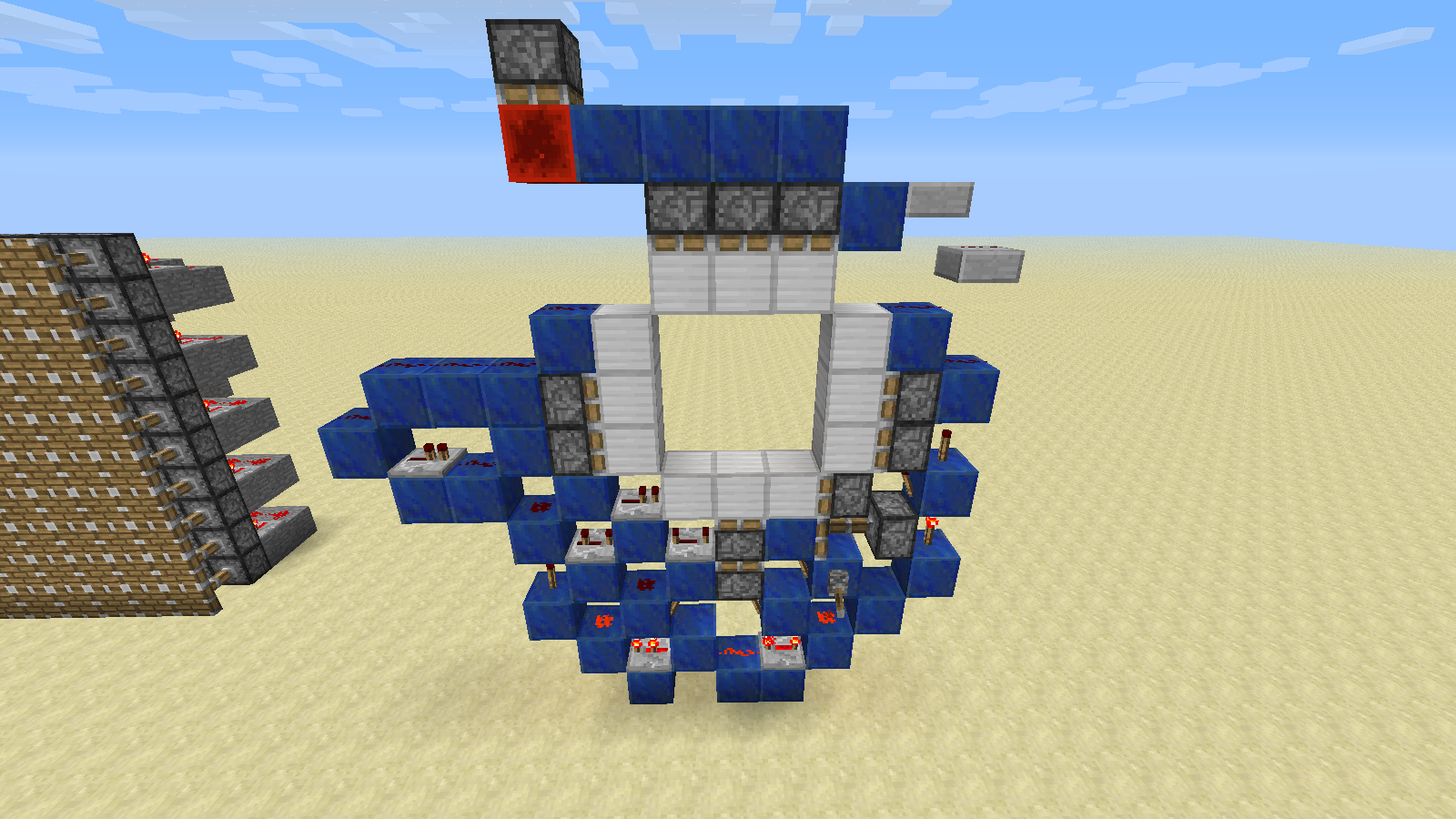
I managed to fix this 3x3 door by modifying it slightly. It's not quite as compact as the original but the concept is obviously workable.
You might also remember that at one point wooden stairs and fences didn't burn. Slabs got a new block because fire and tool properties are based on block ID, and removing the old blocks would have replaced all the existing ones with air or a different type of slab.

–
Another device that breaks is this piston toggle. It can be fixed by extending the redstone above the pistons over the top of them, placing the torches on the sides of the blocks directly above the pistons, and placing redstone wire directly below those torches:
The torches can be placed on any side of those blocks as long as they don't interfere with the output.
My implementation of the bug fix allows repeaters to power the piston below and in front of them. I think that behavior is useful and intuitive enough to keep, and I'm not quite sure how I would be able to fix this particular device if it was removed:

There's supposed to be a wall in front of it, and powering the piston below the piston next to the repeater would break it.
Powering individual rows of a wall using pistons and redstone blocks is possible with this implementation but quickly gets quite bulky. Powering rows of wall has always been pretty much impossible, so I think it might be worth looking into adding a mechanic to remedy that. You still can't do it with a wall of RS torches, but that's objectively less useful than pistons.
–
@grum: BUDs don't expose more implementation than any other system, they just use it differently. For all anyone else cares, they could just as easily poll for changes every tick and the only difference would be performance. Besides, if all that mattered was hiding implementation we'd all be staring at blank or maybe even invisible screens.
I would also like to vote against adding a gamerule. Utilizing gamerules for optional forward compatibility has never happened before, and if you do it once everyone will end up demanding it for everything.
That would power the piston you can't see behind the block the repeater is on.
@grum Floating sand, breaking and placing blocks, flowing water, etc. would still need to be updated somehow. If everything were simulated the simulation could also take into account any blocks that should respond to such changes.
Here's a much more flexible piston toggle. The repeater is required when it is facing most directions, but in some cases it can be omitted. The input can come from any direction, the output can be taken from any side of the redstone block, and the output piston can be rotated in any direction except towards the input.


–
For the alternating extended/retracted piston wall using the mod provided: Send a one tick pulse to the repeaters next to the pistons while sending a two tick pulse to the other ones to extend the pistons directly next to the repeaters. The other pistons can be extended as normal or with a one tick pulse if you like consistency. Two or more tick pulses will clear the wall. If you want to extend raw pistons just use redstone blocks and add another wall of pistons in front of the first. If one set of rows is already extended it can be reversed with a one tick pulse.
And then Notch just gave up and left them with a pig skin and dropping pork.
I posted a screenshot of a working 3x3 door and have built half of a 4x4 door that operates by manually toggling levers. The design can be mirrored and the lever flipping can be automated.
You're getting a bit ridiculous here, but I suspect that those would be possible to build using redstone blocks.
Name one useful thing besides this that aiming a repeater at the side of another repeater does. I'd also like to point out that it is immediately obvious that something is happening.
Two systems that are normally not used together and don't normally interfere can break when they are both activated at the same time. You may notice that this bug was reported before 1.5.
That is neither an obvious solution nor solves all of the problems with this bug.
They don't need to be compact for this to be a problem. A single wire in the wrong place is all it takes.
How about experimenting with redstone and building up your knowledge? How do you think people managed to write the wiki in the first place?
This is pretty much what already happens because, short of using a mod, we can't test the circuit to make sure it would work.
As far as the boats breaking, they collide with items. You can test it by setting up a dispenser on a clock a few blocks above some water, filling your inventory, and boating through it in survival.
I would imagine that in some cases the boat manages to hit the lilly pad item before it gets a chance to be picked up or fall far enough to avoid the boat.
Sounds like you have "Advanced OpenGL" turned on. See
MC-3998.Nope. It's a client side issue. By default, the server doesn't send enough chunks to "fill" far render distance but the client goes ahead and renders the empty chunks anyway. The client prioritizes rendering chunks the player can see but it doesn't re-check empty chunks until they get re-rendered, so the ones the player was looking at when they got rendered will render fine (unless you have Advanced OpenGL on - this is unrelated to
MC-3998), but the ones you weren't looking at at the time they were rendered don't get re-rendered until everything else you can see gets rendered.You can work around this if you have a server by setting the view distance higher (about 12 or 13 I think), but unfortunately I don't think there's a way to change it in singleplayer. Alternatively, as mentioned above, setting Render Distance to normal works fine.
Note that this only applies to "chunk errors" you can see through. If you can see the sides of chunks it's an issue with the client never actually getting the data in the first place.
If I understand this correctly, the problem is that "falling sand" with a lava or water ID (which can be spawned with custom spawners in vanilla) will use the full 2x2 texture on its sides.
I don't think this ever happened before beta 1.8.
The bottom piston should not be powered in that picture.
MC-47986is not a duplicate of MC-11193. MC-11193 is about the green wire updating the piston prior to the magenta wire turning off when the power is cut.MC-47986is about breaking the magenta wire, then breaking the green wire and expecting the piston to be retracted.The colors I'm using are from MC-11193.