 jacobsjo
- CC_fan
- cc_fan
- Europe/Stockholm
- Yes
- No

![[Mojang] slicedlime](../../../data/assets/gravatar/slicedlime.jpeg)
 WEB-5485
![[Mojang] Gnembon](../../../data/avatars/users/93709.png)
 MC-262309
![[Mojang] Billy Sjöberg](../../../data/avatars/users/42806.png)
 Low
Low Normal
![[Mojang] SHugoh](../../../data/avatars/users/18947.svg)
![[Mojang] TommyWallberg](../../../data/avatars/users/18941.svg)









Dropping an Item and closing the World at the same time as you pickup the Item will let you duplicate the item.
How to reproduce:
1. Drop an item on the Ground below you
2. Wait until you pick the item up again
3. Hit Esc at exactly that moment (you should see the pickup animation of the Item in your Hotbar and still the Item on the Ground)
4. Exit the World
5. Reload the World
6. See that you have 2 Items in your Inventorythanks,
CC_fanDropping an Item and closing the World at the same time as you pickup the Item will let you duplicate the item.
How to reproduce:
1. Drop an item on the Ground below you
2. Wait until you pick the item up again
3. Hit Esc at exactly that moment (you should see the pickup animation of the Item in your Hotbar and still the Item on the Ground)
4. Exit the World
4.5 Some people are saying that you have to quit minecraft and relaunch it for the Bug to "work"
5. Reload the World
6. See that you have 2 Items in your Inventorythanks,
CC_fanHere is a german Video showing the Bug (without relaunching Minecraft): https://www.youtube.com/watch?v=wvyUARstSCo
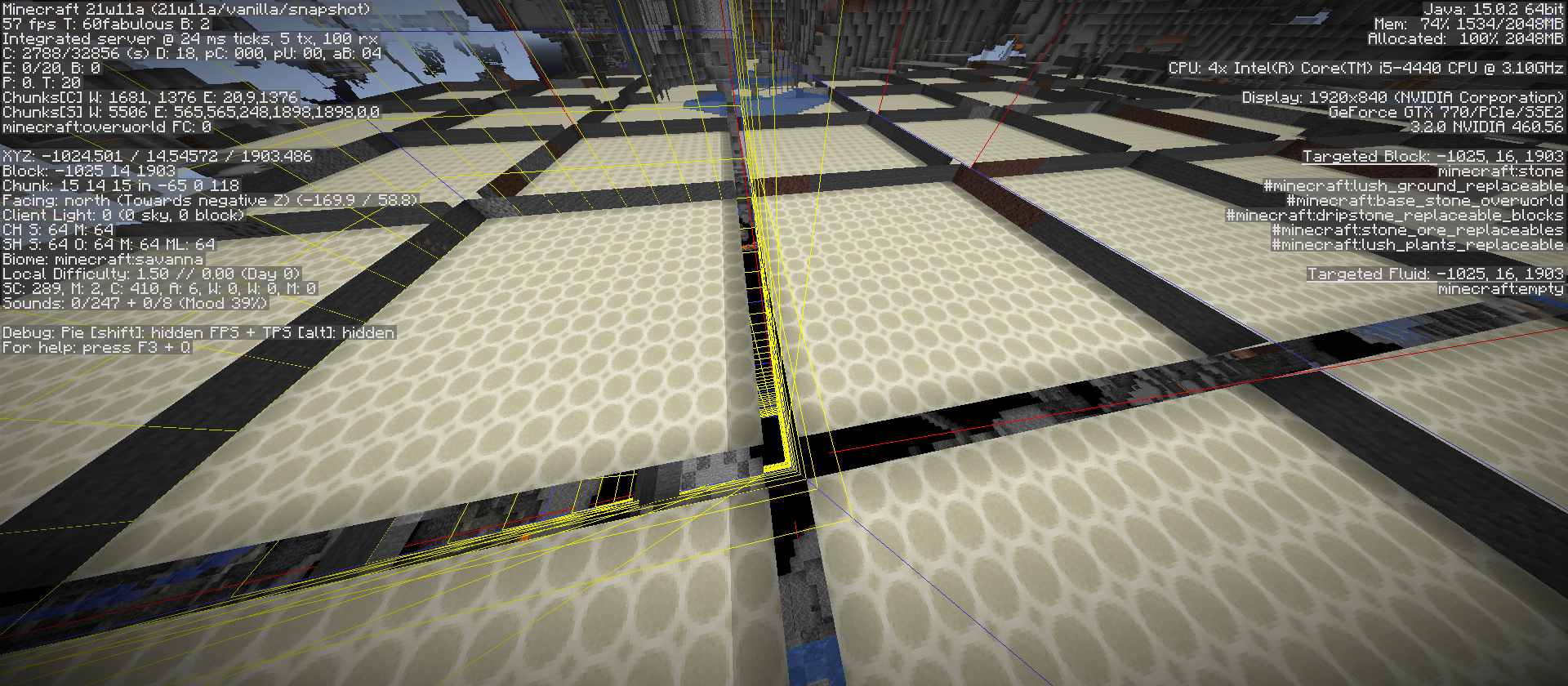
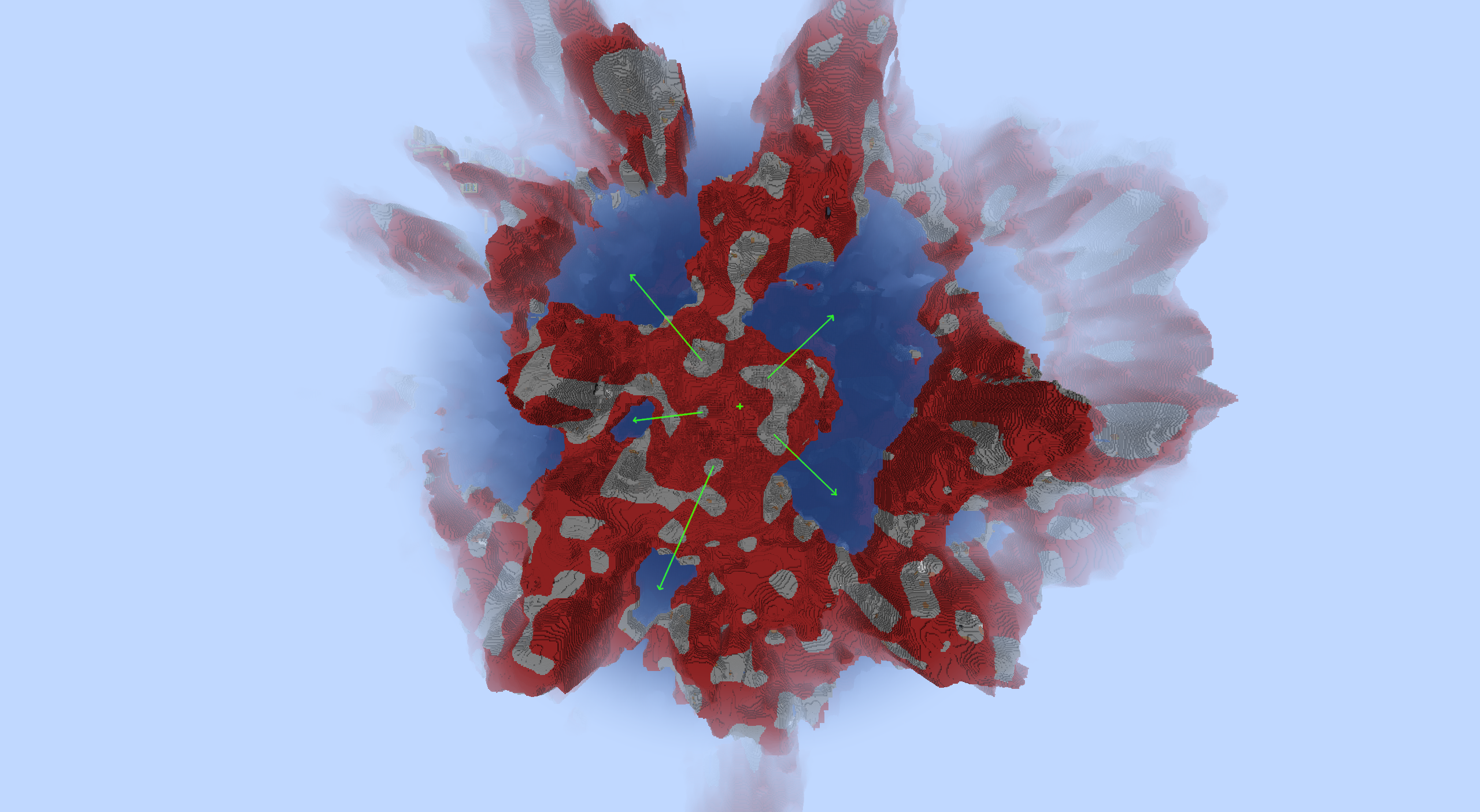
When generating a fossil feature the structure is placed at a random position in the chunk. However this position never includes the far east and south blocks in that chunk (chunk coordinates X=15 or Z=15). This is most obvious when generating structures with size 15x15 as those are always placed at chunk coordinate 0, 0 leaving a one block gap.
(Note that the placement in a grid is not a bug as the feature explicitly makes sure that the structures do not cross chunk boundaries.)
How to reproduce:
- Create a world with the attached datapack
- Teleport to a savanna
- Go into spectator mode and fly downwards
- You will see the structures as in the image above
(Note that while this reproduction involves a datapack the bug also affects the vanilla fossils, although its much less obvious because of their smaller size and rarity)
Code analysis:
(using the official mappings and some variable renaming)
The position to place the structure in the chunk is calculated by
{{int x = random.nextInt(16 - size.getX());}}
{{ int z = random.nextInt(16 - size.getZ());}}However, as the upper bound of random.nextInt is exclusive, the maximum value of x is 16 - size.getX() - 1. The structure would then reach to x + size.get(X) - 1 = 16 - 1 - 1 = 14
When generating a fossil feature the structure is placed at a random position in the chunk. However this position never includes the far east and south blocks in that chunk (chunk coordinates X=15 or Z=15). This is most obvious when generating structures with size 15x15 as those are always placed at chunk coordinate 0, 0 leaving a one block gap.
(Note that the placement in a grid is not a bug as the feature explicitly makes sure that the structures do not cross chunk boundaries.)
How to reproduce:
- Create a world with the attached datapack
- Teleport to a savanna
- Go into spectator mode and fly downwards
- You will see the structures as in the image above
(Note that while this reproduction involves a datapack the bug also affects the vanilla fossils, although its much less obvious because of their smaller size and rarity)
Code analysis:
(using the official mappings and some variable renaming)
The position to place the structure in the chunk is calculated by
in{{t x = random.nextInt(16 - size.getX());}}
{{ int z = random.nextInt(16 - size.getZ());}}However, as the upper bound of random.nextInt is exclusive, the maximum value of x is 16 - size.getX() - 1. The structure would then reach to x + size.get(X) - 1 = 16 - 1 - 1 = 14
When generating a fossil feature the structure is placed at a random position in the chunk. However this position never includes the far east and south blocks in that chunk (chunk coordinates X=15 or Z=15). This is most obvious when generating structures with size 15x15 as those are always placed at chunk coordinate 0, 0 leaving a one block gap.
(Note that the placement in a grid is not a bug as the feature explicitly makes sure that the structures do not cross chunk boundaries.)
How to reproduce:
- Create a world with the attached datapack
- Teleport to a savanna
- Go into spectator mode and fly downwards
- You will see the structures as in the image above
(Note that while this reproduction involves a datapack the bug also affects the vanilla fossils, although its much less obvious because of their smaller size and rarity)
Code analysis:
(using the official mappings and some variable renaming)
The position to place the structure in the chunk is calculated by
in{{t x = random.nextInt(16 - size.getX());}}
{{ int z = random.nextInt(16 - size.getZ());}}However, as the upper bound of random.nextInt is exclusive, the maximum value of x is 16 - size.getX() - 1. The structure would then reach to x + size.get(X) - 1 = 16 - 1 - 1 = 14
When generating a fossil feature the structure is placed at a random position in the chunk. However this position never includes the far east and south blocks in that chunk (chunk coordinates X=15 or Z=15). This is most obvious when generating structures with size 15x15 as those are always placed at chunk coordinate 0, 0 leaving a one block gap.
(Note that the placement in a grid is not a bug as the feature explicitly makes sure that the structures do not cross chunk boundaries.)
How to reproduce:
- Create a world with the attached datapack
- Teleport to a savanna
- Go into spectator mode and fly downwards
- You will see the structures as in the image above
(Note that while this reproduction involves a datapack the bug also affects the vanilla fossils, although its much less obvious because of their smaller size and rarity)
Code analysis:
(using the official mappings and some variable renaming)
The position to place the structure in the chunk is calculated by
int j = random.nextInt(16 - vec3i.getX());
int k = random.nextInt(16 - vec3i.getZ());However, as the upper bound of random.nextInt is exclusive, the maximum value of x is 16 - size.getX() - 1. The structure would then reach to _x + size.get(X) - 1 = 16 - 1 - 1 = 14
When generating a fossil feature the structure is placed at a random position in the chunk. However this position never includes the far east and south blocks in that chunk (chunk coordinates X=15 or Z=15). This is most obvious when generating structures with size 15x15 as those are always placed at chunk coordinate 0, 0 leaving a one block gap.
(Note that the placement in a grid is not a bug as the feature explicitly makes sure that the structures do not cross chunk boundaries.)
How to reproduce:
- Create a world with the attached datapack
- Teleport to a savanna
- Go into spectator mode and fly downwards
- You will see the structures as in the image above
(Note that while this reproduction involves a datapack the bug also affects the vanilla fossils, although its much less obvious because of their smaller size and rarity)
Code analysis:
(using the official mappings and some variable renaming)
The position to place the structure in the chunk is calculated by
int
j= random.nextInt(16 -vec3i.getX());
intk= random.nextInt(16 -vec3i.getZ());However, as the upper bound of random.nextInt is exclusive, the maximum value of x is 16 - size.getX() - 1. The structure would then reach to _x + size.get(X) - 1 = 16 - 1 - 1 = 14
When generating a fossil feature the structure is placed at a random position in the chunk. However this position never includes the far east and south blocks in that chunk (chunk coordinates X=15 or Z=15). This is most obvious when generating structures with size 15x15 as those are always placed at chunk coordinate 0, 0 leaving a one block gap.
(Note that the placement in a grid is not a bug as the feature explicitly makes sure that the structures do not cross chunk boundaries.)
How to reproduce:
- Create a world with the attached datapack
- Teleport to a savanna
- Go into spectator mode and fly downwards
- You will see the structures as in the image above
(Note that while this reproduction involves a datapack the bug also affects the vanilla fossils, although its much less obvious because of their smaller size and rarity)
Code analysis:
(using the official mappings and some variable renaming)
The position to place the structure in the chunk is calculated by
int x = random.nextInt(16 - size.getX());
int z = random.nextInt(16 - size.getZ());However, as the upper bound of random.nextInt is exclusive, the maximum value of x is 16 - size.getX() - 1. The structure would then reach to _x + size.get(X) - 1 = 16 - 1 - 1 = 14
When generating a fossil feature the structure is placed at a random position in the chunk. However this position never includes the far east and south blocks in that chunk (chunk coordinates X=15 or Z=15). This is most obvious when generating structures with size 15x15 as those are always placed at chunk coordinate 0, 0 leaving a one block gap.
(Note that the placement in a grid is not a bug as the feature explicitly makes sure that the structures do not cross chunk boundaries.)
How to reproduce:
- Create a world with the attached datapack
- Teleport to a savanna
- Go into spectator mode and fly downwards
- You will see the structures as in the image above
(Note that while this reproduction involves a datapack the bug also affects the vanilla fossils, although its much less obvious because of their smaller size and rarity)
Code analysis:
(using the official mappings and some variable renaming)
The position to place the structure in the chunk is calculated by
int x = random.nextInt(16 - size.getX());
int z = random.nextInt(16 - size.getZ());However, as the upper bound of random.nextInt is exclusive, the maximum value of x is 16 - size.getX() - 1. The structure would then reach to
_x + size.get(X) - 1 = 16 - 1 - 1 = 14
Fossil structures can't generate in far east and south blocks of a chunk
When generating a fossil feature the structure is placed at a random position in the chunk. However this position never includes the far east and south blocks in that chunk (chunk coordinates X=15 or Z=15). This is most obvious when generating structures with size 15x15 as those are always placed at chunk coordinate 0, 0 leaving a one block gap.
(Note that the placement in a grid is not a bug as the feature explicitly makes sure that the structures do not cross chunk boundaries.)
How to reproduce:
- Create a world with the attached datapack
- Teleport to a savanna
- Go into spectator mode and fly downwards
- You will see the structures as in the image above
(Note that while this reproduction involves a datapack the bug also affects the vanilla fossils, although its much less obvious because of their smaller size and rarity)
Code analysis:
(using the official mappings and some variable renaming)
The position to place the structure in the chunk is calculated by
int x = random.nextInt(16 - size.getX());
int z = random.nextInt(16 - size.getZ());However, as the upper bound of random.nextInt is exclusive, the maximum value of x is 16 - size.getX() - 1. The structure would then reach to x + size.get(X) - 1 = 16 - 1 - 1 = 14
When generating a fossil feature the structure is placed at a random position in the chunk. However this position never includes the far east and south blocks in that chunk (chunk coordinates X=15 or Z=15). This is most obvious when generating structures with size 15x15 as those are always placed at chunk coordinate 0, 0 leaving a one block gap.
(Note that the placement in a grid is not a bug as the feature explicitly makes sure that the structures do not cross chunk boundaries.)
How to reproduce:
- Create a world with the attached datapack
- Teleport to a savanna
- Go into spectator mode and fly downwards
- You will see the structures as in the image above
(Note that while this reproduction involves a datapack the bug also affects the vanilla fossils, although its much less obvious because of their smaller size and rarity)
Code analysis:
(using the official mappings and some variable renaming)
The position to place the structure in the chunk is calculated by
int x = random.nextInt(16 - size.getX());
int z = random.nextInt(16 - size.getZ());However, as the upper bound of random.nextInt is exclusive, the maximum value of x is 16 - size.getX() - 1. The structure would then reach to x + size.get(X) - 1 = 16 - 1 - 1 = 14
When generating a fossil feature the structure is placed at a random position in the chunk. However this position never includes the far east and south blocks in that chunk (chunk coordinates X=15 or Z=15). This is most obvious when generating structures with size 15x15 as those are always placed at chunk coordinate 0, 0 leaving a one block gap.
(Note that the placement in a grid is not a bug as the feature explicitly makes sure that the structures do not cross chunk boundaries.)
How to reproduce:
- Create a world with the attached datapack
- Teleport to a savanna
- Go into spectator mode and fly downwards
- You will see the structures as in the image above
(Note that while this reproduction involves a datapack the bug also affects the vanilla fossils, although its much less obvious because of their smaller size and rarity)
Code analysis:
(using the official mappings and some variable renaming)
The position to place the structure in the chunk is calculated by
int x = random.nextInt(16 - size.getX());
int z = random.nextInt(16 - size.getZ());However, as the upper bound of random.nextInt is exclusive, the maximum value of x is 16 - size.getX() - 1. The structure would then reach to x + size.get(X) - 1 = 16 - 1 - 1 = 14
When generating a fossil feature the structure is placed at a random position in the chunk. However this position never includes the far east and south blocks in that chunk (chunk coordinates X=15 or Z=15). This is most obvious when generating structures with size 15x15 as those are always placed at chunk coordinate 0, 0 leaving a one block gap.
(Note that the placement in a grid is not a bug as the feature explicitly makes sure that the structures do not cross chunk boundaries.)
How to reproduce:
- Create a world with the attached datapack
- Teleport to a savanna
- Go into spectator mode and fly downwards
- You will see the structures as in the image above
(Note that while this reproduction involves a datapack the bug also affects the vanilla fossils, although its much less obvious because of their smaller size and rarity)
Code analysis:
(using the official mappings and some variable renaming)
The position to place the structure in the chunk is calculated by
int x = random.nextInt(16 - size.getX());
int z = random.nextInt(16 - size.getZ());However, as the upper bound of random.nextInt is exclusive, the maximum value of x is 16 - size.getX() - 1. The structure would then reach to x + size.get(X) - 1 = 16 - 1 - 1 = 14
FossilBug.zip
Background
In 1.18 the biomes are laid out in a 5d grid of noise values. Usually all grid cells are filed by one biome. However, if a grid cell is not filled, the world generation will pick the biome from the cell with the closest values.The bug
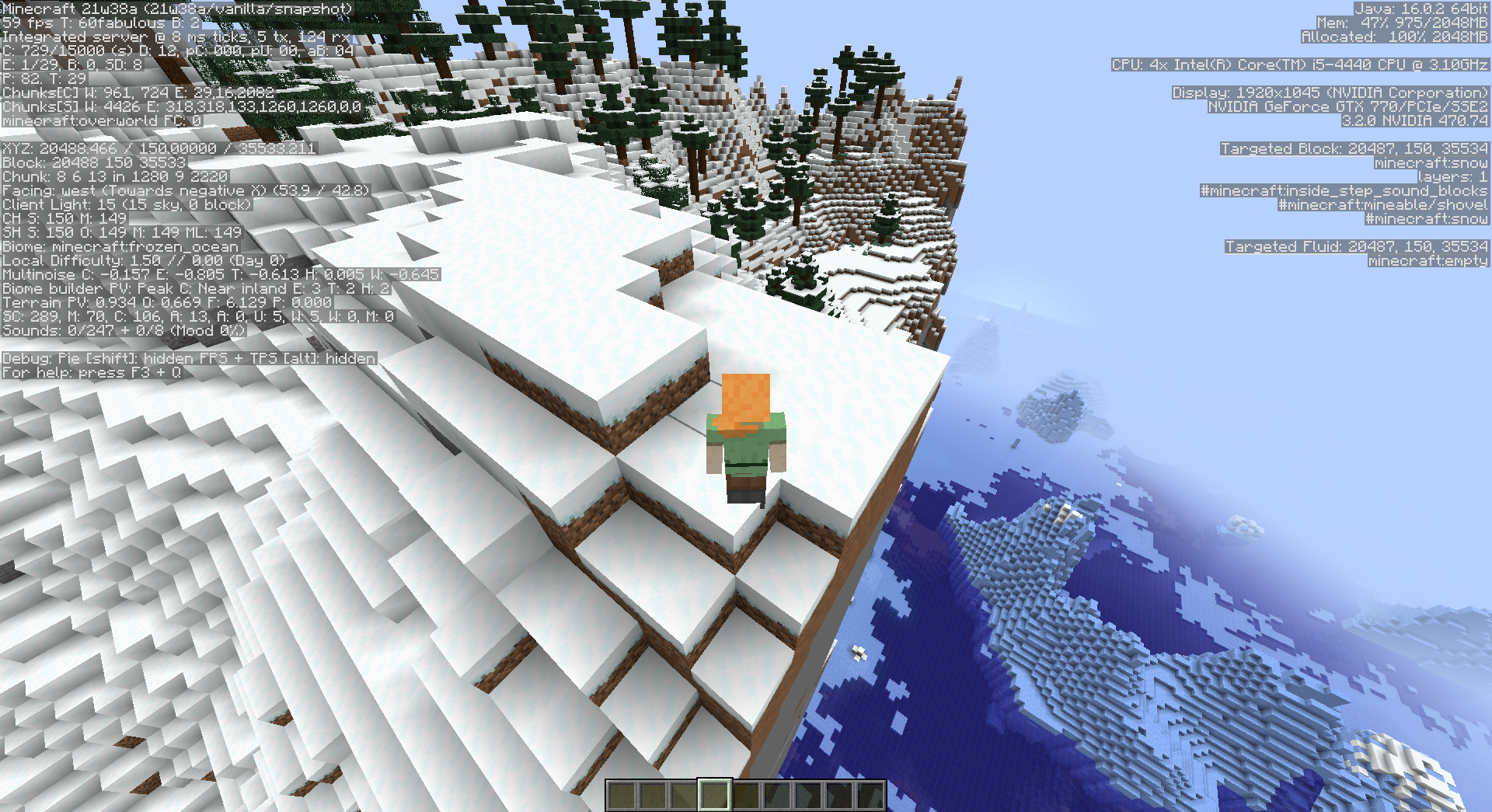
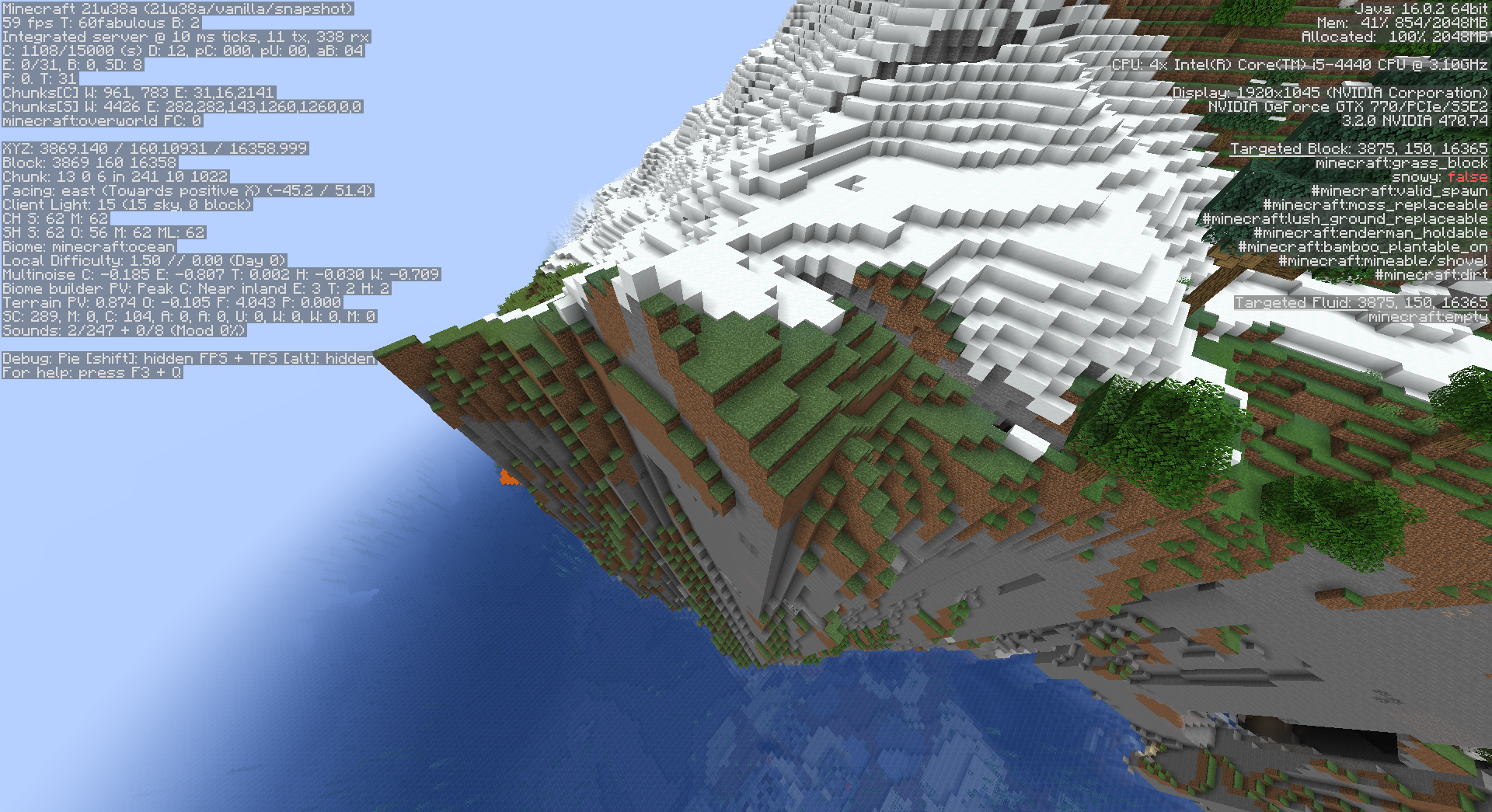
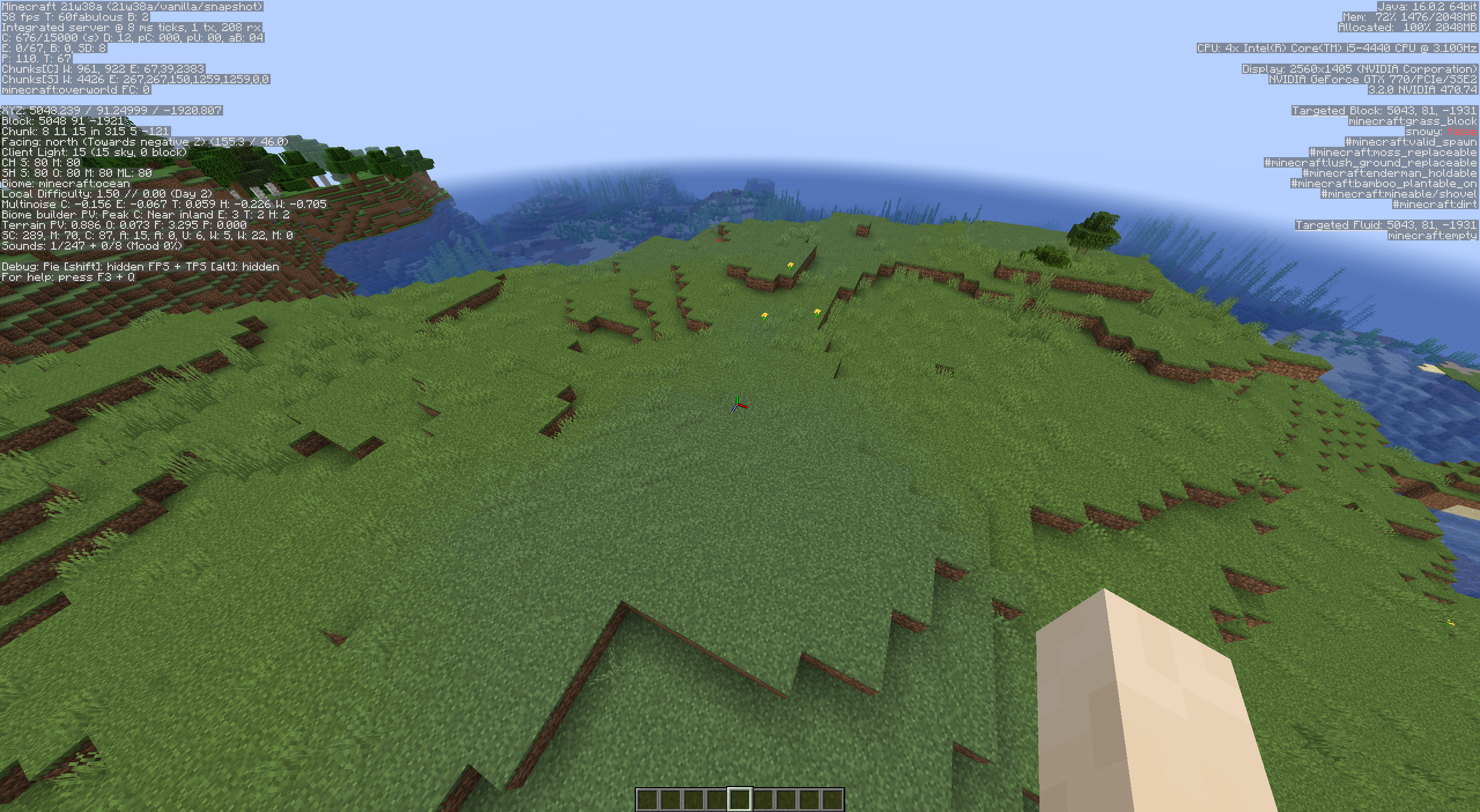
For the combination of peak weirdness, coast continentalness, and erosions 0 to 3 there are no biomes defined. This causes the generation to sometimes pick ocean biomes (that are in the cells with lower continentalness) leading to them generating on land. These are the only grid cells that have no biome definitions.Ingame effects
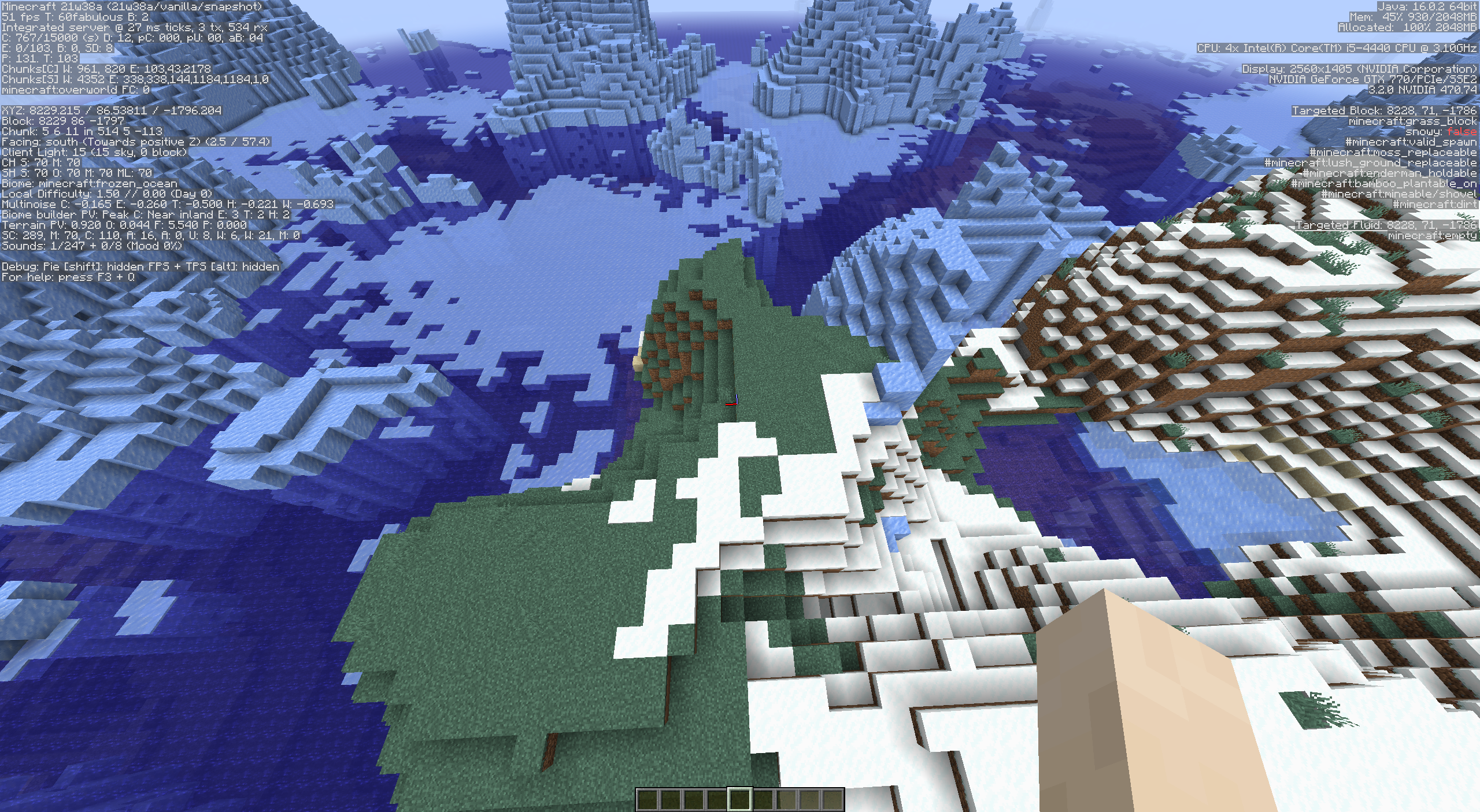
Here are some areas where oceans generate on land (sometimes very high up in the mountains) because of this bug. All of these positions are on seed 1 .Ocean on land:
/execute in minecraft:overworld run tp @s 5048.24 91.25 -1920.81 863.75 46.50Frozen ocean on land:
/execute in minecraft:overworld run tp @s 8229.22 86.54 -1796.20 360.96 52.20
FrozenOcean onpeak:/execute in minecraft:overworld run tp @s20488.47 150.00 35533.21 -289.59 40.35Ocean
atpeak:/execute in minecraft:overworld run tp @s3869.14 160.11 16359.00 316.70 51.00Background
In 1.18 the biomes are laid out in a 5d grid of noise values. Usually all grid cells are filed by one biome. However, if a grid cell is not filled, the world generation will pick the biome from the cell with the closest values.The bug
For the combination of peak weirdness, coast continentalness, and erosions 0 to 3 there are no biomes defined. This causes the generation to sometimes pick ocean biomes (that are in the cells with lower continentalness) leading to them generating on land. These are the only grid cells that have no biome definitions.Ingame effects
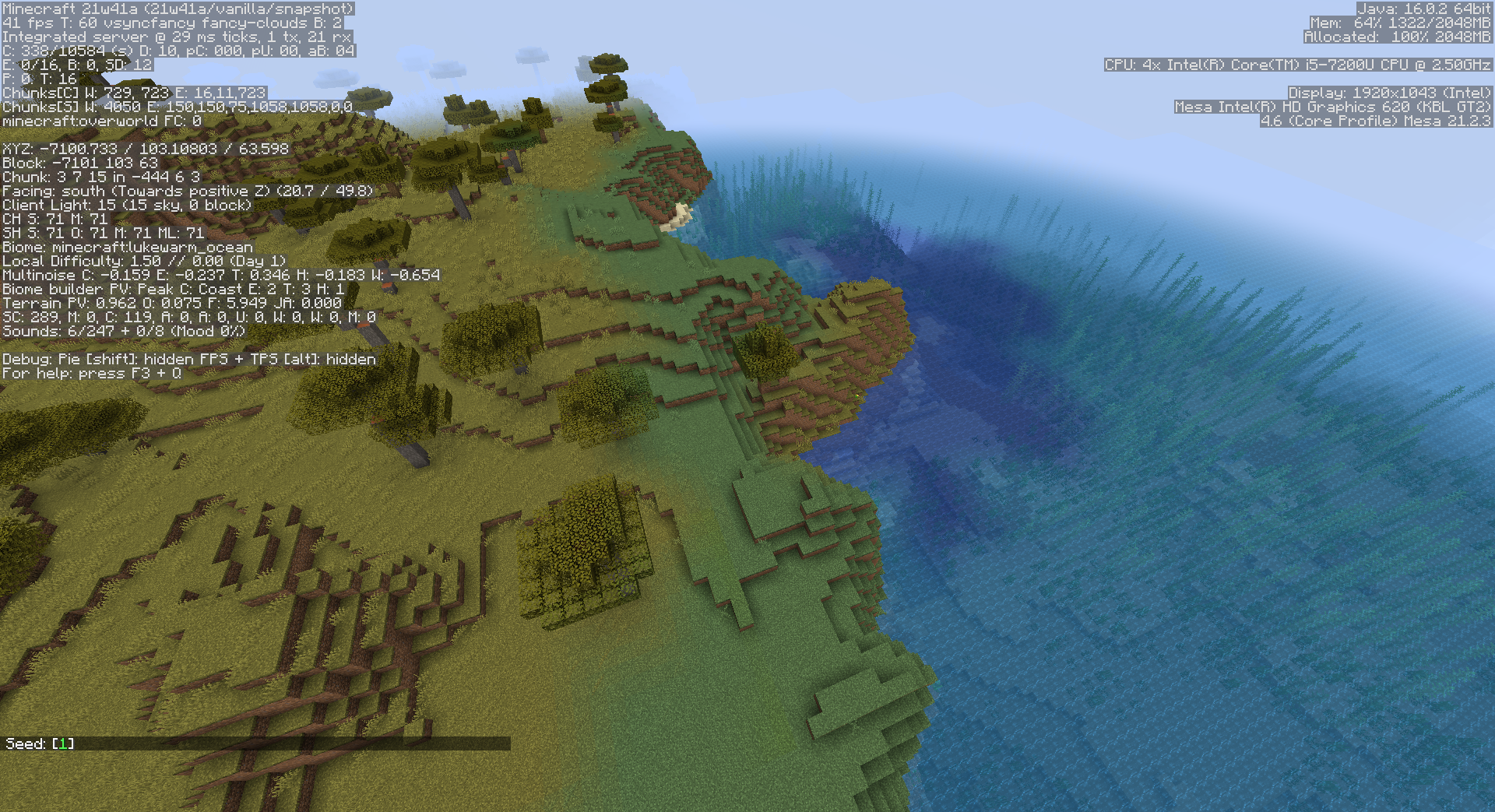
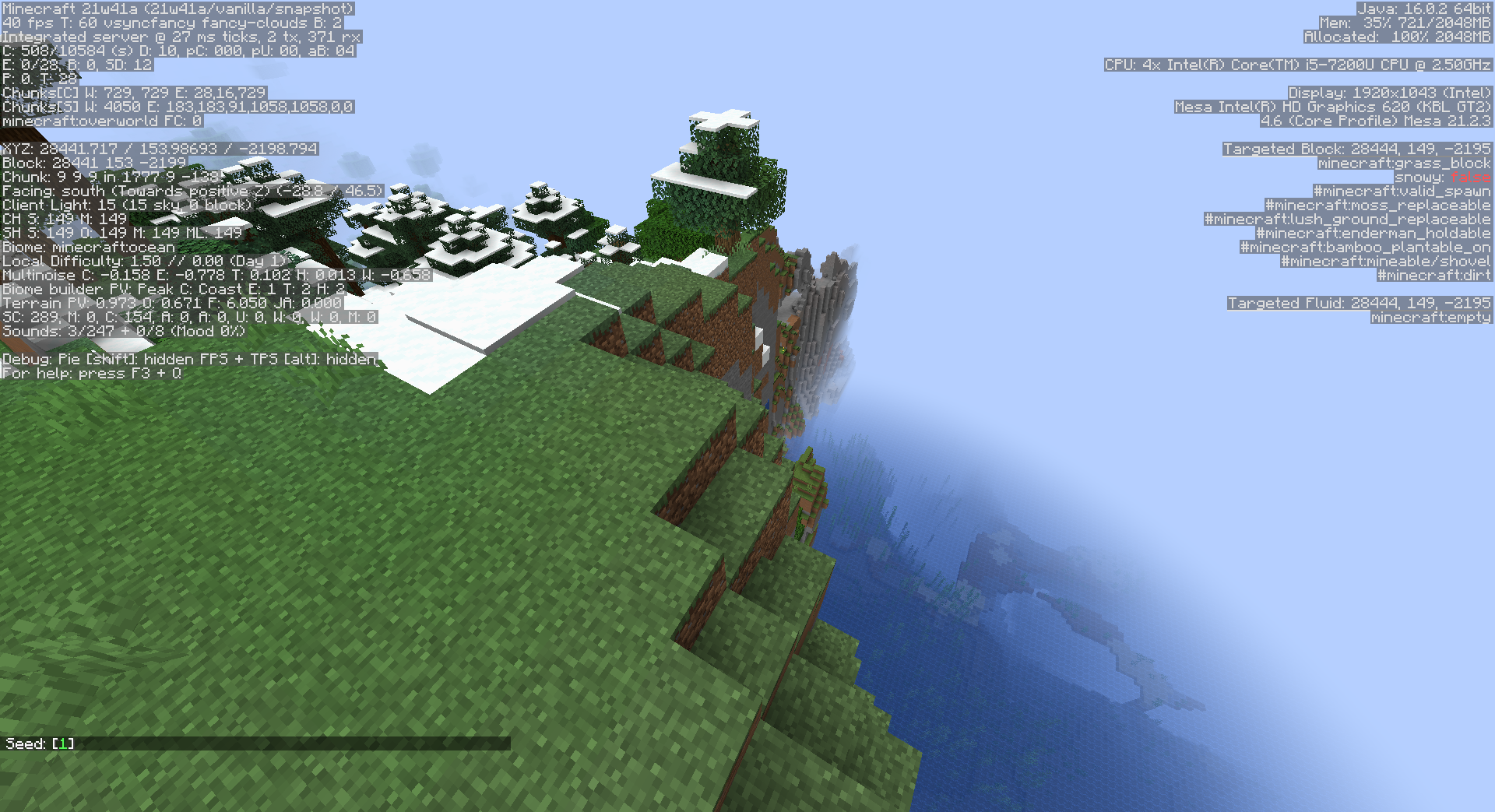
Here are some areas where oceans generate on land (sometimes very high up in the mountains) because of this bug. All of these positions are on seed 1 . (updated to 21w41a)Ocean on land:
/execute in minecraft:overworld run tp @s -7100.73 103.11 63.60 20.70 49.80Frozen Ocean on peak:
/execute in minecraft:overworld run tp @s 28441.72 153.99 -2198.79 -28.80 46.50
Background
In 1.18 the biomes are laid out in a 5d grid of noise values. Usually all grid cells are filed by one biome. However, if a grid cell is not filled, the world generation will pick the biome from the cell with the closest values.The bug
For the combination of peak weirdness, coast continentalness, and erosions 0 to 3 there are no biomes defined. This causes the generation to sometimes pick ocean biomes (that are in the cells with lower continentalness) leading to them generating on land. These are the only grid cells that have no biome definitions.Ingame effects
Here are some areas where oceans generate on land (sometimes very high up in the mountains) because of this bug. All of these positions are on seed 1 . (updated to 21w41a)Ocean on land:
/execute in minecraft:overworld run tp @s -7100.73 103.11 63.60 20.70 49.80
Frozen Ocean on peak:
/execute in minecraft:overworld run tp @s 28441.72 153.99 -2198.79 -28.80 46.50
Background
In 1.18 the biomes are laid out in a 5d grid of noise values. Usually all grid cells are filed by one biome. However, if a grid cell is not filled, the world generation will pick the biome from the cell with the closest values.The bug
For the combination of peak weirdness, coast continentalness, and erosions 0 to 3 there are no biomes defined. This causes the generation to sometimes pick ocean biomes (that are in the cells with lower continentalness) leading to them generating on land. These are the only grid cells that have no biome definitions.Ingame effects
Here are some areas where oceans generate on land (sometimes very high up in the mountains) because of this bug. All of these positions are on seed 1 . (updated to 21w41a)Ocean on land:
/execute in minecraft:overworld run tp @s -7100.73 103.11 63.60 20.70 49.80
FrozenOcean on peak:/execute in minecraft:overworld run tp @s 28441.72 153.99 -2198.79 -28.80 46.50
Cave vines can generate into water when starting above water and the length is larger than the distance to the water surface.
How to reproduce:
Happens regularly in lush caves. Example: Seed: [-729051142556713217] at
/execute in minecraft:overworld run tp @s 812.85 14.90 -979.29 -746.70 32.70Cause:
The "allow_water" setting of the "minecraft:block_column" feature is behaving differently from expected: If set to false the block column can generate in air and water; if set to true the block column is generated independent on any blocks and generates through stone.
Related to
MC-237950
Cave vines can generate into water when starting above water and the length is larger than the distance to the water surface.
How to reproduce:
Happens regularly in lush caves. Example: Seed: [-729051142556713217] at
/execute in minecraft:overworld run tp @s 812.85 14.90 -979.29 -746.70 32.70Cause:
The "allow_water" setting of the "minecraft:block_column" feature is behaving differently from expected: If set to false the block column can generate in air and water; if set to true the block column is generated independent on any blocks and generates through stone.
Related to
MC-237950
Cave vines can generate into water when starting above water and the length is larger than the distance to the water surface.
How to reproduce:
Happens regularly in lush caves.
Example: Seed:[-729051142556713217] at/execute in minecraft:overworld run tp @s 812.85 14.90 -979.29 -746.70 32.70Cause:
The "allow_water" setting of the "minecraft:block_column" feature is behaving differently from expected: If set to false the block column can generate in air and water; if set to true the block column is generated independent on any blocks and generates through stone.
Related to
MC-237950
Cave vines can generate into water when starting above water and the length is larger than the distance to the water surface.
How to reproduce:
Happens regularly in lush caves. Due to MC-219200 it is not possible to give a seed and coordinates.
Cause:
The "allow_water" setting of the "minecraft:block_column" feature is behaving differently from expected: If set to false the block column can generate in air and water; if set to true the block column is generated independent on any blocks and generates through stone.
Vanilla Effect:
Cave vines generate without tip if they are generating too long to fit into the cave.
How to reproduce:
Happens regularly in lush caves. Example: Seed: [-729051142556713217] at
/execute in minecraft:overworld run tp @s 685.73 7.11 -996.83 -716.40 16.65
Cause:
The "prioritize_tip" setting of the "minecraft:block_column" feature is behaving the other way around than expected: setting it to false would instead prioritize the generation of the tip.
Related to
MC-237951
Cave vines generate without tip if they are generating too long to fit into the cave.
How to reproduce:
Happens regularly in lush caves. Example: Seed: [-729051142556713217] at
/execute in minecraft:overworld run tp @s 685.73 7.11 -996.83 -716.40 16.65
Cause:
The "prioritize_tip" setting of the "minecraft:block_column" feature is behaving the other way around than expected: setting it to false would instead prioritize the generation of the tip.
Related to
MC-237951
Cave vines generate without tip if they are generating too long to fit into the cave.
How to reproduce:
Happens regularly in lush caves. Example: Seed: [-729051142556713217] at
/execute in minecraft:overworld run tp @s 685.73 7.11 -996.83 -716.40 16.65
Cause:
The "prioritize_tip" setting of the "minecraft:block_column" feature is behaving the other way around than expected: setting it to false would instead prioritize the generation of the tip.
Related to
MC-237951
Cave vines generate without tip if they are generating too long to fit into the cave.
How to reproduce:
Happens regularly in lush caves. Due to MC-219200 it is not possible to give a seed and coordinates.
Cause:
The "prioritize_tip" setting of the "minecraft:block_column" feature is behaving the other way around than expected: setting it to false would instead prioritize the generation of the tip.
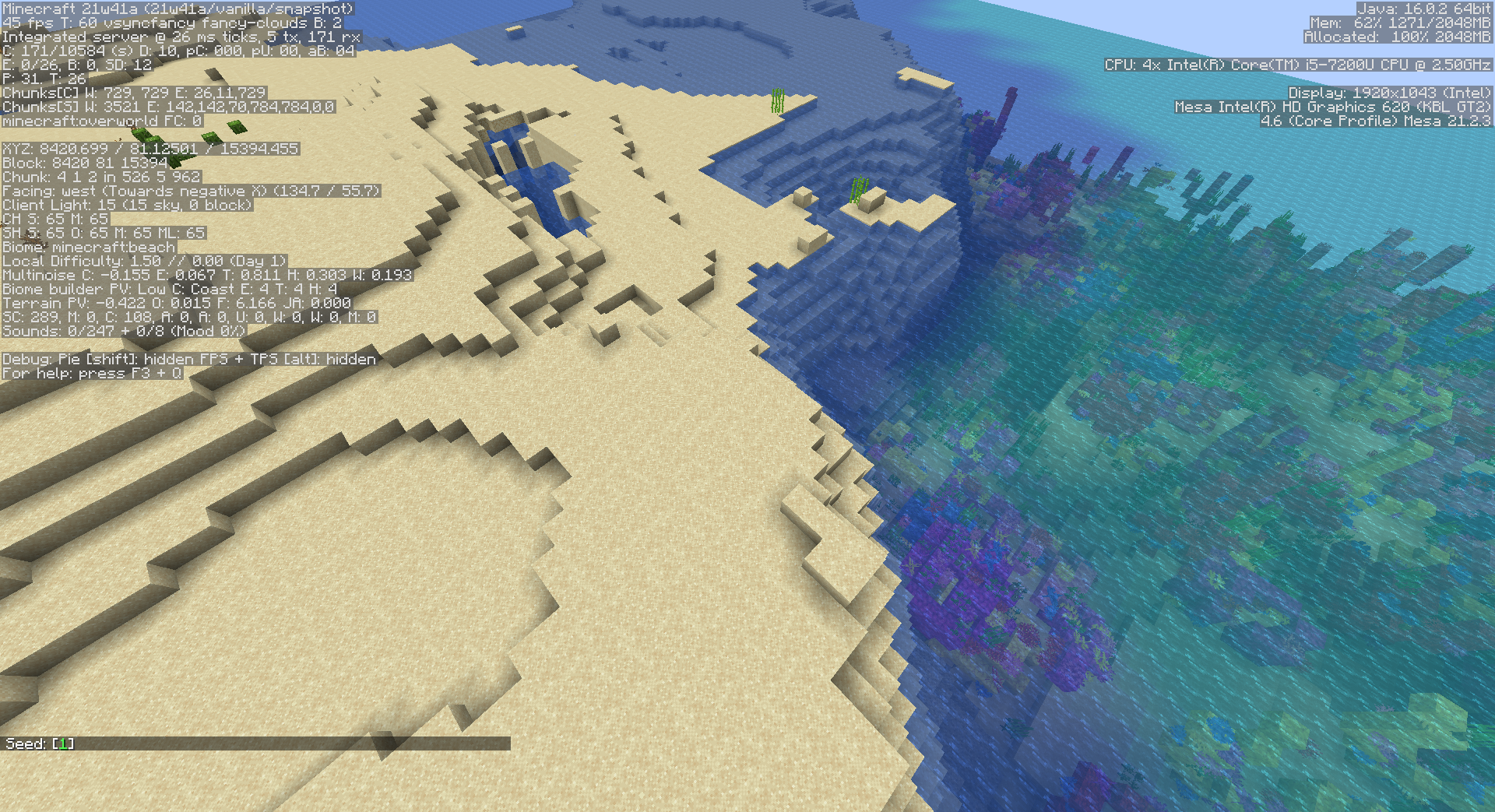
The Bug
In some cases a beach biome is generated between deserts and oceans. This did not happen in 21w39a.
How to Reporduce
Seed: 1 /execute in minecraft:overworld run tp @s-17525.57 72.1213121.60 -99.00 13.80Cause
The "pickBeachBiome" function in the BiomeBuilder decides between beach and desert by:return temperature == 4 && humidity < 3 ? Biomes.DESERT : Biomes.BEACHUntil 21w39a this matched the placement of deserts by "pickMiddleBiome". However in 21w40a deserts are also generated in areas with temperature == 4 and humidity >= 3, but the "pickBeachBiome" function was not updated accordingly.
The Bug
In some cases a beach biome is generated between deserts and oceans. This did not happen in 21w39a.
How to Reporduce
(updated to 21w41a)
Seed: 1 /execute in minecraft:overworld run tp @s 8420.70 81.13 15394.45 -225.30 55.65Cause
The "pickBeachBiome" function in the BiomeBuilder decides between beach and desert by:return temperature == 4 && humidity < 3 ? Biomes.DESERT : Biomes.BEACHUntil 21w39a this matched the placement of deserts by "pickMiddleBiome". However in 21w40a deserts are also generated in areas with temperature == 4 and humidity >= 3, but the "pickBeachBiome" function was not updated accordingly.
The Bug
For the terrain shape and biome placment the 5 noises "continentalness", "erosion", "ridge" (aka weirdness), "temperature, and "vegetation" (aka humidity) are used at 4 times the scaling than other noises are used (i.e. for noise caves and the surface rules).
Why is this relevant?
- The firstOctave setting of the noises has inconsistent effects depending on where the noise is used - if it is used as part of the multi noise biome placement the firstOctave is de facto reduced by 2
- When using the same noise in different places - i.e. using the continentalness noise in a surface rule - the noise values do not match.
How to Reproduce
The attached datapack uses a surface rule with a noise_threshold directly referencing the continentalness. The expected result would be red concrete at all land positions and stone in the oceans.
- Create a new world in creative mode with the attached datapack (and seed 2)
- Increase the render distance as needed
- Notice that the stone pattern matches the water pattern at a different scale
This shows that the surface rule and multi-noise system sample the noise at different scales.
Detailed description of the datapack:
- The firstOctave of the contientalness is set to -5 in order to be able to see enough of the noise on one screen
- Biome placement is set to only plains
- The surface rule is replaced by:
"surface_rule": { "sequence": [ { "if_true": { "noise": "minecraft:continentalness", "min_threshold": -0.19, "max_threshold": 5.0, "type": "minecraft:noise_threshold" }, "then_run": { "result_state": { "Name": "minecraft:red_concrete" }, "type": "minecraft:block" }, "type": "minecraft:condition" } ], "type": "minecraft:sequence" },The datapack thus places red concrete anywhere that the continentalness is larger than -0.19. This matches the continentalness value that causes the terrain shaper to generate above water terrain. Therefore we would expect the red concrete placement to match the above water terrain.
The Bug
For the terrain shape and biome placment the 5 noises "continentalness", "erosion", "ridge" (aka weirdness), "temperature, and "vegetation" (aka humidity) are used at 4 times the scaling than other noises are used (i.e. for noise caves and the surface rules).
Why is this relevant?
- The firstOctave setting of the noises has inconsistent effects depending on where the noise is used - if it is used as part of the multi noise biome placement the firstOctave is de facto reduced by 2
- When using the same noise in different places - i.e. using the continentalness noise in a surface rule - the noise values do not match.
How to Reproduce
The attached datapack uses a surface rule with a noise_threshold directly referencing the continentalness. The expected result would be red concrete at all land positions and stone in the oceans.
- Create a new world in creative mode with the attached datapack (and seed 2)
- Increase the render distance as needed
- Notice that the stone pattern matches the water pattern at a different scale
This shows that the surface rule and multi-noise system sample the noise at different scales.
Detailed description of the datapack:
- The firstOctave of the contientalness is set to -5 in order to be able to see enough of the noise on one screen
- Biome placement is set to only plains
- The surface rule is replaced by:
"surface_rule": { "sequence": [ { "if_true": { "noise": "minecraft:continentalness", "min_threshold": -0.19, "max_threshold": 5.0, "type": "minecraft:noise_threshold" }, "then_run": { "result_state": { "Name": "minecraft:red_concrete" }, "type": "minecraft:block" }, "type": "minecraft:condition" } ], "type": "minecraft:sequence" },The datapack thus places red concrete anywhere that the continentalness is larger than -0.19. This matches the continentalness value that causes the terrain shaper to generate above water terrain. Therefore we would expect the red concrete placement to match the above water terrain.
The Bug
For the terrain shape and biome placment the 5 noises "continentalness", "erosion", "ridge" (aka weirdness), "temperature, and "vegetation" (aka humidity) are used at 4 times the scaling than other noises are used (i.e. for noise caves and the surface rules).
Why is this relevant?
- The firstOctave setting of the noises has inconsistent effects depending on where the noise is used - if it is used as part of the multi noise biome placement the firstOctave is de facto reduced by 2
- When using the same noise in different places - i.e. using the continentalness noise in a surface rule - the noise values do not match.
How to Reproduce
The attached datapack uses a surface rule with a noise_threshold directly referencing the continentalness. The expected result would be red concrete at all land positions and stone in the oceans.
- Create a new world in creative mode with the attached datapack (and seed
2)500.00 0.50 0.0 90.00- Increase the render distance as needed
- Notice that the stone pattern matches the water pattern at a different scale
This shows that the surface rule and multi-noise system sample the noise at different scales.
Detailed description of the datapack:
- The firstOctave of the contientalness is set to -5 in order to be able to see enough of the noise on one screen
- Biome placement is set to only plains
- The surface rule is replaced by:
"surface_rule": { "sequence": [ { "if_true": { "noise": "minecraft:continentalness", "min_threshold": -0.19, "max_threshold": 5.0, "type": "minecraft:noise_threshold" }, "then_run": { "result_state": { "Name": "minecraft:red_concrete" }, "type": "minecraft:block" }, "type": "minecraft:condition" } ], "type": "minecraft:sequence" },The datapack thus places red concrete anywhere that the continentalness is larger than -0.19. This matches the continentalness value that causes the terrain shaper to generate above water terrain. Therefore we would expect the red concrete placement to match the above water terrain.
The Bug
For the terrain shape and biome placment the 5 noises "continentalness", "erosion", "ridge" (aka weirdness), "temperature, and "vegetation" (aka humidity) are used at 4 times the scaling than other noises are used (i.e. for noise caves and the surface rules).
Why is this relevant?
- The firstOctave setting of the noises has inconsistent effects depending on where the noise is used - if it is used as part of the multi noise biome placement the firstOctave is de facto reduced by 2
- When using the same noise in different places - i.e. using the continentalness noise in a surface rule - the noise values do not match.
How to Reproduce
The attached datapack uses a surface rule with a noise_threshold directly referencing the continentalness. The expected result would be red concrete at all land positions and stone in the oceans.
- Create a new world in creative mode with the attached datapack (and seed 3)
- Increase the render distance as needed
- Notice that the stone pattern matches the water pattern at a different scale
This shows that the surface rule and multi-noise system sample the noise at different scales.
Detailed description of the datapack:
- The firstOctave of the contientalness is set to -5 in order to be able to see enough of the noise on one screen
- Biome placement is set to only plains
- The surface rule is replaced by:
"surface_rule": { "sequence": [ { "if_true": { "noise": "minecraft:continentalness", "min_threshold": -0.19, "max_threshold": 5.0, "type": "minecraft:noise_threshold" }, "then_run": { "result_state": { "Name": "minecraft:red_concrete" }, "type": "minecraft:block" }, "type": "minecraft:condition" } ], "type": "minecraft:sequence" },The datapack thus places red concrete anywhere that the continentalness is larger than -0.19. This matches the continentalness value that causes the terrain shaper to generate above water terrain. Therefore we would expect the red concrete placement to match the above water terrain.
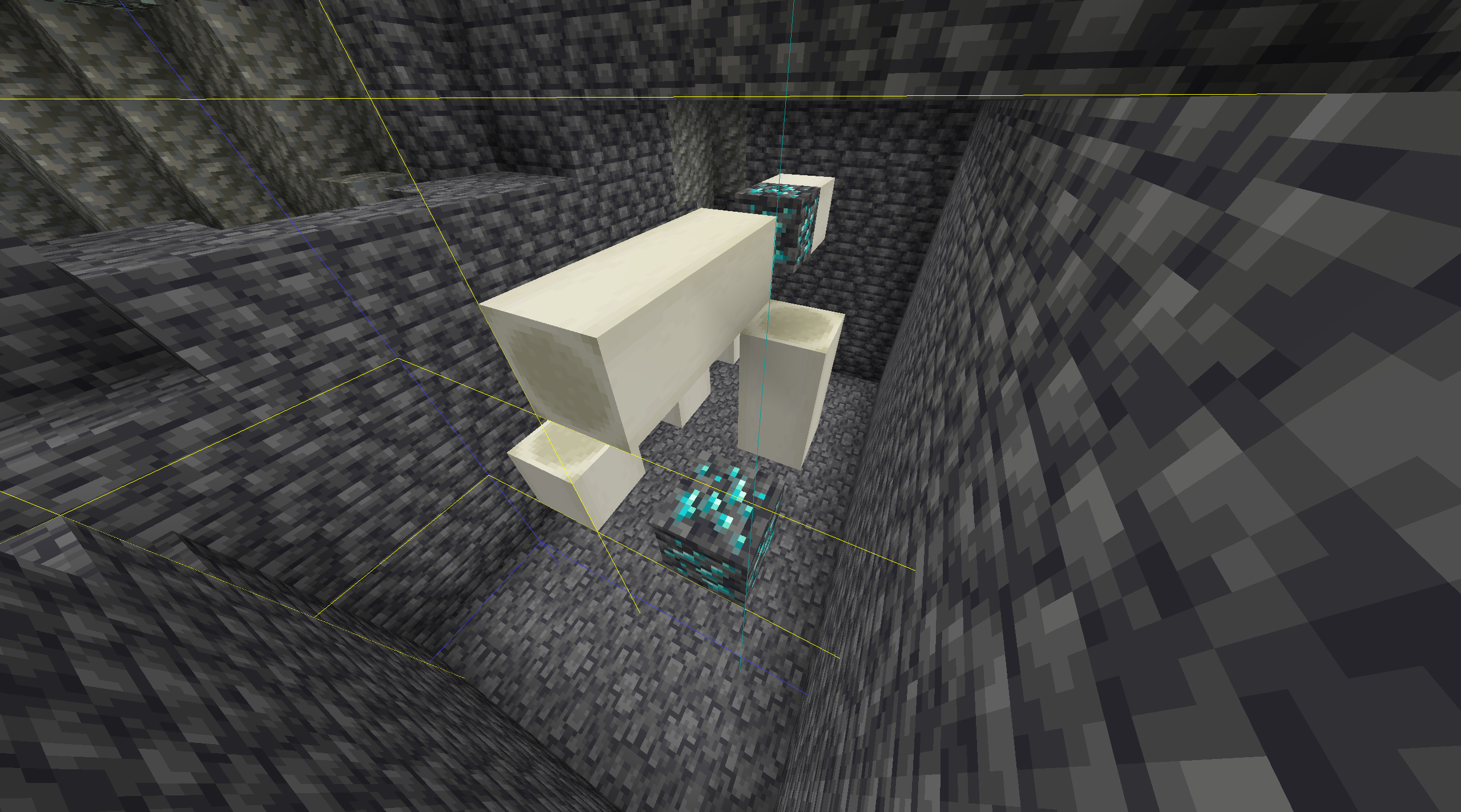
Fossils now generate in a way that they intersect with chunk boundaries. However, they get cut of at any chunk border.
How to reproduce:
- Create a world with seed -247011686617248960
- Go to spectator mode
- notice that the fossil is cut in half
Fossils now generate in a way that they intersect with chunk boundaries. However, they get cut of at any chunk border.
How to reproduce:
- Create a world with seed -247011686617248960
- Go to spectator mode
notice that the fossil is cut in halfFossils now generate in a way that they intersect with chunk boundaries. However, they get cut of at any chunk border.
How to reproduce:
- Create a world with seed -247011686617248960
- Go to spectator mode
- enable chunk borders with F3+G
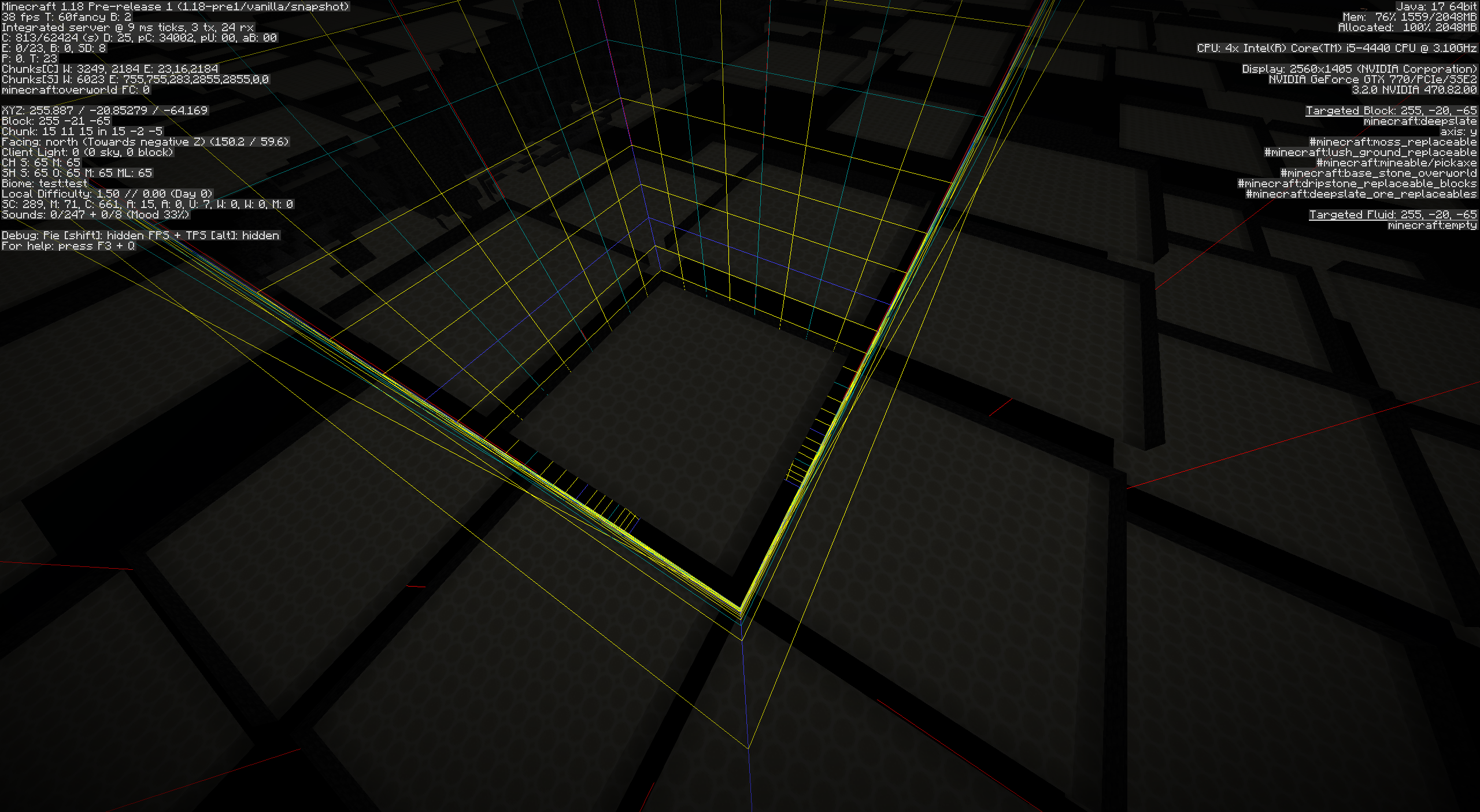
- notice that the fossil is cut in half at the chunk border
Loot tables now use random sequences to determine the loot. Each dimension has its own random sequences. Because random sequences are only seeded based on the world seed and the random sequence id, the sequences are seeded equally in each dimension.
This leads to the loot table giving the same sequence of loot in each dimension.
How to reproduce
- Create a new world
- Mine gravel and keep track of how many gravel you have to mine to get flint
- Go to the nether
- Mine gravel and again keep track of how many gravel you have to mine to get flint
Observe that those numbers are equal.
- Optionally repeat the experiment in the end or for the 2nd flint until you are confident that this wasn't random chance.
Expected BehaviorOne of 2 options:
- Loot tables use a single random sequence independent of dimension
- The sequences used for each dimension are differently seeded
Loot tables now use random sequences to determine the loot. Each dimension has its own random sequences. Because random sequences are only seeded based on the world seed and the random sequence id, the sequences are seeded equally in each dimension.
This leads to the loot table giving the same sequence of loot in each dimension.
How to reproduce
- Create a new world
- Mine gravel and keep track of how many gravel you have to mine to get flint
- Go to the nether
- Mine gravel and again keep track of how many gravel you have to mine to get flint
- Optionally repeat the experiment in the end or for the 2nd flint until you are confident that this wasn't random chance.
More easy reproduction with commands
- Create a new world
- run /loot give @s loot minecraft:gameplay/piglin_bartering multiple times and keep track of the loot it gives
- run /execute in minecraft:the_nether run loot give @s loot minecraft:gameplay/piglin_bartering multiple times.
Expected Behavior
One of 2 options:
- Loot tables use a single random sequence independent of dimension
- The sequences used for each dimension are differently seeded
Loot tables now use random sequences to determine the loot. Each dimension has its own random sequences. Because random sequences are only seeded based on the world seed and the random sequence id, the sequences are seeded equally in each dimension.
This leads to the loot table giving the same sequence of loot in each dimension.
How to reproduce
- Create a new world
- Mine gravel and keep track of how many gravel you have to mine to get flint
- Go to the nether
- Mine gravel and again keep track of how many gravel you have to mine to get flint
- Optionally repeat the experiment in the end or for the 2nd flint until you are confident that this wasn't random chance.
More easyreproduction with commands
- Create a new world
- run /loot give @s loot minecraft:gameplay/piglin_bartering multiple times and keep track of the loot it gives
- run /execute in minecraft:the_nether run loot give @s loot minecraft:gameplay/piglin_bartering multiple times.
Expected Behavior
One of 2 options:
- Loot tables use a single random sequence independent of dimension
- The sequences used for each dimension are differently seeded
Loot tables now use random sequences to determine the loot. Each dimension has its own random sequences. Because random sequences are only seeded based on the world seed and the random sequence id, the sequences are seeded equally in each dimension.
This leads to the loot table giving the same sequence of loot in each dimension.
How to reproduce
- Create a new world
- Mine gravel and keep track of how many gravel you have to mine to get flint
- Go to the nether
- Mine gravel and again keep track of how many gravel you have to mine to get flint
- Optionally repeat the experiment in the end or for the 2nd flint until you are confident that this wasn't random chance.
Easier reproduction with commands
- Create a new world
- run /loot give @s loot minecraft:gameplay/piglin_bartering multiple times and keep track of the loot it gives
- run /execute in minecraft:the_nether run loot give @s loot minecraft:gameplay/piglin_bartering multiple times.
Expected Behavior
One of 2 options:
- Loot tables use a single random sequence independent of dimension
- The sequences used for each dimension are differently seeded
Trying to disable any datapack using /datapack disable fails with the error message Pack 'file/...' cannot be disabled, since it is part of an enabled flag!, even when that is not the case.
How to reproduce:
I've attached an empty datapack to simplify the testing.
- Add the attached empty datapack to a world, or create a new world with the datapack (or use any other datapack)
- If needed, enable the datapack with `/datapack enable "file/empty_datapack.zip"`
- run `/datapack disable "file/empty_datapack.zip"`
Expected result:
- You can disable a datapack that is not required to enable a feature flag.
Trying to disable any datapack using /datapack disable fails with the error message Pack 'file/...' cannot be disabled, since it is part of an enabled flag!, even when that is not the case.
How to reproduce:
I've attached an empty datapack to simplify the testing.
- Add the attached empty datapack to a world, or create a new world with the datapack (or use any other datapack)
- If needed, enable the datapack with `/datapack enable "file/empty_datapack.zip"`
- run `/datapack disable "file/empty_datapack.zip"`
Expected result:
You can disable a datapack that is not required to enable a feature flag.
Trying to disable any datapack using /datapack disable fails with the error message Pack 'file/...' cannot be disabled, since it is part of an enabled flag!, even when that is not the case.
How to reproduce:
I've attached an empty datapack to simplify the testing.
- Add the attached empty datapack to a world, or create a new world with the datapack (or use any other datapack)
- If needed, enable the datapack with `/datapack enable "file/empty_datapack.zip"`
- run `/datapack disable "file/empty_datapack.zip"`
Expected result:
You can disable a datapack that is not required to enable a feature flag.
Trying to disable any datapack using /datapack disable fails with the error message Pack 'file/...' cannot be disabled, since it is part of an enabled flag!, even when that is not the case.
How to reproduce:
I've attached an empty datapack to simplify the testing.
- Add the attached empty datapack to a world, or create a new world with the datapack (or use any other datapack)
- If needed, enable the datapack with /datapack enable "file/empty_datapack.zip"
- run /datapack disable "file/empty_datapack.zip"
Expected result:
You can disable a datapack that is not required to enable a feature flag.
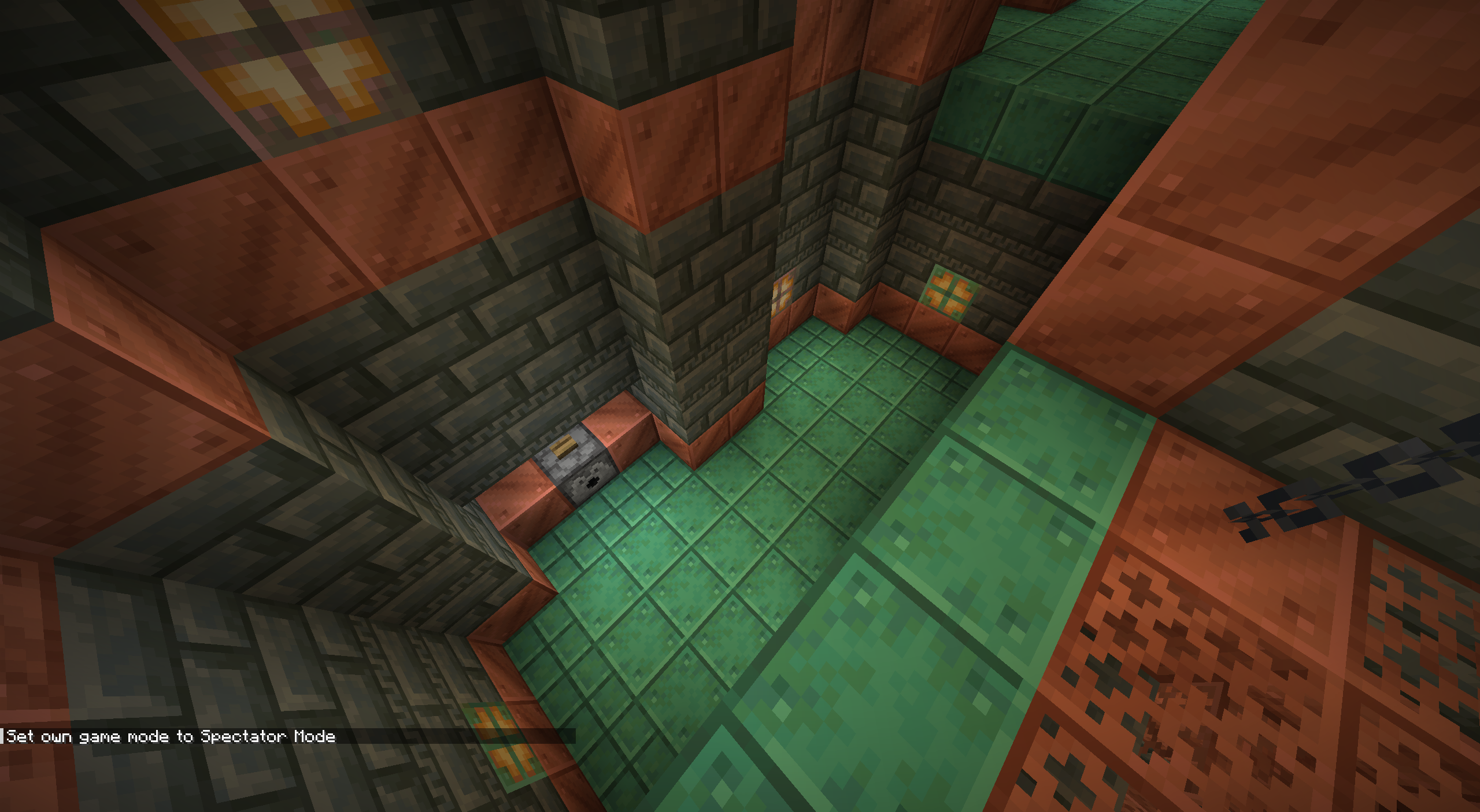
The Assembly trial chamber has an upper entrance that has "staircases" leading up to it from either side. However, sometimes these pieces fail to generate because dispensers (generated earlier) are in the way.
How to reproduce
- Open a world with the experimental 1.21 datapack enabled and seed 4226348645603381645.
- /execute in minecraft:overworld run tp @s -24.41 -22.78 -305.17 -768.60 36.75
Cause
The dispensers that can generate the the bottom of the staircases block the staircases from generating, if the dispensers are generated first. These staircases have a horizontal size of 11x6, so they do not fit if the dispensers are already generated. The following image from my own jigsaw previewing tool illustrates the issue:
!
The orange bounding box of the dispenser (bottom left) intersects with the white bounding box of the attempted staircase placement, causing the failed placement.The Assembly trial chamber has an upper entrance that has "staircases" leading up to it from either side. However, sometimes these pieces fail to generate because dispensers (generated earlier) are in the way.
How to reproduce
- Open a world with the experimental 1.21 datapack enabled and seed 4226348645603381645.
- /execute in minecraft:overworld run tp @s -24.41 -22.78 -305.17 -768.60 36.75
Cause
The dispensers that can generate the the bottom of the staircases block the staircases from generating, if the dispensers are generated first. These staircases have a horizontal size of 11x6, so they do not fit if the dispensers are already generated. The following image from my own jigsaw previewing tool illustrates the issue:
The orange bounding box of the dispenser (bottom left) intersects with the white bounding box of the attempted staircase placement, causing the failed placement.
If you throw an ender pearl into the end fountain after defeating the ender dragon, you get teleported to the overworld by the ender pearl, thus not triggering the credits.
How to reproduce:
- Open a new world, or a world where you haven't seen the credits yet.
- Go to the end and defeat the ender dragon
- Throw an ender pearl into the portal. Make sure to use a shallow angle to ensure the pearl gets teleported before hitting any blocks.
Expected result:
The credits should be reliably shown after defeating the ender dragon independent of how the player travels through the end portal.
If you throw an ender pearl into the end fountain after defeating the ender dragon, you get teleported to the overworld by the ender pearl, thus not triggering the credits.
How to reproduce:
- Open a new world, or a world where you haven't seen the credits yet.
- Go to the end and defeat the ender dragon
- Throw an ender pearl into the portal. Make sure to use a shallow angle to ensure the pearl gets teleported before hitting any blocks.
Expected result:
The credits should be reliably shown after defeating the ender dragon independent of how the player travels through the end portal.
Elytragets damages/ breaks when taking damageElytra looses durability / breaks when taking damage
Until 25w03a it was possible to hide the additional tooltips of Smithing Templates and Disc Fragments using the hide_additional_tooltip component. However, this has no equivalent in 25w04a since those tooltips are not added by any component but the items themselves.
How to reproduce:
(It's difficult to prove that something isn't possible. Below is a reproduction showing that tooltips show up when updating from 25w03a to 25w04a, but this issue is not exclusively a datafixer issue)
- In 25w03a run the following commands:
/give @s minecraft:bolt_armor_trim_smithing_template[minecraft:hide_additional_tooltip={}]
/give @s minecraft:disc_fragment_5[minecraft:hide_additional_tooltip={}]
Observe that those items don't have any tooltip except their name
- Update to 25w04a
Cause:
These items still create their tooltip in the appendHoverText method of the item subclass. Skipping this method was previously the effect of the hide_additional_tooltip component. Other uses were moved to components but these 2 cases still use this method, which can no longer be skipped.
![[Mod] Greymagic27](../../../data/avatars/users/92875.png)
Thanks jacobsjo!
![[Mod] turbo](../../../data/avatars/users/92867.png)
Hi again, after playing around with your datapack, I'm coming to the following result:
Removed datapacks/Arknights.zip/changelog.md: not used
Removed datapacks/Arknights.zip/data/arknights/damage_type/magical.json: not used
Removed datapacks/Arknights.zip/data/arknights/damage_type/physical.json: not used
Removed datapacks/Arknights.zip/data/arknights/damage_type/pure.json: not used
Validated 248 files, 244 accepted, 4 rejected.
Credits go to jacobsjo on Discord for the following:
I think this is mostly related to
REALMS-5322. They don't want experimental stuff on realms, which does include damage types (you get the experimental warning in singleplayer). I think there are other reports for non-worldgen stuff I couldn't find quickly.The function files being rejected is probably a incompatible datapack (i.e. a 1.21 snapshot datapack uploaded to a 1.20.6 realm), see
REALMS-11834for the fix of that (1.21 renamed the folder from functions to function)
Damage types are considered experimental content as per MC-260452.
Caves being cut of seems to have happened because of 2 different causes:
Oh, I must have missed
MC-237243during my search, sorry about that. At least some of the screenshots there are indeed caused by this (you can see in the F3 menu "Biome Builder PV: Peaks")As for the rivers, they don't generate in the peaks, but the valleys - so
MC-236796should be unrelated.Can confirm
Steps to Reproduce:
Also happens in worlds first generated in early alpha versions.
From my comment from the duplicate report:
Steps to Reproduce:
You may also use different versions but I believe this is the minimum amount of conversions needed.
This bug occurs because the game tries (and fails) to load the outdated multi noise configuration saved in the level.dat file even though that configuration would be overridden by the new datapack immediately afterwards.
I would like to clarify, that a fix for this bug does not require the multi noise configuration saved with the world to be upgraded. It is sufficient if the upgraded world is reverted to the default 1.18 multi noise configuration.
Not fixed in 1.18 Pre-release 1.
1.18 Pre-release 1 added an in_square placement modifier. However this simply caused
MC-241234. If (in a datapack), this placement modifier is not used, the fossil feature still does it's own placement inside the chunk, but is still unable to generate in the far east or south blocks of the chunk.I've attached an updated Datapack to confirm this. This datapack generated two different fossil features in two layers.
Can confirm in 1.18 pre 1.
Very similar to
MC-239878that was resolved as Won't Fix, but this report is using the CavesAndCliffs Datapack whereas the other report was relating to worlds generated in 21w06a to 21w14a@PotholedSea40 No, this was fixed in 1.18 Pre-release 1. What you are reporting is not caused by missing biome definitions (it is not at PV: Peak). What you are seeing is
MC-237243andMC-236796- both resolved as WAI.Fixed in 1.18 Pre-release 2. No reopen necessary anymore. (Fossils are now supposed to be used with a in_square placement modifier)
Confirmed in 1.20.2, also affects the LIST_CODEC that uses RegistryCodecs.homogeneousList instead of RegistryFileCodec.
duplicate of
MC-269644can confirm. Command to give yourself a sword without any tool rules:
/give @s minecraft:diamond_sword[minecraft:tool={rules:[]}]
The same thing happens when the "minecraft:tool" component is completely removed using:
/item modify entity @s weapon {function:set_components, components: {"!minecraft:tool":}}
can confirm. The following command should summon an ominous item spawner that takes 2000 ticks to spawn the arrow, but instead spawns it immediately:
/summon minecraft:ominous_item_spawner ~ ~4 ~ {item: {id:"minecraft:arrow"} , spawn_item_after_ticks: 2000L}
Can confirm. Easier reproduction:
1. place a husk spawner from a trial chamber using:
3. Use Ctrl + Pickblock on the trial spawner and place it elsewhere The manually placed spawner can only spawn 2 husks simultaneously (the default value)
2. go into survival mode and verify that the original spawner can spawn 3 husks simultaneously
4.
Duplicate of
MC-269978Can confirm, also happens when the difficulty is set to peaceful.
This was fixed in 1.20.5 pre 4.
I can confirm the behavior described using the attached datapack in 24w19b. The attached datapack uses separate enchantments for each armor piece but the same UUID for all attribute modifiers. So this behavior is probably WAI.
Can confirm.
This even happens when the block_interaction is set such that the block is destroyed (probably because the knockback is calculated first).
Apparently this bug first appeared in 24w21a and didn't happen in earlier snapshots.
This bug was fixed in 24w35a
This affects other types of tags too. It appears to affect all tags of registries whose entries are controlled through datapacks. Specifically, I've tested tags/worldgen/structure, tags/enchantment, and tags/loot_table.
Other tags are working as expected. Specifically, I've tested tags/block.
Code analysis by @ErrorCraft (text slightly edited by me, and translated mappings from yarn to official):
In ServerPlayer::changeDimension (which is used even when the dimension is not changed) it first sets the Player's position via Entity::teleportSetPosition by resolving it. So a y position of -60.0 with a teleport command with ~10 will set the player's position to -50.0. It then calls the ServerGamePacketListenerImpl::teleport method, which coincidentally calls these same methods! However, since it uses the Player's position, it now uses -50.0 instead of the expected -60.0! So the final y coordinate is -40.0, rather than -50.0, because it applies the offset a second time. However, on the client the player gets moved -50.0, so this actually causes a desync.
Now... What causes it to go back to its original position after executing the command a second time? The Player's y coordinate is now -40.0 and we want to teleport 10 blocks upwards from -60.0, which is -50.0. It calculates the position by subtracting the entity's position from the calculated position. This results in the following calculation: -50.0 - -40.0 which equals -10.0, the exact opposite of what we wanted, which causes it to teleport the Player 10 blocks down twice as described before.
Because this happens in the changeDimension override in ServerPlayer, it means that the issue only affects Players, which is something we can observe too if we try it out on another entity like a Pig; The Pig's position is set correctly.
This issue (or two, though one causes the other) is fixed by removing the Entity::teleportSetPosition call in the ServerPlayer::changeDimension method.
To reproduce the desync issue, just go in Survival mode and invoke the /teleport ~ ~10 ~ command while standing still and observe the fall damage. Then compare to the damage taken by falling from 20 blocks high. Falling from 10 blocks the fall damage is less.
I have verified that this datapack does still work in 24w46a. I've attached a video with a demonstration.
I've attached a datapack containing a total of 8 gametests testing that saddled horses, camels, pigs, and striders drop their saddles with both doMobLoot enabled and disabled. The tests with doMobLoot disabled fail.