 John Hughes
- Coolio_Wolfus
- coolio_wolfus
- Europe/London
- Yes
- No
![[Mojang] slicedlime](../../../data/assets/gravatar/slicedlime.jpeg)
 MC-215947MC-220026
![[Mojang] Grum (Erik Broes)](../../../data/assets/gravatar/grum.png)




When pushing a button, the sides of it look like the button was squashed instead of being pushed into the wall.
Mod note: Fix from MC-
MC-90456by John HughesButton not pressed the textures are:
"north": { "uv": [ 5, 14, 11, 16 ], "texture": "#texture" }, "south": { "uv": [ 5, 14, 11, 16 ], "texture": "#texture" }, "west": { "uv": [ 6, 14, 10, 16 ], "texture": "#texture" }, "east": { "uv": [ 6, 14, 10, 16 ], "texture": "#texture" }However when pressed they change to:
"north": { "uv": [ 5, 15, 11, 16 ], "texture": "#texture" }, "south": { "uv": [ 5, 15, 11, 16 ], "texture": "#texture" }, "west": { "uv": [ 6, 15, 10, 16 ], "texture": "#texture" }, "east": { "uv": [ 6, 15, 10, 16 ], "texture": "#texture" }This causes the impression the button is pressed but the texture has jumped, the front sides of the button changes to the back sides texture when it's pressed.
Example: Wall, back px 1, front px 2, Air
W12A < button not pushed
W1A < button pushed default 1.8+ mc (looks weird)
W2A < what it now looks like with this fix (outer texture moves in towards wall for duration of press event)The fix is to change the texture on the pressed button to:
"north": { "uv": [ 5, 14, 11, 15 ], "texture": "#texture" }, "south": { "uv": [ 5, 14, 11, 15 ], "texture": "#texture" }, "west": { "uv": [ 6, 14, 10, 15 ], "texture": "#texture" }, "east": { "uv": [ 6, 14, 10, 15 ], "texture": "#texture" }And the front edge texture moves towards the wall when the button is pressed and out as the button returns to normal.
Hope this is a simple bug to fix... (See attached.)
In time order,
2015-10-12_19.30.17.png <- Unpressed Buttons
2015-10-12_19.30.37.png <- Current buttons pressed note the side texture.
2015-10-12_19.31.11.png <- Corrected version front texture moves closer.The original has the near block texture jumping forward to remain visible, whereas with this suggested fix, it looks like the button actually moves as the near block texture seems to go into the block.
Just added a Resource Pack version of my button_pressed.json fix, called Button Hotfix.zip
Hope this helps make testing the fix easier.
Added a Resource Pack version of my button_pressed.json fix, called Button Hotfix.zip
Hope this helps make testing the fix easier.
When pushing a button, the sides of it look like the button was squashed instead of being pushed into the wall.
Mod note: Fix from MC-
MC-90456by John HughesButton not pressed the textures are:
"north": { "uv": [ 5, 14, 11, 16 ], "texture": "#texture" }, "south": { "uv": [ 5, 14, 11, 16 ], "texture": "#texture" }, "west": { "uv": [ 6, 14, 10, 16 ], "texture": "#texture" }, "east": { "uv": [ 6, 14, 10, 16 ], "texture": "#texture" }However when pressed they change to:
"north": { "uv": [ 5, 15, 11, 16 ], "texture": "#texture" }, "south": { "uv": [ 5, 15, 11, 16 ], "texture": "#texture" }, "west": { "uv": [ 6, 15, 10, 16 ], "texture": "#texture" }, "east": { "uv": [ 6, 15, 10, 16 ], "texture": "#texture" }This causes the impression the button is pressed but the texture has jumped, the front sides of the button changes to the back sides texture when it's pressed.
Example: Wall, back px 1, front px 2, Air
W12A < button not pushed
W1A < button pushed default 1.8+ mc (looks weird)
W2A < what it now looks like with this fix (outer texture moves in towards wall for duration of press event)The fix is to change the texture on the pressed button to:
"north": { "uv": [ 5, 14, 11, 15 ], "texture": "#texture" }, "south": { "uv": [ 5, 14, 11, 15 ], "texture": "#texture" }, "west": { "uv": [ 6, 14, 10, 15 ], "texture": "#texture" }, "east": { "uv": [ 6, 14, 10, 15 ], "texture": "#texture" }And the front edge texture moves towards the wall when the button is pressed and out as the button returns to normal.
Hope this is a simple bug to fix... (See attached.)
In time order,
2015-10-12_19.30.17.png <- Unpressed Buttons
2015-10-12_19.30.37.png <- Current buttons pressed note the side texture.
2015-10-12_19.31.11.png <- Corrected version front texture moves closer.The original has the near block texture jumping forward to remain visible, whereas with this suggested fix, it looks like the button actually moves as the near block texture seems to go into the block.
Just added a Resource Pack version of my
button_pressed.jsonfix, called Button Hotfix.zip
Hope this helps make testing the fix easier.When pushing a button, the sides of it look like the button was squashed instead of being pushed into the wall.
Mod note: Fix from MC-
MC-90456by John HughesButton not pressed the textures are:
"north": { "uv": [ 5, 14, 11, 16 ], "texture": "#texture" }, "south": { "uv": [ 5, 14, 11, 16 ], "texture": "#texture" }, "west": { "uv": [ 6, 14, 10, 16 ], "texture": "#texture" }, "east": { "uv": [ 6, 14, 10, 16 ], "texture": "#texture" }However when pressed they change to:
"north": { "uv": [ 5, 15, 11, 16 ], "texture": "#texture" }, "south": { "uv": [ 5, 15, 11, 16 ], "texture": "#texture" }, "west": { "uv": [ 6, 15, 10, 16 ], "texture": "#texture" }, "east": { "uv": [ 6, 15, 10, 16 ], "texture": "#texture" }This causes the impression the button is pressed but the texture has jumped, the front sides of the button changes to the back sides texture when it's pressed.
Example: Wall, back px 1, front px 2, Air
W12A < button not pushed
W1A < button pushed default 1.8+ mc (looks weird)
W2A < what it now looks like with this fix (outer texture moves in towards wall for duration of press event)The fix is to change the texture on the pressed button to:
"north": { "uv": [ 5, 14, 11, 15 ], "texture": "#texture" }, "south": { "uv": [ 5, 14, 11, 15 ], "texture": "#texture" }, "west": { "uv": [ 6, 14, 10, 15 ], "texture": "#texture" }, "east": { "uv": [ 6, 14, 10, 15 ], "texture": "#texture" }And the front edge texture moves towards the wall when the button is pressed and out as the button returns to normal.
Hope this is a simple bug to fix... (See attached.)
In time order,
2015-10-12_19.30.17.png <- Unpressed Buttons
2015-10-12_19.30.37.png <- Current buttons pressed note the side texture.
2015-10-12_19.31.11.png <- Corrected version front texture moves closer.The original has the near block texture jumping forward to remain visible, whereas with this suggested fix, it looks like the button actually moves as the near block texture seems to go into the block.
Just added a Resource Pack version of my fix, called Button Hotfix.zip
Hope this helps make testing the fix easier.
When pushing a button, the sides of it look like the button was squashed instead of being pushed into the wall.
Mod note: Fix from
MC-MC-90456by John HughesButton not pressed the textures are:
"north": { "uv": [ 5, 14, 11, 16 ], "texture": "#texture" }, "south": { "uv": [ 5, 14, 11, 16 ], "texture": "#texture" }, "west": { "uv": [ 6, 14, 10, 16 ], "texture": "#texture" }, "east": { "uv": [ 6, 14, 10, 16 ], "texture": "#texture" }However when pressed they change to:
"north": { "uv": [ 5, 15, 11, 16 ], "texture": "#texture" }, "south": { "uv": [ 5, 15, 11, 16 ], "texture": "#texture" }, "west": { "uv": [ 6, 15, 10, 16 ], "texture": "#texture" }, "east": { "uv": [ 6, 15, 10, 16 ], "texture": "#texture" }This causes the impression the button is pressed but the texture has jumped, the front sides of the button changes to the back sides texture when it's pressed.
Example: Wall, back px 1, front px 2, Air
W12A < button not pushed
W1A < button pushed default 1.8+ mc (looks weird)
W2A < what it now looks like with this fix (outer texture moves in towards wall for duration of press event)The fix is to change the texture on the pressed button to:
"north": { "uv": [ 5, 14, 11, 15 ], "texture": "#texture" }, "south": { "uv": [ 5, 14, 11, 15 ], "texture": "#texture" }, "west": { "uv": [ 6, 14, 10, 15 ], "texture": "#texture" }, "east": { "uv": [ 6, 14, 10, 15 ], "texture": "#texture" }And the front edge texture moves towards the wall when the button is pressed and out as the button returns to normal.
Hope this is a simple bug to fix... (See attached.)
In time order,
2015-10-12_19.30.17.png <- Unpressed Buttons
2015-10-12_19.30.37.png <- Current buttons pressed note the side texture.
2015-10-12_19.31.11.png <- Corrected version front texture moves closer.The original has the near block texture jumping forward to remain visible, whereas with this suggested fix, it looks like the button actually moves as the near block texture seems to go into the block.
Just added a Resource Pack version of my fix, called Button Hotfix.zip
Hope this helps make testing the fix easier.When pushing a button, the sides of it look like the button was squashed instead of being pushed into the wall.
Mod note: Fix from
MC-90456by John HughesButton not pressed the textures are:
"north": { "uv": [ 5, 14, 11, 16 ], "texture": "#texture" }, "south": { "uv": [ 5, 14, 11, 16 ], "texture": "#texture" }, "west": { "uv": [ 6, 14, 10, 16 ], "texture": "#texture" }, "east": { "uv": [ 6, 14, 10, 16 ], "texture": "#texture" }However when pressed they change to:
"north": { "uv": [ 5, 15, 11, 16 ], "texture": "#texture" }, "south": { "uv": [ 5, 15, 11, 16 ], "texture": "#texture" }, "west": { "uv": [ 6, 15, 10, 16 ], "texture": "#texture" }, "east": { "uv": [ 6, 15, 10, 16 ], "texture": "#texture" }This causes the impression the button is pressed but the texture has jumped, the front sides of the button changes to the back sides texture when it's pressed.
Example: Wall, back px 1, front px 2, Air
W12A < button not pushed
W1A < button pushed default 1.8+ mc (looks weird)
W2A < what it now looks like with this fix (outer texture moves in towards wall for duration of press event)The fix is to change the texture on the pressed button to:
"north": { "uv": [ 5, 14, 11, 15 ], "texture": "#texture" }, "south": { "uv": [ 5, 14, 11, 15 ], "texture": "#texture" }, "west": { "uv": [ 6, 14, 10, 15 ], "texture": "#texture" }, "east": { "uv": [ 6, 14, 10, 15 ], "texture": "#texture" }And the front edge texture moves towards the wall when the button is pressed and out as the button returns to normal.
Hope this is a simple bug to fix... (See attached button_pressed.json
for the fix.)
In time order,
2015-10-12_19.30.17.png
2015-10-12_19.30.37.png
2015-10-12_19.31.11.pngThe original has the near block texture jumping forward to remain visible, whereas with this suggested fix, it looks like the button actually moves as the near block texture seems to go into the block.
Just added a Resource Pack version of my fix, called Button Hotfix.zip
Hope this helps make testing the fix easier.
When pushing a button, the sides of it look like the button was squashed instead of being pushed into the wall.
Mod note: Fix from
MC-90456by John HughesButton not pressed the textures are:
"north": { "uv": [ 5, 14, 11, 16 ], "texture": "#texture" }, "south": { "uv": [ 5, 14, 11, 16 ], "texture": "#texture" }, "west": { "uv": [ 6, 14, 10, 16 ], "texture": "#texture" }, "east": { "uv": [ 6, 14, 10, 16 ], "texture": "#texture" }However when pressed they change to:
"north": { "uv": [ 5, 15, 11, 16 ], "texture": "#texture" }, "south": { "uv": [ 5, 15, 11, 16 ], "texture": "#texture" }, "west": { "uv": [ 6, 15, 10, 16 ], "texture": "#texture" }, "east": { "uv": [ 6, 15, 10, 16 ], "texture": "#texture" }This causes the impression the button is pressed but the texture has jumped, the front sides of the button changes to the back sides texture when it's pressed.
Example: Wall, back px 1, front px 2, Air
W12A < button not pushed
W1A < button pushed default 1.8+ mc (looks weird)
W2A < what it now looks like with this fix (outer texture moves in towards wall for duration of press event)The fix is to change the texture on the pressed button to:
"north": { "uv": [ 5, 14, 11, 15 ], "texture": "#texture" }, "south": { "uv": [ 5, 14, 11, 15 ], "texture": "#texture" }, "west": { "uv": [ 6, 14, 10, 15 ], "texture": "#texture" }, "east": { "uv": [ 6, 14, 10, 15 ], "texture": "#texture" }And the front edge texture moves towards the wall when the button is pressed and out as the button returns to normal.
Hope this is a simple bug to fix... (See attached button_pressed.json
In time order,
2015-10-12_19.30.17.png
2015-10-12_19.30.37.png
2015-10-12_19.31.11.pngThe original has the near block texture jumping forward to remain visible, whereas with this suggested fix, it looks like the button actually moves as the near block texture seems to go into the block.
Just added a Resource Pack version of my fix, called Button Hotfix.zip
Hope this helps make testing the fix easier.When pushing a button, the sides of it look like the button was squashed instead of being pushed into the wall.
Mod note: Fix from
MC-90456by John HughesButton not pressed the textures are:
"north": { "uv": [ 5, 14, 11, 16 ], "texture": "#texture" }, "south": { "uv": [ 5, 14, 11, 16 ], "texture": "#texture" }, "west": { "uv": [ 6, 14, 10, 16 ], "texture": "#texture" }, "east": { "uv": [ 6, 14, 10, 16 ], "texture": "#texture" }However when pressed they change to:
"north": { "uv": [ 5, 15, 11, 16 ], "texture": "#texture" }, "south": { "uv": [ 5, 15, 11, 16 ], "texture": "#texture" }, "west": { "uv": [ 6, 15, 10, 16 ], "texture": "#texture" }, "east": { "uv": [ 6, 15, 10, 16 ], "texture": "#texture" }This causes the impression the button is pressed but the texture has jumped, the front sides of the button changes to the back sides texture when it's pressed.
Example: Wall, back px 1, front px 2, Air
W12A < button not pushed
W1A < button pushed default 1.8+ mc (looks weird)
W2A < what it now looks like with this fix (outer texture moves in towards wall for duration of press event)The fix is to change the texture on the pressed button to:
"north": { "uv": [ 5, 14, 11, 15 ], "texture": "#texture" }, "south": { "uv": [ 5, 14, 11, 15 ], "texture": "#texture" }, "west": { "uv": [ 6, 14, 10, 15 ], "texture": "#texture" }, "east": { "uv": [ 6, 14, 10, 15 ], "texture": "#texture" }And the front edge texture moves towards the wall when the button is pressed and out as the button returns to normal.
Hope this is a simple bug to fix... (See attached button_pressed.json
In time order,
2015-10-12_19.30.17.png
2015-10-12_19.30.37.png
2015-10-12_19.31.11.pngThe original has the near block texture jumping forward to remain visible, whereas with this suggested fix, it looks like the button actually moves as the near block texture seems to go into the block.
Just added a Resource Pack version of my fix, called Button Hotfix.zip
Hope this helps make testing the fix easier.
When pushing a button, the sides of it look like the button was squashed instead of being pushed into the wall.
Mod note: Fix from
MC-90456by John HughesButton not pressed the textures are:
"north": { "uv": [ 5, 14, 11, 16 ], "texture": "#texture" }, "south": { "uv": [ 5, 14, 11, 16 ], "texture": "#texture" }, "west": { "uv": [ 6, 14, 10, 16 ], "texture": "#texture" }, "east": { "uv": [ 6, 14, 10, 16 ], "texture": "#texture" }However when pressed they change to:
"north": { "uv": [ 5, 15, 11, 16 ], "texture": "#texture" }, "south": { "uv": [ 5, 15, 11, 16 ], "texture": "#texture" }, "west": { "uv": [ 6, 15, 10, 16 ], "texture": "#texture" }, "east": { "uv": [ 6, 15, 10, 16 ], "texture": "#texture" }This causes the impression the button is pressed but the texture has jumped, the front sides of the button changes to the back sides texture when it's pressed.
Example: Wall, back px 1, front px 2, Air
W12A < button not pushed
W1A < button pushed default 1.8+ mc (looks weird)
W2A < what it now looks like with this fix (outer texture moves in towards wall for duration of press event)The fix is to change the texture on the pressed button to:
"north": { "uv": [ 5, 14, 11, 15 ], "texture": "#texture" }, "south": { "uv": [ 5, 14, 11, 15 ], "texture": "#texture" }, "west": { "uv": [ 6, 14, 10, 15 ], "texture": "#texture" }, "east": { "uv": [ 6, 14, 10, 15 ], "texture": "#texture" }And the front edge texture moves towards the wall when the button is pressed and out as the button returns to normal.
Hope this is a simple bug to fix... (See attached button_pressed.json
In time order,
2015-10-12_19.30.17.png
2015-10-12_19.30.37.png
2015-10-12_19.31.11.pngThe original has the near block texture jumping forward to remain visible, whereas with this suggested fix, it looks like the button actually moves as the near block texture seems to go into the block.
Just added a Resource Pack version of my fix, called Button Hotfix.zip
Hope this helps make testing the fix easier.When pushing a button, the sides of it look like the button was squashed instead of being pushed into the wall.
Mod note: Fix from
MC-90456by John HughesButton not pressed the textures are:
"north": { "uv": [ 5, 14, 11, 16 ], "texture": "#texture" }, "south": { "uv": [ 5, 14, 11, 16 ], "texture": "#texture" }, "west": { "uv": [ 6, 14, 10, 16 ], "texture": "#texture" }, "east": { "uv": [ 6, 14, 10, 16 ], "texture": "#texture" }However when pressed they change to:
"north": { "uv": [ 5, 15, 11, 16 ], "texture": "#texture" }, "south": { "uv": [ 5, 15, 11, 16 ], "texture": "#texture" }, "west": { "uv": [ 6, 15, 10, 16 ], "texture": "#texture" }, "east": { "uv": [ 6, 15, 10, 16 ], "texture": "#texture" }This causes the impression the button is pressed but the texture has jumped, the front sides of the button changes to the back sides texture when it's pressed.
Example: Wall, back px 1, front px 2, Air
W12A < button not pushed
W1A < button pushed default 1.8+ mc (looks weird)
W2A < what it now looks like with this fix (outer texture moves in towards wall for duration of press event)The fix is to change the texture on the pressed button to:
"north": { "uv": [ 5, 14, 11, 15 ], "texture": "#texture" }, "south": { "uv": [ 5, 14, 11, 15 ], "texture": "#texture" }, "west": { "uv": [ 6, 14, 10, 15 ], "texture": "#texture" }, "east": { "uv": [ 6, 14, 10, 15 ], "texture": "#texture" }And the front edge texture moves towards the wall when the button is pressed and out as the button returns to normal.
Hope this is a simple bug to fix... (See attached button_pressed.json
In time order,
Unable to render embedded object: File (2015-10-12_19.30.17.png]) not found. <- Unpressed Buttons
Unable to render embedded object: File (2015-10-12_19.30.37.png]) not found. <- Current buttons pressed note the side texture.
Unable to render embedded object: File (2015-10-12_19.31.11.png]) not found. <- Corrected version front texture moves closer.The original has the near block texture jumping forward to remain visible, whereas with this suggested fix, it looks like the button actually moves as the near block texture seems to go into the block.
Just added a Resource Pack version of my fix, called Button Hotfix.zip
Hope this helps make testing the fix easier.
When pushing a button, the sides of it look like the button was squashed instead of being pushed into the wall.
Mod note: Fix from
MC-90456by John HughesButton not pressed the textures are:
"north": { "uv": [ 5, 14, 11, 16 ], "texture": "#texture" }, "south": { "uv": [ 5, 14, 11, 16 ], "texture": "#texture" }, "west": { "uv": [ 6, 14, 10, 16 ], "texture": "#texture" }, "east": { "uv": [ 6, 14, 10, 16 ], "texture": "#texture" }However when pressed they change to:
"north": { "uv": [ 5, 15, 11, 16 ], "texture": "#texture" }, "south": { "uv": [ 5, 15, 11, 16 ], "texture": "#texture" }, "west": { "uv": [ 6, 15, 10, 16 ], "texture": "#texture" }, "east": { "uv": [ 6, 15, 10, 16 ], "texture": "#texture" }This causes the impression the button is pressed but the texture has jumped, the front sides of the button changes to the back sides texture when it's pressed.
Example: Wall, back px 1, front px 2, Air
W12A < button not pushed
W1A < button pushed default 1.8+ mc (looks weird)
W2A < what it now looks like with this fix (outer texture moves in towards wall for duration of press event)The fix is to change the texture on the pressed button to:
"north": { "uv": [ 5, 14, 11, 15 ], "texture": "#texture" }, "south": { "uv": [ 5, 14, 11, 15 ], "texture": "#texture" }, "west": { "uv": [ 6, 14, 10, 15 ], "texture": "#texture" }, "east": { "uv": [ 6, 14, 10, 15 ], "texture": "#texture" }And the front edge texture moves towards the wall when the button is pressed and out as the button returns to normal.
Hope this is a simple bug to fix... (See attached button_pressed.json
In time order,
Unable to render embedded object: File (2015-10-12_19.30.17.png]) not found.<- Unpressed Buttons
Unable to render embedded object: File (2015-10-12_19.30.37.png]) not found.<- Current buttons pressed note the side texture.
Unable to render embedded object: File (2015-10-12_19.31.11.png]) not found.<- Corrected version front texture moves closer.The original has the near block texture jumping forward to remain visible, whereas with this suggested fix, it looks like the button actually moves as the near block texture seems to go into the block.
Just added a Resource Pack version of my fix, called Button Hotfix.zip
Hope this helps make testing the fix easier.When pushing a button, the sides of it look like the button was squashed instead of being pushed into the wall.
Mod note: Fix from
MC-90456by John HughesButton not pressed the textures are:
"north": { "uv": [ 5, 14, 11, 16 ], "texture": "#texture" }, "south": { "uv": [ 5, 14, 11, 16 ], "texture": "#texture" }, "west": { "uv": [ 6, 14, 10, 16 ], "texture": "#texture" }, "east": { "uv": [ 6, 14, 10, 16 ], "texture": "#texture" }However when pressed they change to:
"north": { "uv": [ 5, 15, 11, 16 ], "texture": "#texture" }, "south": { "uv": [ 5, 15, 11, 16 ], "texture": "#texture" }, "west": { "uv": [ 6, 15, 10, 16 ], "texture": "#texture" }, "east": { "uv": [ 6, 15, 10, 16 ], "texture": "#texture" }This causes the impression the button is pressed but the texture has jumped, the front sides of the button changes to the back sides texture when it's pressed.
Example: Wall, back px 1, front px 2, Air
W12A < button not pushed
W1A < button pushed default 1.8+ mc (looks weird)
W2A < what it now looks like with this fix (outer texture moves in towards wall for duration of press event)The fix is to change the texture on the pressed button to:
"north": { "uv": [ 5, 14, 11, 15 ], "texture": "#texture" }, "south": { "uv": [ 5, 14, 11, 15 ], "texture": "#texture" }, "west": { "uv": [ 6, 14, 10, 15 ], "texture": "#texture" }, "east": { "uv": [ 6, 14, 10, 15 ], "texture": "#texture" }And the front edge texture moves towards the wall when the button is pressed and out as the button returns to normal.
Hope this is a simple bug to fix... (See attached button_pressed.json
In time order,
[^!2015-10-12_19.30.17.png|thumbnail!] <- Unpressed Buttons
[^!2015-10-12_19.30.37.png|thumbnail!] <- Current buttons pressed note the side texture.
[^!2015-10-12_19.31.11.png|thumbnail!] <- Corrected version front texture moves closer.The original has the near block texture jumping forward to remain visible, whereas with this suggested fix, it looks like the button actually moves as the near block texture seems to go into the block.
Just added a Resource Pack version of my fix, called Button Hotfix.zip
Hope this helps make testing the fix easier.
When pushing a button, the sides of it look like the button was squashed instead of being pushed into the wall.
Mod note: Fix from
MC-90456by John HughesButton not pressed the textures are:
"north": { "uv": [ 5, 14, 11, 16 ], "texture": "#texture" }, "south": { "uv": [ 5, 14, 11, 16 ], "texture": "#texture" }, "west": { "uv": [ 6, 14, 10, 16 ], "texture": "#texture" }, "east": { "uv": [ 6, 14, 10, 16 ], "texture": "#texture" }However when pressed they change to:
"north": { "uv": [ 5, 15, 11, 16 ], "texture": "#texture" }, "south": { "uv": [ 5, 15, 11, 16 ], "texture": "#texture" }, "west": { "uv": [ 6, 15, 10, 16 ], "texture": "#texture" }, "east": { "uv": [ 6, 15, 10, 16 ], "texture": "#texture" }This causes the impression the button is pressed but the texture has jumped, the front sides of the button changes to the back sides texture when it's pressed.
Example: Wall, back px 1, front px 2, Air
W12A < button not pushed
W1A < button pushed default 1.8+ mc (looks weird)
W2A < what it now looks like with this fix (outer texture moves in towards wall for duration of press event)The fix is to change the texture on the pressed button to:
"north": { "uv": [ 5, 14, 11, 15 ], "texture": "#texture" }, "south": { "uv": [ 5, 14, 11, 15 ], "texture": "#texture" }, "west": { "uv": [ 6, 14, 10, 15 ], "texture": "#texture" }, "east": { "uv": [ 6, 14, 10, 15 ], "texture": "#texture" }And the front edge texture moves towards the wall when the button is pressed and out as the button returns to normal.
Hope this is a simple bug to fix... (See attached button_pressed.json
In time order,
[^!2015-10-12_19.30.17.png|thumbnail!] <- Unpressed Buttons
[^!2015-10-12_19.30.37.png|thumbnail!] <- Current buttons pressed note the side texture.
[^!2015-10-12_19.31.11.png|thumbnail!] <- Corrected version front texture moves closer.The original has the near block texture jumping forward to remain visible, whereas with this suggested fix, it looks like the button actually moves as the near block texture seems to go into the block.
Just added a Resource Pack version of my fix, called Button Hotfix.zip
Hope this helps make testing the fix easier.When pushing a button, the sides of it look like the button was squashed instead of being pushed into the wall.
Mod note: Fix from
MC-90456by John HughesButton not pressed the textures are:
"north": { "uv": [ 5, 14, 11, 16 ], "texture": "#texture" }, "south": { "uv": [ 5, 14, 11, 16 ], "texture": "#texture" }, "west": { "uv": [ 6, 14, 10, 16 ], "texture": "#texture" }, "east": { "uv": [ 6, 14, 10, 16 ], "texture": "#texture" }However when pressed they change to:
"north": { "uv": [ 5, 15, 11, 16 ], "texture": "#texture" }, "south": { "uv": [ 5, 15, 11, 16 ], "texture": "#texture" }, "west": { "uv": [ 6, 15, 10, 16 ], "texture": "#texture" }, "east": { "uv": [ 6, 15, 10, 16 ], "texture": "#texture" }This causes the impression the button is pressed but the texture has jumped, the front sides of the button changes to the back sides texture when it's pressed.
Example: Wall, back px 1, front px 2, Air
W12A < button not pushed
W1A < button pushed default 1.8+ mc (looks weird)
W2A < what it now looks like with this fix (outer texture moves in towards wall for duration of press event)The fix is to change the texture on the pressed button to:
"north": { "uv": [ 5, 14, 11, 15 ], "texture": "#texture" }, "south": { "uv": [ 5, 14, 11, 15 ], "texture": "#texture" }, "west": { "uv": [ 6, 14, 10, 15 ], "texture": "#texture" }, "east": { "uv": [ 6, 14, 10, 15 ], "texture": "#texture" }And the front edge texture moves towards the wall when the button is pressed and out as the button returns to normal.
Hope this is a simple bug to fix... (See attached button_pressed.json
In time order,
<- Unpressed Buttons
<- Current buttons pressed note the side texture.
<- Corrected version front texture moves closer.
The original has the near block texture jumping forward to remain visible, whereas with this suggested fix, it looks like the button actually moves as the near block texture seems to go into the block.
Just added a Resource Pack version of my fix, called Button Hotfix.zip
Hope this helps make testing the fix easier.
When pushing a button, the sides of it look like the button was squashed instead of being pushed into the wall.
Mod note: Fix from
MC-90456by John HughesButton not pressed the textures are:
"north": { "uv": [ 5, 14, 11, 16 ], "texture": "#texture" }, "south": { "uv": [ 5, 14, 11, 16 ], "texture": "#texture" }, "west": { "uv": [ 6, 14, 10, 16 ], "texture": "#texture" }, "east": { "uv": [ 6, 14, 10, 16 ], "texture": "#texture" }However when pressed they change to:
"north": { "uv": [ 5, 15, 11, 16 ], "texture": "#texture" }, "south": { "uv": [ 5, 15, 11, 16 ], "texture": "#texture" }, "west": { "uv": [ 6, 15, 10, 16 ], "texture": "#texture" }, "east": { "uv": [ 6, 15, 10, 16 ], "texture": "#texture" }This causes the impression the button is pressed but the texture has jumped, the front sides of the button changes to the back sides texture when it's pressed.
Example: Wall, back px 1, front px 2, Air
W12A < button not pushed
W1A < button pushed default 1.8+ mc (looks weird)
W2A < what it now looks like with this fix (outer texture moves in towards wall for duration of press event)The fix is to change the texture on the pressed button to:
"north": { "uv": [ 5, 14, 11, 15 ], "texture": "#texture" }, "south": { "uv": [ 5, 14, 11, 15 ], "texture": "#texture" }, "west": { "uv": [ 6, 14, 10, 15 ], "texture": "#texture" }, "east": { "uv": [ 6, 14, 10, 15 ], "texture": "#texture" }And the front edge texture moves towards the wall when the button is pressed and out as the button returns to normal.
Hope this is a simple bug to fix... (See attached button_pressed.json
In time order,
The original has the near block texture jumping forward to remain visible, whereas with this suggested fix, it looks like the button actually moves as the near block texture seems to go into the block.
Just added a Resource Pack version of my fix, called Button Hotfix.zip
Hope this helps make testing the fix easier.
When pushing a button, the sides of it look like the button was squashed instead of being pushed into the wall.
Mod note: Fix from
MC-90456by John HughesButton not pressed the textures are:
"north": { "uv": [ 5, 14, 11, 16 ], "texture": "#texture" }, "south": { "uv": [ 5, 14, 11, 16 ], "texture": "#texture" }, "west": { "uv": [ 6, 14, 10, 16 ], "texture": "#texture" }, "east": { "uv": [ 6, 14, 10, 16 ], "texture": "#texture" }However when pressed they change to:
"north": { "uv": [ 5, 15, 11, 16 ], "texture": "#texture" }, "south": { "uv": [ 5, 15, 11, 16 ], "texture": "#texture" }, "west": { "uv": [ 6, 15, 10, 16 ], "texture": "#texture" }, "east": { "uv": [ 6, 15, 10, 16 ], "texture": "#texture" }This causes the impression the button is pressed but the texture has jumped, the front sides of the button changes to the back sides texture when it's pressed.
Example: Wall, back px 1, front px 2, Air
W12A < button not pushed
W1A < button pushed default 1.8+ mc (looks weird)
W2A < what it now looks like with this fix (outer texture moves in towards wall for duration of press event)The fix is to change the texture on the pressed button to:
"north": { "uv": [ 5, 14, 11, 15 ], "texture": "#texture" }, "south": { "uv": [ 5, 14, 11, 15 ], "texture": "#texture" }, "west": { "uv": [ 6, 14, 10, 15 ], "texture": "#texture" }, "east": { "uv": [ 6, 14, 10, 15 ], "texture": "#texture" }And the front edge texture moves towards the wall when the button is pressed and out as the button returns to normal.
Hope this is a simple bug to fix... (See attached button_pressed.json
In time order,
The original has the near block texture jumping forward to remain visible, whereas with this suggested fix, it looks like the button actually moves as the near block texture seems to go into the block.
Just added a Resource Pack version of my fix, called Button Hotfix.zip
Hope this helps make testing the fix easier.
When pushing a button, the sides of it look like the button was squashed instead of being pushed into the wall.
Mod note: Fix from
MC-90456by John HughesButton not pressed the textures are:
"north": { "uv": [ 5, 14, 11, 16 ], "texture": "#texture" }, "south": { "uv": [ 5, 14, 11, 16 ], "texture": "#texture" }, "west": { "uv": [ 6, 14, 10, 16 ], "texture": "#texture" }, "east": { "uv": [ 6, 14, 10, 16 ], "texture": "#texture" }However when pressed they change to:
"north": { "uv": [ 5, 15, 11, 16 ], "texture": "#texture" }, "south": { "uv": [ 5, 15, 11, 16 ], "texture": "#texture" }, "west": { "uv": [ 6, 15, 10, 16 ], "texture": "#texture" }, "east": { "uv": [ 6, 15, 10, 16 ], "texture": "#texture" }This causes the impression the button is pressed but the texture has jumped, the front sides of the button changes to the back sides texture when it's pressed.
Example: Wall, back px 1, front px 2, Air
W12A < button not pushed
W1A < button pushed default 1.8+ mc (looks weird)
W2A < what it now looks like with this fix (outer texture moves in towards wall for duration of press event)The fix is to change the texture on the pressed button to:
"north": { "uv": [ 5, 14, 11, 15 ], "texture": "#texture" }, "south": { "uv": [ 5, 14, 11, 15 ], "texture": "#texture" }, "west": { "uv": [ 6, 14, 10, 15 ], "texture": "#texture" }, "east": { "uv": [ 6, 14, 10, 15 ], "texture": "#texture" }And the front edge texture moves towards the wall when the button is pressed and out as the button returns to normal.
Hope this is a simple bug to fix... (See attached button_pressed.json
In time order,
The original has the near block texture jumping forward to remain visible, whereas with this suggested fix, it looks like the button actually moves as the near block texture seems to go into the block.
Just added a Resource Pack version of my fix, called Button Hotfix.zip
Hope this helps make testing the fix easier.
In 14a & 14b:
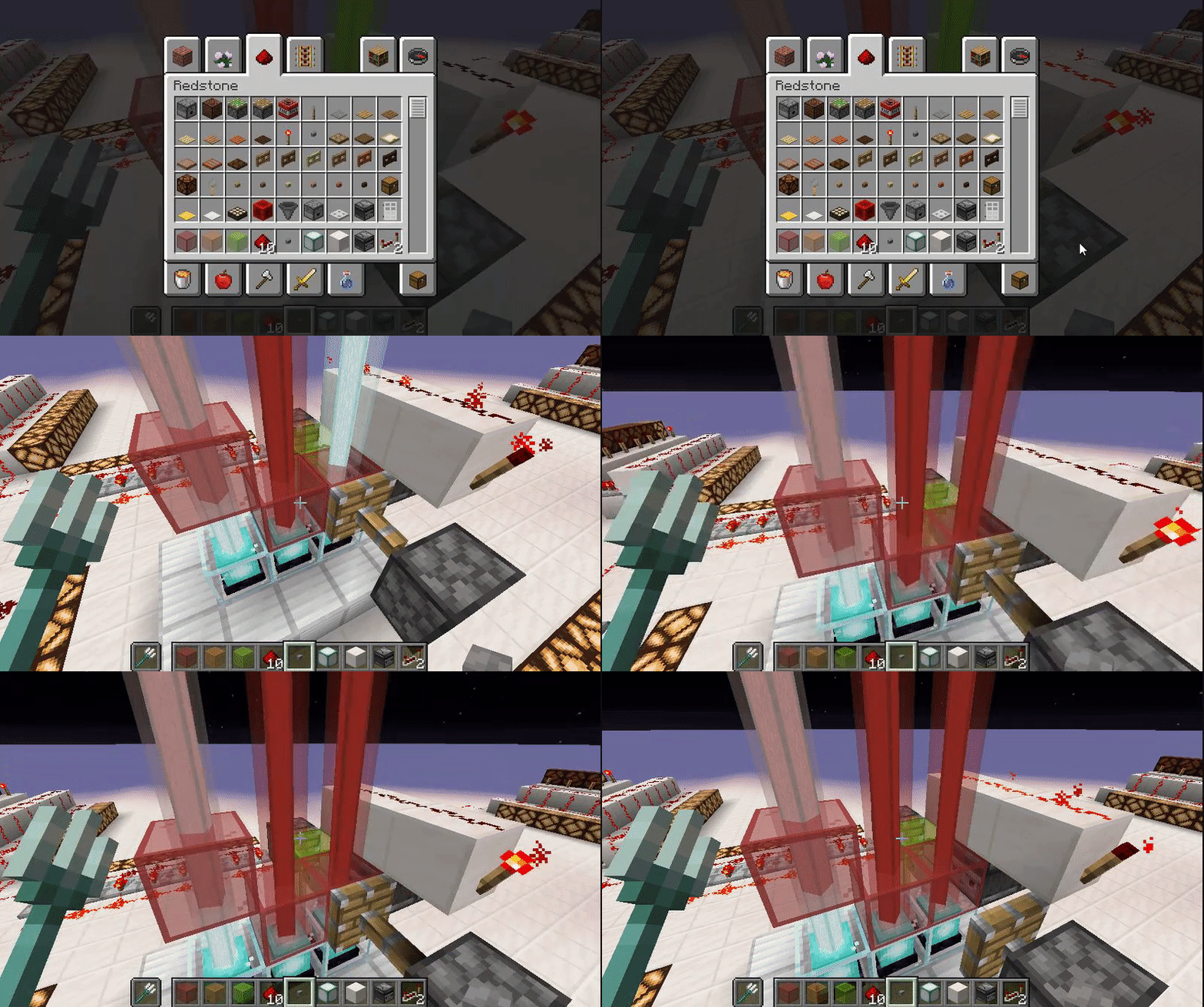
A gap above a beacon before a colored glass block makes the beam a tinted white colour, no gap and it has the normal vivid colour beam.
Pushing a colored glass block over a beacon, which in turn pushes another coloured glass block out of the way, instead of just swapping colours as you would expect, the beam flashes white during the transition.
Both bugs shown in attached .gif as they are both related to the beacon beam.
Just double checked and the white beam flash also happens when pushing 2 solid blocks over a beacon beam or even 2 of the same color in addition to the alternate color swap shown.
398f021f097fcf0a67204109698d6d40[1].mp4
In 14a & 14b:
A gap above a beacon before a colored glass block makes the beam a tinted white colour, no gap and it has the normal vivid colour beam.
Pushing a colored glass block over a beacon, which in turn pushes another coloured glass block out of the way, instead of just swapping colours as you would expect, the beam flashes white during the transition.
Both bugs shown in attached .gif as they are both related to the beacon beam.
Just double checked and the white beam flash also happens when pushing 2 solid blocks over a beacon beam or even 2 of the same color in addition to the alternate color swap shown.
In
14a & 14b:the above versions...
A gap above a beacon before a colored glass block makes the beam a tinted white colour, no gap and it has the normal vivid colour beam.
Pushing a colored glass block over a beacon, which in turn pushes another coloured glass block out of the way, instead of just swapping colours as you would expect, the beam flashes white during the transition.
Both bugs shown in attached .gif as they are both related to the beacon beam.
Just double checked and the white beam flash also happens when pushing 2 solid blocks over a beacon beam or even 2 of the same color in addition to the alternate color swap shown.
In
14a & 14b:the above versions...
A gap above a beacon before a colored glass block makes the beam a tinted white colour, no gap and it has the normal vivid colour beam.
Pushing a colored glass block over a beacon, which in turn pushes another coloured glass block out of the way, instead of just swapping colours as you would expect, the beam flashes white during the transition.
B
oth bugsshown in attached .gifas they are bothrelated to the beacon beam.
Just double checked and the white beam flash also happens when pushing 2 solidblocks over abeaconbeam or even 2ofthesame color in addition to the alternate color swap shown.In the above versions...
Pushing a
colored glassblock over a beacon, which in turn pushes anothercoloured glassblock out of the way, instead of just swappingcoloursas you would expect, the beam flashes white during the transition.
Bug shown in attached .gifs related to the beacon beam.
I have noted in 1.14.3 PR 4 a peculiar side effect occurs 65 blocks above the beacon the white flash stops happening on the beam, this 65 is not world height related but beam length:
A beacon placed at height 11, has the beam stop flashing white from height 76, whilst a beam from a beacon at height 14 will still flash white until height 79.
Beacon beam turns white while the stained glassis moved by a pistonBeacon beam turns white when a block above is moved by a piston.
In the above versions...
Pushing a
colored glassblock over a beacon, which in turn pushes anothercoloured glassblock out of the way, instead of just swappingcoloursas you would expect, the beam flashes white during the transition.
Bug shown in attached .gifs related to the beacon beam.
I have noted
in1.14.3 PR 4 a peculiar side effect occurs 65 blocks above the beacon the white flash stops happening on the beam, this 65 is not world height related but beam length:A beacon placed at height 11, has the beam stop flashing white from height 76, whilst a beam from a beacon at height 14 will still flash white until height 79.
In the above versions...
Pushing a block over a beacon, which in turn pushes another block out of the way, instead of just swapping them over as you would expect, the beam flashes white during the transition.
I have noted that from 1.14.3 PR 4 a peculiar side effect occurs 65 blocks above the beacon, the white flash stops happening on the beam, this 65 is not world height related but beam length as a higher placed beacon still shows the beam flash:
A beacon placed at height 11, has the beam stop flashing white from height 76, whilst a beam from a beacon at height 14 will still flash white until height 79.
See attachments:
Put your operating system (Windows 7, Windows XP, OSX) and Java version if you know it here
Windows 10 (64), Java version
Windows 10 (64), Java version jre1.8.0_281
Falling in flowing water below y-6 to y-15 is slower than it should be.Player falling in flowing water below y-6 to y-15 is slower than it should be.
Falling in flowing water below y-6 to y-15 is slower than it should be.What I expected to happen was...:
keep the same speed all the way downWhat actually happened was...:
As I reached y-6 I slowed to a crawl, then speeded up a little from y-14 and back to normal from y-15Steps to Reproduce:
1. Default World
2. Find a cave pit from around y0 down to y-20
3. Drop and watch...A player falling in flowing water below y-6 to y-15 is slower than it should be.
What I expected to happen was...:
To keep the same speed all the way downWhat actually happened was...:
As I reached y-6 I slowed to a crawl, then speeded up a little from y-14 and back to normal from y-15Steps to Reproduce:
1. Default World
2. Find a cave pit from around y0 down to y-20
3. Drop and watch...randomTickSpeed was unchanged from the default, doFireTick was disabled.
I'll try to get a video clip of this bug but even the F3 y axis counter slowed down between the depths mentioned.
Player falling in flowing waterbelow y-6 to y-15 is slower than it should be.Player falling in flowing water falls slower than normal when the flowing water is surrounded by air blocks.
A player falling in flowing water below y-6 to y-15 is slower than it should be.
What I expected to happen was...:
To keep the same speed all the way downWhat actually happened was...:
As I reached y-6 I slowed to a crawl, then speeded up a little from y-14 and back to normal from y-15Steps to Reproduce:
1. Default World
2. Find a cave pit from around y0 down to y-20
3. Drop and watch...randomTickSpeed was unchanged from the default, doFireTick was disabled.
I'll try to get a video clip of this bug but even the F3 y axis counter slowed down between the depths mentioned.
Playerfalling in flowing waterfalls slower than normalwhen theflowing wateris surrounded by air blocks.Player falls slower than normal in a flowing water column when it's surrounded by air blocks.
A player fall
ingin flowing waterbelow y-6 to y-15 is slower than it should be.What I expected to happen was...:
To keep the same speed all the way downWhat actually happened was...:
As I reached y-6 I slowed to a crawl, then speeded up a little from y-14 and back to normal from y-15Steps to Reproduce:
1. Default World
2. Find a cave pit from around y0 down to y-20
3. Drop and watch...randomTickSpeed was unchanged from the default, doFireTick was disabled.
I'll try to get a video clip of this bug but even the F3 y axis counter slowed down between the depths mentioned.
A player falls slower than normal in a flowing water column when it's surrounded by air blocks.
A player falling in flowing water below y-6 to y-15 is slower than it should be.
What I expected to happen was...:
To keep the same speed all the way downWhat actually happened was...:
As I reached y-6 I slowed to a crawl, then speeded up a little from y-14 and back to normal from y-15Steps to Reproduce:
1. Default World
2. Find a cave pit from around y0 down to y-20
3. Drop and watch...randomTickSpeed was unchanged from the default, doFireTick was disabled.
I'll try to get a video clip of this bug but even the F3 y axis counter slowed down between the depths mentioned.
A player falls slower than normal in a flowing water column when it's surrounded by air blocks.
A player falling in flowing water below y-6 to y-15 is slower than it should be.
What I expected to happen was...:
To keep the same speed all the way downWhat actually happened was...:
As I reachedy-6I slowed to a crawl, then speeded up a littlefrom y-14 and back to normal from y-15Steps to Reproduce:
1. Default World
2. Find a cave pit from around y0 down to y-20
3. Drop and watch...randomTickSpeed was unchanged from the default, doFireTick was disabled.
I'll try to get a video clip of this bug but eventheF3y axis counter slowed downbetween the depthsmentioned.A player falls slower than normal in a flowing water column when it's surrounded by air blocks.
What I expected to happen was...:
To keep the same speed all the way downWhat actually happened was...:
As I reached the area surrounded by air I slowed to a crawl, then speeded up a little just as 1 side of the flowing water column reached a wall of rock and back to normal falling in flowing water speed when the players head is level with the same rock wall.Steps to Reproduce:
1. Default World
2. Use a flowing water column with walls around it leading to an open area and back into an enclosed flowing water column.
3. Drop and watch...■□■ < normal player in top view
■□■ water falling rate ■
■□■ ■□■
□ < will slow down ■
□ around here
□
□ < will speed up a bit
■□■ < and back to normal
■□■
■□■■ = solid blocks in a hollow + shape
□ = flowing water
= airrandomTickSpeed was unchanged from the default, doFireTick was disabled.
video clip of bug added with F3 shown and yes as well as visually slowing the y axis counter slowed down in the area mentioned as well.
A player falls slower than normal in a flowing water column when it's surrounded by air blocks.
What I expected to happen was...:
To keep the same speed all the way downWhat actually happened was...:
As I reached the area surrounded by air I slowed to a crawl, then speeded up a little just as 1 side of the flowing water column reached a wall of rock and back to normal falling in flowing water speed when the players head is level with the same rock wall.Steps to Reproduce:
1. Default World
2. Use a flowing water column with walls around it leading to an open area and back into an enclosed flowing water column.
3. Drop and watch...■□■ < normal player in
top view
■□■ water falling rate ■
■□■■□■□< will slow down■
□ around here
□□< will speed up a bit
■□■ < and back to normal
■□■
■□■■ = solid blocks in a hollow + shape
□ = flowing water
= airrandomTickSpeed was unchanged from the default, doFireTick was disabled.
video clip of bug added with F3 shown and yes as well as visually slowing the y axis counter slowed down in the area mentioned as well.
A player falls slower than normal in a flowing water column when it's surrounded by air blocks.
What I expected to happen was...:
To keep the same speed all the way downWhat actually happened was...:
As I reached the area surrounded by air I slowed to a crawl, then speeded up a little just as 1 side of the flowing water column reached a wall of rock and back to normal falling in flowing water speed when the players head is level with the same rock wall.Steps to Reproduce:
1. Default World
2. Use a flowing water column with walls around it leading to an open area and back into an enclosed flowing water column.
3. Drop and watch...■□■ < normal player in water falling rate
■□■
■□■
_□_ < will slow down around here
_□_
_□_
_□_ < will speed up a bit
■□■ < and back to normal
■□■
■□■■ = solid blocks in a hollow + shape
□ = flowing water
__ = airrandomTickSpeed was unchanged from the default, doFireTick was disabled.
video clip of bug added with F3 shown and yes as well as visually slowing the y axis counter slowed down in the area mentioned as well.
A player falls slower than normal in a flowing water column when it's surrounded by air blocks.
What I expected to happen was...:
To keep the same speed all the way downWhat actually happened was...:
As I reached the area surrounded by air I slowed to a crawl, then speeded up a little just as 1 side of the flowing water column reached a wall of rock and back to normal falling in flowing water speed when the players head is level with the same rock wall.Steps to Reproduce:
1. Default World
2. Use a flowing water column with walls around it leading to an open area and back into an enclosed flowing water column.
3. Drop and watch...■
□■ < normal player in water falling rate
■□■
■□■
_□_ < will slow down around here
_□_
_□_
_□_ < will speed up a bit
■□■ < and back to normal
■□■
■□■■ = solid blocks in a hollow + shape
□ = flowing water
__ = airrandomTickSpeed was unchanged from the default, doFireTick was disabled.
video clip of bug added with F3 shown and yes as well as visually slowing the y axis counter slowed down in the area mentioned as well.
A player falls slower than normal in a flowing water column when it's surrounded by air blocks.
What I expected to happen was...:
To keep the same speed all the way downWhat actually happened was...:
As I reached the area surrounded by air I slowed to a crawl, then speeded up a little just as 1 side of the flowing water column reached a wall of rock and back to normal falling in flowing water speed when the players head is level with the same rock wall.Steps to Reproduce:
1. Default World
2. Use a flowing water column with walls around it leading to an open area and back into an enclosed flowing water column.
3. Drop and watch...■ □ ■ < normal player in water falling rate
■ □ ■
■ □ ■
_ □ _ < will slow down around here
_ □ _
_ □ _
_ □ _ < will speed up a bit
■ □ ■ < and back to normal
■ □ ■
■ □ ■■ = solid blocks in a hollow + shape
□ = flowing water
_ _ = airrandomTickSpeed was unchanged from the default, doFireTick was disabled.
video clip of bug added with F3 shown and yes as well as visually slowing the y axis counter slowed down in the area mentioned as well.
A player falls slower than normal in a flowing water column when it's surrounded by air blocks.
What I expected to happen was...:
To keep the same speed all the way downWhat actually happened was...:
As I reached the area surrounded by air I slowed to a crawl, then speeded up a little just as 1 side of the flowing water column reached a wall of rock and back to normal falling in flowing water speed when the players head is level with the same rock wall.Steps to Reproduce:
1. Default World
2. Use a flowing water column with walls around it leading to an open area and back into an enclosed flowing water column.
3. Drop and watch...■ □ ■ < normal player in water falling rate
■ □ ■
■ □ ■
_ □ _ < will slow down around here
_ □ _
_ □ _
_ □ _ < will speed up a bit
■ □ ■ < and back to normal
■ □ ■
■ □ ■■ = solid blocks in a hollow + shape
□ = flowing water
_ _ = airrandomTickSpeed was unchanged from the default, doFireTick was disabled.
video clip of bug added with F3 shown and yes as well as visually slowing the y axis counter slowed down in the area mentioned as well.
A player falls slower than normal in a flowing water column when it's surrounded by air blocks.
What I expected to happen was...:
To keep the same speed all the way downWhat actually happened was...:
As I reached the area surrounded by air I slowed to a crawl, then speeded up a little just as 1 side of the flowing water column reached a wall of rock and back to normal falling in flowing water speed when the players head is level with the same rock wall.Steps to Reproduce:
1. Default World
2. Use a flowing water column with walls around it leading to an open area and back into an enclosed flowing water column.
3. Drop and watch...randomTickSpeed was unchanged from the default, doFireTick was disabled.
video clip of bug added with F3 shown and yes as well as visually slowing the y axis counter slowed down in the area mentioned as well.
When pushing a button, the sides of it look like the button was squashed instead of being pushed into the wall.
Mod note: Fix from MC-90456 by John Hughes
Button not pressed the textures are:
                "north": { "uv": [ 5, 14, 11, 16 ], "texture": "#texture" },
                "south": { "uv": [ 5, 14, 11, 16 ], "texture": "#texture" },
                "west":  { "uv": [ 6, 14, 10, 16 ], "texture": "#texture" },
                "east":  { "uv": [ 6, 14, 10, 16 ], "texture": "#texture" }
However when pressed they change to:
                "north": { "uv": [ 5, 15, 11, 16 ], "texture": "#texture" },
                "south": { "uv": [ 5, 15, 11, 16 ], "texture": "#texture" },
                "west":  { "uv": [ 6, 15, 10, 16 ], "texture": "#texture" },
                "east":  { "uv": [ 6, 15, 10, 16 ], "texture": "#texture" }
This causes the impression the button is pressed but the texture has jumped, the front sides of the button changes to the back sides texture when it's pressed.
Example: Wall, back px 1, front px 2, Air
W12A < button not pushed
W1A < button pushed default 1.8+ mc (looks weird)
W2A < what it now looks like with this fix (outer texture moves in towards wall for duration of press event)
The fix is to change the texture on the pressed button to:
                "north": { "uv": [ 5, 14, 11, 15 ], "texture": "#texture" },
                "south": { "uv": [ 5, 14, 11, 15 ], "texture": "#texture" },
                "west":  { "uv": [ 6, 14, 10, 15 ], "texture": "#texture" },
                "east":  { "uv": [ 6, 14, 10, 15 ], "texture": "#texture" }
And the front edge texture moves towards the wall when the button is pressed and out as the button returns to normal.
Hope this is a simple bug to fix... (See attached button_pressed.json for the fix.)
In time order,
<- Unpressed Buttons
<- Current buttons pressed note the side texture.
<- Corrected version front texture moves closer.
The original has the near block texture jumping forward to remain visible, whereas with this suggested fix, it looks like the button actually moves as the near block texture seems to go into the block.
Just added a Resource Pack version of my fix, called Button Hotfix.zip
Hope this helps make testing the fix easier.

Found it: MC-8522.
@John Hughes: I will copy your fix to that ticket.
Giving this ticket to John Hughes since reporter seems to be inactive.
John Hughes, I made you the reporter of MC-8522, now you can edit that ticket as you like.
Missing comment imported from MC-90456 by John Hughes
Kumasasa added a comment - 12/Oct/15 10:04 PM
No need to fix pre-1.8, but your fix works also with the 1.9 snapshots 15wXX
![[Mod] violine1101](../../../data/avatars/users/92858.png)
John Hughes, if a dev is no longer assigned to a ticket, that only means that they're not actively working on it. It does not mean that the issue won't be fixed.
In time order,
2015-10-12_19.30.17.png <- Unpressed Buttons
2015-10-12_19.30.37.png <- Current buttons pressed note the side texture.
2015-10-12_19.31.11.png <- Corrected version front texture moves closer.
The original has the near block texture jumping forward to remain visible, whereas with this suggested fix, it looks like the button actually moves as the near block texture seems to go into the block.
I did try searching, oh and mine does include the fixed: button_pressed.json
Which should make fixing it easier, failing that it could even be added as a resource pack hotfix.
Erm, yes but...
Did pre 1.8 use .json models? If not it would have to be a .obj fix for the earlier versions and the .json from 1.8
Glad to of helped.
Thanks Kumasasa.
Sorry, preview button was missing as it was being treated as an advert and blocked, fixed now.
Missing comment imported from
MC-90456by John HughesKumasasa added a comment - 12/Oct/15 10:04 PM
No need to fix pre-1.8, but your fix works also with the 1.9 snapshots 15wXX
Excuse me, [Mojang] Grum (Erik Broes)
Would I be able to get permission to let users have the resource pack hotfix for their 1.8.x versions?
I'd happily replace my game name with a Mojang listing in the zip's pack.mcmeta, please let me know if this would be acceptable to mojang,
And thanks in advance.
button_pressed.json is a tweaked version of a mojang/minecraft core/vanilla file,
I believe that I cannot release a changed Mojang file without their permission,
Therefore my request for permission above.
The only reason I attached Button Hotfix.zip to this is because it would help with testing, as a resource pack it could be added and removed with the game running, allowing for easier testing of both the vanilla and fixed buttons.
Ok, thanks.
(And the request is logged here should it be needed for future reference.)
This used to be used to hide buttons in redstone builds especially those where a surface button would pop off if the block in question moved!
Can we please have a set of vertical slabs that can be clicked through added to redstone blocks as a replacement for this former unintended feature?
Confirmed, note they worked in 19w08a
Prior to the 1.14 Snapshots this was a random occurrence and hard to pinpoint, since the 1.14 snapshots and the other beam fix it happens on every single beacon beam block swap.
MC-151133is an infoless duplicateHave had issues in 1.14.1 of unlocked unpowered repeaters being stuck in their on state, ugh.
Now I don't know if this is a seperate 1.14.1 bug or the same redstone issue, but even pistons won't retract if you power a block over the piston, then remove that powered block or the redstone dust powering that block the piston stays extended until you restore the block's power and unpower it normally (forces nearby blocks to check their power state)
Supplemental - Yes this is a CRITICAL redstone problem, not just dust, but redstone torches, repeaters, comparators, pistons, pressure plates!!! etc.
I just dug a 2x1 hole 2 blocks deep in 1.14.1, I then placed in 2 sticky pistons, placed 2 heavy pressure plates next to the hole on the surface, stand on one and place a block on the sticky piston 1 block below you, it'll pop up, now either place a block on the other piston, or remove the raised block, moving from pressure plate to pressure plate will pop up the sticky piston nearest it, step off both plates and back the pistons stay retracted like they should, wtfbbq???
BeaconFlashBug.gif added
The blocks on the right are solid blocks - coloured concrete, the left are transparent - stained glass.
Both let the (usually white) beacon beam flash through them.
On checking my enabled Resource Packs, one called "e8b22f28dd0202cd90dfd935636080ce-Texture Update V3.1" was active, on removing this the chest textures restored themselves, trying the "Programmer Art" Resource Pack also breaks chests and banners, both of these texture packs are listed as current and valid.
Fix suggestions: Either update the resource pack id, (auto disable these packs and stop the bug) or retro load the packs so that the messed up textrures are transposed on loading and fixed that way.
Note: For mods this also fixes the black banner issue, but not item frames!!!
(I'm going to give up reporting bugs as Jira is bugged itself, searched for 'Chest' before reporting, no listing, posted to get told by a mod I'd duplicated a bug report and to try searching next time ugh!, furthermore a dev assigned to one of my bug reports (
MC-147777) dropped it with no explanation why, so very unhappy with this USELESS system atm.)Zack, You may also want to check out EnderChests and Banners/Banner parts, although I suspect banners is also the current texture transparency issue such as on banners, item frames, shulker boxes, dropped items sign text at a certain angle gets a black background, I'm thinking in the textures transparent (was black has been transposed with the shulker bottom texture, so another transposed issue...
Almost looks like a junior dev screwed up the model texture co-ordinate numbers then edited the texture sheet to match... Almost!
Also happens if sand is dropped onto an open trapdoor, it then becomes a solid block.
This still happens in 19w40a. I hope it gets fixed for 1.15 as I have a trap design that needs this working properly.
I think they mean pistons can no longer push anvils.
Pushing anvils used to be used in traps and smithing setups to replace a completely broken anvil from a hidden stockpile of pre-crafted spares, which is ideal for a crafter rather than mess around finding one in chests and similar.
FAO DEVS: This may be WAI in Java but according to this: https://minecraft.gamepedia.com/Piston
In the Java Version this then becomes a PARITY issue with the other versions. (which treat anvils as sand like blocks in relation to pistons.)
Mod: Please forward this to devs accordingly. (Note: still a parity issue in 1.15.2)
It doesn't even Optimise, all 3 ways to optimise existing world all crash with a mouse click null pointer exception.
A workaround without optimisation is to do a stand alone backup and just load the world with "I know what I am doing"...
otherwise mouse click null pointer crash.
Duplicate of
MC-179841Did you try selecting a world?
Duplicate of
MC-179841Duplicate of:
MC-179841According to @_LadyAgnes on Twitter, this is fixed internally and should be available/fixed in the next snapshot release.
Until then to run the world in 20w17a do a manual backup, once confirmed run the world directly and select:
Then your 20w16a world (or earlier▪) should load into 20w17a.
▪Please Note:
Please test by creating an old world, placing a user placed block then upgrading, I believe the user placed block will remain, the rest of the terrain is world seed generated, due to the changes in seed format to add biomes the original spawn seed will be different between versions accounting for your swamp to ocean change, as placed blocks are stored seperately to keep the world size down the placed block should remain in situ.
This also happens between using a 32 bit seed on bedrock and the same seed in the 64 bit java version, since the output is different.
A fix could be done by noting the limited biomes for the explored area and optimising for that limited number then allowing exploration the full extent of biomes beyond the explored area.
Or for a really old world convert whole chunks to placed blocks for format optimization, takes more storage but would keep older terrain.
A final option would be to class old explored biomes as classic biomes, overriding the new biomes when optimised.
Added 2 video clips, can offer backup of world via google drive if needed.
as you can see from my .mp4 it happens with less lighting than specified. (20w21a)
It appears they are only looking for lava under air blocks, placing an upper closed trapdoor in place of an air block over lava and they suicidally pathfind through it into the lava.
As baby chickens can fit under top slabs & sideways half stairs, they may need waterlogabble blocks adding to the air listing for detecting lava/fire underneath.
Appears to be resolved with
MC-183469I did search, it's not my fault it lists several thousand MCPE listings when searching for an MC Java bug, which in turn makes finding a duplicate near impossible, normally I wouldn't comment back to a refered issue but dang, need to ask Mojang to fix the Jira so that MCPE- & MC- listings can be ignored based on the search.
Anyone need me to try it with hoppers and chests underneath?
Builds that have worked since 1.15.2 (And not 0 tick farms.) suddenly decide to lock up the game clients.
In 1.15.2 you would see the moving Redstone flying machines stuttering but the Game would still be responsive:
https://www.youtube.com/watch?v=dftxbF8U8U4
&
https://www.youtube.com/watch?v=b6aK0BfuGp8
These now put the game in a free cursor [Not Responding] state during the flying machines transition, the game starts responding after about 1 minute for the doors, but the silo build seems to just crash the game out, too long a non response I guess.
This happens in both single player and with a local server (which is happily ticking away as the game client locks up, not only has it done it to myself but to a friend connected externally too.
Have tested and the server stays running, albeit with update spikes as the flying machines move, once they stop the game clients become responsive again, however on longer delays the game not only goes [Not Responding] whilst the server ticks away it can after a few minutes crash the game client completely, even trying to login bogs down as the rapid piston updates continue.
In my experience is down to the latest client being unable to process rapid server updates as part of the 0 tick farm fixes, this however should not be the case as it's the server that should ignore rapid client updates from 0 ticks, since the 0 tick farms never moved server side (it why they never caused server lag).
The advantage I have is that I have 2 large builds, one which only lags [Non Responsive] game client for the duration, the other causes the lag crash, and am happy for the devs to take a look for themselves!
Copy of my Personal Redstone testing area:
https://drive.google.com/file/d/1rtKF-WLZpy_wdAILa2vDTGzBsMGK8kKD/view
/tp -258.5 10.0 -38.0
Push a button and wait for lag to stop.
/tp -394.5 40.0 -119.5
Pull lever and push crimson button.
(Enjoy the Crash)
Makes me wonder if they could fix this with a simple client do not recalculate light in a chunk (or 5/9) where a 0 or 1 tick piston sequence is going off, that would stop the lighting updates for those areas affected, especially as the server seems fine.
The problem is 1.16.1 will still freeze the game client for players outside of the chunks where the updates are happening.
ŢThis may be the same bug affecting larger flying machines without redstone towers, not by the towers but the way they work by chaining updates forward.
See also:
MC-192845[Mojang] Panda, I have linked my test world .zip via Google Drive in the
MC-192845report along with the button co-ordinates to compare lag, sorry to mention it here but that one is still unassigned and I believe them to be the same issue, 1.15.2 thru 1.16 snapshot 4 fine but a little client lag, post snap 4 urgh client deadlock [Not Responding] I have 2 listed builds that do it, one for about 60 seconds the other to crash point.It's bad.
Aha a version of this was caused by client side lighting updates, yes that is brilliant for lamps, I wonder if it could revert to 1.15.2 style listening to the server if more than a set quantity of pistons are triggering, this would allow smaller Redstone Circuits to carry on with lighting updates, and those moving loads of blocks (lots of pistons moving) to ignore lighting updates (preferably from any chunks with moving pistons) until the number of them moving has dropped to lower levels.
My dual sided 8x8 door works fine, even turned into a portal that has 96 pistons total, half of which pulse at the start and the other 48 as it's moving, more than that more than that and it starts lagging with the [Not Responding], Devs & Mods feel free to check the piston count in the lagging areas of my 1.16.1 test world, as listed above.
@Jeremy is it a full crash or just [Not Responding] client?
If it's the client try giving it a moment and see if it recovers, the kelp blocks breaking along with the piston movement may be causing the same update lag as my hangar door, takes about a minute to recover from [Not Responding]
1.16.2 pre 1 is slower than 1.15.2 at moving pistons, the lag is similar just slower pistons on 1.16.2 pre 1
At least the [Not Responding]/Crash of 1.16.1 has gone the way of the dodo for now.
Bedrock is completely black (from the void side)
Will try to get a video clip, but have also experienced this when filling below ground gravel with air, any gravel above drops and sometimes if it's 2 blocks or more high the bottom one breaks to an item.
Video Of Bug Here:
https://youtu.be/Zw67F5GvAeQ
Edited this bug title, after watching my recording back and where it slows down, instead of just a falling column of water
it's a column of water in the middle of air blocks at the point where it slows down.
Simple test then is supporting block a gravity affected block (Sand/Red Sand/Gravel) - if so test downwards for air/non gravity affected block.
it can propagate downwards as fast as falling sand does outwards and blocks passing the query downwards could ignore another test request for a few ticks unless moved preventing it being triggered by multiple sand* side drops.
Another reason for the optional suggestion above too, loading a chunk visualises those surface gravity blocks and caves etc not supporting them, hence the ideal time to drop them.
Still affects 21w14a - The Barrier and Light inner block visual particles should bypass the particle settings when held, which would then display them even on the Minimal Particles setting & instantly fix this problem.
It happens even if a light block is not held & no particles are shown.
Light blocks should either break like grass stems or be stored seperately to not physically interact with the game world unless visual from holding one.
I'm going to guess the light blocks were made based off barrier blocks...
So surrounding a dirt block with light blocks and testing with nearby tnt may be nessesary.
Please also check with falling sand.