 MC-8522
Pushing a button makes the button side textures look wrong
When pushing a button, the sides of it look like the button was squashed instead of being pushed into the wall.
Mod note: Fix from MC-90456 by John Hughes
Button not pressed the textures are:
                "north": { "uv": [ 5, 14, 11, 16 ], "texture": "#texture" },
                "south": { "uv": [ 5, 14, 11, 16 ], "texture": "#texture" },
                "west":  { "uv": [ 6, 14, 10, 16 ], "texture": "#texture" },
                "east":  { "uv": [ 6, 14, 10, 16 ], "texture": "#texture" }
However when pressed they change to:
                "north": { "uv": [ 5, 15, 11, 16 ], "texture": "#texture" },
                "south": { "uv": [ 5, 15, 11, 16 ], "texture": "#texture" },
                "west":  { "uv": [ 6, 15, 10, 16 ], "texture": "#texture" },
                "east":  { "uv": [ 6, 15, 10, 16 ], "texture": "#texture" }
This causes the impression the button is pressed but the texture has jumped, the front sides of the button changes to the back sides texture when it's pressed.
Example: Wall, back px 1, front px 2, Air
W12A < button not pushed
W1A < button pushed default 1.8+ mc (looks weird)
W2A < what it now looks like with this fix (outer texture moves in towards wall for duration of press event)
The fix is to change the texture on the pressed button to:
                "north": { "uv": [ 5, 14, 11, 15 ], "texture": "#texture" },
                "south": { "uv": [ 5, 14, 11, 15 ], "texture": "#texture" },
                "west":  { "uv": [ 6, 14, 10, 15 ], "texture": "#texture" },
                "east":  { "uv": [ 6, 14, 10, 15 ], "texture": "#texture" }
And the front edge texture moves towards the wall when the button is pressed and out as the button returns to normal.
Hope this is a simple bug to fix... (See attached button_pressed.json for the fix.)
In time order,
 <- Unpressed Buttons
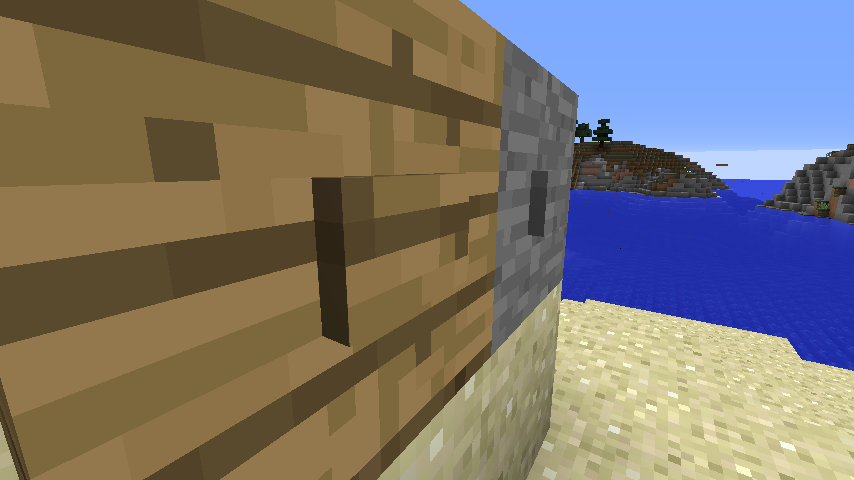 <- Current buttons pressed note the side texture.
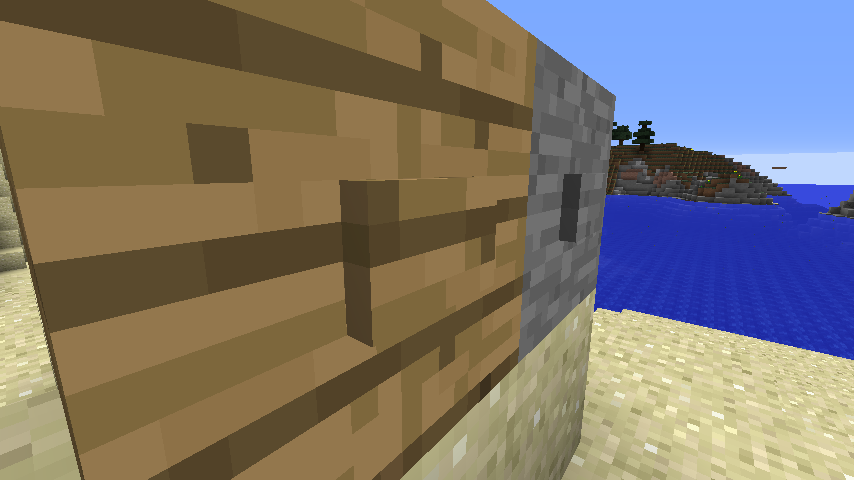 <- Corrected version front texture moves closer.
The original has the near block texture jumping forward to remain visible, whereas with this suggested fix, it looks like the button actually moves as the near block texture seems to go into the block.
Just added a Resource Pack version of my fix, called Button Hotfix.zip
Hope this helps make testing the fix easier.
Linked Issues
 MCPE-32740


Created Issue:
Pressed button not rendering like is was pushed
When pushing a button, the sides of it look like the button was squashed instead of being pushed into the wall.
Attachments2
2013-01-27_18.21.42.png


When pushing a button, the sides of it look like the button was squashed instead of being pushed into the wall.
Mod note: Fix from MC-
MC-90456by John HughesButton not pressed the textures are:
"north": { "uv": [ 5, 14, 11, 16 ], "texture": "#texture" }, "south": { "uv": [ 5, 14, 11, 16 ], "texture": "#texture" }, "west": { "uv": [ 6, 14, 10, 16 ], "texture": "#texture" }, "east": { "uv": [ 6, 14, 10, 16 ], "texture": "#texture" }However when pressed they change to:
"north": { "uv": [ 5, 15, 11, 16 ], "texture": "#texture" }, "south": { "uv": [ 5, 15, 11, 16 ], "texture": "#texture" }, "west": { "uv": [ 6, 15, 10, 16 ], "texture": "#texture" }, "east": { "uv": [ 6, 15, 10, 16 ], "texture": "#texture" }This causes the impression the button is pressed but the texture has jumped, the front sides of the button changes to the back sides texture when it's pressed.
Example: Wall, back px 1, front px 2, Air
W12A < button not pushed
W1A < button pushed default 1.8+ mc (looks weird)
W2A < what it now looks like with this fix (outer texture moves in towards wall for duration of press event)The fix is to change the texture on the pressed button to:
"north": { "uv": [ 5, 14, 11, 15 ], "texture": "#texture" }, "south": { "uv": [ 5, 14, 11, 15 ], "texture": "#texture" }, "west": { "uv": [ 6, 14, 10, 15 ], "texture": "#texture" }, "east": { "uv": [ 6, 14, 10, 15 ], "texture": "#texture" }And the front edge texture moves towards the wall when the button is pressed and out as the button returns to normal.
Hope this is a simple bug to fix... (See attached.)
When pushing a button, the sides of it look like the button was squashed instead of being pushed into the wall.
Mod note: Fix from MC-
MC-90456by John HughesButton not pressed the textures are:
"north": { "uv": [ 5, 14, 11, 16 ], "texture": "#texture" }, "south": { "uv": [ 5, 14, 11, 16 ], "texture": "#texture" }, "west": { "uv": [ 6, 14, 10, 16 ], "texture": "#texture" }, "east": { "uv": [ 6, 14, 10, 16 ], "texture": "#texture" }However when pressed they change to:
"north": { "uv": [ 5, 15, 11, 16 ], "texture": "#texture" }, "south": { "uv": [ 5, 15, 11, 16 ], "texture": "#texture" }, "west": { "uv": [ 6, 15, 10, 16 ], "texture": "#texture" }, "east": { "uv": [ 6, 15, 10, 16 ], "texture": "#texture" }This causes the impression the button is pressed but the texture has jumped, the front sides of the button changes to the back sides texture when it's pressed.
Example: Wall, back px 1, front px 2, Air
W12A < button not pushed
W1A < button pushed default 1.8+ mc (looks weird)
W2A < what it now looks like with this fix (outer texture moves in towards wall for duration of press event)The fix is to change the texture on the pressed button to:
"north": { "uv": [ 5, 14, 11, 15 ], "texture": "#texture" }, "south": { "uv": [ 5, 14, 11, 15 ], "texture": "#texture" }, "west": { "uv": [ 6, 14, 10, 15 ], "texture": "#texture" }, "east": { "uv": [ 6, 14, 10, 15 ], "texture": "#texture" }And the front edge texture moves towards the wall when the button is pressed and out as the button returns to normal.
Hope this is a simple bug to fix... (See attached.)
In time order,
2015-10-12_19.30.17.png <- Unpressed Buttons
2015-10-12_19.30.37.png <- Current buttons pressed note the side texture.
2015-10-12_19.31.11.png <- Corrected version front texture moves closer.The original has the near block texture jumping forward to remain visible, whereas with this suggested fix, it looks like the button actually moves as the near block texture seems to go into the block.
Pressed button not rendering like is was pushedPushing a button makes the button side textures look wrong - Suggested fix attached
is duplicated by
When pushing a button, the sides of it look like the button was squashed instead of being pushed into the wall.
Mod note: Fix from MC-
MC-90456by John HughesButton not pressed the textures are:
"north": { "uv": [ 5, 14, 11, 16 ], "texture": "#texture" }, "south": { "uv": [ 5, 14, 11, 16 ], "texture": "#texture" }, "west": { "uv": [ 6, 14, 10, 16 ], "texture": "#texture" }, "east": { "uv": [ 6, 14, 10, 16 ], "texture": "#texture" }However when pressed they change to:
"north": { "uv": [ 5, 15, 11, 16 ], "texture": "#texture" }, "south": { "uv": [ 5, 15, 11, 16 ], "texture": "#texture" }, "west": { "uv": [ 6, 15, 10, 16 ], "texture": "#texture" }, "east": { "uv": [ 6, 15, 10, 16 ], "texture": "#texture" }This causes the impression the button is pressed but the texture has jumped, the front sides of the button changes to the back sides texture when it's pressed.
Example: Wall, back px 1, front px 2, Air
W12A < button not pushed
W1A < button pushed default 1.8+ mc (looks weird)
W2A < what it now looks like with this fix (outer texture moves in towards wall for duration of press event)The fix is to change the texture on the pressed button to:
"north": { "uv": [ 5, 14, 11, 15 ], "texture": "#texture" }, "south": { "uv": [ 5, 14, 11, 15 ], "texture": "#texture" }, "west": { "uv": [ 6, 14, 10, 15 ], "texture": "#texture" }, "east": { "uv": [ 6, 14, 10, 15 ], "texture": "#texture" }And the front edge texture moves towards the wall when the button is pressed and out as the button returns to normal.
Hope this is a simple bug to fix... (See attached.)
In time order,
2015-10-12_19.30.17.png <- Unpressed Buttons
2015-10-12_19.30.37.png <- Current buttons pressed note the side texture.
2015-10-12_19.31.11.png <- Corrected version front texture moves closer.The original has the near block texture jumping forward to remain visible, whereas with this suggested fix, it looks like the button actually moves as the near block texture seems to go into the block.
Just added a Resource Pack version of my button_pressed.json fix, called Button Hotfix.zip
Hope this helps make testing the fix easier.
Added a Resource Pack version of my button_pressed.json fix, called Button Hotfix.zip
Hope this helps make testing the fix easier.
When pushing a button, the sides of it look like the button was squashed instead of being pushed into the wall.
Mod note: Fix from MC-
MC-90456by John HughesButton not pressed the textures are:
"north": { "uv": [ 5, 14, 11, 16 ], "texture": "#texture" }, "south": { "uv": [ 5, 14, 11, 16 ], "texture": "#texture" }, "west": { "uv": [ 6, 14, 10, 16 ], "texture": "#texture" }, "east": { "uv": [ 6, 14, 10, 16 ], "texture": "#texture" }However when pressed they change to:
"north": { "uv": [ 5, 15, 11, 16 ], "texture": "#texture" }, "south": { "uv": [ 5, 15, 11, 16 ], "texture": "#texture" }, "west": { "uv": [ 6, 15, 10, 16 ], "texture": "#texture" }, "east": { "uv": [ 6, 15, 10, 16 ], "texture": "#texture" }This causes the impression the button is pressed but the texture has jumped, the front sides of the button changes to the back sides texture when it's pressed.
Example: Wall, back px 1, front px 2, Air
W12A < button not pushed
W1A < button pushed default 1.8+ mc (looks weird)
W2A < what it now looks like with this fix (outer texture moves in towards wall for duration of press event)The fix is to change the texture on the pressed button to:
"north": { "uv": [ 5, 14, 11, 15 ], "texture": "#texture" }, "south": { "uv": [ 5, 14, 11, 15 ], "texture": "#texture" }, "west": { "uv": [ 6, 14, 10, 15 ], "texture": "#texture" }, "east": { "uv": [ 6, 14, 10, 15 ], "texture": "#texture" }And the front edge texture moves towards the wall when the button is pressed and out as the button returns to normal.
Hope this is a simple bug to fix... (See attached.)
In time order,
2015-10-12_19.30.17.png <- Unpressed Buttons
2015-10-12_19.30.37.png <- Current buttons pressed note the side texture.
2015-10-12_19.31.11.png <- Corrected version front texture moves closer.The original has the near block texture jumping forward to remain visible, whereas with this suggested fix, it looks like the button actually moves as the near block texture seems to go into the block.
Just added a Resource Pack version of my
button_pressed.jsonfix, called Button Hotfix.zip
Hope this helps make testing the fix easier.When pushing a button, the sides of it look like the button was squashed instead of being pushed into the wall.
Mod note: Fix from MC-
MC-90456by John HughesButton not pressed the textures are:
"north": { "uv": [ 5, 14, 11, 16 ], "texture": "#texture" }, "south": { "uv": [ 5, 14, 11, 16 ], "texture": "#texture" }, "west": { "uv": [ 6, 14, 10, 16 ], "texture": "#texture" }, "east": { "uv": [ 6, 14, 10, 16 ], "texture": "#texture" }However when pressed they change to:
"north": { "uv": [ 5, 15, 11, 16 ], "texture": "#texture" }, "south": { "uv": [ 5, 15, 11, 16 ], "texture": "#texture" }, "west": { "uv": [ 6, 15, 10, 16 ], "texture": "#texture" }, "east": { "uv": [ 6, 15, 10, 16 ], "texture": "#texture" }This causes the impression the button is pressed but the texture has jumped, the front sides of the button changes to the back sides texture when it's pressed.
Example: Wall, back px 1, front px 2, Air
W12A < button not pushed
W1A < button pushed default 1.8+ mc (looks weird)
W2A < what it now looks like with this fix (outer texture moves in towards wall for duration of press event)The fix is to change the texture on the pressed button to:
"north": { "uv": [ 5, 14, 11, 15 ], "texture": "#texture" }, "south": { "uv": [ 5, 14, 11, 15 ], "texture": "#texture" }, "west": { "uv": [ 6, 14, 10, 15 ], "texture": "#texture" }, "east": { "uv": [ 6, 14, 10, 15 ], "texture": "#texture" }And the front edge texture moves towards the wall when the button is pressed and out as the button returns to normal.
Hope this is a simple bug to fix... (See attached.)
In time order,
2015-10-12_19.30.17.png <- Unpressed Buttons
2015-10-12_19.30.37.png <- Current buttons pressed note the side texture.
2015-10-12_19.31.11.png <- Corrected version front texture moves closer.The original has the near block texture jumping forward to remain visible, whereas with this suggested fix, it looks like the button actually moves as the near block texture seems to go into the block.
Just added a Resource Pack version of my fix, called Button Hotfix.zip
Hope this helps make testing the fix easier.
When pushing a button, the sides of it look like the button was squashed instead of being pushed into the wall.
Mod note: Fix from
MC-MC-90456by John HughesButton not pressed the textures are:
"north": { "uv": [ 5, 14, 11, 16 ], "texture": "#texture" }, "south": { "uv": [ 5, 14, 11, 16 ], "texture": "#texture" }, "west": { "uv": [ 6, 14, 10, 16 ], "texture": "#texture" }, "east": { "uv": [ 6, 14, 10, 16 ], "texture": "#texture" }However when pressed they change to:
"north": { "uv": [ 5, 15, 11, 16 ], "texture": "#texture" }, "south": { "uv": [ 5, 15, 11, 16 ], "texture": "#texture" }, "west": { "uv": [ 6, 15, 10, 16 ], "texture": "#texture" }, "east": { "uv": [ 6, 15, 10, 16 ], "texture": "#texture" }This causes the impression the button is pressed but the texture has jumped, the front sides of the button changes to the back sides texture when it's pressed.
Example: Wall, back px 1, front px 2, Air
W12A < button not pushed
W1A < button pushed default 1.8+ mc (looks weird)
W2A < what it now looks like with this fix (outer texture moves in towards wall for duration of press event)The fix is to change the texture on the pressed button to:
"north": { "uv": [ 5, 14, 11, 15 ], "texture": "#texture" }, "south": { "uv": [ 5, 14, 11, 15 ], "texture": "#texture" }, "west": { "uv": [ 6, 14, 10, 15 ], "texture": "#texture" }, "east": { "uv": [ 6, 14, 10, 15 ], "texture": "#texture" }And the front edge texture moves towards the wall when the button is pressed and out as the button returns to normal.
Hope this is a simple bug to fix... (See attached.)
In time order,
2015-10-12_19.30.17.png <- Unpressed Buttons
2015-10-12_19.30.37.png <- Current buttons pressed note the side texture.
2015-10-12_19.31.11.png <- Corrected version front texture moves closer.The original has the near block texture jumping forward to remain visible, whereas with this suggested fix, it looks like the button actually moves as the near block texture seems to go into the block.
Just added a Resource Pack version of my fix, called Button Hotfix.zip
Hope this helps make testing the fix easier.When pushing a button, the sides of it look like the button was squashed instead of being pushed into the wall.
Mod note: Fix from
MC-90456by John HughesButton not pressed the textures are:
"north": { "uv": [ 5, 14, 11, 16 ], "texture": "#texture" }, "south": { "uv": [ 5, 14, 11, 16 ], "texture": "#texture" }, "west": { "uv": [ 6, 14, 10, 16 ], "texture": "#texture" }, "east": { "uv": [ 6, 14, 10, 16 ], "texture": "#texture" }However when pressed they change to:
"north": { "uv": [ 5, 15, 11, 16 ], "texture": "#texture" }, "south": { "uv": [ 5, 15, 11, 16 ], "texture": "#texture" }, "west": { "uv": [ 6, 15, 10, 16 ], "texture": "#texture" }, "east": { "uv": [ 6, 15, 10, 16 ], "texture": "#texture" }This causes the impression the button is pressed but the texture has jumped, the front sides of the button changes to the back sides texture when it's pressed.
Example: Wall, back px 1, front px 2, Air
W12A < button not pushed
W1A < button pushed default 1.8+ mc (looks weird)
W2A < what it now looks like with this fix (outer texture moves in towards wall for duration of press event)The fix is to change the texture on the pressed button to:
"north": { "uv": [ 5, 14, 11, 15 ], "texture": "#texture" }, "south": { "uv": [ 5, 14, 11, 15 ], "texture": "#texture" }, "west": { "uv": [ 6, 14, 10, 15 ], "texture": "#texture" }, "east": { "uv": [ 6, 14, 10, 15 ], "texture": "#texture" }And the front edge texture moves towards the wall when the button is pressed and out as the button returns to normal.
Hope this is a simple bug to fix... (See attached button_pressed.json
In time order,
2015-10-12_19.30.17.png
2015-10-12_19.30.37.png
2015-10-12_19.31.11.pngThe original has the near block texture jumping forward to remain visible, whereas with this suggested fix, it looks like the button actually moves as the near block texture seems to go into the block.
Just added a Resource Pack version of my fix, called Button Hotfix.zip
Hope this helps make testing the fix easier.
When pushing a button, the sides of it look like the button was squashed instead of being pushed into the wall.
Mod note: Fix from
MC-90456by John HughesButton not pressed the textures are:
"north": { "uv": [ 5, 14, 11, 16 ], "texture": "#texture" }, "south": { "uv": [ 5, 14, 11, 16 ], "texture": "#texture" }, "west": { "uv": [ 6, 14, 10, 16 ], "texture": "#texture" }, "east": { "uv": [ 6, 14, 10, 16 ], "texture": "#texture" }However when pressed they change to:
"north": { "uv": [ 5, 15, 11, 16 ], "texture": "#texture" }, "south": { "uv": [ 5, 15, 11, 16 ], "texture": "#texture" }, "west": { "uv": [ 6, 15, 10, 16 ], "texture": "#texture" }, "east": { "uv": [ 6, 15, 10, 16 ], "texture": "#texture" }This causes the impression the button is pressed but the texture has jumped, the front sides of the button changes to the back sides texture when it's pressed.
Example: Wall, back px 1, front px 2, Air
W12A < button not pushed
W1A < button pushed default 1.8+ mc (looks weird)
W2A < what it now looks like with this fix (outer texture moves in towards wall for duration of press event)The fix is to change the texture on the pressed button to:
"north": { "uv": [ 5, 14, 11, 15 ], "texture": "#texture" }, "south": { "uv": [ 5, 14, 11, 15 ], "texture": "#texture" }, "west": { "uv": [ 6, 14, 10, 15 ], "texture": "#texture" }, "east": { "uv": [ 6, 14, 10, 15 ], "texture": "#texture" }And the front edge texture moves towards the wall when the button is pressed and out as the button returns to normal.
Hope this is a simple bug to fix... (See attached button_pressed.json
In time order,
2015-10-12_19.30.17.png
2015-10-12_19.30.37.png
2015-10-12_19.31.11.pngThe original has the near block texture jumping forward to remain visible, whereas with this suggested fix, it looks like the button actually moves as the near block texture seems to go into the block.
Just added a Resource Pack version of my fix, called Button Hotfix.zip
Hope this helps make testing the fix easier.When pushing a button, the sides of it look like the button was squashed instead of being pushed into the wall.
Mod note: Fix from
MC-90456by John HughesButton not pressed the textures are:
"north": { "uv": [ 5, 14, 11, 16 ], "texture": "#texture" }, "south": { "uv": [ 5, 14, 11, 16 ], "texture": "#texture" }, "west": { "uv": [ 6, 14, 10, 16 ], "texture": "#texture" }, "east": { "uv": [ 6, 14, 10, 16 ], "texture": "#texture" }However when pressed they change to:
"north": { "uv": [ 5, 15, 11, 16 ], "texture": "#texture" }, "south": { "uv": [ 5, 15, 11, 16 ], "texture": "#texture" }, "west": { "uv": [ 6, 15, 10, 16 ], "texture": "#texture" }, "east": { "uv": [ 6, 15, 10, 16 ], "texture": "#texture" }This causes the impression the button is pressed but the texture has jumped, the front sides of the button changes to the back sides texture when it's pressed.
Example: Wall, back px 1, front px 2, Air
W12A < button not pushed
W1A < button pushed default 1.8+ mc (looks weird)
W2A < what it now looks like with this fix (outer texture moves in towards wall for duration of press event)The fix is to change the texture on the pressed button to:
"north": { "uv": [ 5, 14, 11, 15 ], "texture": "#texture" }, "south": { "uv": [ 5, 14, 11, 15 ], "texture": "#texture" }, "west": { "uv": [ 6, 14, 10, 15 ], "texture": "#texture" }, "east": { "uv": [ 6, 14, 10, 15 ], "texture": "#texture" }And the front edge texture moves towards the wall when the button is pressed and out as the button returns to normal.
Hope this is a simple bug to fix... (See attached button_pressed.json
In time order,
2015-10-12_19.30.17.png
2015-10-12_19.30.37.png
2015-10-12_19.31.11.pngThe original has the near block texture jumping forward to remain visible, whereas with this suggested fix, it looks like the button actually moves as the near block texture seems to go into the block.
Just added a Resource Pack version of my fix, called Button Hotfix.zip
Hope this helps make testing the fix easier.
When pushing a button, the sides of it look like the button was squashed instead of being pushed into the wall.
Mod note: Fix from
MC-90456by John HughesButton not pressed the textures are:
"north": { "uv": [ 5, 14, 11, 16 ], "texture": "#texture" }, "south": { "uv": [ 5, 14, 11, 16 ], "texture": "#texture" }, "west": { "uv": [ 6, 14, 10, 16 ], "texture": "#texture" }, "east": { "uv": [ 6, 14, 10, 16 ], "texture": "#texture" }However when pressed they change to:
"north": { "uv": [ 5, 15, 11, 16 ], "texture": "#texture" }, "south": { "uv": [ 5, 15, 11, 16 ], "texture": "#texture" }, "west": { "uv": [ 6, 15, 10, 16 ], "texture": "#texture" }, "east": { "uv": [ 6, 15, 10, 16 ], "texture": "#texture" }This causes the impression the button is pressed but the texture has jumped, the front sides of the button changes to the back sides texture when it's pressed.
Example: Wall, back px 1, front px 2, Air
W12A < button not pushed
W1A < button pushed default 1.8+ mc (looks weird)
W2A < what it now looks like with this fix (outer texture moves in towards wall for duration of press event)The fix is to change the texture on the pressed button to:
"north": { "uv": [ 5, 14, 11, 15 ], "texture": "#texture" }, "south": { "uv": [ 5, 14, 11, 15 ], "texture": "#texture" }, "west": { "uv": [ 6, 14, 10, 15 ], "texture": "#texture" }, "east": { "uv": [ 6, 14, 10, 15 ], "texture": "#texture" }And the front edge texture moves towards the wall when the button is pressed and out as the button returns to normal.
Hope this is a simple bug to fix... (See attached button_pressed.json
In time order,
2015-10-12_19.30.17.png
2015-10-12_19.30.37.png
2015-10-12_19.31.11.pngThe original has the near block texture jumping forward to remain visible, whereas with this suggested fix, it looks like the button actually moves as the near block texture seems to go into the block.
Just added a Resource Pack version of my fix, called Button Hotfix.zip
Hope this helps make testing the fix easier.When pushing a button, the sides of it look like the button was squashed instead of being pushed into the wall.
Mod note: Fix from
MC-90456by John HughesButton not pressed the textures are:
"north": { "uv": [ 5, 14, 11, 16 ], "texture": "#texture" }, "south": { "uv": [ 5, 14, 11, 16 ], "texture": "#texture" }, "west": { "uv": [ 6, 14, 10, 16 ], "texture": "#texture" }, "east": { "uv": [ 6, 14, 10, 16 ], "texture": "#texture" }However when pressed they change to:
"north": { "uv": [ 5, 15, 11, 16 ], "texture": "#texture" }, "south": { "uv": [ 5, 15, 11, 16 ], "texture": "#texture" }, "west": { "uv": [ 6, 15, 10, 16 ], "texture": "#texture" }, "east": { "uv": [ 6, 15, 10, 16 ], "texture": "#texture" }This causes the impression the button is pressed but the texture has jumped, the front sides of the button changes to the back sides texture when it's pressed.
Example: Wall, back px 1, front px 2, Air
W12A < button not pushed
W1A < button pushed default 1.8+ mc (looks weird)
W2A < what it now looks like with this fix (outer texture moves in towards wall for duration of press event)The fix is to change the texture on the pressed button to:
"north": { "uv": [ 5, 14, 11, 15 ], "texture": "#texture" }, "south": { "uv": [ 5, 14, 11, 15 ], "texture": "#texture" }, "west": { "uv": [ 6, 14, 10, 15 ], "texture": "#texture" }, "east": { "uv": [ 6, 14, 10, 15 ], "texture": "#texture" }And the front edge texture moves towards the wall when the button is pressed and out as the button returns to normal.
Hope this is a simple bug to fix... (See attached button_pressed.json
In time order,
Unable to render embedded object: File (2015-10-12_19.30.17.png]) not found. <- Unpressed Buttons
Unable to render embedded object: File (2015-10-12_19.30.37.png]) not found. <- Current buttons pressed note the side texture.
Unable to render embedded object: File (2015-10-12_19.31.11.png]) not found. <- Corrected version front texture moves closer.The original has the near block texture jumping forward to remain visible, whereas with this suggested fix, it looks like the button actually moves as the near block texture seems to go into the block.
Just added a Resource Pack version of my fix, called Button Hotfix.zip
Hope this helps make testing the fix easier.
When pushing a button, the sides of it look like the button was squashed instead of being pushed into the wall.
Mod note: Fix from
MC-90456by John HughesButton not pressed the textures are:
"north": { "uv": [ 5, 14, 11, 16 ], "texture": "#texture" }, "south": { "uv": [ 5, 14, 11, 16 ], "texture": "#texture" }, "west": { "uv": [ 6, 14, 10, 16 ], "texture": "#texture" }, "east": { "uv": [ 6, 14, 10, 16 ], "texture": "#texture" }However when pressed they change to:
"north": { "uv": [ 5, 15, 11, 16 ], "texture": "#texture" }, "south": { "uv": [ 5, 15, 11, 16 ], "texture": "#texture" }, "west": { "uv": [ 6, 15, 10, 16 ], "texture": "#texture" }, "east": { "uv": [ 6, 15, 10, 16 ], "texture": "#texture" }This causes the impression the button is pressed but the texture has jumped, the front sides of the button changes to the back sides texture when it's pressed.
Example: Wall, back px 1, front px 2, Air
W12A < button not pushed
W1A < button pushed default 1.8+ mc (looks weird)
W2A < what it now looks like with this fix (outer texture moves in towards wall for duration of press event)The fix is to change the texture on the pressed button to:
"north": { "uv": [ 5, 14, 11, 15 ], "texture": "#texture" }, "south": { "uv": [ 5, 14, 11, 15 ], "texture": "#texture" }, "west": { "uv": [ 6, 14, 10, 15 ], "texture": "#texture" }, "east": { "uv": [ 6, 14, 10, 15 ], "texture": "#texture" }And the front edge texture moves towards the wall when the button is pressed and out as the button returns to normal.
Hope this is a simple bug to fix... (See attached button_pressed.json
In time order,
Unable to render embedded object: File (2015-10-12_19.30.17.png]) not found.<- Unpressed Buttons
Unable to render embedded object: File (2015-10-12_19.30.37.png]) not found.<- Current buttons pressed note the side texture.
Unable to render embedded object: File (2015-10-12_19.31.11.png]) not found.<- Corrected version front texture moves closer.The original has the near block texture jumping forward to remain visible, whereas with this suggested fix, it looks like the button actually moves as the near block texture seems to go into the block.
Just added a Resource Pack version of my fix, called Button Hotfix.zip
Hope this helps make testing the fix easier.When pushing a button, the sides of it look like the button was squashed instead of being pushed into the wall.
Mod note: Fix from
MC-90456by John HughesButton not pressed the textures are:
"north": { "uv": [ 5, 14, 11, 16 ], "texture": "#texture" }, "south": { "uv": [ 5, 14, 11, 16 ], "texture": "#texture" }, "west": { "uv": [ 6, 14, 10, 16 ], "texture": "#texture" }, "east": { "uv": [ 6, 14, 10, 16 ], "texture": "#texture" }However when pressed they change to:
"north": { "uv": [ 5, 15, 11, 16 ], "texture": "#texture" }, "south": { "uv": [ 5, 15, 11, 16 ], "texture": "#texture" }, "west": { "uv": [ 6, 15, 10, 16 ], "texture": "#texture" }, "east": { "uv": [ 6, 15, 10, 16 ], "texture": "#texture" }This causes the impression the button is pressed but the texture has jumped, the front sides of the button changes to the back sides texture when it's pressed.
Example: Wall, back px 1, front px 2, Air
W12A < button not pushed
W1A < button pushed default 1.8+ mc (looks weird)
W2A < what it now looks like with this fix (outer texture moves in towards wall for duration of press event)The fix is to change the texture on the pressed button to:
"north": { "uv": [ 5, 14, 11, 15 ], "texture": "#texture" }, "south": { "uv": [ 5, 14, 11, 15 ], "texture": "#texture" }, "west": { "uv": [ 6, 14, 10, 15 ], "texture": "#texture" }, "east": { "uv": [ 6, 14, 10, 15 ], "texture": "#texture" }And the front edge texture moves towards the wall when the button is pressed and out as the button returns to normal.
Hope this is a simple bug to fix... (See attached button_pressed.json
In time order,
[^!2015-10-12_19.30.17.png|thumbnail!] <- Unpressed Buttons
[^!2015-10-12_19.30.37.png|thumbnail!] <- Current buttons pressed note the side texture.
[^!2015-10-12_19.31.11.png|thumbnail!] <- Corrected version front texture moves closer.The original has the near block texture jumping forward to remain visible, whereas with this suggested fix, it looks like the button actually moves as the near block texture seems to go into the block.
Just added a Resource Pack version of my fix, called Button Hotfix.zip
Hope this helps make testing the fix easier.
When pushing a button, the sides of it look like the button was squashed instead of being pushed into the wall.
Mod note: Fix from
MC-90456by John HughesButton not pressed the textures are:
"north": { "uv": [ 5, 14, 11, 16 ], "texture": "#texture" }, "south": { "uv": [ 5, 14, 11, 16 ], "texture": "#texture" }, "west": { "uv": [ 6, 14, 10, 16 ], "texture": "#texture" }, "east": { "uv": [ 6, 14, 10, 16 ], "texture": "#texture" }However when pressed they change to:
"north": { "uv": [ 5, 15, 11, 16 ], "texture": "#texture" }, "south": { "uv": [ 5, 15, 11, 16 ], "texture": "#texture" }, "west": { "uv": [ 6, 15, 10, 16 ], "texture": "#texture" }, "east": { "uv": [ 6, 15, 10, 16 ], "texture": "#texture" }This causes the impression the button is pressed but the texture has jumped, the front sides of the button changes to the back sides texture when it's pressed.
Example: Wall, back px 1, front px 2, Air
W12A < button not pushed
W1A < button pushed default 1.8+ mc (looks weird)
W2A < what it now looks like with this fix (outer texture moves in towards wall for duration of press event)The fix is to change the texture on the pressed button to:
"north": { "uv": [ 5, 14, 11, 15 ], "texture": "#texture" }, "south": { "uv": [ 5, 14, 11, 15 ], "texture": "#texture" }, "west": { "uv": [ 6, 14, 10, 15 ], "texture": "#texture" }, "east": { "uv": [ 6, 14, 10, 15 ], "texture": "#texture" }And the front edge texture moves towards the wall when the button is pressed and out as the button returns to normal.
Hope this is a simple bug to fix... (See attached button_pressed.json
In time order,
[^!2015-10-12_19.30.17.png|thumbnail!] <- Unpressed Buttons
[^!2015-10-12_19.30.37.png|thumbnail!] <- Current buttons pressed note the side texture.
[^!2015-10-12_19.31.11.png|thumbnail!] <- Corrected version front texture moves closer.The original has the near block texture jumping forward to remain visible, whereas with this suggested fix, it looks like the button actually moves as the near block texture seems to go into the block.
Just added a Resource Pack version of my fix, called Button Hotfix.zip
Hope this helps make testing the fix easier.When pushing a button, the sides of it look like the button was squashed instead of being pushed into the wall.
Mod note: Fix from
MC-90456by John HughesButton not pressed the textures are:
"north": { "uv": [ 5, 14, 11, 16 ], "texture": "#texture" }, "south": { "uv": [ 5, 14, 11, 16 ], "texture": "#texture" }, "west": { "uv": [ 6, 14, 10, 16 ], "texture": "#texture" }, "east": { "uv": [ 6, 14, 10, 16 ], "texture": "#texture" }However when pressed they change to:
"north": { "uv": [ 5, 15, 11, 16 ], "texture": "#texture" }, "south": { "uv": [ 5, 15, 11, 16 ], "texture": "#texture" }, "west": { "uv": [ 6, 15, 10, 16 ], "texture": "#texture" }, "east": { "uv": [ 6, 15, 10, 16 ], "texture": "#texture" }This causes the impression the button is pressed but the texture has jumped, the front sides of the button changes to the back sides texture when it's pressed.
Example: Wall, back px 1, front px 2, Air
W12A < button not pushed
W1A < button pushed default 1.8+ mc (looks weird)
W2A < what it now looks like with this fix (outer texture moves in towards wall for duration of press event)The fix is to change the texture on the pressed button to:
"north": { "uv": [ 5, 14, 11, 15 ], "texture": "#texture" }, "south": { "uv": [ 5, 14, 11, 15 ], "texture": "#texture" }, "west": { "uv": [ 6, 14, 10, 15 ], "texture": "#texture" }, "east": { "uv": [ 6, 14, 10, 15 ], "texture": "#texture" }And the front edge texture moves towards the wall when the button is pressed and out as the button returns to normal.
Hope this is a simple bug to fix... (See attached button_pressed.json
In time order,
The original has the near block texture jumping forward to remain visible, whereas with this suggested fix, it looks like the button actually moves as the near block texture seems to go into the block.
Just added a Resource Pack version of my fix, called Button Hotfix.zip
Hope this helps make testing the fix easier.
When pushing a button, the sides of it look like the button was squashed instead of being pushed into the wall.
Mod note: Fix from
MC-90456by John HughesButton not pressed the textures are:
"north": { "uv": [ 5, 14, 11, 16 ], "texture": "#texture" }, "south": { "uv": [ 5, 14, 11, 16 ], "texture": "#texture" }, "west": { "uv": [ 6, 14, 10, 16 ], "texture": "#texture" }, "east": { "uv": [ 6, 14, 10, 16 ], "texture": "#texture" }However when pressed they change to:
"north": { "uv": [ 5, 15, 11, 16 ], "texture": "#texture" }, "south": { "uv": [ 5, 15, 11, 16 ], "texture": "#texture" }, "west": { "uv": [ 6, 15, 10, 16 ], "texture": "#texture" }, "east": { "uv": [ 6, 15, 10, 16 ], "texture": "#texture" }This causes the impression the button is pressed but the texture has jumped, the front sides of the button changes to the back sides texture when it's pressed.
Example: Wall, back px 1, front px 2, Air
W12A < button not pushed
W1A < button pushed default 1.8+ mc (looks weird)
W2A < what it now looks like with this fix (outer texture moves in towards wall for duration of press event)The fix is to change the texture on the pressed button to:
"north": { "uv": [ 5, 14, 11, 15 ], "texture": "#texture" }, "south": { "uv": [ 5, 14, 11, 15 ], "texture": "#texture" }, "west": { "uv": [ 6, 14, 10, 15 ], "texture": "#texture" }, "east": { "uv": [ 6, 14, 10, 15 ], "texture": "#texture" }And the front edge texture moves towards the wall when the button is pressed and out as the button returns to normal.
Hope this is a simple bug to fix... (See attached button_pressed.json
In time order,
The original has the near block texture jumping forward to remain visible, whereas with this suggested fix, it looks like the button actually moves as the near block texture seems to go into the block.
Just added a Resource Pack version of my fix, called Button Hotfix.zip
Hope this helps make testing the fix easier.
When pushing a button, the sides of it look like the button was squashed instead of being pushed into the wall.
Mod note: Fix from
MC-90456by John HughesButton not pressed the textures are:
"north": { "uv": [ 5, 14, 11, 16 ], "texture": "#texture" }, "south": { "uv": [ 5, 14, 11, 16 ], "texture": "#texture" }, "west": { "uv": [ 6, 14, 10, 16 ], "texture": "#texture" }, "east": { "uv": [ 6, 14, 10, 16 ], "texture": "#texture" }However when pressed they change to:
"north": { "uv": [ 5, 15, 11, 16 ], "texture": "#texture" }, "south": { "uv": [ 5, 15, 11, 16 ], "texture": "#texture" }, "west": { "uv": [ 6, 15, 10, 16 ], "texture": "#texture" }, "east": { "uv": [ 6, 15, 10, 16 ], "texture": "#texture" }This causes the impression the button is pressed but the texture has jumped, the front sides of the button changes to the back sides texture when it's pressed.
Example: Wall, back px 1, front px 2, Air
W12A < button not pushed
W1A < button pushed default 1.8+ mc (looks weird)
W2A < what it now looks like with this fix (outer texture moves in towards wall for duration of press event)The fix is to change the texture on the pressed button to:
"north": { "uv": [ 5, 14, 11, 15 ], "texture": "#texture" }, "south": { "uv": [ 5, 14, 11, 15 ], "texture": "#texture" }, "west": { "uv": [ 6, 14, 10, 15 ], "texture": "#texture" }, "east": { "uv": [ 6, 14, 10, 15 ], "texture": "#texture" }And the front edge texture moves towards the wall when the button is pressed and out as the button returns to normal.
Hope this is a simple bug to fix... (See attached button_pressed.json
In time order,
The original has the near block texture jumping forward to remain visible, whereas with this suggested fix, it looks like the button actually moves as the near block texture seems to go into the block.
Just added a Resource Pack version of my fix, called Button Hotfix.zip
Hope this helps make testing the fix easier.
When pushing a button, the sides of it look like the button was squashed instead of being pushed into the wall.
Mod note: Fix from
MC-90456by John HughesButton not pressed the textures are:
"north": { "uv": [ 5, 14, 11, 16 ], "texture": "#texture" }, "south": { "uv": [ 5, 14, 11, 16 ], "texture": "#texture" }, "west": { "uv": [ 6, 14, 10, 16 ], "texture": "#texture" }, "east": { "uv": [ 6, 14, 10, 16 ], "texture": "#texture" }However when pressed they change to:
"north": { "uv": [ 5, 15, 11, 16 ], "texture": "#texture" }, "south": { "uv": [ 5, 15, 11, 16 ], "texture": "#texture" }, "west": { "uv": [ 6, 15, 10, 16 ], "texture": "#texture" }, "east": { "uv": [ 6, 15, 10, 16 ], "texture": "#texture" }This causes the impression the button is pressed but the texture has jumped, the front sides of the button changes to the back sides texture when it's pressed.
Example: Wall, back px 1, front px 2, Air
W12A < button not pushed
W1A < button pushed default 1.8+ mc (looks weird)
W2A < what it now looks like with this fix (outer texture moves in towards wall for duration of press event)The fix is to change the texture on the pressed button to:
"north": { "uv": [ 5, 14, 11, 15 ], "texture": "#texture" }, "south": { "uv": [ 5, 14, 11, 15 ], "texture": "#texture" }, "west": { "uv": [ 6, 14, 10, 15 ], "texture": "#texture" }, "east": { "uv": [ 6, 14, 10, 15 ], "texture": "#texture" }And the front edge texture moves towards the wall when the button is pressed and out as the button returns to normal.
Hope this is a simple bug to fix... (See attached button_pressed.json
In time order,
The original has the near block texture jumping forward to remain visible, whereas with this suggested fix, it looks like the button actually moves as the near block texture seems to go into the block.
Just added a Resource Pack version of my fix, called Button Hotfix.zip
Hope this helps make testing the fix easier.
Pushing a button makes the button side textures look wrong- Suggested fix attached
![[Mojang] Grum (Erik Broes)](../../../data/assets/gravatar/grum.png) [Mojang] Grum (Erik Broes)
[Mojang] Grum (Erik Broes)relates to
![[Mod] tryashtar](../../../data/avatars/users/41963.png)
relates to
Found it: MC-8522.
@John Hughes: I will copy your fix to that ticket.
John Hughes, I made you the reporter of MC-8522, now you can edit that ticket as you like.
Most likely caused by the fix of MC-8522
When you press a button the side texture is not updated. The side texture should move 1 pixel into the block when pressed. See MC-8522 for more info.

BTW, this was related to MC-8522, which fixed it only for the buttons, not for the pressure plates. Please reopen.
![[Mod] GoldenHelmet](../../../data/avatars/users/18951.svg)
This was previously reported at MCPE-11476. It also existed in Java Edition and was fixed: MC-8522.
I can confirm what bugsbugsbugs says, that it's actually directional. You can see that in the screenshots attached, as the side appears to work correctly but the top does not.
It just seems like the model is one unit smaller, so only one row of pixels of the side texture is rendered.
Confirmed.
Confirmed for 14w18b.
Giving this ticket to John Hughes since reporter seems to be inactive.
Thanks Kumasasa.
Please use the preview button instead of saving edits so frequently. Thank you.
Sorry, preview button was missing as it was being treated as an advert and blocked, fixed now.
Missing comment imported from
MC-90456by John HughesKumasasa added a comment - 12/Oct/15 10:04 PM
No need to fix pre-1.8, but your fix works also with the 1.9 snapshots 15wXX
Confirmed for 15w44a.
Excuse me, [Mojang] Grum (Erik Broes)
Would I be able to get permission to let users have the resource pack hotfix for their 1.8.x versions?
I'd happily replace my game name with a Mojang listing in the zip's pack.mcmeta, please let me know if this would be acceptable to mojang,
And thanks in advance.
You want to distribute a resource pack containing your own model? Of course you can do that.
button_pressed.json is a tweaked version of a mojang/minecraft core/vanilla file,
I believe that I cannot release a changed Mojang file without their permission,
Therefore my request for permission above.
The only reason I attached Button Hotfix.zip to this is because it would help with testing, as a resource pack it could be added and removed with the game running, allowing for easier testing of both the vanilla and fixed buttons.
There are plenty of resource packs out there that change vanilla models/textures, I think you'll be fine.
Ok, thanks.
(And the request is logged here should it be needed for future reference.)