 Matthew Ferguson
- crackedMagnet
- JIRAUSER684205
- Pacific/Auckland
- Yes
- No
 MCPE-140846
 WEB-5702
![[Mojang] Web Team](../../../data/avatars/users/10122.svg) MCPE-158584
MCPE-158584

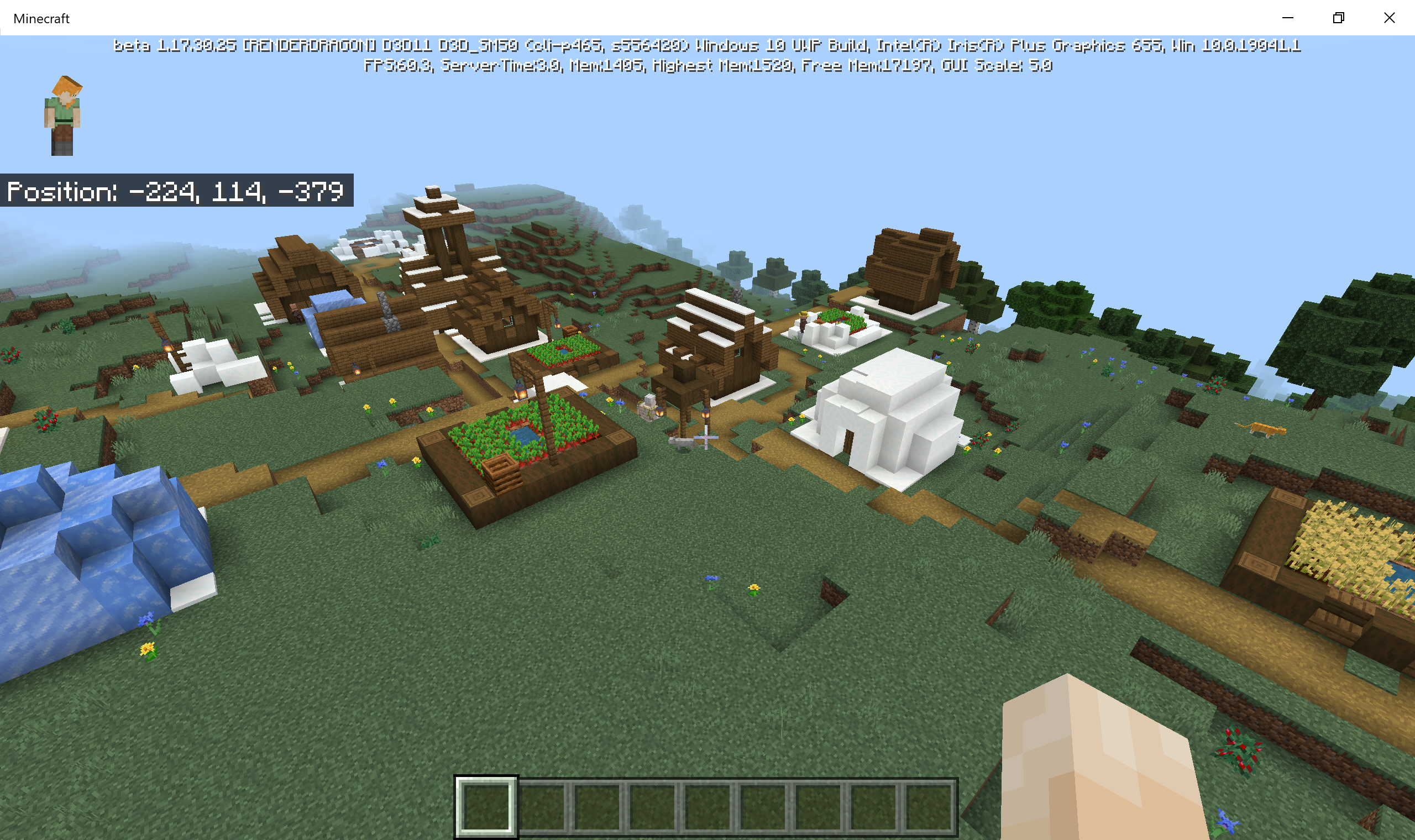





I can confirm there are definitely cases where the temple isn't there. So this still appears to be a problem in 1.17.40.21
seed 583 /tp 136 99 297
I believe this may be related to
MCPE-142840because in this seed a biome check at y320 would return a swamp which is a valid temple biome. This is likely also why the locate command thinks there is one there.

Minecraft 29_09_2021 11_50_06 am.png
~~Also while digging into this, I've discovered there is another way /locate can report a temple that doesn't generate, on top of the sea level check issue.
The isFeatureChunk check does a +/- 2 block check at +8 +8 of the chunk (using the prelim y level of 0 0 of that chunk). I realised this would cover the centre 4 quarts of the chunk. However when ScatteredFeatureStart is selecting which type of temp it gets its biome from the 0 0 of the chunk. If the centre 4 quarts of the chunk are valid temple biomes, but the 0 0 quart of the chunk isn't a valid temple biome it fails to select a temple type and no temple generates.
To confirm this I threw together a quick seed search for this situation and it does indeed occur and cause /locate to report a temple that doesn't exist.
I've attached the output from this search including the surface biomes (based on a depth of 0) in case thats useful for confirmation purposes.
This one should be quite easy to correct by changing the BlockPos used in ScatteredFeatureStart to include the +8 +8 offset. I'm not sure if this was a problem in 1.18.0 but I suspect it probably was. ~~
Here's the output from the search: [^TempleGlichFilter0.txt]
Edit: Actually ignore this, turns out I just couldn't see the offset being added.
Summary:
When using an iPad, on the world creation screen the screen doesn't resize properly if the keyboard is closed using the button in the bottom right of the keyboard.The screen resizes properly if you tap away from the keyboard instead of using the button on the keyboard to close it.
Once a field has been used the problem stops occurring, regardless of how you closed the keyboard the first time you used the field.
Steps to Reproduce:
On an iPad (and maybe larger iPhones if they have the button to close the keyboard)
Create a new world and enter something in the "World Name" or "Seed" field.
Close the keyboard using the "close keyboard" button in the bottom right corner of the keyboard.Observed Results:
The world creation screen does not expand to fill where the keyboard was until part of the screen is touched (eg scrolling)Expected Results:
The world creation screen returns to the size and position it was before you opened the keyboard, regardless of how the keyboard was closed.Notes:
I don't think this is a major issue, its just a minor annoyance. See https://youtu.be/39sY0w6FpQA for a video demonstrating the problem. This occurs on my iPad Pro (12.9-inch) (5th generation) but not my iPhone 13, mainly because the iPhone keyboard lacks that button. Larger iPhones might also have this issue. I don't recall this occurring in 1.8.20.30 preview, but it's possible I missed it.
Using the tab key to complete commands on iOS doesn't work as expected. Command completion options don't work when tab key is used at the end of the parameter, but do if you move the cursor to the start of the parameter.
Steps to Reproduce:
1. Type "/locatemans"
2. Press the tab keyObserved Results:
Command does not complete to "/locatemansion"Expected Results:
Command completes to "/locatemansion"Notes:
Typing "/locatemans" and then moving the cursor before the "m" inmansion(with the cursor keys on the keyboard) and then pressing tab causes the command to complete.Happy to record a video if required.
Using the tab key to complete commands on iOS doesn't work as expected. Command completion options don't work when tab key is used at the end of the parameter, but do if you move the cursor to the start of the parameter.
Steps to Reproduce:
1. Type "/locate str"
2. Press the tab keyObserved Results:
Command does not complete to "/locate structure" and instead you get "/locate strō"Expected Results:
Command completes to "/locate structure"Notes:
Typing "/locate str" and then moving the cursor before the "s" in structure (with the cursor keys on the keyboard) and then pressing tab causes the command to complete, but places a ō symbol before it (the command still works anyway).Happy to record a video if required.
Edit: Updated description and use case to reflect changes to the /locate command from when /locate biome was introduced.
![[Mod] EVGENSYPERPRO](../../../data/avatars/users/92853.png)
Summary:
Plains of villages can be generated in biomes such as jungle and swamp. At the same time, not a single part of the village is located on the plain and close (as in MCPE-41332), that is, villages are located entirely in the specified biomes.
This is not a duplicate of MCPE-136939, as villages in biomes where they can be generated are now generated correctly.
Examples of seeds (taken from comments on MCPE-136939 by Matthew Ferguson):
Plains village in a jungle
Seed: 4345832
Coords: 131 125 149
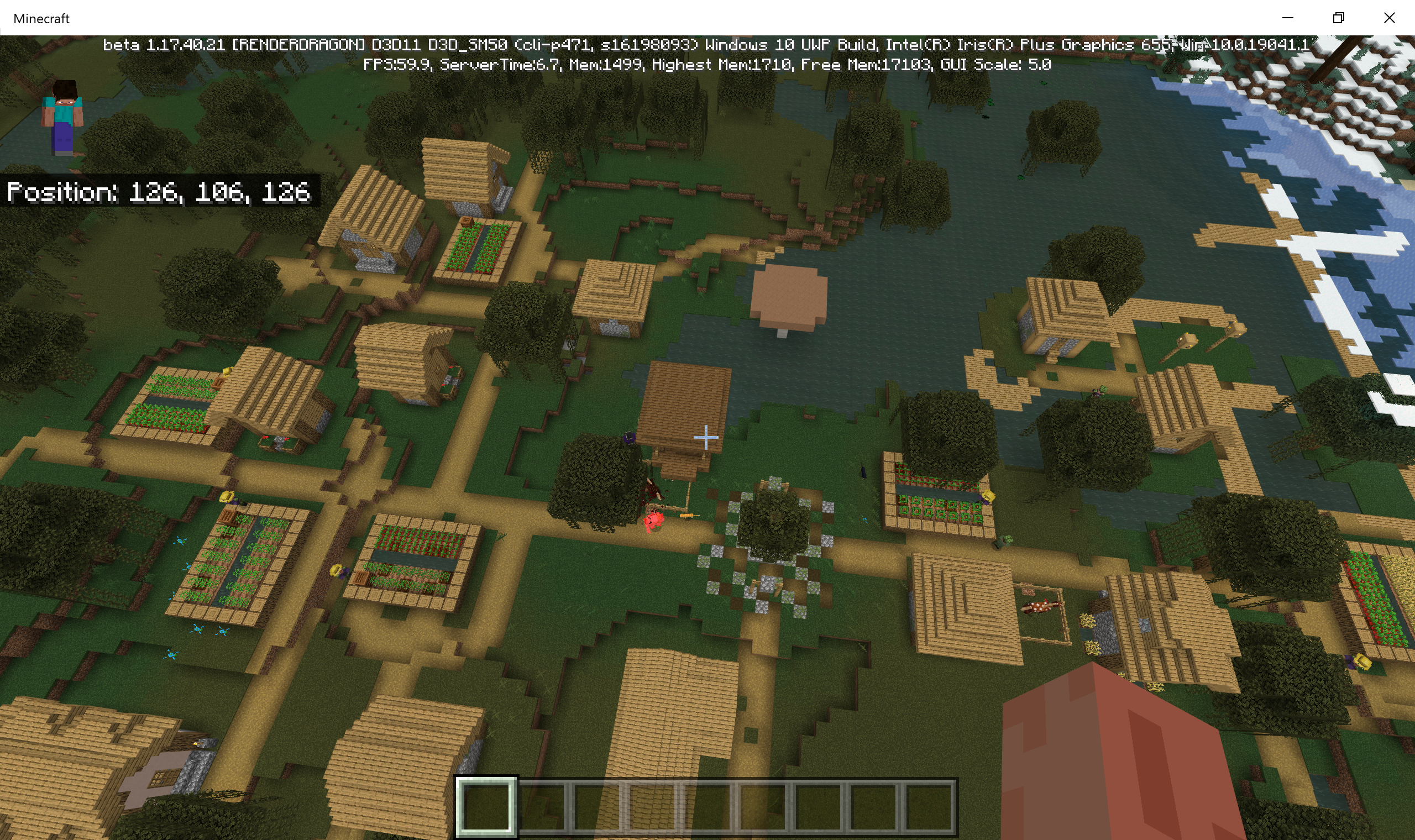
Plains village in a swamp
Seed: 16198093
Coords: 126 106 126
Steps to reproduce:
- Create a world with the specified seed.
- Move to the specified coordinates.
Observed results:
In a biome where villages are not generated (jungle, swamp) a plains village was generated.
Expected results:
This looks good since these villages will spawn residents with sparse textures, but for consistency with the java version, no villages should be generated in the jungle and swamp biome.
Image:


Matthew Ferguson
I think this is all one problem like MCPE-142867 and MCPE-141249.
I suspect this might be related to them being way more rare than they should be. I've been gearing my automated seed searching up for 1.18 and it looks like mansions are failing the biome check due to underground biomes being found in the search area. for a woodland mansion this is +/- 32 blocks. From what I can tell it looks like its looking 32 blocks below sea level as well. I'll log a seperate ticket for that as I think its affecting all biome dependant structures.
I might be wrong here, but I've done some seed searches (just preempting requests for speed running seeds when 1.18 hits) and I don't think I've seen a non plains village. So it could be the village type selection isn't working due to the 3d biomes or something. (edit: turns out I was wrong, ether that or it changed in 1.17.30.25)
ok I've logged what I think might be causing (or at least contributing) to this issue as
MCPE-140846it could be done via statistics but yeah its far easier just to dig into the game and find the data.
I've loaded up this seed on 1.17.30.25 on windows 10 and the village doesn't exist.
Was the world created in an earlier version of the beta? It's possible the chunks were generated in an earlier version.
I guess it's also possible it might be platform specific for some reason.
Does generating a new world with the same seed reproduce the problem?
In the process of adjusting my seed finding tools for 1.18 I'm pretty sure I've discovered what's going on.
When its doing the biome check to place a village its using the world height (ie y=320), when placing the village it's choosing the village type from the biome at y=0. If the biome at y=0 doesn't have a village type you get a plains village.
I was able to run a search for villages that would be affected and that search seems to correctly identify when the problem will occur.
I've attached screenshot of 3 examples.
Seed 54278 /tp -208 98 -293
Seed 89360 /tp -267 100 -312
Seed 556420 /tp -224 114 -379
I can provide a list of search results if that would be useful.
Actually never mind just updated the beta version and it appears to be fixed now.
Not sure this is actually fixed in 1.17.40.20. Seed 491410 /tp -695 75 -714
I don't think this has been completely fixed in 1.17.40.20.
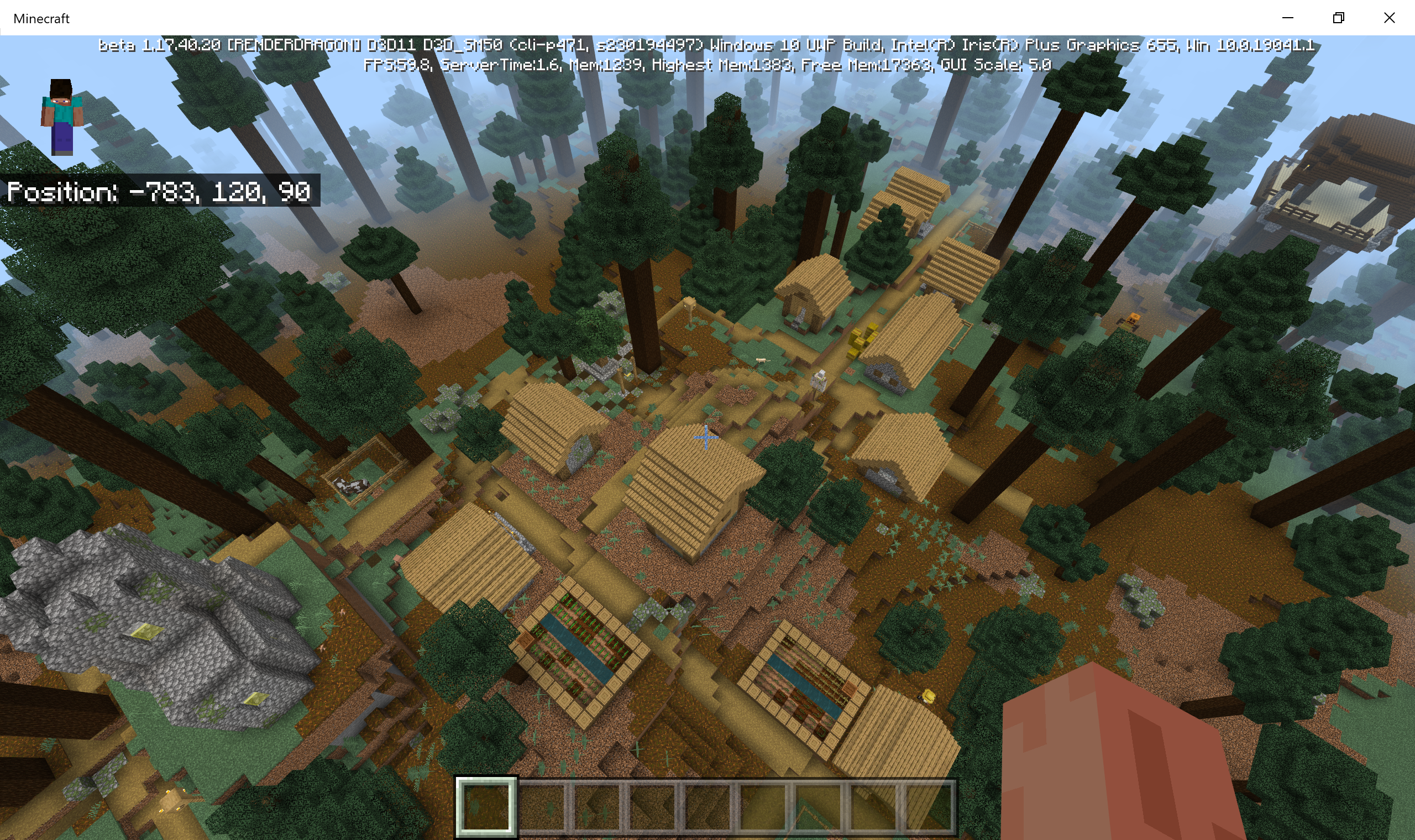
Seed 230194497
/tp -783 120 90
There is no sign of plains biomes anywhere near here.
Screenshot:
Strictly speaking a village shouldn't spawn in a giant tree taiga hills biome. (Unless I'm recalling incorrectly)
I've also attached 2 biome maps. One with the biomes based on the "Preliminary Surface Level", and the other based on Y=320 (ie dimension height). You can see that at surface level the biome is a giant tree taiga hills, but at Y=320 it's a taiga biome.
What I've found is my automated searches will find villages that don't exist if I use surface height biomes for the "isFeatureChunk" check. But If I use Y=320 in the "isFeatureChunk" check the villages will be there, even if the surface biomes are inappropriate for a village to spawn. This leads me to believe there is an issue with the height being used in the "isFeatureChunk" check.
It looks like villages now generate in the correct type when the biome they generate in has a village type.
However, 1.17.40.21 villages are generating in biomes they haven't traditionally.
Seed 4345832 (/tp 131 125 149) has a plains village in a jungle with the closest non jungle biome 96 blocks away.
I searched for seeds with a temple start and village start in the same chunk to demonstrate its definitely a jungle.
Seed 16198093 (/tp 126 106 126) has a plains village in a swamp with the closest non swamp biome 84 blocks away.
And like before witch hut to confirm the start Chunk biome.
I'm not sure if this is actually the same issue tho, and may even be intentional. These biomes do have distinct villager clothing, so might be nice to leave in as a rare village find.
I should also mention the inverse is also true. There are villages that should generate and don't.
For example on seed 1297 a village should generate at x168 z104 but doesn't. you can clearly see its a plains biome for a significant range around the chunk thats been selected for village placement attempt.
The cause for both problems appears to be the same. The biome check appears to be occurring at y=320.
For the jungle and swamp villages, there is a valid village biome at y320, but invalid biomes at surface level and the village gets placed.
For the missing plains village, the biome check at y320 finds an invalid village biome when then surface biomes are clearly valid village biomes.
This location appears to be on next to a forrest. It might be useful to get the block location of where you've seen the wolves spawn.
I've tried using
to remove the leaves and
to remove the mobs and wait for spawn. But every wolf spawn I saw turned out to be in the forrest biome.
If you can get a screenshot of the "pack" on the same block just after they spawn that would be useful in nailing down which biome they are spawning in.
I doubt
MCPE-142867is the same issue. The biome check that I think is causing the inappropriate and missing villages is the "isFeatureChunk" one.MCPE-141249was likely the same issue but it looks like something was done to the "isFeatureChunk" function on RandomScatteredLargeFeature (its a single feature that covers all temple types in bedrock) to correct it. I'm not able to find temples that don't generate due to a y320 biome check, which makes me think they aren't affected anymore. Maybe the same fix can be applied for villages but it's hard to say.I've just rechecked seeds 4345832, 16198093 and 1297 in 1.17.40.23 and they haven't changed so it looks like 1.17.40.23 is affected too.
Seeds 4345832, 16198093 and 1297 are now working as expected in 1.18.0.20. Good stuff.
This does appear to have been resolved. I'm not seeing it happen in the latest beta.
64 bit seeds for everything might be a bit complicated as there would be implications for peoples existing worlds, and would require swapping out the RNG object on a lot of functions.
One option that would have minimal impact is to leave the existing seed variable, and whatever is accessing it, as it is. A new 64 bit seed variable could be added and then only use it to initialise the biome RNG. When parsing the seed field on the create world screen, the 64 bit interpretation of the seed could be put in to the new variable and a simple cast would put the lower 32 bits into the existing seed field.
A data fix would be required for existing worlds with negative seeds but thats as simple as changing the existing world seed to an unsigned long representation of the same number.
I think the world creation screen is already parsing the field as a 64 bit number as it overflows to a 32 bit number up to the 64 bit number limit. After that it treats the number as text.
It appears in the 1.18.0 bedrock release the chance of obsidian being replaced by crying obsidian is 0.2. I don't see anything in the change logs about the chance being increased on java so I assume that hasn't changed.
Actually I've noticed while trying to push the limits of 64 bit seeds that something seems not quite right. Specifically I've been using (cough abusing) the fact dripstone and lush caves are allowed biomes for woodland mansions to try to create a 6 way structure collision.
Anyway what I've noticed is the high occurrence of temples not being there where the /locate command says they should. While I do agree with Auldrick somewhat regarding the locate command not being perfect, I do suspect there are things that can be done to help align these things. In general, structures appearing in /locate but not generating would lead me to think the structure is passing the "isFeatureChunk" check but failing in "postProcess". I'm certainly happy to help if more digging is required.
@GoldenHelmet The reason I mention those 2 functions is:
The call chain for the locate command (in the case of /locate temple) is...
LocateCommand::execute -> OverworldGenerator::findNearestFeature -> RandomScatteredLargeFeature::getNearestGeneratedFeature -> StructureFeature::findNearestFeaturePositionBySpacing -> RandomScatteredLargeFeature::isFeatureChunk
So if the biome check in isFeatureChunk passes /locate will return the temple as being there.
PostProcess is what actually puts the blocks in the world. But I've had a dig and it appears it's more likely failing in the RandomScatteredLargeFeature::createStructureStart -> ScatteredFeatureStart::ScatteredFeatureStart
The y level for both is provided from IPreliminarySurfaceProvider::getPreliminarySurfaceLevel and the 0 0 offset of the chunk as used (as opposed to the +8 +8 used later on when BiomeSouce::containsOnly is called, but thats not the issue here).
So the question then becomes, what causes the structure not to generate. Well it turns out there is a check in ScatteredFeatureStart::ScatteredFeatureStart that isn't in RandomScatteredLargeFeature::isFeatureChunk. Specifically ScatteredFeatureStart::ScatteredFeatureStart checks to see if the y level of the chunk (0 0 offset) is less than sea level and if it is aborts the structure generation.
More specifically RandomScatteredLargeFeature::createStructureStart obtains the sea level from a Dimension reference passed to it. That value gets passed on to ScatteredFeatureStart::ScatteredFeatureStart which then compares it to the y level.
Ideally that check would be done in RandomScatteredLargeFeature::isFeatureChunk as well to avoid the temple being reported by the /locate command. However it's not that simple. RandomScatteredLargeFeature::isFeatureChunk doesn't appear to get passed the Dimension reference, so may not have a way to access what the sea level is.
I can also confirm this check doesn't appear to exist in 1.18.0.
I should probably also mention that given its the preliminary surface level (as opposed to the actual height map), its possible for the prelim surface level to be less than sea level but the actual generated terrain to be above surface level. So it's not as simple as loading up worlds to see if the 0 0 block in the chunk is below sea level. Although if there are cases where the temple doesn't generate and the 0 0 y level for the chunk is quite high, say y75 or more, then I'd be interested to see them.
Let me know if there are any other tickets that are being a bit tricky and I can have a dig and see if I can work out what's going on. (assuming I've got time of course).
It definitely seems temples need to have a pretty reasonable height to generate. And because swamps are normally quite flat I can imagine witch huts would be very rare indeed.
I've had a bit of a dig and it appears the prelim height level in bedrock works significantly different to java. It appears in java the prelim height level includes cave noise etc and the bedrock one doesn't. The other issue is I think the prelim height level might be the height the surface builder builds on top of. So you'd already be up to 8 blocks down from the actual surface level (if I'm not mistaken of course).
If it were up to me, at this point I'd probably remove the check until it functions correctly, or alternatively, move the check to the post process stage because an accurate height map is available.
I've just noticed having used the field before doesn't prevent it from happening. It appears to occur when the field needs to be shifted up because it would be covered by the keyboard.
Good news this appears to have been fixed in 1.18.30.26/27. I've checked a handful of seeds and all the witch huts and desert temples I expected to be there generated properly.
Major, is that on 1.18.12? If so it probably won't work until 1.18.30 releases, which given previous release patterns could be this Tuesday.
22w16a appears to be missing also. If it was an automated process updating the page (release pipeline?), it doesn't appear to be working.
Yes this is still an issue in the latest version.
I've generated and attached some more examples for 1.19.20+ (because the stronghold y positions changed in 1.19.20) to make confirming this easier. The first column is the 64 bit seed, the 2nd column is the 32 bit representation of the same seed and the 3rd column is a teleport command to the bottom of the starting staircase.
I found the exact value doing some "code digging" with ghidra. At the time I was trying to simulate ruined portal generation so I could find seeds with completable portals. That's when I noticed the probability bedrock was using wasn't the same as java.
It looks the crying obsidian decision is actually made in a function called RuinedPortalPiece::_maybeReplaceObsidian but the complier has inlined the function into RuinedPortalPiece::_maybeReplaceBlock. It's pretty clear it's 0.2 up to at least 1.19.20, I haven't checked 1.19.31.
This does appear to working properly in the latest version. This ticket can be closed from my point of view.
Yes the latest release and preview still have this issue. I've added them to the affected versions.
I'm the seed finder who initially discovered the biome checks were being skipped, reverse engineered the cause and used that knowledge to find the -7360672562458547898 seed.
There's a few things going on here...
The function that finds the prelim surface height has a default return value of 32767, the max 16 bit signed integer value (on java its Integer.MAX_VALUE). The biome checks on bedrock return false if a biome is found that isn't in the list of allowed biomes. Because the biome checks are 3 dimensional, the top y coord for the biome check overflows to a negative value causing the entire loop for the biome check to be skipped. I'm actually quite surprised the biome checks are 3d for surface structures as I would have thought just passing a depth of 0 to the biome source and doing the check in 2 dimensions would have been better, and would mean dripstone and lush caves biomes wouldn't need to be on the allowed biomes list for woodland mansions.
The default value gets returned from the prelim surface height function is because it gives up when it hits the bottom of the world and returns the default value. The reason the surface dips that low in the first place is due to the terrain shaper. For continentalness values of 0.25 and 1, for erosion values of -0.35 and 0.58 the depth from the terrain shaper has no floor and is only limited by how high or low the weirdness value can go. For continentalness -0.1 the only erosion values that have a floor are -0.4 and 0.7 all the others are only limited by weirdness. I'm not sure if this was intentional or not, I can certainly see the continentalness -0.1 values being intentional as potentially a way to smooth out the transition into ocean.
Another side effect of the prelim surface height is aquifers that generate in the sky. The reason this occurs is the 16 signed int gets cast to a 32 bit signed int before it gets used in aquifer generation. This means it doesn't overflow and provided there is a large enough area where the surface drops below y -64 aquifers will generate in the sky. Interestingly the only reason this didn't occur in java (before the aquifer chunk order was changed mitigating the effects of this bug on java) is because java uses Integer.MAX_VALUE which does overflow in the aquifer code. Changing the default return value of the prelim surface height method on java (pre 1.19.2?) to match bedrock causes java to generate the same aquifers in the sky that bedrock does.
Happy to clarify any of this if required.