Trapdoors are not affected by Structure Blocks Orientation Modifier
I was creating a SkyWars map, and I wanted to clone an island with structure blocks. But I wasn't expecting that traps doors kept their original orientation. So I save each island individually. That is not a big bug, but it is a little annoying.
_Additional information from user-01fa9
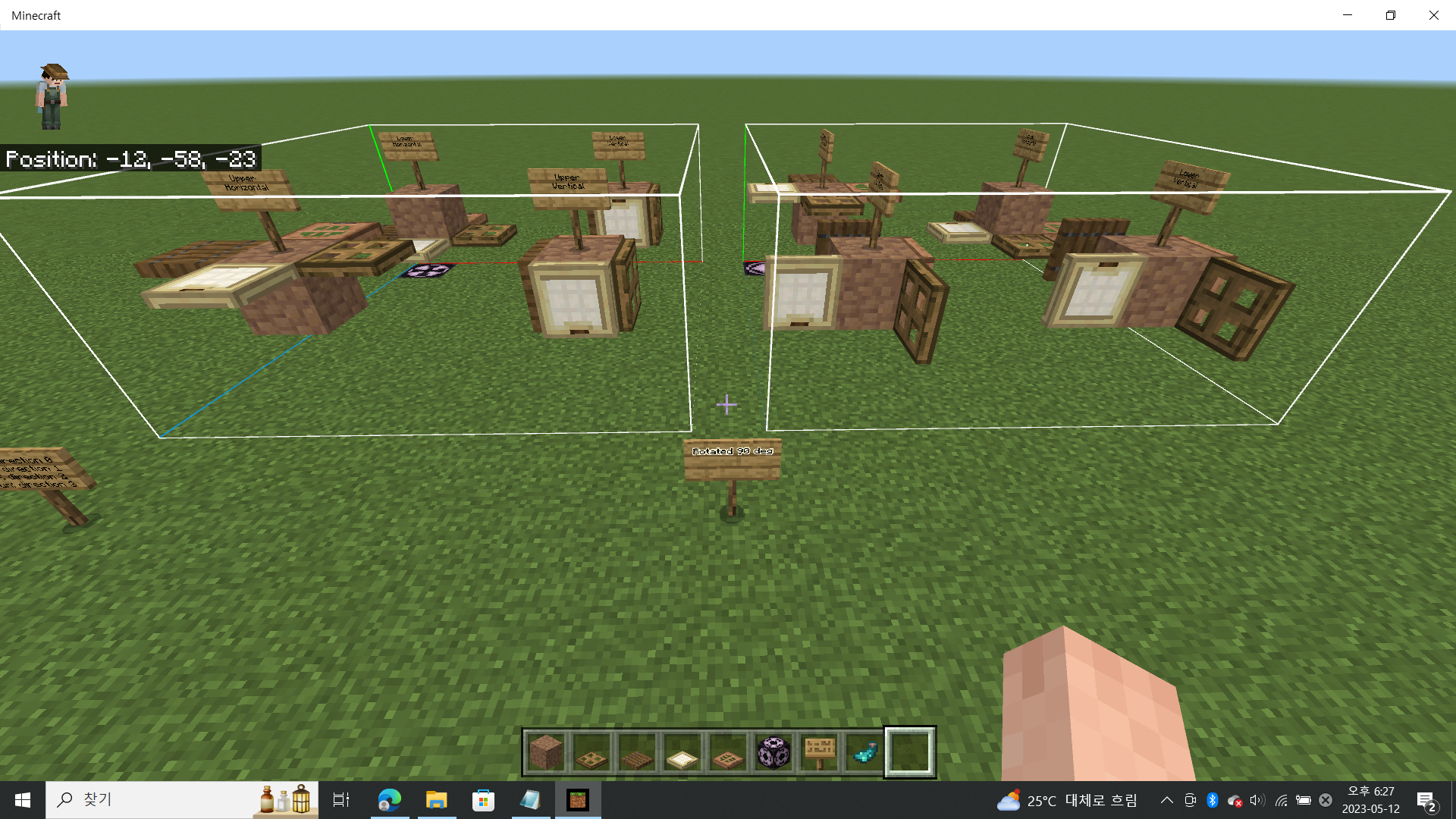
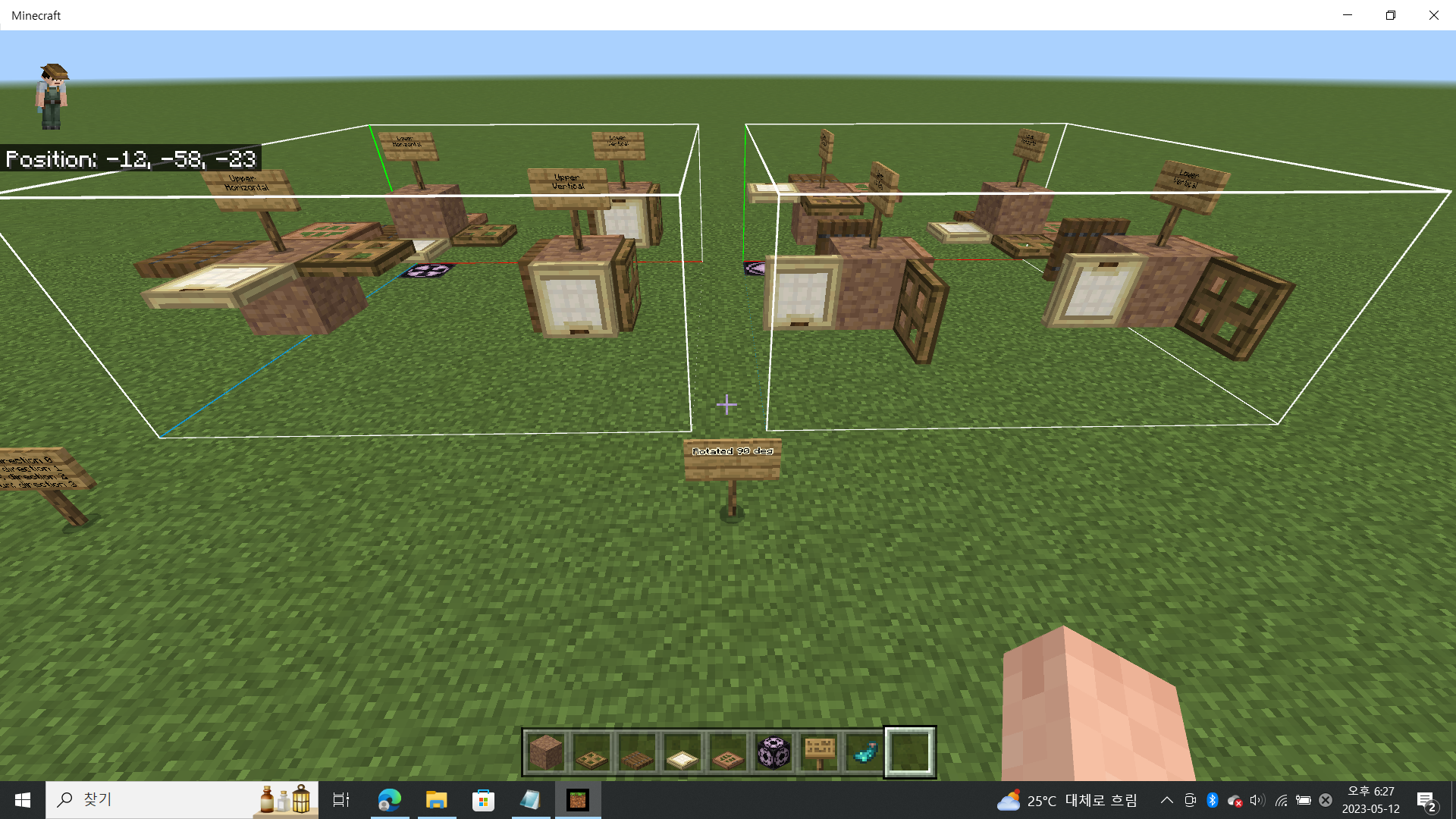
When using structure blocks to copy and paste builds/structures, trapdoors are not copied over accurately when the structure is rotated or mirrored. It is less noticeable when the trapdoors are on the horizontal, but very noticeable when vertical as their position completely changes from it’s origin.
To reproduce:
- Create a flat world in creative.
- Use the /give @s command to get a structure block
- Get snow blocks from your inventory and create a platform that is 7x7 by 1 high.
- Get a locator map and open it.
- Align the arrow representing the player to point South which is the bottom of the map.
- Build a wall out of snow blocks on the South side of the platform that is 5 blocks high, 7 blocks wide and 1 block deep.
- Place 5 spruce trapdoors on the wall and 5 spruce trapdoors on the floor in any direction as long as it is the same for all of them.
- Flip each of the trapdoors to be vertical.
- Place the structure block on the bottom right corner of the platform when facing the wall (North-West corner).
- Open the command block and name the structure "Test1".
- Change the three numbers on the left of the screen to 7.
- Press the "Save" button at the bottom of the screen..
- Change the top drop down menu to "load".
- Change the first number (Next to the red X) to 9 to offset the structure.
- Either rotate or mirror the structure using the slider or button labeled in the structure block menu options.
- Press the "Load" button at the bottom of the screen..
- Exit the structure block.
- Observe that the newly placed structure’s trapdoors are not in the correct position and were rotated incorrectly during the process.
Observed results:
Trapdoors are not rotated properly when the structure block is used and that the player has selected that the structure be rotated or mirrored.
Expected results:
When using a structure block, the entire structure is properly copied and pasted and the trapdoors that are pasted are rotated or mirrored in the same manner that the player choose to rotate or mirror the entire build.
Linked Issues
is duplicated by14
 MCPE-90966Structure Blocks Incorrectly Load Trapdoor/Door Blockstates After Applying a TransformationDuplicateMCPE-103120The trapdoor does not rotate with the structureDuplicateMCPE-113536structure block glitch number 2; door tipe blocks not rotated in structure block cloningDuplicateMCPE-127182When pasting the copied structure back to the world, if the orientation is different from the original orientation, the orientation of the trap door will be incorrectDuplicateMCPE-140226Structure Blocks not rotating/mirroring trapdoors correctlyDuplicateMCPE-147610Trap door loading in wrongly turned with structure blocksDuplicateMCPE-155431A bug named Specification due to the "structure_block" of "Minecraft BE" I confirmedDuplicateMCPE-156038Trapdoors rotating when using structure blocksDuplicateMCPE-167110Structure Blocks place Doors and Trapdoors in the wrong directionDuplicateMCPE-170524Trapdoors aren't pasted properly when they are rotated or mirrored by structure blocks.DuplicateMCPE-173093Copying a structure by flipping it xz in 'Structure block/command' breaks the orientation of the trapdoorDuplicateMCPE-180062Structure block is brokenDuplicateMCPE-185521copper trapdoor shifts in wrong directionDuplicateMCPE-187481Structure block not mirroring or rotating opened trapdoors correctlyDuplicate
Attachments17








Created Issue:
Trap Doors are not affected by Structure Blocks Orientation Modifier
I was creating a SkyWars map, and I wanted to clone an island with structure blocks. But I wasn't expecting that traps doors kept their original orientation. So I save each island individually. That is not a big bug, but it is a little annoying.
![[Mod] tryashtar](../../../data/avatars/users/41963.png)
![[MCQA] v-weszaj](../../../data/avatars/users/18941.svg)
![[Mod] OcelotOnesie](../../../data/avatars/users/43220.png)
is duplicated by
![[Bot] Arisa](../../../data/avatars/users/43007.png)
TrapDoors are not affected by Structure Blocks Orientation ModifierTrapdoors are not affected by Structure Blocks Orientation Modifier
is duplicated by
is duplicated by
relates to
MCM-1336
is duplicated by
relates to

is duplicated by
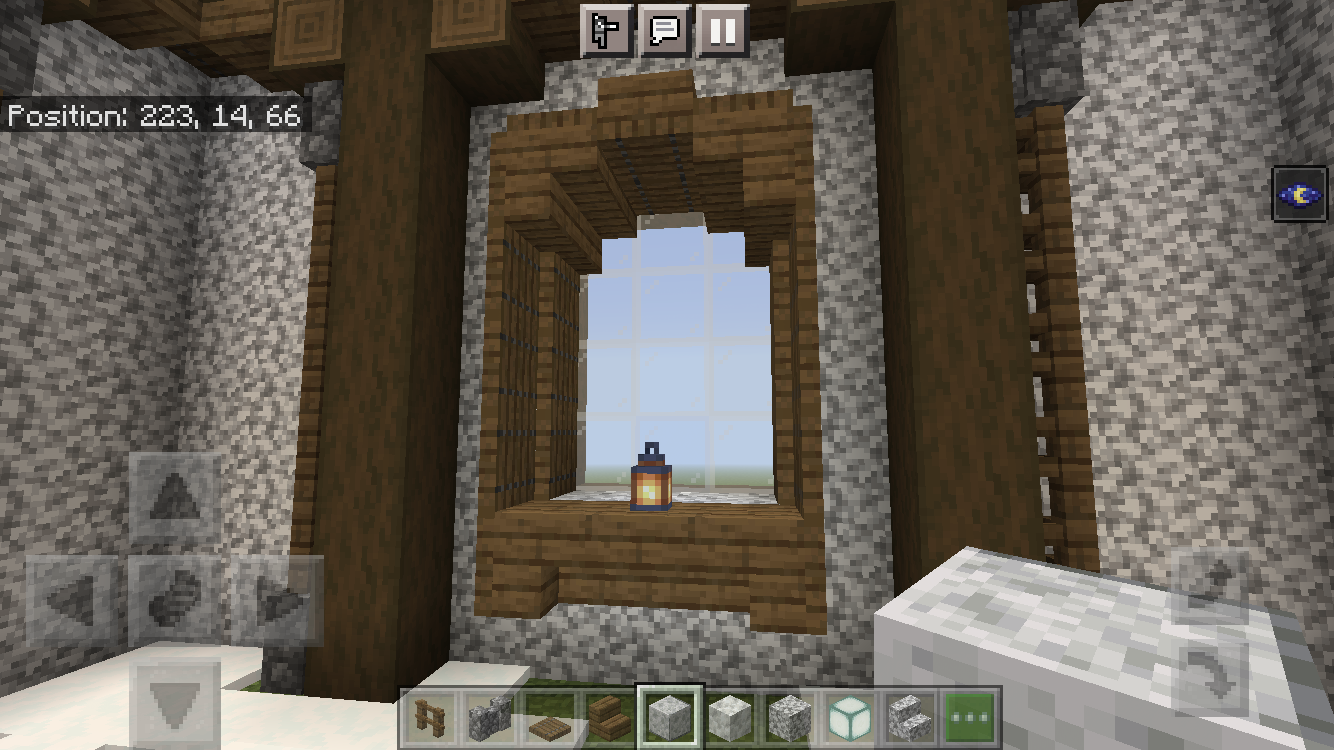
Copied window and pasyed window from structure block.
1.17.41
This needs to be fixed.
Whenever I use the structure block it does not properly orientate the trap doors. It does this when mirrored and also when rotated, as wall as when mirrored and rotated. You would think that mirroring it would not do this but no, it does.

Perhaps it is obvious but it should also be noted that horizontal trap doors are not the problem (visually that is) as if they are being used with a purpose that might mess things up, but the more obvious problems arise when the trap doors are on the vertical.
The thing is that the orientation of trap doors are actually being changed when using the structure block but it changes them in the wrong directions. I do not know if there is a pattern or not but they do get rotated, but just in the wrong ways. And it’s frustrating since on a large build you then have to go back in to fix every single one manually.
I was creating a SkyWars map, and I wanted to clone an island with structure blocks. But I wasn't expecting that traps doors kept their original orientation. So I save each island individually. That is not a big bug, but it is a little annoying.
_Additional information from user-01fa9
When using structure blocks to copy and paste builds/structures, trapdoors are not copied over accurately when the structure is rotated or mirrored. It is less noticeable when the trapdoors are on the horizontal, but very noticeable when vertical as their position completely changes from it’s origin.To reproduce:
- Create a flat world in creative.
- Use the /give @s command to get a structure block
- Get snow blocks from your inventory and create a platform that is 7x7 by 1 high.
- Get a locator map and open it.
- Align the arrow representing the player to point South which is the bottom of the map.
- Build a wall out of snow blocks on the South side of the platform that is 5 blocks high, 7 blocks wide and 1 block deep.
- Place 5 spruce trapdoors on the wall and 5 spruce trapdoors on the floor in any direction as long as it is the same for all of them.
- Flip each of the trapdoors to be vertical.
- Place the structure block on the bottom right corner of the platform when facing the wall (North-West corner).
- Open the command block and name the structure "Test1".
- Change the three numbers on the left of the screen to 7.
- Press the "Save" button at the bottom of the screen..
- Change the top drop down menu to "load".
- Change the first number (Next to the red X) to 9 to offset the structure.
- Either rotate or mirror the structure using the slider or button labeled in the structure block menu options.
- Press the "Load" button at the bottom of the screen..
- Exit the structure block.
- Observe that the newly placed structure’s trapdoors are not in the correct position and were rotated incorrectly during the process.
Observed results:
Trapdoors are not rotated properly when the structure block is used and that the player has selected that the structure be rotated or mirrored.Expected results:
When using a structure block, the entire structure is properly copied and pasted and the trapdoors that are pasted are rotated or mirrored in the same manner that the player choose to rotate or mirror the entire build.
![[Mod] markderickson](../../../data/avatars/users/18946.svg)
is duplicated by
is duplicated by
is duplicated by
is duplicated by
![[Mod] GoldenHelmet](../../../data/avatars/users/18951.svg)
is duplicated by
![[MCQA] Kinga Izdebska](../../../data/avatars/users/18949.svg)
is duplicated by
is duplicated by
is duplicated by
Thank you for your report!
We're actually already tracking this issue at MCPE-66933, so I will resolve and link this ticket as a duplicate.
If you would like to add a vote and any extra information to the main ticket it would be appreciated.
If you haven't already, you might like to make use of the search feature to see if the issue has already been mentioned.
Quick Links:
📓 Bug Tracker Guidelines – 💬 Community Support – 📧 Mojang Support
📓 Project Summary – ✍️ Feedback and Suggestions – 📖 Game Wiki
Thank you for your report!
We're actually already tracking this issue at MCPE-66933, so I will resolve and link this ticket as a duplicate.
If you would like to add a vote and any extra information to the main ticket it would be appreciated.
If you haven't already, you might like to make use of the search feature to see if the issue has already been mentioned.
Quick Links:
📓 Bug Tracker Guidelines – 💬 Community Support – 📧 Mojang Support
📓 Project Summary – ✍️ Feedback and Suggestions – 📖 Game Wiki
Thank you for your report!
We're tracking this issue in MCPE-66933, so this ticket is being resolved and linked as a duplicate.
If you would like to add a vote and any extra information to the main ticket it would be appreciated.
If you haven't already, you might like to make use of the search feature to see if the issue has already been mentioned.
Quick Links:
📓 Bug Tracker Guidelines – 💬 Community Support – 📧 Mojang Support
📓 Project Summary – ✍️ Feedback and Suggestions – 📖 Game Wiki
Thank you for your report!
We're tracking this issue in MCPE-66933, so this ticket is being resolved and linked as a duplicate.
If you would like to add a vote and any extra information to the main ticket it would be appreciated.
If you haven't already, you might like to make use of the search feature to see if the issue has already been mentioned.
Quick Links:
📓 Bug Tracker Guidelines – 💬 Community Support – 📧 Mojang Support
📓 Project Summary – ✍️ Feedback and Suggestions – 📖 Game Wiki
Thank you for your report!
We're tracking this issue in MCPE-66933, so this ticket is being resolved and linked as a duplicate.
If you would like to add a vote and any extra information to the main ticket it would be appreciated.
If you haven't already, you might like to make use of the search feature to see if the issue has already been mentioned.
Quick Links:
📓 Bug Tracker Guidelines – 💬 Community Support – 📧 Mojang Support
📓 Project Summary – ✍️ Feedback and Suggestions – 📖 Game Wiki
– I am a bot. This action was performed automatically! The ticket was resolved by one of our moderators, and I left this message to give more information to you.
Maybe related to the fix to MCPE-66933?
Duplicate of MCPE-66933
Thank you for your report!
We're tracking this issue in MCPE-66933, so this ticket is being resolved and linked as a duplicate.
If you would like to add a vote and any extra information to the main ticket it would be appreciated.
If you haven't already, you might like to make use of the search feature to see if the issue has already been mentioned.
Quick Links:
📓 Bug Tracker Guidelines – 💬 Community Support – 📧 Mojang Support
📓 Project Summary – ✍️ Feedback and Suggestions – 📖 Game Wiki
– I am a bot. This action was performed automatically! The ticket was resolved by one of our moderators, and I left this message to give more information to you.
Thank you for your report!
We're tracking this issue in MCPE-66933, so this ticket is being resolved and linked as a duplicate.
If you would like to add a vote and any extra information to the main ticket it would be appreciated.
If you haven't already, you might like to make use of the search feature to see if the issue has already been mentioned.
Quick Links:
📓 Bug Tracker Guidelines – 💬 Community Support – 📧 Mojang Support
📓 Project Summary – ✍️ Feedback and Suggestions – 📖 Game Wiki
– I am a bot. This action was performed automatically! The ticket was resolved by one of our moderators, and I left this message to give more information to you.
Thank you for your report!
We're tracking this issue in MCPE-66933, so this ticket is being resolved and linked as a duplicate.
If you would like to add a vote and any extra information to the main ticket it would be appreciated.
If you haven't already, you might like to make use of the search feature to see if the issue has already been mentioned.
Quick Links:
📓 Bug Tracker Guidelines – 💬 Community Support – 📧 Mojang Support
📓 Project Summary – ✍️ Feedback and Suggestions – 📖 Game Wiki
– I am a bot. This action was performed automatically! The ticket was resolved by one of our moderators, and I left this message to give more information to you.

Duplicates MCPE-66933
Thank you for your report!
We're tracking this issue in MCPE-66933, so this ticket is being resolved and linked as a duplicate.
If you would like to add a vote and any extra information to the main ticket it would be appreciated.
If you haven't already, you might like to make use of the search feature to see if the issue has already been mentioned.
Quick Links:
📓 Bug Tracker Guidelines – 💬 Community Support – 📧 Mojang Support
📓 Project Summary – ✍️ Feedback and Suggestions – 📖 Game Wiki
– I am a bot. This action was performed automatically! The ticket was resolved by one of our moderators, and I left this message to give more information to you.
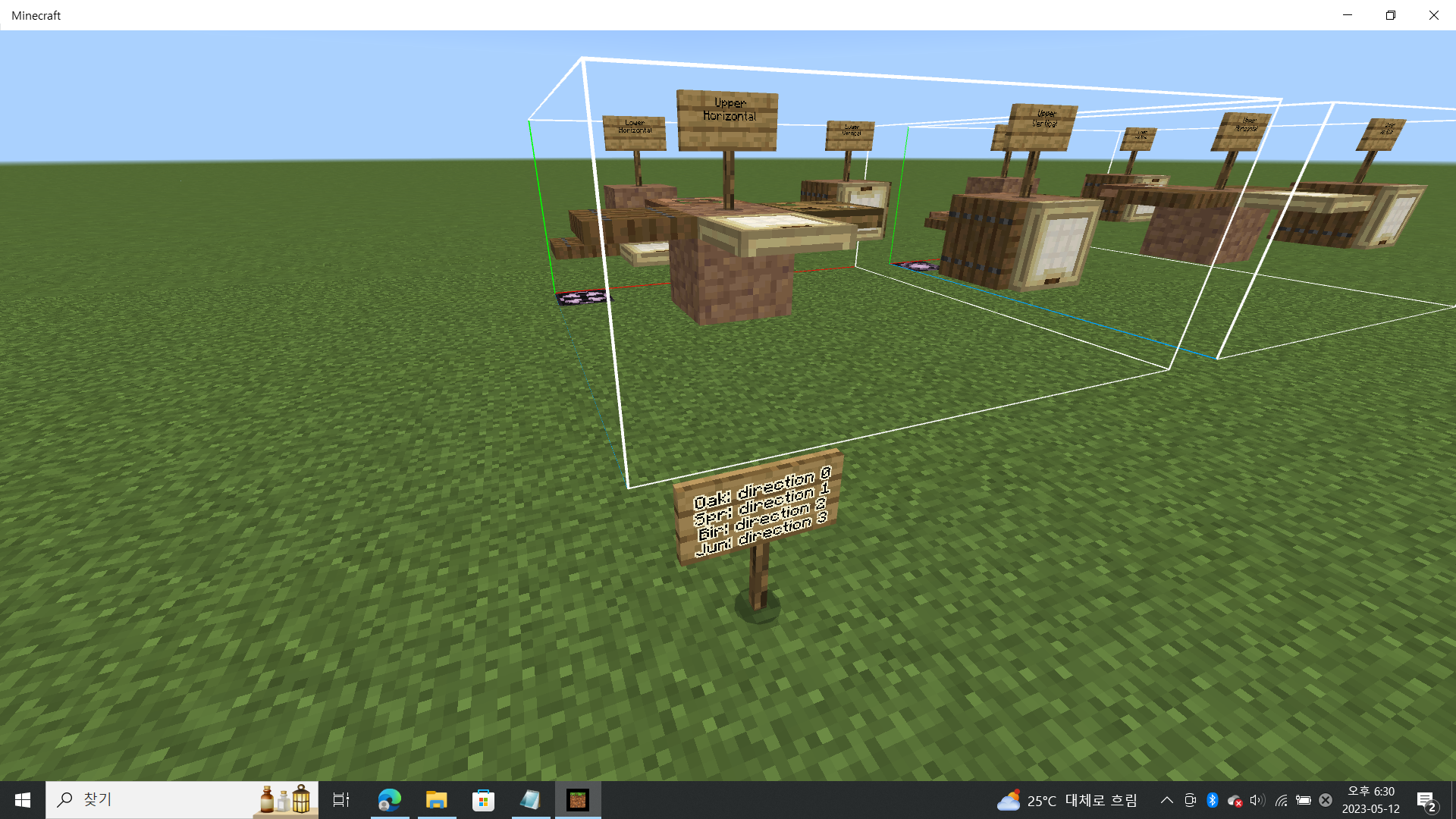
This bug has already been reported by about 10 people, but, I'm reporting it again because I think I've found why this bug is caused by.(MCPE-66933 )
This bug is caused when using structure blocks to copy & paste trapdoors, they are pasted in wrong directions when they are rotated or mirrored.
I think this bug is related to the trapdoor's block state, "direction".
("direction" means the direction the trapdoor is facing.)
When you place a trapdoor looking west from east, the trapdoor's "direction" value is 0,
...east from west, the value is 1,
...north from south, the value is 2,
and, ...south from north, the value is 3.
(the east means Position X+ direction)
Then, we need to know how the trapdoors are pasted when they are rotated or mirrored by using structure blocks and I tested it.
(Unless otherwise noted, direction of rotation is clockwise.)
Not mirrored & not rotated:
- Properly pasted
Not mirrored & rotated 90 degrees:
- direction 0 was rotated by 180 deg(from "direction" 0 to 1,(need to be 2))
- direction 1 was rotated by 270 deg(from 1 to 2,(need to be 3))
- direction 2 was rotated by 180 deg(from 2 to 3,(need to be 1))
- direction 3 was properly rotated(from 3 to 0)
All values was increased by 1.
Not mirrored & rotated 180 degrees:
- direction 0 was rotated by 90 deg(from 0 to 2,(need to be 1))
- direction 1 was rotated by 90 deg(from 1 to 3,(need to be 0))
- direction 2 was rotated by 270 deg(from 2 to 0,(need to be 3))
- direction 3 was rotated by 270 deg(from 3 to 1,(need to be 2))
All values was increased by 2.
Not mirrored & rotated 270 degrees:
- direction 0 was properly rotated(from 0 to 3)
- direction 1 was rotated by 180 deg(from 1 to 0,(need to be 2))
- direction 2 was rotated by 90 deg(from 2 to 1,(need to be 0))
- direction 3 was rotated by 180 deg(from 3 to 2,(need to be 1))
All values was increased by 3.
So, I could find that rotation works as if the "direction" values follow a 'clockwise'.
(The 'clockwise' means that if you set which direction as "direction" value 0 and when you increase the value by 1, the trapdoor is rotated by 90 degrees clockwise.)
X mirrored & not rotated:
Expected Result: the object are inverted in north-south direction around the X axis and trapdoors "direction" value are changed from(0,1,2,3) to (0,1,3,2)
Observed Result:
- direction 0 was rotated by 90 deg(from 0 to 2,(need to be 0))
- direction 1 was properly pasted(not rotated, from 1 to 1)
- direction 2 was rotated by 270 deg(from 2 to 0,(need to be 3))
- direction 3 was not rotated (from 3 to 3,(need to be 2))
So, direction 0 and 2 were inverted and 1 and 3 were not changed.
My guess:
1. This feature misconceives that "direction" value 0 means south or north.
2. And the mirroring also works as if the "direction" values follow a 'clockwise' like the rotate feature.
X mirrored & rotated 90 degrees:
- All trapdoors are pasted in the opposite directions.
(0>2>3(need to be 2)), (1>1>2(need to be 3)), (2>0>1(need to be 0)), and (3>3>0(need to be 1))
All values increased by 1 after a wrong mirroring.
X mirrored & rotated 180 degrees:
direction 0 wasn't rotated(0>2>0(need to be 1))
direction 1 was rotated by 90 deg(1>1>3(need to be 0))
direction 2 was properly rotated deg(2>0>2(need to be 2))
direction 3 was rotated by 270 deg(3>3>1(need to be 3))
All values increased by 2 after a wrong mirroring.
X mirrored & rotated 270 degrees:
- direction 0 wasn't rotated(0>2>1(need to be 1))
- direction 1 was rotated by 90 deg(1>1>0(need to be 0))
- direction 2 was properly rotated deg(2>0>3(need to be 2))
- direction 3 was rotated by 270 deg(3>3>2(need to be 3))
All values increased by 3 after a wrong mirroring.
Z mirrored & not rotated:
Expected Result: the object are inverted in east-weat direction around the Z axis and trapdoors "direction" value are changed from(0,1,2,3) to (1,0,2,3)
Observed Result:
- direction 0 wasn't rotated(from 0 to 0,(need to be 1))
- direction 1 was rotated by 90 deg(from 1 to 3,(need to be 0))
- direction 2 was properly pasted(not rotated, from 2 to 2)
- direction 3 was rotated by 270 deg(from 3 to 1,(need to be 3))
Direction 0 and 2 were not rotated and 1 and 3 were inverted.
X&Z mirrored & not rotated:
- direction 0 was rotated by 90 deg(from 0 to 2,(need to be 1))
- direction 1 was rotated by 90 deg(from 1 to 3,(need to be 0))
- direction 2 was rotated by 270 deg(from 2 to 0,(need to be 3))
- direction 3 was rotated by 270 deg(from 3 to 1,(need to be 2))
Same as the X mirror and Z mirror are combined.
Thus, my conclusion is:
1. Both rotate & mirror features work as if the "direction" values follow 'clockwise'.(In reality, the values 0 and 1, 2 and 3 are in opposite directions.)
2. This feature misconceives that "direction" value 0 trapdoor faces south or north(In reality, "direction" 0 trapdoor faces east and its hinge faces west.).
Please do not create duplicates of existing reports (MCPE-66933).
If you have additional information, you can add a comment to the existing report.

dupe of MCPE-66933
Thank you for your report!
We're tracking this issue in MCPE-66933, so this ticket is being resolved and linked as a duplicate.
If you would like to add a vote and any extra information to the main ticket it would be appreciated.
If you haven't already, you might like to make use of the search feature to see if the issue has already been mentioned.
Quick Links:
📓 Bug Tracker Guidelines – 💬 Community Support – 📧 Mojang Support
📓 Project Summary – ✍️ Feedback and Suggestions – 📖 Game Wiki
– I am a bot. This action was performed automatically! The ticket was resolved by one of our moderators, and I left this message to give more information to you.
![[Mod] EVGENSYPERPRO](../../../data/avatars/users/92853.png)
Thank you for your report!
We're tracking this issue in MCPE-66933, so this ticket is being resolved and linked as a duplicate.
If you would like to add a vote and any extra information to the main ticket it would be appreciated.
If you haven't already, you might like to make use of the search feature to see if the issue has already been mentioned.
Quick Links:
📓 Bug Tracker Guidelines – 💬 Community Support – 📧 Mojang Support (Technical Issues) – 📧 Microsoft Support (Account Issues)
📓 Project Summary – ✍️ Feedback and Suggestions – 📖 Game Wiki
Thank you for your report!
We're tracking this issue in MCPE-66933, so this ticket is being resolved and linked as a duplicate.
If you would like to add a vote and any extra information to the main ticket it would be appreciated.
If you haven't already, you might like to make use of the search feature to see if the issue has already been mentioned.
Quick Links:
📓 Bug Tracker Guidelines – 💬 Community Support – 📧 Mojang Support (Technical Issues) – 📧 Microsoft Support (Account Issues)
📓 Project Summary – ✍️ Feedback and Suggestions – 📖 Game Wiki
– I am a bot. This action was performed automatically! The ticket was resolved by one of our moderators, and I left this message to give more information to you.

Duplicate of MCPE-66933
Thank you for your report!
We're tracking this issue in MCPE-66933, so this ticket is being resolved and linked as a duplicate.
If you would like to add a vote and any extra information to the main ticket it would be appreciated.
If you haven't already, you might like to make use of the search feature to see if the issue has already been mentioned.
Quick Links:
📓 Bug Tracker Guidelines – 💬 Community Support – 📧 Mojang Support (Technical Issues) – 📧 Microsoft Support (Account Issues)
📓 Project Summary – ✍️ Feedback and Suggestions – 📖 Game Wiki
– I am a bot. This action was performed automatically! The ticket was resolved by one of our moderators, and I left this message to give more information to you.
How DO you rotate structures with a structure block?
Not sure this is actually fixed in 1.17.40.20. Seed 491410 /tp -695 75 -714
See
MCPE-141379for thatWhen using structure blocks to copy and paste builds/structures, trapdoors are not copied over accurately when the structure is rotated or mirrored. It is less noticeable when the trapdoors are on the horizontal, but very noticeable when vertical as their position completely changes from it’s origin.
To reproduce:
1. Create a flat world in creative.
2. Use the /give @s command to get a structure block
3. Get snow blocks from your inventory and create a platform that is 7x7 by 1 high.
4. Get a locator map and open it.
5. Align the arrow representing the player to point South which is the bottom of the map.
6. Build a wall out of snow blocks on the South side of the platform that is 5 blocks high, 7 blocks wide and 1 block deep.
7. Place 5 spruce trapdoors on the wall and 5 spruce trapdoors on the floor in any direction as long as it is the same for all of them.
8. Flip each of the trapdoors to be vertical.
9. Place the structure block on the bottom right corner of the platform when facing the wall (North-West corner).
10. Open the command block and name the structure "Test1".
11. Change the three numbers on the left of the screen to 7.
12. Press the "Save" button at the bottom of the screen..
13. Change the top drop down menu to "load".
14. Change the first number (Next to the red X) to 9 to offset the structure.
15. Either rotate or mirror the structure using the slider or button labeled in the structure block menu options.
16. Press the "Load" button at the bottom of the screen..
17. Exit the structure block.
18. Observe that the newly placed structure’s trapdoors are not in the correct position and were rotated incorrectly during the process.
Observed results:
Trapdoors are not rotated properly when the structure block is used and that the player has selected that the structure be rotated or mirrored.
Expected results:
When using a structure block, the entire structure is properly copied and pasted and the trapdoors that are pasted are rotated or mirrored in the same manner that the player choose to rotate or mirror the entire build.
I think this bug is related to the trapdoor's block state, "direction"(= blockdata: direction).
("direction" means the direction the trapdoor is facing.)
When you place a trapdoor looking west from east, the trapdoor's "direction" value is 0,
...east from west, the value is 1,
...north from south, the value is 2,
and, ...south from north, the value is 3.
(the east means Position X+ direction)
Then, I tested how the trapdoors are pasted when they are rotated or mirrored by using structure blocks.
(Unless otherwise noted, direction of rotation is clockwise.)
Not mirrored & not rotated:
Not mirrored & rotated 90 degrees:
All values was increased by 1.
Not mirrored & rotated 180 degrees:
All values was increased by 2.
Not mirrored & rotated 270 degrees:
All values was increased by 3.
So, I could find that rotation works as if the "direction" values follow a 'clockwise'.
(The 'clockwise' means that if you set which direction as "direction" value 0 and when you increase the value by 1, the trapdoor is rotated by 90 degrees clockwise.)
X mirrored & not rotated:
Expected Result: the object are inverted in north-south direction around the X axis and trapdoors "direction" value are changed from(0,1,2,3) to (0,1,3,2)
Observed Result:
So, direction 0 and 2 were inverted and 1 and 3 were not changed.
My guess:
1. This feature misconceives that "direction" value 0 means south or north.
2. And the mirroring also works as if the "direction" values follow a 'clockwise' like the rotate feature.
X mirrored & rotated 90 degrees:
(0>2>3(need to be 2)), (1>1>2(need to be 3)), (2>0>1(need to be 0)), and (3>3>0(need to be 1))
All values increased by 1 after a wrong mirroring.
X mirrored & rotated 180 degrees:
direction 0 wasn't rotated(0>2>0(need to be 1))
direction 1 was rotated by 90 deg(1>1>3(need to be 0))
direction 2 was properly rotated deg(2>0>2(need to be 2))
direction 3 was rotated by 270 deg(3>3>1(need to be 3))
All values increased by 2 after a wrong mirroring.
X mirrored & rotated 270 degrees:
All values increased by 3 after a wrong mirroring.
Z mirrored & not rotated:
Expected Result: the object are inverted in east-west direction around the Z axis and trapdoors "direction" value are changed from(0,1,2,3) to (1,0,2,3)
Observed Result:
Direction 0 and 2 were not rotated and 1 and 3 were inverted.
X&Z mirrored & not rotated:
Same as the X mirror and Z mirror are combined.
Summary:
1. Both rotate & mirror features work as if the "direction" values follow 'clockwise'.(In reality, the values 0 and 1, 2 and 3 are in opposite directions.)
2. This feature misconceives that "direction" value 0 trapdoor faces south or north(In reality, "direction" 0 trapdoor faces east and its hinge faces west.).
Still an issue in 1.21.41. I'm trying to randomly rotate some in-memory structures and the rotations for the trapdoors are messed up. The direction values should be changed to increment from North, East, South, West.
Anything else you all need to resolve this?