 Michael Gill
- eldon96
- eldon96
- Europe/Stockholm
- Yes
- No
14 issues
Key
Summary
Status
Reporter
Assignee
Created
 MCPE-19869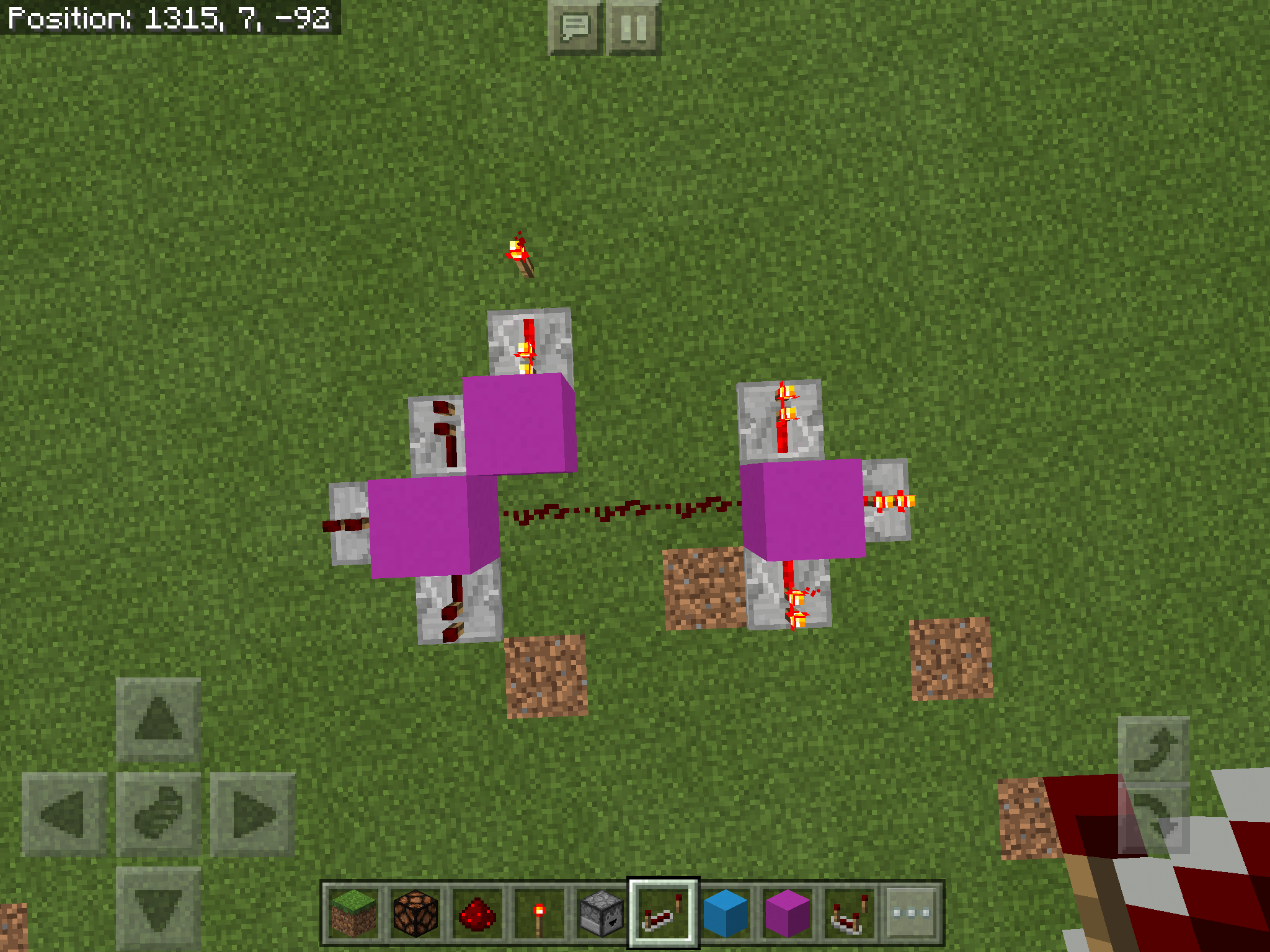




Added Attachments:
Added Attachments:
Added Attachments:
Changed Summary:
Efficiencymining causes player walking soundsEfficiency digging causes player walking sounds
Deleted Comment:
Btw, can you change the title to digging, instead of mining. It’s more accurate. Thanks
Added Attachments:
12.1 alpha with iPad Air and iOS 8.4.1. My son has similar setup and my buddy has iPad mini. All devices show rain in houses, under ledges, even in deep caves. My mother has iPad 4 and rain works correctly even after upgrading to iOS 9. All iPads started with version 11.x, (whichever version was in the Apple Store) and then upgraded to 12.1 through the store.
I have built and tested the mob farm design by Mumbo Jumbo in several worlds. My most recent test is about 130 blocks from the highest ground. I stand on top of the farm which would be about 150 blocks from ground and maybe 1 mob will spawn in 10 minutes. I stand to the side on one end and will get about 1 spawn per minute. But it's nothing like the 10,000+ drops per hour boasted by the designer. I put a ten block tower on top and stood up there for 10 minutes and didn't get a single drop. It seems to only spawn slowly when I am at the same level as the chambers. This makes survival worlds difficult because you can't farm stuff like bone meal which means you can't farm anything else in any significant quantities.
I have confirmed that it works best when I'm standing at one end. Standing directly above or directly below seems to not work at all. Also I confirmed another bug about half slabs disabling spawning completely throughout the entire system.
Confirmed in 1.0.2. Made Mumbo Jumbo's mob spawned design. Spawn rates very low to begin with but add a bottom half slab roof at any height and spawning halts completely.
I can't explain it but the farm worked pretty well for a couple of days. I left the realm on and went to bed once. I found out the next morning that realms has a timeout of 20 minutes. But during that time I got nearly a full stack of bones, arrows, gun powder and string and almost two stacks of zombie flesh. When I was booted out and logged back in a redstone glitch that has also been reported caused some of my dispensers to fire leaving water out on some of the spawning pads. But, I turned on the hopper timer and let it run for another 30 minutes this time keeping the connection alive. I nearly matched the above stated results. I'm thinking, "this is great, I've figured it out". So I build a bottom slab scaffold around the structure, open up several place and fix the dispensers, and return to my afk platform. Spawning stopped cold. I have absolutely no idea what changed. I'm continuing to test but thought the odd flurry of good results should be shared in case it was a clue. I'm wondering if there is a long term light setting that was reset when I opened the sides. I'll continue to test and report.
Ok, I've found something. I started this whole thing on a realm. Then downloaded the realm to my iPad (Copy 1) to experiment with, then downloaded it a second time (Copy 2) after doing some updates to the spawner on the realm. So, on Copy 2 I experimented with a water funneling system and had to use eggs to get some skeletons to test with. I tried a different water method on Copy 1 and suddenly it started dropping out 3 or 4 mobs every 10 seconds, no real explanation. Copy 2 still wasn't working at all. I messed with Copy 2 for a long time and finally figured out that it works if I stand on the opposite side. I tested in the realm from the opposite side and I started getting drops! I have some screenshots but am not sure about attaching them to this thread. Why does one Copy work when I stand on one side, but the other Copy only works on the other side? It's baffling.
Confirmed 1.0.3. Interestingly, I tried to build an ender farm with an endermite. "Mitey" was only about 100 blocks from the mainland. I was getting endermen to spawn on the platform but nothing like the rates on the mainland. So I looked on the wiki and saw that it should be at least 128 blocks away. So I counted this time and moved "Mitey" out 30 more blocks. I haven't had a single enderman spawn on the new platform. Only overworld mobs. On the platform that was on the cusp of the 128 block range, I would get a mix of endermen and overworld mobs. Probably depended on which blocks were on which side of the 128 block range as to if it spawned an enderman or an overworld mob.
I'm not building my Enderman farm in my realm until I can confirm a resolution. Therefore, it is full of unexplored chunks so I just downloaded a copy to my iPad with version 1.0.4. It did work a bit differently than I saw in 1.0.3. The platform I constructed did spawn Endermen, though slowly. Whereas it still spawns overworld mobs prolifically.
It seems to work correctly with a sticky piston and block. If the observer detects an empty piston is redstone dust, when in a chain especially, the result is a pulsing output. With sticky pistons and blocks the chain can be world height and you still just get one pulse output.
Tried to make a villager breeder on realms twice. Detector villager disappeared. Replaced with villager in minecart. It disappeared along with minecart AND the three breeder villagers above. So far, the six trader villagers, also in minecarts, haven't disappeared (mending trade, PLEASE don't disappear lol)
Anyway, not sure of the cause but my nether portal is at x 232 and the trader villagers are at x 95 with very similar z values.
I don't have any real details. Only to comment that two friends using iPads have been losing items but I have not. The only real difference is that I'm using the classic interface and they're using the PE interface.
Another test seemed to top out at 64 blocks, but the Y value is still being ignored.
Well, I don't play the Pc version much, but all the videos I've seen and the wiki says a golem has a chance to spawn once every 7000 game ticks which averages to one every six minutes. So it sounds like 3 an hour is not right.
However, I'll build this same farm on the pc version and report back.
I think this is WAI. I believe I built the farm one lblock too short. I corrected and tested and I get iron golems spawning at a decent rate. Thank you
+1 on that idea
Now, how do you reckon he got there?
A single glass block with a 20 block drop on either side.
1.2.2 for ios. Efficiency shovel works on sand and grass/dirt just fine. Nothing seems to work on crops, cane, and netherwart. Hand or shovel breaks just one block. By accident I broke three blocks of netherwart at once but couldn't replicate.
I built ilmango's most recent mob farm design above water on a realm. I get more ink sacs than anything else. Ido get occasional spawns on the platforms but the mobs definitely prefer the open space of the top level.
I jus built a flat world and used TNT to create a void world 200 x 200. I started to build ilmango's mob farm tower with the light blocking level at y202. I put sea lanterns on top of that and built 9 spawning platforms. It wasn't breaking any speed records but mobs were spawning whereas the one on my realm wasn't. So, in my testing world I flooded the spawn platforms with water to prevent spawning, added a platform at y2 and went back to the top at y202. I did /kill @e and killed what spawned while I was traveling and waited for a few seconds. I did the kill command again and skeletons and creepers were killed. After a few seconds I did it again and more mobs were killed. I then removed the platform at y2 and do the test again. The kill command was empty as there were no valid spawning spaces anywhere. I just updated to 1.2.5 this morning and the y value still seems to be ignored.
I would LOVE for this to work. Coordinates are essential for everything cool. Finding chunk borders is impossible without them.
Still an issue in 1.2.6.
My son and I started an “old” world to play. The next day we loaded up and played for over an hour. His iPad crashed for some reason and it went back to before we even started that morning. I have no explanation and don’t know if I could recreate it.
How do you edit the affected versions? I need to add 1.2.8 but I don’t see how. I’m using an iPad.
MCPE-28352outlines bedrock spawning mechanics which make mobs farms completely useless. Along with this despawn issue it makes survival play difficult and hugely time consuming. Gotta spend 30 minutes hunting for creepers for a few rockets to keep flying. And since nothing deep underground despawns you can’t even make a sniper tower because things are so slow to spawn.I have the same issue. When you get above y 80 or 90 you can’t see the ground. Flying in the end is soooo scary. LOL Just don’t panic and adjust your pitch too much or you’ll nosedive into the void.
I agree. I will add comments to the other bug report.
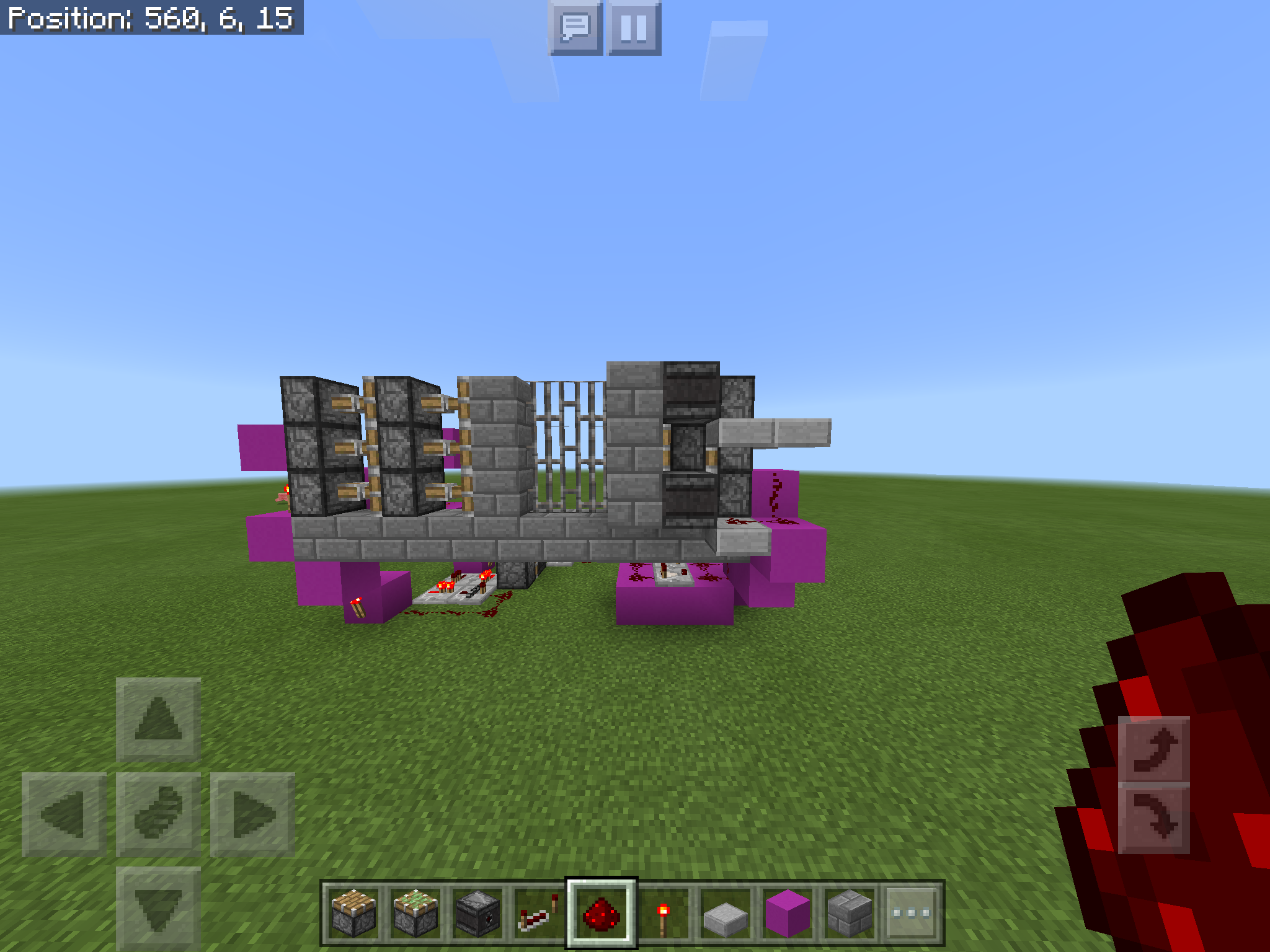
Affects 1.2.8. If you look at the attached sample, the crash only happens for me when the double piston on the right is fully extended and tries to be pushed by by the pistons on the left while they’re retracting. Only the photo beginning with A2EE breaks in my testing.
Also, in some other testing I thought iron bars being the object pushed had something to do with it, but that’s not the case. However, iron bars are the only object that has caused transmutation for me. Pistons on the right just disappeared (no drops) a couple of times, though rare. Crashing is far more common.
I forgot to mention that if you reduce the redstone wiring on the left, thus creating a longer decay in the comparator loop, even A2EE works without breaking. It seems to be something about a piston in a changing state being pushed by a piston with too quick of an actuating pulse.
Here is a simpler test setup. Now, if you decrease the repeater on the left OR completely remove the 2 repeaters on the right it should crash every time. With the setup pictured it BARELY works and seems to be affected by the unreliable repeater bug. So this setup is right on the edge of functionality. (Oddly enough 2 tick repeater on the first setup seems to always deliver 2 ticks to the comparator circuit. I don’t know, but that’s for a different bug report.)
Also, as seen in the picture, one of my tests resulted in transmutation while all the others simply crashed.
I logged off the world to create this ticket. When I logged back in to get screenshots of the broken Redstone torches everything was working fine. When I powered the block the torch turned off like it was supposed to. I’ll try relogging next time it breaks and report back.
Efficiency 4 diamond shovel used on gravel, sand, and dirt, causes the player walking sound to get stuck on.
I first noticed underground getting gravel. I thought something was coming to get me but nothing. Then I noticed it in the desert getting sand. I walked all over and no mobs were anywhere. I noticed that the walking sound stayed at the location it started. The further away I walked, the quieter it got. Then clearing out a small section of dirt near an ocean it happened again. I could hear it change sides when I turn like it was at just one location. I logged out and back it to see if it cleared up and it was still there. Breaking another block made it stop.
It’s almost as if it’s capturing my walking sounds as I’m digging and getting them stuck in a ghost block or something because I have picked up all the drops. I play on a realms server mostly. Haven’t tested in single player.
Ok, I went into my single player testing world to gather more data.
I made a line of powered rails on hoppers, terra-cotta, and grass with blocks at each end so the minecart would just bounce back and forth. I put down a minecart with hopper or chest on each test track
The grass made the minecart sounds plus the grass swishing sound. The terra-cotta and hoppers made the minecart plus footstep sounds. However, a regular minecart just made minecart sounds. It seems that it’s just the minecart with hopper or chest that is doing it.
Also, some identical items won’t combine at all.
This happens on my iPad Air but not on my Samsung Galaxy Note 8. I play on realms with same sign in. A buddy of mine is also on the realms with a Mini 2 and didn’t notice the bow issue.
It does for me. Just loaded a single player survival and tested. Made an unenchanted bow and everything. Just holding it appears in right hand but when using it switches to left and gets real high.


Agreed, bow is weaker. Even my friend who isn’t having the visual glitch has mentioned it.
I think its 1.2.14. 1.2.13 came out and 1.2.14 was hot on its heels so I'm pretty sure it's the latest. I don't have my iPad directly in front of me though. I'll confirm later this evening.
1.2.14 is confirmed. Thanks
Moonshine77: watched and voted. Thanks for the info.
Unless I’m seeing something wrong, 1.2.15 fixed the UI issues for me. I can combine stacks to 64 manually or double tap to get a full stack. It takes from the nearest slot regardless of if it’s in your inventory or a chest.
I noticed that too but didn’t think much about it as I don’t spend much time in the water
For me, its smaller stacks not combining like two stacks of 15 or so. I've noticed it with end rods, purpur blocks, and chests. I have to find which stacks is in error, place them down and break them again, and as I break them they start completing the other tack in my inventory.
Not fixed. I’m actually having more trouble than I was before. Odd thing though, I had two stacks of torches. One was qty 4 the other qty 33. The larger stack was in my ender chest so I crafted the 4 for a project. The I tried to get them put together and they wouldn’t stack. They just kept swapping in my inventory. They wouldn’t even combine if I placed one and broke it, they just kept to themselves. So I put the 33 back in the enderchest but I put the 4 stack instead and decided to keep the 4 and use them and when I took them out and went to swap them with the 33 they stacked! I don’t have an answer. But later I had two ladders that wouldn’t stack and I was able to place them and break them and they stacked.
Let’s get some votes for this so they can see how important it is to us.
I did search for my issue. Yours is different. I dont have any trouble with moving or continuing to move. Mine affects the action hand. They could be related, but they're not the same.
I voted for yours though, never hurts.
I seem to have the most trouble when I'm in water. Like when working in the water streams of my iron farm floors.
It seems similar to the old bug where you would throw your items on the floor when trying to switch to a different item in your hand. When I get stuck in block placement mode, all I have to do is stop and tap the screen. It's like it's still reading that I'm long pressing the screen.
I seem to have the most trouble when I'm in water. Like when working in the water streams of my iron farm floors.
It seems similar to the old bug where you would throw your items on the floor when trying to switch to a different item in your hand. When I get stuck in block placement mode, all I have to do is stop and tap the screen. It's like it's still reading that I'm long pressing the screen.
It’s so bad on my iPad you can’t open doors or place blocks..
You have to know about networking, IP addressing, DNS, and probably firewalls and routing.This is not a bug.
Did you ever find a resolution? You do know that the world folder has to match the world name in the properties file?