 SightDash
- EyeBlox
- JIRAUSER724389
- Europe/Bucharest
- Yes
- No
 MC-255987
![[Mojang] Gegy](../../../data/avatars/users/10122.svg)
 Normal
 MCPE-178041



















Can't interact withtheTrial worldsevenif you have remaining trial timeCan't interact with Trial worlds when the trial timer runs out in a previous world
Can't interact withTrialworlds when thetrialtimer runs out in a previous worldCan't interact with worlds when the Trial Timer runs out in a previous world
When you are in Trial mode and the time runs out in a world, then go into a different world, you still wouldn't be able to interact with it.
How to Replicate the bug:
1. Make sure you didn't unlock the full version of the game
2. Make a new world
3. Wait until the timer runs out
4. Exit that world and make/load a different worldSee for yourself.
By the way, I don't know if the bug works on different platforms, since on mobile devices there's no Trial mode.
When you are in Trial mode and the time runs out in a world, then go into a different world, you still wouldn't be able to interact with it.
How to Replicate the bug:
1.Make sure you didn't unlock the full version of the game
2. Make a new world
3.Waituntil the timer runs out
4.Exitthat world and make/loada different world
See for yourself.By the way, I don't know if the bug works on different platforms, since on mobile devices there's no Trial mode.
When you are in Trial mode and the time runs out in a world, then go into a different world, you still wouldn't be able to interact with it.
How to Replicate the bug:
1. Play the free trial version of the game
2. Make a new world
3. Play until the timer runs out
4. Leave that world and make a different worldWhat I expected:
The timer restarts.
What actually happened:
The timer still displayed 00:00
By the way, I don't know if the bug works on different platforms, since on mobile devices there's no Trial mode.
When you are in Trial mode and the time runs out in a world, then go into a different world, you still wouldn't be able to interact with it.
How to Replicate the bug:
1. Play the free trial version of the game
2. Make a new world
3. Play until the timer runs out
4. Leave that world and make a different worldWhat I expected:
The timer restarts.
What actually happened:
The timer still displayed 00:00
By the way, I don't know if the bug works on different platforms, since on mobile devices there's no Trial mode.
When you are in Trial mode and the time runs out in a world, then go into a different world, you still wouldn't be able to interact with it.
How to Replicate the bug:
1. Play the free trial version of the game
2. Make a new world
3. Play until the timer runs out
4. Leave that world and make a different worldWhat I expected:
The timer restarts.
What actually happened:
The timer didn't restart and I couldn't interact with different worlds.
By the way, I don't know if the bug works on different platforms, since on mobile devices there's no Trial mode.
Screenshot_2.png
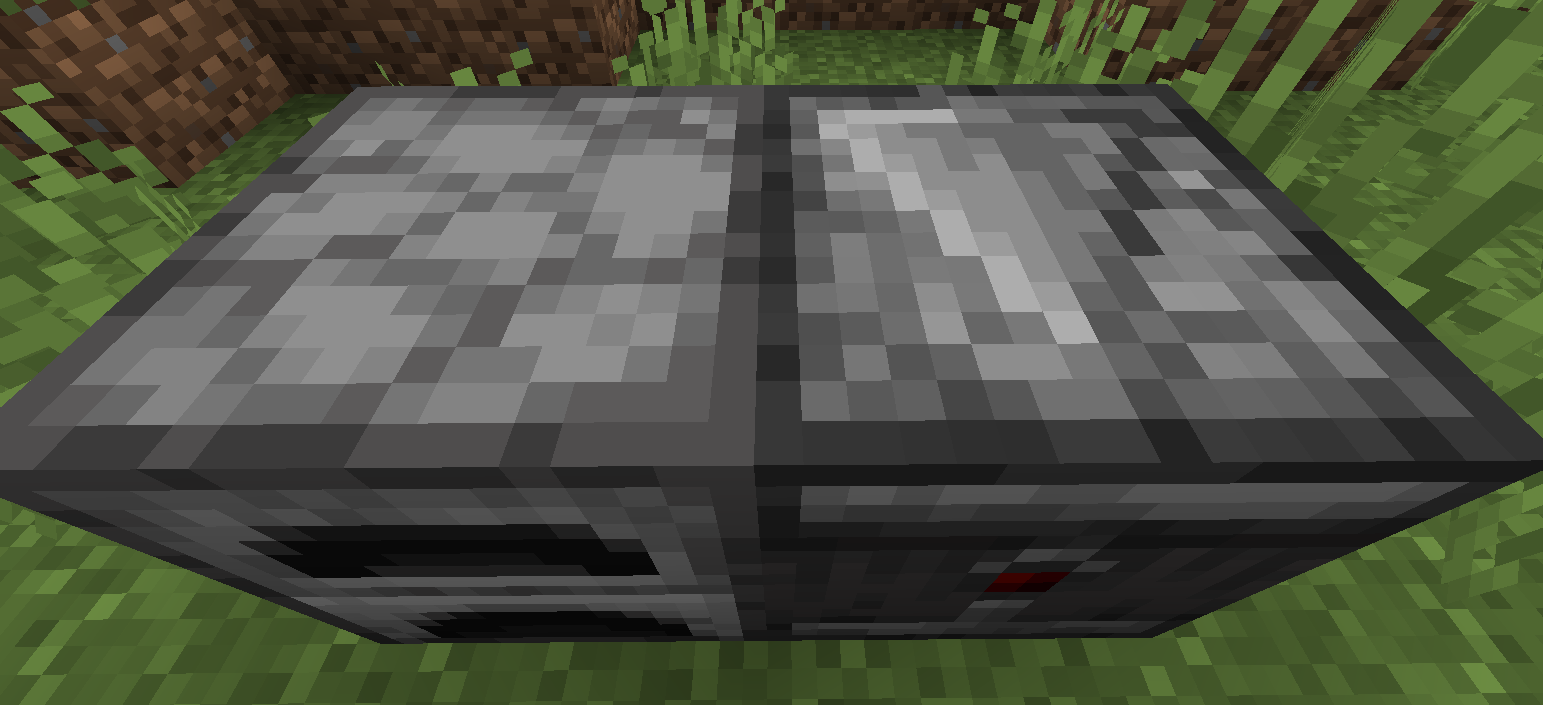
Bamboo fence gates don't have a bottom texture (or it's missing)
Steps to Reproduce:
1. Place 2 blocks of any kind (one on top of another);
2. Place a bamboo fence gate;
3. Break the blocks under it;4. Look under the fence gate.
I attached a screenshot of the bottom texture from another fence gate as reference
Bamboo fence gates don't have a bottom texture (or it's missing)
Steps to Reproduce:
1. Place 2 blocks of any kind (one on top of another);
2. Place a bamboo fence gate;
3. Break the blocks under it;4. Look under the fence gate.
I attached a screenshot of the bottom texture from another fence gate as reference!
Bamboo fence gates don't have a bottom texture (or it's missing)
Steps to Reproduce:
1. Place 2 blocks of any kind (one on top of another);
2. Place a bamboo fence gate;
3. Break the blocks under it;4. Look under the fence gate.
I attached a screenshot of the bottom
texture fromanother fence gate as reference!Bamboo fence gates don't have a bottom texture (or it's missing)
Steps to Reproduce:
1. Place 2 blocks of any kind (one on top of another);
2. Place a bamboo fence gate;
3. Break the blocks under it;4. Look under the fence gate.
I attached a screenshot of the bottom of another fence gate as reference!
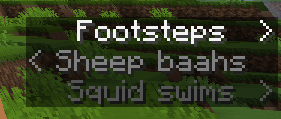
I was having fun playing with Piglins and spawned other mobs (such as zombies) and then noticed that the piglin stepping sound has a different subtitle (rather than Footsteps)
Piglins & Hoglins have a different subtitle when walking
Piglins & Hoglins have adifferent subtitle when walkingPiglins & Hoglins have a custom stepping subtitle
I was having fun playing with Piglins and spawned other mobs (such as zombies) and then noticed that the piglin stepping sound has a different subtitle (rather than Footsteps)
I was having fun playing with Piglins and spawned other mobs (such as zombies) and then noticed that the piglin stepping sound has a different subtitle (rather than Footsteps).
Edit: I spawned Hoglins too and noticed the same issue.
I was having fun playing with Piglins and spawned other mobs (such as zombies) and then noticed that the piglin stepping sound has a different subtitle (rather than Footsteps).
Edit: I spawned Hoglins too and noticed the same issue.
Edit 2: I was digging thru the game files and noticed that other mobs have a custom step subtitle
Piglins&Hoglins have a custom stepping subtitlePiglins, Hoglins & other mobs have a custom stepping subtitle
In 23w06a, Mojang fixed some bugs related to text clipping thru the buttons and since my resource pack makes the buttons rounded, it looks weird.
Down below there's an image of the game menu using my resource pack.And this issue could affect other resource packs that change the shape of the buttons.
In 23w06a, Mojang fixed some bugs related to text clipping thru the buttons and since my resource pack makes the buttons rounded, it looks weird.
Down below there's an image of the game menu using my resource pack.
And this issue could affect other resource packs that change the shape of the buttons.
In 23w06a, Mojang fixed some bugs related to text clipping thru the buttons and since my resource pack makes the buttons rounded, it looks weird.
Down below there's an image of the game menu using my resource pack.
And this issue could affect other resource packs that change the shape of the buttons.In 23w06a, Mojang fixed some bugs related to text clipping thru the buttons and since my resource pack makes the buttons rounded, it looks weird.
Down below there's an image of the game menu using my resource pack, and this issue could affect other resource packs that change the shape of the buttons.
In 23w06a, Mojang fixed some bugs related to text clipping thru the buttons and since my resource pack makes the buttons rounded, it looks weird.
Down below there's an image of the game menu using my resource pack, and this issue could affect other resource packs that change the shape of the buttons.
In 23w06a, Mojang fixed some bugs related to text clipping thru the buttons and since my resource pack makes the buttons rounded, it looks weird.
Down below there's an image of the game menu using my resource pack, and this issue could affect other resource packs that change the shape of the buttons.
To prove my resource pack isn't the problem, I also put the widgets.png file
UI Buttonsare stretched as of 23w06a, whichbreaksmy resource packUI Buttons break my resource pack as of 23w06a
In 23w06a, Mojang fixed some bugs related to text clipping thru the buttons and since my resource pack makes the buttons rounded, it looks weird.
Down below there's an image of the game menu using my resource pack, and this issue could affect other resource packs that change the shape of the buttons.
To prove my resource pack isn't the problem, I also put the widgets.png fileEDIT: I tried putting my resource pack, but accidentally put in all the files from it. So in case I don't get to delete all of them, you'd know.
In 23w06a, Mojang fixed some bugs related to text clipping thru the buttons and since my resource pack makes the buttons rounded, it looks weird.
Down below there's an image of the game menu using my resource pack, and this issue could affect other resource packs that change the shape of the buttons.
To prove my resource pack isn't the problem, I also put the widgets.png fileEDIT: I tried putting my resource pack, but accidentally put in all the files from it. So in case I don't get to delete all of them, you'd know.
Lighting appears dark in someplacesLighting appears dark in some areas
Resource Packs don't loadwhen selectedResource Packs don't load on start-up
When you load up a resource pack,the pack would not load unlessyoupress F3+Tin-gameThis happens when you switch versions, like when you switch between 1.19.3 and 1.19.4 the pack would not load until you reload it in-game by pressing F3+T
Resource Packs don't loadon start-upResource Packs don't load when switching versions
This happens when you switch versions, like when you switch between 1.19.3 and 1.19.4 the pack would not load until you reload it in-game by pressing F3+T or when you download and play a snapshot for the first time
This happens when you switch versions, like when you switch between 1.19.3 and 1.19.4 the pack would not load until you reload it in-game by pressing F3+T
or when you download and play a snapshot for the first timeThis happens when you switch versions, like when you switch between 1.19.3 and 1.19.4 the pack would not load until you reload it in-game by pressing F3+T. The pack was made for 1.19.4, so when you switch from 1.19.3 to 1.19.4 the pack unloads even if it shows in Selected Resource Packs
death.attack.genericKill and death.attack.genericKill.player was placed in between death.attack.generic and death.attack.generic.player in en_us.json
death.attack.genericKill was placed in between death.attack.generic and death.attack.generic.player in en_us.json
In the attachment below i selected the new genericKill death message and as you can see, it's placed between the generic death message
Minecart shadowand tagdon't appear on the center when placed on cornered railsMinecart shadow & custom name don't appear on the center when placed on cornered rails
Name tagon boats/minecarts are obstructed by entitiesCustom names on boats/minecarts are obstructed by entities
How to reproduce bug:
- Rename a boat to something random (preferably smth long)
- Put an entity in the boat
- Notice how the Name
tagis barely visibleHow to reproduce bug:
- Rename a boat to something random (preferably smth long)
- Put an entity in the boat
- Notice how the Custom Name is barely visible
How to reproduce bug:
Place an anvil and get any item
Right click on it and try to name it anything
Press backspace or try selecting the text using Shift + left/right arrow keyExpected behavior:
Pressing backspace would remove textWhat happened:
The text wasn't removedIn the video below, I try to rename a sword but fail because of this bug.
So apparently this bug is already fixed in "a future update", i made this report before i found that out so just ignore it
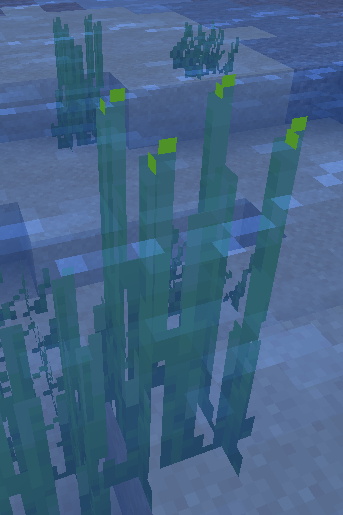
Middle clicking Tall Seagrass gives normal Seagrass as there's no Tall Seagrass variant in the Creative Inventory unlike Grass or Fern
How to reproduce the bug:
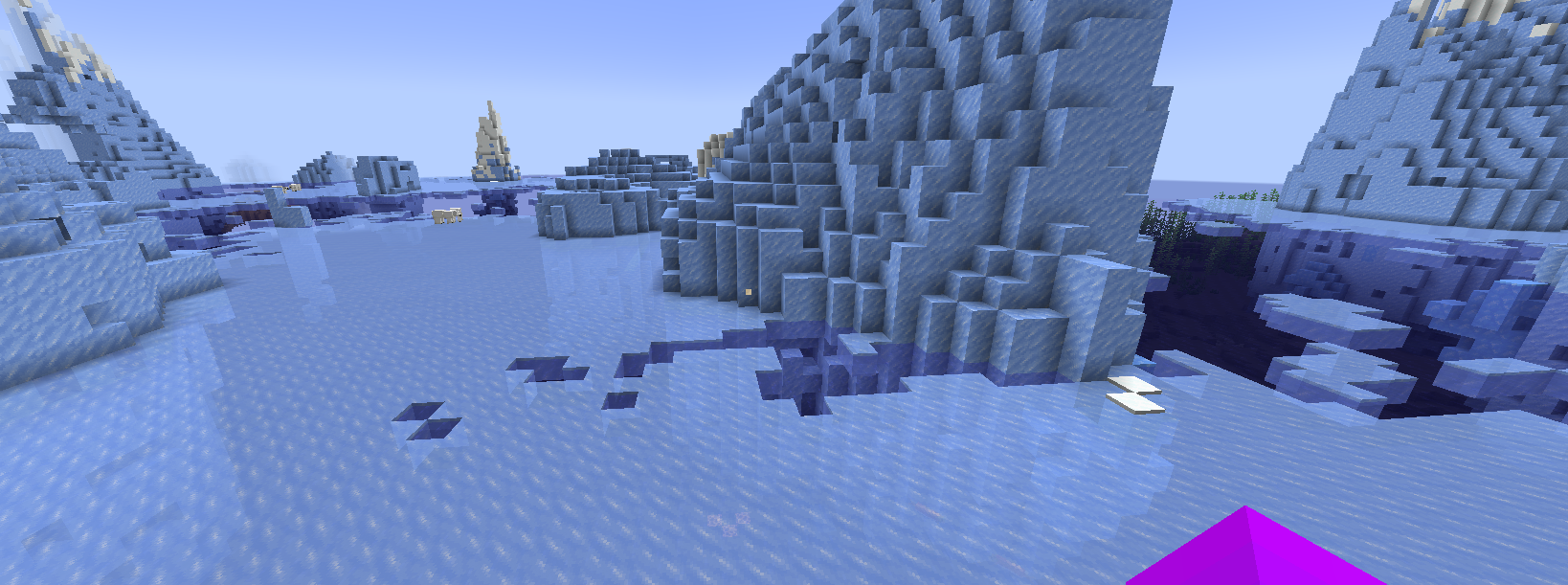
- Find some water.
- Break the blocks underwater while being above it.
- Notice how the particles don't render
Particles also fail to render behind glass or other transparent blocks
Steps to reproduce:
Make sure to have Subtitles on
Spawn a Breeze
Get some Wind Charges
Go in Survival Mode
Use a Wind Charge right after a Breeze shoots theirs and lands next to the player
Notice how there's 2 "Wind Charge bursts" subtitlescan i have this bug report deleted? thx (i accidentally made 2 for the same bug)
Breezes use a different wind charge bursts subtitle compared to Playersaccidental bug report (pls delete if possible)
Steps to reproduce:
Make sure to have Subtitles on
Spawn a Breeze
Get some Wind Charges
Go in Survival Mode
Use a Wind Charge right after a Breeze shoots theirs and lands next to the player
Notice how there's 2 "Wind Charge bursts" subtitlesExpected results:
The "Wind Charge bursts" subtitle appears once, no matter if it was triggered by the Breeze or the player
Breezes use a different "wind charge bursts" subtitle string compared to Players
How to reproduce:
Play Java Edition, place sponges/wet sponges, break them, use sponges or anything.
Now do the same thing in Bedrock.
Notice how the sponge/wet sponge sounds don't match.This is because of Java Edition 1.20.2 where they added custom sounds for sponges and wet sponges. I figured this change would also apply to Bedrock but I guess not.
Sponges and Wetsponges sounds don't match Java EditionSponges and Wet Sponges use the old sounds and don't match Java Edition
How to reproduce:
PlayJava Edition, place sponges/wet sponges, break them, use sponges or anything.
Now do the same thingin Bedrock.
Notice how the sponge/wet sponge sounds don't match.This is because of Java Edition 1.20.2 where they added custom sounds for sponges and wet sponges. I figured this change would also apply to Bedrock but I guess not.
How to reproduce:
On Java Edition, place sponges/wet sponges, break them, use sponges or anything. (make sure to have sound enabled)
Now do the same thing on Bedrock.
Notice how the sponge/wet sponge sounds don't match.This is because of Java Edition 1.20.2 where they added custom sounds for sponges and wet sponges. I figured this change would also apply to Bedrock but I guess not.
How to reproduce:
On Java Edition, place sponges/wet sponges, break them, use sponges or anything. (make sure to have sound enabled)
Now do the same thing on Bedrock.
Notice how the sponge/wet sponge sounds don't match.This is because of Java Edition 1.20.2 where
theyadded custom sounds for sponges and wet sponges. I figured this change would also apply to Bedrock but I guess not.How to reproduce:
On Java Edition, place sponges/wet sponges, break them, use sponges or anything. (make sure to have sound enabled)
Now do the same thing on Bedrock.
Notice how the sponge/wet sponge sounds don't match.This is because of Java Edition 1.20.2 where Mojang added custom sounds for sponges and wet sponges. I figured this change would also apply to Bedrock but I guess not.
How to Reproduce:
Take any wall from creative and drop them on the ground and then take anything else and drop it next to them.
Notice how they spin weirdly compared to other items.EDIT: this applies to heads aswell
How to Reproduce:
Take any wall from creative and drop them on the ground and then take anything else and drop it next to them.
Notice how they spin weirdly compared to other items.EDIT: this applies to all types of heads aswell
How to Reproduce:
Take any wall from creative and drop them on the ground and then take anything else and drop it next to them.
Notice how they spin weirdly compared to other items.EDIT: this applies to all types of heads aswell
How to Reproduce:
Take any wall from creative and drop them on the ground and then take anything else and drop it next to them.
Notice how they spin weirdly compared to other items.IMPORTANT: this applies to all types of heads aswell
How to reproduce:
1. Place down a Hopper
2. Place a down any other container block (Chest, Dispensers, Furnaces etc.)
3. Notice how the Hopper is labeled as "Item Hopper" in the container compared to the other containers.I know it's more of a nitpick but still
In the images below u can see I compared hopper interface with dispenser's
How to reproduce:
1. Place down a Hopper
2. Place a down any other container block (Chest, Dispensers, Furnaces etc.)
3. Notice how the Hopper is labeled as "Item Hopper" in the container compared to the other containers.I know it's more of a nitpick but still
In the images below you can see I compared hopper interface with the dispenser's.
How to reproduce:
Hold a brush (or mace) in your hand and any other item (preferably an arrow) in the offhand
Go in third person (front)
Notice how the size of the brush (or mace) is bigger than the other items
Brushes and Maces held in third person are huge compared to other items
Slabs, Cakes, Trapdoors, Mob heads and Heavy cores mimic the blocks below when walking on them
Video demonstration of this bug:
https://drive.google.com/file/d/1g2kxajFTBCD2AFpRY3ficatdeJsr6n2q/view?usp=sharingHow to reproduce bug:
Place down (any) slabs, cakes, (any) trapdoors, (any) mob head and heavy cores.
Make sure to put something that affects movement, such as Honey Blocks, Soul Sand or even Ice blocks.
Walk on themExpected result:
walking on the blocks mentioned above would act like walking on a full blockObserved result:
movement acts like there's no block between the player and the block that changes movement
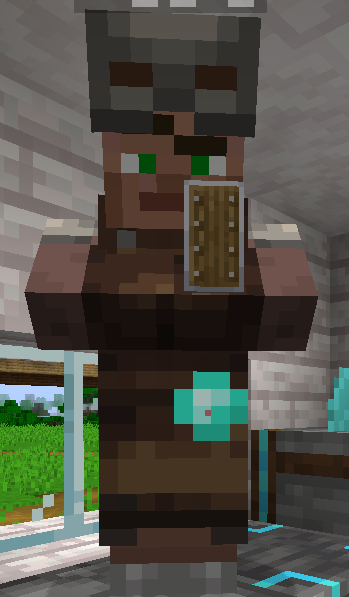
How to reproduce bug:
- Get a villager
- Put a blast furnace next to it
- Get a trade where the result item is a shield
- Hold the item required to trade so the villager shows its trades in his hand.
Observed result:
The shield is held slightly off, similar to how it used to look inside item frames.Expected result:
The shield would be held in the centerThis might be because of my resource pack (I didn't realize that behavior before)
How to reproduce this bug
Take one of the affected blocks/items (Cobblestone Wall, Firefly Bush, Wildflowers, Leaf Litter)
Hover over them
Notice how they have additional spacing after their names.For example: Instead of "Cobblestone Wall", it would be called "Cobblestone Wall ".
I will make proper screenshots when the preview installs for me. I just saw wattle's video on the newest Preview (as of writing this) and noticed the names of the new flowers are off. I know Cobblestone Wall is also affected, so I decided to finally report it. Cobblestone Wall's item name is also spaced incorrectly in latest release, idk since when it originally happened, nor if it was spaced incorrectly when it was originally added!
How to reproduce this bug
Take one of the affected blocks/items (Cobblestone Wall, Firefly Bush, Wildflowers, Leaf Litter)
Hover over them
Notice how they have additional spacing after their names.For example: Instead of "Cobblestone Wall", it would be called "Cobblestone Wall ".
I will make proper screenshots when the preview installs for me. I just saw wattle's video on the newest Preview (as of writing this) and noticed the names of the new
flowers are off. I know Cobblestone Wall is also affected, so I decided to finally report it. Cobblestone Wall's item name is also spaced incorrectly in latest release, idk since when it originally happened, nor if it was spaced incorrectly when it was originally added!How to reproduce this bug
Take one of the affected blocks/items (Cobblestone Wall, Firefly Bush, Wildflowers, Leaf Litter)
Hover over them
Notice how they have additional spacing after their names.For example: Instead of "Cobblestone Wall", it would be called "Cobblestone Wall ".
I will make proper screenshots when the preview installs for me. I just saw wattle's video on the newest Preview (as of writing this) and noticed the names of the new items are off. I know Cobblestone Wall is also affected, so I decided to finally report it. Cobblestone Wall's item name is also spaced incorrectly in latest release, idk since when it originally happened, nor if it was spaced incorrectly when it was originally added!
![[Mod] OcelotOnesie](../../../data/avatars/users/43220.png)
SightDash: You can access the status effect menu by pressing Z.
Just so you know, the resource pack i'm using doesn't affect bamboo fence gates.
a dromader is an african camel. so it's basically the same thing but i think Camila is the right translation.
I would provide my resource pack, however it's size is 3x bigger than the limit (30 MB)
i tried to upload the pack, and accidentally uploaded the folder containing all the files...
to whoever deleted all the files i accidentally uploaded, thanks!
at this point, adding the widgets.png file to a resource pack template would be easier than providing my resource pack which is 30 MB in size...
the problem is that the recipe you tried is wrong, it's actually like the gunpowder in the tnt recipe
Edit: I put an attachment of the actual recipe.. you're welcome!
can confirm
it happens when using /fill command. Sometimes it will be light coming out of nowhere or just dark spots
i decided to attach an in-game screenshot of the nether quartz ore
yeah but if i switch from 1.19.3 to 1.19.4 it should be ok.. I understand that it happens when downgrading from 1.19.4 to 1.19.3 but not backwards
Brain, what are you talking about? this guy just compared the sus gravel tags to normal gravel..
This also happens when you break down wood that's higher than the player range, this bug occurs when jumping and breaking
maybe they pulled a prank on you
that's bedrock edition
this also happens when a zombie villager turns into a villager
ohh that makes sense, sorry
Update: after some testing, this bug also occurs when generating new worlds in creative
yea but who looks under the brewing stand? i mean the pumpkin and melon top textures are also on the bottom, which means they would have 2 stems
blazes also have this bug, with the bottom rod texture being yellow instead of black like the side texture
who cares about development leftovers, as long as it doesn't affect gameplay it shouldn't be that big of a deal
and improperly uncapitalized but i hope they fixed both bugs in the latest snapshot
Can confirm in 1.19.4 (it happened on a server)
Can confirm in 1.20 Pre-release 4
Can confirm in 1.20 Release Candidate 1.
that's because the minecart shakes, and also because you put in the wrong rail type
"Enchantment Table" is also inconsistent, as it's called "Enchanting Table" on Java
Hello, I'm experiencing this issue while still having on a non-full version, it's just that when timer expires and i make a new world, the timer still says 00:00 instead of resetting and im not sure if this was intended or not
the reason you spawned underneath the lobby is because of your internet connection
same with being the only one moving
i think the reason the minecart shakes is because its also taking damage along side the player
ever wondered why it shakes when u wanna remove an entity like a boat or minecart? that's why
Can confirm in 1.20.2 Release Candidate 2
also the reason i keep coming back is because this bug drives me crazy, and i wish it gets fixed before 1.20.2
Edit: 2 updates later and it still wasn't fixed
i have no idea
If anyone's wondering:
The name tag i put on the minecart says "SHEEP CART" while the name tag i put on the boat says "Sheep in a boat"
why would u want custom names on projectiles and area effect clouds?
can confirm in 23w41a
Can confirm in 23w41a
Can confirm.
so that's why i couldn't play on 23w42a
Can confirm in 23w43a, but only with the small one. (big one has been fixed)
i think it should be 1 copper block = 1 copper grate for the stonecutter
because it affects 1.19.4 (atleast that's what he says) but it was fixed nonetheless
After a bit of testing with the spawners, the bug is that some sides stop rendering when a spawner is placed and then you place blocks around it. My guess is that Mojang tried to make it so that when you place spawners next to each other, it doesn't lag.
Can confirm in 1.20.3 Pre-release 1
Still in 1.20.3 Pre release 1
Can confirm in 1.20.3 Pre-Release 1
Can confirm in 1.20.3 Pre-release 1.
In 1.20.3 Pre-release 1
Can confirm in 1.20.3 Pre-release 1 (also affects Copper Trapdoors)
Can confirm in 1.20.3 Pre-Release 2
Can confirm in 1.20.3 Release Candidate 1
also affects waterlogged barriers
The bug was fixed in 20w22a, but ig the fix was reverted somewhere between 20w22a and the current update
Can confirm in 24w05b.
can confirm, however 24w06a is also affected
what i expected is that the Breeze would use the same subtitle string as the player, so it doesn't appear twice
I know I should probably make a new bug report, but I think I should mention that Sponges also use a different particle when sucking water.
that happens because ur device registers ur touches so when u record these appear on the screen
otherwise idk how to replicate
Mob heads are barely visible in first person
Can confirm in 24w11a
done!
Can confirm in 24w14a
can we have access to the status effect screen on pc?
it's only on mobile devices and to activate it u need to tap it. But on a PC with no touch screen, it's impossible to access it.. unless there's a key bind idk of.
Edit: my bad, i didn't know the key bind to show the status effect screen was called "Show Notifications/Status Effects.. oops
Can confirm. The glint is only visible in third person, item frames or dropped on the ground
Also it seems that the cause of this bug is because Mojang removed some unused shaders like blend or position_color_tex... however, some of these unused shaders also include glint_direct and armor_glint
i assume glint_direct was used for rendering in-game items and first person
i agree with the user below me
so what ur saying is that people shouldn't spam "Can confirm in [version]" because it's the oldest issue that wasn't resolved. But the reason people "spam" it is so that Mojang will see it and fix it. Believe it or not, this is how i found this issue in the first place. Telling people to not spam it will make it less likely to be fixed any time soon
I tried replicating the bug, and noticed that you don't need to hold Ctrl at all
do you have the Programmer Art resource pack enabled?
There might be a chance that my resource pack is the reason the shields are held this way.. i'll test tomorrow
there might be more items i'm missing, i will update this when I'm actually in the latest preview (as of writing this).