 Grant Gryczan
- GrantGryczan
- JIRAUSER492531
- America/New_York
- Yes
- No
 MC-195328
 REALMS-5452
 Low
Low Normal



Run the following command to summon an item which only should be able to be picked up by a player with {{
{UUID:[I;0,0,0,0]}}}:
/summon minecraft:item ~ ~ ~ {Owner:[I;0,0,0,0],Item:{id:"minecraft:gold_ingot",Count:1b}}
Piglins will still successfully pick up this item regardless.
Run the following command to summon an item which only should be able to be picked up by a player with {{UUID:[I;0,0,0,0]
}}:
/summon minecraft:item ~ ~ ~ {Owner:[I;0,0,0,0],Item:{id:"minecraft:gold_ingot",Count:1b}}
Piglins will still successfully pick up this item regardless.
Run the following command to summon an item which only should be able to be picked up by a player with
{{UUID:[I;0,0,0,0]}}:
/summon minecraft:item ~ ~ ~ {Owner:[I;0,0,0,0],Item:{id:"minecraft:gold_ingot",Count:1b}}
Piglins will still successfully pick up this item regardless.
Run the following command to summon an item which only should be able to be picked up by a player with UUID [I;0,0,0,0]:
/summon minecraft:item ~ ~ ~ {Owner:[I;0,0,0,0],Item:{id:"minecraft:gold_ingot",Count:1b}}
Piglins will still successfully pick up this item regardless.
Run the following command in a singleplayer world:
/data modify storage test_world:storage test set value 0
Upon saving & exiting the world, the above command will create the following file in the world save's "data" folder:
Upload this world to Realms. Then run the following command in the world in Realms:
/data get storage test_world:storage test
You may find that it is no longer set to 0. Then download the world again, and in the "data" folder in the world save you may find this:
This is because my Realm was named "hi", and the world was named "World 1". It seems to replace "world" in all file paths with the name of the Realm/world. (This also applies to data pack contents which are unzipped, for example.)
Run the following command in a singleplayer world:
/data modify storage test_world:storage test set value 0
Upon saving & exiting the world, the above command will create the following file in the world save's "data" folder:
Upload this world to Realms. Then run the following command in the world in Realms:
/data get storage test_world:storage test
You may find that it is no longer set to 0. Then download the world again, and in the "data" folder in the world save you may find this:
This is because my Realm was named "hi", and the world was named "World 1". It seems to replace "world" in all file paths with the name of the Realm/world. (This also applies to data pack contents which are unzipped, for example, which has led to any data packs with "world" any of their file names being broken.)
Run the following command in a singleplayer world:
/data modify storage test_world:storage test set value 0
Upon saving & exiting the world, the above command will create the following file in the world save's "data" folder:
Upload this world to Realms. Then run the following command in the world in Realms:
/data get storage test_world:storage test
You may find that it is no longer set to 0. Then download the world again, and in the "data" folder in the world save you may find this:
This is because my Realm was named "hi", and the world was named "World 1". It seems to replace "world" in all file paths with the name of the Realm/world. (This also applies to data pack contents which are unzipped, for example, which has led to any data packs with "world" in any of their file names being broken.)
Run the following command in a singleplayer world:
/data modify storage test_world:storage test set value 0
Upon saving & exiting the world, the above command will create the following file in the world save's "data" folder:
Upload this world to Realms. Then run the following command in the world in Realms:
/data get storage test_world:storage test
You may find that it is no longer set to 0. Then download the world again, and in the "data" folder in the world save you may find this:
This is because my Realm was named "hi"
,and the world was named "World 1". It seems to replace "world" in all file paths with the name of the Realm/world. (This also applies to data pack contents which are unzipped, for example, which has led to any data packs with "world" in any of their file names being broken.)
Normally, entering an End portal creates an obsidian platform at y=48 and teleports the player to y=49. But if you create an End portal in the Nether (e.g. using creative mode), it instead creates it at y=49 and teleports the player to y=50.
An example of why this is a problem is that it leads to builds around the platform appearing to be offset depending on which dimension you enter from (which is irritating for me as a mapmaker trying to use all three dimensions–I have to use commands to fix this in my map).
Multiple chunks saved in single /forceload command are not kept after a restartdata/chunks.dat isn't saved if the most recent /forceload command failed
When you use the /forceload add command for only one chunk, and you restart the server, this chunk is effectively save and reload after the restart.
But, if you use the same command for save multiple chunks in one command :/forceload add x_from z_from x_to z_toAll of this chunk are not reload after a restart (see
/forceload query)Precise reproduction steps:
- Save and restart the world.
→
No force loaded chunks were found in minecraft:overworld
Code analysis:
In net.minecraft.server.level.ServerLevel#setChunkForced, the dirty state of chunks.dat is set to the result of addition/removal of a forced chunk. If the server stops with the dirty state false, forced chunks will not be saved in chunks.dat properly.
Precise reproduction steps:
- Save and restart the world.
→
Code analysis:
In net.minecraft.server.level.ServerLevel#setChunkForced, the dirty state of chunks.dat is set to the result of addition/removal of a forced chunk. If the server stops with the dirty state false, forced chunks will not be saved in chunks.dat properly.Reproduction steps:
- Save and restart the world.
→
Code analysis (by @intsuc):
In net.minecraft.server.level.ServerLevel#setChunkForced, the dirty state of chunks.dat is set to the result of addition/removal of a forced chunk. If the server stops with the dirty state false, forced chunks will not be saved in chunks.dat properly.
The cause of this is that a single chunk's dirty state overwrites the dirty state of all force-loaded chunks (which are stored in chunks.dat).
Reproduction steps:
- Save and restart the world.
→
Code analysis (by @intsuc):
In net.minecraft.server.level.ServerLevel#setChunkForced, the dirty state of chunks.dat is set to the result of addition/removal of a forced chunk. If the server saves/stops with the dirty state false, forced chunks will not be saved in chunks.dat properly.
The cause of this is that a single chunk's dirty state overwrites the dirty state of all force-loaded chunks (which are stored in chunks.dat).
Reproduction steps:
- Save and restart the world.
0 0→
Code analysis (by @intsuc):
In net.minecraft.server.level.ServerLevel#setChunkForced, the dirty state of chunks.dat is set to the result of addition/removal of a forced chunk. If the server saves/stops with the dirty state false, forced chunks will not be saved in chunks.dat properly.The cause of this is that a single chunk's dirty state overwrites the dirty state of all force-loaded chunks (which are stored in chunks.dat).
Reproduction steps:
- Save and restart the world.
→
Code analysis (by @intsuc):
In net.minecraft.server.level.ServerLevel#setChunkForced, the dirty state of chunks.dat is set to the result of addition/removal of a forced chunk. If the server saves/stops with the dirty state false, forced chunks will not be saved in chunks.dat properly.
The cause of this is that a single chunk's dirty state overwrites the dirty state of all force-loaded chunks (which are stored in chunks.dat).
Reproduction steps:
- Save and restart the world.
→
Code analysis (by @intsuc):
In net.minecraft.server.level.ServerLevel#setChunkForced, the dirty state of chunks.dat is set to the result of addition/removal of a forced chunk. If the server saves/stops with the dirty state false, forced chunks will not be saved in chunks.dat properly.The cause of this is that a single chunk's dirty state overwrites the dirty state of all force-loaded chunks (which are stored in chunks.dat).
Reproduction steps:
- Save and restart the world.
→
Code analysis (by @intsuc):
In net.minecraft.server.level.ServerLevel#setChunkForced, the dirty state of chunks.dat is set to the result of addition/removal of a forced chunk. If the server saves/stops with the dirty state false, forced chunks will not be saved in chunks.dat properly.
The cause of this is that a single chunk's dirty state overwrites the dirty state of all force-loaded chunks (which are stored in chunks.dat).
Reproduction steps:
- Save and restart the world.
→
Code analysis (by intsuc):
In net.minecraft.server.level.ServerLevel#setChunkForced, the dirty state of chunks.dat is set to the result of addition/removal of a forced chunk. If the server saves/stops with the dirty state false, forced chunks will not be saved in chunks.dat properly.If the most recent `/forceload add` or `/forceload remove` command failed at the time of saving, then no changes to any force-loaded chunks will be saved.
The cause of this is that a single chunk's dirty state overwrites the dirty state of all force-loaded chunks (which are stored in chunks.dat).
Reproduction steps:
- Save and restart the world.
→
Code analysis (by intsuc):
In net.minecraft.server.level.ServerLevel#setChunkForced, the dirty state of chunks.dat is set to the result of addition/removal of a forced chunk. If the server saves/stops with the dirty state false, forced chunks will not be saved in chunks.dat properly.
If the most recent `/forceload add` or `/forceload remove` command failed at the time of saving, then no changes to any force-loaded chunks will be saved.
The cause of this is that a single chunk's dirty state overwrites the dirty state of all force-loaded chunks (which are stored in chunks.dat).
Reproduction steps:
- Save and restart the world.
→
Code analysis (by intsuc):
In net.minecraft.server.level.ServerLevel#setChunkForced, the dirty state of chunks.dat is set to the result of addition/removal of a forced chunk. If the server saves/stops with the dirty state false, forced chunks will not be saved in chunks.dat properly.If at the time of saving the world, the most recent /forceload add or /forceload remove command failed (e.g. if a data pack does `/forceload add` to the same chunk periodically), then no changes to any force-loaded chunks are saved at all.
The cause of this is that a single chunk's dirty state overwrites the dirty state of all force-loaded chunks (which are stored in chunks.dat).
Reproduction steps:
- Save and restart the world.
→
Code analysis (by intsuc):
In net.minecraft.server.level.ServerLevel#setChunkForced, the dirty state of chunks.dat is set to the result of addition/removal of a forced chunk. If the server saves/stops with the dirty state false, forced chunks will not be saved in chunks.dat properly.
If at the time of saving the world, the most recent /forceload add or /forceload remove
command failed (e.g. if a data pack does `/forceload add`to the same chunk periodically), then no changes to any force-loaded chunks are saved at all.The cause of this is that a single chunk's dirty state overwrites the dirty state of all force-loaded chunks (which are stored in chunks.dat).
Reproduction steps:
- Save and restart the world.
→
Code analysis (by intsuc):
In net.minecraft.server.level.ServerLevel#setChunkForced, the dirty state of chunks.dat is set to the result of addition/removal of a forced chunk. If the server saves/stops with the dirty state false, forced chunks will not be saved in chunks.dat properly.If at the time of saving the world, the most recent /forceload add or /forceload remove command failed (e.g. if a data pack does /forceload add to the same chunk periodically), then no changes to any force-loaded chunks are saved at all.
The cause of this is that a single chunk's dirty state overwrites the dirty state of all force-loaded chunks (which are stored in chunks.dat).
Reproduction steps:
- Save and restart the world.
→
Code analysis (by intsuc):
In net.minecraft.server.level.ServerLevel#setChunkForced, the dirty state of chunks.dat is set to the result of addition/removal of a forced chunk. If the server saves/stops with the dirty state false, forced chunks will not be saved in chunks.dat properly.
Some candles in a certain ancient city structure can, seemingly unexpectedly, generate with water that flows out of the candles. See attached image.
To reproduce, create a world with seed `-6358854471368778311` and then enter `/tp @s -612 -45 443 -72 41`.
Some candles in a certain ancient city structure can, seemingly unexpectedly, generate with water that flows out of the candles. See attached image.
To reproduce, create a world with seed -6358854471368778311 and then enter /tp @s -612 -45 443 -72 41.
Description
Incorrect Conversion
Player heads in previous versions could have a SkullOwner.Name set to an invalid username, such as a string with spaces, special characters, or more than 16 characters. When updating a world to the latest snapshot, all items with such data turn into plain player heads with no skin texture information, due to the entire minecraft:profile item component being invalidated.
Game Crashes
Despite that, player heads placed down in block form remain the same: they are able to keep their texture and invalid player name. Therefore, when the player head block is broken, it drops a player head item with an invalid component:
Trying to use /data get entity @s SelectedItem while holding this invalid item results in the following error:
Furthermore, trying to save & quit the world results in a game crash:
Reproduction Steps
- In a 1.20.4 creative world, use a command block to run the following command. This gives you the Elder Guardian head from the https://vanillatweaks.net/ "More Mob Heads" data pack (meaning many players will have this exact item in survival mode).
give @p minecraft:player_head{SkullOwner:{Id:[I;1449915152,-149469738,-1161669070,1520260531],Name:"Elder Guardian",Properties:{textures:[{Value:"eyJ0ZXh0dXJlcyI6eyJTS0lOIjp7InVybCI6Imh0dHA6Ly90ZXh0dXJlcy5taW5lY3JhZnQubmV0L3RleHR1cmUvNGEyZDY0ZjRhMDBlOWM4NWY2NzI2MmVkY2FjYjg0NTIzNTgxYWUwZjM3YmRhYjIyZGQ3MDQ1MjRmNjJlMTY5ZiJ9fX0="}]}},BlockEntityTag:{note_block_sound:"minecraft:entity.elder_guardian.ambient"}}- Place the head down, but keep it in your inventory too.
- Upgrade the world to the latest snapshot.
- Observe that all the head in your inventory has become a plain player head with no profile component at all.
- Enter /gamemode survival.
- Break the head.
- Log out of the world. The game crashes.
Possible Solutions
I believe the most backwards-compatible solution would be to once again allow invalid player names on player heads. But if for some reason this is unideal, then at worst, the conversion should only remove the player name part of the component, rather than deleting the entire head texture, because otherwise a lot of heads will just be lost. (With the Vanilla Tweaks "More Mob Heads" pack, for example, this will result in a lot of upset players losing difficult-to-obtain mob heads in their head collections.)
If necessary, the same conversion should be applied to player head block entity data as well, to prevent invalid components from being generated.
Description
Incorrect Conversion
Player heads in previous versions could have a SkullOwner.Name set to an invalid username, such as a string with spaces, special characters, or more than 16 characters. When updating a world to the latest snapshot, all items with such data turn into plain player heads with no skin texture information, due to the entire minecraft:profile item component being invalidated.
Game Crashes
Despite that, player heads placed down in block form remain the same: they are able to keep their texture and invalid player name. Therefore, when the player head block is broken, it drops a player head item with an invalid component:
Trying to use /data get entity @s SelectedItem while holding this invalid item results in the following error:
Furthermore, trying to save & quit the world results in a game crash:
Reproduction Steps
- In a 1.20.4 creative world, use a command block to run the following command. This gives you the Elder Guardian head from the https://vanillatweaks.net/ "More Mob Heads" data pack (meaning many players will have this exact item in survival mode).
give @p minecraft:player_head{SkullOwner:{Id:[I;1449915152,-149469738,-1161669070,1520260531],Name:"Elder Guardian",Properties:{textures:[{Value:"eyJ0ZXh0dXJlcyI6eyJTS0lOIjp7InVybCI6Imh0dHA6Ly90ZXh0dXJlcy5taW5lY3JhZnQubmV0L3RleHR1cmUvNGEyZDY0ZjRhMDBlOWM4NWY2NzI2MmVkY2FjYjg0NTIzNTgxYWUwZjM3YmRhYjIyZGQ3MDQ1MjRmNjJlMTY5ZiJ9fX0="}]}},BlockEntityTag:{note_block_sound:"minecraft:entity.elder_guardian.ambient"}}- Place the head down, but keep it in your inventory too.
- Upgrade the world to the latest snapshot.
- Observe that all the head in your inventory has become a plain player head with no profile component at all.
- Enter /gamemode survival.
- Break the head.
- Log out of the world. The game crashes.
Possible Solutions
I believe the most backwards-compatible solution would be to once again allow invalid player names on player heads. But if for some reason this is unideal, then at worst, the conversion should only remove the player name part of the component, rather than deleting the entire head texture, because otherwise a lot of heads will just be lost. (With the Vanilla Tweaks "More Mob Heads" pack, for example, this will result in a lot of upset players losing difficult-to-obtain mob heads in their head collections.)
If necessary, the same conversion should be applied to player head block entity data as well, to prevent invalid components from being generated when the block is broken.
Description
Incorrect Conversion
Player heads in previous versions could have a SkullOwner.Name set to an invalid username, such as a string with spaces, special characters, or more than 16 characters. When updating a world to the latest snapshot, all items with such data turn into plain player heads with no skin texture information, due to the entire minecraft:profile item component being invalidated.
Game Crashes
Despite that, player heads placed down in block form remain the same: they are able to keep their texture and invalid player name. Therefore, when the player head block is broken, it drops a player head item with an invalid component:
Trying to use /data get entity @s SelectedItem while holding this invalid item results in the following error:
Furthermore, trying to save & quit the world results in a game crash:
Reproduction Steps
- In a 1.20.4 creative world, use a command block to run the following command. This gives you the Elder Guardian head from the https://vanillatweaks.net/ "More Mob Heads" data pack (meaning many players will have this exact item in survival mode).
give @p minecraft:player_head{SkullOwner:{Id:[I;1449915152,-149469738,-1161669070,1520260531],Name:"Elder Guardian",Properties:{textures:[{Value:"eyJ0ZXh0dXJlcyI6eyJTS0lOIjp7InVybCI6Imh0dHA6Ly90ZXh0dXJlcy5taW5lY3JhZnQubmV0L3RleHR1cmUvNGEyZDY0ZjRhMDBlOWM4NWY2NzI2MmVkY2FjYjg0NTIzNTgxYWUwZjM3YmRhYjIyZGQ3MDQ1MjRmNjJlMTY5ZiJ9fX0="}]}},BlockEntityTag:{note_block_sound:"minecraft:entity.elder_guardian.ambient"}}- Place the head down, but keep it in your inventory too.
- Upgrade the world to the latest snapshot.
- Observe that all the head in your inventory has become a plain player head with no profile component at all.
- Enter /gamemode survival.
- Break the head.
- Log out of the world. The game crashes.
Possible Solutions
I believe the most backwards-compatible solution would be to once again allow invalid player names on player heads. But if for some reason this is unideal, then at worst, the conversion should only remove the player name part of the component, rather than deleting the entire head texture, because otherwise a lot of heads will just be lost. (With the Vanilla Tweaks "More Mob Heads" pack, for example, this will result in a lot of upset players losing difficult-to-obtain mob heads in their head collections.)
If necessary, the same conversion should be applied to player head block entity data as well, to prevent invalid item components from being generated when the block is broken.
Description
Incorrect Conversion
Player heads in previous versions could have a SkullOwner.Name set to an invalid username, such as a string with spaces, special characters, or more than 16 characters. When updating a world to the latest snapshot, all items with such data turn into plain player heads with no skin texture information, due to the entire minecraft:profile item component being invalidated.
Game Crashes
Despite that, player heads placed down in block form remain the same: they are able to keep their texture and invalid player name. Therefore, when the player head block is broken, it drops a player head item with an invalid component:
Trying to use /data get entity @s SelectedItem while holding this invalid item results in the following error:
Furthermore, trying to save & quit the world results in a game crash:
Reproduction Steps
- In a 1.20.4 creative world, use a command block to run the following command. This gives you the Elder Guardian head from the https://vanillatweaks.net/ "More Mob Heads" data pack (meaning many players will have this exact item in survival mode).
give @p minecraft:player_head{SkullOwner:{Id:[I;1449915152,-149469738,-1161669070,1520260531],Name:"Elder Guardian",Properties:{textures:[{Value:"eyJ0ZXh0dXJlcyI6eyJTS0lOIjp7InVybCI6Imh0dHA6Ly90ZXh0dXJlcy5taW5lY3JhZnQubmV0L3RleHR1cmUvNGEyZDY0ZjRhMDBlOWM4NWY2NzI2MmVkY2FjYjg0NTIzNTgxYWUwZjM3YmRhYjIyZGQ3MDQ1MjRmNjJlMTY5ZiJ9fX0="}]}},BlockEntityTag:{note_block_sound:"minecraft:entity.elder_guardian.ambient"}}- Place the head down, but keep it in your inventory too.
- Upgrade the world to the latest snapshot.
- Observe that all the head in your inventory has become a plain player head with no profile component texture at all.
- Enter /gamemode survival.
- Break the head.
- Log out of the world. The game crashes.
Possible Solutions
I believe the most backwards-compatible solution would be to once again allow invalid player names on player heads. But if for some reason this is unideal, then at worst, the conversion should only remove the player name part of the component, rather than deleting the entire head texture, because otherwise a lot of heads will just be lost. (With the Vanilla Tweaks "More Mob Heads" pack, for example, this will result in a lot of upset players losing difficult-to-obtain mob heads in their head collections.)
If necessary, the same conversion should be applied to player head block entity data as well, to prevent invalid item components from being generated when the block is broken.
Description
Incorrect Conversion
Player heads in previous versions could have a SkullOwner.Name set to an invalid username, such as a string with spaces, special characters, or more than 16 characters. When updating a world to the latest snapshot, all items with such data turn into plain player heads with no skin texture information, due to the entire minecraft:profile item component being invalidated.
Game Crashes
Despite that, player heads placed down in block form remain the same: they are able to keep their texture and invalid player name. Therefore, when the player head block is broken, it drops a player head item with an invalid component:
Trying to use /data get entity @s SelectedItem while holding this invalid item results in the following error:
Furthermore, trying to save & quit the world results in a game crash:
Reproduction Steps
- In a 1.20.4 creative world, use a command block to run the following command. This gives you the Elder Guardian head from the https://vanillatweaks.net/ "More Mob Heads" data pack (meaning many players will have this exact item in survival mode).
give @p minecraft:player_head{SkullOwner:{Id:[I;1449915152,-149469738,-1161669070,1520260531],Name:"Elder Guardian",Properties:{textures:[{Value:"eyJ0ZXh0dXJlcyI6eyJTS0lOIjp7InVybCI6Imh0dHA6Ly90ZXh0dXJlcy5taW5lY3JhZnQubmV0L3RleHR1cmUvNGEyZDY0ZjRhMDBlOWM4NWY2NzI2MmVkY2FjYjg0NTIzNTgxYWUwZjM3YmRhYjIyZGQ3MDQ1MjRmNjJlMTY5ZiJ9fX0="}]}},BlockEntityTag:{note_block_sound:"minecraft:entity.elder_guardian.ambient"}}- Place the head down, but keep it in your inventory too.
- Upgrade the world to the latest snapshot.
- Observe that all the head in your inventory has become a plain player head with no profile component texture at all.
- Enter /gamemode survival.
- Break the head and pick it up.
- Log out of the world. The game crashes.
Possible Solutions
I believe the most backwards-compatible solution would be to once again allow invalid player names on player heads. But if for some reason this is unideal, then at worst, the conversion should only remove the player name part of the component, rather than deleting the entire head texture, because otherwise a lot of heads will just be lost. (With the Vanilla Tweaks "More Mob Heads" pack, for example, this will result in a lot of upset players losing difficult-to-obtain mob heads in their head collections.)
If necessary, the same conversion should be applied to player head block entity data as well, to prevent invalid item components from being generated when the block is broken.
Description
Incorrect Conversion
Player heads in previous versions could have a SkullOwner.Name set to an invalid username, such as a string with spaces, special characters, or more than 16 characters.
When updating a world to the latest snapshot, all items with such data turn into plain player heads with no skin texture information, due to the entireminecraft:profile item component being invalidated.Game Crashes
Despite that, player heads placed down in block form remain the same: they are able to keep their texture and invalid player name. Therefore, when the player head block is broken, it drops a player head item with an invalid component:
Trying to use /data get entity @s SelectedItem while holding this invalid item results in the following error:
Furthermore, trying to save & quit the world results in a game crash:
Reproduction Steps
- In a 1.20.4 creative world, use a command block to run the following command. This gives you the Elder Guardian head from the https://vanillatweaks.net/ "More Mob Heads" data pack (meaning many players will have this exact item in survival mode).
give @p minecraft:player_head{SkullOwner:{Id:[I;1449915152,-149469738,-1161669070,1520260531],Name:"Elder Guardian",Properties:{textures:[{Value:"eyJ0ZXh0dXJlcyI6eyJTS0lOIjp7InVybCI6Imh0dHA6Ly90ZXh0dXJlcy5taW5lY3JhZnQubmV0L3RleHR1cmUvNGEyZDY0ZjRhMDBlOWM4NWY2NzI2MmVkY2FjYjg0NTIzNTgxYWUwZjM3YmRhYjIyZGQ3MDQ1MjRmNjJlMTY5ZiJ9fX0="}]}},BlockEntityTag:{note_block_sound:"minecraft:entity.elder_guardian.ambient"}}- Place the head down, but keep it in your inventory too.
- Upgrade the world to the latest snapshot.
- Observe that all the head in your inventory has become a plain player head with no profile component texture at all.
- Enter /gamemode survival.
- Break the head and pick it up.
- Log out of the world. The game crashes.
Possible Solutions
I believe the most backwards-compatible solution would be to once again allow invalid player names on player heads. But if for some reason this is unideal, then at worst, the conversion should only remove the player name part of the component, rather than deleting the entire head texture, because otherwise a lot of heads will just be lost. (With the Vanilla Tweaks "More Mob Heads" pack, for example, this will result in a lot of upset players losing difficult-to-obtain mob heads in their head collections.)
If necessary, the same conversion should be applied to player head block entity data as well, to prevent invalid item components from being generated when the block is broken.
Description
Incorrect Conversion
Player heads in previous versions could have a SkullOwner.Name set to an invalid username, such as a string with spaces, special characters, or more than 16 characters. This was commonly used to allow head names to persist when placed and broken again, due to
MC-174496. When updating a world to the latest snapshot, all items with such data turn into plain player heads with no skin texture information, due to the entire minecraft:profile item component being invalidated.Game Crashes
Despite that, player heads placed down in block form remain the same: they are able to keep their texture and invalid player name. Therefore, when the player head block is broken, it drops a player head item with an invalid component:
Trying to use /data get entity @s SelectedItem while holding this invalid item results in the following error:
Furthermore, trying to save & quit the world results in a game crash:
Reproduction Steps
- In a 1.20.4 creative world, use a command block to run the following command. This gives you the Elder Guardian head from the https://vanillatweaks.net/ "More Mob Heads" data pack (meaning many players will have this exact item in survival mode).
give @p minecraft:player_head{SkullOwner:{Id:[I;1449915152,-149469738,-1161669070,1520260531],Name:"Elder Guardian",Properties:{textures:[{Value:"eyJ0ZXh0dXJlcyI6eyJTS0lOIjp7InVybCI6Imh0dHA6Ly90ZXh0dXJlcy5taW5lY3JhZnQubmV0L3RleHR1cmUvNGEyZDY0ZjRhMDBlOWM4NWY2NzI2MmVkY2FjYjg0NTIzNTgxYWUwZjM3YmRhYjIyZGQ3MDQ1MjRmNjJlMTY5ZiJ9fX0="}]}},BlockEntityTag:{note_block_sound:"minecraft:entity.elder_guardian.ambient"}}
- Place the head down, but keep it in your inventory too.
- Upgrade the world to the latest snapshot.
- Observe that all the head in your inventory has become a plain player head with no profile component texture at all.
- Enter /gamemode survival.
- Break the head and pick it up.
- Log out of the world. The game crashes.
Possible Solutions
I believe the most backwards-compatible solution would be to once again allow invalid player names on player heads. But if for some reason this is unideal, then at worst, the conversion should only remove the player name part of the component, rather than deleting the entire head texture, because otherwise a lot of heads will just be lost. (With the Vanilla Tweaks "More Mob Heads" pack, for example, this will result in a lot of upset players losing difficult-to-obtain mob heads in their head collections.)
If necessary, the same conversion should be applied to player head block entity data as well, to prevent invalid item components from being generated when the block is broken.
Description
Incorrect Conversion
Player heads in previous versions could have a SkullOwner.Name set to an invalid username, such as a string with spaces, special characters, or more than 16 characters. This was commonly used to allow head names to persist when placed and broken again, due to
MC-174496. When updating a world to the latest snapshot, all items with such data turn into plain player heads with no skin texture information, due to the entire minecraft:profile item component being invalidated.Even if invalid usernames must be removed during conversion, the skin texture should at least remain.
Game Crashes
Despite that, player heads placed down in block form remain the same: they are able to keep their texture and invalid player name. Therefore, when the player head block is broken, it drops a player head item with an invalid component:
Trying to use /data get entity @s SelectedItem while holding this invalid item results in the following error:
Furthermore, trying to save & quit the world results in a game crash:
Reproduction Steps
- In a 1.20.4 creative world, use a command block to run the following command. This gives you the Elder Guardian head from the https://vanillatweaks.net/ "More Mob Heads" data pack (meaning many players will have this exact item in survival mode).
give @p minecraft:player_head{SkullOwner:{Id:[I;1449915152,-149469738,-1161669070,1520260531],Name:"Elder Guardian",Properties:{textures:[{Value:"eyJ0ZXh0dXJlcyI6eyJTS0lOIjp7InVybCI6Imh0dHA6Ly90ZXh0dXJlcy5taW5lY3JhZnQubmV0L3RleHR1cmUvNGEyZDY0ZjRhMDBlOWM4NWY2NzI2MmVkY2FjYjg0NTIzNTgxYWUwZjM3YmRhYjIyZGQ3MDQ1MjRmNjJlMTY5ZiJ9fX0="}]}},BlockEntityTag:{note_block_sound:"minecraft:entity.elder_guardian.ambient"}}
- Place the head down, but keep it in your inventory too.
- Upgrade the world to the latest snapshot.
- Observe that all the head in your inventory has become a plain player head with no profile component texture at all.
- Enter /gamemode survival.
- Break the head and pick it up.
- Log out of the world. The game crashes.
Possible Solutions
I believe the most backwards-compatible solution would be to once again allow invalid player names on player heads. But if for some reason this is unideal, then at worst, the conversion should only remove the player name part of the component, rather than deleting the entire head texture, because otherwise a lot of heads will just be lost. (With the Vanilla Tweaks "More Mob Heads" pack, for example, this will result in a lot of upset players losing difficult-to-obtain mob heads in their head collections.)
If necessary, the same conversion should be applied to player head block entity data as well, to prevent invalid item components from being generated when the block is broken.
Description
Incorrect Conversion
Player heads in previous versions could have a SkullOwner.Name set to an invalid username, such as a string with spaces, special characters, or more than 16 characters. This was commonly used to allow head names to persist when placed and broken again, due to
MC-174496. When updating a world to the latest snapshot, all items with such data turn into plain player heads with no skin texture information, due to the entire minecraft:profile item component being invalidated.Even if invalid usernames must be removed during conversion, the skin texture should at least remain. Currently it does not.
Game Crashes
Despite that, player heads placed down in block form remain the same: they are able to keep their texture and invalid player name. Therefore, when the player head block is broken, it drops a player head item with an invalid component:
Trying to use /data get entity @s SelectedItem while holding this invalid item results in the following error:
Furthermore, trying to save & quit the world results in a game crash:
Reproduction Steps
- In a 1.20.4 creative world, use a command block to run the following command. This gives you the Elder Guardian head from the https://vanillatweaks.net/ "More Mob Heads" data pack (meaning many players will have this exact item in survival mode).
give @p minecraft:player_head{SkullOwner:{Id:[I;1449915152,-149469738,-1161669070,1520260531],Name:"Elder Guardian",Properties:{textures:[{Value:"eyJ0ZXh0dXJlcyI6eyJTS0lOIjp7InVybCI6Imh0dHA6Ly90ZXh0dXJlcy5taW5lY3JhZnQubmV0L3RleHR1cmUvNGEyZDY0ZjRhMDBlOWM4NWY2NzI2MmVkY2FjYjg0NTIzNTgxYWUwZjM3YmRhYjIyZGQ3MDQ1MjRmNjJlMTY5ZiJ9fX0="}]}},BlockEntityTag:{note_block_sound:"minecraft:entity.elder_guardian.ambient"}}
- Place the head down, but keep it in your inventory too.
- Upgrade the world to the latest snapshot.
- Observe that all the head in your inventory has become a plain player head with no profile component texture at all.
- Enter /gamemode survival.
- Break the head and pick it up.
- Log out of the world. The game crashes.
Possible Solutions
I believe the most backwards-compatible solution would be to once again allow invalid player names on player heads. But if for some reason this is unideal, then at worst, the conversion should only remove the player name part of the component, rather than deleting the entire head texture, because otherwise a lot of heads will just be lost. (With the Vanilla Tweaks "More Mob Heads" pack, for example, this will result in a lot of upset players losing difficult-to-obtain mob heads in their head collections.)
If necessary, the same conversion should be applied to player head block entity data as well, to prevent invalid item components from being generated when the block is broken.
Description
Incorrect Conversion
Player heads in previous versions could have a SkullOwner.Name set to an invalid username, such as a string with spaces, special characters, or more than 16 characters. This was commonly used to allow head names to persist when placed and broken again, due to
MC-174496. When updating a world to the latest snapshot, all items with such data turn into plain player heads with no skin texture information, due to the entire minecraft:profile item component being invalidated.Even if invalid usernames must be removed during conversion, the skin texture should at least remain. Currently it does not.
Game Crashes
Despite that, player heads placed down in block form remain the same: they are able to keep their texture and invalid player name. Therefore, when the player head block is broken, it drops a player head item with an invalid component:
Trying to use /data get entity @s SelectedItem while holding this invalid item results in the following error:
Furthermore, trying to save & quit the world results in a game crash:
Reproduction Steps
- In a 1.20.4 creative world, use a command block to run the following command. This gives you the Elder Guardian head from the https://vanillatweaks.net/ "More Mob Heads" data pack (meaning many players will have this exact item in survival mode).
give @p minecraft:player_head{SkullOwner:{Id:[I;1449915152,-149469738,-1161669070,1520260531],Name:"Elder Guardian",Properties:{textures:[{Value:"eyJ0ZXh0dXJlcyI6eyJTS0lOIjp7InVybCI6Imh0dHA6Ly90ZXh0dXJlcy5taW5lY3JhZnQubmV0L3RleHR1cmUvNGEyZDY0ZjRhMDBlOWM4NWY2NzI2MmVkY2FjYjg0NTIzNTgxYWUwZjM3YmRhYjIyZGQ3MDQ1MjRmNjJlMTY5ZiJ9fX0="}]}},BlockEntityTag:{note_block_sound:"minecraft:entity.elder_guardian.ambient"}}
- Place the head down, but keep it in your inventory too.
- Upgrade the world to the latest snapshot.
- Observe that all the head in your inventory has become a plain player head with no profile component texture at all.
- Enter /gamemode survival.
- Break the head and pick it up.
- Log out of the world. The game crashes.
Possible Solutions
I believe the most backwards-compatible solution would be to once again allow invalid player names on player heads. But if for some reason th
is is unideal, then at worst, the conversion should only remove the player name part of the component, rather than deleting the entire head texture, because otherwise a lot of heads will just be lost. (With the Vanilla Tweaks "More Mob Heads" pack, for example, this will result in a lot of upset players losing difficult-to-obtain mob heads in their head collections.)If necessary, the same conversion should be applied to player head block entity data as well, to prevent invalid item components from being generated when the block is broken.
Description
Incorrect Conversion
Player heads in previous versions could have a SkullOwner.Name set to an invalid username, such as a string with spaces, special characters, or more than 16 characters. This was commonly used to allow head names to persist when placed and broken again, due to
MC-174496. When updating a world to the latest snapshot, all items with such data turn into plain player heads with no skin texture information, due to the entire minecraft:profile item component being invalidated.Even if invalid usernames must be removed during conversion, the skin texture should at least remain. Currently it does not.
Game Crashes
Despite that, player heads placed down in block form remain the same: they are able to keep their texture and invalid player name. Therefore, when the player head block is broken, it drops a player head item with an invalid component:
Trying to use /data get entity @s SelectedItem while holding this invalid item results in the following error:
Furthermore, trying to save & quit the world results in a game crash:
Reproduction Steps
- In a 1.20.4 creative world, use a command block to run the following command. This gives you the Elder Guardian head from the https://vanillatweaks.net/ "More Mob Heads" data pack (meaning many players will have this exact item in survival mode).
give @p minecraft:player_head{SkullOwner:{Id:[I;1449915152,-149469738,-1161669070,1520260531],Name:"Elder Guardian",Properties:{textures:[{Value:"eyJ0ZXh0dXJlcyI6eyJTS0lOIjp7InVybCI6Imh0dHA6Ly90ZXh0dXJlcy5taW5lY3JhZnQubmV0L3RleHR1cmUvNGEyZDY0ZjRhMDBlOWM4NWY2NzI2MmVkY2FjYjg0NTIzNTgxYWUwZjM3YmRhYjIyZGQ3MDQ1MjRmNjJlMTY5ZiJ9fX0="}]}},BlockEntityTag:{note_block_sound:"minecraft:entity.elder_guardian.ambient"}}
- Place the head down, but keep it in your inventory too.
- Upgrade the world to the latest snapshot.
- Observe that all the head in your inventory has become a plain player head with no profile component texture at all.
- Enter /gamemode survival.
- Break the head and pick it up.
- Log out of the world. The game crashes.
Possible Solutions
I believe the most backwards-compatible solution would be to once again allow invalid player names on player heads. But if for some reason that can't be done, then at worst, the conversion should only remove the player name part of the component, rather than deleting the entire head texture, because otherwise a lot of heads will just be lost. (With the Vanilla Tweaks "More Mob Heads" pack, for example, this will result in a lot of upset players losing difficult-to-obtain mob heads in their head collections.)
If necessary, the same conversion should be applied to player head block entity data as well, to prevent invalid item components from being generated when the block is broken.
Description
Incorrect Conversion
Player heads in previous versions could have a SkullOwner.Name set to an invalid username, such as a string with spaces, special characters, or more than 16 characters. This was commonly used to allow head names to persist when placed and broken again, due to
MC-174496. When updating a world to the latest snapshot, all items with such data turn into plain player heads with no skin texture information, due to the entire minecraft:profile item component being invalidated.Even if invalid usernames must be removed during conversion, the skin texture should at least remain. Currently it does not.
Game Crashes
Despite that, player heads placed down in block form remain the same: they are able to keep their texture and invalid player name. Therefore, when the player head block is broken, it drops a player head item with an invalid component:
Trying to use /data get entity @s SelectedItem while holding this invalid item results in the following error:
Furthermore, trying to save & quit the world results in a game crash:
Reproduction Steps
- In a 1.20.4 creative world, use a command block to run the following command. This gives you the Elder Guardian head from the https://vanillatweaks.net/ "More Mob Heads" data pack (meaning many players will have this exact item in survival mode).
give @p minecraft:player_head{SkullOwner:{Id:[I;1449915152,-149469738,-1161669070,1520260531],Name:"Elder Guardian",Properties:{textures:[{Value:"eyJ0ZXh0dXJlcyI6eyJTS0lOIjp7InVybCI6Imh0dHA6Ly90ZXh0dXJlcy5taW5lY3JhZnQubmV0L3RleHR1cmUvNGEyZDY0ZjRhMDBlOWM4NWY2NzI2MmVkY2FjYjg0NTIzNTgxYWUwZjM3YmRhYjIyZGQ3MDQ1MjRmNjJlMTY5ZiJ9fX0="}]}},BlockEntityTag:{note_block_sound:"minecraft:entity.elder_guardian.ambient"}}
- Place the head down, but keep it in your inventory too.
- Upgrade the world to the latest snapshot.
- Observe that all the head in your inventory has become a plain player head with no profile component texture at all.
- Enter /gamemode survival.
- Break the head and pick it up.
- Log out of the world. The game crashes.
Possible Solutions
I believe the most backwards-compatible solution would be to once again allow invalid player names on player heads.
But if for some reason that can't be done, then at worst, the conversion should only remove the player name part of the component, rather than deleting the entire head texture, because otherwise a lot of heads will just be lost. (With the Vanilla Tweaks "More Mob Heads" pack, for example, this will result in a lot of upset players losing difficult-to-obtain mob heads in theirheadcollections.)
If necessary, the same conversion should be applied to player head block entity data as well, to prevent invalid item components from being generated when the block is broken.Description
Incorrect Conversion
Player heads in previous versions could have a SkullOwner.Name set to an invalid username, such as a string with spaces, special characters, or more than 16 characters. This was commonly used to allow head names to persist when placed and broken again, due to
MC-174496. When updating a world to the latest snapshot, all items with such data turn into plain player heads with no skin texture information, due to the entire minecraft:profile item component being invalidated.Even if invalid usernames must be removed during conversion, the skin texture should at least remain. Currently it does not.
Game Crashes
Despite that, player heads placed down in block form remain the same: they are able to keep their texture and invalid player name. Therefore, when the player head block is broken, it drops a player head item with an invalid component:
Trying to use /data get entity @s SelectedItem while holding this invalid item results in the following error:
Furthermore, trying to save & quit the world results in a game crash:
Reproduction Steps
- In a 1.20.4 creative world, use a command block to run the following command. This gives you the Elder Guardian head from the https://vanillatweaks.net/ "More Mob Heads" data pack (meaning many players will have this exact item in survival mode).
give @p minecraft:player_head{SkullOwner:{Id:[I;1449915152,-149469738,-1161669070,1520260531],Name:"Elder Guardian",Properties:{textures:[{Value:"eyJ0ZXh0dXJlcyI6eyJTS0lOIjp7InVybCI6Imh0dHA6Ly90ZXh0dXJlcy5taW5lY3JhZnQubmV0L3RleHR1cmUvNGEyZDY0ZjRhMDBlOWM4NWY2NzI2MmVkY2FjYjg0NTIzNTgxYWUwZjM3YmRhYjIyZGQ3MDQ1MjRmNjJlMTY5ZiJ9fX0="}]}},BlockEntityTag:{note_block_sound:"minecraft:entity.elder_guardian.ambient"}}
- Place the head down, but keep it in your inventory too.
- Upgrade the world to the latest snapshot.
- Observe that all the head in your inventory has become a plain player head with no profile component texture at all.
- Enter /gamemode survival.
- Break the head and pick it up.
- Log out of the world. The game crashes.
Possible Solutions
I believe the most backwards-compatible solution would be to once again allow invalid player names on player heads. (With the Vanilla Tweaks "More Mob Heads" pack, for example, this allows newly obtained mob heads to continue stacking with old heads, and perfectionist players who want the "real" head won't be dissatisfied with a mob head merely called "Player Head".)
But if for some reason that can't be done, then at worst, the conversion should only remove the player name part of the component, rather than deleting the entire head texture, because otherwise a lot of heads will just be lost. (Using "More Mob Heads" as an example again, this will result in a lot of upset players losing difficult-to-obtain mob heads in their head collections. They will just turn into Steve.)
If necessary, the same conversion should be applied to player head block entity data as well, to prevent invalid item components from being generated when the block is broken.
Incorrect Conversion
Player heads in previous versions could have a SkullOwner.Name set to an invalid username, such as a string with spaces, special characters, or more than 16 characters. This was commonly used to allow head names to persist when placed and broken again, due to
MC-174496. When updating a world to the latest snapshot, all items with such data turn into plain player heads with no skin texture information, due to the entire minecraft:profile item component being invalidated.Even if invalid usernames must be removed during conversion, the skin texture should at least remain. Currently it does not.
Game Crashes
Despite that, player heads placed down in block form remain the same: they are able to keep their texture and invalid player name. Therefore, when the player head block is broken, it drops a player head item with an invalid component:
Trying to use /data get entity @s SelectedItem while holding this invalid item results in the following error:
Furthermore, trying to save & quit the world results in a game crash:
Reproduction Steps
- In a 1.20.4 creative world, use a command block to run the following command. This gives you the Elder Guardian head from the https://vanillatweaks.net/ "More Mob Heads" data pack (meaning many players will have this exact item in survival mode).
give @p minecraft:player_head{SkullOwner:{Id:[I;1449915152,-149469738,-1161669070,1520260531],Name:"Elder Guardian",Properties:{textures:[{Value:"eyJ0ZXh0dXJlcyI6eyJTS0lOIjp7InVybCI6Imh0dHA6Ly90ZXh0dXJlcy5taW5lY3JhZnQubmV0L3RleHR1cmUvNGEyZDY0ZjRhMDBlOWM4NWY2NzI2MmVkY2FjYjg0NTIzNTgxYWUwZjM3YmRhYjIyZGQ3MDQ1MjRmNjJlMTY5ZiJ9fX0="}]}},BlockEntityTag:{note_block_sound:"minecraft:entity.elder_guardian.ambient"}}
- Place the head down, but keep it in your inventory too.
- Upgrade the world to the latest snapshot.
- Observe that all the head in your inventory has become a plain player head with no profile component texture at all.
- Enter /gamemode survival.
- Break the head and pick it up.
- Log out of the world. The game crashes.
Possible Solutions
I believe the most backwards-compatible solution would be to once again allow invalid player names on player heads. (With the Vanilla Tweaks "More Mob Heads" pack, for example, this allows newly obtained mob heads to continue stacking with old heads, and perfectionist players who want the "real" head won't be dissatisfied with a mob head merely called "Player Head".)
But if for some reason that can't be done, then at worst, the conversion should only remove the player name part of the component, rather than deleting the entire head texture, because otherwise a lot of heads will just be lost. (Using "More Mob Heads" as an example again, this w
illresult in a lot of upset players losing difficult-to-obtain mob heads in their head collections. They will just turn into Steve.)If necessary, the same conversion should be applied to player head block entity data as well, to prevent invalid item components from being generated when the block is broken.
Incorrect Conversion
Player heads in previous versions could have a SkullOwner.Name set to an invalid username, such as a string with spaces, special characters, or more than 16 characters. This was commonly used to allow head names to persist when placed and broken again, due to
MC-174496. When updating a world to the latest snapshot, all items with such data turn into plain player heads with no skin texture information, due to the entire minecraft:profile item component being invalidated.Even if invalid usernames must be removed during conversion, the skin texture should at least remain. Currently it does not.
Game Crashes
Despite that, player heads placed down in block form remain the same: they are able to keep their texture and invalid player name. Therefore, when the player head block is broken, it drops a player head item with an invalid component:
Trying to use /data get entity @s SelectedItem while holding this invalid item results in the following error:
Furthermore, trying to save & quit the world results in a game crash:
Reproduction Steps
- In a 1.20.4 creative world, use a command block to run the following command. This gives you the Elder Guardian head from the https://vanillatweaks.net/ "More Mob Heads" data pack (meaning many players will have this exact item in survival mode).
give @p minecraft:player_head{SkullOwner:{Id:[I;1449915152,-149469738,-1161669070,1520260531],Name:"Elder Guardian",Properties:{textures:[{Value:"eyJ0ZXh0dXJlcyI6eyJTS0lOIjp7InVybCI6Imh0dHA6Ly90ZXh0dXJlcy5taW5lY3JhZnQubmV0L3RleHR1cmUvNGEyZDY0ZjRhMDBlOWM4NWY2NzI2MmVkY2FjYjg0NTIzNTgxYWUwZjM3YmRhYjIyZGQ3MDQ1MjRmNjJlMTY5ZiJ9fX0="}]}},BlockEntityTag:{note_block_sound:"minecraft:entity.elder_guardian.ambient"}}
- Place the head down, but keep it in your inventory too.
- Upgrade the world to the latest snapshot.
- Observe that all the head in your inventory has become a plain player head with no profile component texture at all.
- Enter /gamemode survival.
- Break the head and pick it up.
- Log out of the world. The game crashes.
Possible Solutions
I believe the most backwards-compatible solution would be to once again allow invalid player names on player heads. (With the Vanilla Tweaks "More Mob Heads" pack, for example, this allows newly obtained mob heads to continue stacking with old heads, and perfectionist players who want the "real" head won't be dissatisfied with a mob head merely called "Player Head".)
But if for some reason that can't be done, then at worst, the conversion should only remove the player name part of the component, rather than deleting the entire head texture, because otherwise a lot of heads will just be lost. And at best, the old player name could somehow be converted into a display name on the item, provided there isn't already one set. (Using "More Mob Heads" as an example again, otherwise this would result in a lot of upset players losing difficult-to-obtain mob heads in their head collections. They will just turn into Steve.)
If necessary, the same conversion should be applied to player head block entity data as well, to prevent invalid item components from being generated when the block is broken.
Run this to get a bundle containing dirt:
{{/give @s minecraft:bundle[minecraft:bundle_contents=[
{id:"minecraft:dirt"}]]}}
Hold the bundle in your main hand, and enter this to check if the bundle contains a diamond:
{{/execute if items entity @s weapon.mainhand *[minecraft:bundle_contents~{items:{contains:[
{item:"minecraft:diamond"}]}}]}}
Clearly, the bundle did not contain a diamond, and yet this outputs "Test passed, count: 1".
I tested this on minecraft:bundle_contents and minecraft:container. The only case I could find where this bug doesn't apply is when the collection being matched is empty.
Run this to get a bundle containing dirt:
/give @s minecraft:bundle[minecraft:bundle_contents=[{id:"minecraft:dirt"}]]Hold the bundle in your main hand, and enter this to check if the bundle contains a diamond:
/execute if items entity @s weapon.mainhand *[minecraft:bundle_contents~{items:{contains:[{item:"minecraft:diamond"}]}}]Clearly, the bundle did not contain a diamond, and yet this outputs "Test passed, count: 1".
I tested this on minecraft:bundle_contents and minecraft:container. The only case I could find where this bug doesn't apply is when the collection being matched is empty.
Enter the following command to give yourself an item with a custom item_name component:
/give @s minecraft:oak_log[minecraft:item_name='"custom name"']
Then drop the item and enter:
/say @e[type=minecraft:item,limit=1,sort=nearest]
It prints "Oak Log" to the chat instead of "custom name".
Enter the following command to give yourself an item with a custom minecraft:item_name component:
/give @s minecraft:oak_log[minecraft:item_name='"custom name"']Then drop the item and enter:
/say @e[type=minecraft:item,limit=1,sort=nearest]It prints "Oak Log" to the chat instead of "custom name".
Ah, apparently it's supposed to be items, not item, even though https://www.minecraft.net/en-us/article/minecraft-java-edition-1-20-5 says the opposite.
Enter the following command to give yourself an item with a custom minecraft:item_name component:
/give @s minecraft:oak_log[minecraft:item_name='"custom name"']Then drop the item and enter:
/say @e[type=minecraft:item,limit=1,sort=nearest]It prints "Oak Log" to the chat instead of "
custom name".Enter the following command to give yourself an item with a custom minecraft:item_name component:
/give @s minecraft:oak_log[minecraft:item_name='"item name"']Then drop the item and enter:
/say @e[type=minecraft:item,limit=1,sort=nearest]It prints "Oak Log" to the chat instead of "item name".
(The same applies to the minecraft:custom_name component, but I suspect that's not a bug since that's never worked before.)
Enter the following command to give yourself an item with a custom minecraft:item_name component:
/give @s minecraft:oak_log[minecraft:item_name='"item name"']Then drop the item and enter:
/say @e[type=minecraft:item,limit=1,sort=nearest]It prints "
Oak Log" to the chat instead of "item name".(The same applies to the minecraft:custom_name component, but I suspect that's not a bug since that's never worked before.)
Enter the following command to give yourself an item with a custom minecraft:item_name component:
/give @s minecraft:diamond[minecraft:item_name='"item name"']Then drop the item and enter:
/say @e[type=minecraft:item,limit=1,sort=nearest]It prints "Diamond" to the chat instead of "item name".
(The same applies to the minecraft:custom_name component, but I suspect that's not a bug since that's never worked before.)
Run this command:
/attribute @s minecraft:generic.step_height base set 2.0Despite this being a gap the player can fit through, it's impossible to walk through it (unless you aren't touching the ground). Walking straight will step you onto the top carpet, not the bottom carpet.
This results in very unexpected effects. For example, with very high step heights, walking up this hill will randomly step you to the top of this tree (where the sign indicates) rather than up the grass block. This is how I stumbled upon this bug, and I didn't even notice the tree there while I was walking up the hill.
Run this command:
/attribute @s minecraft:generic.step_height base set 2.0Despite this being a gap the player can fit through, it's impossible to walk through it (unless you aren't touching the ground). Walking straight will step you onto the top carpet, not the bottom carpet.
This results in very unexpected effects. For example, with very high step heights, walking up this hill will randomly step you to the top of this tree (where the sign indicates) rather than up the grass block. This is how I stumbled upon this bug, and I didn't even notice the tree there while I was walking up the hill.
Run this command:
/attribute @s minecraft:generic.step_height base set 2.0Despite this being a gap the player can fit through, it's impossible to walk through it (unless you aren't touching the ground). Walking straight will step you onto the top carpet, not the bottom carpet.
This results in very unexpected effects. For example, with very high step heights, walking up this hill will randomly step you to the top of this tree (where the sign indicates) rather than up the grass block. This is how I stumbled upon this bug, and I didn't even notice the tree there while I was walking up the hill, so I was very confused when I was sent to the top of it.
Run this command:
/attribute @s minecraft:generic.step_height base set 2.0Despite this being a gap the player can fit through, it's impossible to walk through it (unless you aren't touching the ground). Walking straight will step you onto the top carpet, not the bottom carpet.
This works for distances up to 9 blocks and results in very unexpected effects. For example, with very high step heights, walking up this hill will randomly step you to the top of this tree (where the sign indicates) rather than up the grass block. This is how I stumbled upon this bug, and I didn't even notice the tree there while I was walking up the hill, so I was very confused when I was sent to the top of it.
Run this command:
/attribute @s minecraft:generic.step_height base set 2.0Despite this being a gap the player can fit through, it's impossible to walk through it (unless you aren't touching the ground). Walking straight will step you onto the top carpet, not the bottom carpet.
This works for distances up to 9 blocks and results invery unexpectedeffects. For example, with very high step heights, walking up this hill will randomly step you to the top of this tree (where the sign indicates) rather than up the grass block. This is how I stumbled upon this bug, and I didn't even notice the tree there while I was walking up the hill, so I was very confused when I was sent to the top of it.
Run this command:
/attribute @s minecraft:generic.step_height base set 2.0Despite this being a gap the player can fit through, it's impossible to walk through it (unless you aren't touching the ground). Walking straight will step you onto the top carpet, not the bottom carpet.
This works for distances up to 9 blocks relative to where I would expect to step up to.
Some effects of this are very unexpected. For example, with very high step heights, walking up this hill will randomly step you to the top of this tree (where the sign indicates) rather than up the grass block. This is how I stumbled upon this bug, and I didn't even notice the tree there while I was walking up the hill, so I was very confused when I was sent to the top of it.
Run this command:
/attribute @s minecraft:generic.step_height base set 2.0Despite this being a gap the player can fit through, it's impossible to walk through it (unless you aren't touching the ground). Walking straight will step you onto the top carpet, not the bottom carpet.
This
works for distances up to 9 blocks relative to where I would expect to step up to.Some effects of this are very unexpected. For example, with very high step heights, walking up this hill will randomly step you to the top of this tree (where the sign indicates) rather than up the grass block. This is how I stumbled upon this bug, and I didn't even notice the tree there while I was walking up the hill, so I was very confused when I was sent to the top of it.
Run this command:
/attribute @s minecraft:generic.step_height base set 2.0Despite this being a gap the player can fit through, it's impossible to walk through it (unless you aren't touching the ground). Walking straight will step you onto the top carpet, not the bottom carpet.
This applies for distances up to 9 blocks relative to where I would expect to step up to.
Some effects of this are very unexpected. For example, with very high step heights, walking up this hill will randomly step you to the top of this tree (where the sign indicates) rather than up the grass block. This is how I stumbled upon this bug, and I didn't even notice the tree there while I was walking up the hill, so I was very confused when I was sent to the top of it.
Enter the following command with multiple entities in the world.
/return run execute as @e run say hiI expect th
isto completely evaluate everything to the right of the return before returning, as it would in a normal programming language, saying "hi" for each entity. Instead, it only says "hi" once, acting the same as the following command which does work as expected:/execute as @e run return run say hiEnter the following command with multiple entities in the world.
/return run execute as @e run say hiI expect that to completely evaluate everything to the right of the return before returning, as it would in a normal programming language, saying "hi" for each entity. Instead, it only says "hi" once, acting the same as the following command which does work as expected:
/execute as @e run return run say hi
Enter the following command with multiple entities in the world.
/return run execute as @e run say hiI expect that to completely evaluate everything to the right of the return before returning, as it would in a normal programming language, saying "hi" for each entity. Instead, it only says "hi" once, acting the same as the following command which does work as expected:
/execute as @e run return run say hiThis bug does not occur when execute as @e run say hi is moved into a function:
return run function test:test # function test:test execute as @e run say hiThis says "hi" for each entity as expected.
Enter the following command with multiple entities in the world
./return run execute as @e run say hiI expect that to completely evaluate everything to the right of the return before returning, as it would in a normal programming language, saying "hi" for each entity. Instead, it only says "hi" once, acting the same as the following command which does work as expected:
/execute as @e run return run say hiThis bug does not occur when execute as @e run say hi is moved into a function:
return run function test:test # function test:test execute as @e run say hiThis says "hi" for each entity as expected.
Enter the following command with multiple entities in the world:
/return run execute as @e run say hiI expect that to completely evaluate everything to the right of the return before returning, as it would in a normal programming language, saying "hi" for each entity. Instead, it only says "hi" once, acting the same as the following command which does work as expected:
/execute as @e run return run say hiThis bug does not occur when execute as @e run say hi is moved into a function:
return run function test:test # function test:test execute as @e run say hiThis says "hi" for each entity as expected.
Enter the following command with multiple entities in the world:
/return run execute as @e run say hiI expect that to completely evaluate everything to the right of the return before returning, as it would in a normal programming language, saying "hi" for each entity. Instead, it only says "hi" once, acting the same as the following command which does work as expected:
/execute as @e run return run say hiThis bug does not occur when execute as @e run say hi is moved into a function:
return run function test:test # function test:test execute as @e run say hiThis says "hi" for each entity as expected.
Enter the following command with multiple entities in the world:
/return run execute as @e run say hiI expect that to completely evaluate everything to the right of the return before returning, as it would in a normal programming language, saying "hi" for each entity. Instead, it only says "hi" once, acting the same as the following command which does work as expected:
/execute as @e run return run say hiThis bug does not occur when execute as @e run say hi is moved into a function:
return run function test:test # function test:test execute as @e run say hiThis says "hi" for each entity as expected. The first command should behave the same; moving a command to another function and calling the function instead of running the command generally shouldn't change any behavior.
`/execute <fork>run return` stops forking early`/return run execute <fork>` stops forking early
Enter the following command with multiple entities in the world:
/return run execute as @e run say hiI expect that to completely evaluate everything to the right of the return before returning, as it would in a normal programming language, saying "hi" for each entity. Instead, it only says "hi" once, acting the same as the following command which does work as expected:
/execute as @e run return run say hiThis bug does not occur when execute as @e run say hi is moved into a function:
return run function test:test # function test:test execute as @e run say hiThis says "hi" for each entity as expected. The first command should behave the same; moving a command to another function and calling the function instead of running the command generally shouldn't change any behavior.
Edit:
This behavior is documented in https://www.minecraft.net/en-us/article/minecraft-snapshot-23w41a:
The changelog lists two related bullet points above. But the latter point was undone due to the behavior being confusing, and I suspect the former related point was simply neglected since it's not as common for people to use return run execute.
Enter the following command with multiple entities in the world:
/return run execute as @e run say hiI expect that to completely evaluate everything to the right of the return before returning, as it would in a normal programming language, saying "hi" for each entity. Instead, it only says "hi" once, acting the same as the following command which does work as expected:
/execute as @e run return run say hiThis bug does not occur when execute as @e run say hi is moved into a function:
return run function test:test # function test:test execute as @e run say hiThis says "hi" for each entity as expected. The first command should behave the same; moving a command to another function and calling the function instead of running the command generally shouldn't change any behavior.
Edit:
This behavior is documented in https://www.minecraft.net/en-us/article/minecraft-snapshot-23w41a:
The changelog lists two related bullet points above.But the latter point was undone due to the behavior being confusing,and I suspect the former related point was simply neglected since it's not as common for people to use return runexecute.Enter the following command with multiple entities in the world:
/return run execute as @e run say hiI expect that to completely evaluate everything to the right of the return before returning, as it would in a normal programming language, saying "hi" for each entity. Instead, it only says "hi" once, acting the same as the following command which does work as expected:
/execute as @e run return run say hiThis bug does not occur when execute as @e run say hi is moved into a function:
return run function test:test # function test:test execute as @e run say hiThis says "hi" for each entity as expected. The first command should behave the same; moving a command to another function and calling the function instead of running the command generally shouldn't change any behavior.
Edit:
This behavior is documented in https://www.minecraft.net/en-us/article/minecraft-snapshot-23w41a:
The changelog lists two related bullet points above. The latter point was undone due to the behavior being confusing, since return run implies it will always run the command to the right of it and then end the calling function with the same result as the command it ran. But I suspect that rule was simply neglected for the former related point when the latter point was fixed, since it's not as common for people to use return run execute.
The selector parameters distance (except when only a minimum distance is specified such as distance=x..), dx, dy, and dz don't succeed for any entity when executing at a position outside the range -8388608 <= y < 8388608.
(8388608 is 2^23.)
Reproduction steps:
/summon interaction ~ 8388608 ~

/execute at @e[type=interaction] run say @e[type=interaction,dx=0]
# says nothing

/execute at @e[type=interaction] run say @e[type=interaction,distance=..1]
# says nothing

/execute at @e[type=interaction] run say @e[type=interaction,distance=0..]
# says Interaction
The selector parameters distance (except when only a minimum distance is specified such as distance=x..), dx, dy, and dz don't succeed for any entity when executing at a position outside the range -8388608 <= y < 8388608.
(8388608 is 2^23.)
Reproduction steps:
/summon interaction ~ 8388608 ~ /execute at @e[type=interaction] run say @e[type=interaction,dx=0] # says nothing /execute at @e[type=interaction] run say @e[type=interaction,distance=..1] # says nothing /execute at @e[type=interaction] run say @e[type=interaction,distance=0..] # says InteractionThe selector parameters distance (except when only a minimum distance is specified such as distance=x..), dx, dy, and dz don't succeed for any entity when executing at a position outside the range -8388608 <= y < 8388608.
(8388608 is 2^23.)
Reproduction steps (using an interaction entity since otherwise dx=0 wouldn't select it either way):
/summon interaction ~ 8388608 ~

/execute at @e[type=interaction] run say @e[type=interaction,dx=0]
# says nothing

/execute at @e[type=interaction] run say @e[type=interaction,distance=..1]
# says nothing

/execute at @e[type=interaction] run say @e[type=interaction,distance=0..]
# says Interaction
The selector parameters distance (except when only a minimum distance is specified such as distance=x..), dx, dy, and dz don't succeed for any entity when executing at a position outside the range -8388608 <= y < 8388608.
(8388608 is 2^23.)
Reproduction steps (using an interaction entity since otherwise dx=0 wouldn't select it either way):
/summon interaction ~ 8388608 ~ /execute at @e[type=interaction] run say @e[type=interaction,dx=0] # says nothing /execute at @e[type=interaction] run say @e[type=interaction,distance=..1] # says nothing /execute at @e[type=interaction] run say @e[type=interaction,distance=0..] # says InteractionThe selector parameters distance (except when only a minimum distance is specified such as distance=x..), dx, dy, and dz don't succeed for any entity when executing at a position outside the range -8388608 <= y < 8388608.
(8388608 is 2^23.)
Reproduction steps:
/summon interaction ~ 8388608 ~

/execute at @e[type=interaction] run say @e[type=interaction,dx=0]
# says nothing

/execute at @e[type=interaction] run say @e[type=interaction,distance=..1]
# says nothing

/execute at @e[type=interaction] run say @e[type=interaction,distance=0..]
# says Interaction
The selector parameters distance (except when only a minimum distance is specified such as distance=x..), dx, dy, and dz don't succeed for any entity when executing at a position outside the range -8388608 <= y < 8388608.
(8388608 is 2^23.)
Reproduction steps:
/summon interaction ~ 8388608 ~ /execute at @e[type=interaction] run say @e[type=interaction,dx=0] # says nothing /execute at @e[type=interaction] run say @e[type=interaction,distance=..1] # says nothing /execute at @e[type=interaction] run say @e[type=interaction,distance=0..] # says Interaction(The issue is not unique to execute at; you can reproduce this with execute positioned as well, or by teleporting there and avoiding execute entirely.)
The block tag convertable_to_mud should be spelled convertible_to_mud . "Convertable" is not a word.
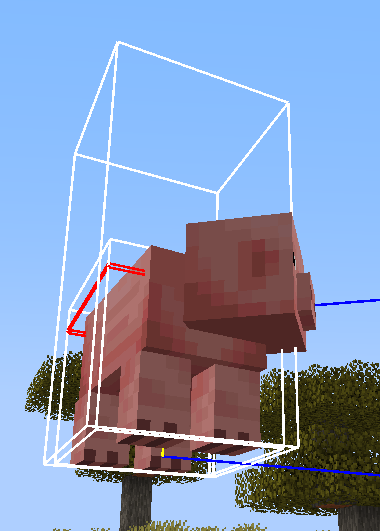
Enter the following command./summon minecraft:interaction ~ ~ ~ {height:2.0f,Passengers:[{id:"minecraft:pig"}]}You can see that the pig is not above the passenger but inside it.
The cause of this is likely the same as
MC-269996.Press F3+B and enter the following command.
/summon minecraft:interaction ~ ~ ~ {height:2.0f,Passengers:[{id:"minecraft:pig"}]}You can see that the pig is not above the passenger but inside it.
The cause of this is likely the same as
MC-269996.
Press F3+B and enter the following command.
/summon minecraft:interaction ~ ~ ~ {height:2.0f,Passengers:[{id:"minecraft:pig"}]}You can see that the pig is not above the
passengerbut inside it.
The cause of this is likely the same as
MC-269996.Press F3+B and enter the following command.
/summon minecraft:interaction ~ ~ ~ {height:2.0f,Passengers:[{id:"minecraft:pig"}]}You can see that the pig is not above the vehicle but inside it.
The cause of this is likely the same as
MC-269996.
![[Mod] Michael Wobst](../../../data/avatars/users/37868.png)
Grant Gryczan, ticket is yours now.
Confirmed in 20w51a
@Bobbyawesome101 I don't think 64 Minecraft map/data pack/command block developers voted for this issue without trying that. You should try it yourself before commenting something like that.
Not sure if this comment is appropriate/worth mentioning here, but this issue breaks several of my data packs (on https://vanillatweaks.net) that depend on selecting newly summoned entities in newly force-loaded chunks.
Edit: For those who are also running into this issue in their data packs, I've written a guide on working around it: https://gist.github.com/GrantGryczan/f0a51fc195f76da570d67826974bf2de#file-guide-to-working-around-mc-227930-md
None of the solutions I've detailed in this guide are a catch-all substitute for the option to synchronously force-load, but I tried to cover as many use cases as possible.
Agreed with the suggestion in the previous comment. Currently this issue can't feasibly be worked around in many use cases. In those cases, the performance cost is necessary given the way that data packs work. And generally, that cost is negligible anyway, since they are instances which only run once to load a single chunk, spawn an entity in it, and assign some data to the entity that we only necessarily have access to for one tick, which requires selecting it in the same tick it's summoned. Then it never runs again. It's not really an issue for performance to only run one synchronous chunk load per data pack during the world's entire lifetime.
Another use case this makes less feasible is chunk pre-generation. We can use the `/forceload` command for that in 1.16, but in 1.17, recursively spreading outward with `/forceload` commands throughout a very large area (of variable size) in order to generate chunks would take an extremely long time due to being asynchronous, with each iteration waiting for the previous iterations to finish, and there being tens of thousands of iterations.
Oh! Never mind, this is a duplicate of MC-101723.
Why is this working as intended? How are creative players supposed to tell how many blocks they broke, as they would expect to from the statistics screen?
This also happens with advancement loot rewards. Should that be added as part of this issue, or should there be a new issue for that?
It is not `more mob heads v2.9.2.zip` that causes this issue. Adding that file fixed it for you because it overwrote whichever other pack had this issue. More Mob Heads doesn't touch the yellow shulker box loot table.
@railgun290 12 (and probably 13) blocks works fine for me in 1.19.2 if I'm not in the boat when it falls.
Never mind, I just found that this is a duplicate of
MC-252361.To add more specific details, normally entering an End portal creates an obsidian platform at Y=48 and teleports the player to Y=49, but if you create an End portal in the Nether (e.g. using creative mode or `/setblock`), it instead creates the platform at Y=49 and teleports the player to Y=50. The X and Z coordinates are the same.
An example of why this is a problem is that it leads to builds around the platform appearing to be offset depending on which dimension you enter from (which is irritating for me as a mapmaker trying to use all three dimensions–I have to use commands to fix this in my map).
Duplicates MC-143952. This was unknown before because it was unclear that both issues were caused by the same thing.
Confirmed in 1.19.3. Can someone please update the title and description to actually be accurate? The issue has nothing to do with whether it was one chunk or multiple chunks. The title should communicate that data/chunks.dat doesn't save if the most recent /forceload command failed at the time of saving. The first comment's reproduction steps and code analysis would be good to replace the current inaccurate description.
If appropriate, I wouldn't mind taking ownership of this issue and making these edits myself.
Confirmed in 1.20.3
Bloo It sounds like that use case could be addressed if Minecraft instead saved all item components in the tile entity, right? Similarly to
MC-174496but for more than just display name.Ah, apparently it's supposed to be items, not item, even though https://www.minecraft.net/en-us/article/minecraft-java-edition-1-20-5 says the opposite.
BugTracker I don't think this has any relation to MC-209. This isn't related to blocks persisting item data.
I don't think this is
MC-267441. That issue says stepping fails under certain conditions. This issue says it works but steps too high. But if it was fixed by the fix for that issue anyway, cool.Confirmed in 1.20.6.
Confirmed in 1.21. Also, relates to
MC-273578.Oh wait, I just realized I was mixing this up with count. Durability 0 never deletes items, so this is probably WAI.