 BugTracker
- EliteTracker
- JIRAUSER774846
- Europe/Stockholm
- Yes
- No
 MCPE-180066
 MC-270396MCPE-180336






Confirmed!
image-2024-03-25-01-28-01-756.png
The mace cannot be found in minecraft creative mode nor can the ingredients be found either. Some players might wanna check it out without having to go through the trial chamber.
Update : The problem has been fixed, just head over to data packs and add the 3 data packs.
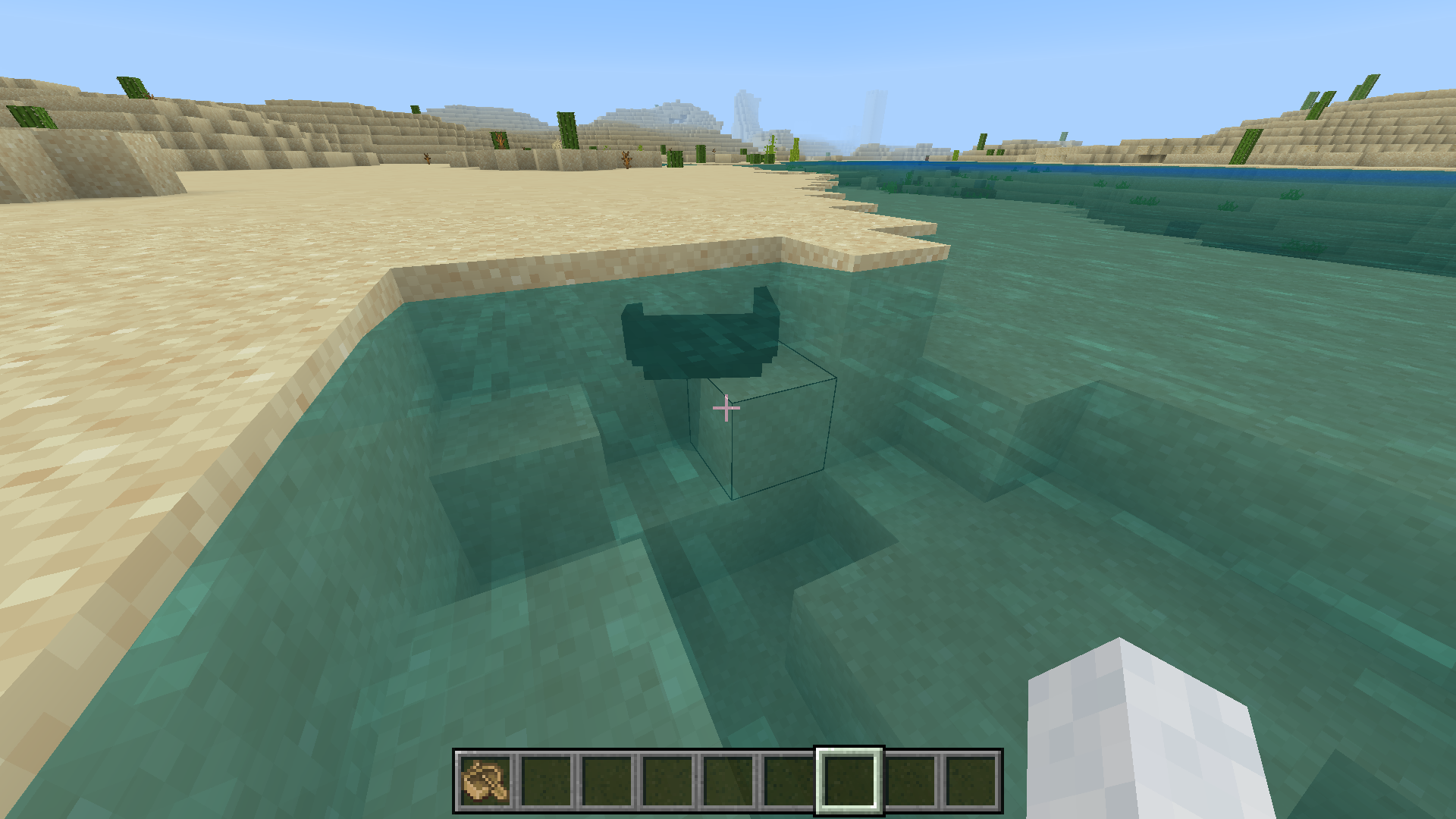
When you connect a redstone block to a piston it
works, but when you add another redstone block on top of the redstone block that activates the piston and break it the floating one will keep the piston activated.How to reproduce
Craft a piston and 2 blocks of redstone
Then connect the block of redstone with the piston to activate it
Then add 1 block of redstone on top of the first block of redstone
Then break the first one you place and the second block should be floating and the piston will still be activated when it should deactivate.When you connect a redstone block to a piston it activates, but when you add another redstone block on top of the redstone block that activates the piston and break it the floating one will keep the piston activated.
How to reproduce
Craft a piston and 2 blocks of redstone
Then connect the block of redstone with the piston to activate it
Then add 1 block of redstone on top of the first block of redstone
Then break the first one you place and the second block should be floating and the piston will still be activated when it should deactivate.
When you connect a redstone block to a piston it activates, but when you add another redstone block on top of the redstone block that activates the piston and break it the floating one will keep the piston activated.
How to reproduce
Craft a piston and 2 blocks of redstone
Then connect the block of redstone with the piston to activate it
Then add 1 block of redstone on top of the first block of redstone
Then break the first one you placeed and the second block should be floating and the piston will still be activated when it should deactivate.
When you connect a redstone block to a piston it activates, but when you add another redstone block on top of the redstone block that activates the piston and break it the floating one will keep the piston activated.
How to reproduce
Craft a piston and 2 blocks of redstone
Then connect the block of redstone with the piston to activate it
Then add 1 block of redstone on top of the first block of redstone
Then break the first one you placeed and the second block should be floating and the piston will still be activated when it should deactivate.
Powder snow canreplacelava when placedSnow can be placed on a small portion of lava
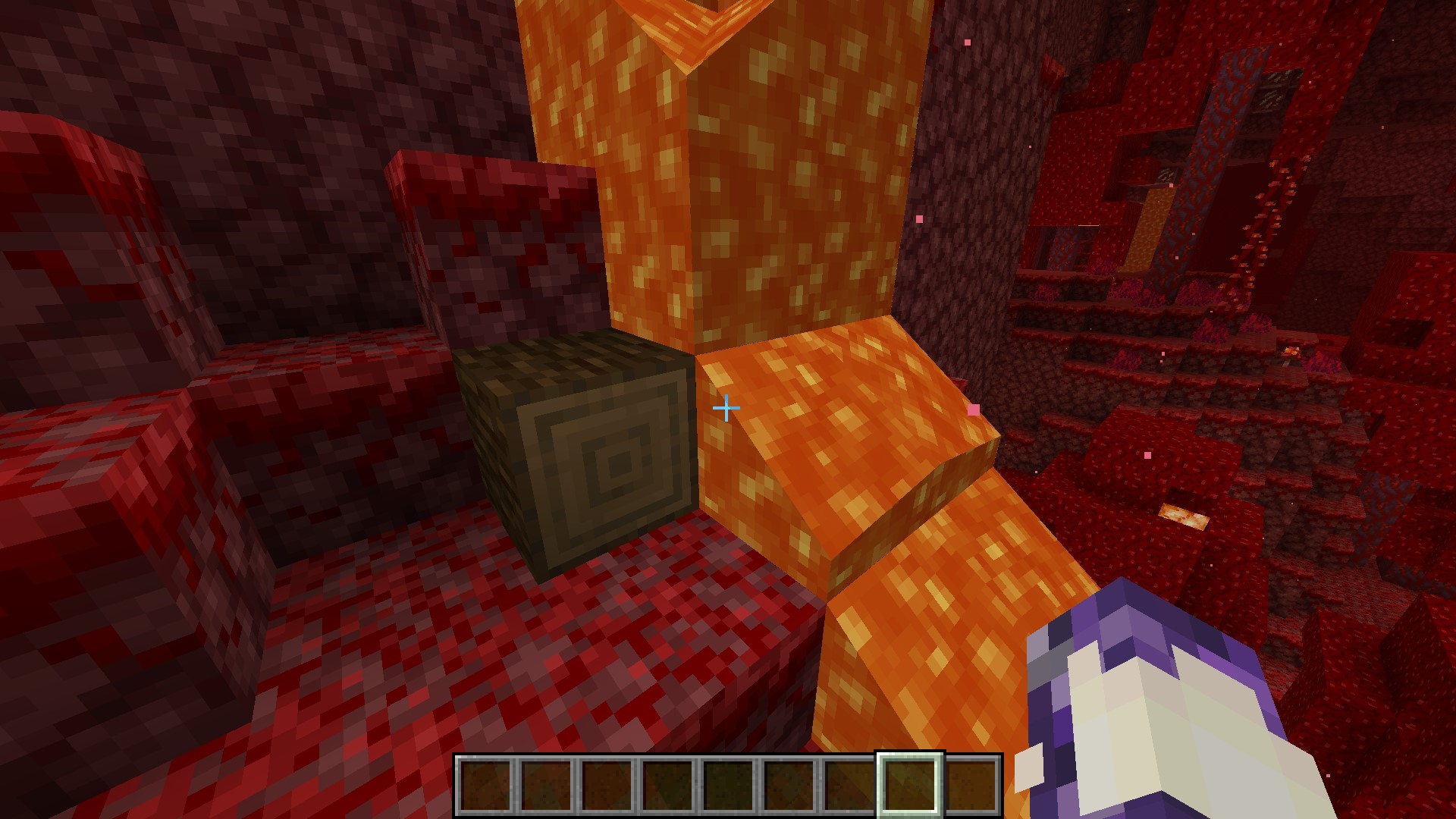
When placing liquid lava on an ice block it doesn't melt.
How to reproduce
Start by filling a bucket with lava
Then freeze water and turn it into an ice block
Then pour the lava onto the ice block, its not gonna melt.Update
Turns out I was using blue ice and not normal ice, blue ice doesn't melt but regular ice does.
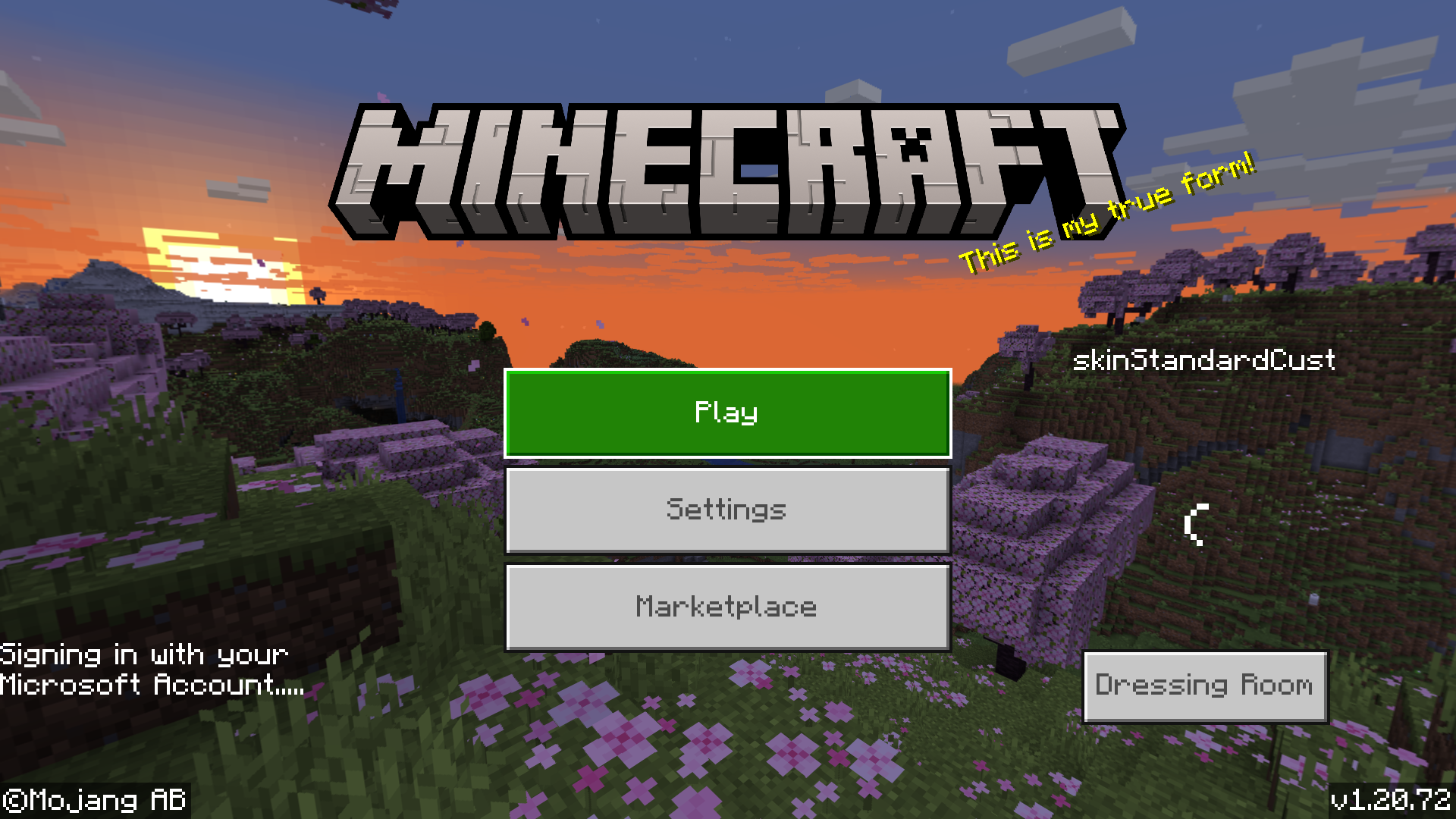
When using a boat and parking somewhere if you keep on moving the boat inside the blocks it sometimes glitches under the blocks and turns black. This bug rarely happens and only occurred thrice for me.
How to reproduce
Start off by crafting a boat
Then start moving the boat inside the blocks and it might glitchdownand turn black.When using a boat and parking somewhere if you keep on moving the boat inside the blocks it sometimes glitches under the blocks and turns black. This bug rarely happens and only occurred thrice for me.
How to reproduce
Start off by crafting a boat
Then start moving the boat inside the blocks and it might glitch under the blocks and turn black.
Rain does not extinguish a campfire for some reason. This is not supposed to happen and the fire's supposed to be
extinguished.How to reproduce
Start of by crafting a campfire
If you're on creative just run this command to make it rain: /weather rain
Place the campfire while its raining, the fire will keep going.Rain does not extinguish a campfire for some reason. This is not supposed to happen and the fire's supposed to be put out.
How to reproduce
Start of by crafting a campfire
If you're on creative just run this command to make it rain: /weather rain
Place the campfire while its raining, the fire will keep going.
When you choose no platform in world creation, you will spawn falling into the void, go ahead and fly upwards to escape the void and another sun will be revealed. Also, when going down to the void the clouds turn black. And last but not least, when you stare at the 2nd sun and go down to the void, the void turns the 2nd sun into the moon.
How to reproduce
Start by choosing air as you're platform in world creation.
Then choose creative mode to fly.
Then try going down to the void, it will turn the clouds black, and once you go upwards a 2nd sun will be revealed, and the 2nd sun will turn into the moon if you go back to the void.
Observation
Going down to the void will turn the clouds black, and once you go upwards a 2nd sun will be revealed, and the second sun will turn into the moon if you go back to the void.
Expectations
There should be no second sun, and the clouds shouldn't turn black even if you are nearby the void and the sun should never turn into the moon.
Confirmed!
Can confirm!
Before automatically signing into my microsoft account, my gamertag/username displays skinstandardcust.
How to reproduce
Load minecraft bedrock.
And wait for the game to load, you might get the same username before signing in.
Observations
Username/gamertag is skinstandardcust.
Expecations
It always has to be my original username.
Another reason for this could also be because it take about 10 seconds to sign into my microsoft account so this odd username shows up, which is why I think its best if the game signs you in before launching the game if possible.
I believe this is working as intended, because if you wanna trade for an enchanted book you have to trade 2 items, it depends on what you wanna actually trade, I just tested this bug and there's nothing wrong. This isn't a bug, you gave the villagers 12 emeralds when all they need is one emerald, I don't think you're giving them the right amount of items that's why you weren't able to trade. If that doesn't work out for you please let me know.
When placing a cobblestone fence on top a chest for example, it doesn't seem to stop chest from opening and many other blocks too.
How to reproduce
Start by crafting 2 chests, and combine them into 1 large chest
Then add for example: a cobblestone fence or pistons on top of chest, the chest will still open.Note this bug may work with only some blocks.
Observations: Chest still opens after placing specific types of blocks on top of it.Expectations: Chest should never open after placing blocks like piston or cobblestone fence on top of it.When placing a cobblestone fence on top a chest for example, it doesn't seem to stop chest from opening and many other blocks too.
How to reproduce
Start by crafting 2 chests, and combine them into 1 large chest
Then add for example: a cobblestone fence or pistons on top of chest, the chest will still open.Note this bug may work with only some blocks.
Observations: Chest still opens after placing specific types of blocks on top of it.
Expectations: Chest should never open after placing blocks like piston or cobblestone fence on top of it.
With a death message so lengthy, it's a plight,
Displayed in one line, out of sight.
Much like inMCPE-156550's game,
Where the issue persists, it's such a shame.Steps to mimic this plight
Fetch the pack, attached tight.- Enter survival,
embrace the heat,- Dive into lava,
meet defeat.
The death message, alas, too long to peep,
On your death screen, it hides deep.
Yet in the chat, its full tale's spun,This discrepancy, a frustratingone.When downloading the resource pack, and dying you will realize that the long death screen message cannot be seen and only a part of it can be seen.
How to reproduce
- Download the resource pack
- Enter survival, craft a bucket of lava
- Dive into lava, and once you die you will notice the death message.
Observations: the death message cannot be fully seen.
Expectations: The death message should be complete rather than only a part of it showing up.
When downloading the resource pack, and dying you will realize that the long death screen message cannot be seen and only a part of it can be seen.
How to reproduce
- Download the resource pack
- Enter survival, craft a bucket of lava
- Dive into lava, and once you die you will notice the death message.
Observations:
the death message cannot be fully seen.
Expectations: The death message should be complete rather than only a part of it showing up.When downloading the resource pack, and dying you will realize that the long death screen message cannot be seen and only a part of it can be seen.
How to reproduce
- Download the resource pack
- Enter survival, craft a bucket of lava
- Dive into lava, and once you die you will notice the death message.
Observations: The death message cannot be fully seen.
Expectations: The death message should be complete rather than only a part of it showing up.
When downloading the resource pack, and dying you will realize that the long death screen message cannot be seen and only a part of it can be seen.
How to reproduce
- Download the resource pack
- Enter survival, craft a bucket of lava
- Dive into lava, and once you die you will notice the death message.
Observations: The death message cannot be fully seen
.
Expectations: The death message should be complete rather than only a part of it showing up.When downloading the resource pack, and dying you will realize that the long death screen message cannot be seen and only a part of it can be seen.
How to reproduce
- Download the resource pack
- Enter survival, craft a bucket of lava
- Dive into lava, and once you die you will notice the death message.
Observations: The death message cannot be fully seen,
Expectations: The death message should be complete rather than only a part of it showing up.
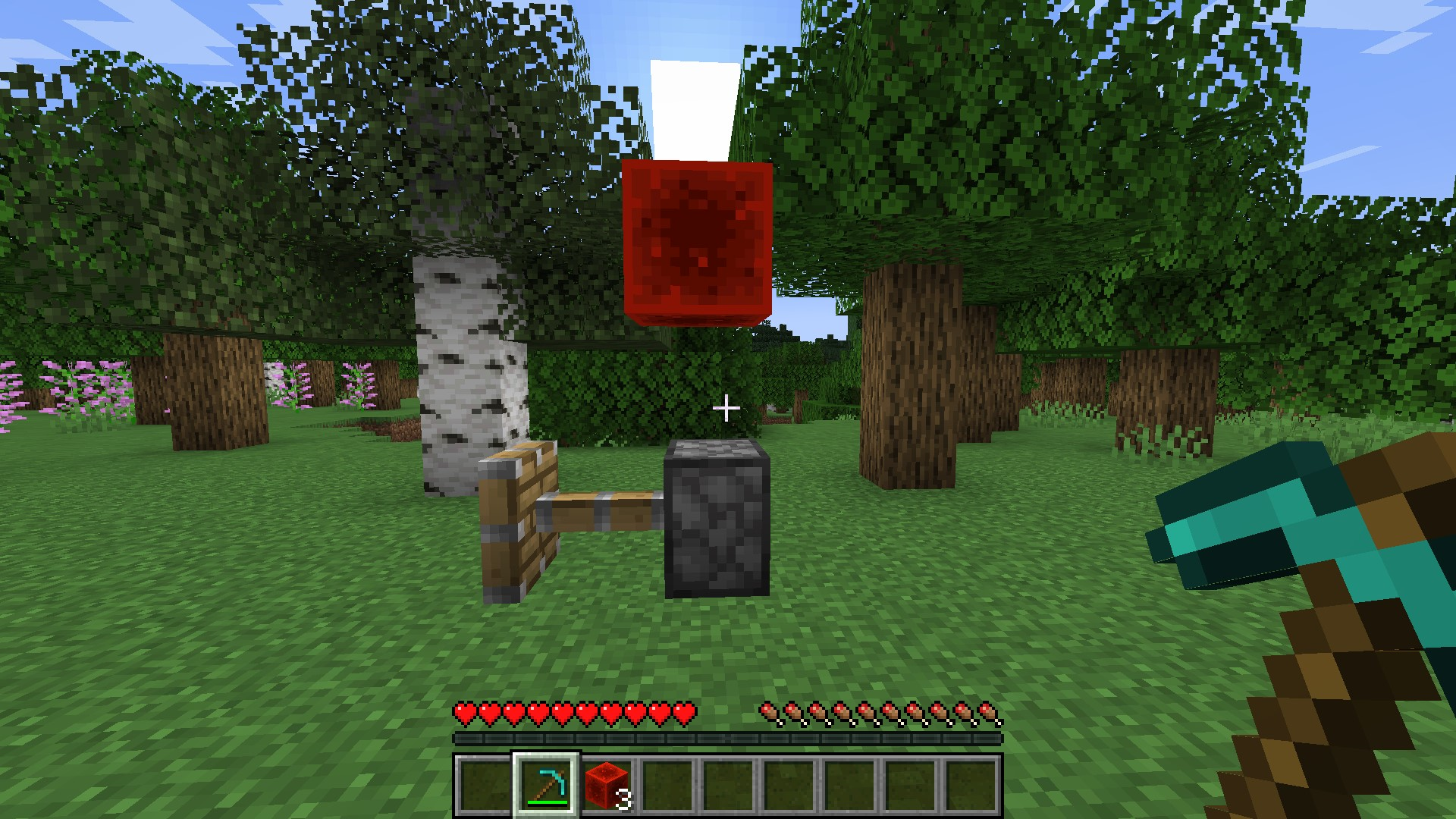
Can you please provide a screenshot showing you're video settings.

I don't really think this is a bug, due to the fact being you're placing the lever in the middle of the block meaning the piston will push the lever too, leading to the lever breaking. But if you notice that once you place the lever in the stone part of the piston which is in the back of the piston, the lever doesn't break.
Please provide a screenshot to the report so I can test this.
This is indeed confirmed, requesting ownership since reporter is inactive.
Ender dragons exhibit a behavior where they do not target the player they intend to attack, which differs from the behavior of most other mobs. This issue is related to
MC-269192,MC-264456, andMC-263315.Steps to replicate
- Enter the End realm
- Respawn the ender dragon if it has already been defeated
- Paste the following command in a repeating activated command block:
execute as @e[type=minecraft:ender_dragon] on target run say I will be attacked be the ender dragon- Switch to survival mode
Observed results: The ender dragon consistently fails to target you, as evidenced by the absence of messages from the say command even during attacks
.
Expected behavior: The ender dragon should target you, triggering messages from the say command accordingly.Ender dragons exhibit a behavior where they do not target the player they intend to attack, which differs from the behavior of most other mobs. This issue is related to
MC-269192,MC-264456, andMC-263315.Steps to replicate
- Enter the End realm
- Respawn the ender dragon if it has already been defeated
- Paste the following command in a repeating activated command block:
execute as @e[type=minecraft:ender_dragon] on target run say I will be attacked be the ender dragon
- Switch to survival mode
Observed results: The ender dragon consistently fails to target you, as evidenced by the absence of messages from the say command even during attacks,
Expected behavior: The ender dragon should target you, triggering messages from the say command accordingly.
This maybe an invalid report due to the fact that many reports about the same topic end up being resolved as invalid. The reason for this is because technically this isn't really a bug but rather a technical issue that happens with many players. Also, I've notice many custom posters you have added into the world and resource packs. Maybe try removing the resource packs and add an fps boosting resource pack which may help boost fps significantly and get rid of stuttering.
Even without movement, sprinting with the slowness 7 effect still produces particles
, dear./effect give @s slowness infinite 6 trueEven without movement, sprinting with the slowness 7 effect still produces particles.
/effect give @s slowness infinite 6 true
Can confirm! Requesting ownership.
Even without movement, sprinting with the slowness 7 effect still produces particles
./effect give @s slowness infinite 6 trueEven without movement, sprinting with the slowness 7 effect still produces particles,
/effect give @s slowness infinite 6 true
Also affects 1.21.0.20.
When the gamerule globalSoundEvents is set to true, all players can hear the death sounds of ender dragons and the spawning sounds of withers, regardless of distance. However, this rule doesn't extend to the wither's death sound, causing an inconsistency. Consequently, on multiplayer servers, all players become aware when the wither spawns, but they won't hear its death sound. Relates to MC-177741.
steps to replicate
- Make sure that the gamerule called globalSoundEvents is set to true, dearie
- Construct a wither from a distance
, my dear- Fly even farther away from the wither if you desire
, dearieNoticed: The death sound wasn't audible.
Hoped for: You'd hear the death sound, considering it's meant to be a global sound event, my dear.When the gamerule globalSoundEvents is set to true, all players can hear the death sounds of ender dragons and the spawning sounds of withers, regardless of distance. However, this rule doesn't extend to the wither's death sound, causing an inconsistency. Consequently, on multiplayer servers, all players become aware when the wither spawns, but they won't hear its death sound. Relates to MC-177741.
steps to replicate
- Make sure that the gamerule called globalSoundEvents is set to true.
- Construct a wither from a distance.
- Fly even farther away from the wither if you desire.
Noticed: The death sound wasn't audible.
Hoped for: You'd hear the death sound, considering it's meant to be a global sound event.
Can confirm! Requesting ownership due to the reporter being inactive.
When the gamerule globalSoundEvents is set to true, all players can hear the death sounds of ender dragons and the spawning sounds of withers, regardless of distance. However, this rule doesn't extend to the wither's death sound, causing an inconsistency. Consequently, on multiplayer servers, all players become aware when the wither spawns, but they won't hear its death sound. Relates to MC-177741.
steps to replicate
- Make sure that the gamerule called globalSoundEvents is set to true.
- Construct a wither from a distance.
- Fly even farther away from the wither if you desire
.Noticed: The death sound wasn't audible.
Hoped for: You'd hear the death sound, considering it's meant to be a global sound event.When the gamerule globalSoundEvents is set to true, all players can hear the death sounds of ender dragons and the spawning sounds of withers, regardless of distance. However, this rule doesn't extend to the wither's death sound, causing an inconsistency. Consequently, on multiplayer servers, all players become aware when the wither spawns, but they won't hear its death sound. Relates to MC-177741.
steps to replicate
- Make sure that the gamerule called globalSoundEvents is set to true.
- Construct a wither from a distance.
- Fly even farther away from the wither if you desire,
Noticed: The death sound wasn't audible.
Hoped for: You'd hear the death sound, considering it's meant to be a global sound event.
Minecart cannot be placed on ground, but when placing minecart on top of rail and breaking it, it doesn't break with the rail.
Can confirm, there seems to be a difference. Also could be an intentional change from mojang. Requesting ownership due to the reporter being inactive.
Prior to 1.16, when you simultaneously struck and drew a bow, the animation of your arms exhibited a distinct appearance. Your left arm remained close to your right arm, conveying a sense of realism, as both arms are typically involved in drawing a bow. However, this is no longer the case as of version 1.16. In contrast to previous versions, your right arm now moves upwards.
Steps to reproduce
- Start version 1.15.2
- Change to third-person perspective
- Grasp a bow in your dominant hand
- Swiftly click the left mouse button and then maintain pressure on the right mouse button
- Launch the latest version
- Repeat steps 1-4
Observed: In newer versions, your right arm moves upward, resulting in it being too distant from your left arm
.
Expected: Your arm would maintain a closer proximity to the other arm, as seen in previous versions.Prior to 1.16, when you simultaneously struck and drew a bow, the animation of your arms exhibited a distinct appearance. Your left arm remained close to your right arm, conveying a sense of realism, as both arms are typically involved in drawing a bow. However, this is no longer the case as of version 1.16. In contrast to previous versions, your right arm now moves upwards.
Steps to reproduce
- Start version 1.15.2
- Change to third-person perspective
- Grasp a bow in your dominant hand
- Swiftly click the left mouse button and then maintain pressure on the right mouse button
- Launch the latest version
- Repeat steps 1-4
Observed: In newer versions, your right arm moves upward, resulting in it being too distant from your left arm,
Expected: Your arm would maintain a closer proximity to the other arm, as seen in previous versions.
Can confirm! Requesting ownership.
Referring to
MC-254920and MC-254922. Since MC-254922 is triaged, the cooking effect of burning mobs likely should apply to non-meat items. This could be viewed as a feature request akin toMC-254920, but it's ultimately up to Mojang to decide. With iron boots being smeltable into iron nuggets as of version 1.11.1, one might anticipate that a burning Piglin bartering iron boots would yield an iron nugget instead. However, this isn't currently the case.steps to reproduce
- Summon a group of Piglins
/execute as @e[type=minecraft:piglin,distance=..10] run data merge entity @s {Fire:1000}- Continue to execute step 4 repeatedly until you acquire iron boots enchanted with Soul Speed
Observed: The Piglin traded iron boots despite being ignited.
Expected: The iron boots are supposed to be smeltable into iron nuggets, hence yielding an iron nugget instead in this scenario.Note: To resolve this issue, one potential solution is to incorporate a "minecraft:furnace_smelt" function into the loot table entry, under the condition that the entity is engulfed in flames.
Referring to
MC-254920and MC-254922. Since MC-254922 is triaged, the cooking effect of burning mobs likely should apply to non-meat items. This could be viewed as a feature request akin toMC-254920, but it's ultimately up to Mojang to decide. With iron boots being smeltable into iron nuggets as of version 1.11.1, one might anticipate that a burning Piglin bartering iron boots would yield an iron nugget instead. However, this isn't currently the case.steps to reproduce
- Summon a group of Piglins,
/execute as @e[type=minecraft:piglin,distance=..10] run data merge entity @s {Fire:1000}
- Continue to execute step 4 repeatedly until you acquire iron boots enchanted with Soul Speed
Observed: The Piglin traded iron boots despite being ignited.
Expected: The iron boots are supposed to be smeltable into iron nuggets, hence yielding an iron nugget instead in this scenario.Note: To resolve this issue, one potential solution is to incorporate a "minecraft:furnace_smelt" function into the loot table entry, under the condition that the entity is engulfed in flames.
Can confirm! Requesting ownership.
If an animal possesses the fire resistance effect, it will still yield cooked meat upon demise while ablaze. Whether this behavior is deliberate or requires consideration as a feature request is within Mojang's purview to decide. As the fire resistance effect is applicable to the mob, it could be inferred that it should also extend to the resulting meat.
Steps to reproduce
- Summon a pig
- Apply a fire resistance potion to it
- Kill it using a sword enchanted with Fire Aspect
Observed: The pig dropped cooked porkchop despite having fire resistance
.
Expected: The pig should drop raw meat, considering its fire resistance.If an animal possesses the fire resistance effect, it will still yield cooked meat upon demise while ablaze. Whether this behavior is deliberate or requires consideration as a feature request is within Mojang's purview to decide. As the fire resistance effect is applicable to the mob, it could be inferred that it should also extend to the resulting meat.
Steps to reproduce
- Summon a pig
- Apply a fire resistance potion to it
- Kill it using a sword enchanted with Fire Aspect
Observed: The pig dropped cooked porkchop despite having fire resistance,
Expected: The pig should drop raw meat, considering its fire resistance.
Can confirm! Also affects 24w14a. Requesting ownership since the reporter is inactive.
In version 1.5 onwards, items are deposited into an inventory slot upon releasing the left mouse button, despite still being removed from slots when initially holding the left mouse button. If you move your mouse during the click, upon releasing the left mouse button, the item will be placed where the click initially started. Prior to version 1.5, items were placed into the slot as expected when clicking commenced. Relates to MC-204095 and MC-206644 .
How to reproduce
1. Click an item in the inventory and hold the mouse button for an extended period.
2. Click an empty slot with the item on the cursor for a prolonged duration.Observations : The item is taken when the click begins but placed when the click ends.
Expectations : The item would be placed when the click ends just like before 1.5.
In version 1.5 onwards, items are deposited into an inventory slot upon releasing the left mouse button, despite still being removed from slots when initially holding the left mouse button. If you move your mouse during the click, upon releasing the left mouse button, the item will be placed where the click initially started. Prior to version 1.5, items were placed into the slot as expected when clicking commenced. Relates to MC-204095 and MC-206644.
How to reproduce
1. Click an item in the inventory and hold the mouse button for an extended period.
2. Click an empty slot with the item on the cursor for a prolonged duration.Observations: The item is taken when the click begins but placed when the click ends
.
Expectations: The item would be placed when the click ends just like before 1.5.In version 1.5 onwards, items are deposited into an inventory slot upon releasing the left mouse button, despite still being removed from slots when initially holding the left mouse button. If you move your mouse during the click, upon releasing the left mouse button, the item will be placed where the click initially started. Prior to version 1.5, items were placed into the slot as expected when clicking commenced. Relates to MC-204095 and MC-206644.
How to reproduce
1. Click an item in the inventory and hold the mouse button for an extended period.
2. Click an empty slot with the item on the cursor for a prolonged duration.Observations: The item is taken when the click begins but placed when the click ends,
Expectations: The item would be placed when the click ends just like before 1.5.
While teleporting inside the nether, player can break the portal and still will teleport.
How to reproduce
Start by making a nether portal
Then get inside the nether portal, and while teleportation is commencing, break the portal
You will still end up teleporting.
Make sure to also setObservations Breaking the portal while teleporting doesn't seem to stop teleportation
Expectations Teleportation should stop commencing once the portal has been broken.
While teleporting inside the nether, player can break the portal and still will teleport.
How to reproduce
Start by making a nether portal
Then get inside the nether portal, and while teleportation is commencing, break the portal
You will still end up teleporting.
Make sure to also setObservations Breaking the portal while teleporting doesn't seem to stop teleportation
Expectations Teleportation should stop commencing once the portal has been broken.While teleporting inside the nether, player can break the portal and still will teleport.
How to reproduce
Start by making a nether portal
Then get inside the nether portal, and while teleportation is commencing, break the portal
You will still end up teleporting.
Make sure to also set game rule playersNetherPortalCreativeDelay to 1.Observations Breaking the portal while teleporting doesn't seem to stop teleportation
Expectations Teleportation should stop commencing once the portal has been broken.
While teleporting inside the nether, player can break the portal and still will teleport.
How to reproduce
Start by making a nether portal
Then get inside the nether portal, and while teleportation is commencing, break the portal
You will still end up teleporting.
Make sure to also set game rule playersNetherPortalCreativeDelay to 1.Observations
Breaking the portal while teleporting doesn't seem to stop teleportation
Expectations Teleportation should stop commencing once the portal has been broken.While teleporting inside the nether, player can break the portal and still will teleport.
How to reproduce
Start by making a nether portal
Then get inside the nether portal, and while teleportation is commencing, break the portal
You will still end up teleporting.
Make sure to also set game rule playersNetherPortalCreativeDelay to 1.Observations Breaking the portal while teleporting doesn't seem to stop teleportation.
Expectations Teleportation should stop commencing once the portal has been broken.
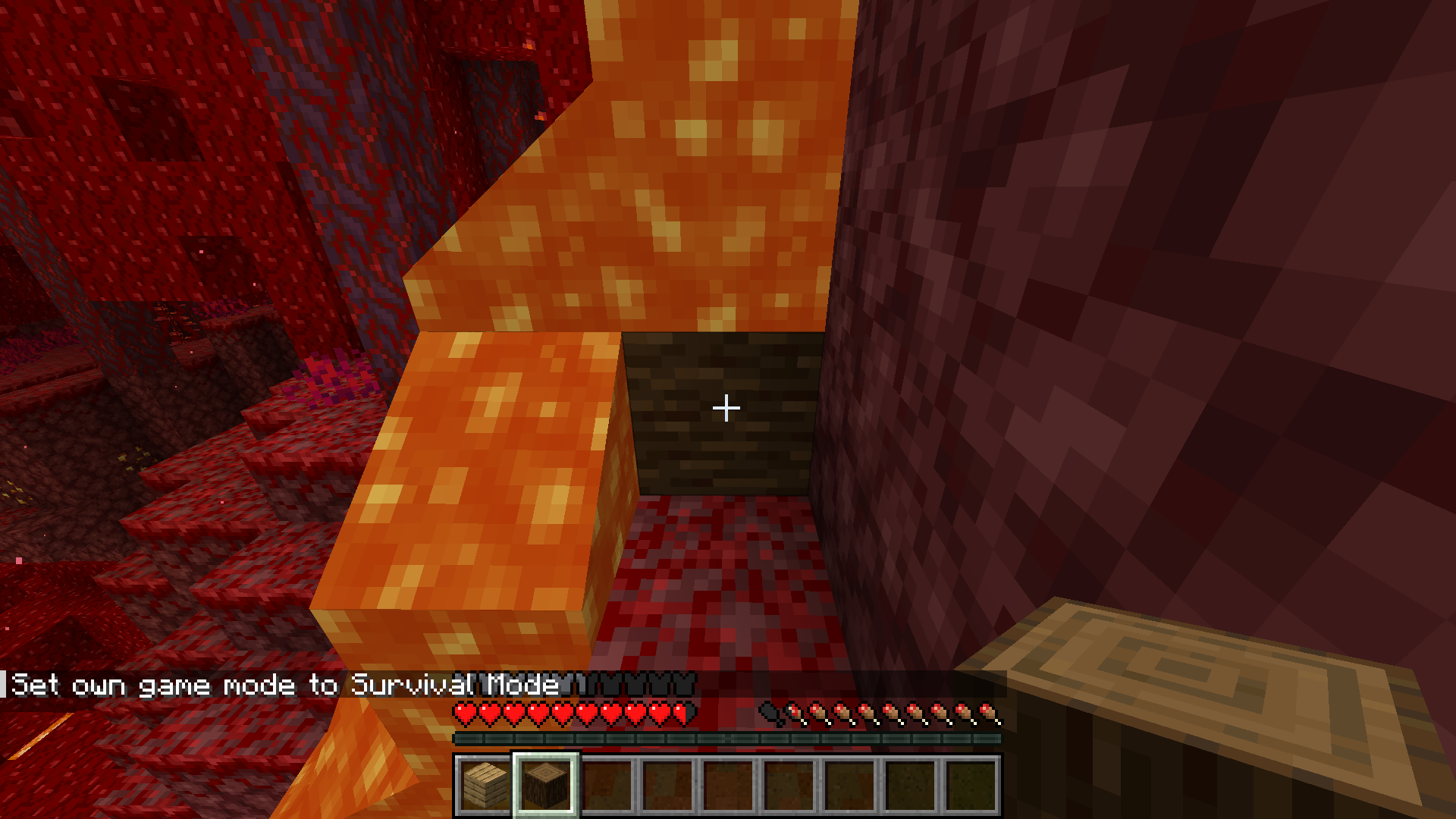
When placing a wood block nearby lava, the expected result is the wood burning, but apparently not. Wood only burns when it is inside the lava rather than burning when its so close to it.
How to reproduce
Start by obtaining some wood and a lava bucket
Then place a wood block next to the lava, its not gonna burn.Observations: Wood doesn't burn nearby lava
Expectations: It should burn as long as it interacts with lava.
When placing a wood block nearby lava, the expected result is the wood burning, but apparently not. Wood only burns when it is inside the lava rather than burning when its so close to it.
How to reproduce
Start by obtaining some wood and a lava bucket
Then place a wood block next to the lava, its not gonna burn.Observations: Wood doesn't burn nearby lava
Expectations: It should burn as long as it interacts with lava.
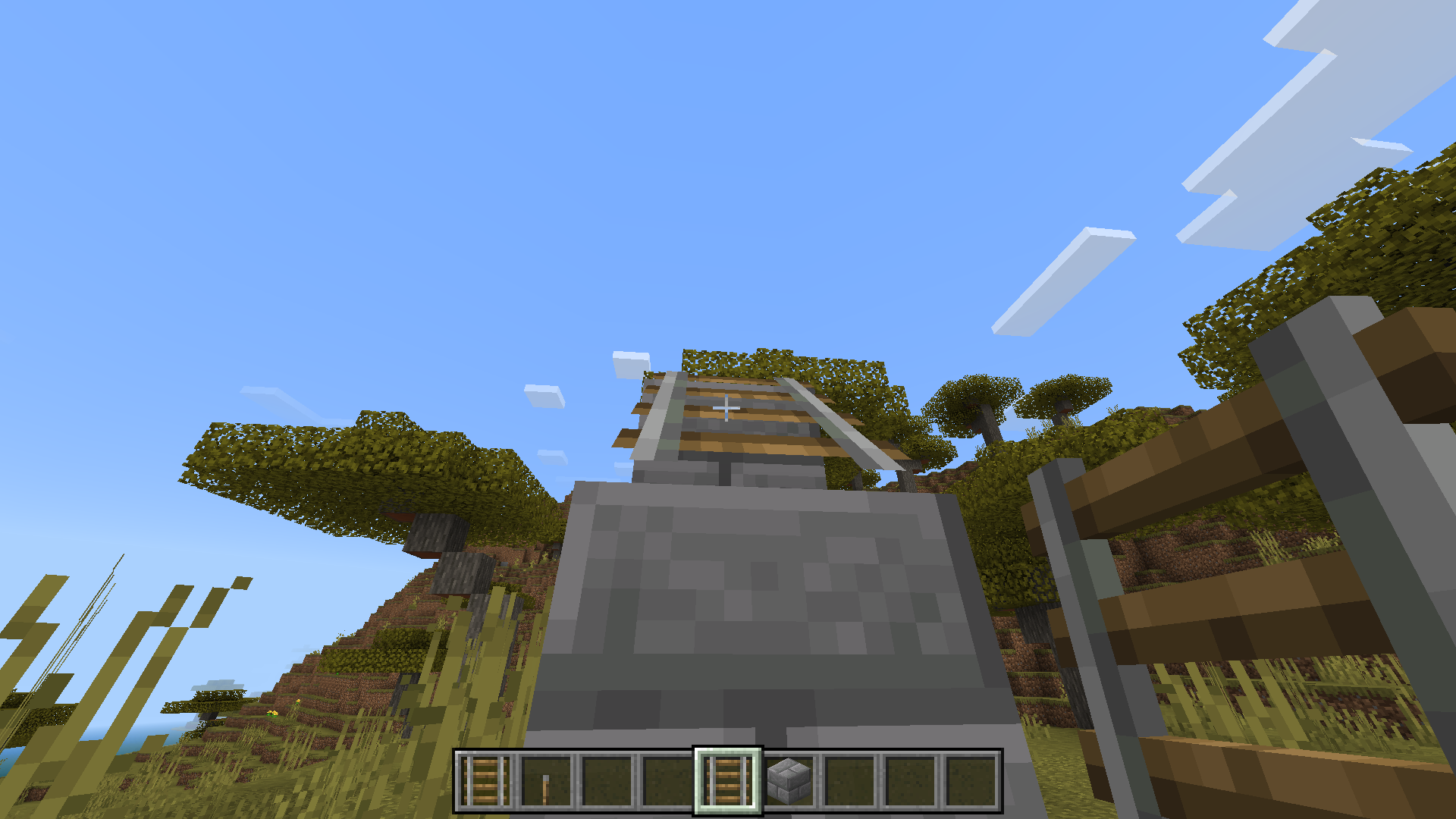
Upon some further inspection, when looking at a connected rail, you realize that its not fully connected with a block,
How to reproduce
Start by crafting some rails, then place blocks going upwards.
Then place rails on blocks, they will connect, break all the connected rails and keep 1 only, you will realize that its not connected to the block like shown in the attached video and screenshots.Observation: Upon further inspection/examination you can tell that the rail isn't really connected to the block.
Expectations: It should be connected to the block at all times.
Also affects 24w14a, requesting ownership due to the reporter being inactive.
Requesting ownership since the reporter is inactive.
I don't think this is a bug, dispensers were never supposed to deploy boats outside of water. But it would be better if they could. This relates to MC-114111
Affects 24w14a.
Dispensers are unable to deploy boats outside of water, unlike players. This is inconsistent.
Steps to reproduce
- Set up a dispenser containing boats
- Activate it
- Position water beneath the block where the boat would land
- Activate it again
Observation: In the absence of water, the dispenser drops the boat, whereas players can place the boat without issue
.
Expectation: The dispenser should have the capability to place boats outside of water, akin to players' ability.Dispensers are unable to deploy boats outside of water, unlike players. This is inconsistent.
Steps to reproduce
- Set up a dispenser containing boats
- Activate it
- Position water beneath the block where the boat would land
- Activate it again
Observation: In the absence of water, the dispenser drops the boat, whereas players can place the boat without issue,
Expectation: The dispenser should have the capability to place boats outside of water, akin to players' ability.
Affects 24w14a, requesting ownership since the reporter is inactive.
When mobs are slain by withers, they are unable to replace replaceable blocks such as snow, grass, light blocks, fire etc. with wither roses. Relates to
MC-269974.Steps to reproduce
- Make sure the gamerule mobGriefing is set to true
- Place snow
- Stand in the snow
/summon pig ~ ~ ~ {NoAI:1b}/summon minecraft:wither ~ ~ ~ {NoAI:1b}Observed: Upon the pig's demise, it doesn't replace the snow with a wither rose; instead, the rose is dropped as an item.
Expected: The pig should replace the snow with a wither rose upon being killed by the wither.When mobs are slain by withers, they are unable to replace replaceable blocks such as snow, grass, light blocks, fire etc. with wither roses. Relates to
MC-269974.Steps to reproduce
- Make sure the gamerule mobGriefing is set to true
- Place snow
- Stand in the snow,
/summon pig ~ ~ ~ {NoAI:1b}
/summon minecraft:wither ~ ~ ~ {NoAI:1b}
Observed: Upon the pig's demise, it doesn't replace the snow with a wither rose; instead, the rose is dropped as an item.
Expected: The pig should replace the snow with a wither rose upon being killed by the wither.
![[Mod] j_p_smith](../../../data/avatars/users/92851.png)
@BugTracker, that screenshot looks like 1.20.4, based on the menu background. The mace is only available in the 1.20.5 snapshots.

BugTracker, please don't spread wrong information, villager trading has always worked that way.
Duplicate of MC-269191 according to the comments of the linked issue.
BugTracker this issue is currently blocked by MC-268941 and cannot be reproduced. If mojang reintroduces the ability to start sprinting while gliding, this can be reproduced again.
![[Mod] Jiingy](../../../data/avatars/users/91802.png)
BugTracker, just letting you know that generally if someone has already pointed out information about a ticket, it's generally not of much utility to repeat what has already been said verbatim. That is, unless additional information is added along side it.

BugTracker No, if an issue can clearly be identified as a feature request, there is no need to let Mojang decide what happens with the report.
I still want to get an answer from CaptainFlame54 to make sure I understood the report correctly and confirm that this might be a feature request.
BugTracker, the video is attached by Lolo1010hp, not Blockbyblock98.
BugTracker Are you sure? I can still reproduce this bug in 1.20.5-pre1.
BugTracker No, this part of the description says otherwise:
This does not duplicate MC-267539 as said ticket requests new sounds be implemented for special wood types.
BugTracker They are related to each other but not exactly the same issue. MC-195732 describes two food items being consumed, while MC-212926 is about the eating animation being skipped.
@BugTracker, the bug here is with the mob counter, which isn't shown in your video.
BugTracker It is not a request feature, it a request for Vanilla parity which is supposed to be posted here, NOT the Minecraft Feedback website.
BugTracker please try to avoid repeating things that have already been stated if you are not adding any new or valuable information to the report. It can be overwhelming to have to respond to multiple comments, and causes clutter/noise. (Primarily just being unnecessary)

It's most likely not the same issue BugTracker:
- Attempting to mine the block again resets the visual glitch for the painting/item frame glitch of MC-205451. This is not the case in my ticket. However, both have the same issue where insta-mining the block and placing it back keeps the visual glitch.
- The reproduction steps are pretty different from each other in my opinion, though both are rendering problems.
MC-205451 relates to this ticket but is probably not a duplicate. Please correct me if I am wrong, or if this is a duplicate of another issue. 
Edit: I don't mean for this to be interpreted as a snarky comment.
BugTracker Weird. For reference, this is a newly-created world for this snapshot, and my Glint Speed is set to 50% and Glint Strength to 75%. But, it may just be that some users don't experience it, not sure.
Edit: Unlikely, but could this depend on the graphics card?

BugTracker I can confirm, it happens to me all the time (tested in a superflat world, by the way).

BugTracker I don't think this has any relation to MC-209. This isn't related to blocks persisting item data.
BugTracker No, this issue is about minecarts going through non-full blocks. This duplicates MC-2714.
BugTracker Yes, but since this was an unannounced change (as per my knowledge), it feels like a bug to me, especially since it makes sense for the player to face the center of the island
![[Mod] ManosSef](../../../data/avatars/users/61702.png)
BugTracker End portals work completely differently to nether portals, so it's very unlikely this is intended.
As BugTracker stated, this bug seems to be a common occurrence on Lunar Client.
BugTracker That's not what the reporter was asking for.
Suvi-tuuli Virkkala The best way is to convert the folder into a zip (or any other archive file) and upload it to your Google Drive. We will have access to it, once you provide the link to the Drive here.
This is a feature request, and is a duplicate of the issues BugTracker mentioned.
BugTracker Yes, it depends on the speed of your device in how quickly it can load the chunks on the other end
BugTracker It does seem to duplicate MC-118107, however, that bug report has no information about dropping items while walking, as far as I could see. The videos attached to this bug report display the player walking while dropping the items by holding the Q key.
BugTracker Oh yeah, sorry; this is a duplicate of MC-118107.
![[Mod] violine1101](../../../data/avatars/users/92858.png)
Confirmed. BugTracker, that screenshot doesn't really show the issue. I've attached 2024-07-19 18-08-56.mp4 instead (I've modified the data pack slightly to also play a sound when hitting an entity).
BugTracker, your game is modified in that screenshot:

You should know already not to reproduce bugs in modified versions, but instead be on an entirely vanilla environment. Seeing report confirmations like this installs distrust and hesitance towards future confirmations.
BugTracker, I am still able to reproduce this in 1.21.1, it is most likely that the horse you summoned cannot jump high enough. This issue was introduced in 24w06a.
A side note: this issue can be reproduced quicker by holding golden carrots on the other side of the trapdoor wall.
BugTracker I'm a bit curious, how is their game modified? Based off the screenshot everything appears normal to me. Though yes, the bug should be reproduced in vanilla.

BugTracker Definitely related and maybe the same issue, I'm not sure.
BugTracker They are probably using PojavLauncher or something like that, which allows Java Edition to run on a phone.
Either way, please only report bugs if you can reproduce them on a vanilla version of Minecraft (on PC in the case of Java Edition).
BugTracker No, clipping through vs. not able to clip through with experiments on.
This is WAI as per the 24w34a changelog:
Minecarts no longer phase through blocks on slopes when going up or down, they collide instead
You can still use 'ESC' to close the inventory, but I can confirm.
BugTracker, 'Enter' is not a mouse button.
![[Mojang] Maxime Lebrot](../../../data/avatars/users/18941.svg)
Either J Z or BugTracker - could you please provide a screenshot of your video settings when you're able to reproduce this issue?
@BugTracker, in your video you never re-entered the area covered by the map, so I'm not seeing any unexpected behaviour there.
If anyone is able to reproduce this in the latest version or snapshot, please comment and attach a video.
BugTracker; issues cannot duplicate reports that are already resolved as a duplicate of another report.
I can confirm that this is happening.
Thank you for you're report!
The reason is clearly reasonable, and it's because of the fact that this is an armor stand, and it wasn't programmed to lay down on the bed, so technically I wouldn't really consider that a bug, same thing for any mob, they're not programmed to lay down on a bed. But if things do get buggy, please update your report!
Thank you for you're report!
However, horse armor cannot be enchanted in survival mode and can only be enchanted in creative mode with only some enchantments, you can enchant horse armor with fire protection, but there will be no effect.
Thank you for you're report! But as I said for the past report, you can only enchant horse armor with some enchantments that may work, blast protection is not one of them leading to an ineffective reaction, some enchanments may be effective, but blast protection is not one of them.
I can indeed confirm that
Can you please provide this report with a video showing the bug?
I just turned that option on and unfortunately nothing changed.....
Update: The problem has been fixed, just head over to data packs and add the 3 data packs as jingy showed in the video he sent.
Confirmed, also affects 1.20.4 pre-release 2.
I believe this is working as intended.
Also, the reason for the ice not melting is because you're in the end, which is technically like space, the temperature is too cold for ice to melt and there is no light source.
Confirmed!
Smile58, you're right.....but although they're entities, they're also considered objects so normally they shouldn't glitch inside the blocks, in addition to that, although they're entities have you ever seen a player or an entity like zombies or creepers glitch into the blocks? So its technically a bug.
Can confirm
Can you please provide a video attachment to the report?
Turns out I was using blue ice and not normal ice, blue ice doesn't melt but regular ice does. So this report is invalid. Thanks for informing me tryashtar
Confirmed, I didn't obtain the achievement.
Confirmed! Also is related to
MCPE-180022.Yeah Invisible826, but in survival mode you can mine using melee weapons, why not creative too?
Can confirm.
Can confirm this! Also affects 24w14a.
This duplicates
MC-269352as haykam said.Confirmed!
Yeah I knew that, but if the other sun is the moon then it shouldn't be revealed until its actually night time, also if it looks like the sun because its rendered so brightly than its technically considered a bug and needs to look like the moon at all times.
Confirmed!
Can confirm!
Can confirm!
I can confirm! I didn't get the bottle from any of the pillagers either.
Can confirm!
Can confirm!
I'm pretty sure you need the internet for you're add-ons to show up, I don't really think this is a bug if they still show up using the internet.
Can confirm!
Can confirm!
After a little testing, I can confirm. But I believe this relates to MCPE-176172
Confirmed! Also affects 1.21.0.20.
Dolphins you've got a good point, but how does it make sense that you can mine blocks under a boat and can also break the boat?
Confirmed! But this is currently being tracked in
MC-269993Confirmed! Also affects 24w14a.
Enable the 1.21 experimental update.
Maybe try installing lag reducing resource packs, they work for many players.
This is already confirmed and is being tracked in MCPE-173209
Maybe try resetting the game or going through you're mouse settings, because I can't seem to reproduce this.
Can you please mention the steps on how to reproduce?
Mohamed capar Try to go through you're mouse settings then, or maybe go through minecraft mouse settings and controls.
Can confirm!
Many of us experience the same issue, because you're cpu is having trouble rendering the map while flying in creative mode, but this technically isn't a bug so its invalid.
This is related to
MC-269377Can confirm! Requesting ownership.
Can confirm!
Can confirm, also relates to MC-270174
Can confirm!
Confirmed!
misha2play I understand, but the thing is every player encounters this problem too, that's why you see many players install optifine, forge mods, fabric mods just to make the game run smoothly and boost performance, so sometimes you have to install mods and performance boosters, and trust me this is a normal thing and happens with every minecraft player when they start a new world, you're cpu usage may increase and that's why I suggest you install resource packs and mods and most importantly you should download optifine, it will make you're game run smoothly and will help render blocks from a far distance.
Can confirm.
Confirmed and is related to MC-269858.
Can confirm
Can confirm!
Invisible826 It can't be a duplicate if the report was closed/resolved. This is a reopened report although it does copy
MCPE-115178Yeah this duplicates MCPE-149131 and
MCPE-79375Did you make sure that outline selection was turned on? You can find that in video settings.
Can confirm!
Can confirm
icouldntget1 can you please provide a video/screenshot attachment of the bug?
This problem describes MC-114265
Can confirm
Evgensypherpro Yeah I agree but I forgot mentioning the fact that once you wear full armor you basically go invisible with this skin, the reason for this is when you wear a chest plate and leggings and boots that covers up most of the skin's body and since the skin is headless you will go completely invisible since there is no head.
Please don't create another report for the same bug, there is no need for
MC-270228This report duplicates
MC-270192, also jiingy there is no need to make the same report if you already have ownership over this report.Requesting ownership since the reporter is inactive.
Can confirm! Requesting ownership since reporter is inactive.
Can confirm, also affects 1.20.5 pre-release 3.
I don't really think this is a bug but rather a problem. Also relates to MC-270257
I don't really think this is a bug. Only a problem, and I think the reason you're experiencing this problem is because nobody cares about these small details, so you can search for texture packs that retexture world selection box.
Can confirm.
Can confirm! Requesting ownership due to the reporter being inactive.
Can confirm! Requesting ownership due to reporter being inactive.
Can confirm, affects 1.20.5 pre-release.
Can confirm.
Can confirm! Taking ownership due to the reporter being inactive.
Can confirm! Requesting ownership.
Can indeed confirm, also requesting ownership due to reporter being inactive.
Can confirm! Requesting ownership. Also affect 1.21.0.20.
Umija5995M I just feel like its better if wood actually reacts to magma rather than nothing happening, because magma still can burn things and one of them can be wood.
Can confirm. Affects 1.20.5 pre-release 1.
Can confirm!
Can confirm, this relates to
MC-269936.Please note there is no need to make a report about the same bug with the same resource pack when you can provide the bug about this resource pack in 1 report, which in this case is
MC-269936.jiingy Well I can confirm the bug, but it relates to
MC-269936.Can confirm!
As Auldrick said, please make sure to save your worlds by exporting them to a backup file, You can do that by clicking the edit icon next to the world in the world creation menu, then scroll down until you come across export world and then choose the file you want to save it to. That way you ensure that your minecraft worlds are safe before updating.
Can you please attach a video showing the bug?
Please provide a video attachment showing the bug.
Affects 1.20.72.
Can confirm!
invisible826 I don't think you can reproduce this on windows, you have to be using linux as you're main operating system to actually reproduce this.
Can confirm.
Can confirm!
Connor steppie When it comes to confirmed reports like these, there is no need to request ownership as the report has been confirmed and is currently being reviewed by mojang, so it's not necessary to request ownership. You can request ownership if the report isn't confirmed and the reporter is inactive.
Can confirm on 1.20.4, also affects 24w13a as misha2play said. It also relates to MC-240720
Can confirm! Also relates to
MC-149075Jiingy I don't think MC-240720 describes this report's issue, it is related though.
Can confirm! Also affects 24w12a.
Can confirm! Requesting ownership since the reporter is inactive.
I cannot seem to reproduce this, can you please provide a video attachment to the report showing the steps on how to reproduce?
Can confirm!
Can confirm! Relates to
MC-270309Can confirm! Also affects 24w14a.
Can confirm! Also relates to
MC-270310Also affects 24w14a.
Connor Steppie Yeah good question, but still confirmed.
As Jiingy said, this is likely invalid due to the fact being this duplicates
MC-269437so its either a duplicate or invalid.Can confirm!
Jiingy Yeah true, but I still think it duplicates
MC-269437since both reports are about how a selection box cannot be retextured. And if not, then this report strongly relates toMC-269437and may end up being invalid.Can confirm! Affects 24w14a.
Make sure to disable optifine RK and any other resource pack. If that doesn't seem to work for you. You can reset/reinstall minecraft and it may work. And one last suggestion is downloading a resource pack that restores outline selection, try this resource pack (selectionbox.mcpe) and tell me if it works for you.
Can confirm
Could be an intentional change, and I don't really see how this is a bug. Of course 1.8.9 is smoother, but overall I think that 24w13a/1.20.4 have faster horse movement. This also affects 24w14a
Can confirm! Requesting ownership due to the reporter being inactive.
Can confirm, this affects 24w13a and 1.20.4. I would like to request ownership since the reporter is inactive.
Can confirm! Affects 24w13a and 1.20.4. Requesting ownership due to the reporter being inactive.
Affects 24w13a. Requesting ownership.
I believe this works as intended as xoamub said, strongly relates to
MC-203567.This maybe an invalid report due to the fact that many reports about the same topic end up being resolved as invalid. The reason for this is because technically this isn't really a bug but rather a technical issue that happens with many players. Also make sure to update game driver, that may help with you're issue.
Can confirm!
Can you please provide a video on how to reproduce?
Can confirm!
Can confirm!
Can confirm! Requesting ownership due to the reporter being inactive.
Can confirm, also affects 1.20.4.
Can confirm! Also affects 24w13a and 24w12a. Requesting ownership due to the reporter being inactive.
Can confirm! Affects 24w13a and 24w12a. Also relates to
MC-270333. Requesting ownership since the reporter is inactive.Does
MCPE-179364describe you're issue?Can confirm! It's better to reproduce this with 2 players, 1 ringing the bell and the other moving away from the bell. Requesting ownership since the reporter is inactive.
Can confirm! Also affects 1.20.5 pre-release 2.
Can confirm!
Can confirm! Also affects 24w14a
Can confirm.
Can confirm!
This is likely an invalid report. Also please note that you have to add more clarification/information when making any report, you have to add steps on how to reproduce, observations and expectations etc.
Can confirm
Jiingy Sorry meant to type 24w13a. Affects 24w13a.
Greymagic27 That's really weird, but I think you have to be inside of the portal and break the portal a second before teleporting.
Please provide a video showing the bug.
Can confirm! Also affects 24w14a
Can confirm! Also affects 24w14a.
Can confirm!
Can confirm!
Invisible826 Try and reproduce this yourself and tell me if the same thing happens for you. Also it is recommended reproducing this bug in version 24w14a, it still occurs for 1.20.4 but mostly affects 24w14a.
Can confirm!
Can confirm.
Greymagic27 I can't reproduce this either, I think the reason for this is because this bug only occurs on linux.
Please provide the steps on how to reproduce and the observations and expectations. Please note that when making a report you have to include as much information as you can so that anyone reviewing the report can reproduce easily and understand the report.
Yeah this duplicates MC-48453 as invisible826 said.
Greymagic27 Yeah try setting gamerule playersNetherPortalCreativeDelay to 1, that could help reproduce the bug.
Greymagic27 Yeah it technically does duplicate, but I think it also may relate, because MC-148302 describes how you can use splash water bottles to damage mobs in the nether, my report talks about why you shouldn't use water bottles in the nether since a bucket of water cannot be used. But It slightly duplicates it.
EliteHog Yeah you're right I just thought it may relate to my report rather than being a duplicate since the report's intention isn't really about using water in the nether but it talks about damaging mobs in the nether using water bottle.
Invisible826 When it comes to closed reports, anyone can make a duplicate of that closed report since its a closed report, so basically, I just reopened that report. So my report is not a duplicate, you could say its likely invalid due to the fact that
MC-183076is invalid and this is a reopened report ofMC-183076.Jiingy I actually discovered this by placing a boat then trying to place a minecart. It doesn't really make sense that a boat can be placed on ground while minecart needs rails to be placed.
Invisible826 Yeah it is a feature request, but only mojang can decide that, even if the report I duplicated is invalid.
Can confirm!
Jiingy If you read the report's description, it says that nothing happens once he clicks. So I don't think it opens the web browser for him.
Jiingy Thanks for the command, can confirm.
Jiingy Yeah this could be resolved as WAI but that's for mojang to decide.
Jiingy Yeah but this is a reopened report so its either working as intended or they're gonna review the report.
Can confirm!
Please provide more information to you're report, you have to add things like: Steps on how to reproduce, Observations and Expectations and if possible you can attach a screenshot/video (optional). But you have to make sure to add as much information as possible so that you're report can be reviewed and tested.
Can confirm!
Can confirm, this happens sometimes, also affects 1.20.4.
AppleSW No worries
Can confirm! Requesting ownership since the reporter is inactive.
This is already being tracked in MC-230719.
EliteHog Yeah this duplicates
MC-154407, also maybe WAI.Can you please provide a video showing the bug. When making a report, add as much information as possible. Please and thank you
This duplicates
MC-108.Jiingy I'm gonna reproduce this again, maybe you're right. But even if so fire shouldn't take too long to spread around wood.
Update: Jiingy Turns out my tick rate was under 20 and was a little slow, after increasing it to 100 wood started to actually catch on fire. Anyways thanks for the command
Yeah this is being tracked in MC-206922 as Jiingy said.
Can confirm, this may happen sometimes. Still don't know what causes this.
Can confirm, but this only occurs when facing east direction. Also affects 1.21.0.20.
Can confirm.
Please provide more information to you're report, like steps on how to reproduce, observation and expected results and (optional) attach a video and screenshot.
Cannot reproduce this, I'm on version 1.21.0.20, so if you haven't already please make sure to update the game.
KR_ If you watch the video he attached you can see that he's playing in a flat creative world, so its single player.
This is likely invalid, due to the fact that this is a technical issue and not a bug. I've seen many reports like this and they would end up being resolved as invalid, also this happens with many players, sometimes the server could be down, sometimes you may need to restart you're internet or minecraft.
Cannot reproduce this, can you please provide a video to you're report?
Can confirm! Also affects 24w14a.
Also affects 24w14a.
icouldntget1 Another solution I find useful is reseting the game's data, have you tried doing that? You could also reset your minecraft settings, sometimes you may have something turned on that could prevent outline selection.
Can confirm! Also affects 1.20.4.
Can confirm!
The reason for this maybe because of the swimming animation.
[Mod] Greymagic27, if you're graphic settings are on fabulous then the hitbox won't appear.
I can confirm this, also affects 24w14a.
Affects 24w14a.
Also affects 24w14a.
Affects 24w14a.
Affects 24w14a.
Also affects 24w14a.
Can confirm!
Jiingy
In order to reproduce this, I believe you may have to increase you're sensitivity, this makes it easier to attack the giant while rotating the camera.
EliteHog Its okay, after some further research, I found out this maybe working as intended. Which means this report is invalid.
Also affects 24w14a.
Affects 24w14a. I'd also like to request ownership if possible due to the reporter being inactive