 Happ MacDonald
- happmacdonald
- happmacdonald
- America/Los_Angeles
- Yes
- No
 MC-90811
![[Mojang] Grum (Erik Broes)](../../../data/assets/gravatar/grum.png)
![[Mojang] Ulraf](../../../data/avatars/users/43122.png)
![[Mojang] Felix Jones](../../../data/avatars/users/40484.png)
![[Mojang] Nathan Adams](../../../data/assets/gravatar/dinnerbone.png)


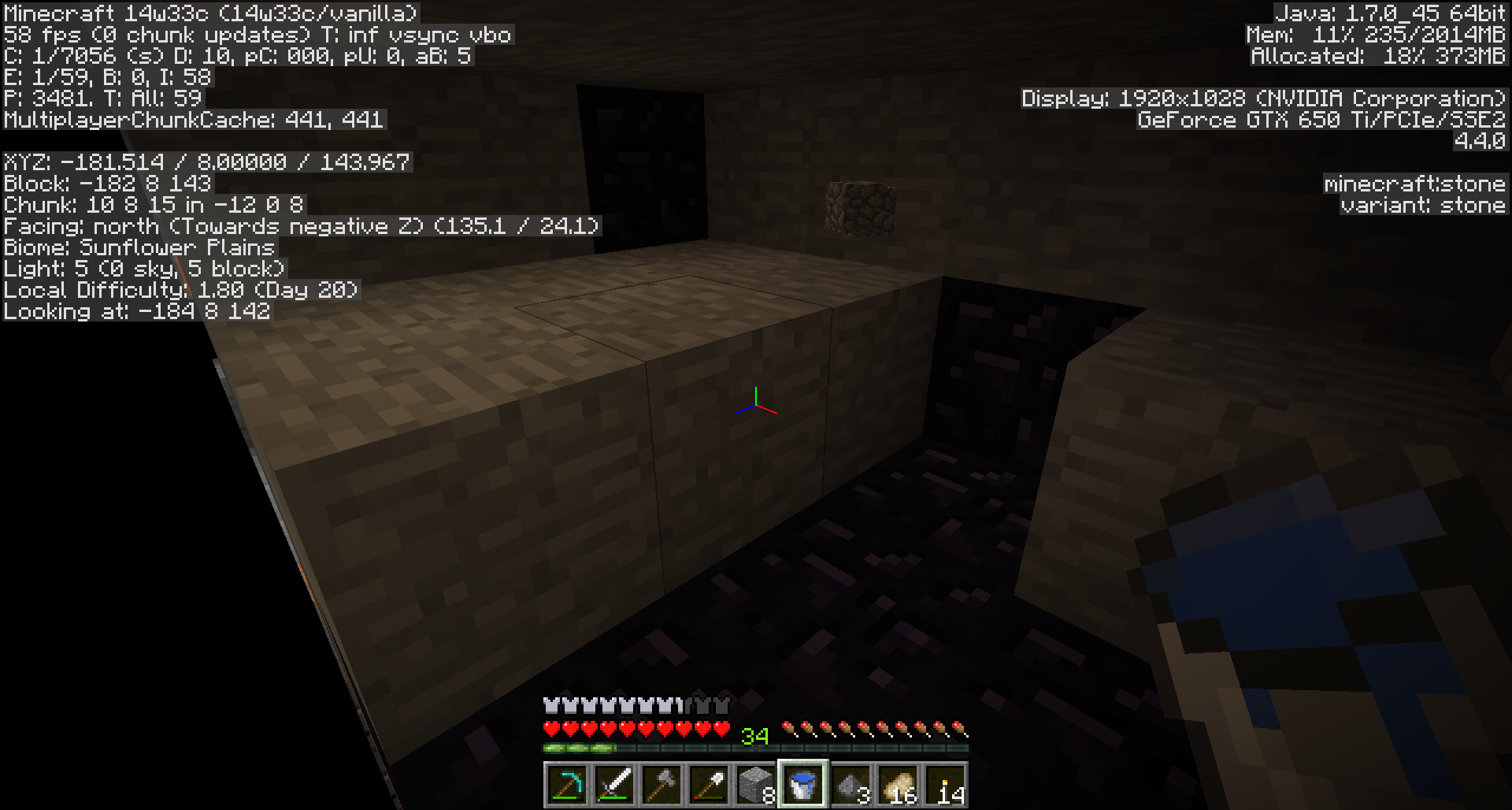
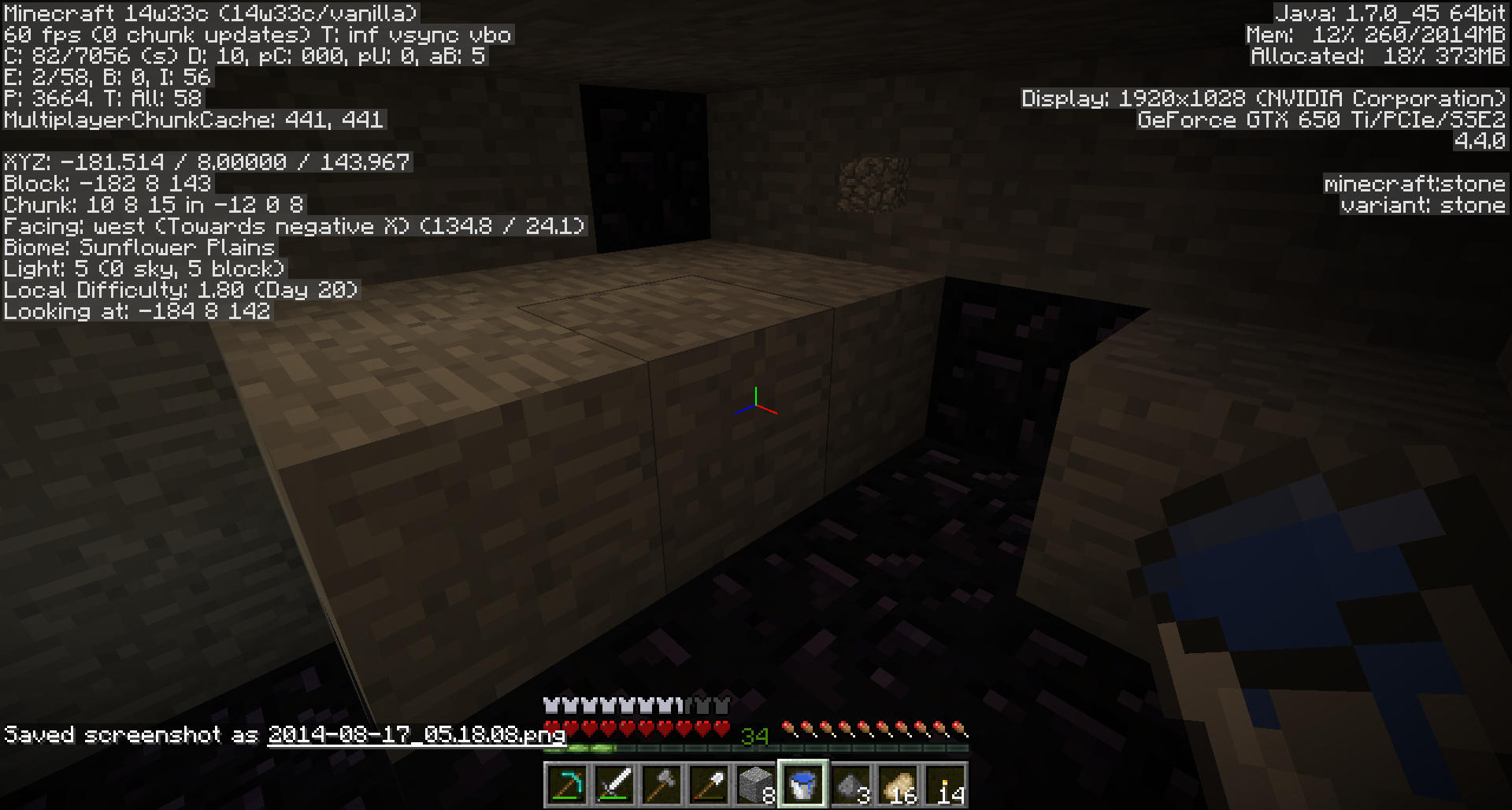

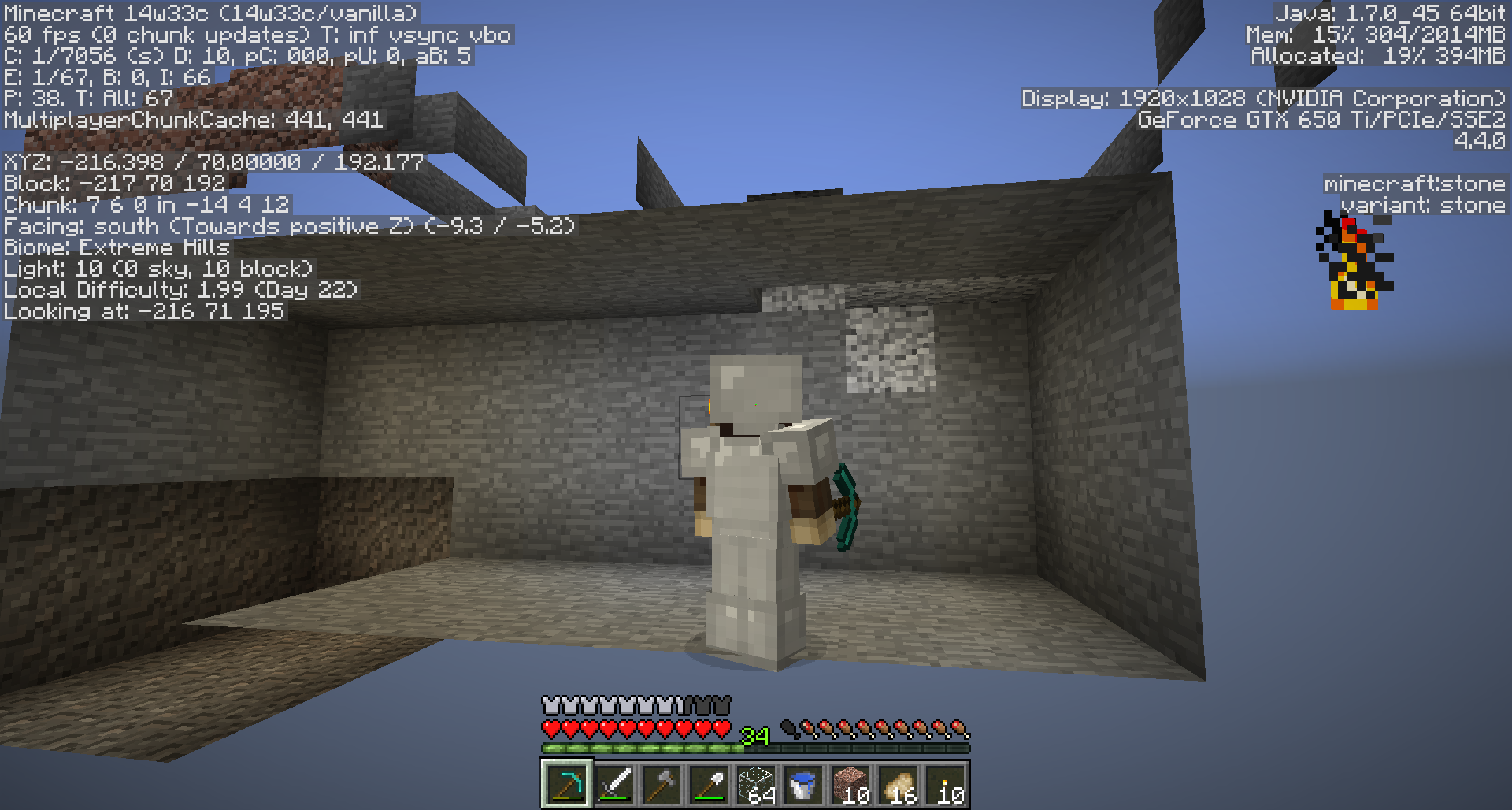
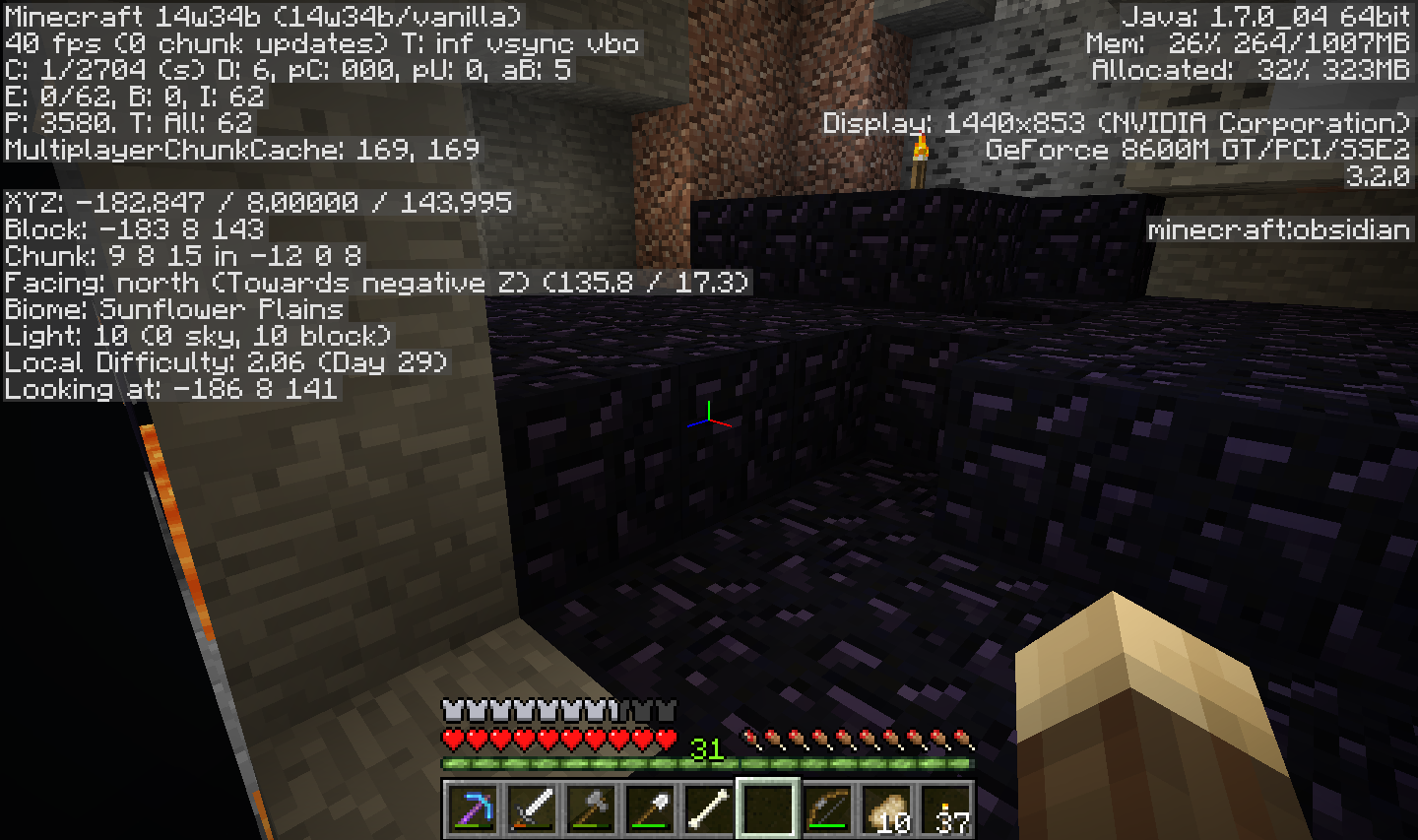
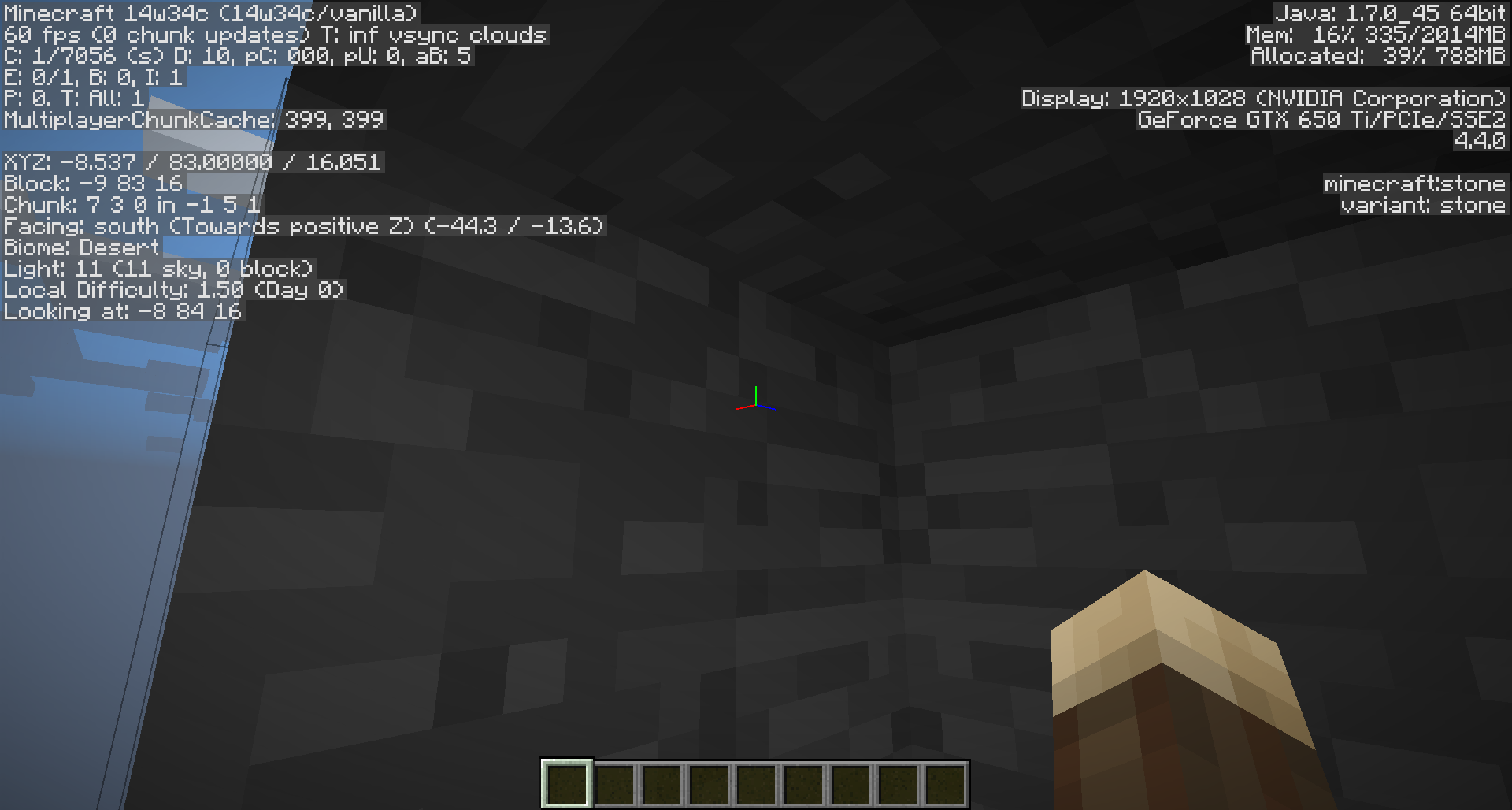

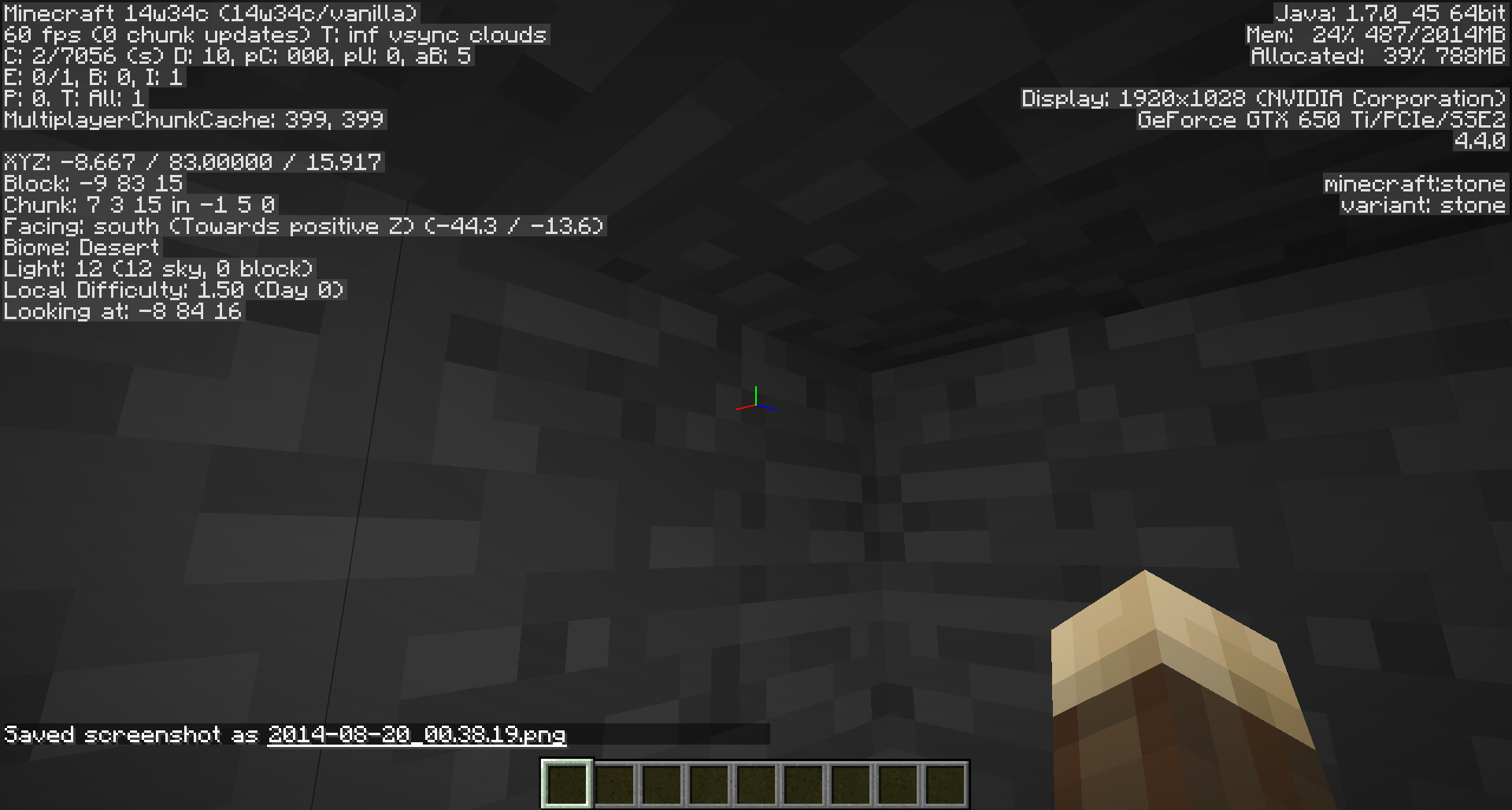

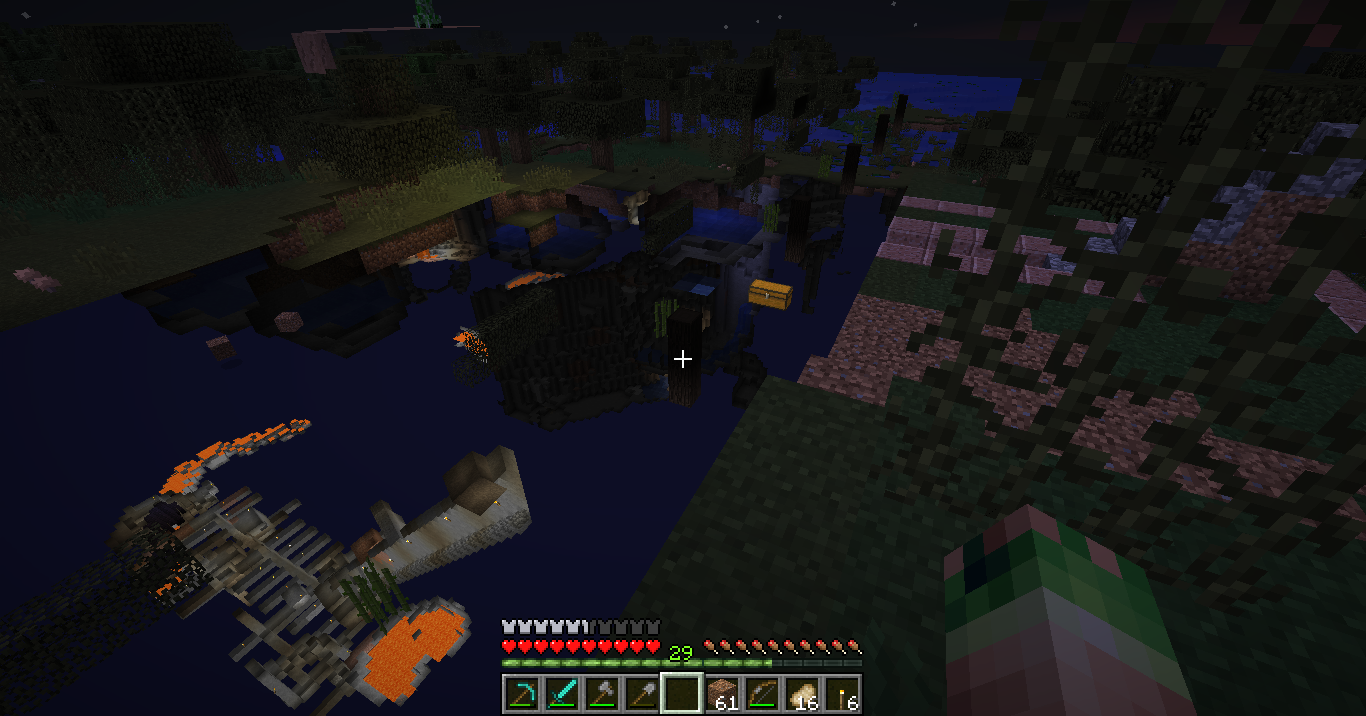


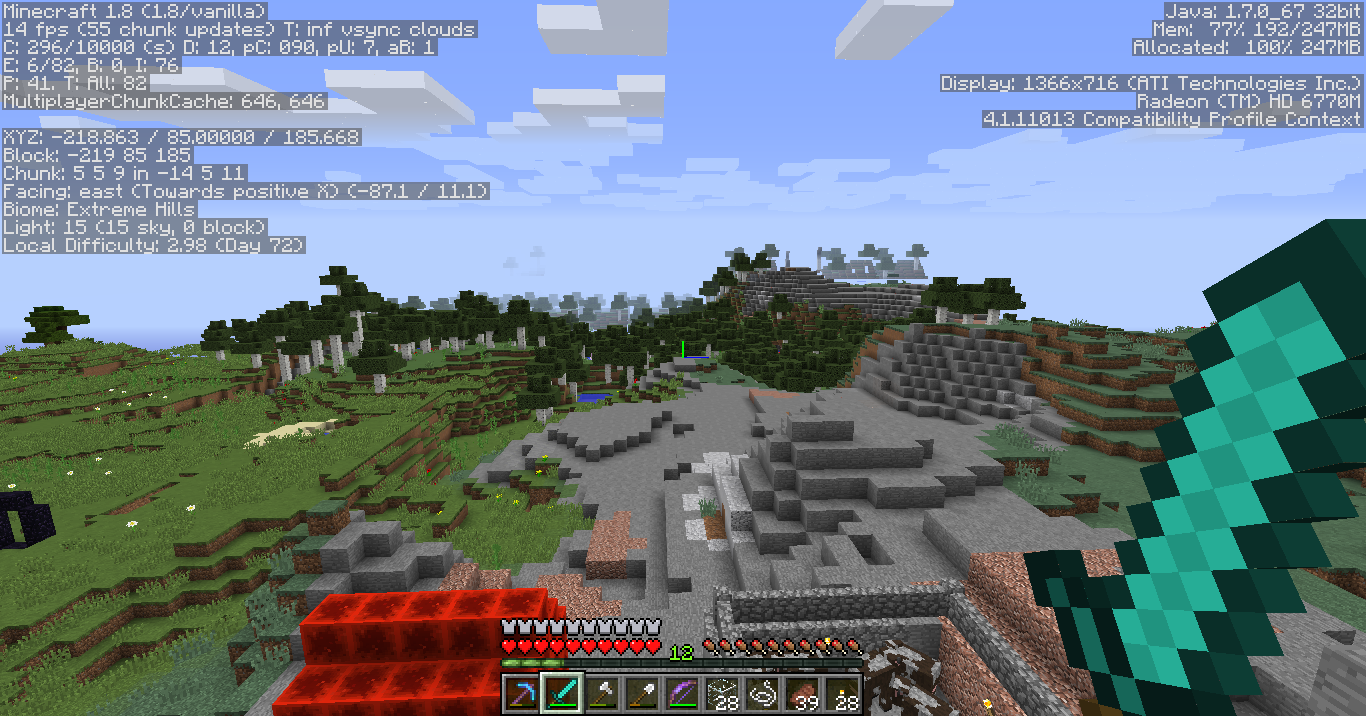








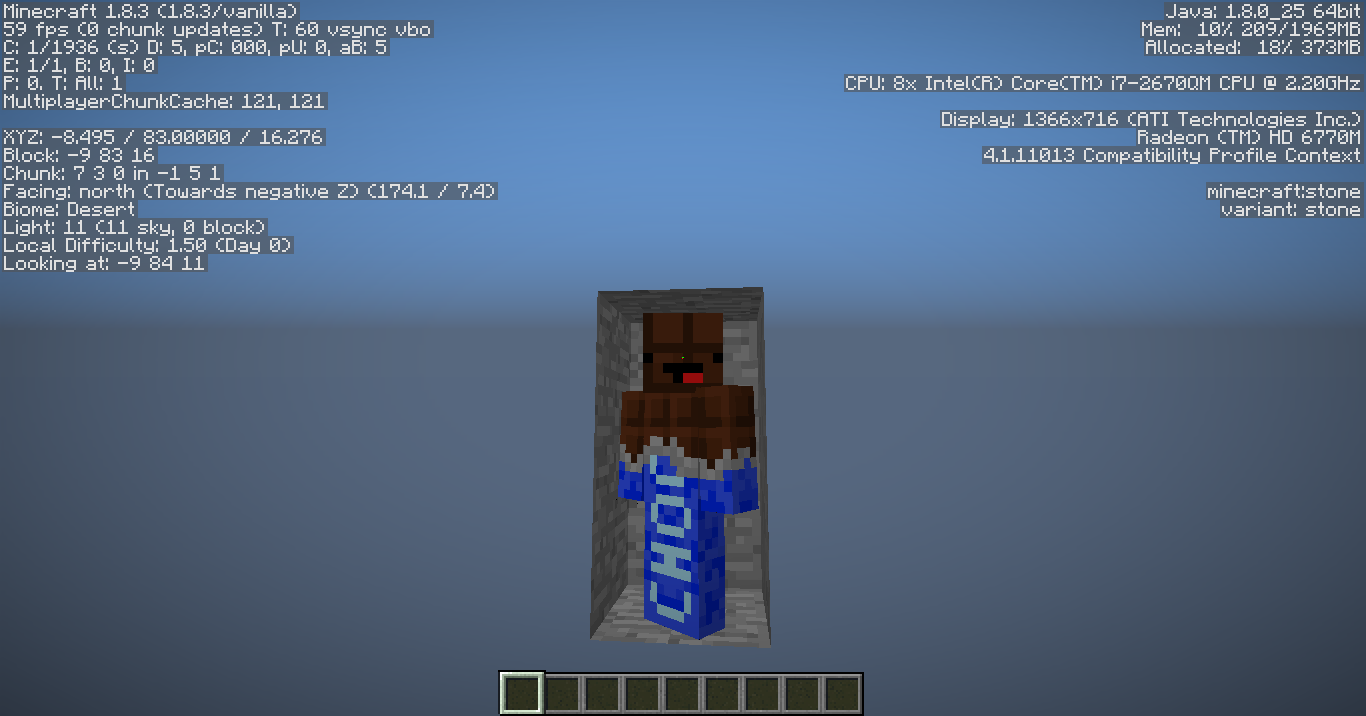


Chunks do not render behind the player in F5or changed FOV until movingthemouseChunks do not render behind the player in F5. Perhaps culling should calculate from camera POV instead of presuming head position.
Screenshots say everything,
Moderator Edit:
This issue covers chunk rendering in 3rd person only (F5).
For the issue with 1st person rendering or high FOV seeMC-63020.AFAICT the reproducibility of this bug is still 100% identical to that of
MC-63020, so I'll repeat the test case I posted on that ticket to here.Here is a world save (superflat with a simple mineshaft dug in it to find amenable coordinates): https://docs.google.com/file/d/0B57wgZSp2XofSXc4V1BLc1c5aU0
When you load that, player will be at exactly the correct position and rotation to reproduce bug
MC-63020. To instead reproduce this one (MC-63070) you need only press F5 to enter behind-the-head view.Incorrect culling happens precisely as it does in
MC-63020, but the meat of this bug is that game's culling math assumes camera is still inside players head instead of translated to a point behind it.Moderator Edit:
This issue covers chunk rendering in 3rd person only (F5).
For the issue with 1st person rendering or high FOV seeMC-63020.
AFAICT the reproducibility of this bug is still 100% identical to that of
MC-63020, so I'll repeat the test case I posted on that ticket to here.Here is a world save (superflat with a simple mineshaft dug in it to find amenable coordinates): https://d
ocs.google.com/file/d/0B57wgZSp2XofSXc4V1BLc1c5aU0When you load that, player will be at exactly the correct position and rotation to reproduce bug
MC-63020. To instead reproduce this one (MC-63070) you need only press F5 to enter behind-the-head view.Incorrect culling happens precisely as it does in
MC-63020, but the meat of this bug is that game's culling math assumes camera is still inside players head instead of translated to a point behind it.Moderator Edit:
This issue covers chunk rendering in 3rd person only (F5).
For the issue with 1st person rendering or high FOV seeMC-63020.AFAICT the reproducibility of this bug is still 100% identical to that of
MC-63020, so I'll repeat the test case I posted on that ticket to here.Here is a world save (superflat with a simple mineshaft dug in it to find amenable coordinates): https://drive.google.com/file/d/10MjcYT6X667OTNczi7ax2pw8e-qxl0qk/view?usp=sharing (link updated on 2018-06-29 to work with Minecraft Java version 1.13-pre5)
When you load that, player will be at exactly the correct position and rotation to reproduce bug
MC-63020. To instead reproduce this one (MC-63070) you need only press F5 to enter behind-the-head view.Incorrect culling happens precisely as it does in
MC-63020, but the meat of this bug is that game's culling math assumes camera is still inside players head instead of translated to a point behind it.Moderator Edit:
This issue covers chunk rendering in 3rd person only (F5).
For the issue with 1st person rendering or high FOV seeMC-63020.
You can take water with a bucket outside worldborder, but it will leave a hole in the water instad of refilling
When you try to interact with water, lilypads, or lava beyond the worldborder the client and server will disagree about the outcome. This leads to ghost (client-side only) holes in the water, or standing water source blocks, or floating lilypads, or ghost objects in your inventory which all reset as soon as the server interacts with them (eg: empty ghostwater into valid playing space or relog).
Code-centric analysis can be found in the following comment: https://bugs.mojang.com/browse/MC-54119?focusedCommentId=317000&page=com.atlassian.jira.plugin.system.issuetabpanels:comment-tabpanel#comment-317000
When you try to interact with water, lilypads, or lava beyond the worldborder the client and server will disagree about the outcome. This leads to ghost (client-side only) holes in the water, or standing water source blocks, or floating lilypads, or ghost objects in your inventory which all reset as soon as the server interacts with them (eg: empty ghostwater into valid playing space or relog).
Code-centric analysis can be found in the following comment: https://bugs.mojang.com/browse/MC-54119?focusedCommentId=317000&page=com.atlassian.jira.plugin.system.issuetabpanels:comment-tabpanel#comment-317000When you try to interact with water, lilypads, or lava beyond the worldborder the client and server will disagree about the outcome. This leads to ghost (client-side only) holes in the water, or standing water source blocks, or floating lilypads, or ghost objects in your inventory which all reset as soon as the server interacts with them (eg: empty ghostwater into valid playing space or relog).
Marcono1234 has offered a code-centric analysis can be found in the following comment: https://bugs.mojang.com/browse/MC-54119?focusedCommentId=317000&page=com.atlassian.jira.plugin.system.issuetabpanels:comment-tabpanel#comment-317000
When you try to interact with water, lilypads, or lava beyond the worldborder the client and server will disagree about the outcome. This leads to ghost (client-side only) holes in the water, or standing water source blocks, or floating lilypads, or ghost objects in your inventory which all reset as soon as the server interacts with them (eg: empty ghostwater into valid playing space or relog).
Marcono1234 has offered a code-centric analysis can be found in the following comment:
https://bugs.mojang.com/browse/MC-54119?focusedCommentId=317000&page=com.atlassian.jira.plugin.system.issuetabpanels:comment-tabpanel#comment-317000When you try to interact with water, lilypads, or lava beyond the worldborder the client and server will disagree about the outcome. This leads to ghost (client-side only) holes in the water, or standing water source blocks, or floating lilypads, or ghost objects in your inventory which all reset as soon as the server interacts with them (eg: empty ghostwater into valid playing space or relog).
Marcono1234 has offered a code-centric analysis can be found in the linked comment
I suspect it is related to mipmapping and code to decide the rotation of generic, rotatable textures. For example, if you change distance the mipmap changes and then each mipmap winds up with a differently chosen rotation than the previous mipmap you were seeing. I suspect it's also probable we'll see it with dirt textures and some kinds of stone, but I've just rushed to get the most easily reproduced example which is only of Netherack and only in the Nether.
I've used Fraps to record a video demonstration of the effect: https://youtu.be/BozurzcfKiI
It's nearly subliminal (and when unexpected in the dark nether, really gives one the heebeejeebees that the ground is shifting beneath your feet. ;P) so a single snapshot can't really communicate much.
But, that said I forgot to leave F3 on for the video so I'll get a separate snapshot of that detail attached as well.
What I expected to happen was...:
That whatever orientation a texture was set to display at the beginning of a scene (eg: a chunk loading) should remain unchanged for me as an observer (even if other players are offered a different rotation) at least until the chunk unloads, or even culls, and then later has to be displayed again. It should NOT change while I'm looking at it.What actually happened was...:
Texture rotation jumps, glitches, and changes while I'm looking straight at it.Steps to Reproduce:
This is just the EASIEST way:
1. Go to nether. Creative mode is just fine to do this.
2. Find a place where you can easily walk or fly towards or from a feature made out of netherack, bonus points if the walls/ceiling/floor around you are also made of netherack
3. Move forwards and backwards as my video demonstrates to invoke the fast and sometimes challenging to consciously spot glitchy rendering behavior.Standard Disclaimer: Yes, I know this report is probably a duplicate but after 5 careful keyword searches and reading through over a thousand matches that I'm definitely not a duplicate of, you can't say I didn't give it the old college try before ressing up a new ticket at least. Merging me into the correct stream will be very much appreciated just please don't be too upset with me.

I suspect it is related to mipmapping and code to decide the rotation of generic, rotatable textures. For example, if you change distance the mipmap changes and then each mipmap winds up with a differently chosen rotation than the previous mipmap you were seeing. I suspect it's also probable we'll see it with dirt textures and some kinds of stone, but I've just rushed to get the most easily reproduced example which is only of Netherack and only in the Nether.
I've used Fraps to record a video demonstration of the effect: https://youtu.be/BozurzcfKiI
It's nearly subliminal (and when unexpected in the dark nether, really gives one the heebeejeebees that the ground is shifting beneath your feet. ;P) so a single snapshot can't really communicate much.
But, that said I forgot to leave F3 on for the video so I'll get a separate snapshot of that detail attached as well.
What I expected to happen was...:
That whatever orientation a texture was set to display at the beginning of a scene (eg: a chunk loading) should remain unchanged for me as an observer (even if other players are offered a different rotation) at least until the chunk unloads, or even culls, and then later has to be displayed again. It should NOT change while I'm looking at it.What actually happened was...:
Texture rotation jumps, glitches, and changes while I'm looking straight at it.Steps to Reproduce:
This is just the EASIEST way:
1. Go to nether. Creative mode is just fine to do this.
2. Find a place where you can easily walk or fly towards or from a feature made out of netherack, bonus points if the walls/ceiling/floor around you are also made of netherack
3. Move forwards and backwards as my video demonstrates to invoke the fast and sometimes challenging to consciously spot glitchy rendering behavior.
Standard Disclaimer:Yes, I know this report is probably a duplicate but after 5 careful keyword searches and reading through over a thousand matches that I'm definitely not a duplicate of, you can't say I didn't give it the old college try before ressing up a new ticket at least. Merging me into the correct stream will be very much appreciated just please don't be too upset with me.I suspect it is related to mipmapping and code to decide the rotation of generic, rotatable textures. For example, if you change distance the mipmap changes and then each mipmap winds up with a differently chosen rotation than the previous mipmap you were seeing. I suspect it's also probable we'll see it with dirt textures and some kinds of stone, but I've just rushed to get the most easily reproduced example which is only of Netherack and only in the Nether.
I've used Fraps to record a video demonstration of the effect: https://youtu.be/BozurzcfKiI
It's nearly subliminal (and when unexpected in the dark nether, really gives one the heebeejeebees that the ground is shifting beneath your feet. ;P) so a single snapshot can't really communicate much.
But, that said I forgot to leave F3 on for the video so I'll get a separate snapshot of that detail attached as well.
What I expected to happen was...:
That whatever orientation a texture was set to display at the beginning of a scene (eg: a chunk loading) should remain unchanged for me as an observer (even if other players are offered a different rotation) at least until the chunk unloads, or even culls, and then later has to be displayed again. It should NOT change while I'm looking at it.What actually happened was...:
Texture rotation jumps, glitches, and changes while I'm looking straight at it.Steps to Reproduce:
This is just the EASIEST way:
1. Go to nether. Creative mode is just fine to do this.
2. Find a place where you can easily walk or fly towards or from a feature made out of netherack, bonus points if the walls/ceiling/floor around you are also made of netherack
3. Move forwards and backwards as my video demonstrates to invoke the fast and sometimes challenging to consciously spot glitchy rendering behavior.Standard Disclaimer: Yes, I know this report is probably a duplicate but after 5 careful keyword searches and reading through over a thousand matches that I'm definitely not a duplicate of, you can't say I didn't give it the old college try before ressing up a new ticket at least. Merging me into the correct stream will be very much appreciated just please don't be too upset with me.
I suspect it is related to mipmapping and code to decide the rotation of generic, rotatable textures. For example, if you change distance the mipmap changes and then each mipmap winds up with a differently chosen rotation than the previous mipmap you were seeing. I suspect it's also probable we'll see it with dirt textures and some kinds of stone, but I've just rushed to get the most easily reproduced example which is only of Netherack and only in the Nether.
I've used Fraps to record a video demonstration of the effect: https://youtu.be/BozurzcfKiI
It's nearly subliminal (and when unexpected in the dark nether, really gives one the heebeejeebees that the ground is shifting beneath your feet. ;P) so a single snapshot can't really communicate much.
But, that said I forgot to leave F3 on for the video so I'll get a separate snapshot of that detail attached as well.
What I expected to happen was...:
That whatever orientation a texture was set to display at the beginning of a scene (eg: a chunk loading) should remain unchanged for me as an observer (even if other players are offered a different rotation) at least until the chunk unloads, or even culls, and then later has to be displayed again. If the rotation never changes under any circumstances due to clever PRNG math then that is probably the safest choice, but the payload is that It should NOT change while I'm looking at it.What actually happened was...:
Texture rotation jumps, glitches, and changes while I'm looking straight at it.Steps to Reproduce:
This is just the EASIEST way:
1. Go to nether. Creative mode is just fine to do this.
2. Find a place where you can easily walk or fly towards or from a feature made out of netherack, bonus points if the walls/ceiling/floor around you are also made of netherack
3. Move forwards and backwards as my video demonstrates to invoke the fast and sometimes challenging to consciously spot glitchy rendering behavior.Standard Disclaimer: Yes, I know this report is probably a duplicate but after 5 careful keyword searches and reading through over a thousand matches that I'm definitely not a duplicate of, you can't say I didn't give it the old college try before ressing up a new ticket at least. Merging me into the correct stream will be very much appreciated just please don't be too upset with me.
I suspect it is related to
mipmapping andcode to decide the rotation of generic, rotatable textures.For example, if you change distance the mipmap changes and then each mipmap winds up with a differently chosen rotation than the previous mipmap you were seeing.I suspect it's also probable we'll see it with dirt textures and some kinds of stone, but I've just rushed to get the most easily reproduced example which is only of Netherack and only in the Nether.I've used Fraps to record a video demonstration of the effect: https://youtu.be/BozurzcfKiI
It's nearly subliminal (and when unexpected in the dark nether, really gives one the heebeejeebees that the ground is shifting beneath your feet. ;P) so a single snapshot can't really communicate much.
But, that said I forgot to leave F3 on for the video so I'll get a separate snapshot of that detail attached as well.
What I expected to happen was...:
That whatever orientation a texture was set to display at the beginning of a scene (eg: a chunk loading) should remain unchanged for me as an observer (even if other players are offered a different rotation) at least until the chunk unloads, or even culls, and then later has to be displayed again. If the rotation never changes under any circumstances due to clever PRNG math then that is probably the safest choice, but the payload is that It should NOT change while I'm looking at it.What actually happened was...:
Texture rotation jumps, glitches, and changes while I'm looking straight at it.Steps to Reproduce:
This is just the EASIEST way:
1. Go to nether. Creative mode is just fine to do this.
2. Find a place where you can easily walk or fly towards or from a feature made out of netherack, bonus points if the walls/ceiling/floor around you are also made of netherack
3. Move forwards and backwards as my video demonstrates to invoke the fast and sometimes challenging to consciously spot glitchy rendering behavior.Standard Disclaimer: Yes, I know this report is probably a duplicate but after 5 careful keyword searches and reading through over a thousand matches that I'm definitely not a duplicate of, you can't say I didn't give it the old college try before ressing up a new ticket at least. Merging me into the correct stream will be very much appreciated just please don't be too upset with me.
I suspect it is related to the code to decide the rotation of generic, rotatable textures. I suspect it's also probable we'll see it with dirt textures and some kinds of stone, but I've just rushed to get the most easily reproduced example which is only of Netherack and only in the Nether.
I've used Fraps to record a video demonstration of the effect: https://youtu.be/BozurzcfKiI
It's nearly subliminal (and when unexpected in the dark nether, really gives one the heebeejeebees that the ground is shifting beneath your feet. ;P) so a single snapshot can't really communicate much.
But, that said I forgot to leave F3 on for the video so I'll get a separate snapshot of that detail attached as well.
What I expected to happen was...:
That whatever orientation a texture was set to display at the beginning of a scene (eg: a chunk loading) should remain unchanged for me as an observer (even if other players are offered a different rotation) at least until the chunk unloads, or even culls, and then later has to be displayed again. If the rotation never changes under any circumstances due to clever PRNG math then that is probably the safest choice, but the payload is that It should NOT change while I'm looking at it.What actually happened was...:
Texture rotation jumps, glitches, and changes while I'm looking straight at it.Steps to Reproduce:
This is just the EASIEST way:
1. Go to nether. Creative mode is just fine to do this.
2. Find a place where you can easily walk or fly towards or from a feature made out of netherack, bonus points if the walls/ceiling/floor around you are also made of netherack
3. Move forwards and backwards as my video demonstrates to invoke the fast and sometimes challenging to consciously spot glitchy rendering behavior.I have confirmed that the bug triggers sometimes as you change your distance moving towards and away from blocks, but also as lighting recalculations are done. So another very easy way to trigger it is to either begin or end a complex cascade of light-emitting lava. Every time a new block gets or loses it's lava contents in your cascade, many many textures in your field of view (and probably within 16 blocks of the lighting change) will flip and glitch about quite regularly.
Posting or removing a torch can cause it, but only for a very brief moment and not every time. Mining a block can even trigger it with the same proviso, most likely due to changing the flood of nearby lighting sources.
Standard Disclaimer: Yes, I know this report is probably a duplicate but after 5 careful keyword searches and reading through over a thousand matches that I'm definitely not a duplicate of, you can't say I didn't give it the old college try before ressing up a new ticket at least. Merging me into the correct stream will be very much appreciated just please don't be too upset with me.
I suspect it is related to the code to decide the rotation of generic, rotatable textures. I suspect it's also probable we'll see it with dirt textures and some kinds of stone, but I've just rushed to get the most easily reproduced example which is only of Netherack and only in the Nether.
I've used Fraps to record a video demonstration of the effect: https://youtu.be/BozurzcfKiI
It's nearly subliminal (and when unexpected in the dark nether, really gives one the heebeejeebees that the ground is shifting beneath your feet. ;P) so a single snapshot can't really communicate much.
But, that said I forgot to leave F3 on for the video so I'll get a separate snapshot of that detail attached as well.
What I expected to happen was...:
That whatever orientation a texture was set to display at the beginning of a scene (eg: a chunk loading) should remain unchanged for me as an observer (even if other players are offered a different rotation) at least until the chunk unloads, or even culls, and then later has to be displayed again. If the rotation never changes under any circumstances due to clever PRNG math then that is probably the safest choice, but the payload is that It should NOT change while I'm looking at it.What actually happened was...:
Texture rotation jumps, glitches, and changes while I'm looking straight at it.Steps to Reproduce:
This is just the EASIEST way:
1. Go to nether. Creative mode is just fine to do this.
2. Find a place where you can easily walk or fly towards or from a feature made out of netherack, bonus points if the walls/ceiling/floor around you are also made of netherack
3. Move forwards and backwards as my video demonstrates to invoke the fast and sometimes challenging to consciously spot glitchy rendering behavior.I have confirmed that the bug triggers sometimes as you change your distance moving towards and away from blocks, but also as lighting recalculations are done. So another very easy way to trigger it is to either begin or end a complex cascade of light-emitting lava. Every time a new block gets or loses it's lava contents in your cascade, many many textures in your field of view (and probably within 16 blocks of the lighting change) will flip and glitch about quite regularly.
Posting or removing a torch can cause it, but only for a very brief moment and not every time. Mining a block can even trigger it with the same proviso, most likely due to changing the flood of nearby lighting sources.
Standard Disclaimer: Yes, I know this report is probably a duplicate but after 5 careful keyword searches and reading through over a thousand matches that I'm definitely not a duplicate of, you can't say I didn't give it the old college try before ressing up a new ticket at least. Merging me into the correct stream will be very much appreciated just please don't be too upset with me.
I suspect it is related to the code to decide the rotation of generic, rotatable textures. I suspect it's also probable we'll see it with dirt textures and some kinds of stone, but I've just rushed to get the most easily reproduced example which is only of Netherack and only in the Nether.
I've used Fraps to record a video demonstration of the effect: https://youtu.be/BozurzcfKiI
It's nearly subliminal (and when unexpected in the dark nether, really gives one the heebeejeebees that the ground is shifting beneath your feet. ;P) so a single snapshot can't really communicate much.
But, that said I forgot to leave F3 on for the video so I'll get a separate snapshot of that detail attached as well.
What I expected to happen was...:
That whatever orientation a texture was set to display at the beginning of a scene (eg: a chunk loading) should remain unchanged for me as an observer (even if other players are offered a different rotation) at least until the chunk unloads, or even culls, and then later has to be displayed again. If the rotation never changes under any circumstances due to clever PRNG math then that is probably the safest choice, but the payload is that It should NOT change while I'm looking at it.What actually happened was...:
Texture rotation jumps, glitches, and changes while I'm looking straight at it.Steps to Reproduce:
This is just the EASIEST way:
1. Go to nether. Creative mode is just fine to do this.
2. Find a place where you can easily walk or fly towards or from a feature made out of netherack, bonus points if the walls/ceiling/floor around you are also made of netherack
3. Move forwards and backwards as my video demonstrates to invoke the fast and sometimes challenging to consciously spot glitchy rendering behavior.I have confirmed that the bug triggers sometimes as you change your distance moving towards and away from blocks, but also as lighting recalculations are done. So another very easy way to trigger it is to either begin or end a complex cascade of light-emitting lava. Every time a new block gets or loses it's lava contents in your cascade, many many textures throughout the vertical chunk will flip and glitch about quite regularly.
Posting or removing a torch can cause it, but only for a very brief moment and not every time. Mining a block can even trigger it with the same proviso, most likely due to changing the flood of nearby lighting sources.
Standard Disclaimer: Yes, I know this report is probably a duplicate but after 5 careful keyword searches and reading through over a thousand matches that I'm definitely not a duplicate of, you can't say I didn't give it the old college try before ressing up a new ticket at least. Merging me into the correct stream will be very much appreciated just please don't be too upset with me.
Some textures (onlyconfirmedwith Netherack in the Netherso far) jump and change rotation as you move closer or farther from themSome textures (Easy to confirm with Netherack in the Nether) jump and change rotation as you move closer or farther from them
I suspect it is related to the code to decide the rotation of generic, rotatable textures. I suspect it's also probable we'll see it with dirt textures and some kinds of stone, but I've just rushed to get the most easily reproduced example which is only of Netherack and only in the Nether.
I've used Fraps to record a video demonstration of the effect: https://youtu.be/BozurzcfKiI
It's nearly subliminal (and when unexpected in the dark nether, really gives one the heebeejeebees that the ground is shifting beneath your feet. ;P) so a single snapshot can't really communicate much.
But, that said I forgot to leave F3 on for the video so I'll get a separate snapshot of that detail attached as well.
What I expected to happen was...:
That whatever orientation a texture was set to display at the beginning of a scene (eg: a chunk loading) should remain unchanged for me as an observer (even if other players are offered a different rotation) at least until the chunk unloads, or even culls, and then later has to be displayed again. If the rotation never changes under any circumstances due to clever PRNG math then that is probably the safest choice, but the payload is that It should NOT change while I'm looking at it.What actually happened was...:
Texture rotation jumps, glitches, and changes while I'm looking straight at it.Steps to Reproduce:
This is just the EASIEST way:
1. Go to nether. Creative mode is just fine to do this.
2. Find a place where you can easily walk or fly towards or from a feature made out of netherack, bonus points if the walls/ceiling/floor around you are also made of netherack
3. Move forwards and backwards as my video demonstrates to invoke the fast and sometimes challenging to consciously spot glitchy rendering behavior.I have confirmed that the bug triggers sometimes as you change your distance moving towards and away from blocks, but also as lighting recalculations are done. So another very easy way to trigger it is to either begin or end a complex cascade of light-emitting lava. Every time a new block gets or loses it's lava contents in your cascade, many many textures throughout the vertical chunk will flip and glitch about quite regularly.
Posting or removing a torch can cause it, but only for a very brief moment and not every time. Mining a block can even trigger it with the same proviso, most likely due to changing the flood of nearby lighting sources.
I have caught an instance of non-grass dirt glitching the same way in the overworld.
Standard Disclaimer: Yes, I know this report is probably a duplicate but after 5 careful keyword searches and reading through over a thousand matches that I'm definitely not a duplicate of, you can't say I didn't give it the old college try before ressing up a new ticket at least. Merging me into the correct stream will be very much appreciated just please don't be too upset with me.
I suspect it is related to the code to decide the rotation of generic, rotatable textures. I suspect it's also probable we'll see it with dirt textures and some kinds of stone, but I've just rushed to get the most easily reproduced example which is only of Netherack and only in the Nether.
I've used Fraps to record a video demonstration of the effect: https://youtu.be/BozurzcfKiI
It's nearly subliminal (and when unexpected in the dark nether, really gives one the heebeejeebees that the ground is shifting beneath your feet. ;P) so a single snapshot can't really communicate much.
But, that said I forgot to leave F3 on for the video so I'll get a separate snapshot of that detail attached as well.
What I expected to happen was...:
That whatever orientation a texture was set to display at the beginning of a scene (eg: a chunk loading) should remain unchanged for me as an observer (even if other players are offered a different rotation) at least until the chunk unloads, or even culls, and then later has to be displayed again. If the rotation never changes under any circumstances due to clever PRNG math then that is probably the safest choice, but the payload is that It should NOT change while I'm looking at it.What actually happened was...:
Texture rotation jumps, glitches, and changes while I'm looking straight at it.Steps to Reproduce:
This is just the EASIEST way:
1. Go to nether. Creative mode is just fine to do this.
2. Find a place where you can easily walk or fly towards or from a feature made out of netherack, bonus points if the walls/ceiling/floor around you are also made of netherack
3. Move forwards and backwards as my video demonstrates to invoke the fast and sometimes challenging to consciously spot glitchy rendering behavior.I have confirmed that the bug triggers sometimes as you change your distance moving towards and away from blocks, but also as lighting recalculations are done. So another very easy way to trigger it is to either begin or end a complex cascade of light-emitting lava. Every time a new block gets or loses it's lava contents in your cascade, many many textures throughout the vertical chunk will flip and glitch about quite regularly.
Posting or removing a torch can cause it, but only for a very brief moment and not every time. Mining a block can even trigger it with the same proviso, most likely due to changing the flood of nearby lighting sources.
2015-11-24: I have now caught an instance of non-grass dirt glitching the same way in the overworld.
Standard Disclaimer: Yes, I know this report is probably a duplicate but after 5 careful keyword searches and reading through over a thousand matches that I'm definitely not a duplicate of, you can't say I didn't give it the old college try before ressing up a new ticket at least. Merging me into the correct stream will be very much appreciated just please don't be too upset with me.
Confirmed so far on SMP, will carry out more testing to see if SSP affected.
Confirmed so far in Survival, will carry out more testing in Creative
Confirmed so far while holding torch in off-hand (as I almost always do),
I will report back as "not holding anything in left hand" is also tested.This is a challenge while trying to build, as 10%+ of the time when you right-click to place, even when the click is sniper-fast a second block gets placed directly in your face if you're at least a full space back. If not, block place gets rapidly followed up by a torchplace.
Trying to place a torch often rapidfires a second torch.
Trying to eat a peace of food more rarely leads to a second piece being silently eaten (since this is a slower process, server lag may play a role..)
Sometimes when you wish to place a block or a torch, you hold right for a fraction of a second only to notice no placement, but cracks just beginning to form on the block you were trying to place on, and a waving steve-arm, and arm slowly raising / weapon exhaust bar unwinding which indicates your entire half-second right click event was viewed as a left click.
This is a challenge when trying to either feed or shear sheep, as either it comes out only as a punch against the poor animal, or as a punch coupled with an instant shear/feed event. (via this I've learnt that frightened sheep refuse to mate until they've calmed down! ;P)
Confirmed so far on SMP, will carry out more testing to see if SSP affected.
Confirmed so far in Survival, will carry out more testing in Creative
Confirmed so far while holding torch in off-hand (as I almost always do), UPDATE: Also confirmed with nothing in left hand.
This is a challenge while trying to build, as 10%+ of the time when you right-click to place, even when the click is sniper-fast a second block gets placed directly in your face if you're at least a full space back. If not, block place gets rapidly followed up by a torchplace.
Trying to place a torch often rapidfires a second torch.
Trying to eat a peace of food more rarely leads to a second piece being silently eaten (since this is a slower process, server lag may play a role..)
Sometimes when you wish to place a block or a torch, you hold right for a fraction of a second only to notice no placement, but cracks just beginning to form on the block you were trying to place on, and a waving steve-arm, and arm slowly raising / weapon exhaust bar unwinding which indicates your entire half-second right click event was viewed as a left click.
This is a challenge when trying to either feed or shear sheep, as either it comes out only as a punch against the poor animal, or as a punch coupled with an instant shear/feed event. (via this I've learnt that frightened sheep refuse to mate until they've calmed down! ;P)

Good analysis, Happ MacDonald!
![[Mod] Torabi](../../../data/assets/gravatar/torabi.png)
Happ MacDonald, I've made you the reporter on this issue, since the original reporter no longer seems to be active on the tracker. This will allow you to change most of the fields, including the affected versions.

Happ MacDonald as of now, no
Happ MacDonald: The original reporter is still active - we can do it if they agree.
@Bob Saggot: What do you think?
Changed reporter to Happ MacDonald.

Happ MacDonald, look into local help about markup (you can also get it by clicking on a "?" in a circle)
Happ MacDonald you shouldn't, bumping is not appreciated.
The game crashes while converting the world old world from MC-63070, namely: https://docs.google.com/file/d/0B57wgZSp2XofSXc4V1BLc1c5aU0/edit to the new version. Note that Happ MacDonald did not have this issue, see his comment.
Happ MacDonald Yup this one works!  Created an issue for the crash anyway, by the way:
 MC-132382
I've seen variants of this bug since beta version 1.5.
Always notice the lighting error occurring either somewhere under an overhang, entrance to a cave, under tree leaves, or underwater: never in direct sunlight, but most often adjacent to direct sunlight. Lighting error does not always extend vertically all the way from a floor to a ceiling, sometimes the error only extends from floor-or-ceiling to the next multiple of 16 along the y (vertical) axis. You can measure where the glitch ends by determining at what eye-level the player's hand and tool change brightness.
Lighting error is ALWAYS resolved by a block update within or directly adjacent to the affected region. OFTEN resolved by player moving in or near the affected region. There also seems to be a delay between entering the region and lighting getting resolved directly proportional to the number of blocks involved in the error. Player entering region does NOT appear to resolve error if the affected region is exactly 1x1x1 in size: have tested both moving players feet and players head into regions matching criteria above of mid-air vertical cutoff. SOMETIMES resolved when player walks within a few blocks away from the error, or puts crosshairs into the error while standing within a few blocks away.
Really, Talven? That's good news.
I'm at work so cannot presently, but can anyone confirm the "black lighting" bug is either fixed or significantly altered in snapshot 12w39a?
Issue remains in 13w01b, screenshot http://i.imgur.com/vIcPI.jpg
In related news .. what is wrong with that waterfall in my screenshot? Why isn't it .. falling? That's not a terrain generation behavior I've ever encountered before. :O
That position, in case it's interesting, is ~x=-212 z=+248 and seed is -6770244940745311567 13w01b
remains on 13w07a
http://i.imgur.com/ltPVq6X.png
Nope, still happens in 1.5. Every bit as black as ever, though as it has been for about a year now the lighting under affected trees or water (partly transparent shade sources) can be "too dark" but not quite pitch black, until you block update or walk through the shade to correct it. EG: the shade would be black were it not for some of the light penetrating the partly transparent blocks.
http://i.imgur.com/o8DJrf1.png
Still happens with 13w16a, first 1.6 snapshot: http://i.imgur.com/hfZfkFh.jpg
Possible Solution 0: fix the original bug in the lighting engine. It's nothing but lateral ambient sunlight not being calculated properly.
If the computer is capable of checking the correctness of the light as an audit, it's capable of checking it during first calculation too.
The simplest examples of the bug are on the surface, where everything under an overhang is black, like this: https://mojang.atlassian.net/secure/attachment/24330/2013-03-13_15.32.53.png . No exotic materials, just a concavity in the blocks that sunlight does not directly strike. 50%+ of these shapes render as pitch black. Oftentimes the ground is perfectly flat, and ground square is 15-16 brightness sunlight while the directly adjacent square is 0.
Also, the game already has a hack that tries to compensate for this. It re-lights cubic chunks constantly. It spawns a relight to almost every block you step in (so if you step into one of these shadows, there is a high percentage chance the game will repair the lighting within a moment or two).
I'm pretty sure the problem will simply grow more exotic the more you try to plug up holes in the dam. The root bug needs to be eliminated.
@Jonathan Vernon: I don't have any older versions to test with, but can you confirm that the problem is not present in any of the Alpha releases, but is present in Beta 1.0?
If so, I'm certain this regression information may prove quite helpful to the developers. Thank you. :3
Yes, as of 1.6.2 release this bug is still easy to reproduce: http://i.imgur.com/LSZrlWY.png
Step 1: start a new world in creative mode (mode only matters to more conveniently locate an affected area)
Step 2: in Video Settings, turn off Smooth Lighting (bug happens whether smooth lighting is on or not, turning it off only helps add contrast to the visual presentation of symptom)
Step 3: fly up in the air, look around, and in some rare cases actually travel somewhere in search of an overhang. Due to processes in the game that obviously search for lighting errors like this to fix after the fact, avoid trying to look directly into a shadow or flying into said shadow as doing so has roughly a 15% chance of correcting the shadow before you can screenshot it. Forcing a block update inside of, or directly adjacent to a contiguous shadow (such as breaking any block in the shadow) has close to a 100% chance of correcting it.
Out of curiosity, this bug is globally visible, right? I mean, there do not exist minecraft clients who can't reproduce it, do there?
I've reproduced since ~1.2 beta, on 4 different computers I own running win 7, win XP and Ubuntu 10.04 linux and friends of mine in multiplayer reliably encounter it on at least a dozen more computers. I've never played with anyone who doesn't see this more frequently than they see red or yellow flowers.
Since the launcher now allows easy exploration of alpha and beta worlds, I did some exploring to see how early I could confirm the black lighting underhang bug.
As of beta, it's way way less frequent but does still happen. In 1.8.1 it's easy to reproduce thanks to creative mode (but still nowhere near as common as newer versions), but prior to this lacking creative mode it either takes somehow adding a fly mod (that I'm not up to) or investing tons of time searching to find anything.
It took forever but after boating about and creating beds to dispell night and lots of hunting I did spot the gremlin in the wild in beta 1.7: http://i.imgur.com/VvnpE8e.png
I put similar effort into beta 1.5_01 but over half an hour of searching and I could not reproduce. (then again, when I used to reproduce back in the day it was after solid days of playing. ;D)
As to Jeb's fix; has anyone noticed a new snapshot since 1.6.2 shipped? Is there anything new I can play to determine if the fix is even superficially effective? :o
in 13w26a, I would call this primarily resolved. I am still able to encounter the black lighting, but like Jeb said it is a couple orders of magnitude less common.
I'll report back on what I have seen however, on the off-chance anyone still wants to root this out at the source.
I've seen one instance of a pair of trees with over-dark shading below them. Not full-black, but then again light filters through the leaves. Shading problem resolved itself as I hovered nearby watching.
And I've seen about a half-dozen instances of black lighting where there was a precisely 1-block overhang (often tree leaves, though at least 2 times it was an outcropping of rock) and lighting was normal for many blocks directly below the overhang, but the cliff face was smooth and some number of blocks below the overhang the lighting cut out and went black. Then the blackness continued either until the cliff face gave out (test world was amplified) or sometimes the blackness gave out of it's own accord. Bottom of effect was either horizontal or diagonal; I'll have to check again but I'm guessing diagonal bottoms were near tree leaves (re-radiated sunlight) or other light sources (this world had loads of lavafalls)
My spidey senses tell me the top of such phenomena probably lines up with the largest multiple of 16 on the y axis less than the overhang, and I'll bet many of the unexpected bottom cut-offs are multiples of 16y as well.
This leads me to believe that jeb's code checks for pitch black directly underneath certain overhangs, and probably triggers a recalc when that's found. But that due to the problem not being addressed at it's root, said recalc fails to reach farther than the next multiple of 16y. Furthermore that trees which evince this bug, and have not-quite-pitch-black beneath them by dint of light through the leaves, don't directly benefit either.
Some of the cliff-face examples I've found so far fixed themselves while I hovered nearby. Many fixed themselves as I floated through them. 1 or 2 survived even that, and I could float through them and confirm my character's hand turns black for 1 block away from the cliff face. I could place a torch near the black and add a meager amount of light, remove torch and blackness returns, or place torch within the black (triggering block update) and destroy a large part of it .. though that effort does not always reach beyond 16y boundaries.
I will try again after work tonight and submit screenshots or video of what I find, however the search is hampered by a different problem. Flying around a lot, the game has a terrible time rendering 16^3 chunks of terrain onto the screen. If I rush or fall at a given hole in the world, then the game will rapidly deliver said chunks. But it's hard to explore when the land is too lazy to keep up. Increasing RAM to java has not helped, and my quad core CPU is only at 33% total, 80% average for highest core. Do you guys suspect Disk latency? Tonight I'm going to try running off a RAMdisk and see if that helps.
Tried RAM disk, confirmed it was actually running from RAM disk, and chunk display lag was not impacted. Obviously a separate bug, but still .. kind of unsettling.
I guess even if display performance could not be improved, I would prefer that all chunks touching the crosshair (pick ray from players eye), nearest first get top display priority. Similar to the "player is about to touch it" getting display priority. That way, if I'm trying to set up a scene for a screenshot or a video, I don't have to move to a whole in the scene just to load it, and find that the area I just left decided to unload while my back was turned.
== Blacklights: it looks like I only really captured one screenshot. I'd spent a bunch of time and got about a dozen good shots, but forgot I was on the RAM drive for testing above issue so the screenshots did not get rescued from the drive disapperating. ;(
Alright. I'm back with more goods on the remainder of this bug. :3
I resolved my slow-world-generation problems by upgrading to Java 64 bit. Man, oh man is that better.
Here are 10 screenshots of 7 different Black Lighting incidents I've recorded yesterday on 13w43a. Note, since the "fix" in 13w36a this bug has become about 100x more rare, so in my mind this isn't as much "fixed" as lowered from "makes game aesthetically untennable" priority down to "gosh darn it, I am a perfectionist" priority. :3
http://imgur.com/a/tn76v
You can tell by the coords in my F3 stats that many of these shots happen to have been taken near the farlands. That is entirely coincidental, I just wandered out there for fun. My exploration shows that blacklight bugs happen neither more nor less frequently in that vicinity. This trip and the timestamps on the last 6 events show an encounter frequency of about one black lighting bug caught per 3 minutes of full speed flying through amplified world type.
Confirmed. Got an inventory full of bows. :O
14w05b 64bit java 7 on Windows 7 single player survival
Not sure why the "endermite drowns on soulsand" issue is duplicate to this, but it is true. Also, silverfish suffer the same fate.
Not fixed as of 1.7.5 (or, at least, 1.7.5 clients connecting to 1.7.4 server)
Person who places the mushroom in the pot sees it, other players do not see it until block update.
Tested and confirmed bug on brown and red mushroom, doesn't seem to be a problem for blue orchid or red poppy.
Can we get somebody to update the title then, and then potentially the description as well?
I feel it was a mistake for the minecart bug and the soulsand bug to ever have been merged or marked as duplicate to one another, and bug reports lacking clarity will only be ignored for a longer time.
Can this be fixed just by altering the point in the model which acts as a breathing/seeing point, so that it's not quite so close to the ground?
Confirmed 14w18b, also it seems that the water you take is ghost water, and the hole that you leave is a ghost-hole.
Proof: Take water from beyond worldborder. you get an unmoving hole in the water visibly apparent, and a visibly apparent bucket-full-of-water.
Try emptying your bucket back into the hole. Empty bucket, hole back to normal and full of water.
Try emptying your bucket anywhere else, outside or even inside the world border. Empty bucket, but no water.
Try restarting your world, or reconnecting in SMP. Hole you left vanishes, bucket-full-of-water you were holding (if holding one) is now empty.
Try having third party walk up to you and inspect the hole you left, or what you are holding in your hand. They will report no hole, empty bucket.
Thus, client side engine thinks you are taking water but server never allows that transaction to succeed. Client only continue to show you an illusion of water in a bucket or hole in the water until it's memory on that matter are cleared and brought back to jesus.
I confirm this in 14w29b. While I understand the thought that "they are in sprint mode", it challenges believability that the animal is somehow kicking up dust during a 1 second cooldown between it's jumps. Does it have chainsaw feet or something?
It would be visually better if the sprint particles only occurred while the animal is horizontally translating.
While we're at it, rabbits "running away from you" should be looking in the direction they intend to go instead of always staring in your direction (thus body rotated towards you) while somehow drilling into the ground with their butts. x3
Confirmed 14w31a. Still matches my previous analysis, with one exception.
Now if you try to empty your ghostbucket full of water into a new spot (such as onto the land) outside the worldborder, it no longer behaves the same as when you place it inside (empty bucket, no effect on world). Instead, your bucket is emptied and you get a ghost water surplus in the one outside block that you targeted.
Also, things get fun if you take or place ghostwater, and then extend the world border so that you can access the mess you made. Because the server sees no block updates with the worldborder growth, it never corrects the client and you can go swimming about in ghostwater blocks that don't flow or else walk on the bottom of a lake through a ghostwater hole. At least, until you begin taking damage for no apparent reason ~10 seconds later once the server reckons you must be drowning. xD
Confirmed 14w33a
Confirmed 14w33a, and this is really easily audited in the debug world. :3
http://imgur.com/a/RigqE
Confirmed 14w33a
Makes mining near bedrock really strange. ;3
Confirmed 14w33c
Confirmed 14w33c
14w33c
This looks like the right place to report what I am seeing, please assist if what I am reporting isn't exactly the same. I do think I am seeing chunks get culled when they are not supposed to be.
http://imgur.com/a/qCU5e
I report that this general location and orientation in my SSP world (seed 4462387242882506075 mined to and glassified an underground lava lake @ -181.5x 8y 144z)
This is on the border between chunks -12/0/8 and -12/0/9. When I step into the -12/0/8 side, eg x < -181.5, while facing anything north of northwest (>135 degrees orientation .. same issue facing to the right, anything north of northeast or < -135 orientation) all data south of position x >= -182 is no longer rendered even though much of it should still be visible on my screen. I am only using FOV = Normal @ 1920x1080 (bar exactly in the middle) although the effect is much more pronounced with high FOV and more hidden in low FOV (if I am careful I can leave just a touch of the effect visible @ FOV as narrow as 38)
When I F5 to behind-my-head, effect is tons more noticeable. If I do not move the mouse at all, then after pressing F5 to get into selfie-view, I just have stars behind me. Any touching of the mouse recalculates and erases that effect.
I tried finding other chunk borders to reproduce this with no luck, so the shape of the cave you are in might have an impact. I could offer my world file but this one is ~40MB so if there is interest I think I might first clean up the testcase a little bit.
Just encountered the same effect in a new room I am hollowing out, -216x 70y 192z. This time it is a chunk boundary (-14 4 11/12) on the z coordinate (Actually last report was also z coordinate, I was watching the wrong numbers change as you could tell by the chunk report :/ ) stepping between 191/192z. It happens when my view is between -45 and 45 towards south. Turning around and trying to reproduce the effect facing the other direction (stepping back and forth 191/192z facing north) I am not able to reproduce.
Be advised that in both instances I am facing into a fairly narrow, freshly dug room. To illustrate this, have the breathtaking view from my F5 behind-the-head: http://i.imgur.com/0ExoiK1.png
If it helps at all, I've walked back and forth and confirmed that the entirety of the segment of the room I am facing left visible by the culling bug (or at least the floor of it, though I suspect the whole shebang) does exist within the -14 4 12 chunk, with no traversable paths or avenues to other chunks.
To test this last hypothesis, I dug into a nearby wall and reproduced the effect until I poke a hole as far as -223x 70y 192z. Breaching the -223x step caused the effect to stop being reproducible for some reason, even though I am still in -14 4 12. Filling that hole back in brings the effect back, however.
Confirmed the issue I am reporting persists in 14w34b, and on a different computer (same SSP worldsave) no less: http://i.imgur.com/7yBbxoU.png
14w34b
I am putting tons of comments, observations and screenshots into
MC-63020for a reproducible example of overculling that sounds like what is being described here, which is viewable both in first person (normal, and even tighter FOV's) and in third person views.It sounds as though
MC-63020's goal is "make sure culling works per a single viewpoint and defined FOV" while the goal of this ticket is "make sure the single viewpoint discussed inMC-63020moves out of your head appropriately in third person mode".I also notice that culling is not recalculated when you press F5 to move that viewpoint, until you also move the mouse (and relative angle-of-view with it) which is a bug or part of a bug in it's own right.
Confirmed 14w34b
Thank you Grum, confirmed on 14w34c btw.
I whipped together a test case world in superflat:
3;minecraft:bedrock,100*minecraft:stone;2;
by following the meat of my hypothesis thus far and mining down in creative to y=84 (well between the y bounds of any vertical chunk) a few blocks north of the midpoint of a chunk boundary along the Z axis, and then mining forward (south, positive z) a 1x2 hallway through said chunk boundary by one step. This successfully created the enclosure that catalyzes overculling.
World save with player in position to view overculling here: https://docs.google.com/file/d/0B57wgZSp2XofSXc4V1BLc1c5aU0
Screenshots here: http://imgur.com/a/FpxfB
Best of luck, sir, and bear in mind that what I am reporting may not match the troubles that everybody else in this ticket is reporting, furthermore that it may also match lots of the troubles reported by folks in sister ticket
MC-63070. My specific bug is viewable both in first and third person view, and my estimation of the meaning of the bugs is as follows:MC-63020- overculling so that from the camera's pov sometimes stuff you should be seeing gets culledMC-63070- improper assumption that you should always cull from character's head pov instead of tracking how the camera pov changes when F5 is pressed and culling from the camera. Furthermore, the fact that culling recalculates on mouse move (changed angle of view) but not on F5 press without mouse move (often time changed angle or vantage point of view).1.8pre-1 confirmd
Ooo, "attach files"? I only through the submitter could do that for some reason, which is why I was doing all the imgur links so far. :o
Lemme try this. ;3
Your issue Tom looks distinct from what others in this thread have been reporting on. Also I suspect that if you're in SSP your view distance is set rather high, and/or if you are in SMP your server view-distance may be set too high. Minecraft standard client memory allocation is 1GB but your debug screen clarifies that you are running at 83% used out of 2GB allocated.
What we are reporting on is overculling (the algorithm which decides which loaded surfaces to actually render onscreen omitting some surfaces which ought to be viewable, so you only see sky instead) but your screenshot demonstrates trouble with chunk loading keeping up to your avatar (all sides of all of the loaded chunks do render, showing dirt and stone faces below ground level), which is a different issue.
Perhaps issue
MC-63020could do with a bit better focusing? I think the issues should get focused into batches pertaining to some fairly precise and reproducible symptoms where possible, or we're stuck with folks thinking "what's on the screen and what should be there don't match" is just one huge issue. :3confirmed pre3
confirmed pre3
confirmed pre3
That's great news Tom, your symptoms did seem fairly distressing.
My unrelated symptoms of overculling issues which aren't related to chunk loading or memory allocation, and are easy to precisely reproduce, do remain.
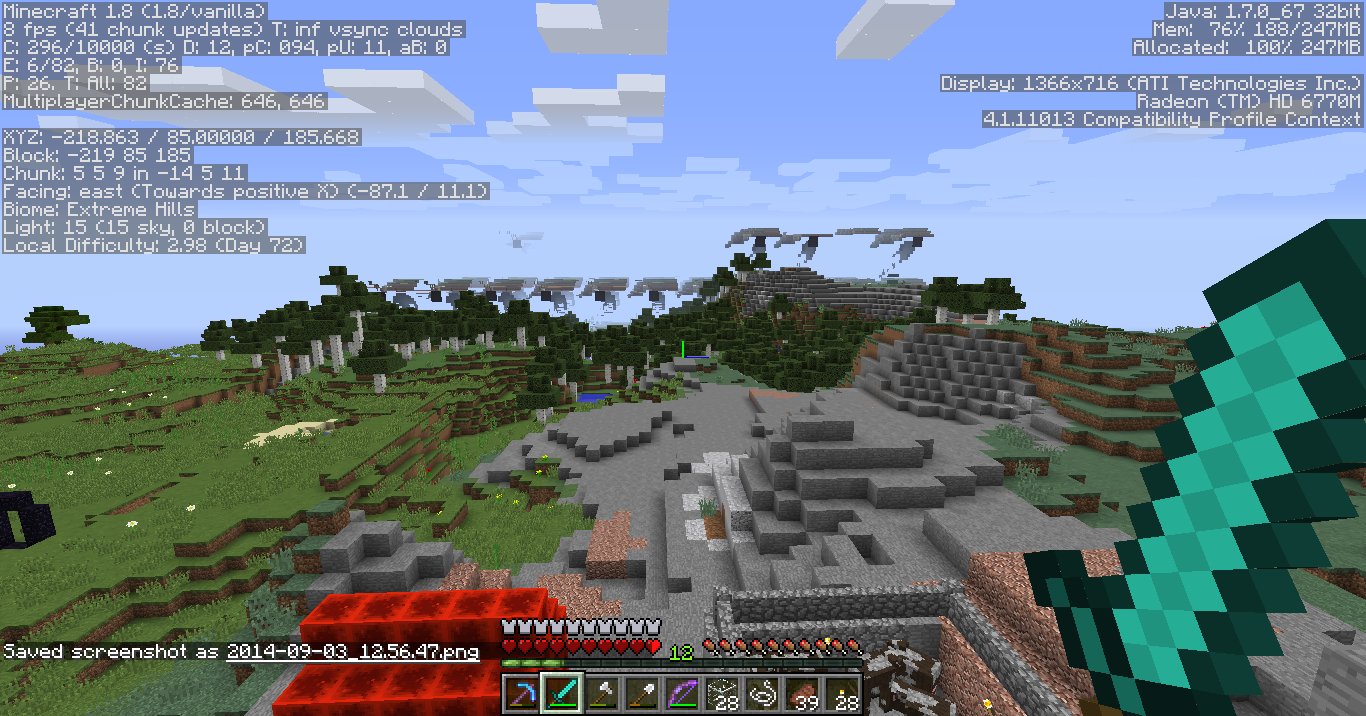
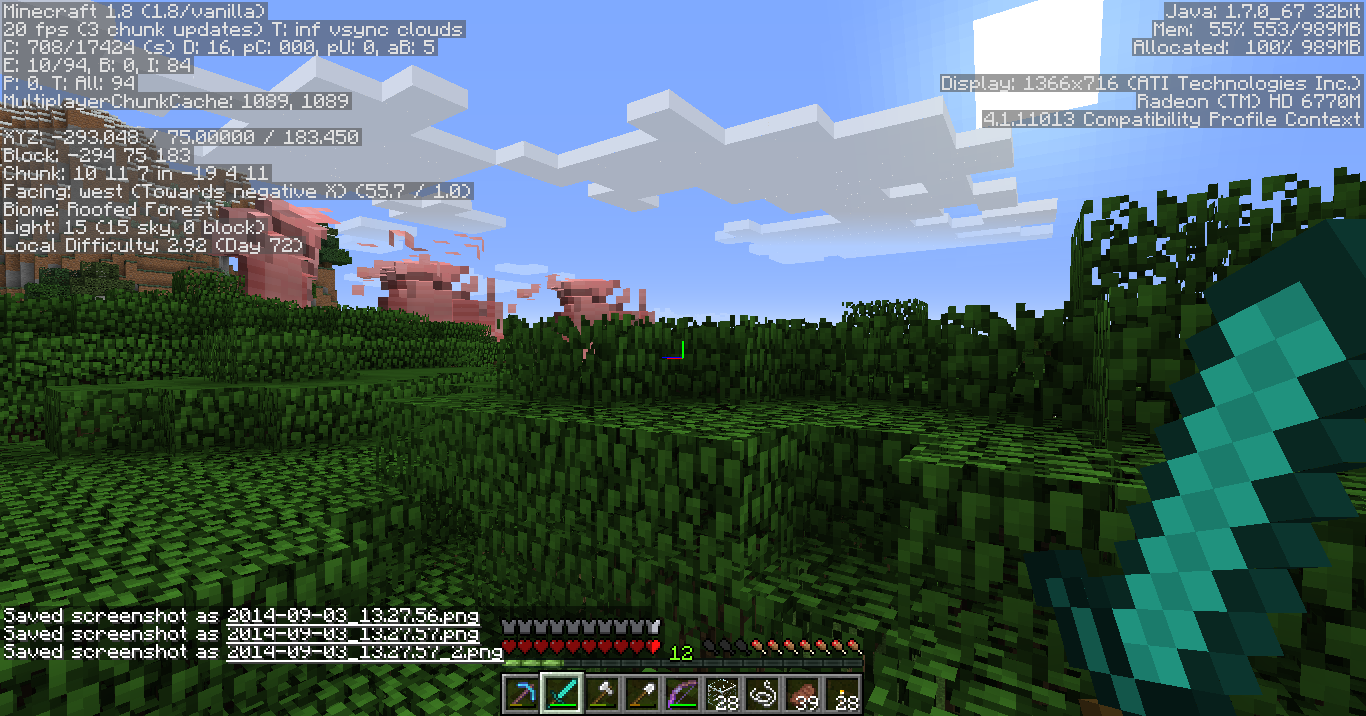
I didn't notice this particular glitch until the day 1.8 came out, and it only happens on one of my computers: an HP Pavilion dv6-6173cl Entertainment Notebook PC with hybrid video card ("high performance" card = ATI Radeon 6770M, "power saving" card = some kind of an Intel HD).
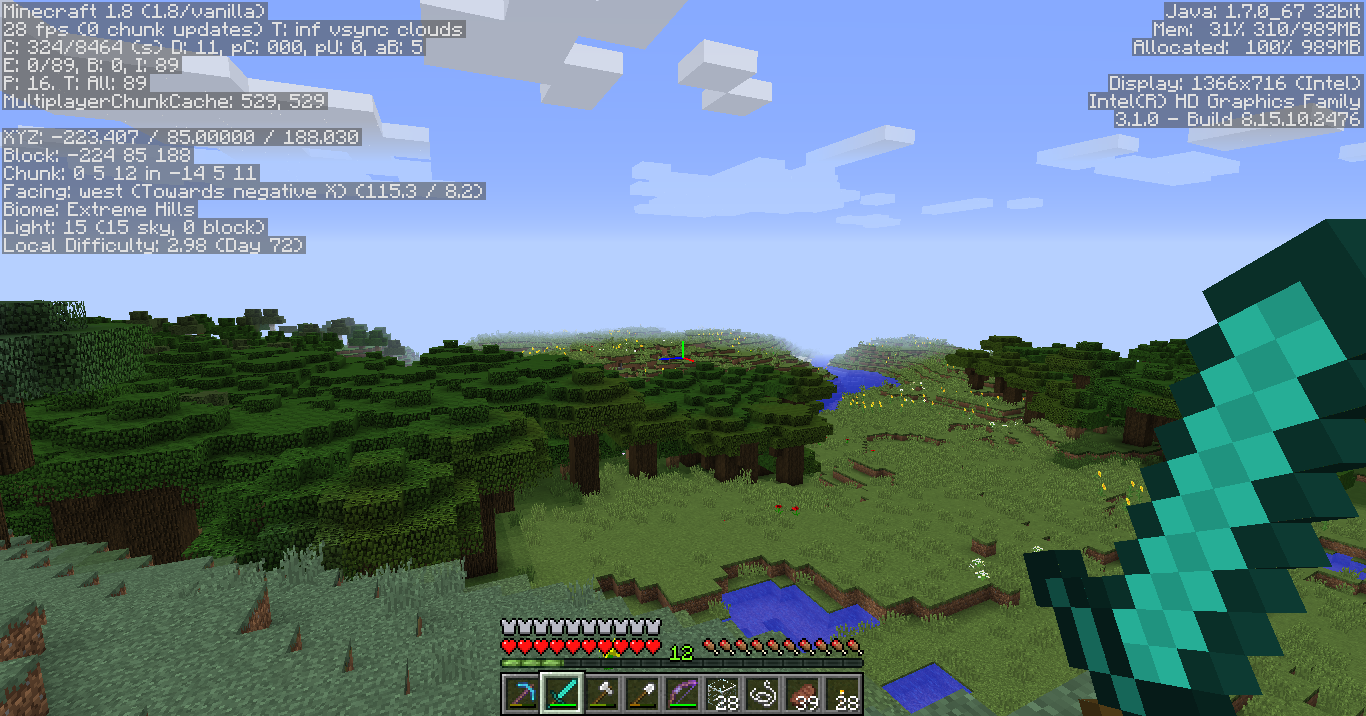
I am running 32 bit Java on 64 bit windows (this computer requires it for work reasons). The symptom only happens when the hybrid video card is in High Power (ATI) mode. The symptom does not happen on view distances less than 10 chunks, and is noticeable on view distances 11 or greater up to an allowed maximum of 16.
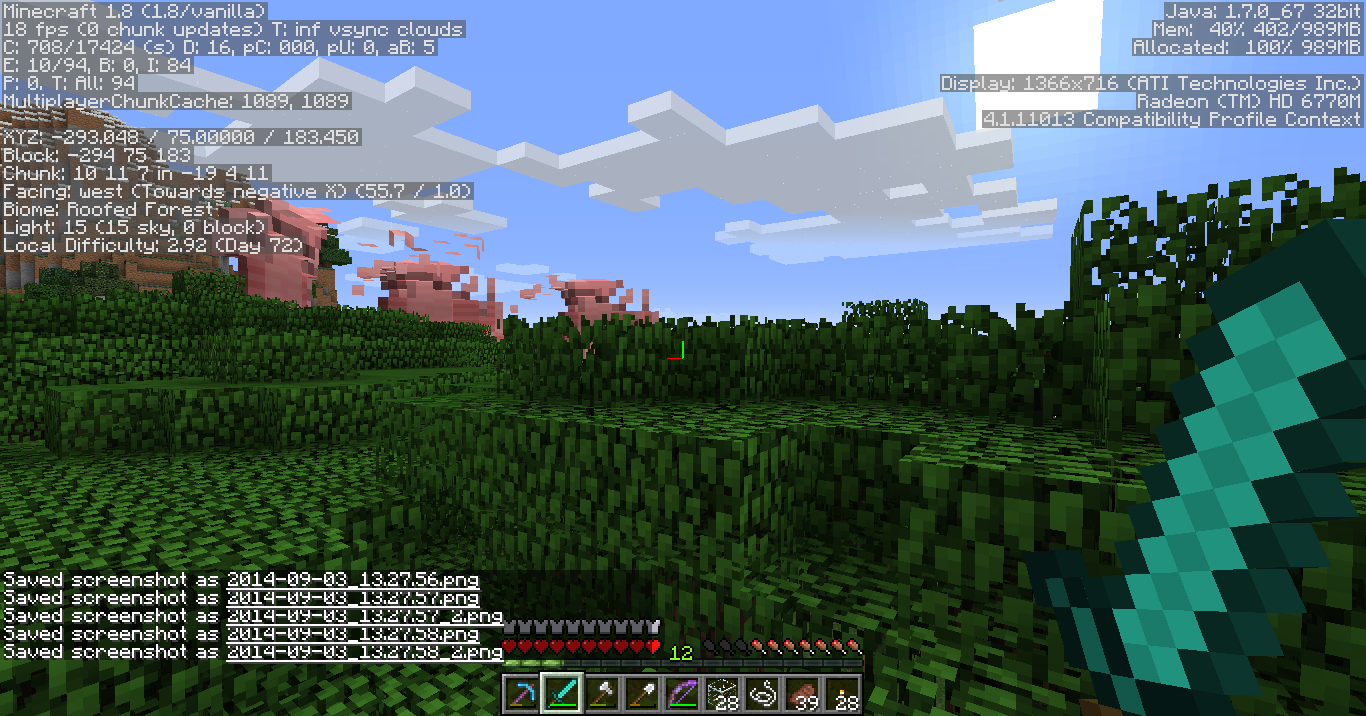
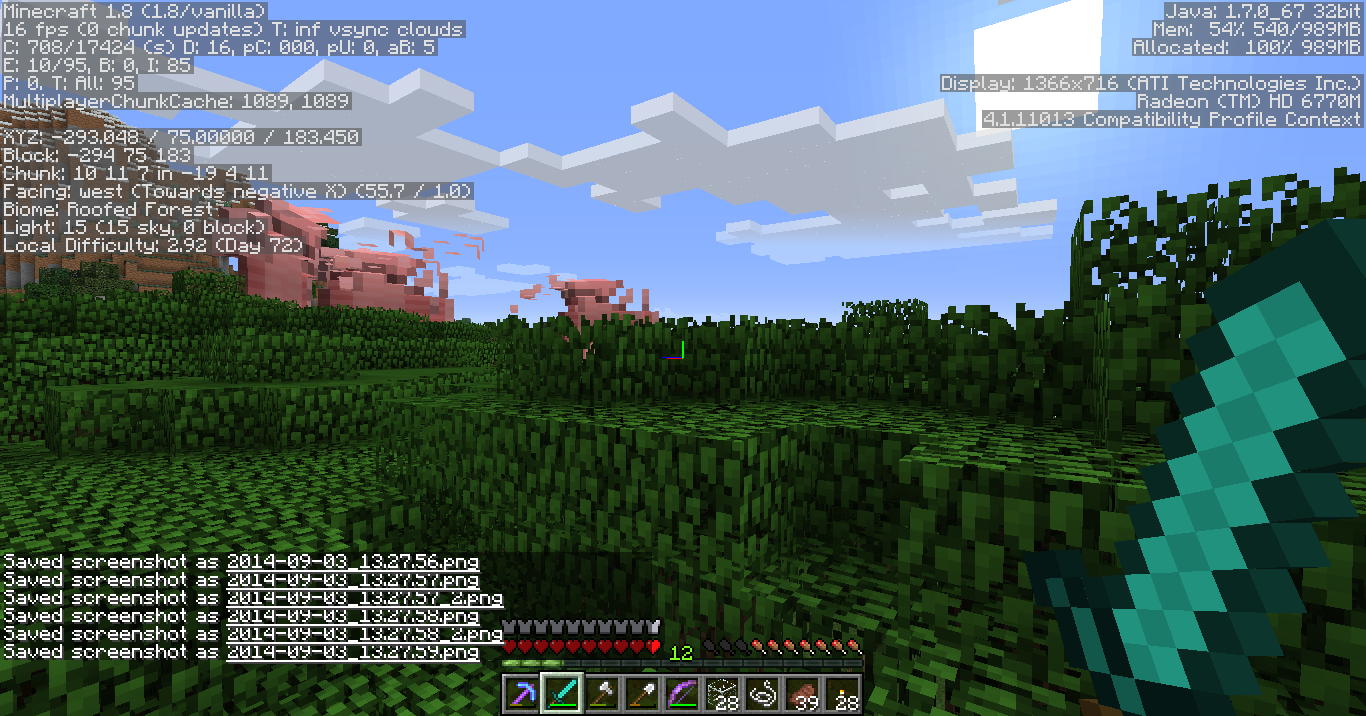
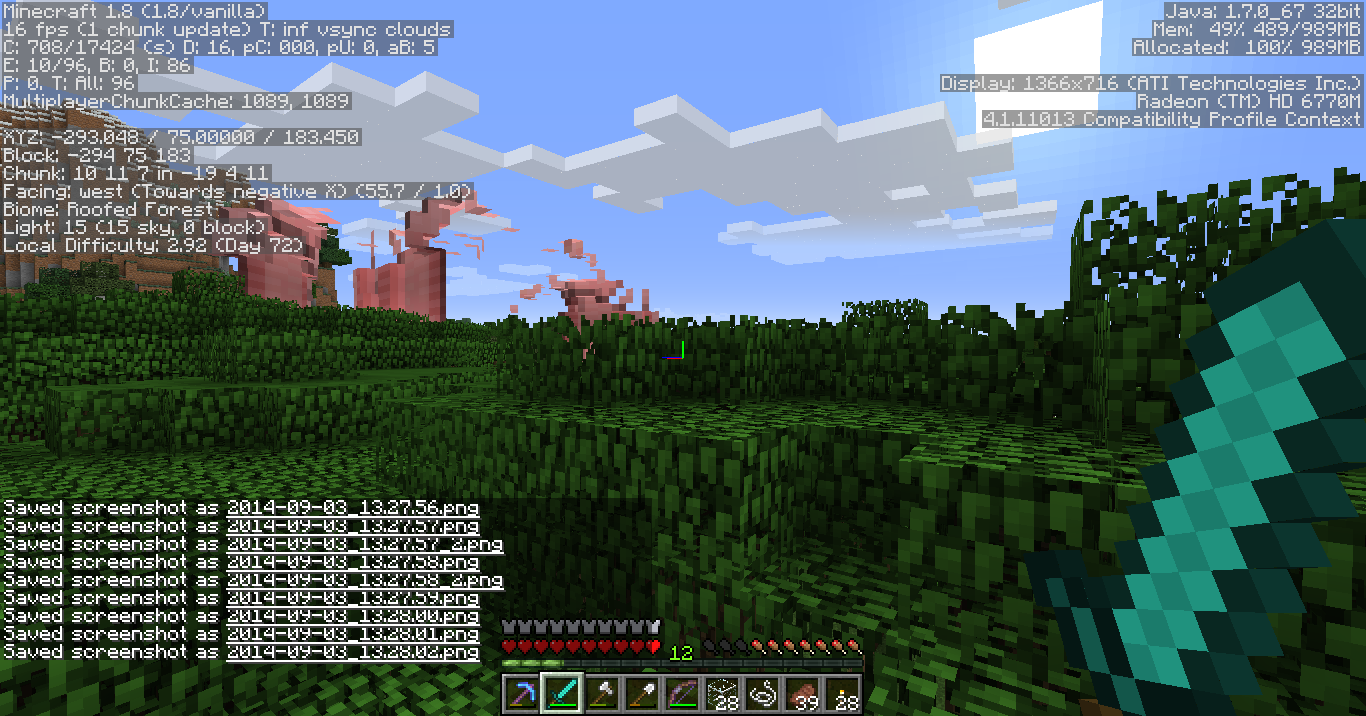
Have tested and confirmed on both SSP and SMP. Result of symptom is that certain chunks visually glitch out (physics and hitboxes not affected). One of the more common patterns is that entire ZY planes of 3d (16x16x16) chunks, any that contain non-air data, all try to display the same chunk contents (eg: part of a villager house; a segment of the ground with a slice through stone, ores, dirt, and dark caves facing you; dismembered leaf block arrangements, etc). The chunk contents they all simultaneously try to display can change dozens of times per second, are more easily agitated by player or head movement, and sometimes just get stuck on one pattern no matter how you move around.
Raising view distance above this seeming threshold of safety (10 in my tests) leads to the glitches becoming evident. Higher view distances induce greater parts of the landscape to glitch until at view 16 (and possibly only for locations >16 chunks from spawn) every visible chunk will glitch.
I will post a bunch of image attachments demonstrating this including one gif animation I compiled.
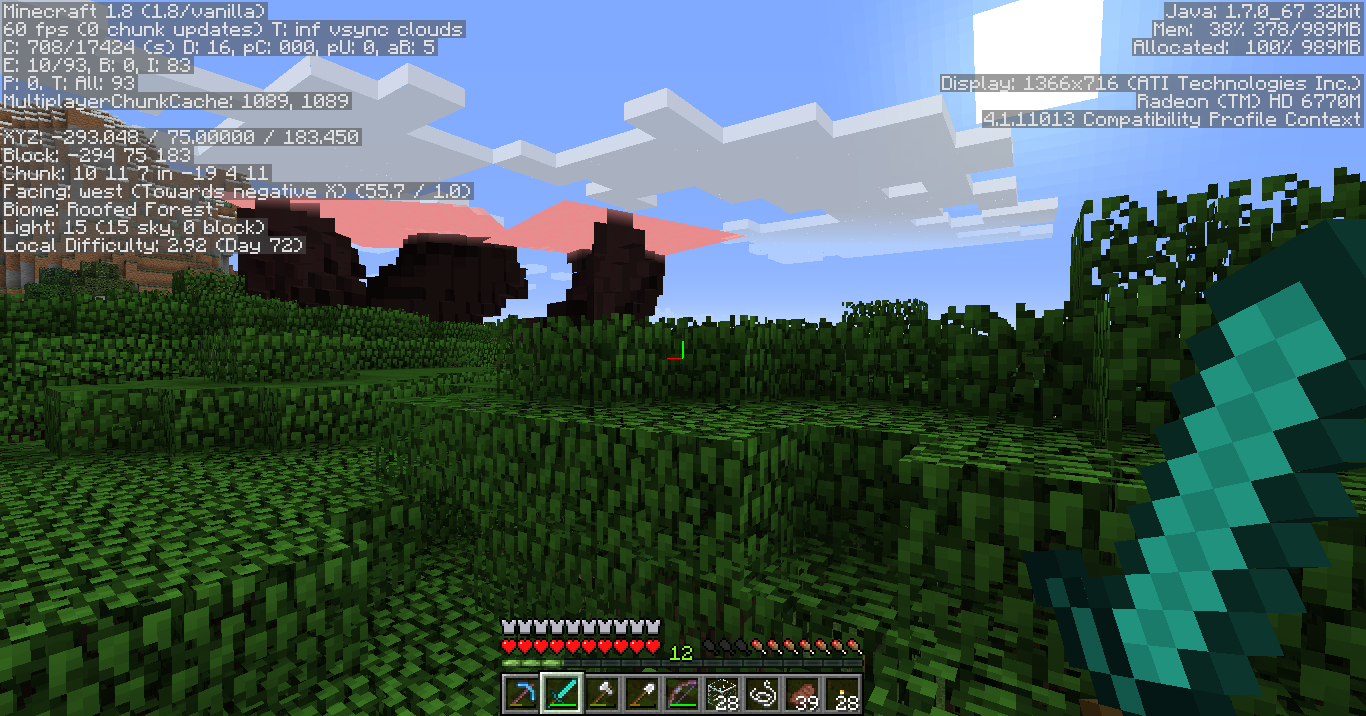
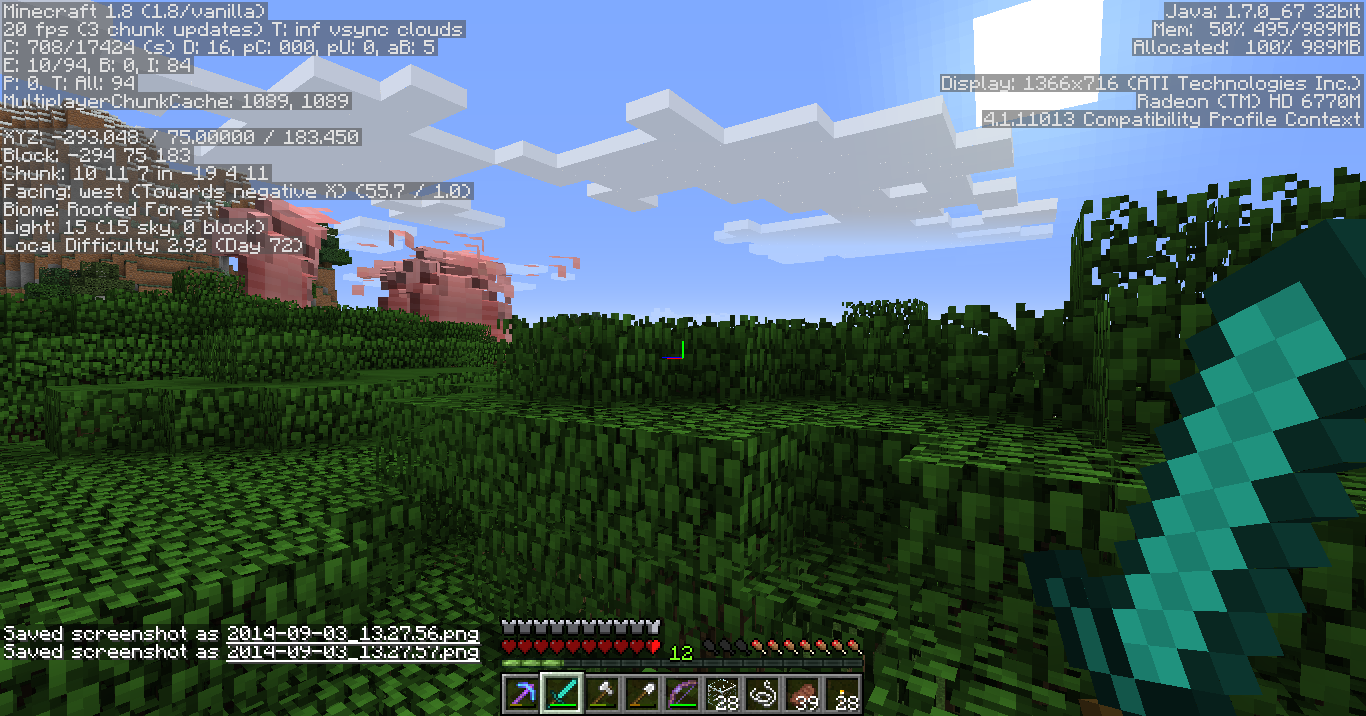
UPDATE: while gathering additional data for this ticket, I've somehow altered my symptom reproduction parameters slightly. 1> my safe view distance got bumped up to 12 chunks, I can't seem to repro now until I hit 13 chunks 2> in addition to chunks glitching, at 13+ mob models appear to glitch as well. They remain rectilinear, but become very large and shuffle through large rectilinear shapes temporally in sync with the landscape glitching. In fact, sometimes their body parts almost resemble landscape chunks.. save that they rotate soothly about like head movements etc and that sometimes you can recognize pig skin or skeleton texturing on the huge, intrusive (terrifying) things.
Snapshots demonstrating corrupt mob models are everything between 2014-09-03 13:27 and 13:30.
I'm sorry StevenNL2000, both what I am reporting and the other comments I see here do make this look like it's basically identical to
MC-62958, but logs show you marked duplicate and then unmarked duplicate directly thereafter.I am interested to hear your mind on this matter? Also, given that I appear to be able to reproduce this somewhat easily, let me know if there are any particular tests I could run to help gather more insight on the matter.
Oh, Say Alan .. do you have a seed for your world so I could try to reproduce the same?
Yep, confirmed. And the circumstances surrounding your vertical overculling behavior are quite curious, and show several differences from my horizontal example.
First fun thing to try: dig your hole in the cliff face exactly one block higher. Then you don't even need a waist high block in front of you, you can trigger the bug just by being in a 2x1 hole and looking far enough down to your feet. ;3
2. From where you stand to cause bug, dig sideways to the left as far as you like and as long as you can dig forward without moving your feet and reach open air, you'll still be able to reproduce the bug from this new horizontal position, too.
3. I've tried a few simple things editing the surrounding environment with no luck yet altering how the bug presents. I've tried stopping up the lava flow, filling in all of the caves to the left, digging a new cave in the field of view where the bug occurs, but I got fatigued because of constantly flying away from the important framing viewpoint to make decisions on what to change. If I could somehow leave one monitor with a player standing still and reproducing the bug in my RL view while I used another monitor and player to venture out into the depicted area to vandalize the landscape I could explore the limits of this effect somewhat more easily. :J
@redstonehelper, does this mean you have found an instance where the following occurs?
1. find a well chosen position to stand at
2. do something to change your FOV that involves not moving the mouse
3. Directly view culling errors as a result (eg, chunks not viewable due to new FOV)
and then the all important step 4:
4. upon moving the mouse, the culling errors go away, or chunks begin to be visible again .. respecting the new FOV.
I have never encountered this described test situation so I would love to see an example.
In my analyses so far with this bug up to 1.8 release, part of the base problem (both here and
MC-63020) is that the culling algorithm absolutely ignores any offset of the camera position to outside of the player's head, and any changes to FOV under any circumstances. The culling algo does appear to respect direction that the camera faces, though often that consideration is only updated after a mouse move.Lemme know if you can offer a way to repro this claim red, this is a bug I love digging at and learning more about. <3
@redstonehelper Thank you sir, that did answer my question. :3
confirmed 1.8.1-pre3
I can confirm that the issue still affects 1.8.1-pre3, by going into creative mode, going deep into some water and turning on night vision.
Fixing this bug may have dropped significantly in popularity now that the void (which was the easiest place to see it) has stopped showing fog and particles.
@Grum: as of 1.8.1-pre4 AFAICT the reproducibility of this bug is still 100% identical to that of
MC-63020, so I'll repeat the test case I posted on that ticket to here.Here is a world save (superflat with a simple mineshaft dug in it to find amenable coordinates): https://docs.google.com/file/d/0B57wgZSp2XofSXc4V1BLc1c5aU0
When you load that, player will be at exactly the correct position and rotation to reproduce bug
MC-63020. To instead reproduce this one (MC-63070) you need only press F5 without touching the mouse.In behind-the-head view, incorrect culling happens precisely as it does in
MC-63020, as game's culling math assumes camera is still inside players head instead of translated to a point behind it.If you go into selfie-view while being careful not to touch the mouse, then the culling math still does not yet change. Whatever chunks
MC-63020left missing, are still missing. but, as soon as you touch the mouse in any way, that is when culling algo decides to notice that the view has somehow updated and all the chunks behind you snap back into place.It sounds like the initial culling issue in
MC-63020may be challenging for you to fix, but at least registering F5 as an update on the same level as a mousemove would cover what we are reporting inMC-63070. shrugsGood luck sir,
It is a view which offers absolutely zero utility not already covered by third-person view aside from insinuating the avatar's personal portraiture into the scene.
This view has zero uses aside from taking selfies.
Selfie-view.
http://i.imgur.com/dE352bg.gif
confirmed 1.8.2-pre1
Also, I notice in the "environment" tab it mentions Windows 8? I am confirming this bug on (probably jre-7) 64 bit java on Windows 7, and since it appears to be a direct bug in game logic I doubt it will be any different on any other environment for the PC version of the game. :J
Happy Horlidays gais!
Confirmed 1.8.2-pre1
confirmed 1.8.2-pre1
I got an email with your first comment too, it read:
> Happ, the only two reasons as to why you think it can still be reproduced is 1, your Java is outdated, and 2, your graphics card dates back to 2009.
> I, on the other hand, am running Java 1.8.0_31, and my graphics drivers have been updated to Catalyst 14.12.
This ticket does require some clarification.
The issue I initially discovered where view does not recalculate direction when F5 is pressed to transition from "behind the head" to "selfie" mode I can confirm has been resolved. I kind of forgot that was one of the ingredients too, lol. ;3
However direction is only part of the issue driving
MC-63070and differentiating it from it's brotherMC-63020.Still in the line of fire is that culling calculations are performed from the player's head coordinates instead of the camera coordinates. That leaves
MC-63020with the business of overculling even at those coordinates, and kind of makes the bugMC-63020an easy way to test ifMC-63070is fixed or not (and vice versa, as it happens).Here are some screenshots continuing to demonstrate the behavior in 1.8.6-pre6, with Java 1.8.0_31 64 bit, on a completely different computer with a newer video card (GTX 650 Titanium). First is in behind the head view, second in selfie view. http://imgur.com/a/Kbneq
Now if you were to march your character's face over to the corner of the cave where I've placed the camera in these shots, then all of the chunks would be visible just fine. In fact, here is a screenshot of just that, too: http://i.imgur.com/R7L3SBf.png
Sonic, if you think this isn't reproducing for you, I would appreciate it if you could try out my testcase here, and possibly get some screenshots: https://docs.google.com/file/d/0B57wgZSp2XofSXc4V1BLc1c5aU0
Load that world as singleplayer, and don't let the crosshairs move or move your feet as it finishes loading in. If you can see the sky near the right side of your screen, then you are already reproducing
MC-63020.Now turn around with your mouse but don't move your feet, so that you can get a good look at the small hallway you are in. Face your character squarely toward the end of the hallway you are in (as though your character were in time-out, or something. Bad Steve! lol) and then press F5. If it appears as though your 1x1x2 end of the hallway is floating in the sky, then you have successfully reproduced
MC-63070. If not, then at least try moving the mouse about until you are certain the camera is at the opposite end of the hallway from you, similar to my screenshots.As of 1.8.6_pre6, I confirm that carefully not moving the mouse as you press F5 brings you to a selfie-view where you now can see the hallway behind your face, this means that the game re-calculates the direction of view on keypress, but location of view is still borked because if you turn 180 without moving your feet you'll see that chunk disappear once more while your face smiles to the camera as though it's proud to be floating in the sky instead of it's physical location which is underground.
If you do move your feet, you'll find the
MC-63070bits easy to reproduce again by just making certain that the center of your character is in the 1x1 square meter at the end of the hallway (Block -9 83 16) while your camera is at (or near) the other end of the hallway. TheMC-63020bits can be a lot pickier based on how close to the edge of the square you stand combined with exact angle your head is tilted, because only at the extremes do overculled chunks actually intersect your field of view.So lemme know what you find, thanks for your input Sonic but I am definitely still repro'ing this for 1.8.2_pre6. :3
EDIT: fixed name of version: it's not "1.8.6_pre6"
Ymus have you tried my test case mentioned in last comment? I'd love to see a screenshot of it working, basically for anyone. I believe this is a game logic issue and thus should be pretty hard not to reproduce when the steps are followed.
Problem persists in 1.8.3.
Sonic, are you trying my test case world as I've recommended?
All of my test platforms run Windows 7 64 bit.
Can we get a screenshot of you in my testcase world, facing camera, camera positioned at far end of hallway like I did? I am basically convinced that it is impossible for Minecraft to render this scene any differently — regardless of OS or Java version or any niggling low level considerations — due to the raw game logic culling from the perspective of the player's head even though the camera is physically elsewhere in space.
If you could demonstrate with a screenshot that the same scene gives you different results then that should add volumes to what we know about this bug.
Thanks for your help, Sonic! :3
MC-63020confirmed 1.8.3MC-63020confirmed 15w31aMC-63070confirmed 15w31aMC-54119confirmed 15w31aconfirmed 15w33c
confirmed 15w39b
confirmed 15w40b
Confirmed 15w40b
Be advised, the variant of this bug that I am primarily reporting on because it's the easiest for me to reproduce (EG: the third-person variant of
MC-63020) may not stem from precisely the same cause that the variant Dobypeti is reporting on. :3confirmed 15w43c
(say, is there a way I could be set to just update version on this one mahself? :3)
Is it worth just merging this one with
MC-54119?The problem is basically the same root: different kinds of actions beyond the worldborder that the client-code thinks are legit while the server-code refuses.
While I can replicate "putting lilypads beyond worldborder", it is a phantom lilypad. Messing with the stack in my inventory causes the "missing" one to re-appear, and re-logging causes the phantom one I put beyond the worldborder to vanish. This is basically identical to the phantom water/lava I can place outside, and the phantom holes in water/lava I can scoop up from
MC-54119.At the end of the day there simply exist a stack of interactions like this, that client code allows while server code rejects, and all of them should be eliminated by syncing up behaviors between the code bases. I don't know if every variation is best expressed as a separate ticket, though?
What are your thoughts, SteveKunG? :3
I want to know if there is some way to just disable the cheat protection. It's my server, and I'd rather have cheat protection broken (and thus disabled) than access to anywhere beyond the overworld broken.
Mods: may I be set to reporter on this ticket so that I can keep affected versions up2date?
Mods: may I be set to reporter on this ticket too, so that I can keep affected versions up2date?
@redstonehelper I don't know if @Mateusz Niedrowski is still active here, no comments since initial report.
Confirmed 15w44b
Confirmed 15w44b
My experience with this bug as recently as 15w46a on Survival Multiplayer is that if you are alone on the server, it seems less liable to trigger while if there is another player, and if she is within load distance of your destination portal, the chances of replicating the bug become nearly certain.
It's become predictable enough that we can try to use the portal knowing another person is near the far end, experience a bounce at least 9/10 of the time, ask other person to briefly log out, then go through the portal with nearly 100% chance of success and let them know it's safe to log back in.
I do not think the cooldown time will (or certainly should!) make a difference since when the bug does not trigger — as should be the case — you can stand in side the portal blocks in the destination portal indefinitely and experience the visual warble effect and purple swirls but never travel through the portal again. What has to happen is that first you leave the portal blocks for at least one tick, then come back, and then there is a timeout.
I am not convinced that this cooldown mechanism is either broken or lagged. When I bounce back to source portal, it normally happens in less total time (several seconds less) than not bouncing, spending a split second leaving contact with portal blocks before re-establishing contact, and waiting for timeout to move me again. I am fairly certain the game is sending you back as some sort of a "last known good position" feature due to detecting your character "moving too quickly" instead.
@Wyatt Jackson: but in the current iteration of the bug, I (and I would guess basically everyone else ever) have already tried holding a directional key from the moment the screen cuts away from the source dimension and begins the dirt texture loading screen. In my case, the entire layout of my nether portals supports this: both are in closed off rooms against a wall, coincidentally such that if you face the wall in one world you will be teleported into the other world facing the center of the room. So all I do is hold the forward key into the portal, taking me through the portal block until my nose is mashed against the wall and I continue holding. In cases where this bug bounces me back (in my case this is normally when another player is in the far dimension with chunks loaded) I land back in my source portal still grinding my nose against the wall. I never bounce twice or wind up in a "loop" as others here discuss, probably because there's never another player at both ends of the portal simultaneously.
If the bug does not bounce me back, then my key holding rockets me out of the destination portal at walking speed into the safe, closed in room on the other side. Again: basically only when no other player is nearby in the destination dimension.
I just added a screenshot from the same area as the youtube demonstration (SMP server) with full F3 information visible.
I've also just created a fresh Creative, Single Player (CSP) 15w47c world and confirmed that the effect happens in the nether there.
THEN I just re-oppened that same world in 15w47b and tried very hard to reproduce the visual glitch, but I could not.
It appears to happen ONLY in 15w47c.
Thank you, I looked for that setting initially and couldn't find it but upon being encouraged to look again I did find it. Unfortunately problem does continue, even the bit about changing with distance, so I've removed all mentions of mipmap that I could find in the ticket description.
I did find a few more (and sometimes even easier) trigger conditions and posted them in the primary description. :3 Put simply: Block updates that alter lighting data seem to do trigger the bug too.
Update again, I stopped a lava cascade off of a high place and then long after the lava had vacated the area wondered about why the textures were still flipping around in the general vicinity on my plateau. I couldn't even look down from any comfortable vantage and confirm any more lava was receding, so it couldn't have been within flood fill distance.
After a minute I found a different perch (looking for how a fortress was situated relative to nearby cliffs) and noticed the receding cascade still very slowly shrinking. Looking up, I could tell every block within ~16 blocks horizontally but even a hundred blocks vertically continued to glitch and shift. Blocks farther than a guestimated 16 horizontal were not shifting (or, at the very least, shifting once or twice per minute instead of once every one or two seconds )
)
I am uploading 2015-11-22_16.30.18.png which is an F3 on my work laptop. My work laptop does not demonstrate this bug in 15w47c, while my home computer does.
Please let me know if there are any good ideas of data I can try to gather about the difference between these two computers. Both run Windows 7 64 bit, but the affected home computer runs an Nvidia GeForce GTX 650 Titanium while the not-affected work computer runs an ATI Radeon HD 6770M switchable graphics laptop video card with apparently non-upgradeable firmware.
Both should be using precisely the same Minecraft settings since I sync my entire %appdata%\.minecraft folder (among many others) between the two computers in between invocations.
Wish/command, here is my home computer with fully up to date driver (build 359.00), also figured out how to cook a quick animation into a webm instead of leaning on youtube for once:
http://gfycat.com/RepulsiveCoolDoctorfish
Thank you sir. :3
In case it helps, I have posted another video detailing a completely clean and maximum reproducibility test scenario:
https://youtu.be/VJVPfVi4_cw
Following the video instructions you can create identical test world from scratch, or download a save that puts you right at the meat (where you should instantly start seeing some glitching just standing there watching) at the following link: http://lightsecond.com/pub/MC-93167.7z
If this is not enough to bring out any glitching on your system, then I guess you are just not affected after all.
I also noticed during early attempts to record this that when I had many other applications running, enough to lag minecraft, the glitches became much harder to spot. It may benefit you to ensure Minecraft is not competing for resources on your system. Close unneeded processes, and reduce render depth if you must, I have tested with as low as 7 chunk depth so far.
Thank you and good luck. :3
Here you go, Grum.
When I first noticed this problem/glitch, it was the Void Particles near Bedrock. I was accustomed to mining around and seeing particle motion like in this clip from 1.4.7: http://gfycat.com/RealisticAlarmingFly
But then as of the very next update, the particles would appear for one brief frame, and then jump over the course of 2-3 frames @60fps to a new location roughly to their NorthWest before stopping at a new location and then finishing their "journey" for another second or so prior to fading or disappearing. This behavior spans many many versions, but the last version we can still access that shows it fully is 1.7.10: http://gfycat.com/FrenchBouncyDobermanpinscher
By then I was reporting and confirming per version, but I open up 1.8.1-pre3 and see the equivilent of this: (1.8.1): http://gfycat.com/WindingJadedGemsbok
Void particles have been summarily removed. :O
So, I found a new way to confirm that the particle glitch still happens, but now the test is a lot harder and I never encounter the effect in regular gameplay because the void particles were the primary way to see it.
Nonetheless, I can confirm even 15w47c continues the bug.
Steps to reproduce these days: open creative mode, either drink a potion of night vision extended (older versions) or it's going to be cleaner to use an "effect of night vision" command and turn off the obnoxious effect-particles in newer versions. Find water at least 8 blocks deep or so. Dunk down into the bottom. Look down near your feet and press F5 for behind the head view (when you have potion/effect particles spamming your view this helps limit the attention-drawing noise that they generate, but also gives you the best view of the water particles).
Looking down past your head to the ocean floor at a steep angle helps make the particle-glitch a lot easier to notice.
As of 1.4.7, no problem the particles appear, potentially float around by a millimeter or so, and then vanish.
1.4.7: http://gfycat.com/WhoppingGregariousGreendarnerdragonfly
For every newer version, the particles glitch towards the NW prior to settling into their ordinary behavior.
1.5.2: http://gfycat.com/ImprobableOptimisticDobermanpinscher
1.7.10: http://gfycat.com/CautiousOddballKouprey
(Starting with 1.8ish, the noisy potion particles I was too lazy to suppress here stop just wafting upwards and begin to waft out much more aggressively, lol!)
1.8.8: http://gfycat.com/BonyDisfiguredHornet
15w47c: http://gfycat.com/SoreHomelyBasilisk
Here are the save files I made for each of these test scenarios. In both, you should already be in the right place. Underwater, you have night vision active for several more minutes and a bottle of it in you hand to re-quaff at will. Underwater you WILL need to press F5 to set the behind-the-head view, as that is not saved with the world. In Void Particle save, you don't gotta do nothing but sit and observe. xD
http://lightsecond.com/pub/MC-12269%20void%20particles.7z
http://lightsecond.com/pub/MC-12269%20underwater.7z
Yes it does, 15w47c confirmed.
Confirmed 15w49a
Confirm appears to be fixed in 15w49a, still easy to reproduce in 15w47a but cannot for the life of me reproduce in 15w49a. :o
I see here it's already marked as fixed, too.. so what was it? Not just my rig being strange, eh? ;3
Confirmed 15w50a
Confirmed 15w51b
Confirmed 16w02a
Confirmed 16w03a
Roger that, Mathew. I have recently been able to confirm the same symptom happening to different games (like Far Cry 3.. try to right click to bring up scope on silenced sniper rifle, automatically it fires giving away your position! xD) and I have not ever yet been able to reproduce on a different computer in Minecraft.
I would like to close as "hardware issue, only affected reporter" or "false alarm" or whatevers but I'm not certain how do dat. :o
PS: your OC looks adorable, Matthew. x3
Confirmed 16w04a
Confirmed 16w05a
Confirmed for 16w05a.
Are you still active +iftah gold, or may I be named reporter to keep this issue up to date?
Proposed solution: simply shorten the hitbox of these blocks so that points are not "within the hitbox" until they are lower than the foot position of mobs walking on the blocks.
Note: it appears as though in Minecraft 1.8.9 the creatures are harmed both on soul sand and on end portal frames, but that by Snapshot 16w05b only the Soul Sand harms them. End Frames are now safe.
Look,
MC-89928(coordinate / dimension mismatch) andMC-90605(bouncing between dimensions, possibly either caused or exacerbated byMC-89928) are at their core separate problems. The real question is: Yesterday the Fix condition for the bug I am commenting on (MC-90605) said "Future 1.9" while today it says "16w06a".Can anybody confirm whether or not the bouncing effect is happening in 16w06a or not? If so, then
MC-90605is not fixed. IfMC-90605is fixed whileMC-89928is not, then we need somebody to describe what now happens instead of bouncing. Do you get stuck in the wall at the wrong coordinates? Does everything work perfectly? What's up?I personally cannot easily test this because I've never been able to reproduce without multiple players on an SMP server.
Confirmed 16w06a
Confirmed 16w07a
Confirmed 1.9pre1
Same :3
Perhaps one variant of the chunk not rendering has been fixed, but the variant I have been testing has not.
Check back to this comment for my testcase: https://bugs.mojang.com/browse/MC-63070?focusedCommentId=208071&page=com.atlassian.jira.plugin.system.issuetabpanels:comment-tabpanel#comment-208071
Sorry, just to be clear half of what was described in that testcase has been fixed. It used to be that culling math did not update until you moved the mouse. They fixed that bit.
The bit that still remains to be fixed in
MC-63070in particular is that any "outside of head" view still culls from the perspective of the head, instead of culling from the perspective of the camera.That leaves sibling
MC-63020with the unique position of "wherever the culling is calculated from, it is possible, and easier with wider field of view, for some of the chunks you should normally be able to see to be culled". Folks have shown several examples above, most of which I cannot make easily reproducible, but the example I can make reproducible is listed above. Stand in a closed-in space right at the edge of the chunk the space is in, tilt head as close to 45 degrees horizontally as you can, and you can see around corners into culled areas.Here we go, let us know if this description sounds better? :3
Confirmed 1.9-pre3
Confirmed 1.9-pre4
Confirmed 1.9.1-pre1
Hello, Steven.
It is possible that you've discovered either a different bug, or a different variant of the bug than I have been reproducing. In my variant of the bug it would be impossible for chunks under the crosshair (in first or third person views at least) to ever become culled.
Can you find a way to reproduce the issue you are seeing? The major portion of the issue we have been chasing can be reproduced by the method in the discription of this bug, and also by the method in the description of bug
MC-63070(which is not the same bug, but a bug that this bug helps to enhance the visibility of).Or, if you start a brand new minecraft world do you see your copy of the bug at all? Or if you play minecraft from a different machine? I want to be certain your copy of the bug does not rely upon a certain specific save or a certain specific client environment.
Thank you, Steven!
Confirmed 1.9.1-pre2
Confirmed 1.9.1-pre3
While 1.9.1-pre3 is confirmed, the actual behavior has become a bit more complicated than it was in 1.9.1-pre2 and before.
it used to be, you use your bucket out of the border (to scoop up water or to place it) and on client side the water scoops or places (but doesn't flow) and your bucket looks as though it has scooped or placed. Then trying to use the bucket within the world border causes it to look as though you are scooping or placing for just a fraction of a second before the server over-rides client's view of the updated block(s) in the normal world (within border) and the bucket in your hand. EG: try to dump ghostwater onto land, you see the ghostwater on the land for a brief period before it vanishes and your bucket is left, now correctly, empty.
New behavior is: the first time or two you try to interact with world outside of border, client is corrected by server. But when you try again and again there is an increasing chance the client will get back out of sync and demonstrate the bug again (ghostwater or ghostempty bucket, with hole in water or standing water outside world border again). And THEN, sometimes trying to update bucket in real world takes a try or two as well! It's rather weird. xD
But it is not the desired behavior, which is A> Any time client gets incorrect world state server always and exactly corrects it, and B> client should agree on every gamerule with server (such as: no, you cannot f@#$ with things beyond the worldborder, Timmy!) reducing or eliminating any known cause of client getting incorrect worlds state to begin with.
Confirmed 1.9.1 + 1.9.2
As of 1.9.2, the slight complications mentioned regarding 1.9.1-pre3 appear to have lapsed back to older bug behavior again. That, or what I observed with 1.9.1-pre3 may have been a strange issue of IPC lag between client and server SSP. I don't view the distinction as important enough to justify loading up 1.9.1-pre3 again to clarify, unless somebody working on the code thinks that would be worth a look? :3
Confirmed 16w14a
Confirmed 16w15a
Confirmed 16w15b
Confirmed 1.9.3-pre1
Confirmed 1.9.3-pre2
Confirmed 1.9.3-pre3
Confirmed Minecraft 1.9.3 + 1.9.4
Confirmed 16w20a
Confirmed 16w21a
Confirmed 1.10-pre1
Thank you for that inspection, Marcono. I have added a link to your comment into the description as you've requested.
Does anybody know if comments or descriptions in mojira support BBcode or similar, so that I can label links instead of just spilling out complex looking URLs? ;3
Thank you Suncat. :3
Do you happen to know if waving my arms about in the comments will help bring attention to ancient bugs which ought to be either easy to fix, or like this one good canaries for solid client/server synchronization in general?
Reminder of why this bug would be good to fix, out of all of the ancient bugs:
It's sufficiently visually distracting to see parts of the world disappear that it even mars the videos of popular youtubers
It can frighten players to see sudden changes to large areas of the screen in the periphery of their vision. Making use of that form of jumpscare on purpose is fine — such as the specter of the elder guardian — but in cases like this it has no connection to the story narrative and does not train players to interact with the game in any sense.
Reminder of why this ancient bug is important to try to fix.
Primarily, it can be used to cheat. Sort of a poor-person's X-ray mod to peek into hidden caves and dungeons or to spy on other players from a hidden vantage point. Also it ruins my ability to take certain kinds of screenshots.
Also/also, it ruins YOUR ability, as a game developer to do very many different kinds of cinematic elements.
Suggestion: if it is (potentially) too computationally expensive to re-calculate culling from a flighty, mouse-driven camera location then alternately consider calculating culling from the entire sphere representing the potential positions of the camera? that won't have to recalculate unless/until the player moves either, and by roughly the same delta.
Plus, you could have a fix for most of
MC-63020if you swap out point eye position for a ~1m^3 sphere around eye position for free.Reasons to fix THIS ancient bug:
Primarily just because it reveals some very strange design issues with the NPC hitbox system that are liable to find other ways of making your life miserable if you only let them. ;P
Reasons to fix this ancient bug:
Making foggy particle systems look professional enough to spend any time looking at. Some time down the road you might want "freezing fog" as a game element, wouldn't that be tits?
Also, this bug most likely tells us that you've got two coordinate systems in the client which have glitched origin points relative to one another. One responsible for spawning each particle and a completely different one responsible for evolving the particles after they leave their spawn points.
Does it bump when I test a half a dozen listed issues on each snapshot release and add results to the listed versions field too? Because after a hundred snapshots or so it starts to feel like so many forms filed into a round bin.
OK, IIUC that means that comment + updating affected list emits two emails instead of one (which might be what FVbico was concerned about) but to people only paying attention to ordering tickets by most-recently-updated there won't be any appreciable difference.
I guess what I'm really after is insight into what the coders view as priority. I've been reporter for 6 (real, non-duplicate) issues. One was next to impossible to reproduce and only happened on one in a zillion computers but got resolved in two snapshots. The other 5 are globally reproducible, easy to reproduce and at least as annoying to experience as the one that got fixed yet go unresolved for years.
@Torabi
> Bugs are not all equally easy to fix. Some are just a single edit on a single line, other require ripping out and replacing code spread across the entire codebase.
Perhaps so, but this bug we are chatting in is a single-line fix, according to @Marcono1234 who has done a decompile and described the problem in this comment.
I just learned (and confirmed) something interesting.
The client-side mod Optifine (at the very least OptiFine 1.11 HD U B1) not only absolutely fixes this bug, but also it's cousin
MC-63070to boot.I have not yet tested older versions of Optiifine to see how long it's been fixed there, but I was lead to try this out due to a new chunk loading / culling finding that I've made.
Vanilla minecraft as of 1.11 makes some very very strange decisions about which nearby chunks in clear line of site it will keep unloaded for no well determined reasons. After trying out the latest optifine I noticed that while this problem may not be 100% solved, the odd choices are at least pushed quite a lot farther away from the camera.
@Judith Milgram
Well, the problem listed here (fixed by changing your VBO settings, as it happens) is limited to purely visual glitching.. seeing chunks appear or cycle in flashes either far away or even all around you, but the errors have no physicality. If you were playing blindfolded for example, you wouldn't even know there is a problem. All hit-detection and physical movement and block interaction or placement is unaffected.
It sounds like you are describing "big stone blocks popping up" that you can walk up to and interact with? If the erroneous blocks are actually present, you can't walk through them and you can mine them etc, then your bug is quite different from the one that we are discussing. :o
OK, I can report that this is resolved as of 18w19b. 👍
I would just do the thing to mark "resolved" myself, but I don't see where in the interface I do that. :o
As of 18w19b I can confirm that bug is at least more difficult to trigger. Not every right click of bucket will scoop up a liquid, though spam clicking or clicking at just the right angle facing a liquid can still do it. And I have not yet successfully been able to dump a liquid past world boundary.
So from a user-facing perspective (custom survival maps that use a tight worldborder) I would rate this bug as "much less annoying" now at least.
18w22a, While it is more difficult to dump a liquid past world border than it is to scoop it up, I have now confirmed that it can still be done when you try enough.
Plus a very curious side effect, when you make your bucket false-empty in this fashion, you can now use the false-empty bucket to scoop up liquid on the inside of the world border and create a new kind of "dead air".
Previously, if you scooped liquid inside the world border with false-bucket, client would render the liquid as scooped for only about one tick before server rejects client's interpretation and liquid re-appears.
Previously you could also scoop liquid outside of the world border, there would be no block update, and if you expanded the world border you could go into the standing hole in the liquid. It would act as a sort of "dead air", the client thinks there's no liquid there while the server does, client allows you to swim only where it thinks the liquid is, no bubble meter comes up when you submerse your head in the dead air, but after a time you do start to lose health as the server thinks there is liquid there.
Now, with dead air (which can now be created without having to first move the world border outwards) the new effect is that the bubble meter DOES appear, even though client still does not allow you to swim through the dead air.
All interesting stuff, but understandably all much harder to reach now that something blocks picking past the worldborder on ~97% of attempts.
Alright, while I didn't have that problem myself I've loaded the file in 1.13-pre5 and let it do it's conversion magic, and I've updated the description to have a link to the newly updated save file: https://drive.google.com/file/d/10MjcYT6X667OTNczi7ax2pw8e-qxl0qk/view?usp=sharing
Let's see if this one works better for you. Thanks, Steven.
As of 19w08b (NOT happening in 19w08a!) absolutely all minecarts at absolutely all corners (flat, no walls nearby, no other tracks or minecarts anywhere nearby) get stuck, derail, or bounce at absolutely every corner.
I tried to post a seperate bug about that but Jira just dumps me here instead, so I'll comment about it here.
OK, I can confirm this is fixed as of 1.14.3PR2.
Yay, I wonder if that's a sign that someone is now tackling the issue.
If they are, I'd recommend keeping in mind how this issue relates with
MC-63070(same problem except when camera position and player's head don't coincide) and with Field of View.The algorithm to decide which faces to cull as "out of view" ought to take FOV into account on one hand, and the position of the camera instead of the position of the center of the player's head on the other.
In circumstances where re-calculating what gets culled is expensive enough that potential wild swings of the camera become problematic, one could alternately calculate what ought to be culled from the entire filled sphere centered on the player's head with a radius of the camera's maximal distance from that point.
</armchair-quarterback-advice>