Chunks do not render behind the player in F5. Perhaps culling should calculate from camera POV instead of presuming head position.
AFAICT the reproducibility of this bug is still 100% identical to that of MC-63020, so I'll repeat the test case I posted on that ticket to here.
Here is a world save (superflat with a simple mineshaft dug in it to find amenable coordinates): https://drive.google.com/file/d/10MjcYT6X667OTNczi7ax2pw8e-qxl0qk/view?usp=sharing (link updated on 2018-06-29 to work with Minecraft Java version 1.13-pre5)
When you load that, player will be at exactly the correct position and rotation to reproduce bug MC-63020. To instead reproduce this one (MC-63070) you need only press F5 to enter behind-the-head view.
Incorrect culling happens precisely as it does in MC-63020, but the meat of this bug is that game's culling math assumes camera is still inside players head instead of translated to a point behind it.
Moderator Edit:
This issue covers chunk rendering in 3rd person only (F5).
For the issue with 1st person rendering or high FOV see MC-63020.
Linked Issues
is duplicated by102
 MC-62153Minecraft chunks ''unloading'' while changing F5 camera perspectiveDuplicateMC-63076When in F5 mode viewing your character from the front, a line of chunks behind your character don't render.DuplicateMC-63088Chunk Bug with 32 by "render distance"DuplicateMC-63108Dobble F5 no chunk renderingDuplicateMC-63110See through world. With F3 Correct Angle.DuplicateMC-63112New render bugDuplicateMC-63120Invisble blocksDuplicateMC-63125F5 camera viewthrough unloaded chunks: small exploitDuplicateMC-63133Can x-ray through world in third person viewDuplicateMC-63134Can see through blocks in F5 modeDuplicateMC-63153rendering bug in third personDuplicateMC-63162Chunk not render behind the player in thrid person.DuplicateMC-63165World doesn't render below you in 3rd person front viewDuplicateMC-63211The F5-Bug (2nd Person View)DuplicateMC-63255Chunk not loaded in the back of player [F5]DuplicateMC-63268Xray bugDuplicateMC-63285One chunks will unload behind youDuplicateMC-63311BannersDuplicateMC-63320Chunk's don't render in 3rd person modeDuplicateMC-63352Weird Chunk glitchDuplicateMC-63356Odd graphics rendering error when riding horsesDuplicateMC-63360F5 mode rendering bugDuplicateMC-63385Rendering bugDuplicateMC-63402Chunks while F5 Don't loading well.DuplicateMC-63406Unloading chunksDuplicateMC-63407World renders incorrectly in third personDuplicateMC-63427Strange drawing chunksDuplicateMC-63429Hello Mojang I've found an error in Minecraft Snapshot 14w30b I have 2x the F5 key is pressed and then I suddenly saw a chunk of was blue!DuplicateMC-63454error in chuckDuplicateMC-63457You can't see the chunk behind you when holding an item.DuplicateMC-63500f5 mode rendering issueDuplicateMC-63701Chunks not rendering behind/in front of player after twice/triple F5 without moving the mouseDuplicateMC-64041World not loadingDuplicateMC-64481Graphical LoadingDuplicateMC-65005Pressing F5 causes missing chunksDuplicateMC-65104In the new snapshot when you go into F5, the land behind you/infront of you doesn't load in until you move your body or head or until you wait for 2 secondsDuplicateMC-66895Changing Character view Bug.DuplicateMC-67284No-render bug (looking behind walls...)DuplicateMC-67360Glitch... that doesn't even have a name ...DuplicateMC-67404Chunk rendering glitch!DuplicateMC-68245Third person look bug the world loadingDuplicateMC-68722Renderer does not update when switching view mode (1st,3rd person)DuplicateMC-68756Perspective BugDuplicateMC-68844Switching between third and first person view doesn't update chunk view frustumDuplicateMC-69085When pressing F5, the world behind player only loads from when you move your mouseDuplicateMC-69259Chunk ErrorDuplicateMC-69352Pressing F5 Sometimes Reloads ChunksDuplicateMC-69803Chunks behind player don't render when switching F5 mode until camera movesDuplicateMC-69953F5 can couse a X-ray effectDuplicateMC-699623rd Person Render Distance [F5]DuplicateMC-71281Unloaded Chunks Behind Me?DuplicateMC-72952Chunk-Related IssueDuplicateMC-73471While sleeping blocks dont render.DuplicateMC-74237chunks not loading when looking down in a holeDuplicateMC-74269Snow Layers under a half a block causes chunks to stop renderingDuplicateMC-77797Interesting rendering bug (1st and 3rd person)DuplicateMC-79739Found a glitch where you can see through walls.DuplicateMC-85467Chunks will not render using F5DuplicateMC-85621Big Error "wall hack" without mod/cheatDuplicateMC-86040Third person white screen when look above blocksDuplicateMC-86800X-Ray BugDuplicateMC-87747Visual glitching when player faces a certain direction in narrow areasDuplicateMC-8810415w36d - Third person rendering bug...DuplicateMC-88406Xray glitch 1.9 15w37aDuplicateMC-99471F5 stacking up error | Blocks disappearingDuplicateMC-102250Chunk not renderedDuplicateMC-103401F5 key feature bugDuplicateMC-104053When in 3rd person view, certain chunks are not being renderedDuplicateMC-106753chunks unload in third person when they should notDuplicateMC-115346bug grafico cuando se usa el Quake proDuplicateMC-1154453rd and 2nd person bugDuplicateMC-116506Chunks Not Rendering in 3rd PersonDuplicateMC-117348Render bug undergroundDuplicateMC-117992If you press f5 on the border of a chunk you have x-ray vision!DuplicateMC-119430Terrain in third-person is invisible under certain conditions.DuplicateMC-121447Chunk rendering issues in F5 mode (Broken block rendering)DuplicateMC-122803Flat world chunk problemDuplicateMC-123332XRay in third person view across chunk bordersDuplicateMC-124246The game wrongly calculates what is visible to the player, and doesn't render everything because of itDuplicateMC-124420Setting your memory above 99gb and switching your perspective to third person in a corner of a solid block, it will XRAY through.DuplicateMC-125795When I press f5 part in a door part of the map disappearsDuplicateMC-129061Can somebody please explain what happend? DuplicateMC-129962Some chunks do not render in third person while in boatDuplicateMC-130686Half of rooms/caves not renderingDuplicateMC-130813Visual void chunkDuplicateMC-130816Blocks textures outside waterDuplicateMC-132045Hiding holes in a mine hole (easier to find in the third person)DuplicateMC-133113Weird third person mode glitchDuplicateMC-133298Xray BugDuplicateMC-134161Visual glitch when going under sea level in 3rd person on landDuplicateMC-134373Second & Third Person lookout out of water turns blocks invisibleDuplicateMC-134647Only 1 chunk loads inDuplicateMC-135787Bug F5DuplicateMC-135942X-ray in 1.13DuplicateMC-135984Ladder Chunk GlitchDuplicateMC-136045Boat rendering differentDuplicateMC-136123Blocks disappear behind Player when switched to F5 mode in a 2x1 block corridorDuplicateMC-136232F5 weird vision in a close spaceDuplicateMC-136860another chunk xray bug like MC-123332DuplicateMC-137092F5 rendering bug - black cube under playerDuplicateMC-141054Swimming on Water with Third-Person Mode Toggled makes Some Blocks Appear IncorrectlyDuplicateMC-141593See Through The RoofDuplicate
relates to5
MC-63185Chunk culling not updating when getting into bedFixedMC-46424Chunks not loading for mob camera viewAwaiting ResponseMC-60772Draw order of translucent blocks based on head position (not POV)FixedMC-63020Some chunks are not rendered in first person from some angles in certain situations (incorrect frustum culling)FixedMC-63025Chunks don't reload until the mouse is movedFixedAttachments14
![[Mod] Sonicwave](../../../data/avatars/users/94627.png)




![[Helper] Lord_Quadrato](../../../data/avatars/users/26105.png)


![[Mod] bemoty](../../../data/avatars/users/50554.png)
- Fixed
 Happ MacDonald
- Bob Saggot
![[Mojang] Nathan Adams](../../../data/assets/gravatar/dinnerbone.png) [Mojang] Nathan Adams
[Mojang] Nathan Adams- 75
- 25
- Confirmed
14w30b - 1.13.2
14w30b 1.8-pre1 1.8-pre2 1.8-pre3 1.8 1.8.1-pre1 1.8.1-pre2 1.8.1-pre3 1.8.1-pre4 1.8.1 1.8.2-pre1 1.8.2-pre4 1.8.2-pre5 1.8.2-pre6 1.8.3 15w31a 15w33b 15w36d 15w37a 15w40b 15w43c 15w44a 15w44b 15w45a 15w47a 15w47c 15w49a 1.8.9 15w50a 15w51b 16w02a 16w03a 16w04a 16w05b 16w06a 16w07a 16w07b 1.9-pre1 1.9-pre2 1.9-pre3 1.9-pre4 1.9 1.9.1-pre1 1.9.1-pre2 1.9.1-pre3 1.9.1 1.9.2 16w14a 16w15a 16w15b 1.9.3-pre1 1.9.3-pre2 1.9.3-pre3 1.9.3 1.9.4 16w20a 16w21a 16w21b 1.10-pre1 1.10-pre2 1.10 1.10.1 1.10.2 16w32a 16w32b 16w33a 16w35a 16w36a 16w38a 16w39a 16w39b 16w40a 16w41a 16w42a 16w43a 16w44a 1.11-pre1 1.11 16w50a 1.11.2 1.12-pre5 1.12.1 1.12.2-pre1 1.12.2-pre2 1.12.2 17w43a 17w43b 18w19b 18w20c 18w22a 1.13-pre1 1.13-pre5 1.13 1.13.1 1.13.2- 14w30c 1.8.1-pre4 19w11a
Created Issue:
Invisible chunks at certain angle in 3rd person
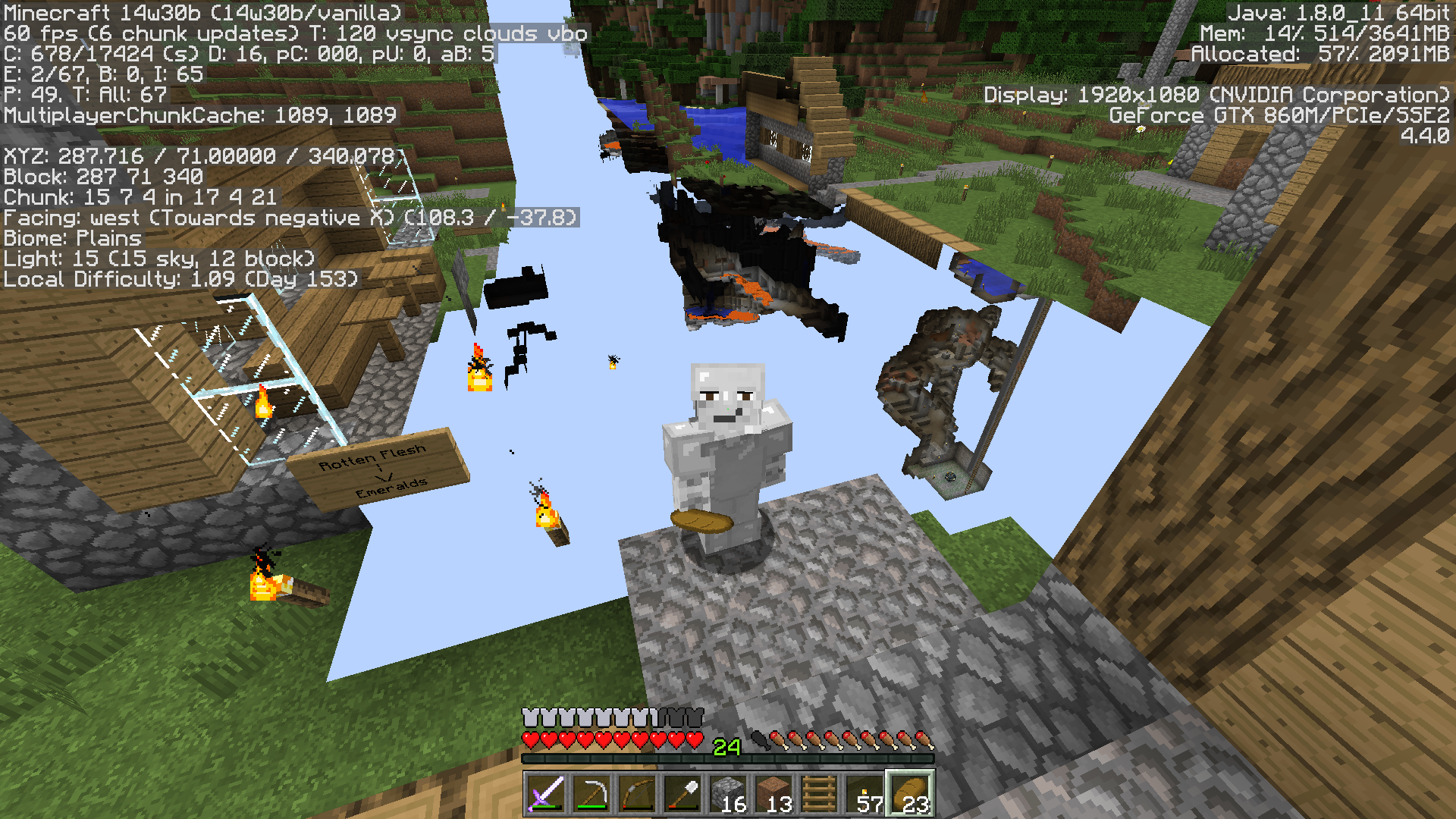
Screenshots say everything,
Attachments4

is duplicated by
is duplicated by
is duplicated by

relates to
is duplicated by
is duplicated by
is duplicated by
is duplicated by
is duplicated by
is duplicated by

is duplicated by
is duplicated by

Invisible chunks at certain angle in 3rd personChunks not rendering that should be (F5 mode or in corner of screen)
relates to
is duplicated by
is duplicated by

Chunks not renderingthat should be (F5 mode or in corner of screen)Chunks do not render behind the player in F5
ok ;c
Screenshots say everything,
Moderator Edit:
This issue covers chunk rendering in 3rd person only (F5).
For the issue with 1st person rendering or high FOV seeMC-63070.
Screenshots say everything,
Moderator Edit:
This issue covers chunk rendering in 3rd person only (F5).
For the issue with 1st person rendering or high FOV seeMC-630.70Screenshots say everything,
Moderator Edit:
This issue covers chunk rendering in 3rd person only (F5).
For the issue with 1st person rendering or high FOV seeMC-63020.
is duplicated by
is duplicated by
is duplicated by
is duplicated by
is duplicated by

is duplicated by
is duplicated by
is duplicated by
is duplicated by
is duplicated by
Chunks do not render behind the player in F5 until moving the mouse
is duplicated by
is duplicated by
is duplicated by
is duplicated by
is duplicated by
is duplicated by
![[Mojang] Grum (Erik Broes)](../../../data/assets/gravatar/grum.png)
Chunks do not render behind the player in F5 or changed FOV until moving the mouse
is duplicated by
relates to
is duplicated by
![[Mod] Neko](../../../data/avatars/users/92901.png)
is duplicated by
is duplicated by
is duplicated by
relates to
is duplicated by
2015-02-20_21.30.49.png
is duplicated by
is duplicated by
is duplicated by
relates to
is duplicated by
is duplicated by
is duplicated by
is duplicated by
is duplicated by
![[Mod] CubeTheThird](../../../data/assets/gravatar/cubethethird.jpeg)
is duplicated by
Chunks do not render behind the player in F5or changed FOV until movingthemouseChunks do not render behind the player in F5. Perhaps culling should calculate from camera POV instead of presuming head position.
Screenshots say everything,
Moderator Edit:
This issue covers chunk rendering in 3rd person only (F5).
For the issue with 1st person rendering or high FOV seeMC-63020.AFAICT the reproducibility of this bug is still 100% identical to that of
MC-63020, so I'll repeat the test case I posted on that ticket to here.Here is a world save (superflat with a simple mineshaft dug in it to find amenable coordinates): https://docs.google.com/file/d/0B57wgZSp2XofSXc4V1BLc1c5aU0
When you load that, player will be at exactly the correct position and rotation to reproduce bug
MC-63020. To instead reproduce this one (MC-63070) you need only press F5 to enter behind-the-head view.Incorrect culling happens precisely as it does in
MC-63020, but the meat of this bug is that game's culling math assumes camera is still inside players head instead of translated to a point behind it.Moderator Edit:
This issue covers chunk rendering in 3rd person only (F5).
For the issue with 1st person rendering or high FOV seeMC-63020.
is duplicated by
is duplicated by

is duplicated by
is duplicated by
is duplicated by

relates to
is duplicated by
is duplicated by
is duplicated by
is duplicated by
![[Mod] Pokechu22](../../../data/avatars/users/92931.png)
is duplicated by
is duplicated by
relates to
is duplicated by
relates to
is duplicated by
is duplicated by
![[Mod] Michael Wobst](../../../data/avatars/users/37868.png)
is duplicated by
is duplicated by
is duplicated by
is duplicated by
is duplicated by
is duplicated by
relates to
relates to
is duplicated by
is duplicated by
is duplicated by
AFAICT the reproducibility of this bug is still 100% identical to that of
MC-63020, so I'll repeat the test case I posted on that ticket to here.Here is a world save (superflat with a simple mineshaft dug in it to find amenable coordinates): https://d
ocs.google.com/file/d/0B57wgZSp2XofSXc4V1BLc1c5aU0When you load that, player will be at exactly the correct position and rotation to reproduce bug
MC-63020. To instead reproduce this one (MC-63070) you need only press F5 to enter behind-the-head view.Incorrect culling happens precisely as it does in
MC-63020, but the meat of this bug is that game's culling math assumes camera is still inside players head instead of translated to a point behind it.Moderator Edit:
This issue covers chunk rendering in 3rd person only (F5).
For the issue with 1st person rendering or high FOV seeMC-63020.AFAICT the reproducibility of this bug is still 100% identical to that of
MC-63020, so I'll repeat the test case I posted on that ticket to here.Here is a world save (superflat with a simple mineshaft dug in it to find amenable coordinates): https://drive.google.com/file/d/10MjcYT6X667OTNczi7ax2pw8e-qxl0qk/view?usp=sharing (link updated on 2018-06-29 to work with Minecraft Java version 1.13-pre5)
When you load that, player will be at exactly the correct position and rotation to reproduce bug
MC-63020. To instead reproduce this one (MC-63070) you need only press F5 to enter behind-the-head view.Incorrect culling happens precisely as it does in
MC-63020, but the meat of this bug is that game's culling math assumes camera is still inside players head instead of translated to a point behind it.Moderator Edit:
This issue covers chunk rendering in 3rd person only (F5).
For the issue with 1st person rendering or high FOV seeMC-63020.
is duplicated by
is duplicated by
is duplicated by
is duplicated by
is duplicated by
is duplicated by
is duplicated by
is duplicated by
is duplicated by
is duplicated by
is duplicated by
is duplicated by
is duplicated by
is duplicated by
is duplicated by
is duplicated by
is duplicated by
is duplicated by
is duplicated by
![[Mojang] Adrian Östergård](../../../data/assets/gravatar/nighter.jpeg)
The bug
If you are in a small enclosed room, which spans two chunks in the Z direction, but fits entirely within an X-chunk/Y-section, and you stand right at the chunk border, and turn your head, a portion of the world (the other chunk) completely disappears from view. I've attached screenshots. In all the screenshots, I'm standing in one place, but then barely turning my head, and the world disappears in the bottom left hand portion of the screen.
This effect can be seen more often with a higher FOV.
How to reproduce
Set up from MC-97509.
- Run in a superflat world:
/fill 34 8 30 40 12 36 stone hollow
/tp 36 9 32
- Look towards North (F3), check that you are standing on 4 9 0 in 2 0 2 side
- Slowly turn your mouse gaze away from the -Z wall towards to +Z wall
 Once your head turns 45 degrees away, the portion of the world in the other chunk stops rendering.
Another method is described in MC-165777.
AFAICT the reproducibility of this bug is still 100% identical to that of MC-63020, so I'll repeat the test case I posted on that ticket to here.
Here is a world save (superflat with a simple mineshaft dug in it to find amenable coordinates): https://drive.google.com/file/d/10MjcYT6X667OTNczi7ax2pw8e-qxl0qk/view?usp=sharing (link updated on 2018-06-29 to work with Minecraft Java version 1.13-pre5)
When you load that, player will be at exactly the correct position and rotation to reproduce bug MC-63020. To instead reproduce this one (MC-63070) you need only press F5 to enter behind-the-head view.
Incorrect culling happens precisely as it does in MC-63020, but the meat of this bug is that game's culling math assumes camera is still inside players head instead of translated to a point behind it.
Moderator Edit:
This issue covers chunk rendering in 3rd person only (F5).
For the issue with 1st person rendering or high FOV see MC-63020.
Dupe of MC-63070
Duplicate of MC-63070
Duplicate of MC-63070
Close enough.
Duplicate of MC-63070
Duplicate of MC-63070
Duplicate of MC-63070
Duplicate of MC-63070
Duplicate of MC-63070
Looks like MC-63070 covers this issue when caused by 3rd person and high FOV's (higher FOV = more likely). Likely that the two issues are related.
Dupe of MC-63070
Dupe of MC-63070
duplicates MC-63070
MC-63070 is the first of THREE possible hits for the search "chunk 3rd person"
With some bugs it is hard to find that it has been reported before, but for something as simple as that, PLEASE search before posting the bug to the tracker. Chances are someone has posted the bug before with the size of the minecraft fanbase.
When you get into a bed facing from the foot towards the head (i.e. when getting in you turn around), you end up looking at chunks that are not rendered.
Relates to MC-63070 - when viewing chunks outside the normal frustum either by their method (F5, high FOV) or this one (bed) they won't render. Fixing one should fix the other.
Steps to easily reproduce
1. Build a wall
2. Stand on one side of the wall, facing away, inside a different chunk
3. Put down a bed in front of you
4. Get in the bed
5. See un-rendered chunks
Duplicate of MC-63070
It seems related to MC-63070, except third-person view is not required
Dupe of MC-63070
Dupe of MC-63070
Dupe of MC-63070
Dupe of MC-63070
Dupe of MC-63070
Dupe of MC-63070
Dupe of MC-63070
Not just caused by riding horses. Dupe of MC-63070
Under request of Dinnerbone, this issue has been separated. MC-63070 will be used to track the render issue with F5, while this issue will be used to track the render issue in first person.
Duplicate of MC-63070 – If you have not, please use the search function in the future, to see if your bug has already been submitted.
Yes, the issue was originally about both side chunks and F5, and has been split.
The F5 issue is located at MC-63070.
Duplicate of MC-63020 and MC-63070 – If you have not, please use the search function in the future, to see if your bug has already been submitted.
Dupe of MC-63070
Dupe of MC-63070
Dupe of MC-63070
Dupe of MC-63070
This is fixed in the current version, when MC-63070 was fixed
Duplicate of reopened MC-63070
Duplicate of MC-63070
Duplicate of MC-63070
Thank you Grum, confirmed on 14w34c btw.
I whipped together a test case world in superflat:
3;minecraft:bedrock,100*minecraft:stone;2;
by following the meat of my hypothesis thus far and mining down in creative to y=84 (well between the y bounds of any vertical chunk) a few blocks north of the midpoint of a chunk boundary along the Z axis, and then mining forward (south, positive z) a 1x2 hallway through said chunk boundary by one step. This successfully created the enclosure that catalyzes overculling.
World save with player in position to view overculling here: https://docs.google.com/file/d/0B57wgZSp2XofSXc4V1BLc1c5aU0
Screenshots here: http://imgur.com/a/FpxfB
Best of luck, sir, and bear in mind that what I am reporting may not match the troubles that everybody else in this ticket is reporting, furthermore that it may also match lots of the troubles reported by folks in sister ticket MC-63070. My specific bug is viewable both in first and third person view, and my estimation of the meaning of the bugs is as follows:
MC-63020 - overculling so that from the camera's pov sometimes stuff you should be seeing gets culled
MC-63070 - improper assumption that you should always cull from character's head pov instead of tracking how the camera pov changes when F5 is pressed and culling from the camera. Furthermore, the fact that culling recalculates on mouse move (changed angle of view) but not on F5 press without mouse move (often time changed angle or vantage point of view).
Duplicate of MC-63070
Duplicate of MC-63070
Duplicate of MC-63070
Dupe of MC-63070
Dupe of MC-63070
Dupe of MC-63070
Duplicate of MC-63070
Dupe of MC-63070
Dupe of MC-63070
Duplicate of MC-63070.
MC-63070 did go through several mutations:
Invisible chunks at certain angle in 3rd person
Chunks not rendering that should be (F5 mode or in corner of screen)
Chunks do not render behind the player in F5
*Fixed
*Reopened
Chunks do not render behind the player in F5 until moving the mouse
*Cannot reproduce
*Reopened
Chunks do not render behind the player in F5 or changed FOV until moving the mouse
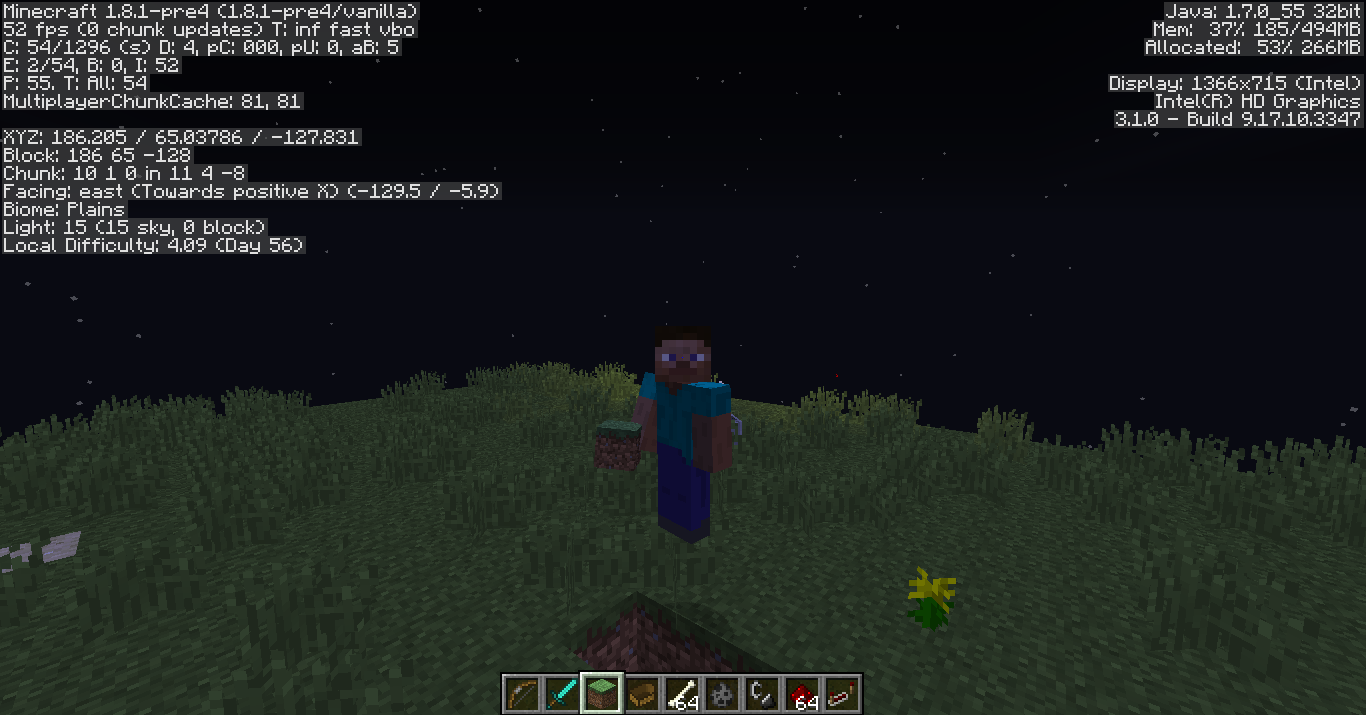
@Grum: as of 1.8.1-pre4 AFAICT the reproducibility of this bug is still 100% identical to that of MC-63020, so I'll repeat the test case I posted on that ticket to here.
Here is a world save (superflat with a simple mineshaft dug in it to find amenable coordinates): https://docs.google.com/file/d/0B57wgZSp2XofSXc4V1BLc1c5aU0
When you load that, player will be at exactly the correct position and rotation to reproduce bug MC-63020. To instead reproduce this one (MC-63070) you need only press F5 without touching the mouse.
In behind-the-head view, incorrect culling happens precisely as it does in MC-63020, as game's culling math assumes camera is still inside players head instead of translated to a point behind it.
If you go into selfie-view while being careful not to touch the mouse, then the culling math still does not yet change. Whatever chunks MC-63020 left missing, are still missing. but, as soon as you touch the mouse in any way, that is when culling algo decides to notice that the view has somehow updated and all the chunks behind you snap back into place.
It sounds like the initial culling issue in MC-63020 may be challenging for you to fix, but at least registering F5 as an update on the same level as a mousemove would cover what we are reporting in MC-63070. shrugs
Good luck sir,
- - Happ
Dupe of MC-63070
Its not just the snow layer. Dupe of MC-63070
Duplicate of MC-63070
I got an email with your first comment too, it read:
> Happ, the only two reasons as to why you think it can still be reproduced is 1, your Java is outdated, and 2, your graphics card dates back to 2009.
> I, on the other hand, am running Java 1.8.0_31, and my graphics drivers have been updated to Catalyst 14.12.
This ticket does require some clarification.
The issue I initially discovered where view does not recalculate direction when F5 is pressed to transition from "behind the head" to "selfie" mode I can confirm has been resolved. I kind of forgot that was one of the ingredients too, lol. ;3
However direction is only part of the issue driving MC-63070 and differentiating it from it's brother MC-63020.
Still in the line of fire is that culling calculations are performed from the player's head coordinates instead of the camera coordinates. That leaves MC-63020 with the business of overculling even at those coordinates, and kind of makes the bug MC-63020 an easy way to test if MC-63070 is fixed or not (and vice versa, as it happens).
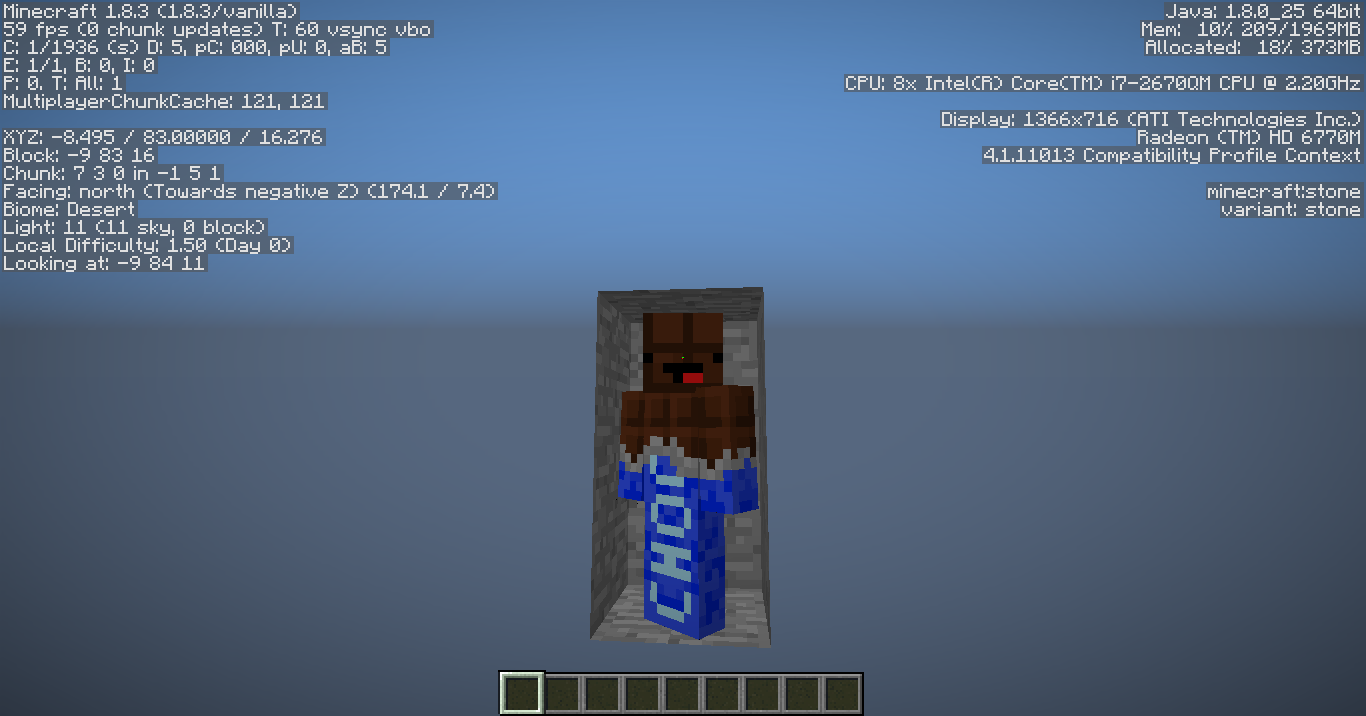
Here are some screenshots continuing to demonstrate the behavior in 1.8.6-pre6, with Java 1.8.0_31 64 bit, on a completely different computer with a newer video card (GTX 650 Titanium). First is in behind the head view, second in selfie view. http://imgur.com/a/Kbneq
Now if you were to march your character's face over to the corner of the cave where I've placed the camera in these shots, then all of the chunks would be visible just fine. In fact, here is a screenshot of just that, too: http://i.imgur.com/R7L3SBf.png
Sonic, if you think this isn't reproducing for you, I would appreciate it if you could try out my testcase here, and possibly get some screenshots: https://docs.google.com/file/d/0B57wgZSp2XofSXc4V1BLc1c5aU0
Load that world as singleplayer, and don't let the crosshairs move or move your feet as it finishes loading in. If you can see the sky near the right side of your screen, then you are already reproducing MC-63020.
Now turn around with your mouse but don't move your feet, so that you can get a good look at the small hallway you are in. Face your character squarely toward the end of the hallway you are in (as though your character were in time-out, or something. Bad Steve! lol) and then press F5. If it appears as though your 1x1x2 end of the hallway is floating in the sky, then you have successfully reproduced MC-63070. If not, then at least try moving the mouse about until you are certain the camera is at the opposite end of the hallway from you, similar to my screenshots.
As of 1.8.6_pre6, I confirm that carefully not moving the mouse as you press F5 brings you to a selfie-view where you now can see the hallway behind your face, this means that the game re-calculates the direction of view on keypress, but location of view is still borked because if you turn 180 without moving your feet you'll see that chunk disappear once more while your face smiles to the camera as though it's proud to be floating in the sky instead of it's physical location which is underground. 
If you do move your feet, you'll find the MC-63070 bits easy to reproduce again by just making certain that the center of your character is in the 1x1 square meter at the end of the hallway (Block -9 83 16) while your camera is at (or near) the other end of the hallway. The MC-63020 bits can be a lot pickier based on how close to the edge of the square you stand combined with exact angle your head is tilted, because only at the extremes do overculled chunks actually intersect your field of view.
So lemme know what you find, thanks for your input Sonic but I am definitely still repro'ing this for 1.8.2_pre6. :3
EDIT: fixed name of version: it's not "1.8.6_pre6"
MC-63070 confirmed 15w31a
Dupe of MC-63070
Dupe of MC-63070
Dupe of MC-63070
Dupe of MC-63070
Dupe of MC-63070
I think 2014-08-17_06.18.42.png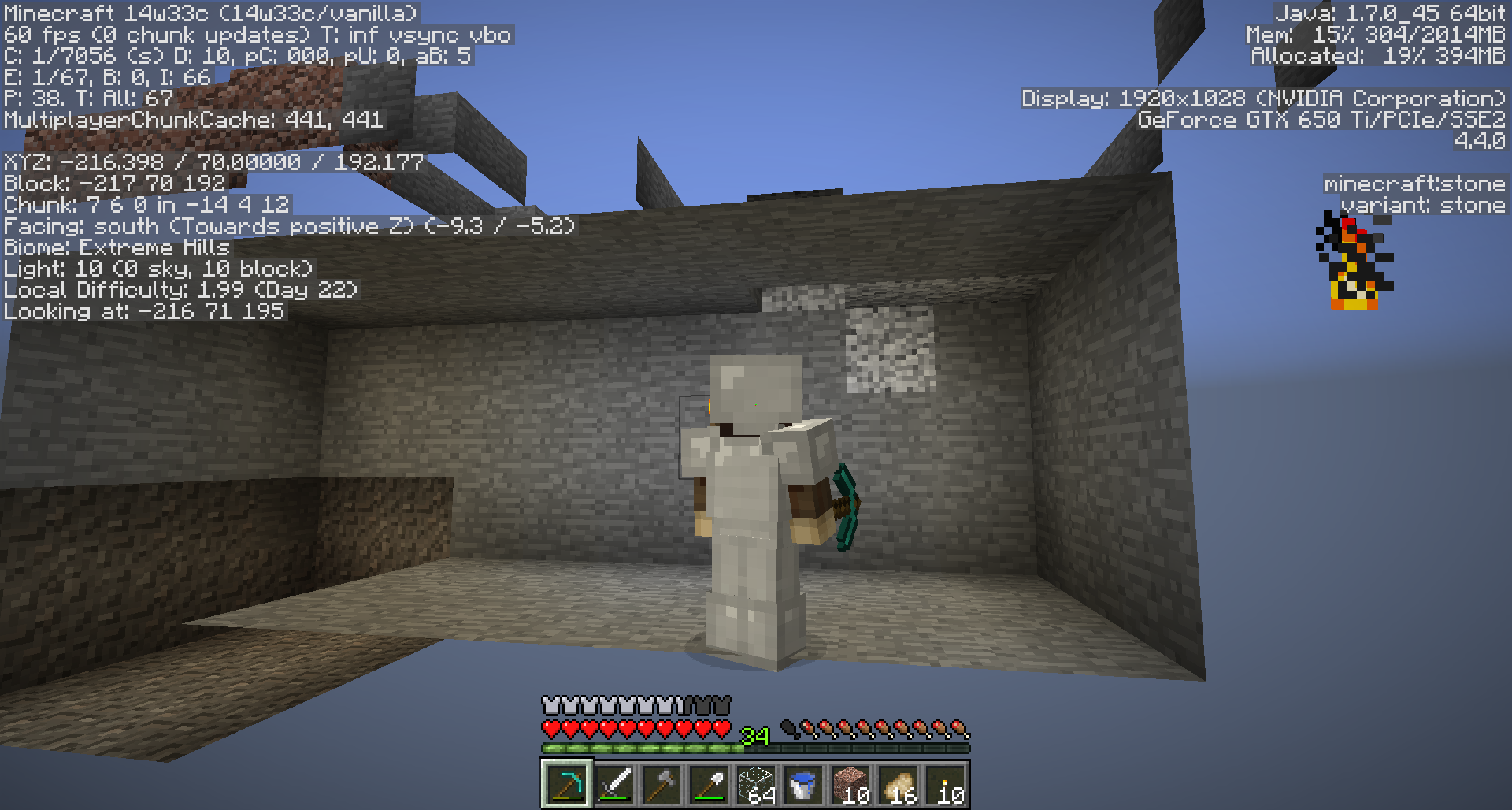 and 2014-08-27_20.50.12.png
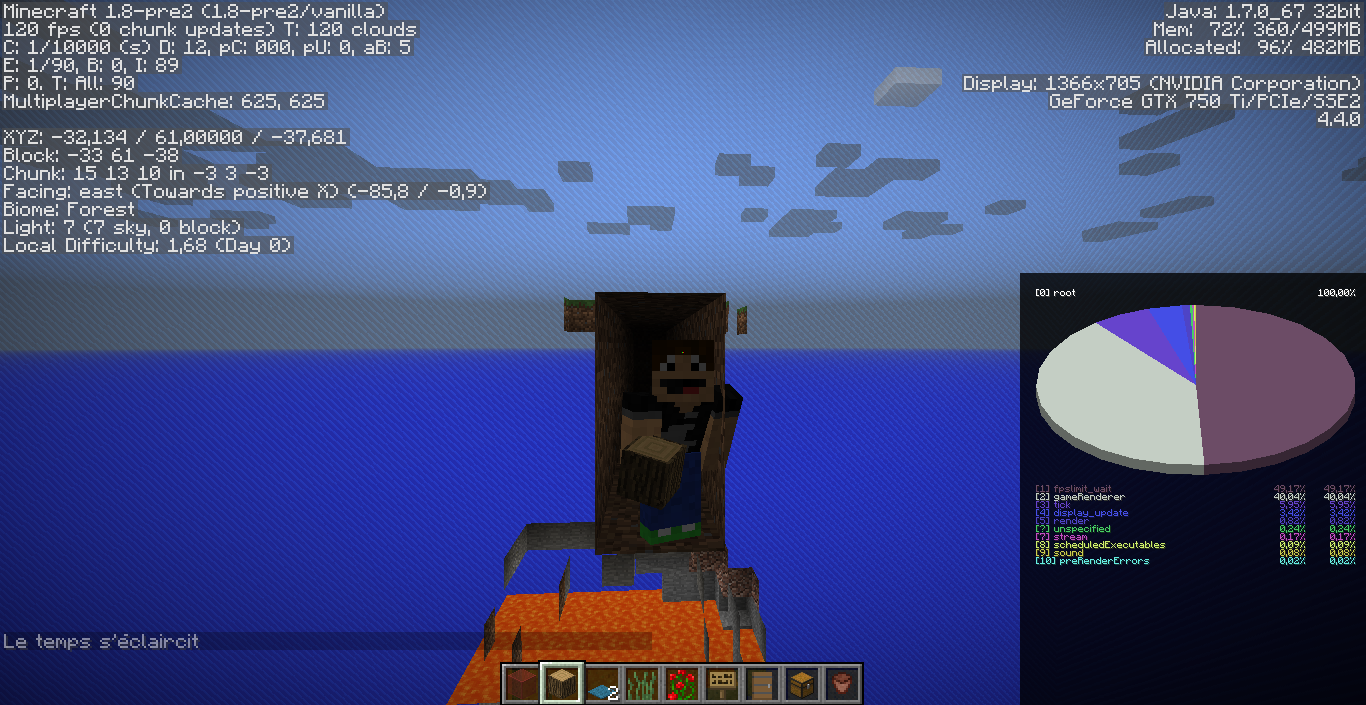 should be deleted or moved to
 MC-63070.
I have found that this bug can occur in 3rd person mode too. It is different from MC-63070 in that it does not go away upon moving the mouse.
Perhaps one variant of the chunk not rendering has been fixed, but the variant I have been testing has not.
Check back to this comment for my testcase: https://bugs.mojang.com/browse/MC-63070?focusedCommentId=208071&page=com.atlassian.jira.plugin.system.issuetabpanels:comment-tabpanel#comment-208071
Sorry, just to be clear half of what was described in that testcase has been fixed. It used to be that culling math did not update until you moved the mouse. They fixed that bit.
The bit that still remains to be fixed in MC-63070 in particular is that any "outside of head" view still culls from the perspective of the head, instead of culling from the perspective of the camera.
That leaves sibling MC-63020 with the unique position of "wherever the culling is calculated from, it is possible, and easier with wider field of view, for some of the chunks you should normally be able to see to be culled". Folks have shown several examples above, most of which I cannot make easily reproducible, but the example I can make reproducible is listed above. Stand in a closed-in space right at the edge of the chunk the space is in, tilt head as close to 45 degrees horizontally as you can, and you can see around corners into culled areas.
Hello, Steven.
It is possible that you've discovered either a different bug, or a different variant of the bug than I have been reproducing. In my variant of the bug it would be impossible for chunks under the crosshair (in first or third person views at least) to ever become culled.
Can you find a way to reproduce the issue you are seeing? The major portion of the issue we have been chasing can be reproduced by the method in the discription of this bug, and also by the method in the description of bug MC-63070 (which is not the same bug, but a bug that this bug helps to enhance the visibility of).
Or, if you start a brand new minecraft world do you see your copy of the bug at all? Or if you play minecraft from a different machine? I want to be certain your copy of the bug does not rely upon a certain specific save or a certain specific client environment.
Thank you, Steven! 
Dupe of MC-63070
I just learned (and confirmed) something interesting.
The client-side mod Optifine (at the very least OptiFine 1.11 HD U B1) not only absolutely fixes this bug, but also it's cousin MC-63070 to boot.
I have not yet tested older versions of Optiifine to see how long it's been fixed there, but I was lead to try this out due to a new chunk loading / culling finding that I've made.
Vanilla minecraft as of 1.11 makes some very very strange decisions about which nearby chunks in clear line of site it will keep unloaded for no well determined reasons. After trying out the latest optifine I noticed that while this problem may not be 100% solved, the odd choices are at least pushed quite a lot farther away from the camera.
Thank you for your report!
However, this issue has been closed as a Duplicate of MC-63070.
It has been linked to this report. If you have additional information, please add it to that report.
Please search before reporting, as it's likely that one exists already.
Quick Links:
📓 Issue Guidelines – 💬 Community Support – 📧 Customer Support – 📖 Game Wiki
Thank you for your report!
However, this issue has been closed as a Duplicate of MC-63070.
It has been linked to this report. If you have additional information, please add it to that report.
Please search before reporting, as it's likely that one exists already.
Quick Links:
📓 Issue Guidelines – 💬 Community Support – 📧 Customer Support – 📖 Game Wiki
Thank you for your report!
However, this issue is a Duplicate of MC-63070.
It will be linked to this report. If you have additional information, please add it to that report.
Please search before reporting, as it's likely that one exists already.
Quick Links:
📓 Issue Guidelines – 💬 Community Support – 📧 Customer Support – 📖 Game Wiki
Thank you for your report!
However, this issue has been closed as a Duplicate of MC-63070.
It has been linked to this report. If you have additional information, please add it to the duplicated report.
Please search before reporting, as it's likely that one exists already.
Quick Links:
📓 Issue Guidelines – 💬 Community Support – 📧 Customer Support – 📖 Game Wiki
I'm pretty sure that that's not true. This is based off of my understanding so it may be wrong, especially since I'm only backing up the existence of systems based off of where those systems are broken. 1.8 introduced builtin chunk culling which replaced the graphics card version (and you can see this breaking in MC-63020 and MC-63070). And entities are culled too (which you can see breaking by MC-1058 - which is, in fact, about item frames being culled too aggressively).
Glowstone and sea lanterns shouldn't behave differently. Animated textures are based off of a bound texture, and the texture itself is, based off of my understanding from some super horrible graphical glitches, constantly updated regardless as to whether one of those blocks is on screen. The game doesn't calculate what frame the animation is on each time it starts drawing one - it's already chosen the frame of the texture for all blocks, and uses that to render.
EDIT: Oh, I think I understand better what you're talking about. Entities are culled when they're off camera, but I don't think they're culled when they're behind walls/in chunks that don't need to render (but the rendering code is not my area of expertise, so this may be completely wrong)
Dupe of MC-63070
This is just caused by MC-63070...
![[Mod] Les3awe](../../../data/avatars/users/79847.png)
Thank you for your report!
However, this issue is a Duplicate of MC-63070.
It has been linked to this report. If you have additional information, please add it to that report.
Please search before reporting, as it's likely that one exists already.
Quick Links:
📓 Issue Guidelines – 💬 Community Support – 📧 Customer Support – 📖 Game Wiki
This sounds like it might be MC-63070. Does that seem accurate to you?
Thank you for your report!
However, this issue is a Duplicate of MC-63020.
It has been linked to this report. If you have additional information, please add it to that report.
Please search before reporting, as it's likely that one exists already.
There's actually a second possible issue that this could be: MC-63070, for 3rd-person view. However I'm assuming that you're in first-person since that's the default.
Quick Links:
📓 Issue Guidelines – 💬 Community Support – 📧 Customer Support – 📖 Game Wiki
The game crashes while converting the world old world from MC-63070, namely: https://docs.google.com/file/d/0B57wgZSp2XofSXc4V1BLc1c5aU0/edit to the new version. Note that Happ MacDonald did not have this issue, see his comment.
![[Mod] Asteraoth](../../../data/avatars/users/92886.png)
Duplicate of MC-63070.

Thank you for your report!
However, this issue is a Duplicate of MC-63070.
If you have additional information, please add it to that report.
Please search before reporting, as it's likely that one exists already.
Quick Links:
📓 Issue Guidelines – 💬 Community Support – 📧 Customer Support – 📖 Game Wiki
Oh ok. I didn't notice that it had already been confirmed in earlier releases like 1.12.2... It had only occured to me in this version for some reason...
It would be good if fixed, as this is also a good way to see what lies beneath you when digging straight down.
Why has the bug MC-63070 destined to be fixed so late though (since 1.8)?
Duplicate of MC-63070.
Thank you for your report!
However, both MC-123332 and this issue is a Duplicate of MC-63070.
If you have additional information, please add it to that report.
Please search before reporting, as it's likely that one exists already.
Quick Links:
📓 Issue Guidelines – 💬 Community Support – 📧 Customer Support – 📖 Game Wiki
Thank you for your report!
However, this issue is a Duplicate of MC-63070.
If you have additional information, please add it to that report.
Please search before reporting, as it's likely that one exists already.
Quick Links:
📓 Issue Guidelines – 💬 Community Support – 📧 Customer Support – 📖 Game Wiki

Thank you for your report!
However, this issue is a Duplicate of MC-63070.
If you have additional information, please add it to that report.
Please search before reporting, as it's likely that one exists already.
Quick Links:
📓 Issue Guidelines – 💬 Community Support – 📧 Customer Support – 📖 Game Wiki
Yay, I wonder if that's a sign that someone is now tackling the issue. 
If they are, I'd recommend keeping in mind how this issue relates with MC-63070 (same problem except when camera position and player's head don't coincide) and with Field of View.
The algorithm to decide which faces to cull as "out of view" ought to take FOV into account on one hand, and the position of the camera instead of the position of the center of the player's head on the other.
In circumstances where re-calculating what gets culled is expensive enough that potential wild swings of the camera become problematic, one could alternately calculate what ought to be culled from the entire filled sphere centered on the player's head with a radius of the camera's maximal distance from that point.
</armchair-quarterback-advice>

MC-63070 is already linked, there is already quite a lot of Mojang activity on this report (see the "all" tab). Please restrict comments to useful new information about the report.
Also happens in first person view: http://youtu.be/-ldlgk6V7z8
In First Person this happens at higher FOV's. Using Quake Pro made the issue very prevalent. I could not reproduce the issue at 30 FOV though, only high FOV's.
I use FOV 80, probably why I saw it happen pretty frequently then.
It seems that the game will always cull the chunks behind the player's head - these would not normally be seen. 3rd person mode kind of screws with that though.
Also, you could go through the effort to type a description, even if you are just repeating what is told in the pictures. Yes, "pictures tell a thousand words" but sometimes it is better to have some direct explanation.
I can confirm.
This effect can also be caused by sleeping in a bed. I created a separate ticket for it here -
MC-63185- because they are separate issues but likely with the same cause.Beaten to the punch again. I can confirm
I can also confirm!
Confirmed.
Under request of Dinnerbone, this issue has been separated.
MC-63020will be used to track the render issue in first person, while this issue will be used to track the render issue with F5.Confirming as fixed in 14w30c.
This is sorta happening in 14w32b again...
Reopened from comment here and
MC-66895I am putting tons of comments, observations and screenshots into
MC-63020for a reproducible example of overculling that sounds like what is being described here, which is viewable both in first person (normal, and even tighter FOV's) and in third person views.It sounds as though
MC-63020's goal is "make sure culling works per a single viewpoint and defined FOV" while the goal of this ticket is "make sure the single viewpoint discussed inMC-63020moves out of your head appropriately in third person mode".I also notice that culling is not recalculated when you press F5 to move that viewpoint, until you also move the mouse (and relative angle-of-view with it) which is a bug or part of a bug in it's own right.
1.8pre-1 confirmd
Relates to
MC-63025confirmed pre3
Confirmed in the release. (1.8)
Cannot reproduce.
There is however a bug with the occlusion that is not really trivial to fix.
This ticket might need to be merged with that.
Perhaps you are misunderstanding the bug? It is different from the original purpose of this report. The bug is that, after pressing F5, the calculation for which chunks should be rendered does not happen until the mouse is moved.
Steps to reproduce:
1. Look into the distance and stop moving the mouse
2. Press F5
3. Move the mouse and notice that the chunks suddenly render
Affects 1.8.1-pre1.
edit: Also affects changing the Field of View.
@redstonehelper, does this mean you have found an instance where the following occurs?
1. find a well chosen position to stand at
2. do something to change your FOV that involves not moving the mouse
3. Directly view culling errors as a result (eg, chunks not viewable due to new FOV)
and then the all important step 4:
4. upon moving the mouse, the culling errors go away, or chunks begin to be visible again .. respecting the new FOV.
I have never encountered this described test situation so I would love to see an example.
In my analyses so far with this bug up to 1.8 release, part of the base problem (both here and
MC-63020) is that the culling algorithm absolutely ignores any offset of the camera position to outside of the player's head, and any changes to FOV under any circumstances. The culling algo does appear to respect direction that the camera faces, though often that consideration is only updated after a mouse move.Lemme know if you can offer a way to repro this claim red, this is a bug I love digging at and learning more about. <3
Are we talking about the same bug here? I find it to be very easy to reproduce: http://gfycat.com/UnfortunateMisguidedAustraliankelpie
@redstonehelper Thank you sir, that did answer my question. :3
Affects 1.8.1-pre2.
edit: System details from a forced crash report:
Still happening in 1.8
Added a screenshot for it happening in 1.8.1pre2 (specifically the "look behind you without hitting the mouse" part of the bug).
Still in 1.8.1-pre3.
Found it!
Stupid bug! DEAD NOW!~
It's behaving!
Still not fixed. http://prntscr.com/53r96s http://prntscr.com/53r9ff http://prntscr.com/53r9z9
N, your issue isMC-63020Scratch that. Can still reproduce in 1.8.1-pre4
You sure? Check my third screenshot
Fully reproducible in 1.8.1-pre4.
Please add a way to reproduce. World seed + exact tp locations (including angles) where it is reproducable all the time.
@Grum: as of 1.8.1-pre4 AFAICT the reproducibility of this bug is still 100% identical to that of
MC-63020, so I'll repeat the test case I posted on that ticket to here.Here is a world save (superflat with a simple mineshaft dug in it to find amenable coordinates): https://docs.google.com/file/d/0B57wgZSp2XofSXc4V1BLc1c5aU0
When you load that, player will be at exactly the correct position and rotation to reproduce bug
MC-63020. To instead reproduce this one (MC-63070) you need only press F5 without touching the mouse.In behind-the-head view, incorrect culling happens precisely as it does in
MC-63020, as game's culling math assumes camera is still inside players head instead of translated to a point behind it.If you go into selfie-view while being careful not to touch the mouse, then the culling math still does not yet change. Whatever chunks
MC-63020left missing, are still missing. but, as soon as you touch the mouse in any way, that is when culling algo decides to notice that the view has somehow updated and all the chunks behind you snap back into place.It sounds like the initial culling issue in
MC-63020may be challenging for you to fix, but at least registering F5 as an update on the same level as a mousemove would cover what we are reporting inMC-63070. shrugsGood luck sir,
@Happ MacDonald
really
It is a view which offers absolutely zero utility not already covered by third-person view aside from insinuating the avatar's personal portraiture into the scene.
This view has zero uses aside from taking selfies.
Selfie-view.
http://i.imgur.com/dE352bg.gif
Was fixed in 1.8.1-pre4 but came back in pre5 D:
happens in 1.8.1 (release)
confirmed 1.8.2-pre1
I think my comment was removed due to a rollback.
Anyway, after testing once more, I can say that it is fixed (at least for me) in 1.8.2-pre6, possibly earlier.
I got an email with your first comment too, it read:
> Happ, the only two reasons as to why you think it can still be reproduced is 1, your Java is outdated, and 2, your graphics card dates back to 2009.
> I, on the other hand, am running Java 1.8.0_31, and my graphics drivers have been updated to Catalyst 14.12.
This ticket does require some clarification.
The issue I initially discovered where view does not recalculate direction when F5 is pressed to transition from "behind the head" to "selfie" mode I can confirm has been resolved. I kind of forgot that was one of the ingredients too, lol. ;3
However direction is only part of the issue driving
MC-63070and differentiating it from it's brotherMC-63020.Still in the line of fire is that culling calculations are performed from the player's head coordinates instead of the camera coordinates. That leaves
MC-63020with the business of overculling even at those coordinates, and kind of makes the bugMC-63020an easy way to test ifMC-63070is fixed or not (and vice versa, as it happens).Here are some screenshots continuing to demonstrate the behavior in 1.8.6-pre6, with Java 1.8.0_31 64 bit, on a completely different computer with a newer video card (GTX 650 Titanium). First is in behind the head view, second in selfie view. http://imgur.com/a/Kbneq
Now if you were to march your character's face over to the corner of the cave where I've placed the camera in these shots, then all of the chunks would be visible just fine. In fact, here is a screenshot of just that, too: http://i.imgur.com/R7L3SBf.png
Sonic, if you think this isn't reproducing for you, I would appreciate it if you could try out my testcase here, and possibly get some screenshots: https://docs.google.com/file/d/0B57wgZSp2XofSXc4V1BLc1c5aU0
Load that world as singleplayer, and don't let the crosshairs move or move your feet as it finishes loading in. If you can see the sky near the right side of your screen, then you are already reproducing
MC-63020.Now turn around with your mouse but don't move your feet, so that you can get a good look at the small hallway you are in. Face your character squarely toward the end of the hallway you are in (as though your character were in time-out, or something. Bad Steve! lol) and then press F5. If it appears as though your 1x1x2 end of the hallway is floating in the sky, then you have successfully reproduced
MC-63070. If not, then at least try moving the mouse about until you are certain the camera is at the opposite end of the hallway from you, similar to my screenshots.As of 1.8.6_pre6, I confirm that carefully not moving the mouse as you press F5 brings you to a selfie-view where you now can see the hallway behind your face, this means that the game re-calculates the direction of view on keypress, but location of view is still borked because if you turn 180 without moving your feet you'll see that chunk disappear once more while your face smiles to the camera as though it's proud to be floating in the sky instead of it's physical location which is underground.
If you do move your feet, you'll find the
MC-63070bits easy to reproduce again by just making certain that the center of your character is in the 1x1 square meter at the end of the hallway (Block -9 83 16) while your camera is at (or near) the other end of the hallway. TheMC-63020bits can be a lot pickier based on how close to the edge of the square you stand combined with exact angle your head is tilted, because only at the extremes do overculled chunks actually intersect your field of view.So lemme know what you find, thanks for your input Sonic but I am definitely still repro'ing this for 1.8.2_pre6. :3
EDIT: fixed name of version: it's not "1.8.6_pre6"
Seems fixed for me in 1.8.2-pre6.
Ymus have you tried my test case mentioned in last comment? I'd love to see a screenshot of it working, basically for anyone. I believe this is a game logic issue and thus should be pretty hard not to reproduce when the steps are followed.
Seems fixed for me in 1.8.3.
Problem persists in 1.8.3.
Sonic, are you trying my test case world as I've recommended?
Yes.
Also, what's the operating system that you use? 64 or 32 bit? Just wondering.
All of my test platforms run Windows 7 64 bit.
Can we get a screenshot of you in my testcase world, facing camera, camera positioned at far end of hallway like I did? I am basically convinced that it is impossible for Minecraft to render this scene any differently — regardless of OS or Java version or any niggling low level considerations — due to the raw game logic culling from the perspective of the player's head even though the camera is physically elsewhere in space.
If you could demonstrate with a screenshot that the same scene gives you different results then that should add volumes to what we know about this bug.
Thanks for your help, Sonic! :3
OK. I'll get to that later. I just have to run some errands.
BTW, make sure that your graphics driver is updated to the latest version: http://support.amd.com/en-us/download/desktop?os=Windows+7+-+64
Ok, Happ.
I've managed to reproduce
MC-63070andMC-63020.MC-63070confirmed 15w31aConfirmed for 15w31a.
How I can reproduce the bug (example):
1. Change your FOV settings while logged in a world. (From Normal to 30, for example)
2. Close the menu (go back to the game)
3. Open the menu again, then change back your FOV (E.g: to Normal)
When you go back to the game, the chunks render again if you move your mouse...
Confirmed 15w40b
Be advised, the variant of this bug that I am primarily reporting on because it's the easiest for me to reproduce (EG: the third-person variant of
MC-63020) may not stem from precisely the same cause that the variant Dobypeti is reporting on. :3Confirmed for 15w43c when changing FOV as Dobypeti said. Only chunks which aren't visible in the changed FOV (30) are not initially rendered. But: don't forget to move your mouse after changing the FOV to 30, or else the chunks will still stay rendered.
Confirmed for 15w44a
Mods: may I be set to reporter on this ticket so that I can keep affected versions up2date?
Happ MacDonald: The original reporter is still active - we can do it if they agree.
@Bob Saggot: What do you think?
@redstonehelper I don't know if @Mateusz Niedrowski is still active here, no comments since initial report.
Confirmed 15w44b
Fair enough, considering ticket abandoned. You're the reporter now.
Confirmed for 15w45a
[Mod] redstonehelper I completely forgot about this report, but as long as it's working towards solving the issue I don't have any problems with that.
Thank you
Confirmed for 15w47a and 15w47c
Seems to be fixed in 1.9-pre2, can somebody confirm this?
Perhaps one variant of the chunk not rendering has been fixed, but the variant I have been testing has not.
Check back to this comment for my testcase: https://bugs.mojang.com/browse/MC-63070?focusedCommentId=208071&page=com.atlassian.jira.plugin.system.issuetabpanels:comment-tabpanel#comment-208071
Sorry, just to be clear half of what was described in that testcase has been fixed. It used to be that culling math did not update until you moved the mouse. They fixed that bit.
The bit that still remains to be fixed in
MC-63070in particular is that any "outside of head" view still culls from the perspective of the head, instead of culling from the perspective of the camera.That leaves sibling
MC-63020with the unique position of "wherever the culling is calculated from, it is possible, and easier with wider field of view, for some of the chunks you should normally be able to see to be culled". Folks have shown several examples above, most of which I cannot make easily reproducible, but the example I can make reproducible is listed above. Stand in a closed-in space right at the edge of the chunk the space is in, tilt head as close to 45 degrees horizontally as you can, and you can see around corners into culled areas.Please update the description so it is up to date for 1.9-pre2.
Here we go, let us know if this description sounds better? :3
Reminder of why this ancient bug is important to try to fix.
Primarily, it can be used to cheat. Sort of a poor-person's X-ray mod to peek into hidden caves and dungeons or to spy on other players from a hidden vantage point. Also it ruins my ability to take certain kinds of screenshots.
Also/also, it ruins YOUR ability, as a game developer to do very many different kinds of cinematic elements.
Suggestion: if it is (potentially) too computationally expensive to re-calculate culling from a flighty, mouse-driven camera location then alternately consider calculating culling from the entire sphere representing the potential positions of the camera? that won't have to recalculate unless/until the player moves either, and by roughly the same delta.
Plus, you could have a fix for most of
MC-63020if you swap out point eye position for a ~1m^3 sphere around eye position for free.Mojang should make it so chunks will render everytime we press F5
Opening the world safe in https://docs.google.com/file/d/0B57wgZSp2XofSXc4V1BLc1c5aU0 crashes the game in the newest version...
I could report the crash but that should happen automatically right @mods?
Alright, while I didn't have that problem myself I've loaded the file in 1.13-pre5 and let it do it's conversion magic, and I've updated the description to have a link to the newly updated save file: https://drive.google.com/file/d/10MjcYT6X667OTNczi7ax2pw8e-qxl0qk/view?usp=sharing
Let's see if this one works better for you. Thanks, Steven.
Happ MacDonald Yup this one works! Created an issue for the crash anyway, by the way:
MC-132382Confirmed for 1.13.1.
I am in 1.13.2 and I still experience this bug, or a similar one.
Gamepro5, this bug was fixed in 19w11a, which is a 1.14 snapshot. 1.13.2 is still affected, though, since it's before 1.14. I've added it to the list to prevent confusion, but do note that it should still already be fixed.