 Jacob Hanson
- hi5
- hi5
- Europe/Stockholm
- Yes
- No
 MCPE-41534



I placed a grindstone down and then put a ton of TNT around it but the block
snever explodedand once the TNT was done exploding all that would be left would be a grindstone.I placed a grindstone down and then put a ton of TNT around it but the block never exploded but all of the other new ones did. Once the TNT was done exploding all that would be left would be a grindstone.
When trading with any of the new villagers, it will say their profession but it will have the wrong trades. Example: Stone mason has butcher trades. Trades are normal with the old style villagers.
I was playing survival Minecraft on my switch. I went to grab a sword out of my inventory when the boat was moving. When I pulled up my inventory my boat started spinning in circles. It stopped when I got out of my inventory. There is a video below of the bug.
Affects all Platforms
A while back I posted a JAVA PARITY feature on Minecraft feedback. When I found out it was coming in 1.13 I was excited. When the update released for switch, I did a raid and won but nothing happened. I expected them to shoot of Fire works and to throw free items (Like Java) at me but nothing happened.
What I Expected: Villagers to shoot fire works and give me free items.
What actually happened: They just reduced their prices like they did in the previous update.
I was really hoping this would work in the new update but I didn't.
A while back I posted a JAVA PARITY feature on Minecraft feedback. When I found out it was coming in 1.13 I was excited. When the update released for switch, I did a raid and won but nothing happened. I expected them to shoot of Fire works and to throw free items (Like Java) at me but nothing happened.
What I Expected: Villagers to shoot fire works and give me free items.
What actually happened: They just reduced their prices like they did in the previous update.
I was really hoping this would work in the new update but I didn't. This affects all versions!
Villagersand PillagersnotCelebratingVillager and Pillagers Celebration Broken
When I opened up my double chest and looked through the items I noticed something odd. At the bottom of my screen my controls were overlapping the items in the double chest.
The issue: Buttons over lapping double chest inventory
Expected: The buttons should be below the white box for the double chest inventory.
Edit: Make sure your controls are showing on screen.
When I opened up my double chest and looked through the items I noticed something odd. At the bottom of my screen my controls were overlapping the items in the double chest.
The issue: Buttons over lapping double chest inventory
Expected: The buttons should be below the white box for the double chest inventory.
Edit: Make sure your controls are showing on screen.
When I opened up my double chest and looked through the items I noticed something odd. At the bottom of my screen my controls were overlapping the items in the double chest.
Steps to Reproduce:
1.Make sure hide controller hints is off
2.Open up a world
3.In that world open your inventory and make sure the crafting recipes are also open. Also works with a double chest.Observed Results:
When the certain user interfaces are open the controller tips will overlap.Expected Results:
The controller tips should not overlap the user interfaces but should instead be moved towards a spot where they would not overlap any user interfaces.Edit: Make sure your controls are showing on screen.
Nintendo switch contolls overlappingcertain thingsNintendo switch controller tips overlapping UI
I watched Eckosoldier's character creator video and he was able to get certain items to popup below his character when he clicked on body. I tried this on my switch but no items poped up and no loading bars either.
The Issue: Certain items on character creator not poping up.
Expected: All the items should pop up below the character
This Happened when I was online.
I was testing out the new bedrock 1.13 update on my switch in survival when I noticed a weird thing with my hand and my map. My hand was lower than the bottom of the map. I found this out while running with the map in my off hand.
The Issue: Hand is not properly aligned with map.
Expected: my hand should look like it is properly holding the map
P.S Sorry for the video quality I recorded this on my tablet from my switch. This also effects all versions.
!!Unable to render embedded object: File (URGENT PLEASE FIX) not found.!!
Effects all versions!
I was playing on my survival world and decided to refight the enderdragon. The right was difficult even with diamond armour because what use to be his purple breath is now his invisible breath.
His breath is completely invisible and this can cause major issues for a lot of players. I have no footage of this because you can't see his breath anyways so what's the point of posting images too.
How to Reproduce:
- Fight the enderdragon
- Let him shoot his breath at you
- When it hits the ground it is completely invisible.
How it should be:
1. His breath should be a bunch of purple particles on the ground.
I was playing in one of my world's when I opened a chest and noticed a change in background. I did it over again and found it my render distance would go to the lowest setting and when the UI was closed it went back to what it was originally.
Main issue: Render distance changes when a UI is opened
EXPECTED: The render distance should stay the same when UI are opened and closed.
Sorry about the photo quality. Hopefully you can see the change in render distance.
Edit: This effects all bedrock platforms/versions.
I've only noticed this on Nintendo switch. When vexes are summoned during a raid, they do not act normal. They constantly fly straight up and down in one spot (Can be annoying and hard to hit). I cannot confirm if this is the same for vexes in mansions. I will update this once I figure it out.
Edit: effects regular vex ai. Doesn't just happen during raids.
I've only noticed this on Nintendo switch. When vexes are summoned during a raid, they do not act normal. They constantly fly straight up and down in one spot (Can be annoying and hard to hit). I cannot confirm if this is the same for vexes in mansions. I will update this once I figure it out.
Edit: effects regular vex ai. Doesn't just happen during raids.
Steps to Reproduce:
1. Start a raid or summon an evoker
2. Wait for vexes to spawn
3. Once vexes have spawned their movement is broken (especially during raids).Observed Results:
Vexes will fly straight up and down. They won't move out of the same area very quickly but the rate in which they fly up and down can increase. They will be hard to hit as well.Expected Results:
The vexes should fly around like normal and target certain entities. They should go fly after players and go through walls as normal.
If you place an item on a armour stand, the stack of items it came from will be stuck in place until that item is retrieved.
For example: I had 16 potatoes and I put one on an armor stand. I then tried to move them out of my hot bar and it did not work. They wouldn't move.
How to reproduce:
-Have 2 or more items in a stack.
-Put one on an armor stand.'
You should not be able to move the items that had the one item put on the armor stand.
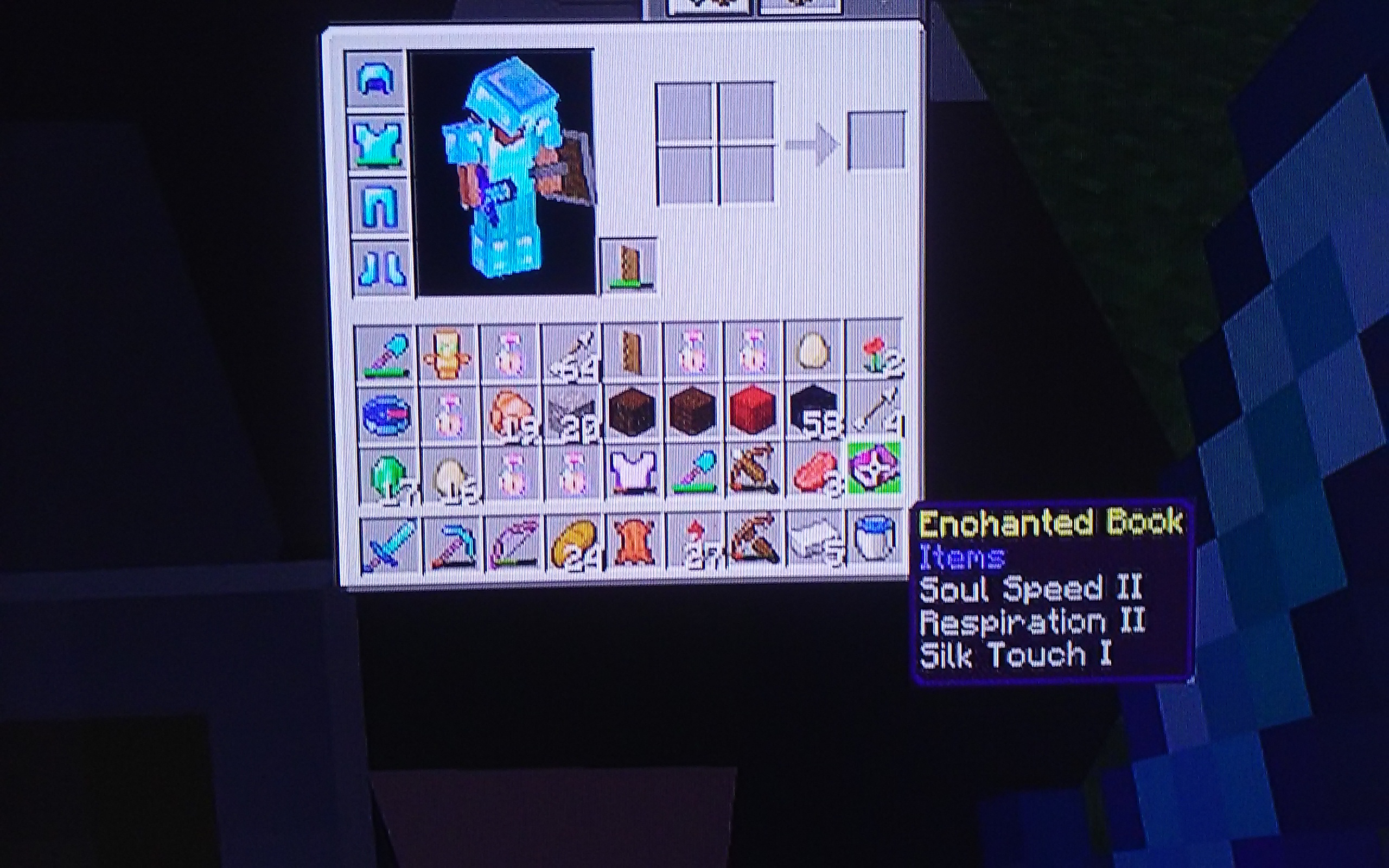
When soul speed was added it was said to only be collected through bartering or bastions. However, I have managed to obtain a soul speed 2 book through a raid. This is not ment to happen.
How to reproduce:
- Start a raid. (Make sure you have a looting 3 sword. It makes it easier.)
- Kill all the raiders in a raid and if they drop enchacnted books check for soul speed.
- This may take a while but I obtained it in my first 1.16 raid.
![[MCPE Mod] Auldrick](../../../data/avatars/users/10122.svg)
Jacob Hanson: Please try to make corrections before saving changes. Every time you save a comment, an email gets sent out to all the people watching this ticket. Thank you.
It is in the official 1.9.0 update too
its also in the 1.9 update
I hope they fix this because i play the switch version too! I up voted!
Other mobs work with spawners still
Do you have any images. I do not play the betas because I am on switch but I do watch beta videos on youtube.
It is also on the Switch Version 1.10 as well.
Its random and it happens on Xbox and Switch as well. It gets annoying.
Happens to me to. Not even using experimental game-play and it lagged out twice. And after the lag any mobs near me would speed up really fast and then slow down to normal walk.
You cannot kill yourself in creative. It that way on Java too. Not a bug.
This happened to me too on the Switch version. I was inside a building and several villagers ran in and out without shutting the doors. After it turned day I found at least three building I was not in with the doors wide open. Please fix this in 1.11! @ [Minecraft] Mega_Spud
Are you signed into your Microsoft or Xbox live account?
@MCPE Mod Auldrick
Sorry I must have been thinking of something else.
They fixed this in todays beta 1.11.0.8
What device was it on
They wont fix it if it is a 1.8 bug but they might if it is a 1.10 or 1.11 bug.
This probably works as intended
On switch as well
Also on the Nintendo switch version
Also on 1.10 update on switch. It is anoying
Was it night
@Mega_Spud this is no longer a problem in 1.11
Happens on Nintendo switch as well
I tested them they worked fine
It's hard to fight mobs if they get in a boat. I end up having to retreat for a bow to get them out of my boat.
It works in water to
I can confirm for Nintendo Switch as well
Add 1.14.60 hotfix
It hasn't happened to me and Iv'e been on the marketplace recently after 1.16.1
My lag spikes happen on the switch. It doesn't matter where I am or what dimension. They just happen randomly.
Happens to me a lot. It's impossible for me to use more than one portal knowing that my other portals aren't linking properly.
I added a video showing the items being immovable. Basically I placed one potato on an armor stand and then I couldn't move the rest until I took that potato off of the armor stand. This was on Nintendo switch version 1.16.0 - 1.16.1
I added a photo from my Nintendo switch. Please update this to say multiple versions and not just Android. Issue was on 1.16.0 - 1.16.1
can confirm for switch as well. 1.16.100
It also effects the paper doll.