 Lunade Lunade
- Lunade_
- JIRAUSER562605
- Europe/Stockholm
- Yes
- No
 MC-202670
 REALMS-5933
![[Mojang] Cory Scheviak](../../../data/avatars/users/92893.png)
![[Mojang] slicedlime](../../../data/assets/gravatar/slicedlime.jpeg)
 MCPE-143075
![[Mojang] Searge (Michael Stoyke)](../../../data/assets/gravatar/searge.png)



Since Azaleas can only be planted on moss, I think it was intentional
Caves&Caves(NoBiomeFix).zip
Hey guys! Since the issue was with datapack biomes, I decided to upload this datapack with the biomes removed (which I've tested, it should fix the issue!)
Sadly, that means the biomes won't have the proper 1.18 ore distribution, but it still has the caves, geodes, dripstone clusters, etc!
(just realized i named it caves&caves instead of caves&cliffs dang it)
The main cause of this is now fixed.
THANK YOU SLICEDLIME!!!!!!!
In every world I've played in on any 1.17 prereleases and snapshots, there is constant lag that affects both TPS and FPS, making the game extremely off-putting to play. Upon leaving and rejoining a world, however, the lag and stuttering is even worse, and is much, much more visible in both FPS and TPS - causing the game to become extremely frustrating to play.
However, this isn't just caused by crossing chunk borders or generating chunks, or anything of those sorts. I've even been getting lag spikes while standing completely still!
Another extremely weird thing about this is that the game thinks that it's hitting a solid 90FPS, however, it's obvious that it looks much closer to about 25-15FPS with all the stuttering at its worst.
The fact that I have a good CPU and GPU makes me believe that 1.17 will be even worse for players on any devices that aren't top-of-the-line, and likely even straight-up unplayable for them.
This bug report is about vanilla Minecraft's rendering system, not modded Minecraft's voice mods.
I honestly hope someone at Mojang is working on this. 1.18 is nearly unplayable. My PC has an RTX 3080, 32GB of RAM, and an Intel 19-10900KF CPU, and yet I only get an incredibly stuttery 60 FPS on a render distance of 14. If nothing can be done about it, I'd recommend Mojang see if they can put code from a mod like Sodium into the game.
I've also seen these while playing. Never seen these before either and haven't seen anything about them in the changelog, so I'd assume it's unintended.
Axolotls can indeed spawn without spawn eggs, the only problem is that their spawn conditions are extremely specific.
-They must be underground
-They must be in a water source
-A normal type of stone (stone, deepslate, granite, diorite, andesite, not cobble/polished) must be within 5 blocks below them, with no blocks in-between
-The light level must be 0The same spawning conditions also apply to Glow Squids!
It could potentially be a driver issue, as for whatever reason some of Nvidia's driver updates are a bit broken.
I had the same problem with extremely recent drivers, but v466.47 seems to run fine for me (make sure to do a clean install, this helped me a ton)
There's a good chance this isn't the same problem, but it's worth a try!
In Bedrock Edition, motions like turning around and sprinting almost drag the hand around violently compared to Java Edition. On top of this, the hand is place too far to the left and is quite a bit farther from the camera compared to the Java edition, which makes the hand obstruct much more of the player's view.
Hand movement exaggerated/ Hand is too far out compared to Java Edition (Java Parity)
I'm not sure what else is supposed to happen, they're cave biomes
The changelog states:
"Grove
- Snowy terrain with big spruce trees and powder snow traps. Might want to wear leather boots!
- Tends to generate on high-altitude terrain beneath mountain peaks or on hilltops.
- Spawns wolfs, rabbits, and foxes."
Yet no groves I visit have trees whatsoever, no matter the world.
Expected Result
The big spruce trees would generate like the changelog saidThe changelog states:
"Grove
- Snowy terrain with big spruce trees and powder snow traps. Might want to wear leather boots!
- Tends to generate on high-altitude terrain beneath mountain peaks or on hilltops.
- Spawns wolfs, rabbits, and foxes."
Yet no groves I visit have trees whatsoever, no matter the world.
Expected Result
Spruce trees would generate like the changelog stated.
In 21w42a, whenever the world autosaves, there's
HUGElag spike compared to auto-saving in 21w41a.On top of this,is causes legitimate gameplay issues, as mobs are able to attack the play some time before the world unfreezes, resulting in unfair deaths. I've noticed that it gets even laggier if you've mined some blocks and moved away from spawn as well.Steps to reproduce:
1. Open a world.
2. Punch some trees and move away from spawn.
3. Wait for the autosave.
Expected behavior: The game will autosave as usual, with little to no lag.
What actually happens: The game freezes for 5-15 seconds on average, and mobs can attack the player before the game unfreezes.In 21w42a, whenever the world autosaves, there's huge lag spike compared to auto-saving in 21w41a. This issue also causes legitimate gameplay issues, as mobs are able to attack the player some time before the world unfreezes, resulting in unfair deaths. I've noticed that it gets even laggier if you've mined some blocks and moved away from spawn as well.
Steps to reproduce:
1. Open a world.
2. Punch some trees and move away from spawn.
3. Wait for the autosave.
Expected behavior: The game will autosave as usual, with little to no lag.
What actually happens: The game freezes for 5-15 seconds on average, and mobs can attack the player before the game unfreezes.Note: I’ve tried replicating the bug multiple times on multiple worlds since I reported it, and results have been quite inconsistent. Sometimes the autosave is smooth as usual, other times the game is frozen for 20 seconds. I don’t know why exactly this is the case, but I have a suspicion it could have something to do with the world seed. Not sure though.
In 21w42a, whenever the world autosaves, there's a huge lag spike compared to auto-saving in 21w41a. This issue also causes legitimate gameplay issues, as mobs are able to attack the player some time before the world unfreezes, resulting in unfair deaths. I've noticed that it gets even laggier if you've mined some blocks and moved away from spawn as well.
Steps to reproduce:
1. Open a world.
2. Punch some trees and move away from spawn.
3. Wait for the autosave.
Expected behavior: The game will autosave as usual, with little to no lag.
What actually happens: The game freezes for 5-15 seconds on average, and mobs can attack the player before the game unfreezes.Note: I’ve tried replicating the bug multiple times on multiple worlds since I reported it, and results have been quite inconsistent. Sometimes the autosave is smooth as usual, other times the game is frozen for 20 seconds. I don’t know why exactly this is the case, but I have a suspicion it could have something to do with the world seed. Not sure though.
In 21w42a, whenever the world autosaves, there's a huge lag spike compared to auto-saving in 21w41a. This issue also causes legitimate gameplay issues, as mobs are able to attack the player some time before the world unfreezes, resulting in unfair deaths. I've noticed that it gets even laggier if you've mined some blocks and moved away from spawn as well.
Steps to reproduce:
1. Open a world.
2. Punch some trees and move away from spawn.
3. Wait for the autosave.
Expected behavior: The game will autosave as usual, with little to no lag.
What actually happens: The game freezes for 5-15 seconds on average, and mobs can attack the player before the game unfreezes.Note: I’ve tried replicating the bug multiple times on multiple worlds since I reported it, and results have been quite inconsistent. Sometimes the autosave is smooth as usual, other times the game is frozen for 20 seconds. I don’t know why exactly this is the case, but I have a suspicion it could have something to do with the world seed. Not sure though.
In 21w42a, whenever the world autosaves, there's a huge lag spike compared to auto-saving in 21w41a. This issue also causes legitimate gameplay issues, as mobs are able to attack the player some time before the world unfreezes, resulting in unfair deaths. I've noticed that it gets even laggier if you've mined some blocks and moved away from spawn as well.
Steps to reproduce:
1. Open a world.
2. Punch some trees and move away from spawn.
3. Wait for the autosave.
Expected behavior: The game will autosave as usual, with little to no lag.
What actually happens: The game freezes for5-15seconds on average, and mobs can attack the player before the game unfreezes.In 21w42a, whenever the world autosaves, there's a huge lag spike compared to auto-saving in 21w41a. This issue also causes legitimate gameplay issues, as mobs are able to attack the player some time before the world unfreezes, resulting in unfair deaths. I've noticed that it gets even laggier if you've mined some blocks and moved away from spawn as well.
Steps to reproduce:
1. Open a world.
2. Punch some trees and move away from spawn.
3. Wait for the autosave.
Expected behavior: The game will autosave as usual, with little to no lag.
What actually happens: The game freezes for a few second, and mobs can attack the player before the game unfreezes.
That's unrelated to the autosave issue, the problem you're describing is simply due to the game running out of memory and struggling to keep up- autosaving, from what I've tested, remains laggy even up to 8GB of RAM (I haven't tested by allocating more.)
Keep in mind that if you're getting lag spikes constantly, that's not autosaving. Autosaving happens each time you open the pause menu, and every now and then (generally not too often.) Constant lag spikes point to either rendering issues, memory issues, and server-side overload (like having thousands of mobs in a farm,) etc.
GNEMBON!?!?!?!?!?!
Does
MC-239282describe your issue relating to FPS?
When standing near the wall of a cave, you'll notice while moving your head around that there's a sharp declineinrendering performance, leading to highly unstable framerates. I've compared this to the performance I get while looking at caves in spectator mode, and it is indeed quite similar. Although I can't be 100% sure this is the exact cause of performance dropping in caves, I'm pretty sure this is what's going on.Steps to reproduce: Go into a cave, and stand next to a wall. Then, look around while facing the wall, and notice how performance/FPS drops.
EDIT: I've tested it multiple times again in the new pre-release and it seems to be fixed, or caused by something else I didn't think about prior to reporting this bug. Please ignore this bug report.
When standing near the wall of a cave, you'll notice while moving your head around that there's a sharp decline in rendering performance, leading to highly unstable framerates. I've compared this to the performance I get while looking at caves in spectator mode, and it is indeed quite similar. Although I can't be 100% sure this is the exact cause of performance dropping in caves, I'm pretty sure this is what's going on.
Steps to reproduce: Go into a cave, and stand next to a wall. Then, look around while facing the wall, and notice how performance/FPS drops.
Cave Systems Are Rendered Behind Walls, Causing Lag (Please Ignore)
![[Mod] Michael Wobst](../../../data/avatars/users/37868.png)
Lunade Lunade is this still an issue for you in 21w03a or later?
![[Mod] CubeTheThird](../../../data/assets/gravatar/cubethethird.jpeg)
Lunade Lunade, as was mentioned in previous comments, this report's main purpose is to gather information. Comments that are not directly contributing helpful information should be taken to the linked subreddit. Seeing as you previously indicated your issue was resolved with updated graphics drivers (at least for 1.17), I'd recommend you provide new profiling details, along with screenshots, as per this report's instructions.
Oh... I didn't know that was a feature... Thank you!
If you hit the "installations" or "versions" tab it lets you play, I just tested it!
I don't think that's a bug
I've had the same problem too, even with nametagged hostile mobs
I don't think it's really a bug, because the Eye of Ender model on the portal frame is just above the block's hitbox, and Z-fighting happens between the Eye and the boat because they're on exactly the same Y-level. They could extend the hitbox to include the Eye of Ender, but it'd be annoying to walk on portals.
There are possibly a few pillagers hidden slightly underground, it's good to bring a bell around as you're searching for them, as ringing a bell shows you all the raiders in a 31x31x31 area around it!
That terrain was already generated, and upgrading to a newer version won't delete terrain
That's intentional, every mob does that besides bosses. If you want to keep them, you should nametag them or get them in boats or minecarts.
It's an intentional feature, the Glow Squid will loose its glow after being hit for a few seconds to escape easier, because it's harder to see. it should come back after about 5-ish seconds.
I think levers also don't support transparent textures
I've tested with render distances of both 15 and 3, the lag persists. I noticed that when this happens, the RAM usage sometimes goes above 2GB, and even with 4 and 8GB, the lag persists. I don't know what the issue is, but it makes the game very unplayable. All I can guess is that it has to do with a weird rendering or entity bug, because the world has already been generated in the chunks I'm lagging in.
Update: It seems that when you go quite a bit farther out from the spawn chunks, the lag spikes aren't nearly as bad - quite odd. However, the big lag spikes still sometimes come back even when farther out, they're just not as common anymore.
Quite an interesting bug, honestly. I'd love to know what's causing this!
Still happening on 21w16a.
I just went to "Edit" and hit "Optimize World," and it helped a little bit. Although the glitch still occurs (sadly), it can temporarily help if you're stuck in a crash loop when loading up the world.
Can confirm on 21w17a
I checked this out, and both comments above are correct. However, the bug still happens in a fresh world when going through a Nether Portal and back, and the bug is still just as bad as ever when re-opening a world.
HOWEVER, this bug now more often applies to chunks farther from spawn too, whereas they hadn't before. This bug seems to still only target pre-existing chunks (chunks that were generated before you open the world again,) and using the "Optimize World" button doesn't do anything anymore, despite being able to sometimes help a bit before.
Caves&Cliffs(NoBiomeFix).zip This edited Caves&Cliffs preview pack should fix the issue! : )
It removes the custom biomes that cause the bug, although that means the updated 1.18 ore distribution won't happen. However, the dripstone clusters, caves, geodes, etc. work just fine! I hope this is good enough until the datapack biome bug gets fixed!
(Note: The ores still generate below Y leve 0, which is a good plus for this datapack! Also means deepslate coal is common with it)
Update: The bug still occurs, although much more tamed. Thankfully it avoids the null biome bug.
This could possibly by a side-effect of
MC-197616but more people would have to test it outI've had the same issue a few times, I've actually had to restart my computer for it to work again
Soul Sand's collision is just slightly lower than other blocks, which causes this to happen. I don't know if it's intentional or not, but it's my guess that it's intended.
I honestly hope Mojang uses their extended 1.18 deadline to revamp chunk loading, so it includes vertical chunk loading. I'd assume the lack of that is the main issue as the game now needs to deal with basically an extra half a world added onto itself.
I'm experiencing a similar bug in 21w19a even without the datapack, every chunk border causes lag
I don't know if I should report it or not because I don't understand the causes/technical things behind it, but just wanted to get it out there.
Actually I found out my problem, it's a weird solution but someone talked about it before.
I gave it 4GB of RAM, and I guess since it takes longer to clear, it caused lag. Once I gave it only 2GB of RAM, it was fine.
I don't know why I didn't think of that earlier
I had a similar issue in the previous snapshot - leaving a rejoining the world fixed it for me. I remember seeing that it was possibly a spawn protection in singleplayer bug?
It may not be your specific issue, but I'd give it a try
Still affects 1.17-pre3
Java: Java 16, 64Bit
FPS in 21w08b: 467
FPS in 1.17-pre3: 78
OS: Windows 10 Home 64Bit
CPU: Intel i9-10900KF
GPU: RTX 3080
2021-06-01_15_18_36-New World-1_17-pre3.zip
Edit 1: I forgot to mention, this bug also causes a ton of micro-stutters. This makes the game report a MUCH higher framerate than it actually is, as these stutters effectively make the game look visually the same as about 15FPS for me in some cases.
Can't replicate- Piglins only barter for gold ingots. Tested in both 1.16.5 and 1.17-pre3, they'll pick up gold items and will only trade for ingots.
Since nothing would make the lag stop (minimap off didn't help me, smooth lighting off, etc.) I decided to open the performance tab in the task manager.
It turns out, the newer OpenGL only uses about 7% of my GPU, whereas the original OpenGL used about 32% of it on average.
So I'm wondering if the game is capped to only use a certain percentage of the GPU, or if it really is a bug, or if it's something about the new OpenGL itself.
Something odd to note is that the GPU usage goes up once you go out of fullscreen (for me, from 7% to 11% average,) and the FPS seems a bit higher (even when the window's maximized to nearly fullscreen size,) although the stuttering is by no means gone.
Either way, I think we should also include these statistics in our comments from now on, and hopefully this issue gets fixed soon.
I made a resource pack that makes both lava and water look much smoother!
All that needs to be changed is the MCMETA file, as it doesn't have interpolation enabled for water and lava animations.
WaterFix.zip
@Archer Legend brought up a good point about outdated drivers.
some results are quite odd and I think that are due to people having some issue with video drivers which they could solve by DDUing their drivers and then clean installing them again, also some results run on old drivers despite much newer ones being available for their GPU"
I went to Nvidia's GeForce Experience and did a reinstall of all drivers, and 1.17 seems to now work nearly just as good as 1.16. I guess it means that manufacturers are actually the ones to blame if this really is the root of the issue, as they evidently aren't shipping out PCs with compatible drivers.
(thank you archer legend)
Unable to reproduce.
Perhaps does making the game windowed with f11 make the lag stop? Or does this occur across chunk borders?
You have to generate new chunks to generate new features. There are some 3rd-party programs that can delete chunks if you want to re-generate some of them near you as well, if you've explored too much of the world for exploration to be an issue.
In that case, the Nether Gold Ore should be removed from it- although I'm pretty sure Quartz is supposed to be in there
Can confirm, this happened to me the other day as well.
The environment is listed as "Java Version 8 Update 291," are you sure it's Java 8? 1.17+ requires Java 16.
1. Modified clients are not supported
2. You can't downgrade a world from 1.17 to 1.8.9 (the game has doubled in content, has a new world file format, etc.)
thats a ccleaner problem, invalid
This isn't in an experimental snapshot why was this resolved?
And this is a bug report..?
Here's proof this isn't a feature request, from the changelog itself:
"Grove
If you meant to report this for Bedrock Edition, there's a chance one of the consoles/PCs didn't update the game to 1.17.30
Can confirm in 21w39a.
Can confirm, has happened to me a few times.
Can also confirm.
Can confirm. No Pillagers spawn, regardless of the light level.
(Duplicates MC-81098)
I loaded a world with cheats. /debug start/stop are there, but there's no /debug report. On top of that, I can't run any commands during an autosave, because the game freezes. Either way, there are still freezes from autosaving, which sometimes still result in unfair deaths and confusing gameplay.
Note: I accidentally set it to 1280x768@60 instead of 1280x720@60, but the relative results should still be clear.
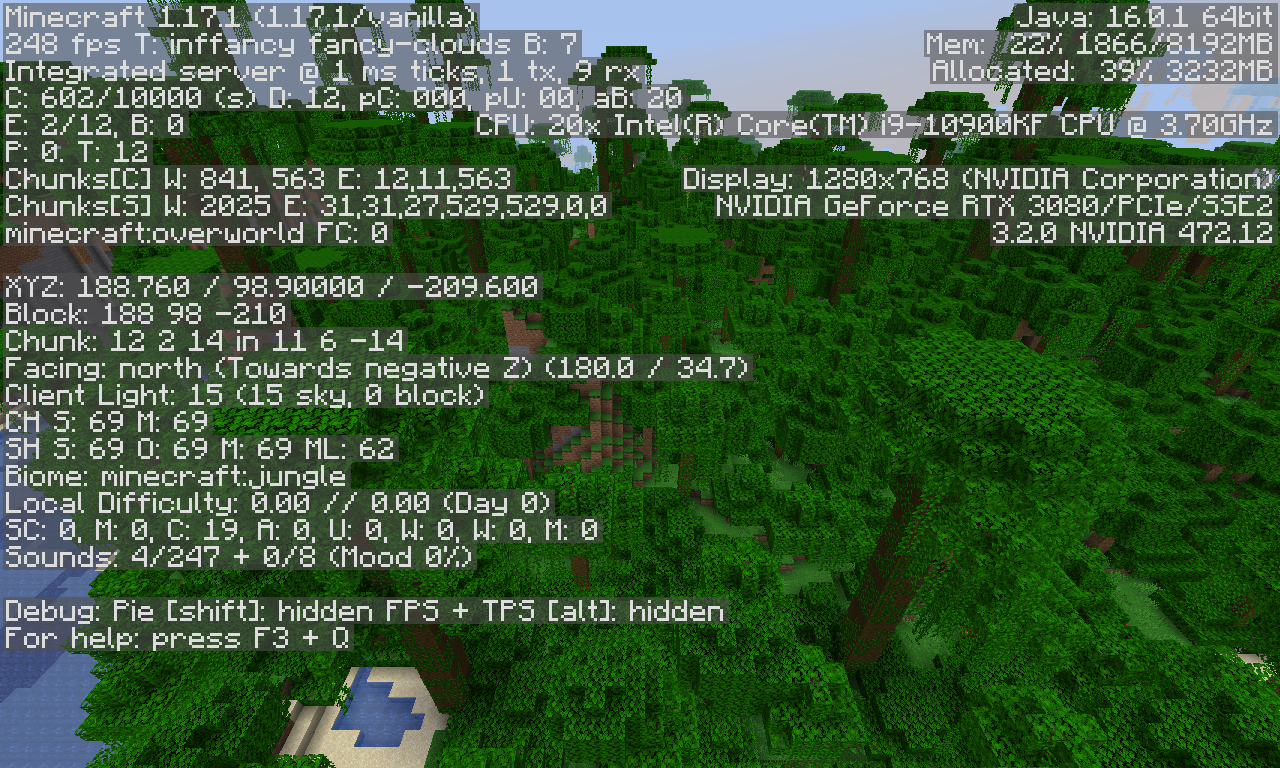
Average FPS in 1.16.5: 315
Average FPS in 1.17.1: 248

1.17.1 Profiling: 2021-10-21_10_42_30-PerformanceTest1_17-1_17_1.zip
From what I've seen, the upgrade to OpenGL hasn't done too much, although it still causes some performance loss. However, it's clear that the current rendering engine can't keep up with 1.18. I loaded up the 1.17 performance world and got nearly the same results. However, when I load a world made in 1.18, the rendering engine can not keep up.
Average FPS in 21w42a with 1.17 World: roughly 150 FPS
21w42a Profiling: 2021-10-21_10_56_26-New World-21w42a.zip
The game seems to be running smoothly- just like 1.17. Doesn't seem to be too different from 1.17.
In 1.18 worlds, the game is quite laggy in general while moving around. Staying still is fine for me, but actual gameplay comes with tons of stuttering and lag. Raising the RAM to 4GB helps, but still results in quite laggy gameplay. 2021-10-21_11.01.49.png
Intel i9-10900KF@3.70GHz
NVIDIA GeForce RTX 3080 (Custom Dell Card for Alienware R11)
32GB of RAM at 2667 MHz
Windows 10 Home
GeForce Game Ready Driver: Version 472.12
Duplicate of
MC-151934Zombie's Clothes No Longer Matches Steve - Jira (mojang.com), which was resolved as Works as Intended.Can confirm. I think it would be better to remove the fade-in, or make it much faster.
Can confirm- this happens on my laptop all the time. Your report does mention Java 8 which could be the cause of the issue as Minecraft requires Java 16 as of 1.17. However, my laptop uses Java 16 and it crashes at least once before launching.
Intended - Glow Squid are able to spawn in any water below Y 30. Same logic applies to slime spawning, as they can only spawn below Y 40.
Invalid. You stated you loaded the world in 21w40a, which does not support chunk blending, but still changes the world to a 1.18 world. In return, a 1.18 world doesn't need to blend with a 1.18 world.
I'd say it's roughly down to 1/3 of the time of 21w42a's saving, definitely a great improvement!
Sadly, it still causes some lag and freezing between 1-3 seconds. It does still impact gameplay- although a lot less compared to 21w42a.
Edit: I don't know if it's possible, but I think autosaving should be able to freeze mob AI. I just loaded a world and the autosave happened- a spider warped to me and hit me right when the autosave finished. Although it wasn't a big deal, I'm sure there are some situations in the game where that would spell the end for some players.
Duplicate of
MC-237986Mobs specific to structures aren't spawning in their structures - Jira (mojang.com).Bug report is about Bedrock Edition, please report the bug at https://bugs.mojang.com/projects/MCPE.
Bug reports from old versions aren't valid, are you able to reproduce in 1.17.1 or 21w43a?
Mojang has repeatedly stated that worlds in old snapshots have no guarantee of being supported in future versions, especially 1.18 snapshots. They've also stated blending only works with worlds using the old terrain generation.
1.18 worlds don't blend with 1.18 worlds
Unable to reproduce.
Invalid. Modified clients have never been supported by Mojang.
Have you tried allocating at least 3GB of RAM to Minecraft? I've noticed while playtesting that 2GB causes the game to be nearly unplayable, after allocating more RAM it's been running much smoother. I'd personally recommend 4GB allocated, but 3GB might also work.
The bug for that issue is
MC-240507Duplicate of
MC-239878, resolved at Won't Fix.Mojang has also never stated that snapshot worlds are guaranteed to be supported in the future.
1. Versions from 2011 aren't supported in 2021. Snapshot 21w44a and release 1.17.1 are the only versions Mojang's worried about.
2. You are apparently using Lunar Client, that also isn't supported.
3. It could've just been raining and the rain didn't render.
This happens due to the new swimming mechanics added in 1.13, where the player flips to be horizontal and swims faster.
There was a similar report like this a few days ago. Do you happen to be using Optifine?
If so, this would be a duplicate of
MC-240733.Have you tried increasing the allocated RAM from 2GB to something like 4GB?
If you don't know how, it's in the installations tab, hover over the Latest snapshot, click the 3 dots and edit, then clicks More Options, scroll down, and change the 2 (in -Xmx2G) to 4 or higher. I don't know if this is the exact solution to your issue, but I had a very similar problem and doing this fixed it. I hope this helps!
Invalid- the cloud height is lower and matches 1.17.1 and earlier versions, not 1.18-pre1.
Does allocating 4GB of RAM or more help with this?
This is a feature request. Ice caves were more or less a bug in Bedrock Betas, and Mojang has never, ever stated that Ice Caves were an official feature. Invalid.
Does MC-219639 describe the issue with FPS?
Unable to reproduce in 1.18.1-pre1.
The closest thing to reproducing this was setting the server’s view distance lower than the client- in which case, this works as intended per 1.18’a changelog.
99% sure this works as intended.
Is the client modded?
You're playing with OptiFine, that's why. Try playing without OptiFine and see how the game runs.