 Fjodor Dostojewski
- mcmila
- mcmila
- Europe/Stockholm
- Yes
- No
 MC-11033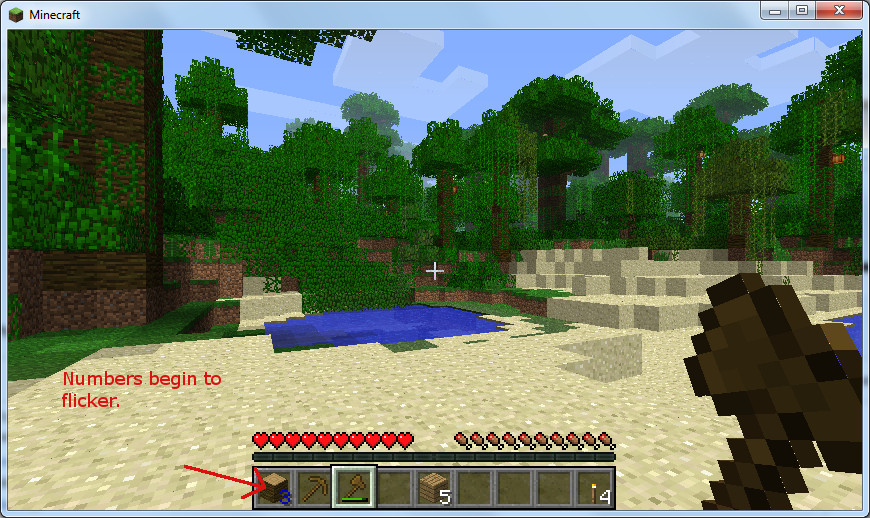

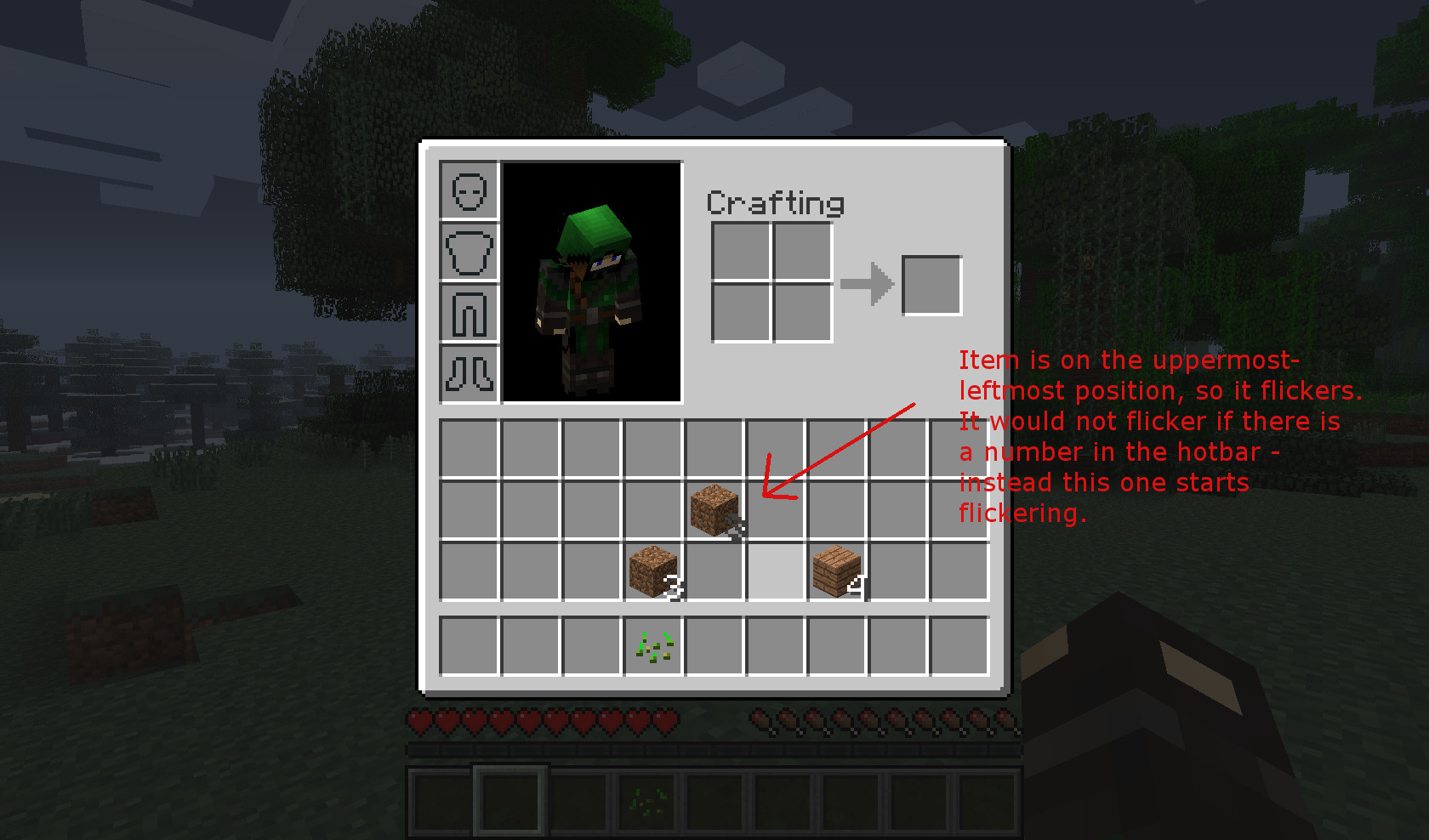


Item count / numbers randomly flickering in item bar, inventory, workbench
Windows 7 32-bit & Ubuntu 12.04 64-bit
Java 1.7.0_15 / OpenJDK 1.7.0_15
No mods
Windows 7 32-bit & Ubuntu 12.04 64-bit
Java 1.7.0_15 / OpenJDK 1.7.0_15
No modsAMD/ATI Radeon HD4950 graphics adapter
gap.jpg
After hitting "login" only a black screen appears. I get the following error in the terminal:
[code]Exception in thread "Minecraft main thread" java.lang.ExceptionInInitializerError
at net.minecraft.client.Minecraft.a(SourceFile:208)
at avv.a(SourceFile:56)
at net.minecraft.client.Minecraft.run(SourceFile:507)
at java.lang.Thread.run(Thread.java:679)
Caused by: java.lang.ArrayIndexOutOfBoundsException: 0
at org.lwjgl.opengl.XRandR$Screen.<init>(XRandR.java:234)
at org.lwjgl.opengl.XRandR$Screen.<init>(XRandR.java:196)
at org.lwjgl.opengl.XRandR.populate(XRandR.java:87)
at org.lwjgl.opengl.XRandR.access$100(XRandR.java:52)
at org.lwjgl.opengl.XRandR$1.run(XRandR.java:110)
at java.security.AccessController.doPrivileged(Native Method)
at org.lwjgl.opengl.XRandR.getConfiguration(XRandR.java:108)
at org.lwjgl.opengl.LinuxDisplay.init(LinuxDisplay.java:618)
at org.lwjgl.opengl.Display.<clinit>(Display.java:135)
... 4 more[/code]After hitting "login" only a black screen appears. I get the following error in the terminal:
TerminalException in thread "Minecraft main thread" java.lang.ExceptionInInitializerError at net.minecraft.client.Minecraft.a(SourceFile:208) at avv.a(SourceFile:56) at net.minecraft.client.Minecraft.run(SourceFile:507) at java.lang.Thread.run(Thread.java:679) Caused by: java.lang.ArrayIndexOutOfBoundsException: 0 at org.lwjgl.opengl.XRandR$Screen.<init>(XRandR.java:234) at org.lwjgl.opengl.XRandR$Screen.<init>(XRandR.java:196) at org.lwjgl.opengl.XRandR.populate(XRandR.java:87) at org.lwjgl.opengl.XRandR.access$100(XRandR.java:52) at org.lwjgl.opengl.XRandR$1.run(XRandR.java:110) at java.security.AccessController.doPrivileged(Native Method) at org.lwjgl.opengl.XRandR.getConfiguration(XRandR.java:108) at org.lwjgl.opengl.LinuxDisplay.init(LinuxDisplay.java:618) at org.lwjgl.opengl.Display.<clinit>(Display.java:135) ... 4 more
Affects "debug" snapshot 13w12~ and 1.5.1 pre-release.
Ubuntu 12.04 64-bit
java version "1.6.0_27"
OpenJDK Runtime Environment (IcedTea6 1.12.3) (6b27-1.12.3-0ubuntu1~12.04.1)
OpenJDK 64-Bit Server VM (build 20.0-b12, mixed mode)Affects "debug" snapshot 13w12~ and 1.5.1 pre-release.
java version "1.6.0_27"
OpenJDK Runtime Environment (IcedTea6 1.12.3) (6b27-1.12.3-0ubuntu1~12.04.1)
OpenJDK 64-Bit Server VM (build 20.0-b12, mixed mode)java version "1.7.0_15"
OpenJDK Runtime Environment (IcedTea7 2.3.7) (7u15-2.3.7-0ubuntu1~12.04.1)
OpenJDK 64-Bit Server VM (build 23.7-b01, mixed mode)
Crash report added.
I don't play on any server. I play solo survival mode on my local computer.
Reproduce:
When downgrading to Minecraft 1.4.7 (via "force update") the bug does not appear within the same world that we just created. It will reappear if I install the mentioned snapshot.
It seems not to appear in a newly created creative-mode world. BUT it also appears when using "/gamemode 1" while playing survival mode with cheats.
I was also able to reproduce this bug under Ubuntu 12.04 64-bit (Java: OpenJDK 7).
I was also able to reproduce it on another machine (Windows 7 as well).
I have this bug on a 32-bit Windows environment. Voted.
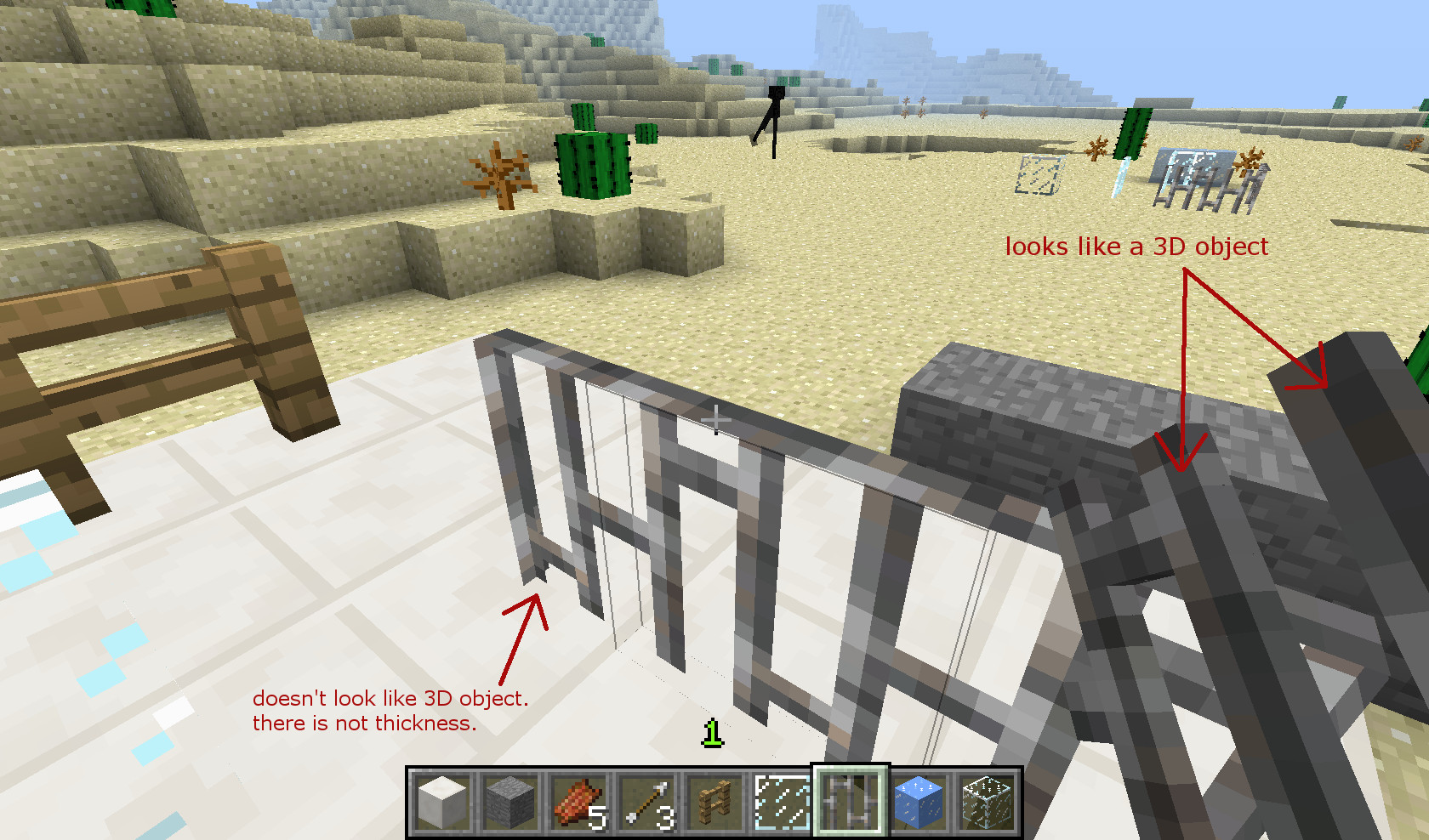
It feels like there are gaps between textures of nearby blocks. If I come closer I can see through the texture to the scenery behind. See gap.jpg above.
Well, I could not reproduce it on a THIRD machine (my slow netbook, Ubuntu 12.04)
The 2 machines where I could reproduce it have an ATI/AMD Radeon graphics card (different models).
The netbook has a Nvidia graphics card and is very slow in CPU power.
But I want to repeat, that the flickering doesn't appear in earlier MC versions like the actual 1.4.7
Update: The item number is not only flickering in the item bar, but also in the inventory, the crafting area of the inventory and inside a workbench area. I didn't realize this earlier.
Update2: I made a clean install of Minecraft (deleted all in %appdata%\.minecraft) and updated my graphics drivers. Bug still exists, even with latest snapshot 13w10b. The flickering is very heavy and switches between white, gray, blue.
I tried fullscreen on/off, creating worlds with different smooth lighting settings, vsync on/off and advanced OpenGL on/off - no difference for me.
I just created a world in Snapshot 13w10b (vanilla) and there were 2 wolves - one of them sunken into a dirtblock. When destroying the dirtblock the wolf was sunken into, he sunk into the next block underneath him.
Edit: After saving and reloading the world the mentioned wolf was not sunken anymore. But while loading the other wolf got forced 5 blocks to the right, like he was pulled. Then everything was fine. Maybe it has something to do with creating mobs.
I cannot confirm this either with the current snapshot and clean install of MC.
I've got the same trees as in the picture when I try to reproduce. How could I know, that kind of trees should be large oak trees?
@Kumasasa: It's directly at your spawn point.
Seed for Copy&Paste: -753548930
Thank you, this is the same bug I already created: https://mojang.atlassian.net/browse/MC-11033
I figured the following out:
See screenshots with explanation.
I downloaded the map "Zanozus" and can confirm the flickering in it. I also have a Phenom 2 X4 Processor btw. - but I don't use any programs to alter frequency. I could also reproduce this on my girlfriends computer. And remember: no such bug with 1.4.7
Thank you!
No, she's got an AMD Athlon 64 3000+
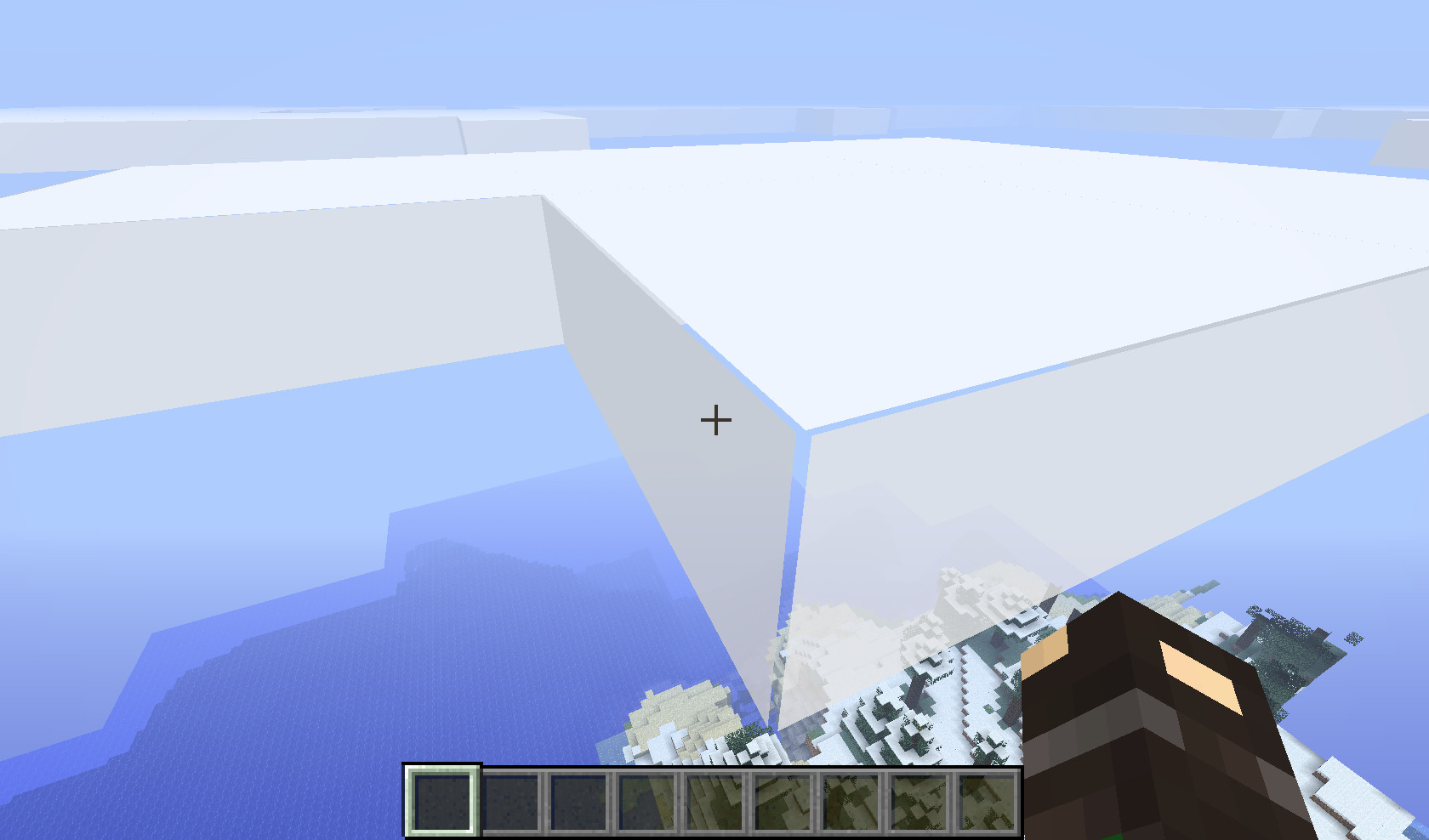
Those problems are not just "white or black lines". As I mentioned earlier it's like there are gaps between the textures. You can clearly see this in most of the pictures above. It appears as if you can see through the textures to the things that are behind. Are the textures not close enough together in some cases?
Those gaps get bigger if you go near them. So it's not just lines.
Different "performance" settings (power saver, balanced, max fps) did not alter the flickering in my case.
I can confirm this effect.
I cannot confirm this in 1.5
When I focus the space under the bed, the bed is surrounded by the black lines and when I punch the space, the bed gets destroyed.
@Marius
If it is only graphics card related, it would appear in version 1.4.7 too, but it does not.
I can confirm that it only happens with single digit numbers.
I already stated, that I updated my graphics cards driver (Catalyst 13.1). It didn't affect the bug - still there.
OpenGL 3.3.11672
[Can you have a look at the things you changed between 13w07a (no bug) and 13w09a (bug) - things like "added HD font support" - "fonts are now changeable"...]
I drank 6 potions. Timers were fine, also they disappeared without problems after timeout. (13w11a)
I can confirm this. Switching back to non-fullscreen does not help.
Still a problem in 1.5.1 pre-release.
Only got it since the mentioned versions - it appears always and I cannot play the game.
Well, something strange must have happened. Even after "force update" the game throws this error now. It seems like Ubuntu re-installed OpenJDK version 6 with the latest updates. I uninstalled the version and used OpenJDK 7 again. The error still occurs. That's annoying. Don't know what has changed.
I didn't change LWJGL. How can I check the installed version?
Update: I deleted the ".minecraft\bin" files and forced update again. No difference.
I found the reason for this behavior. My beamer was attached to my second graphics card output. After disconnecting it, the game started without problems.
You can close this bug btw.
Confirmed for 1.5.1
I have the same problem: created a map, then zoomed out 2 times. After creating another map + 2 zooms in the new one, the contents of the first map disappeared.
@Christophe
The first map you create is a very zoomed in version, you have to zoom out first to get unexplored areas on it.
Installing Optifine for 1.5.1 removes the bug. Can you please hire this guy? Now it's your turn, dear Mojang.
@Morten
Did you ever walk through snow in real life?
OP here. I actually didn't update my graphics card driver yet and I DO NOT experience the issue in the current snapshot 13w18b. OpenGL version still the same (3.3.11672).
Update: The bug is present in 1.5.2 though.