Item count / numbers randomly flickering in item bar, inventory, workbench
Since one of the last snapshots item count is randomly flickering in item bar. It switches between different numbers randomly. It happens with all 3 smooth lighting settings (off, minimum, maximum).
- It happens since snapshot 13w09a.
- It does NOT appear in an earlier snapshot or in version 1.4.7
- It still happens in snapshot 13w10a.
- I don't use mods / Optifine.
Affected Graphic cards:
OpenGL: AMD Radeon HD 6520G GL version 4.2.11554 Compatibility Profile Context, ATI Technologies Inc.
OpenGL: AMD Radeon HD 6800 Series GL version 4.2.11631 Compatibility Profile Context, ATI Technologies Inc.
OpenGL: ATI Radeon HD 4300/4500 Series GL version 3.3.11566 Compatibility Profile Context, ATI Technologies Inc.
OpenGL: AMD Radeon HD 6300M Series GL version 4.2.11318 Compatibility Profile Context, ATI Technologies Inc.
OpenGL: ATI Radeon HD 4800 Series GL version 3.3.11653 Compatibility Profile Context, ATI Technologies Inc.
Not affected Graphic cards (Catalyst 13.1):
OpenGL: AMD Radeon HD 6700 Series GL version 4.2.12002 Compatibility Profile Context 9.12.0.0, ATI Technologies Inc.
OpenGL: AMD Radeon HD 7700 Series GL version 4.2.12002 Compatibility Profile Context 9.12.0.0, ATI Technologies Inc.
Environment
Windows 7 32-bit & Ubuntu 12.04 64-bit
Java 1.7.0_15 / OpenJDK 1.7.0_15
No mods
AMD/ATI Radeon HD4950 graphics adapter
Linked Issues
is duplicated by18
 MC-11275icon error for blocks in hotbar or inventoryDuplicateMC-11467Colour cycling on the console interfaceDuplicateMC-11510The Item in the Second Hot Bar Slot's Item Count Changes ColorDuplicateMC-11741Blinking numbers.DuplicateMC-11796Bug with DroppersDuplicateMC-11812Index number of staksDuplicateMC-11851Numerals in hot bar slots change colorsDuplicateMC-12271Item stack numbers flash randomlyDuplicateMC-12633Numbers on Status Bar Flicker Under Certain ConditionsDuplicateMC-12786Stack number flickeringDuplicateMC-14356GUI Flicker (item numbers, exp bar, level number)DuplicateMC-16028Flickering numbersDuplicateMC-16118There is a problem with the crafting, when I go to create something the number glitiches out and I can only craft the items one at a time and not do a multiple craft by holding shift and clicking the craft boxDuplicateMC-17185Blinky chests, and numbers.DuplicateMC-18388Item amount changes colors.DuplicateMC-19553Stacked Items "blink"DuplicateMC-22326Number of items in a stack flickersDuplicateMC-71575Hotbar glitchIncomplete
Attachments12




Created Issue:
Item count / numbers randomly flickering in item bar
Since one of the last snapshots item count is randomly flickering in item bar. It switches between different numbers randomly. It happens with all 3 smooth lighting settings (off, minimum, maximum).
- It happens since snapshot 13w09a.
- It does NOT appear in an earlier snapshot or in version 1.4.7
- It still happens in snapshot 13w10a.
- I don't use mods / Optifine.
Environment
Windows 7 32-bit
Java 1.7.0_15
No mods
Attachments1
Item count / numbers randomly flickering in item bar, inventory, workbench
Windows 7 32-bit & Ubuntu 12.04 64-bit
Java 1.7.0_15 / OpenJDK 1.7.0_15
No mods
is duplicated by
Windows 7 32-bit & Ubuntu 12.04 64-bit
Java 1.7.0_15 / OpenJDK 1.7.0_15
No modsAMD/ATI Radeon HD4950 graphics adapter
relates to

is duplicated by
is duplicated by
is duplicated by
is duplicated by
is duplicated by
is duplicated by
Since one of the last snapshots item count is randomly flickering in item bar. It switches between different numbers randomly. It happens with all 3 smooth lighting settings (off, minimum, maximum).
- It happens since snapshot 13w09a.
- It does NOT appear in an earlier snapshot or in version 1.4.7
- It still happens in snapshot 13w10a.
- I don't use mods / Optifine.
Graphic cards:
OpenGL: AMD Radeon HD 6520G GL version 4.2.11554 Compatibility Profile Context, ATI Technologies Inc.
OpenGL: AMD Radeon HD 6800 Series GL version 4.2.11631 Compatibility Profile Context, ATI Technologies Inc.
OpenGL: ATI Radeon HD 4300/4500 Series GL version 3.3.11566 Compatibility Profile Context, ATI Technologies Inc.
OpenGL: AMD Radeon HD 6300M Series GL version 4.2.11318 Compatibility Profile Context, ATI Technologies Inc.
OpenGL: ATI Radeon HD 4800 Series GL version 3.3.11653 Compatibility Profile Context, ATI Technologies Inc.
Since one of the last snapshots item count is randomly flickering in item bar. It switches between different numbers randomly. It happens with all 3 smooth lighting settings (off, minimum, maximum).
- It happens since snapshot 13w09a.
- It does NOT appear in an earlier snapshot or in version 1.4.7
- It still happens in snapshot 13w10a.
- I don't use mods / Optifine.
Affected Graphic cards:
OpenGL: AMD Radeon HD 6520G GL version 4.2.11554 Compatibility Profile Context, ATI Technologies Inc. OpenGL: AMD Radeon HD 6800 Series GL version 4.2.11631 Compatibility Profile Context, ATI Technologies Inc. OpenGL: ATI Radeon HD 4300/4500 Series GL version 3.3.11566 Compatibility Profile Context, ATI Technologies Inc. OpenGL: AMD Radeon HD 6300M Series GL version 4.2.11318 Compatibility Profile Context, ATI Technologies Inc. OpenGL: ATI Radeon HD 4800 Series GL version 3.3.11653 Compatibility Profile Context, ATI Technologies Inc.Not affected Graphic cards:
OpenGL: AMD Radeon HD 6700 Series GL version 4.2.12002 Compatibility Profile Context 9.12.0.0, ATI Technologies Inc.
is duplicated by

is duplicated by
is duplicated by
Since one of the last snapshots item count is randomly flickering in item bar. It switches between different numbers randomly. It happens with all 3 smooth lighting settings (off, minimum, maximum).
- It happens since snapshot 13w09a.
- It does NOT appear in an earlier snapshot or in version 1.4.7
- It still happens in snapshot 13w10a.
- I don't use mods / Optifine.
Affected Graphic cards:
OpenGL: AMD Radeon HD 6520G GL version 4.2.11554 Compatibility Profile Context, ATI Technologies Inc. OpenGL: AMD Radeon HD 6800 Series GL version 4.2.11631 Compatibility Profile Context, ATI Technologies Inc. OpenGL: ATI Radeon HD 4300/4500 Series GL version 3.3.11566 Compatibility Profile Context, ATI Technologies Inc. OpenGL: AMD Radeon HD 6300M Series GL version 4.2.11318 Compatibility Profile Context, ATI Technologies Inc. OpenGL: ATI Radeon HD 4800 Series GL version 3.3.11653 Compatibility Profile Context, ATI Technologies Inc.Not affected Graphic cards:
OpenGL: AMD Radeon HD 6700 Series GL version 4.2.12002 Compatibility Profile Context 9.12.0.0, ATI Technologies Inc.
OpenGL: AMD Radeon HD 7700 Series GL version 4.2.12002 Compatibility Profile Context 9.12.0.0, ATI Technologies Inc.
Since one of the last snapshots item count is randomly flickering in item bar. It switches between different numbers randomly. It happens with all 3 smooth lighting settings (off, minimum, maximum).
- It happens since snapshot 13w09a.
- It does NOT appear in an earlier snapshot or in version 1.4.7
- It still happens in snapshot 13w10a.
- I don't use mods / Optifine.
Affected Graphic cards:
OpenGL: AMD Radeon HD 6520G GL version 4.2.11554 Compatibility Profile Context, ATI Technologies Inc. OpenGL: AMD Radeon HD 6800 Series GL version 4.2.11631 Compatibility Profile Context, ATI Technologies Inc. OpenGL: ATI Radeon HD 4300/4500 Series GL version 3.3.11566 Compatibility Profile Context, ATI Technologies Inc. OpenGL: AMD Radeon HD 6300M Series GL version 4.2.11318 Compatibility Profile Context, ATI Technologies Inc. OpenGL: ATI Radeon HD 4800 Series GL version 3.3.11653 Compatibility Profile Context, ATI Technologies Inc.Not affected Graphic cards (Catalyst 13.1):
OpenGL: AMD Radeon HD 6700 Series GL version 4.2.12002 Compatibility Profile Context 9.12.0.0, ATI Technologies Inc.
OpenGL: AMD Radeon HD 7700 Series GL version 4.2.12002 Compatibility Profile Context 9.12.0.0, ATI Technologies Inc.
is duplicated by
is duplicated by
is duplicated by
is duplicated by
is duplicated by
is duplicated by
is duplicated by
Duplicate of MC-11033, please use the search function to see if your bug has already been submitted. Currently over 53% of tickets are being closed as duplicate.
I didn't expect that the issue would vanish with the update of Java, that was just a general hint.
But as I could see in the clip that you have the flickering hotbar numbers as described in MC-11033 ?
Dependancy between the repeater delay and the flickering items ?
Can you attach a zip of your world here (or create a new world which shows the issue) ?
Maybe people of MC-11033 may test if there is a coincidence between the two issues.
But another question: Why does your CPU change frequency ? What CPU do you have (attach a screenshot of CPUID http://www.cpuid.com/softwares/cpu-z.html ) ?
Duplicate of MC-11033, please use the search function to see if your bug has already been submitted. Currently over 53% of tickets are being closed as duplicate.
Duplicate of MC-11033, please use the search function to see if your bug has already been submitted. Currently over 54% of tickets are being closed as duplicate.
Duplicate of MC-11033, please use the search function to see if your bug has already been submitted. Currently over 54% of tickets are being closed as duplicate.
Duplicate of MC-11033, please use the search function to see if your bug has already been submitted. Currently over 54% of tickets are being closed as duplicate.
Duplicate of MC-11033, please use the search function to see if your bug has already been submitted. Currently over 54% of tickets are being closed as duplicate.
Duplicate of MC-11033, please use the search function to see if your bug has already been submitted. Currently over 54% of tickets are being closed as duplicate.
Duplicate of MC-11033, please use the search function to see if your bug has already been submitted. Currently over 54% of tickets are being closed as duplicate.
I think that there might be some relation to MC-11033 . There is at least a chance of it.
Duplicate of MC-11033, please use the search function to see if your bug has already been submitted. Currently over 54% of tickets are being closed as duplicate.
Duplicate of MC-11033, please use the search function to see if your bug has already been submitted. Currently over 56% of tickets are being closed as duplicate.
Duplicate of MC-11033, please use the search function to see if your bug has already been submitted. Currently over 57% of tickets are being closed as duplicate.
Duplicate of MC-11033, please use the search function to see if your bug has already been submitted. Currently over 57% of tickets are being closed as duplicate.
Please force a crash by pressing F3 + C for 10 seconds while ingame and attach the crash report here.
Duplicate of MC-11033
Actually a duplicate of the (fixed) MC-11033 , but that was fixed a long time ago.
Please force a crash by pressing F3 + C for 10 seconds while in-game and attach the crash report (minecraft/crash-reports/crash-<DATE>-client.txt) here.
Please force a crash by pressing F3 + C for 10 seconds while ingame and attach the crash report here.
Crash report added.
On what server do you play ? Vanilla or Bukkit ?
I don't play on any server. I play solo survival mode on my local computer.
Sorry, misread the crash report.
But can you provide exact steps to reproduce that issue ?
I fail to reproduce that.
Reproduce:
When downgrading to Minecraft 1.4.7 (via "force update") the bug does not appear within the same world that we just created. It will reappear if I install the mentioned snapshot.
It seems not to appear in a newly created creative-mode world. BUT it also appears when using "/gamemode 1" while playing survival mode with cheats.
I was also able to reproduce this bug under Ubuntu 12.04 64-bit (Java: OpenJDK 7).
I was also able to reproduce it on another machine (Windows 7 as well).
Can still not reproduce.
Well, I could not reproduce it on a THIRD machine (my slow netbook, Ubuntu 12.04)
The 2 machines where I could reproduce it have an ATI/AMD Radeon graphics card (different models).
The netbook has a Nvidia graphics card and is very slow in CPU power.
But I want to repeat, that the flickering doesn't appear in earlier MC versions like the actual 1.4.7
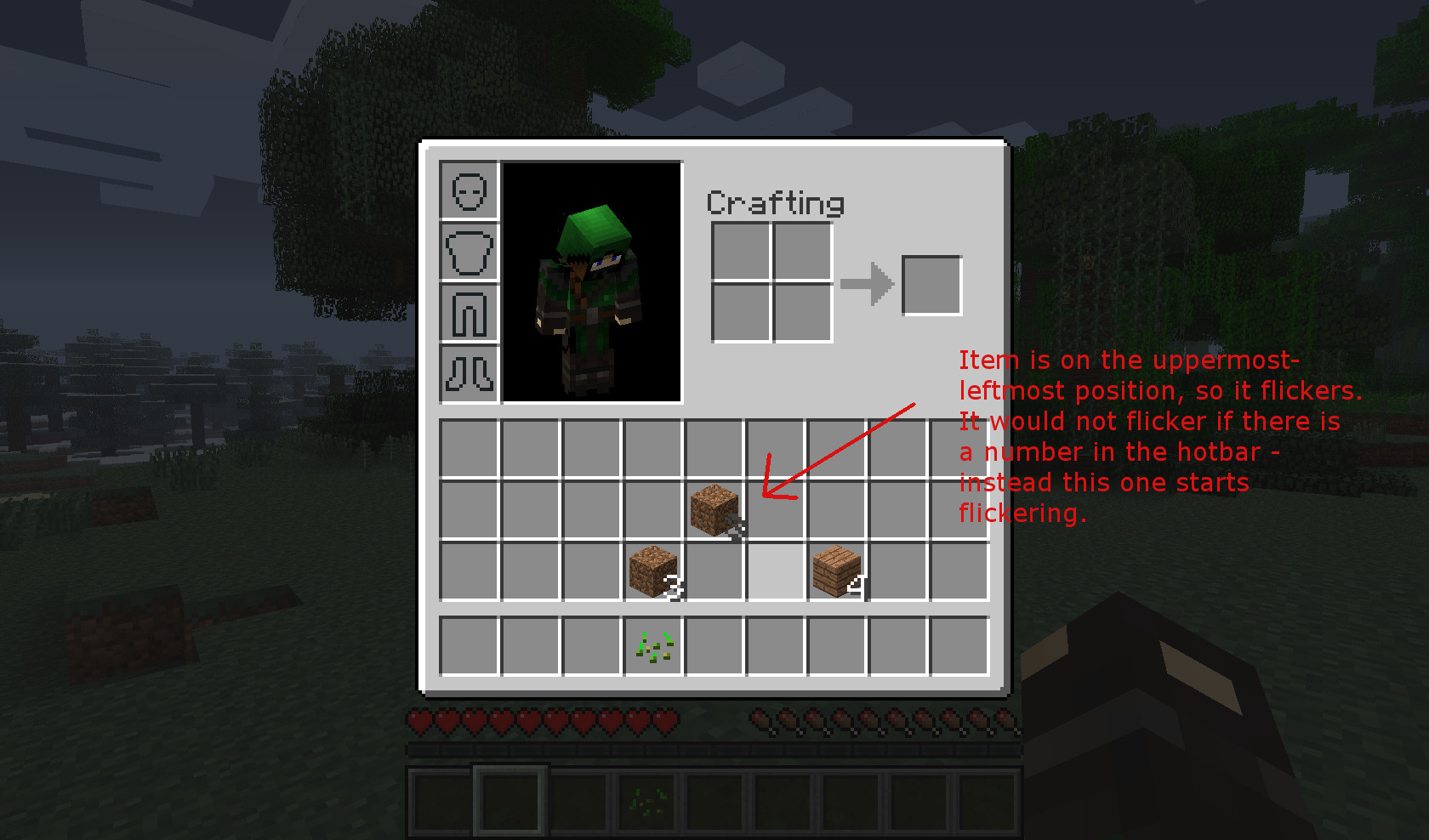
Update: The item number is not only flickering in the item bar, but also in the inventory, the crafting area of the inventory and inside a workbench area. I didn't realize this earlier.
Update2: I made a clean install of Minecraft (deleted all in %appdata%\.minecraft) and updated my graphics drivers. Bug still exists, even with latest snapshot 13w10b. The flickering is very heavy and switches between white, gray, blue.
I tried fullscreen on/off, creating worlds with different smooth lighting settings, vsync on/off and advanced OpenGL on/off - no difference for me.
I figured the following out:
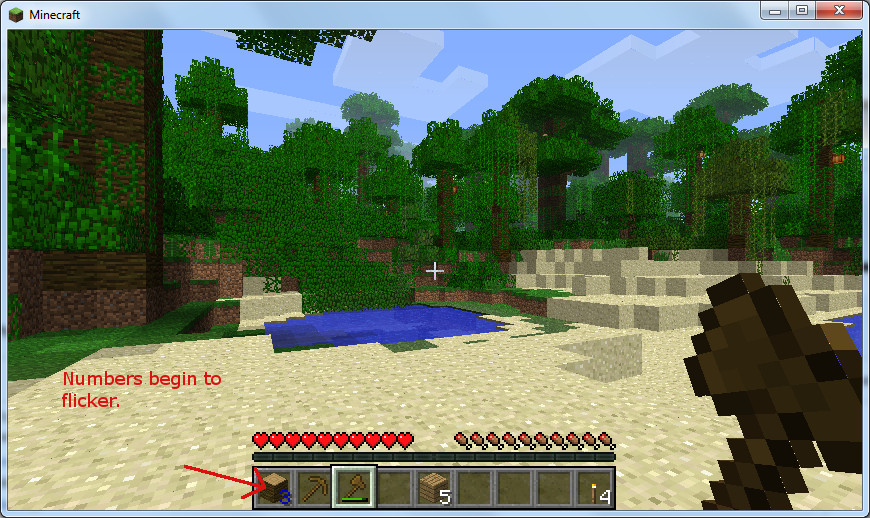
See screenshots with explanation.
Can you confirm the flickering with the world posted in
MC-11233? (I cannot)I downloaded the map "Zanozus" and can confirm the flickering in it. I also have a Phenom 2 X4 Processor btw. - but I don't use any programs to alter frequency. I could also reproduce this on my girlfriends computer. And remember: no such bug with 1.4.7
Thank you!
According to
MC-11233is the flickering is independent of changing CPU frequency, but does your girlfriend's PC also have a Phenom 2 CPU ?No, she's got an AMD Athlon 64 3000+
Oh, NO ! I have flickering and redstone anomaly in new world again !
They appeared simultaneously. I think it caused by sudden reboot of my computer due to loss of power.
And it depends on "perfomance" option of minecraft.
Different "performance" settings (power saver, balanced, max fps) did not alter the flickering in my case.
Couldn't reproduce in 1.5pre
Happens also in creative and some times the number gets removed and also happens with 1 character or the underscore in the console yet it only cycles grey in the console
I too have experienced this too since upgrading to 1.5. (I skipped the last few weeks worth of prereleases, so I don't know if the bug was present there.)
Based on my own experimentation, the bug involves the leftmost item in the hotbar where a number is rendered. (So, "Dirt Block, Gravel Block, 3 * Wood Block" would make the 3 flicker.) However, if said number is 10 or greater, it apparently won't flash, nor any of the other numbers. The flashes are seemingly random colors and occur at seemingly random times.
Flickering seems to be independent of graphics fanciness, lighting and performance settings.
The incorrect color it occasionally flickers into seems to remain constant if one isn't moving or turning the camera. Changing either may yield a new color.
Graphics adapter is AMD Radeon HD 7700 Series. Running Windows 7 64 bit.
Also reproduced in snapshot 13w11a vanilla single player.
In the item bar, I've only experienced flickering in the first stack, regardless of its item slot, so if, for example, I've got three wool in slot 6, and two seeds in slot 7, the 3 on wool will flicker, but not the 2 on seeds. But if I rearrange the two and put seeds first, then the 2 on seeds will flicker, and the 3 on wool will stop.
Happens regardless of video settings or game mode.
Have not experienced flickering in any other gui component.
I'm running MC through 64-bit java on Win7, also using an ATI video card.
I'm able to reproduce this on an AMD Radeon 6370M card. Added an animation (Bug4.gif ) showing frame by frame what happens through 99 frames. The number 9 on the dirt stack (leftmost) seems to alternate between dark gray, black and navy colors.
Could this possibly be graphics card related? All the users who have added their GPU OEM/model name say their cards are ATi/AMD...
Can confirm the bug. I have an AMD Radeon card. Also of note is that it seems to, as you said, only happen to the item in the leftmost hotbar slot. However, it seems to only happen when that item stack is in single digits. Having a stack of 21 mellons in the leftmost slot prevented any hotbar flickering.
Can anyone who is experiencing this issue please force a crash by pressing F3 + C for 10 seconds while ingame and attach the crash report here.
So we'll get the graphics cards and driver versions.
@Marius
If it is only graphics card related, it would appear in version 1.4.7 too, but it does not.
I can confirm that it only happens with single digit numbers.
I haven't had the time to fully look at this bug on my system, but I have seen flickering of item counts in inventory in both single-player and my own multi-player server.
My bigger problem right now is the new inventory management system (double-clicking, shift+drag, shift+double-click) does not work at all. I know the system has changed since 1.4.7, but I don't think it's supposed to be the way it's acting on my system now.
I had neither of these problems in 1.4.7. I have not had time to check it on my other system.
Attached a crash report above.
Inventory clicking problems:
MC-12081Was about to start looking for that problem too...thanks Kumasasa. You suggest posting a crash report there, too?
Edit: Just saw your comment on the other thread. I'll post there, too.
Ok, I uploaded my crash log too.
@Fjodor;
Maybe it's both related to graphics card and some change in rendering or something in the code?
Attached my crash report.
Judging by the fact that all the crash reports (including mine) are reporting AMD/ATI Radeon, im gonna go ahead and assume this is a driver/graphics card issue, unless someone can confirm otherwise.
In the description of the ticket is the list of affected and not affected (mine) graphic cards.
Eye-catching is that all "affected" cards are ATI/AMD.
All are running a driver version 11xxx.
Maybe an update to the latest Catalyst 13.1 (but not Catalyst 13.3 beta, because of
MC-12006) may help here ?@Kumasasa: Appears it's a driver problem. Updated to Catalyst 13.1 from 12.4 and don't appear to have this issue anymore. Did not solve the other issue mentioned, but I'm going to update that on the other ticket.
I learned today I can't force a crash in Minecraft (apparently because on my laptop the F-keys are the sub-function, not the default function, so pressing F3+C is actually FN+F3+C?). I'm using an AMD Radeon HD 7670M graphics card. I'm not sure how to get the driver version without a crash log in Win 7.
@Levi Cromer:
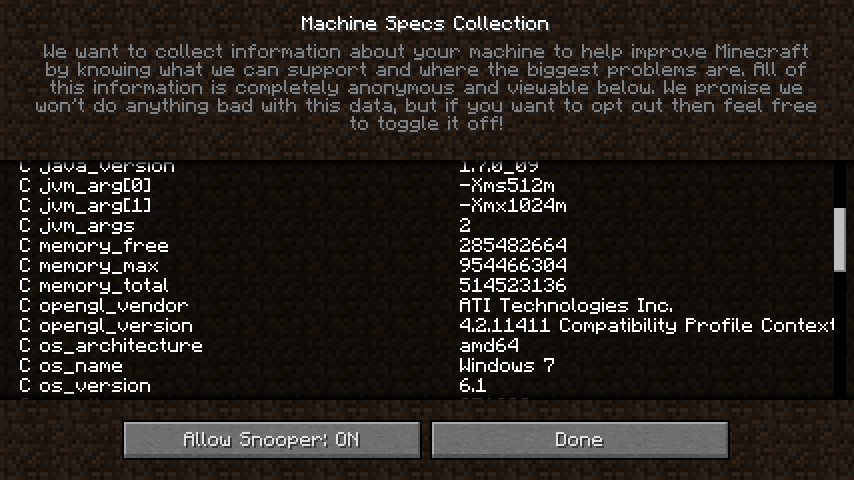
In Minecraft
Options -> Snooper Settings
Scroll down to opengl.
Make a screenshot and attach it here, that counts as McGyver crash report.
I already stated, that I updated my graphics cards driver (Catalyst 13.1). It didn't affect the bug - still there.
OpenGL 3.3.11672
[Can you have a look at the things you changed between 13w07a (no bug) and 13w09a (bug) - things like "added HD font support" - "fonts are now changeable"...]
@Kumasasa
Done. Its an 11411.
Upgraded Catalyst to 13.1 (OpenGL version 6.14.10.12002) and has since then been unable to reproduce the flickering.
@Smallhacker: Can you please attach a forced crash report.
Attached crash report post-upgrade with no signs of the flickering so far.
Installing Optifine for 1.5.1 removes the bug. Can you please hire this guy? Now it's your turn, dear Mojang.
Confirmed. I saw slot one flickering blue when it was in single digits.
Just noticed it also happens with the Experience Level number, as long as it is in single digits. Just thought I'd mention it.
Add AMD Radeon HD 7560D to that list.
I have a Radeon HD 7450 as my graphics card, and this happens to me as well. Optifine seemed to worked until I installed Forge.
I am having the number for a stack also flickering in the pre-release of 1.6
That doesn't exist yet.
Please try out the latest 1.5.2 pre-release from http://mojang.com/2013/04/1-5-2-pre-release-and-13w17a-snapshot-oh-my/ and let us know if you still experience this issue.
I still encounter the issue on the 1.5.2 pre-release.
AMD Catalyst 13.4 is out: http://support.amd.com/us/gpudownload/windows/Pages/radeonaiw_vista64.aspx, can please anyone experiencing this issue update the graphics drivers and try out ?
OP here. I actually didn't update my graphics card driver yet and I DO NOT experience the issue in the current snapshot 13w18b. OpenGL version still the same (3.3.11672).
Update: The bug is present in 1.5.2 though.
Ok, fixed for 13w18b
I can confirm this being fixed in the latest snapshot as well.
This should be reopened, it's kinda still happening.
Edit: still happening in 1.6 prerelease, that is
What do you mean by "kinda"?