 Megabobster
- Megabobster
- megabobster
- America/Los_Angeles
- Yes
- No
 MC-29192
![[Mod] Jiingy](../../../data/avatars/users/91802.png)







Items get deleted when using the recipe book to return items fromthecrafting tableoverflows the inventory.Items get deleted when the inventory is overflowed by using the recipe book to return items from a crafting table.
Repairing a weapon or tool in the grindstone or by crafting succeeds even if the items have full durability.
Repairing a weapon or tool in the grindstoneor by craftingsucceeds even if the items have full durability.
To reproduce:
- Obtain one fully repaired tool and another of the same type (fully repaired or damaged; either works).
Open the inventory or use a crafting table and place both items in the craftinginterface to combine them.Expected results:
Crafting to repair only works if the items are damaged.Actual results:
As a result of crafting the output, one of the items will be "deleted." Not actually deleted, but the result will just be one fully repaired item (as expected, really).This is by no means game-breaking ("oh no, I have one less of the hundreds of bows I get from skeletons!"), and could technically be useful/intended (fully repaired, bad enchantment + low durability, no enchantment = disenchant the tool), so I'm not really sure if this is WAI or not.
An attempted bisect revealed that apparently it's been this way since repair was first added (I tested 1.0.0, as I couldn't find beta 1.9pre3 on the launcher). This, to me, adds further to the "is this WAI?" confusion.
To reproduce:
- Obtain one fully repaired tool and another of the same type (fully repaired or damaged; either works).
- Use a grindstone interface to combine them.
Expected results:
- Repairing only works if the items are damaged. This is how an anvil behaves.
Actual results:
- The two items will still be combined, and as a result, one of the items will be "deleted."
This is by no means game-breaking ("oh no, I have one less of the hundreds of bows I get from skeletons!"),
and could technically be useful/intended (fully repaired, bad enchantment + low durability, no enchantment = disenchant the tool)(doesn't seem intentional now that disenchanting is a thing), so I'm not really sure if this is WAI or not.An attempted bisect revealed that apparently it's been this way since repair was first added (I tested 1.0.0, as I couldn't find beta 1.9pre3 on the launcher). This, to me, adds further to the "is this WAI?" confusion. This behavior persisted through 1.14, when crafting to repair was replaced with the grindstone.
Repairing a weapon or tool in the grindstone or by crafting succeeds even if the items have full durability.
To reproduce:
- Obtain one fully repaired tool and another of the same type (fully repaired or damaged; either works).
- Use a grindstone interface to combine them.
Expected results:
- Repairing only works if the items are damaged. This is how an anvil behaves.
Actual results:
- The two items will still be combined, and as a result, one of the items will be "deleted."
This is by no means game-breaking ("oh no, I have one less of the hundreds of bows I get from skeletons!"),
and could technically be useful/intended (fully repaired, bad enchantment + low durability, no enchantment = disenchant the tool)(doesn't seem intentional now that disenchanting is a thing), so I'm not really sure if this is WAI or not.An attempted bisect revealed that apparently it's been this way since repair was first added (I tested 1.0.0, as I couldn't find beta 1.9pre3 on the launcher). This, to me, adds further to the "is this WAI?" confusion. This behavior persisted through 1.14, when crafting to repair was replaced with the grindstone.
To reproduce:
- Obtain one fully repaired tool and another of the same type (fully repaired or damaged; either works).
- Use a grindstone or the crafting interface to combine them.
Expected results:
- Repairing only works if the items are damaged. This is how an anvil behaves.
Actual results:
- The two items will still be combined, and as a result, one of the items will be "deleted."
This is by no means game-breaking ("oh no, I have one less of the hundreds of bows I get from skeletons!"),
and could technically be useful/intended (fully repaired, bad enchantment + low durability, no enchantment = disenchant the tool)(doesn't seem intentional now that disenchanting is a thing), so I'm not really sure if this is WAI or not.An attempted bisect revealed that apparently it's been this way since repair was first added (I tested 1.0.0, as I couldn't find beta 1.9pre3 on the launcher). This, to me, adds further to the "is this WAI?" confusion. This behavior persisted through 1.14 and 1.14.3pre3, when crafting to repair was
replaced withsupplemented by the grindstone.
To reproduce:
- Obtain one fully repaired tool and another of the same type (fully repaired or damaged; either works).
- Use a grindstone or
thecrafting interface to combine them.Expected results:
- Repairing only works if the items are damaged. This is how an anvil behaves.
Actual results:
- The two items will still be combined
, and as a result, one of the items will be "deleted."This is by no means game-breaking ("oh no, I have one less of the hundreds of bows I get from skeletons!"),
and could technically be useful/intended (fully repaired, bad enchantment + low durability, no enchantment = disenchant the tool)(doesn't seem intentional now that disenchanting is a thing), so I'm not really sure if this is WAI or not.An attempted bisect revealed that apparently it's been this way since repair was first added (I tested 1.0.0, as I couldn't find beta 1.9pre3 on the launcher). This, to me, adds further to the "is this WAI?" confusion. This behavior persisted through 1.14 and 1.14.3pre3, when crafting to repair was
replaced withsupplemented by the grindstone.To reproduce:
- Obtain one fully repaired tool and another of the same type (fully repaired or damaged; either works).
- Use a grindstone or crafting interface to combine them.
Expected results:
- Repairing only works if the items are damaged. This is how an anvil behaves.
Actual results:
- The two items will still be combined. As a result, one of the items will be "deleted."
This is by no means game-breaking ("oh no, I have one less of the hundreds of bows I get from skeletons!"), and could have been used to disenchant before grindstones were added. That makes me unsure if this is WAI or not.
An attempted bisect revealed that apparently it's been this way since repair was first added (I tested 1.0.0, as I couldn't find beta 1.9pre3 on the launcher). This, to me, adds further to the "is this WAI?" confusion. This behaviour persisted through 1.14 and 1.14.3pre3, when crafting to repair was
replaced withsupplemented by the grindstone.
I fell asleep with a zombie grinder running which made my server lag like crazy once I killed them and made them drop their XP. As the XP was flowing into me I went to use an anvil to add an enchanted book to a helmet. The zombie drops filled my inventory, so normally if I was to exit this UI the items would drop to the ground. However, at this point the server crashed after hitting max tick time. Upon restarting the server (with a much more generous max tick time), the helmet and enchanted book weren't in my inventory, on the ground, or in any of the nearby containers (including the one they had come from moments prior. The zombies didn't grab them either). Running tp @e[type=item] @p only gave me eggs, which means it didn't just clip somewhere weird.
I'm my own server admin so I just
went into creative mode andcheated myself a new helmet to replace the one that got eaten, so that's not the end of the world at least.Expected behavior would be that the server checks players for "floating" items in UIs or under cursors and drops them if their inventory is full as it hits max tick time and crashes.
I wasn't able to reproduce this by clogging my inventory, putting an item in a UI, and tabbing out to the server console and stopping it. That makes me sure it's either specifically related to crashing or I'm barking up entirely the wrong tree with why those items disappeared.
I fell asleep with a zombie grinder running, which made my server lag like crazy when I killed them and they dropped their XP. As the XP was flowing into me I went to use an anvil to add an enchanted book to a helmet. The zombie drops filled my inventory, so if I was to exit this UI normally, the helmet and enchanted book would drop to the ground. However, at this point the server crashed because it hit max tick time. Upon restarting the server, the helmet and enchanted book weren't in my inventory, on the ground, or in any of the nearby containers, including the one they had come from moments prior. The zombies didn't grab them either. Running
tp @e[type=item] @ponly gave me eggs, which means they didn't just clip somewhere weird.
I'm my own server admin so I just cheated myself a new helmet to replace the one that got eaten, so that's not the end of the world at least.
Expected behavior would be that the server checks players for "floating" items in UIs or under cursors and drops them if their inventory is full as it hits max tick time and crashes.
I wasn't able to reproduce this by clogging my inventory, putting an item in a UI, and tabbing out to the server console and stopping it. That makes me sure it's either specifically related to crashing or I'm barking up entirely the wrong tree with why those items disappeared. I can try some more in-depth reproductions of this later.
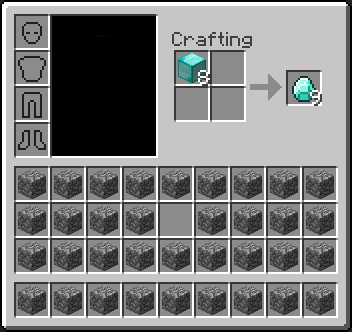
- First, arrange your inventory like this, and drop an extra stack of diamonds on the ground so you'll pick them up if you empty a slot in your inventory.
- Then, shift click the diamond blocks in the recipe book.
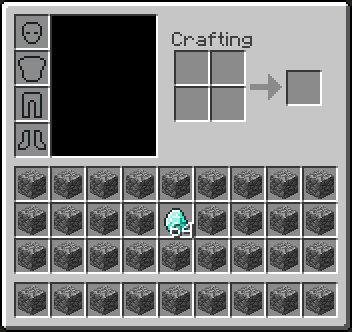
- Finally, shift click it again.
The items picked up are now destroyed.
I tested/discovered this in a survival world while crafting melons, and it seems like it's only destroying the items you pick up while crafting.
- First, arrange your inventory like this, and drop an extra stack of diamonds on the ground so you'll pick them up if you empty a slot in your inventory.
- Then, shift click the diamond blocks in the recipe book.
- Finally, shift click it again.
The items picked up are now destroyed.
I tested/discovered this in a survival world while crafting melons, and it seems like it's only destroying the items you pick up while crafting.
I picked up a shulker box containing many enchanted tools, placed it into my ender chest, entered the nether, then had my game crash due to a complication with
MC-200083. When I reloaded my game, my inventory and ender chest were in the state they were before I picked up the shulker box (not containing shulker box), and the world was in the state it was after (not containing shulker box).To reproduce:
- Launch Minecraft and load a world.
- Break and pick up or place a block.
- Kill Minecraft with SIGKILL (using alt+F4 or holding F3+C to force a crash does not reproduce the bug).
- Launch Minecraft and load the world again.
Expected behavior:
- The game should revert to the last "safe" autosave. Losing 5 minutes of progress is better than save corruption.
Actual behavior:
- The player and world will be a mix of before and after you placed or picked up the block. Either the item is present in both the world and the inventory, or it is present in neither.
I picked up a shulker box containing many enchanted tools, placed it into my ender chest, entered the nether, then had my game crash due to a complication with
MC-200083. When I reloaded my game, my inventory and ender chest were in the state they were before I picked up the shulker box (not containing shulker box), and the world was in the state it was after (not containing shulker box).To reproduce:
- Launch Minecraft and load a world.
- Break and pick up or place a block.
- Kill Minecraft with SIGKILL or by reproducing
MC-200083and otherwise causing the opened application to crash (which takes Minecraft with it). Using alt+F4 or holding F3+C to force a crash does not reproduce the bug.- Launch Minecraft and load the world again.
Expected behavior:
- The game should revert to the last "safe" autosave. Losing 5 minutes of progress is better than save corruption.
Actual behavior:
- The player and world will be a mix of before and after you placed or picked up the block. Either the item is present in both the world and the inventory, or it is present in neither.
Megabobster ^This. It should be a gamerule though, so that you can toggle it in singleplayer.
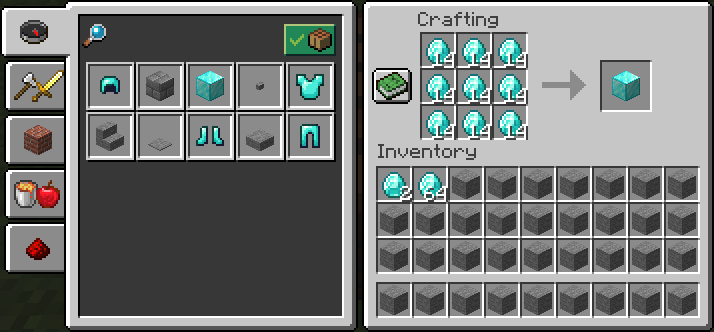
I attached proper screenshots of the issue (my skin is blacked out because it's terrible). First two are the buggy behavior when shift clicking, second two are the what happens under normal circumstances.
It's worth noting that this bug affects ALL mineral blocks.
I can provide more screenshots or even video if it is necessary.
Confirmed. There's an area around their "chin" that obscures water as well, when they're not aggro. Screenshots inbound.
I set up a fresh server on 1.9pre4 and was unable to reproduce this, so it might be an issue with your world or server configuration (worth uploading?). For the record, the spawn-protection setting is a radius (is that the right word for a square?), not a side length. I did settings of 16 and 64 and got the expected 33x33 and 129x129 protected areas on a superflat world.
Here's some images showing the enderman's neck issue in 1.9pre4 (originally from a duplicate report). Both open and closed there's a visual bug.
I'm not sure if this counts as a suggestion (and as such would be considered off topic), but could an additional solution for the possible fixes, however temporary, be to add a game rule or server.properties option to disable this anti-cheat, in the same vein as the allow-flight option? Say, allow-speed. It'd fix half the problem if you were playing on a server with people you trust not to cheat/hack.
Off topic: I was actually initially under the impression that allow-flight was what disabled the subject of this bug report.
Edit: Apparently /gamerule disableElytraMovementCheck was already a thing when I posted this, lol. I do wish this would apply to all movement and not just elytra movement.
Confirmed for 1.9.4.
I also found out about it because of conditional command blocks, in my case it was signs I was trying to replace. /fill works as a placeholder.
/clone ~ ~ ~ ~ ~1 ~ ~1 ~ ~ in an impulse command block with a button on top doesn't work, but /clone ~ ~ ~ ~1 ~1 ~1 ~2 ~ ~ does. When the button is on the side (command block at ~ ~ ~, button at ~ ~ ~1), /clone ~ ~ ~ ~ ~ ~1 ~1 ~ ~ doesn't work, and /clone ~ ~ ~ ~1 ~ ~2 ~2 ~ ~ does work. Here comes the interesting part: putting the button on the other side (command block still at ~ ~ ~, button at ~ ~ ~-1), /clone ~ ~ ~-1 ~ ~ ~ ~1 ~ ~-1 doesn't work, but increasing the selection in the X direction by only one block, like so: /clone ~ ~ ~-1 ~1 ~ ~ ~2 ~ ~-1, allows it to function as expected. This leads me to believe this bug is caused by the boundaries of the clone command, but only in the positive X and Z direction. The first test case proved the Y boundary didn't matter, the second established that it wasn't any of the inner blocks, and the third established that it was only the positive boundaries.
This same behavior will also cause command block chains to stop executing when cloned (or in my case when I found out about this, moved). I would request that the original report be edited to reflect that. I think it might affect some redstone devices, but I could not reproduce my results once I realized the bugged button was what was powering things, not the bug itself. It would also be worth testing some tile entities to see how they are affected.
Also, confirmed for 1.9.4.
Confirmed present in 1.10.
Relates to
MC-9553?I discovered and reproduced this bug in survival.
Regardless of intention, this has been fixed as of 18w02a/1.13.
I've confirmed this for 1.13 by putting execute as @e[type=minecraft:lightning_bolt] run say foo in a repeating, always on command block, then running summon minecraft:lightning_bolt. Any other entity would result in that entity saying "foo" in chat, but the lightning bolt doesn't.
However, I'm pretty sure this is WAI.
Confirmed for 1.13; a pufferfish clipped through a stone brick slab above it when it puffed up.
I think the only thing that would change is that you'd have to do one durability of damage. And maybe I'm thinking about it wrong, but would that not end up being a waste of materials? I'm thinking that at the point this would be useful, you're already making a new item to remove the enchantments from the other.
Might relate to
MC-1555,MC-122000, and their related bugs.This bug doesn't seem to be exclusive to ominous banners. I made a banner, duplicated it twice (3 total) and one of them wouldn't stack with the other two. I might have placed and broken the banner before trying to stack it, I don't remember the exact sequence of things. I'm running 1.14.2pre4.
This bug might relate to
MC-1555,MC-122000,MC-152996, and their other related bugs.Oops, that's what I get for forgetting to search!
This issue also affects 1.14.3pre2. I've attached the images from my duplicate issue (
MC-154078) as I think it's the simplest way to reproduce this bug.Duplicates
MC-140565I made a test case; I was able to reproduce this bug in 1.14, but not in 1.14.2. I think this is now fixed. The fix doesn't affect banners previously obtained, but all new banners stack properly. Placing and breaking misbehaving banners seems to fix them.
To test:
In 1.14, after breaking, it wouldn't stack with the other banner. In 1.14.2, it will stack as expected. I updated the 1.14 test world to 1.14.2, placed the banner that wouldn't stack, broke it, then it stacked as expected.
This is, of course, assuming that it's the same issue that affected Ominous Banners. But considering those can also be fixed by placing and breaking them, I think it is.
Relates to
MC-63010,MC-152035, andMC-151793.Possibly relates to MCCE-4796, but of course that's a different codebase etc.
Duplicates
MC-152182?Affects 1.14.3pre3
To clarify on reproducing this bug:
I cannot find a way to reproduce this without creating an empty space in the inventory. If shift-clicking the recipe does not create an empty space, the items on the ground will simply top up any stacks you have, which then seems to correctly(?) prevent shift-clicking the recipe more. Also, the type of item used doesn't seem to matter.
1.14.3pre4?
Behavior is unchanged in 1.18.1
Behavior is unchanged in 1.18.1
I think this may have been fixed. Now it seems like they correctly push away from panes (both flat and corner) instead of clipping through them. I haven't been able to substantially test clipping on solid blocks, but I haven't noticed anything incorrect. The only situation when they can clip through a pane is when there's a block behind it that makes the space available smaller than their inflated hitbox, so I think clipping through in this scenario would be expected behavior.
Still present in 1.18.1; I think I was mistaken or confused in my testing methodology when I thought it had been fixed before. Should either this or
MC-151793be closed as duplicate, since it seems like it's the same core issue?To summarize: any banner with a pattern (not just ominous banners) that has not yet been placed seem to erroneously have an additional NBT tag that is lost when it's placed in the world, which prevents them from stacking. I think this is most easily seen by reproducing the bug and running /data get entity @p
To reproduce: craft two blank banners of any color. Use a loom and some dye to add a pattern to one, then use a crafting interface and the blank banner to copy it. They will stack. Place and break one of them, and they will no longer stack. If the banner does not have a pattern, they will still stack, and if the banner is placed and broken before copying it, they will still stack.
Affects 1.18.1, and I think it's worth noting that if the photo viewer that Minecraft opens crashes it will take Minecraft with it.
Thank you, I was unable to find that by searching for some reason.