 Sciger
- Sciger
- sciger
- America/Denver
- Yes
- No
 MC-18621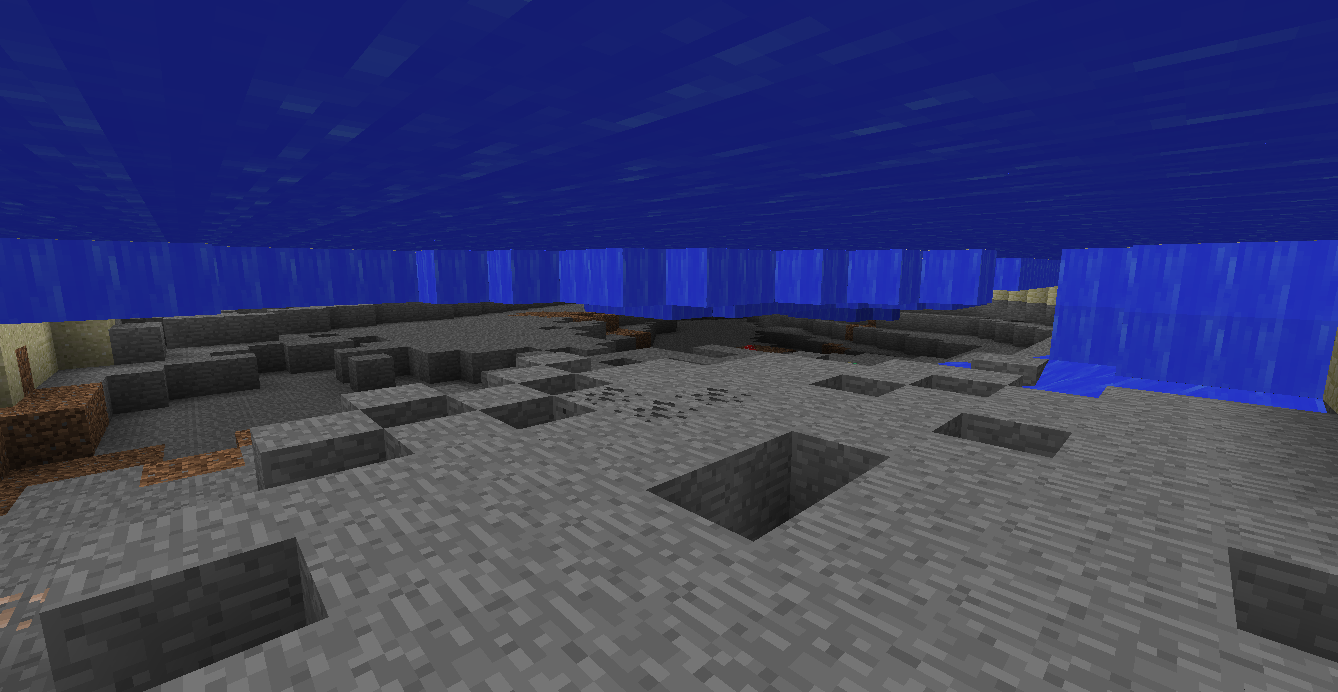
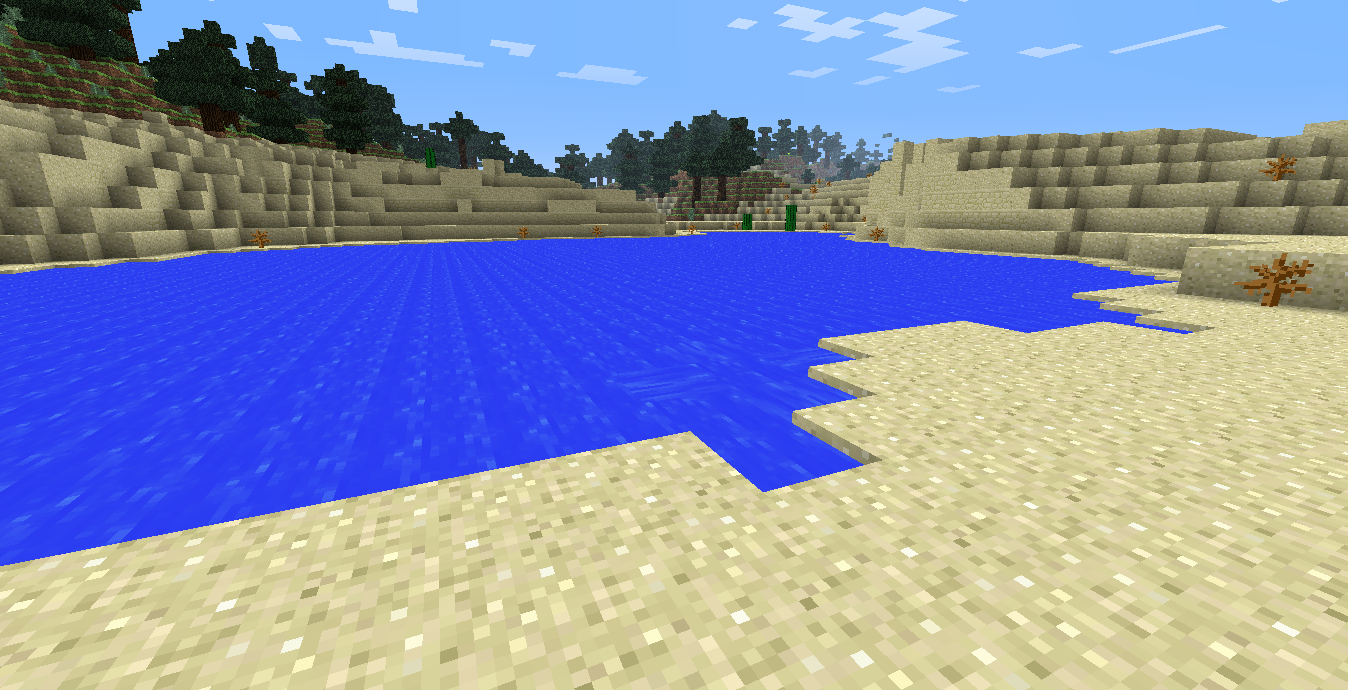


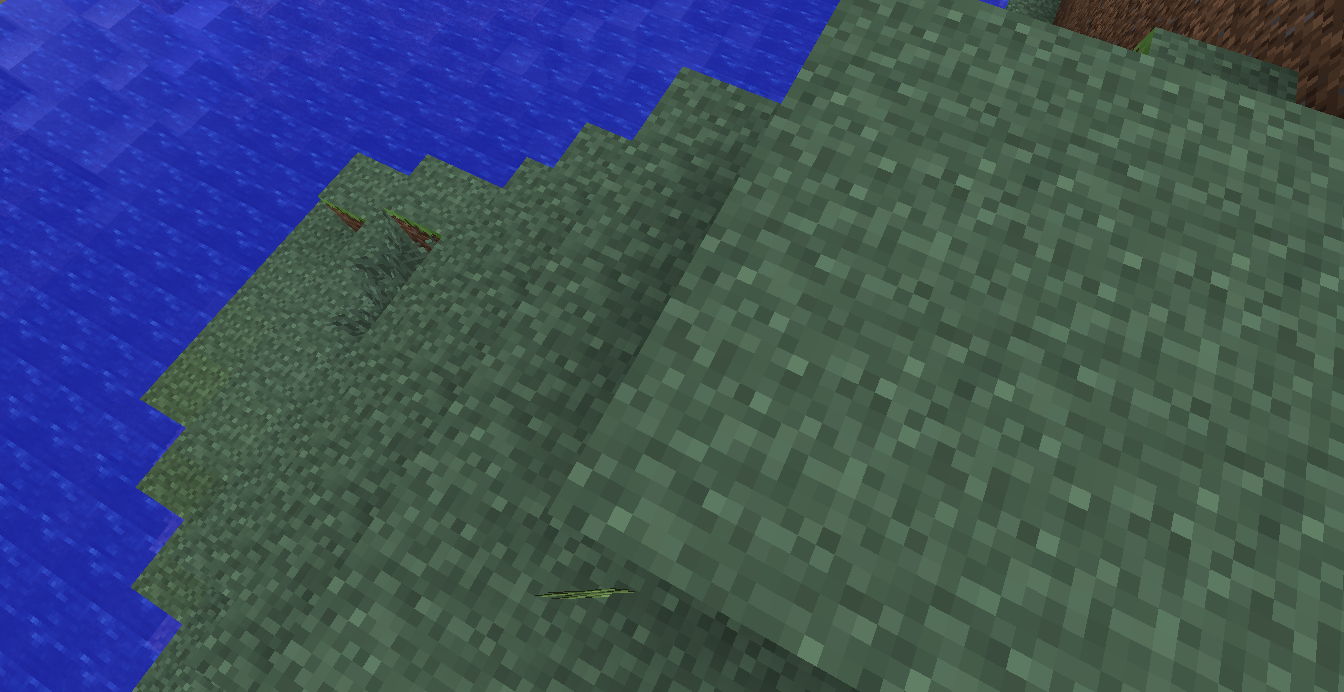

Top side of the lake with the water that won't replenish like it should.
The water flowing downwards on the right of the screenshot attached was likely because I snagged water out of the 'lake' with a bucket. When it didn't replenish like it should, I went underwater to investigate and discovered this bug.
I have seen several other lakes in sand mesas and not seen a bug like this.
I did plenty of searching to see iftherewas asimilar bug submitted for this and didn't find anything that looked related.The water flowing downwards on the right of the screenshot attached was likely because I snagged water out of the 'lake' with a bucket. When it didn't replenish like it should, I went underwater to investigate and discovered this bug.
I have seen several other lakes in sand mesas and not seen a bug like this.
EDIT: I take that back, there's a long river that runs through the biome and it is the same way. Editing screenshots.
I did plenty of searching to see if there was a similar bug submitted for this and didn't find anything that looked related.
The water flowing downwards on the right of the screenshot attached was likely because I snagged water out of the 'lake' with a bucket. When it didn't replenish like it should, I went underwater to investigate and discovered this bug.
I have seen several other lakes in sand mesas and not seen a bug like this.
EDIT: I take that back, there's a long river that runs through the biome and it is the same way.
Editing screenshots.I did plenty of searching to see if there was a similar bug submitted for this and didn't find anything that looked related.
The water flowing downwards on the right of the screenshot attached was likely because I snagged water out of the 'lake' with a bucket. When it didn't replenish like it should, I went underwater to investigate and discovered this bug.
I have seen several other lakes in sand mesas and not seen a bug like this.
EDIT: I take that back, there's a long river that runs through the biome and it is the same way.
I did plenty of searching to see if there was a similar bug submitted for this and didn't find anything that looked related.
EDIT2:
Coordinates:
X: -692
Y: 63
Z: -257Seed: 279699790638812385
I checked the remaining water around in the Mesa and all were similar.
The only angle in which you can see an item with fast graphics.
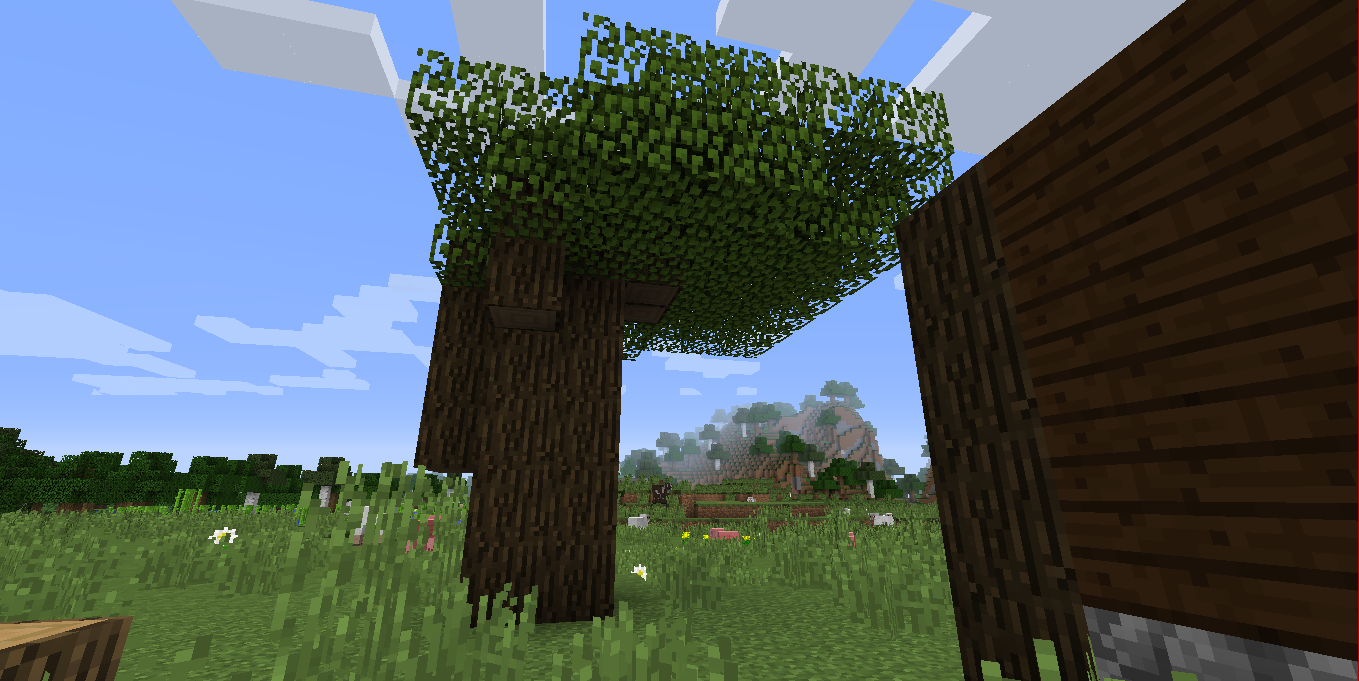
Example of misplaced leaves.
Dark oak leaves notgrowing centered on the treeDark oak leaves not spawning centered on the tree
Occasionally when grown, dark oak leaves will grow only on one side of the tree. Appears to spawn all the leaves, just not in the right place. This does not always happen when growing a dark oak tree. Possible bug or works as intended?
Occasionally when grown, dark oak leaves will grow only on one side of the tree. Appears to spawn all the leaves, just not in the right place. This does not always happen when growing a dark oak tree. Possible bug
or works as intended?
Occasionally when grown, dark oak leaves will grow only on one side of the tree. Appears to spawn all the leaves, just not in the right place. This does not always happen when growing a dark oak tree. I have seen examples of misaligned leaves spawned in roofed forests. Possible bug?
Occasionally when grown, dark oak leaves will grow only on one side of the tree. Appears to spawn all the leaves, just not in the right place. This does not always happen when growing a dark oak tree. I have seen examples of misaligned leaves spawned in roofed forests. Possible bug?
Edit: In the second screenshot, DarkOakLeafMisplace2.png, only half of the trunk spawned on one side.
I have updated Java to the most recent version (both 32 and 64 bit seeing as I need both for my system) as well as deleted the .minecraft folder (backed up my resource packs, have not put them back in .minecraft; Minecraft is vanilla) and redownloading it via the launcher.
Every time I click Play while online, it launches the game for half a moment before Java crashes.
This is the information from the launcher log.I cannot attempt to force a crash in game as the game crashes immediately after launch. I am going to continue to change variables (I.E, seeing if launching while offline works, etc) and update this with information as I go.Please let me know if you need more information and how I can obtain such information.
[15:03:51 INFO]: Minecraft Launcher 1.5.3 (through bootstrap 5) started on windows...
[15:03:51 INFO]: Current time is Sep 14, 2014 3:03:51 PM
[15:03:51 INFO]: System.getProperty('os.name') == 'Windows 8.1'
[15:03:51 INFO]: System.getProperty('os.version') == '6.3'
[15:03:51 INFO]: System.getProperty('os.arch') == 'amd64'
[15:03:51 INFO]: System.getProperty('java.version') == '1.7.0_67'
[15:03:51 INFO]: System.getProperty('java.vendor') == 'Oracle Corporation'
[15:03:51 INFO]: System.getProperty('sun.arch.data.model') == '64'
[15:03:52 INFO]: JFX has been detected & successfully loaded
[15:03:52 INFO]: Refreshing local version list...
[15:03:52 INFO]: Refreshing remote version list...
[15:03:52 INFO]: Refresh complete.
[15:03:52 INFO]: Loaded 1 profile(s); selected 'Sciger'
[15:03:52 INFO]: Refreshing auth...
[15:03:52 INFO]: Logging in with access token
[15:03:56 INFO]: Getting syncinfo for selected version
[15:03:56 INFO]: Queueing library & version downloads
[15:03:56 INFO]: Download job 'Version & Libraries' started (16 threads, 33 files)
[15:03:56 INFO]: Attempting to download C:\Users\Erin\AppData\Roaming\.minecraft\libraries\tv\twitch\twitch\6.5\twitch-6.5.jar for job 'Version & Libraries'... (try 0)
[15:03:56 INFO]: Attempting to download C:\Users\Erin\AppData\Roaming\.minecraft\libraries\com\google\guava\guava\17.0\guava-17.0.jar for job 'Version & Libraries'... (try 0)
[15:03:56 INFO]: Attempting to download C:\Users\Erin\AppData\Roaming\.minecraft\libraries\org\apache\logging\log4j\log4j-api\2.0-beta9\log4j-api-2.0-beta9.jar for job 'Version & Libraries'... (try 0)
[15:03:56 INFO]: Attempting to download C:\Users\Erin\AppData\Roaming\.minecraft\libraries\com\paulscode\codecwav\20101023\codecwav-20101023.jar for job 'Version & Libraries'... (try 0)
[15:03:56 INFO]: Attempting to download C:\Users\Erin\AppData\Roaming\.minecraft\libraries\net\java\jinput\jinput\2.0.5\jinput-2.0.5.jar for job 'Version & Libraries'... (try 0)
[15:03:56 INFO]: Attempting to download C:\Users\Erin\AppData\Roaming\.minecraft\libraries\org\apache\logging\log4j\log4j-core\2.0-beta9\log4j-core-2.0-beta9.jar for job 'Version & Libraries'... (try 0)
[15:03:56 INFO]: Attempting to download C:\Users\Erin\AppData\Roaming\.minecraft\libraries\com\paulscode\libraryjavasound\20101123\libraryjavasound-20101123.jar for job 'Version & Libraries'... (try 0)
[15:03:56 INFO]: Attempting to download C:\Users\Erin\AppData\Roaming\.minecraft\libraries\com\paulscode\librarylwjglopenal\20100824\librarylwjglopenal-20100824.jar for job 'Version & Libraries'... (try 0)
[15:03:56 INFO]: Attempting to download C:\Users\Erin\AppData\Roaming\.minecraft\libraries\com\mojang\realms\1.5.4\realms-1.5.4.jar for job 'Version & Libraries'... (try 0)
[15:03:56 INFO]: Attempting to download C:\Users\Erin\AppData\Roaming\.minecraft\libraries\net\java\jutils\jutils\1.0.0\jutils-1.0.0.jar for job 'Version & Libraries'... (try 0)
[15:03:56 INFO]: Attempting to download C:\Users\Erin\AppData\Roaming\.minecraft\libraries\commons-logging\commons-logging\1.1.3\commons-logging-1.1.3.jar for job 'Version & Libraries'... (try 0)
[15:03:56 INFO]: Attempting to download C:\Users\Erin\AppData\Roaming\.minecraft\libraries\com\mojang\authlib\1.5.17\authlib-1.5.17.jar for job 'Version & Libraries'... (try 0)
[15:03:56 INFO]: Attempting to download C:\Users\Erin\AppData\Roaming\.minecraft\libraries\com\ibm\icu\icu4j-core-mojang\51.2\icu4j-core-mojang-51.2.jar for job 'Version & Libraries'... (try 0)
[15:03:56 INFO]: Attempting to download C:\Users\Erin\AppData\Roaming\.minecraft\libraries\commons-codec\commons-codec\1.9\commons-codec-1.9.jar for job 'Version & Libraries'... (try 0)
[15:03:56 INFO]: Attempting to download C:\Users\Erin\AppData\Roaming\.minecraft\libraries\com\google\code\gson\gson\2.2.4\gson-2.2.4.jar for job 'Version & Libraries'... (try 0)
[15:03:56 INFO]: Attempting to download C:\Users\Erin\AppData\Roaming\.minecraft\libraries\org\apache\httpcomponents\httpclient\4.3.3\httpclient-4.3.3.jar for job 'Version & Libraries'... (try 0)
[15:03:57 INFO]: Download job 'Resources' skipped as there are no files to download
[15:03:57 INFO]: Job 'Resources' finished successfully (took 0:00:00.000)
[15:03:57 INFO]: Finished downloading C:\Users\Erin\AppData\Roaming\.minecraft\libraries\com\google\guava\guava\17.0\guava-17.0.jar for job 'Version & Libraries': Local file matches local checksum, using that
[15:03:57 INFO]: Finished downloading C:\Users\Erin\AppData\Roaming\.minecraft\libraries\com\ibm\icu\icu4j-core-mojang\51.2\icu4j-core-mojang-51.2.jar for job 'Version & Libraries': Local file matches local checksum, using that
[15:03:57 INFO]: Finished downloading C:\Users\Erin\AppData\Roaming\.minecraft\libraries\org\apache\httpcomponents\httpclient\4.3.3\httpclient-4.3.3.jar for job 'Version & Libraries': Local file matches local checksum, using that
[15:03:57 INFO]: Attempting to download C:\Users\Erin\AppData\Roaming\.minecraft\libraries\com\paulscode\soundsystem\20120107\soundsystem-20120107.jar for job 'Version & Libraries'... (try 0)
[15:03:57 INFO]: Attempting to download C:\Users\Erin\AppData\Roaming\.minecraft\libraries\org\lwjgl\lwjgl\lwjgl\2.9.1\lwjgl-2.9.1.jar for job 'Version & Libraries'... (try 0)
[15:03:57 INFO]: Finished downloading C:\Users\Erin\AppData\Roaming\.minecraft\libraries\com\google\code\gson\gson\2.2.4\gson-2.2.4.jar for job 'Version & Libraries': Local file matches local checksum, using that
[15:03:57 INFO]: Finished downloading C:\Users\Erin\AppData\Roaming\.minecraft\libraries\commons-codec\commons-codec\1.9\commons-codec-1.9.jar for job 'Version & Libraries': Local file matches local checksum, using that
[15:03:57 INFO]: Attempting to download C:\Users\Erin\AppData\Roaming\.minecraft\libraries\com\paulscode\codecjorbis\20101023\codecjorbis-20101023.jar for job 'Version & Libraries'... (try 0)
[15:03:57 INFO]: Finished downloading C:\Users\Erin\AppData\Roaming\.minecraft\libraries\com\paulscode\soundsystem\20120107\soundsystem-20120107.jar for job 'Version & Libraries': Local file matches local checksum, using that
[15:03:57 INFO]: Attempting to download C:\Users\Erin\AppData\Roaming\.minecraft\libraries\io\netty\netty-all\4.0.15.Final\netty-all-4.0.15.Final.jar for job 'Version & Libraries'... (try 0)
[15:03:57 INFO]: Finished downloading C:\Users\Erin\AppData\Roaming\.minecraft\libraries\com\paulscode\codecjorbis\20101023\codecjorbis-20101023.jar for job 'Version & Libraries': Local file matches local checksum, using that
[15:03:57 INFO]: Attempting to download C:\Users\Erin\AppData\Roaming\.minecraft\libraries\org\lwjgl\lwjgl\lwjgl_util\2.9.1\lwjgl_util-2.9.1.jar for job 'Version & Libraries'... (try 0)
[15:03:57 INFO]: Finished downloading C:\Users\Erin\AppData\Roaming\.minecraft\libraries\org\lwjgl\lwjgl\lwjgl_util\2.9.1\lwjgl_util-2.9.1.jar for job 'Version & Libraries': Local file matches local checksum, using that
[15:03:57 INFO]: Attempting to download C:\Users\Erin\AppData\Roaming\.minecraft\libraries\net\java\jinput\jinput-platform\2.0.5\jinput-platform-2.0.5-natives-windows.jar for job 'Version & Libraries'... (try 0)
[15:03:57 INFO]: Attempting to download C:\Users\Erin\AppData\Roaming\.minecraft\libraries\net\sf\jopt-simple\jopt-simple\4.6\jopt-simple-4.6.jar for job 'Version & Libraries'... (try 0)
[15:03:57 INFO]: Finished downloading C:\Users\Erin\AppData\Roaming\.minecraft\libraries\net\java\jinput\jinput-platform\2.0.5\jinput-platform-2.0.5-natives-windows.jar for job 'Version & Libraries': Local file matches local checksum, using that
[15:03:57 INFO]: Attempting to download C:\Users\Erin\AppData\Roaming\.minecraft\libraries\net\sf\trove4j\trove4j\3.0.3\trove4j-3.0.3.jar for job 'Version & Libraries'... (try 0)
[15:03:57 INFO]: Finished downloading C:\Users\Erin\AppData\Roaming\.minecraft\libraries\net\sf\jopt-simple\jopt-simple\4.6\jopt-simple-4.6.jar for job 'Version & Libraries': Local file matches local checksum, using that
[15:03:57 INFO]: Attempting to download C:\Users\Erin\AppData\Roaming\.minecraft\libraries\tv\twitch\twitch-external-platform\4.5\twitch-external-platform-4.5-natives-windows-64.jar for job 'Version & Libraries'... (try 0)
[15:03:57 INFO]: Finished downloading C:\Users\Erin\AppData\Roaming\.minecraft\libraries\org\lwjgl\lwjgl\lwjgl\2.9.1\lwjgl-2.9.1.jar for job 'Version & Libraries': Local file matches local checksum, using that
[15:03:57 INFO]: Attempting to download C:\Users\Erin\AppData\Roaming\.minecraft\libraries\tv\twitch\twitch-platform\6.5\twitch-platform-6.5-natives-windows-64.jar for job 'Version & Libraries'... (try 0)
[15:03:57 INFO]: Finished downloading C:\Users\Erin\AppData\Roaming\.minecraft\libraries\tv\twitch\twitch-platform\6.5\twitch-platform-6.5-natives-windows-64.jar for job 'Version & Libraries': Local file matches local checksum, using that
[15:03:57 INFO]: Attempting to download C:\Users\Erin\AppData\Roaming\.minecraft\libraries\org\apache\commons\commons-lang3\3.3.2\commons-lang3-3.3.2.jar for job 'Version & Libraries'... (try 0)
[15:03:57 INFO]: Finished downloading C:\Users\Erin\AppData\Roaming\.minecraft\libraries\com\mojang\authlib\1.5.17\authlib-1.5.17.jar for job 'Version & Libraries': Local file matches local checksum, using that
[15:03:57 INFO]: Attempting to download C:\Users\Erin\AppData\Roaming\.minecraft\libraries\org\apache\commons\commons-compress\1.8.1\commons-compress-1.8.1.jar for job 'Version & Libraries'... (try 0)
[15:03:57 INFO]: Attempting to download C:\Users\Erin\AppData\Roaming\.minecraft\libraries\org\lwjgl\lwjgl\lwjgl-platform\2.9.1\lwjgl-platform-2.9.1-natives-windows.jar for job 'Version & Libraries'... (try 0)
[15:03:57 INFO]: Finished downloading C:\Users\Erin\AppData\Roaming\.minecraft\libraries\org\apache\commons\commons-lang3\3.3.2\commons-lang3-3.3.2.jar for job 'Version & Libraries': Local file matches local checksum, using that
[15:03:57 INFO]: Attempting to download C:\Users\Erin\AppData\Roaming\.minecraft\libraries\org\apache\httpcomponents\httpcore\4.3.2\httpcore-4.3.2.jar for job 'Version & Libraries'... (try 0)
[15:03:57 INFO]: Finished downloading C:\Users\Erin\AppData\Roaming\.minecraft\libraries\org\apache\commons\commons-compress\1.8.1\commons-compress-1.8.1.jar for job 'Version & Libraries': Local file matches local checksum, using that
[15:03:57 INFO]: Attempting to download C:\Users\Erin\AppData\Roaming\.minecraft\libraries\commons-io\commons-io\2.4\commons-io-2.4.jar for job 'Version & Libraries'... (try 0)
[15:03:57 INFO]: Finished downloading C:\Users\Erin\AppData\Roaming\.minecraft\libraries\org\apache\httpcomponents\httpcore\4.3.2\httpcore-4.3.2.jar for job 'Version & Libraries': Local file matches local checksum, using that
[15:03:57 INFO]: Attempting to download C:\Users\Erin\AppData\Roaming\.minecraft\libraries\java3d\vecmath\1.5.2\vecmath-1.5.2.jar for job 'Version & Libraries'... (try 0)
[15:03:57 INFO]: Finished downloading C:\Users\Erin\AppData\Roaming\.minecraft\libraries\java3d\vecmath\1.5.2\vecmath-1.5.2.jar for job 'Version & Libraries': Local file matches local checksum, using that
[15:03:57 INFO]: Attempting to download C:\Users\Erin\AppData\Roaming\.minecraft\versions\1.8\1.8.jar for job 'Version & Libraries'... (try 0)
[15:03:57 INFO]: Finished downloading C:\Users\Erin\AppData\Roaming\.minecraft\libraries\org\lwjgl\lwjgl\lwjgl-platform\2.9.1\lwjgl-platform-2.9.1-natives-windows.jar for job 'Version & Libraries': Local file matches local checksum, using that
[15:03:57 INFO]: Finished downloading C:\Users\Erin\AppData\Roaming\.minecraft\libraries\commons-io\commons-io\2.4\commons-io-2.4.jar for job 'Version & Libraries': Local file matches local checksum, using that
[15:03:57 INFO]: Finished downloading C:\Users\Erin\AppData\Roaming\.minecraft\libraries\commons-logging\commons-logging\1.1.3\commons-logging-1.1.3.jar for job 'Version & Libraries': Local file matches local checksum, using that
[15:03:57 INFO]: Finished downloading C:\Users\Erin\AppData\Roaming\.minecraft\libraries\io\netty\netty-all\4.0.15.Final\netty-all-4.0.15.Final.jar for job 'Version & Libraries': Local file matches local checksum, using that
[15:03:57 INFO]: Finished downloading C:\Users\Erin\AppData\Roaming\.minecraft\libraries\org\apache\logging\log4j\log4j-core\2.0-beta9\log4j-core-2.0-beta9.jar for job 'Version & Libraries': Local file matches local checksum, using that
[15:03:57 INFO]: Finished downloading C:\Users\Erin\AppData\Roaming\.minecraft\libraries\net\java\jutils\jutils\1.0.0\jutils-1.0.0.jar for job 'Version & Libraries': Local file matches local checksum, using that
[15:03:57 INFO]: Finished downloading C:\Users\Erin\AppData\Roaming\.minecraft\libraries\com\mojang\realms\1.5.4\realms-1.5.4.jar for job 'Version & Libraries': Local file matches local checksum, using that
[15:03:57 INFO]: Finished downloading C:\Users\Erin\AppData\Roaming\.minecraft\libraries\net\java\jinput\jinput\2.0.5\jinput-2.0.5.jar for job 'Version & Libraries': Local file matches local checksum, using that
[15:03:57 INFO]: Finished downloading C:\Users\Erin\AppData\Roaming\.minecraft\libraries\com\paulscode\libraryjavasound\20101123\libraryjavasound-20101123.jar for job 'Version & Libraries': Local file matches local checksum, using that
[15:03:57 INFO]: Finished downloading C:\Users\Erin\AppData\Roaming\.minecraft\libraries\com\paulscode\librarylwjglopenal\20100824\librarylwjglopenal-20100824.jar for job 'Version & Libraries': Local file matches local checksum, using that
[15:03:57 INFO]: Finished downloading C:\Users\Erin\AppData\Roaming\.minecraft\libraries\com\paulscode\codecwav\20101023\codecwav-20101023.jar for job 'Version & Libraries': Local file matches local checksum, using that
[15:03:57 INFO]: Finished downloading C:\Users\Erin\AppData\Roaming\.minecraft\libraries\org\apache\logging\log4j\log4j-api\2.0-beta9\log4j-api-2.0-beta9.jar for job 'Version & Libraries': Local file matches local checksum, using that
[15:03:57 INFO]: Finished downloading C:\Users\Erin\AppData\Roaming\.minecraft\libraries\tv\twitch\twitch\6.5\twitch-6.5.jar for job 'Version & Libraries': Local file matches local checksum, using that
[15:03:57 INFO]: Finished downloading C:\Users\Erin\AppData\Roaming\.minecraft\libraries\net\sf\trove4j\trove4j\3.0.3\trove4j-3.0.3.jar for job 'Version & Libraries': Local file matches local checksum, using that
[15:03:57 INFO]: Finished downloading C:\Users\Erin\AppData\Roaming\.minecraft\libraries\tv\twitch\twitch-external-platform\4.5\twitch-external-platform-4.5-natives-windows-64.jar for job 'Version & Libraries': Local file matches local checksum, using that
[15:03:57 INFO]: Finished downloading C:\Users\Erin\AppData\Roaming\.minecraft\versions\1.8\1.8.jar for job 'Version & Libraries': Used own copy as it matched etag
[15:03:57 INFO]: Job 'Version & Libraries' finished successfully (took 0:00:00.696)
[15:03:57 INFO]: Launching game
[15:03:57 INFO]: Unpacking natives to C:\Users\Erin\AppData\Roaming\.minecraft\versions\1.8\1.8-natives-187145564966339
[15:03:57 INFO]: Launching in C:\Users\Erin\AppData\Roaming\.minecraft
[15:03:57 INFO]: Half command: C:\Program Files\Java\jre7\bin\javaw.exe -XX:HeapDumpPath=MojangTricksIntelDriversForPerformance_javaw.exe_minecraft.exe.heapdump -Xmx1G -XX:+UseConcMarkSweepGC -XX:+CMSIncrementalMode -XX:-UseAdaptiveSizePolicy -Xmn128M -Djava.library.path=C:\Users\Erin\AppData\Roaming\.minecraft\versions\1.8\1.8-natives-187145564966339 -cp C:\Users\Erin\AppData\Roaming\.minecraft\libraries\java3d\vecmath\1.5.2\vecmath-1.5.2.jar;C:\Users\Erin\AppData\Roaming\.minecraft\libraries\net\sf\trove4j\trove4j\3.0.3\trove4j-3.0.3.jar;C:\Users\Erin\AppData\Roaming\.minecraft\libraries\com\ibm\icu\icu4j-core-mojang\51.2\icu4j-core-mojang-51.2.jar;C:\Users\Erin\AppData\Roaming\.minecraft\libraries\net\sf\jopt-simple\jopt-simple\4.6\jopt-simple-4.6.jar;C:\Users\Erin\AppData\Roaming\.minecraft\libraries\com\paulscode\codecjorbis\20101023\codecjorbis-20101023.jar;C:\Users\Erin\AppData\Roaming\.minecraft\libraries\com\paulscode\codecwav\20101023\codecwav-20101023.jar;C:\Users\Erin\AppData\Roaming\.minecraft\libraries\com\paulscode\libraryjavasound\20101123\libraryjavasound-20101123.jar;C:\Users\Erin\AppData\Roaming\.minecraft\libraries\com\paulscode\librarylwjglopenal\20100824\librarylwjglopenal-20100824.jar;C:\Users\Erin\AppData\Roaming\.minecraft\libraries\com\paulscode\soundsystem\20120107\soundsystem-20120107.jar;C:\Users\Erin\AppData\Roaming\.minecraft\libraries\io\netty\netty-all\4.0.15.Final\netty-all-4.0.15.Final.jar;C:\Users\Erin\AppData\Roaming\.minecraft\libraries\com\google\guava\guava\17.0\guava-17.0.jar;C:\Users\Erin\AppData\Roaming\.minecraft\libraries\org\apache\commons\commons-lang3\3.3.2\commons-lang3-3.3.2.jar;C:\Users\Erin\AppData\Roaming\.minecraft\libraries\commons-io\commons-io\2.4\commons-io-2.4.jar;C:\Users\Erin\AppData\Roaming\.minecraft\libraries\commons-codec\commons-codec\1.9\commons-codec-1.9.jar;C:\Users\Erin\AppData\Roaming\.minecraft\libraries\net\java\jinput\jinput\2.0.5\jinput-2.0.5.jar;C:\Users\Erin\AppData\Roaming\.minecraft\libraries\net\java\jutils\jutils\1.0.0\jutils-1.0.0.jar;C:\Users\Erin\AppData\Roaming\.minecraft\libraries\com\google\code\gson\gson\2.2.4\gson-2.2.4.jar;C:\Users\Erin\AppData\Roaming\.minecraft\libraries\com\mojang\authlib\1.5.17\authlib-1.5.17.jar;C:\Users\Erin\AppData\Roaming\.minecraft\libraries\com\mojang\realms\1.5.4\realms-1.5.4.jar;C:\Users\Erin\AppData\Roaming\.minecraft\libraries\org\apache\commons\commons-compress\1.8.1\commons-compress-1.8.1.jar;C:\Users\Erin\AppData\Roaming\.minecraft\libraries\org\apache\httpcomponents\httpclient\4.3.3\httpclient-4.3.3.jar;C:\Users\Erin\AppData\Roaming\.minecraft\libraries\commons-logging\commons-logging\1.1.3\commons-logging-1.1.3.jar;C:\Users\Erin\AppData\Roaming\.minecraft\libraries\org\apache\httpcomponents\httpcore\4.3.2\httpcore-4.3.2.jar;C:\Users\Erin\AppData\Roaming\.minecraft\libraries\org\apache\logging\log4j\log4j-api\2.0-beta9\log4j-api-2.0-beta9.jar;C:\Users\Erin\AppData\Roaming\.minecraft\libraries\org\apache\logging\log4j\log4j-core\2.0-beta9\log4j-core-2.0-beta9.jar;C:\Users\Erin\AppData\Roaming\.minecraft\libraries\org\lwjgl\lwjgl\lwjgl\2.9.1\lwjgl-2.9.1.jar;C:\Users\Erin\AppData\Roaming\.minecraft\libraries\org\lwjgl\lwjgl\lwjgl_util\2.9.1\lwjgl_util-2.9.1.jar;C:\Users\Erin\AppData\Roaming\.minecraft\libraries\tv\twitch\twitch\6.5\twitch-6.5.jar;C:\Users\Erin\AppData\Roaming\.minecraft\versions\1.8\1.8.jar net.minecraft.client.main.Main
[15:03:57 INFO]: Looking for orphaned versions to clean up...
[15:03:57 INFO]: Looking for old natives & assets to clean up...
[15:04:11 ERROR]: Game ended with bad state (exit code 255)
[15:04:11 INFO]: Ignoring visibility rule and showing launcher due to a game crash
[15:04:11 INFO]: Deleting C:\Users\Erin\AppData\Roaming\.minecraft\versions\1.8\1.8-natives-187145564966339
[15:04:11 WARN]: Couldn't delete C:\Users\Erin\AppData\Roaming\.minecraft\versions\1.8\1.8-natives-187145564966339 - scheduling for deletion upon exitI have updated Java to the most recent version (both 32 and 64 bit seeing as I need both for my system) as well as deleted the .minecraft folder (backed up my resource packs, have not put them back in .minecraft; Minecraft is vanilla) and redownloading it via the launcher.
Every time I click Play while online, it launches the game for half a moment before Java crashes. I cannot attempt to force a crash in game as the game crashes immediately after launch. I am going to continue to change variables (I.E, seeing if launching while offline works, etc) and update this with information as I go.
Please let me know if you need more information and how I can obtain such information. The launcher log is attached in a .txt file.
I have updated Java to the most recent version (both 32 and 64 bit seeing as I need both for my system) as well as deleted the .minecraft folder (backed up my resource packs, have not put them back in .minecraft; Minecraft is vanilla) and redownloading it via the launcher.
Every time I click Play while online, it launches the game for half a moment before Java crashes. I cannot attempt to force a crash in game as the game crashes immediately after launch. I am going to continue to change variables (I.E, seeing if launching while offline works, etc) and update this with information as I go.
Please let me know if youneedmore information and how I can obtain such information. The launcher log is attachedin a.txt file.I have updated Java to the most recent version (both 32 and 64 bit seeing as I need both for my system) as well as deleted the .minecraft folder (backed up my resource packs, have not put them back in .minecraft; Minecraft is vanilla) and redownloading it via the launcher.
Every time I click Play while online, it launches the game for half a moment before Java crashes. I cannot attempt to force a crash in game as the game crashes immediately after launch. I am going to continue to change variables (I.E, seeing if launching while offline works, etc) and update this with information as I go.
EDIT: Tried launching with my wifi turned off. I obtained a different error with a different error code. Providing the log in a txt file.
Please let me know if you need more information and how I can obtain such information. The launcher log is attached in a .txt file.
I'm getting really severe lag like this in snapshot 13w25c and not even having to deal with any sieges. I'm just mining! It's throwing the 'can't keep up' message very often whether I'm breaking a block or just walking around. Using Windows 7 64 bit, most recent version of Java.
More info on the recent lag in SP:
Tested lag using the old launcher, worked fine.
Tested lag using the new launcher and release 1.5.2, worked fine.
Tested lag using the new launcher and the snapshots from 13w25a, b, and c, all had the same lag problems.
May or may not be useful but eh. xD
For a long time, my sister and I were unable to play via wireless LAN and had to have a physical connection to a router in order to play Minecraft with each other.
I'm not sure when it began to work again but we tried wireless LAN again not long ago and it worked like it should. This was during the Snapshot 13w25a release if I remember correctly.
Still having this problem in the 1.6 pre-release. I don't believe this will be fixed before 1.6 is released so I guess the most I can do is offer a temporary 'solution.'
Since this problem is linked to too many zombies spawning during sieges, the best way to deal with it is to set the difficulty to 'Peaceful' until day. Not optimal but it'll have to do until this is addressed and fixed.
Once this issue is fixed, or hopefully will be, such an option as to 'turn off' the zombie pathfinding mechanic won't be needed.
I dunno about you guys but I had severe problems with this lag which made living in villages pretty much unbearable. I just tested with the new snapshot, 13w36a, in creative in a village, spawned over 20 zombies and had absolutely no lag.
@Markku
Yes, I did block all the doors with a single solid block to prevent them from banging on the door. I started getting tiny bits of lag at about 30 zombies, not enough to affect gameplay all that much.
Right away.
Posted in the description.
Interesting. Let's hope it is, the lakes are making my inner Minecraftian go nuts. ;3;
Minor confirmation for me; the mesa biome spawned sand and what not, no hardened clay. Also had the water sources in the biome where the water was only one block thick and then air underneath. A mod believes it is a combination of this bug and one other bug.
I have had this happen more since the recent snapshots, 13w36a and 13w36b. I have noticed that it does appear to occur after the menu is opened for some reason then closed again. Sometimes it happens, sometimes it doesn't, I haven't paid attention too much. Very annoying, I have to reboot Minecraft completely to be rid of it for the time being.
This just happened to me. I AFKed from Minecraft when a package came irl for me. I came back probably 45 minutes later to try and mine more obsidian. The obsidian blocks weren't popping like they should. A few seconds later, I was hearing a boatload of skeletons and I was instantly dead. All my items appeared to have despawned as well. Pity, I had 50 obsidian.
Watched a second incident of this bug. I was AFK in my house for a while. When I came back, I looked out the window and watched my villagers spaz out with seriously sped up time. I watched one full day and one full night go by at lightning speed, in about 30 seconds.
Ofc Ezekiel, quite expected from snapshots. Any little change with each one always has a chance of breaking something. As a matter a fact, just found another possible generation bug I'm about to report if it hasn't been reported already. XD
Confirmed in 13w41b. Just encountered several.
I have added a log called 14w02cDevConsole.txt in which my sister and I experienced lag (sun jumping backwards, blocks popping back then finally breaking, etc.) trying to play multiplayer Minecraft via LAN. I have played with 14w02c on my 1.7.4-created world and had no problems with lag. I will create a new world in singleplayer and see if I can replicate this lag in singleplayer.
This bug still exists as of 14w02c, I have a screenshot of a very long strip of missing generation in the middle of a forest, can provide it if needed.
I have managed to semi-replicate the lag in SP, except it is just with FPS lag/freezes when in an environment with lots of trees, etc. When I went into an extreme hills biome, it stopped. Can provide a developer's console log if needed.
Confirmed in 14w04b. Can see square items (i.e. blocks) but items with unique shapes are invisible.
I have noticed for unique items, if you're standing RIGHT above them, you can see them. Any other angle, you cannot.
Confirmed, noticed this when repairing a bow when my sister and I were playing LAN minecraft on the current snapshot, 14w05b.
Confirmed for me, noticed when repairing a bow while playing LAN Minecraft with my sis. Thankfully, I didn't press shift! xD
I would only say half-resolved really. I discovered upon the creation/opening of new worlds, there is massive lag until it has all its ducks in a row then it seems pretty happy. Still annoying though.
I can say I was not having this problem earlier when playing on LAN Minecraft with my sister and appears to have started right as my internet connection got bad. It tends to go up and down due to it being a pure wireless connection that takes interference regularly. I highly doubt they're related but just noting it
I'm having a similar problem except the knot itself is invisible as well. I can't right click to unattach the lead, I have to destroy the fence. Then, it takes a few moments before the lead drops by my horse. Are you having similar problems or is it just me?
Can confirm, bug has returned in 14w25b. Just spent two long nights in a swamp with absolutely no slime spawns.
Confirmed 14w31a. Just attempted to go into a temple and every time the Elder Guardian inflicts mining fatigue, it crashes my game. Has occurred multiple times.
Having this problem as well. Tried launching it in offline mode and obtained a different error code.
Rebooted my computer as I usually do daily and now Minecraft is launching and appears to be running properly. Not sure what changed.
I created a new hardcore world for SP use today and am experiencing symptoms of this issue. Mobs are lagging horribly, also experiencing issues from the
MC-42088mentioned in the comment above me, but only as I explored the world and loaded new chunks. I took a look at the CPU usage by Java and it is at 1.15 GB. Can provide more information as needed.EDIT: As I continued to walk about in the world, I checked my CPU usage and it spiked to 80%.
EDIT2: I created a new world, wandered around for some few thousand blocks but didn't experience the same lag as before. I'm guessing the world with the extreme lag was probably corrupted.
Definitely confirmed here, I'd use it for torches 'cept I pick up half of 'em on my way back when mining. Hoping for a fix soon!
Confirmed singleplayer 15w38b, I would avoid shift clicking anything in your inventory for the time being to avoid any losses. My poor unbreaking I leather boots I got off a zombie. ;(
Confirmed for 15w45a. My sister and I were playing over LAN and found some donkeys. Ever since we got the donkeys, we've been struggling with this bug almost constantly, to the point where we can't play.
Definitely confirmed for 15w45a. I did eventually get my donkey out of the boat, got in and then entered the boat before getting my donkey in. Needless to say, the donkey completely covered my vision. I laughed for about 5 minutes before hitting F5 and taking off.
Confirmed for 15w45a.
Thanks for the post, will try and follow that and post the results.
Can confirm this problem, though I discovered a few things in the past 3 hours of troubleshooting with someone else.
I can get away with launching MC 1.12.2 ONLY when I have it modded for some reason (I use Mo Creatures and Biomes o Plenty) and when I do have it launched and a world loaded, it's using a whopping 7.3 GB of my RAM. I have 24 GB of RAM overall so I think that's the only reason why I was able to load and run it. I am also able to launch and run 1.13 with some trial and error, and it appears to only be using 1.5 GB of RAM. I presume the launcher is somehow able to ask for too much memory, even if it doesn't use it all.
Also for some reason, the Java version affects it. I rolled back to version 8 update 171 and had less crashes on 1.12.2, I was even able to try to load a world.