 Tenebrae
- tenebrae
- tenebrae
- Europe/Stockholm
- Yes
- No
 MC-387
![[Mojang] Grum (Erik Broes)](../../../data/assets/gravatar/grum.png)
![[Mojang] Jeb (Jens Bergensten)](../../../data/assets/gravatar/jeb.jpeg)
 Normal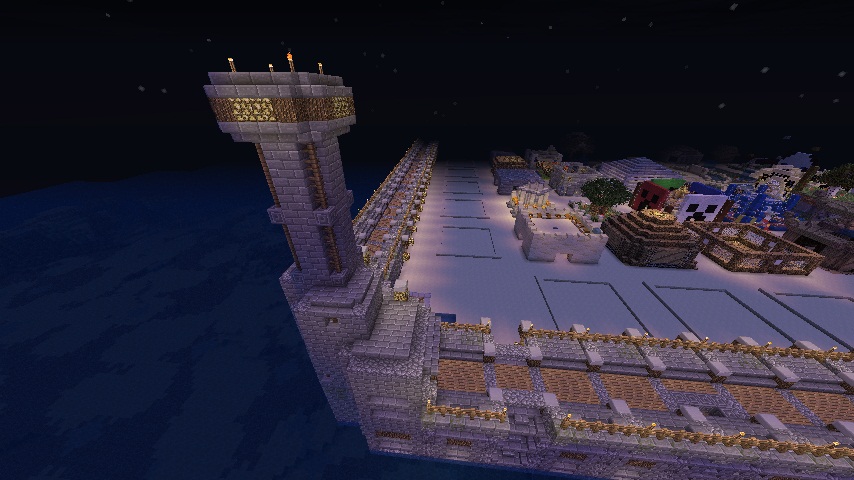




Chest glitch that lets them appear as if they are opened while they are not.(SMP)
This is something that has been around for a very long time.
==================
PROBLEM
==================
Basically, signs and their characters are rendered over a very large distance. Now, this is fine for small stuff, like Survival Single Player, but for servers using iConomy chestshops, and building markets out of them, this turns into a nightmare.I've witnessed fps drops from 134 fps to 5 fps due to this annoyance. There is a mod that fixed this problem, but not everyone is capable of modding that easily.
(mod is here: http://www.minecraftforum.net/topic/843697-101-sign-lag-fix-major-fps-boost-for-some-people/page__st__40, it had been updated to 1.4.5, see last page)
I don't know a server that has a market that's up and running right now though, but I'm pretty sure this problem still persists.
==================
EXAMPLE
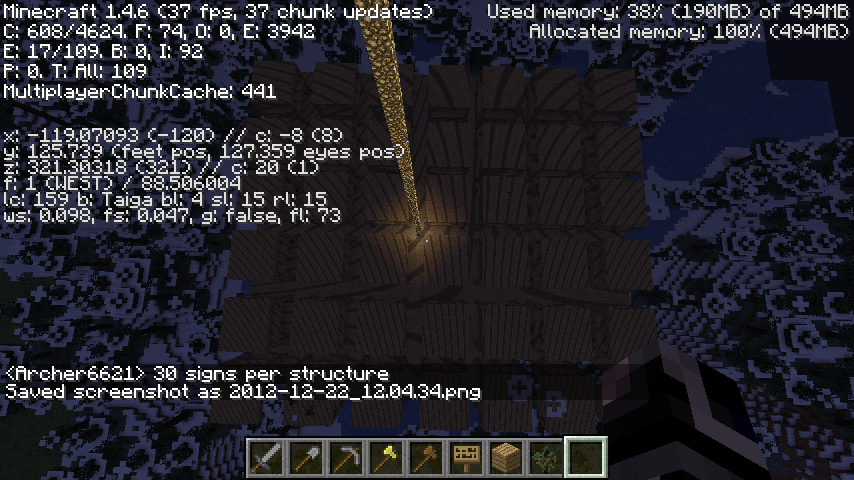
==================Below you can see a screenshot of a server-market I mean. It might not look that impressive from that angle, but believe me, walking through it reduced fps by something around 90%.
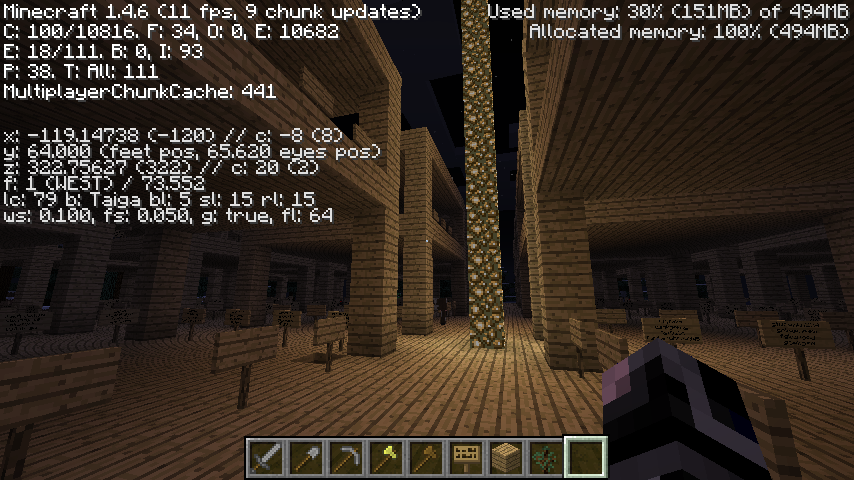
Now look at the second screenshot. Imagine the market filled.. Each shop averagely has about 15-20 chest-shops. that's about 15-20 signs each having at least more than 20 characters on em, averagely 25. The grid is 10x10 minus lets say.. 9 shops (middle and corners), makes 91. About every sign's text gets rendered when standing in there. There are probably like 75 random signs with other text spread through the market, each definitely having more than 40 chars, say 50 averagely?
Calculation: (20 * 20 * 91) + (50 * 75) = 36400 + 3750 = 40150 characters.
My system:
-i5 650 @ 3.2 ghz cpu
-4gb RAM memory
-Sapphire Radeon HD6870 graphics cardI admit this is isn't a supercomputer, but I get drops from 134 fps to around 15 fps, which is quite horrible for a decent system like that (I run games like skyrim with all HD mods and stuff around 60 fps constant np).
==================
FIX
==================Please make a slider in the options menu that adjusts the character-on-sign rendering distance, perhaps make it change along with the "fast/fancy" render setting, it would be a huge relief to those that don't have the processing power to draw all those signs in a server-market.
This would make a server-market a lot more viable use, instead of scaring people away because their computer can't handle it.
I hope this will be taken into consideration.
This is something that has been around for a very long time.
==================
PROBLEM
==================
Basically, signs and their characters are rendered over a very large distance. Now, this is fine for small stuff, like Survival Single Player, but for servers using iConomy chestshops, and building markets out of them, this turns into a nightmare.I've witnessed fps drops from 134 fps to 5 fps due to this annoyance. There is a mod that fixed this problem, but not everyone is capable of modding that easily.
(mod is here: http://www.minecraftforum.net/topic/843697-101-sign-lag-fix-major-fps-boost-for-some-people/page__st__40, it had been updated to 1.4.5, see last page)
I don't know a server that has a market that's up and running right now though, but I'm pretty sure this problem still persists.
==================
EXAMPLE
==================Below you can see a screenshot of a server-market I mean. It might not look that impressive from that angle, but believe me, walking through it reduced fps by something around 90%.
Now look at the second screenshot. Imagine the market filled.. Each shop averagely has about 15-20 chest-shops. that's about 15-20 signs each having at least more than 20 characters on em, averagely 25. The grid is 10x10 minus lets say.. 9 shops (middle and corners), makes 91. About every sign's text gets rendered when standing in there. There are probably like 75 random signs with other text spread through the market, each definitely having more than 40 chars, say 50 averagely?
Calculation: (20 * 20 * 91) + (50 * 75) = 36400 + 3750 = 40150 characters.
My system:
-i5 650 @ 3.2 ghz cpu
-4gb RAM memory
-Sapphire Radeon HD6870 graphics cardI admit this is isn't a supercomputer, but I get drops from 134 fps to around 15 fps, which is quite horrible for a decent system like that (I run games like skyrim with all HD mods and stuff around 60 fps constant np).
==================
FIX
==================Please make a slider in the options menu that adjusts the character-on-sign rendering distance, perhaps make it change along with the "fast/fancy" render setting, it would be a huge relief to those that don't have the processing power to draw all those signs in a server-market.
This would make a server-market a lot more viable use, instead of scaring people away because their computer can't handle it.
I hope this will be taken into consideration.
This is something that has been around for a very long time.
==================
PROBLEM
==================
Basically, signs and their characters are rendered over a very large distance. Now, this is fine for small stuff, like Survival Single Player, but for servers using iConomy chestshops, and building markets out of them, this turns into a nightmare.I've witnessed fps drops from 134 fps to 5 fps due to this annoyance. There is a mod that fixed this problem, but not everyone is capable of modding that easily.
(mod is here: http://www.minecraftforum.net/topic/843697-101-sign-lag-fix-major-fps-boost-for-some-people/page__st__40, it had been updated to 1.4.5, see last page)
I don't know a server that has a market that's up and running right now though, but I'm pretty sure this problem still persists.
==================
EXAMPLE
==================Below you can see a screenshot of a server-market I mean. It might not look that impressive from that angle, but believe me, walking through it reduced fps by something around 90%.
Now look at the second screenshot. Imagine the market filled.. Each shop averagely has about 15-20 chest-shops. that's about 15-20 signs each having at least more than 20 characters on em, averagely 25. The grid is 10x10 minus lets say.. 9 shops (middle and corners), makes 91. About every sign's text gets rendered when standing in there. There are probably like 75 random signs with other text spread through the market, each definitely having more than 40 chars, say 50 averagely?
Calculation: (20 * 20 * 91) + (50 * 75) = 36400 + 3750 = 40150 characters.
My system:
-i5 650 @ 3.2 ghz cpu
-4gb RAM memory
-Sapphire Radeon HD6870 graphics cardI admit this is isn't a supercomputer, but I get drops from 134 fps to around 15 fps, which is quite horrible for a decent system like that (I run games like skyrim with all HD mods, enb series and stuff around 60 fps constant np, just to give an idea).
==================
FIX
==================Please make a slider in the options menu that adjusts the character-on-sign rendering distance, perhaps make it change along with the "fast/fancy" render setting, it would be a huge relief to those that don't have the processing power to draw all those signs in a server-market.
This would make a server-market a lot more viable use, instead of scaring people away because their computer can't handle it.
I hope this will be taken into consideration.
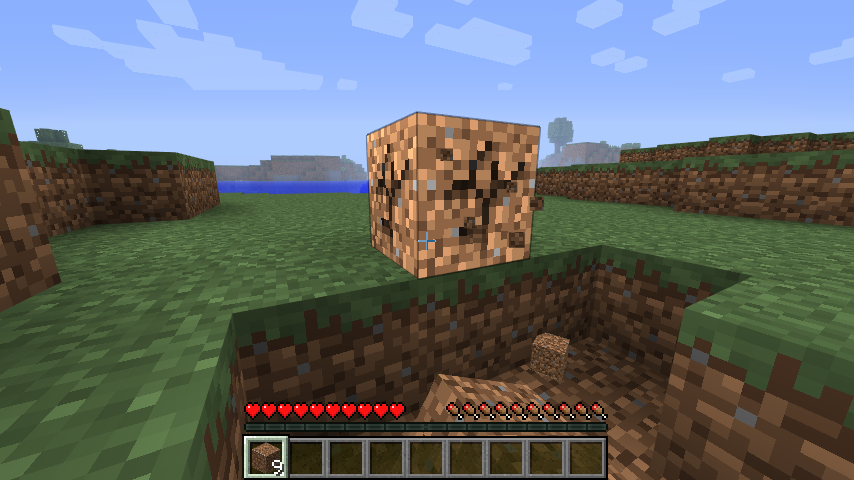
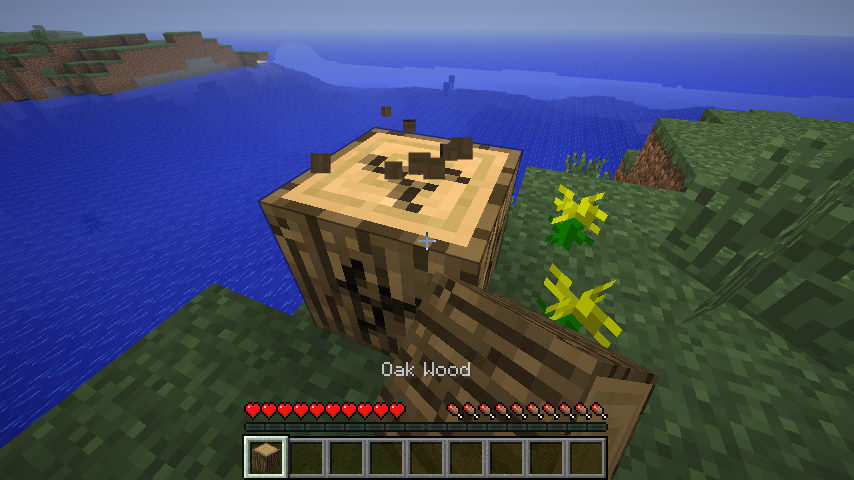
Pretty straightforward, whenever I try to break a block, the breaking animation lights up the entire block, as shown in the screenshots below.
Tested this on various blocks. The brightening also seems to flicker and tear when moving while breaking due to a changing view-angle.
I don't know if this is intended, but it's pretty annoying :\
I'm using a Sapphire Radeon HD6870, with the latest Catalyst drivers.
EDIT: so
Pretty straightforward, whenever I try to break a block, the breaking animation lights up the entire block, as shown in the screenshots below.
Tested this on various blocks. The brightening also seems to flicker and tear when moving while breaking due to a changing view-angle.
I don't know if this is intended, but it's pretty annoying :\
I'm using a Sapphire Radeon HD6870, with the latest Catalyst drivers.
EDIT: so
Pretty straightforward, whenever I try to break a block, the breaking animation lights up the entire block, as shown in the screenshots below.
Tested this on various blocks. The brightening also seems to flicker and tear when moving while breaking due to a changing view-angle.
I don't know if this is intended, but it's pretty annoying :\
I'm using a Sapphire Radeon HD6870, with the latest Catalyst drivers.
EDIT: sorry, seems to be an Optifine issue, mark as resolved please
Many people indicated that they were using the application settings.. So I can already disapprove this.
Basically, I was building an auto-chicken farm, when I seemed to run into this issue.
Every time a baby-chicken spawned out of an egg from the dispensers, it landed in the water, and wasn't carried along, like items and other entities, but rather remained still, so it would drown.
On the screenshot you can see a part of the contraption. Signs were holding off the water from the hoppers you see on the screenshot. Baby-chickens would drown where the dispensers are, or at deeper parts, because they aren't carried along like the normal chickens, as you can see.
I'm not sure if this only counts for baby-chickens, or for any baby-animal.
Weird, I only noticed this since I started an own little 1.4 private server for me and my brother. Before that I played on a bukkit server, didn't have that issue at any time.
I'll try this and put the result in a comment below.
This is kinda a bug because the sword has 0 effect on the player after hitting him, but still eats durability, which makes no sense.
That might be it, back then I was the only one using my chests anyway, and now it's me and my brother both sharing the same chests, it has happened 2 times so far.
The cave sounds were not corrupted, all of them were exactly the same as the original, and they played fine in Windows Media Player, without being chopped off.
Ouch. I'll be more careful when spamming then :]
Discovered that this happens a lot more often when somebody is already looking in the chest, and then you look in it as well. Every time I did this it remained open and broken.
Funny then that nobody thought of fixing it.
Haha I guess so
Done
Nah I think it's fine now, they don't get chopped off in the middle anymore
Done as well.
Lol. It's getting better and better :]
Still not fixed, didn't know this was that bad :o
I honestly don't know, didn't test it properly to conclude that, lost interest in MC for a while.
Can this be re-opened please?
This is not a feature request.. It is a bug, because it makes the game unplayable for various people with slightly lower end systems in specific areas while it shouldn't.
Secondly, this is not about modded stuff, this already happens on a vanilla client, and the plugin creator had been asked already, but it's not a plugin issue, it's an issue with the allowed rendering of so incredibly many signs because the render distance is large, check the links I provided, there are people with the same problem.
This was tested on a bukkit server, and I will now try to prove this on both vanilla SP and vanilla MP, if I can find proof of the same sluggish performance, I want this ticket to be re-opened please.
I can tell you 100% it's true, because if a mod that reduces the render distance of the characters on signs actually helps, it would have NOTHING to do with the server being modded/bukkit/whatever.
Will try to do so, thank you for the quick response
I reproduced it, will post the results asap, got me from 104 fps to 9 fps this time, with sluggish mouse response while walking, making the game barely playable.
EDIT:
-Confirmed on bukkit server 1.4.6
-Confirmed on vanilla SP 1.4.6
-Confirmed on vanilla MP server 1.4.6, will upload world and screenshots now.
world is attached, check world.zip, just consider it as a "save" and load it in minecraft SP. First screenshot is on SP, second one on MP, both on vanilla 1.4.6.
There were about 30 signs per structure, and there were 42 structures.
If you don't spawn near it, look for a 128 blocks tall glowstone tower
Can somebody please put this back to "unresolved"?
There's an easy way to test that, will try it out, because I was wondering the same thing.
I'll just save the entire thing as a worldedit schematic, and then paste it again, it won't copy the data on the signs, so they will be blank.
I'll post the result asap.
EDIT: meh, it didn't work, will do it the hard way then.
EDIT: found another way, just turned all signs into signs again, now they are all empty, will show you in a screenshot asap
As you can see, performance has improved a little bit, lets say 3 times the fps, but still pretty low.
The sluggish mouse movement is still there when walking though :\
I'm happy to help making this a better game
Hope Mojang will consider fixing this.
@Zuriki Lee: I get your point, but this is something that goes further than Minecraft only. If anti-aliasing goes well on every game out there except one, that single game is the exception, and should provide a solution/fix for it.
Furthermore, both Anti-aliasing and anisotropic filtering cause graphical glitches in Minecraft, and I can confirm anti-aliasing causes problems as well.
Yeah I can confirm that this is terribly annoying on PvP servers, and this is still the case in 1.4.6.
I've seen it in 1.4.6, but usually re-opening the chest fixes it again.
Yeah, it would be nice if there would be some more support for various cards..
I'll try, hope it'll work
@Zuriki Lee: That last sentence made me happy
Indeed, I use OptiFine atm for anti-aliasing and anisotropic-filtering, but I can still see little white dots on the edges of a netherbrick block in my inventory for example, but I'm glad that there will be a new texture-system.
^^^^ Exactly that, would love a fix for that.
No clue, I'll try testing in 1.4.7 soon
Yes I can
Remember that this issue is from before the texture change, 1.4.7 and anything before.
Honestly I think the best fix would be to link sprinting to a button, instead of double tap. I don't mind slowdowns on stairs and such, that's realistic, but the non-responsiveness and strange behavior of sprinting atm (on PvP servers especially noticeable) is about the worst I've seen in any game so far.
The most awesome solution would still be.. To only render signs when they are within line of sight, with an addition of a slider for the maximum render distance.
Same with itemframes, they seem to cause similar lag issues for people.
@[Mod] Tails: You sure? That issue is related to signs and the text on them, this issue is related to fences.
Can finally confirm this:
Tried it on a Sapphire HD6870, all settings (an-isotropic filtering, anti-aliasing) set on application settings. I can see little white dots flickering right on the edges of blocks, especially easy to spot on darker blocks like pine wood, black wool, obsi, etc.
This is on snapshot 13w07a.
Sorry, will use search first next time.
It's not that they don't swim, it's that they are totally 100% unaffected by flowing water, and I consider that as a bug.
Yeah, like they said ^^^
You spend all time making this cool grinder, only to find it that it'll suck due to these animal bugs, including the fact that baby chickens don't swim.....
I agree, though I hope there will be a way to make it more or less like it was in 1.4.7, the issue didn't bother me there because it was pretty much invisible.
Could you guys add some kind of fall-back for it though? An option to toggle to the old texturing system?
Yes, this is still a concern in the latest 1.5 pre-release, especially visible on water.
Try making a redstone clock, and then turn on smooth lighting, it'll lower your fps to a crawl.
It's still present in 1.5 Pre.
@Alexander I found another way to make one, one that doesn't involve water at all
Just make a whole floor of hoppers, then make upward dispensers at the end, with top-half slabs on em to make space for the baby-chicken spawns from the eggs.
Then just attach a redstone clock to all four dispensers. The hoppers will lead all eggs to the dispensers, and they will keep spewing them out as long as the chickens lay eggs, occasionally spawning a chicken
But ye, I can confirm that the problem still exists.
Still present in latest version, 1.5.
Still present in latest 1.5 snapshot, 13w11a.
Especially in caves, you barely see an enderman without being in the aggressive state, which looks horrible... They just walk calmly, but shake, generate particles, and have their mouth open, it just doesn't fit.
This issue has been reduced by tons in 13w11a, sometimes you can still spot the occasional white dot while being in a cave while it's day, but it's not much of a nuisance anymore.
@Darth: I wouldn't call the HD6870 an old card, maybe outdated for a bit by now, but it still has OpenGL 4.1 support, and despite of that the issue still affects me badly.
Sure, will be uploaded in a sec.
Crash report as requested —
I want to add that the only thing modded about this jar file is that it runs through Magic Launcher, with META-INF deleted automatically. No further client modding, it is raw 13w11a
It is a base unmodded minecraft, no mods have been added to it, only the META-INF folder has been removed. The META-INF folder should have 0 influence on the game itself.
I did that, it threw the same error, not sure what's going on? I just downloaded the snapshot from the website and named it minecraft.jar, then launched it with default launcher, and it still tells me it is modded.
Does it work with snapshots?
I found out that it was due to me using a slightly older version of the launcher, it is okay now, see attachment.
I will post here if the issue persists.
It saved me from crashes in the past though, but I don't think those trouble me now anymore.
Didn't have issues so far with sounds.
Come guys lets make 20 accounts each and vote this up
^Agree with wall of text above
It looks terrible, it's game-breaking bug, endermen are supposed to be scary, now they just look stupid due to this bug.
Yeah, they really thought that one out, it renders pigs totally useless as a mount because they are glitchy, slow and not maneuverable... And then this.
If Mojang would have the tiniest bit of sympathy for its SMP community (which is by far the majority), they would add a game-rule that would disable this "intended behavior".
You aren't talking to an idiot here. I simply write down what I observe, and yes I had observed this behavior on SMP at first, and later I tested it on single player to confirm the problem.
Instead of acting like a know-it-all, maybe you should look-up that great search you neatly prepared for me and point me to a video where you can see several players pig racing next to each other on the same track without a single disruption.
If you are capable of doing that, I will hold my mouth and accept it.
I understand.
Will features and improvement suggestions ever be tracked here on this website in the future?
I'll give those a go then. Thanks
Confirmed with horses at least, kills them quickly, hope this gets fixed.
If the texturepack hasn't updated, it still remains a rose.
It's up to the texturepack's creator to update his pack with the poppy-instead-of-rose thing.