 Xcom6000
- Xcom6000
- xcom6000
- Europe/Stockholm
- Yes
- No
 MC-119994
![[Mojang] Grum (Erik Broes)](../../../data/assets/gravatar/grum.png)


Chunks can be loaded outside player loaded areas using various means. Redstone and hoppers are more commonly known but grass spread, tree growth, leave decay, farming tiles looking for water and most importantly fire spread can also load chunks. Most of them cause no harm and some are vital for general gameplay but in the one instance of fires it causes more problems then the other ones listed.
Nether spawns with random fires on netherrack that permanently stay lit. Fires also cause chunks to load around them 2 blocks out from the centre in a 5x5 area. Basically any fire next to or 1 block from a neighbouring chunk on any y-level cause a chunk to load randomly anywhere between 0 and 3 seconds. This causes no problem when there are few fires as said chunks get removed during auto saves. But the issue is when some configurations of fires daisy chain making them even auto save immune. It even gets worse where if there are to many fires in a single chunk they keep that chunk permanently loaded. By permanently loaded referring to chunks that are outside player loaded areas.
These fire loaded chunks get loaded and stay loaded when the player enters the nether and simply explore the nether. Even though the player travelling in a specific direction force unloads chunks behind the player, the fires cause chunks outside the player loaded area to load, behind or towards the sides of the direction of travel where the player loaded areas never have the chance to force unload
them. After a time of nether exploration these fire loaded chunks accumulate and cause unneeded strain on the server.The pictures provided shows a mod by EDDxample which shows loaded chunks outside the player loaded areas (green being the player loaded, red the extra loaded chunks). He even shows this in a 5 min video.
https://www.youtube.com/watch?v=kOIsPONbR8AOne of the pictures even show a chunk that have an unusual amount of fires in it for case of demonstration that never unloads. Even after hours of the player staying outside view distance.
Lastly there is even a picture of a random area in the nether (picture taken from the nether roof for ease of travel) to clearly demonstrate that chunks outside the player loaded area stay loaded.
A simple suggestion is to simply have fires not get ticked in lazy chunks.
Chunks can be loaded outside player loaded areas using various means. Redstone and hoppers are more commonly known but grass spread, tree growth, leave decay, farming tiles looking for water and most importantly fire spread can also load chunks. Most of them cause no harm and some are vital for general gameplay but in the one instance of fires it causes more problems then the other ones listed.
Nether spawns with random fires on netherrack that permanently stay lit. Fires also cause chunks to load around them 2 blocks out from the centre in a 5x5 area. Basically any fire next to or 1 block from a neighbouring chunk on any y-level cause a chunk to load randomly anywhere between 0 and 3 seconds. This causes no problem when there are few fires as said chunks get removed during auto saves. But the issue is when some configurations of fires daisy chain making them even auto save immune. It even gets worse where if there are to many fires in a single chunk they keep that chunk permanently loaded. By permanently loaded referring to chunks that are outside player loaded areas.
These fire loaded chunks get loaded and stay loaded when the player enters the nether and simply explore the nether. Even though the player travelling in a specific direction force unloads chunks behind the player, the fires cause chunks outside the player loaded area to load, behind or towards the sides of the direction of travel where the player loaded areas never have the chance to force unload. After a time of nether exploration these fire loaded chunks accumulate and cause unneeded strain on the server.
The pictures provided shows a mod by EDDxample which shows loaded chunks outside the player loaded areas (green being the player loaded, red the extra loaded chunks). He even shows this in a 5 min video.
https://www.youtube.com/watch?v=kOIsPONbR8AOne of the pictures even show a chunk that have an unusual amount of fires in it for case of demonstration that never unloads. Even after hours of the player staying outside view distance.
Lastly there is even a picture of a random area in the nether (picture taken from the nether roof for ease of travel) to clearly demonstrate that chunks outside the player loaded area stay loaded.
A simple suggestion is to simply have fires not get ticked in lazy chunks preventing them from loading neighbouring chunks.
Chunks can be loaded outside player loaded areas using various means. Redstone and hoppers are more commonly known but grass spread, tree growth, leave decay, farming tiles looking for water and most importantly fire spread can also load chunks. Most of them cause no harm and some are vital for general gameplay but in the one instance of fires it causes more problems then the other ones listed.
Nether spawns with random fires on netherrack that permanently stay lit. Fires also cause chunks to load around them 2 blocks out from the centre in a 5x5 area. Basically any fire next to or 1 block from a neighbouring chunk on any y-level cause a chunk to load randomly anywhere between 0 and 3 seconds. This causes no problem when there are few fires as said chunks get removed during auto saves. But the issue is when some configurations of fires daisy chain making them even auto save immune. It even gets worse where if there are to many fires in a single chunk they keep that chunk permanently loaded. By permanently loaded referring to chunks that are outside player loaded areas.
These fire loaded chunks get loaded and stay loaded when the player enters the nether and simply explore the nether. Even though the player travelling in a specific direction force unloads chunks behind the player, the fires cause chunks outside the player loaded area to load, behind or towards the sides of the direction of travel where the player loaded areas never have the chance to force unload. After a time of nether exploration these fire loaded chunks accumulate and cause unneeded strain on the server.
The pictures provided shows a mod by EDDxample which shows loaded chunks outside the player loaded areas (green being the player loaded, red the extra loaded chunks). He even shows this in a 5 min video.
https://www.youtube.com/watch?v=kOIsPONbR8AOne of the pictures even show a chunk that have an unusual amount of fires in it for case of demonstration that never unloads. Even after hours of the player staying outside view distance.
Lastly there is even a picture of a random area in the nether (picture taken from the nether roof for ease of travel) to clearly demonstrate that chunks outside the player loaded area stay loaded.
A simple suggestion is to simply have fires not get ticked in lazy chunks preventing them from loading neighbouring chunks. Code provided by in a picture.
Chunks can be loaded outside player loaded areas using various means. Redstone and hoppers are more commonly known but grass spread, tree growth, leave decay, farming tiles looking for water and most importantly fire spread can also load chunks. Most of them cause no harm and some are vital for general gameplay but in the one instance of fires it causes more problems then the other ones listed.
Nether spawns with random fires on netherrack that permanently stay lit. Fires also cause chunks to load around them 2 blocks out from the centre in a 5x5 area. Basically any fire next to or 1 block from a neighbouring chunk on any y-level cause a chunk to load randomly anywhere between 0 and 3 seconds. This causes no problem when there are few fires as said chunks get removed during auto saves. But the issue is when some configurations of fires daisy chain making them even auto save immune. It even gets worse where if there are to many fires in a single chunk they keep that chunk permanently loaded. By permanently loaded referring to chunks that are outside player loaded areas.
These fire loaded chunks get loaded and stay loaded when the player enters the nether and simply explore the nether. Even though the player travelling in a specific direction force unloads chunks behind the player, the fires cause chunks outside the player loaded area to load, behind or towards the sides of the direction of travel where the player loaded areas never have the chance to force unload. After a time of nether exploration these fire loaded chunks accumulate and cause unneeded strain on the server.
The pictures provided shows a mod by EDDxample which shows loaded chunks outside the player loaded areas (green being the player loaded, red the extra loaded chunks). He even shows this in a 5 min video.
https://www.youtube.com/watch?v=kOIsPONbR8AOne of the pictures even show a chunk that have an unusual amount of fires in it for case of demonstration that never unloads. Even after hours of the player staying outside view distance.
Lastly there is even a picture of a random area in the nether (picture taken from the nether roof for ease of travel) to clearly demonstrate that chunks outside the player loaded area stay loaded.
A simple suggestion is to simply have fires not get ticked in lazy chunks preventing them from loading neighbouring chunks. Code provided by
in a picture.Chunks can be loaded outside player loaded areas using various means. Redstone and hoppers are more commonly known but grass spread, tree growth, leave decay, farming tiles looking for water and most importantly fire spread can also load chunks. Most of them cause no harm and some are vital for general gameplay but in the one instance of fires it causes more problems then the other ones listed.
Nether spawns with random fires on netherrack that permanently stay lit. Fires also cause chunks to load around them 2 blocks out from the centre in a 5x5 area. Basically any fire next to or 1 block from a neighbouring chunk on any y-level cause a chunk to load randomly anywhere between 0 and 3 seconds. This causes no problem when there are few fires as said chunks get removed during auto saves. But the issue is when some configurations of fires daisy chain making them even auto save immune. It even gets worse where if there are to many fires in a single chunk they keep that chunk permanently loaded. By permanently loaded referring to chunks that are outside player loaded areas.
These fire loaded chunks get loaded and stay loaded when the player enters the nether and simply explore the nether. Even though the player travelling in a specific direction force unloads chunks behind the player, the fires cause chunks outside the player loaded area to load, behind or towards the sides of the direction of travel where the player loaded areas never have the chance to force unload. After a time of nether exploration these fire loaded chunks accumulate and cause unneeded strain on the server.
The pictures provided shows a mod by EDDxample which shows loaded chunks outside the player loaded areas (green being the player loaded, red the extra loaded chunks). He even shows this in a 5 min video.
https://www.youtube.com/watch?v=kOIsPONbR8AOne of the pictures even show a chunk that have an unusual amount of fires in it for case of demonstration that never unloads. Even after hours of the player staying outside view distance.
Lastly there is even a picture of a random area in the nether (picture taken from the nether roof for ease of travel) to clearly demonstrate that chunks outside the player loaded area stay loaded.
A simple suggestion is to simply have fires not get ticked in lazy chunks preventing them from loading neighbouring chunks. Code provided by Timothy Miller in a picture as suggestion for the fix.
In the image 2017-09-19_09.37.49.png is a proposed fix for this bug.
Random ticks are set to zero and the lava + water generated as per normal.The fix can be found in WorldServer.java
There is a code that is used for instantly updating or rather instantly running scheduled updates in the code. When its used it generates water instantly when a chunk is populated. The instant updates have a check to see if an area around 8 blocks in all directions is loaded. This check prevents the water to flow naturally and causes the water to stop spreading towards unloaded chunks. When this happens the water stops spreading and looks like it's been stopped by a invisible barrier. In other instances it sporadically spreads, most likely because more neighbouring chunk loaded in while it was spreading and randomly selected water blocks had already spread while the neighbouring chunk loaded giving a sporadic shape.The simple fix to this is to remove the check where a loaded chunk is needed for the scheduled updates to happen instantly. Removing it will give water the naturally generated shape, the same goes for lava. After removing the if statement that prevents instant updates near unloaded chunks the water generation stopped creating error waters. The picture is of the seed and the coordinate of where error water have been spotted.
A picture of what was changed in the code:
https://i.imgur.com/7jiNzbW.pngAn hour of flying in spectator mode into newly generated chunk gave good results with no noticeable error water generation. But as of writing this there was no noticeable errors caused by this change. If anyone else can test this fix and report any other issues caused by removing this check. It's pointing towards having no side effects removing this particular loaded chunks check during instant scheduled updates.
2017-09-19_09.37.49.png
It needs to be pointed out that adding a 2nd return is ill advised. The return only needs to be moved into the if stetment.
When transferring items in inventory's some desync
hissues can show up to create ghost items or have items disappear from the player inventory. When clicking on them or in empty slots the items show back up or update to there corresponding correct states. The most common place they show up is the hopper transferring into a chest while a player edits the content. It's most easily spotted when non-stackable items are used. It also shows up in other instances and creates confusion.The most easy way to reproduce this bug is to feed a chest from a hopper with non-stackable items such as swords. If getting the timing right as to pickup one of the swords already in the chest just as a new sword is about to show up then the next sword that should show up never does. Clicking in that slot makes the invisible sword show back up.
The bug is related to a hackfix found in ServerGamePacketListenerImpl.handleContainerClick around lines 1140.
this.player.connection.send(new ClientboundContainerAckPacket(lvt1.getContainerId(), lvt1.getUid(), true)); this.player.ignoreSlotUpdateHack = true; this.player.containerMenu.broadcastChanges(); this.player.broadcastCarriedItem(); this.player.ignoreSlotUpdateHack = false;The "broadcastChanges" method sends all inventory changes including any that was altered prior in the same gametick up to that point. "ignoreSlotUpdateHack" prevents any inventory update be sent to the client.
Given changes in inventory's can be done in the same gametick before hitting this part of the code and having the updates get flushed when the "ignoreSlotUpdateHack" is true results in some needed updates getting suppressed. Fix would be to flush out all updates, "broadcastChanges" before setting the flag true. Alternatively removing it altogether given its not exactly harmful to send 1 extra packet.
Item desynchbug
The bug
Animals seem to suffocate when growing up near a solid block.
How to reproduce
- Create a one block large, two block high enclosure. Use solid blocks like cobble.
- Throw chicken eggs in it until 4 chickens have spawned
- Wait until all chickens are grown up
- Count the chicken
Most of the time all of the chickens have died, sometimes 1 or 2 survive. This happens not only in tight enclosure but also randomly near walls or blocks.
If the blocks are transparent (glass, fence) the animal just can walk through.
I think this is probably due to a smaller hitbox, that is immediately enlarged, when the animal grows up.
See this comment and ticket: https://bugs.mojang.com/browse/MC-1524?focusedCommentId=43968&page=com.atlassian.jira.plugin.system.issuetabpanels:comment-tabpanel#comment-43968
Also note DpP41Mf.png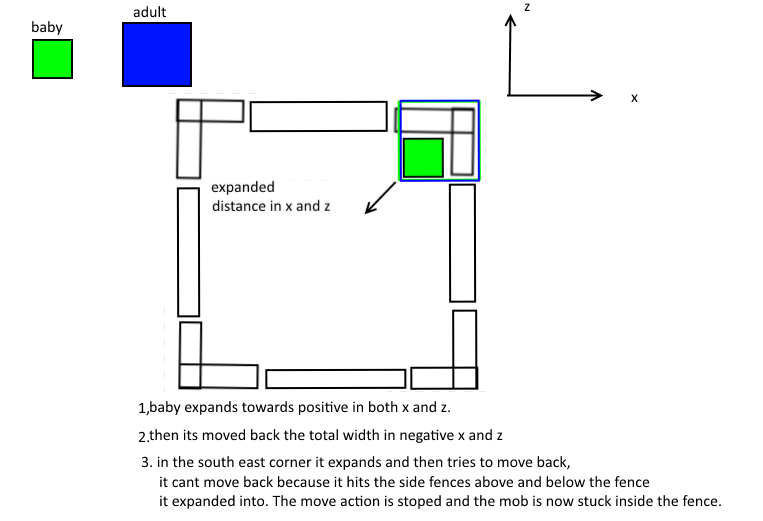 which provides a concrete way to reproduce and an explanation.
Code analysis
Code analysis by Xcom6000 can be found in this comment.
I was trying to create a machine that would take mobs and put them in minecarts when i noticed that some mobs moved their minecarts and others did not. This was weird, as mobs do not have pathfinding when riding in minecarts. For example, zombies riding minecarts do not react at all when close to villagers. Therefore it would make sense that mobs should not be able to control the minecart they are riding as they do not have pathfinding.
To investigate the cause of this bug I set up a system that places mobs in minecarts and tested it with creepers. Pictures 1 shows a creeper being placed in the mechanism. The minecart eventually comes to a stop (picture 2), showing that the creeper did not control the minecart at all. Placing cats next to the creeper (picture 3) also caused no response, which further shows that the creeper was not in control of the minecart.
For the second test, I placed a cat close to the rails and then summoned the creeper so that it would flee and thus BE IN MOTION when the minecart picks it up (picture 4). In picture 5 we see that the creeper goes forward in a similar matter to the first test. However, the creeper then stops and starts going backwards (picture 6), which is very weird.
We saw from the previous test that the cat should not affect the creeper when it is riding the minecart, and therefore there is no reason why test 1 and 2 should have different results. The only difference is that the creeper had momentum BEFORE it was picked up in test 2, whereas in test 1 it was stationary. My hypothesis is that when mobs enter minecarts, they keep whatever pathfinding they had before and try to get to the direction they were going before by controlling the minecart.
To conclude, mobs should not control minecarts, but test 2 shows that they sometimes can, and thus this bug should be fixed.
Here is a world download if you want to see the bug for yourself:
http://www.mediafire.com/download/qq1vyxuxvdcq7e1/Minecart_Bug_Demo.rar
There is a cat spawn egg for your convenience.
Edit: I uploaded Picture 7 with the debug screen so you can see the version and a better view of the machine as well.
The bug
When saving witch hut structure data the game wrongly assumes all witch huts generate at the same height. As a result, witch huts generated higher than usual will allow regular mobs to spawn inside.
How to reproduce
Observe spawning in the witch hut at 8832, 9456 on seed "Witch hut test", pointed out by Anomie X in the comments.
/tp @p 8832 100 9456
See attached screenshots: One showing three layers of witch spawning floors built in a witch hut generated at its usual height, one showing three layers built at the same height (relative to the witch hut) which generated above Y=100. One spawns witches, the other spawns all kinds of mobs.
Code analysis
Code analysis by Xcom6000 can be found in this comment.

When a piston is unloaded in the exact game tick he should extend or retract, he sometimes forgets to extend or retract after being reloaded.
Video demonstrating the bug in 16w44a: https://www.youtube.com/watch?v=9bm5_fKPcDc
According to the 1.10 code decompiled with MCP, pistons don´t extend or retract immediately when they´re updated and powered/unpowered, but they just schedule a block event, that gets processed later. Block Events get processed every tick. And only once the block events get processed the piston will extend/retract. However if the game is unloaded before the block events get processed, all scheduled block events get lost, because block events don´t get saved anywhere. Therefore, if the game is unloaded, pistons sometimes don´t extend or retract, even though they should.
It should be mentioned, that before 1.9 pistons that forgot to retract didn´t just stay extended, but transformed into a state that looks like the one in this bug report MC-49981
So while the bug that pistons get into a glitchy piston state when they forget to retract was resolved, the bug that pistons sometimes forget to retract has not been resolved yet.
The situations depicted in the pictures below can occur if the game is unloaded in the exact moment the piston directly next to the lever finishes his extension.
Code analysis and fix by Xcom6000 can be found in this comment.
The bug
The anti-cheat engine is being over-zealous causing the following issues with nether portals, caused by the game teleporting a player back:
- Portals setting the player on fire if there is lava at the exact location of the entry portal in the other dimension.
MC-97523- Can kill player if they are low on food or health - very serious.
- Deals 11 damage (5 1/2 hearts) over time.
- Usually survivable in survival mode, especially if you are full on food or have good armour - you will only take 1 or 2 hearts' damage.
- Portals loading chunks at the exact location of the entry portal, but in the other dimension.
MC-97523- Only the chunk at the exact location of the other dimension's portal loads.
- Only the terrain is generated: entities do not spawn.
- InhabitedTime of that chunk is 0.
These issues are usually characterised by a debug message in the chat claiming that the player moved too quickly:
[11:07:36] [Server thread/WARN]: FM22 moved too quickly! 8740.213380243677,-16.0,8751.561382695907
(this was going through a nether portal in the overworld at 10 000, 10 000).
Workaround
Remove all fire/lava at the exact location of the entry portal in the other dimension. E.g., if you have a portal at (100, 64, 100) in the overworld and you are set on fire when going to the nether, go to (100, 64, 100) in the nether (not to the location of the exit portal) and remove fire and lava around that exact location.
Related issues
MC-90062 - which covers the other effects of the cheat engine changes
MC-86850 - which covers how taking certain actions may cause you to remain at the erroneous location.
The fix
A suggested fix by Xcom6000, Timothy Miller, and [Mod] Pokechu22 can be found in this comment.
What is happening?
Probably Minecraft have bad days and don't want to load world/structures/structure.nbt/palette/(noname)/Properties/shape
String NBTData.jpg .
.
Unexpected is that the shape String is loaded normally for stairs that have also this variable.
How to reproduce
- Build some rail art as shown on Step1.png
 . You have to build it in the directions of the world shown in screenshot.
 - Save it as a new structure using a structure block
- When you load this structure first time, you will see that it messed up the rail art as can be seen on Step2.png
- When you load it second time, it will load normally


Code analysis
Code analysis by Xcom6000 can be found in this comment.
![[Mojang] Panda](../../../data/avatars/users/41658.png)
The bug
In many cases when entities are moved into another chunk they are not added to the new chunks entity lists rightaway.
Instead they get added when the entity receives the next update tick. Until that happens the entity will not be found by some searches that use the chunk-wise lists.
In some cases (like in lazy chunks) it can even happen that the entity is not ticked and doesn't get added to the new list at all. Upon unloading the world the entity will not get saved in the correct chunk and be deleted upon the next reload.
Two cases where this bug can happen are teleport commands and pistons. It's likely that there are more cases though.
How to reproduce
- Create a superflat world.
/setworldspawn 0 0 0
/tp 1000 100 0
- Reload the world to make sure only the right chunks are loaded.
/summon minecraft:armor_stand 0 100 0 {NoGravity:1,Tags:["MC-108469"]}/tp @e[tag=MC-108469,x=0,y=100,z=0,distance=..10] 200 100 0
Notice that the target position is still a loaded chunk, just not one in which entities get ticked.
- If you now unload and reload the world the armour stand will be gone only leaving the following messages in the launcher:
[INFO] 01:58:46.893 Preparing spawn area: 0%
[WARN] 01:58:46.919 Wrong location! (12, 0) should be (0, 0), avm['Armor Stand'/22, l='19w46b', x=200.50, y=100.00, z=0.50]
[INFO] 01:58:46.960 Changing view distance to 31, from 10
Alternatively to reloading the world, the error can be shown using these commands. They are not able to find the entity.
/say @e[tag=MC-108469]
/say @e[tag=MC-108469,x=200,y=100,z=0,distance=..100]
In contrast this one does find the entity:
/say @e[tag=MC-108469,x=200,y=100,z=0,distance=..1000]
Given the position of the armorstand all of the above commands should be able to find it, however, since it is not constantly updated across different entity lists, only the third one will find it (as off 1.15pre1).
Also note that the behaviour of these commands is highly dependant on performance decisions of entity selectors and might not behave the same under all conditions.
This issue affects survival (pistons) as well as creative/map making (teleport commands).
Another way this issue shows is when trying to teleport an entity twice in the same tick through several chunks, using selectors that make use of the chunk entity lists. The second selector will then not be able to find the entity.
Code analysis
Code analysis and suggested fix by Xcom6000 can be found here and there. Additional minor optimization here.

@Xcom6000, I assume you could just send a SPacketBlockChange to the affected client which already done by the method net.minecraft.network.NetHandlerPlayServer.processPlayerDigging(CPacketPlayerDigging) in other situations in which the player was not able to destroy a block, for example because it was protected.
Nonetheless a "proper" fix for this bug probably consists at least of the following:
- Client has to send that it just instantly mined a block (currently only a start destroying without stop destroying packet is send).
- Server has to indicate that client should not have been able to mine block. Notifying other clients even for the animation should not be needed since at this point nothing was send to them.
- Possibly: Send position and on-ground in mining packet to prevent desync?

Xcom6000 I just placed a repeating command block with say @r[type=player] in 1.12.2 and went through a nether portal about a hundred times. Shouldn't this stop saying my name after a while?
The bug happens because growingAge variable is constantly set to 1 on the client instead of decrementing all the way down to 0 as on the server. The flag never sets to true on the client making the client think that it needs to ride the lama instead of just feeding the lama.
As this bug persists across all animals that have inventory's like donkeys or mules it might be best to fix the issue at the root in the class "AbstractChestHorse.java".
http://i.imgur.com/i0ocILF.png
Best way to fix the bug is to force the player to never mount animals when holding food in the main hand. This will fix all bugs related to breeding across all animals that have inventory's including lamas and when the animal can't be bread the food wont be wasted.
While on the subject of lama breeding it might be worth mentioning that the check to overfeed already bread lamas is missing. Adding this additional if check will result in not feeding a lama that already have been fed and put into love mode.
http://i.imgur.com/y6vkAk1.png
Its worth noting that the line:
worldIn.scheduleUpdate(pos, this, this.tickRate(worldIn) + rand.nextInt(10));
only gets called when the fire is updated. It basically breaks when doFireTick is set to false. It won't ever update itself causing odd effects making the fire never go out. It might be worth placing a secondary update outside the if statement to make sure updates are scheduled even if the if statement isn't run.
Picture of code:
http://i.imgur.com/Ipy9K8r.png
Suggested fix in picture BzqwEv7 shows the most simple solution to fixing ghost blocks client side. It causes blinking effects that can be fixed as well. But the suggested fix fixes the ghost blocks.
In the image "fixed water image.png" is a proposed fix for this bug.
Random ticks are set to zero and the lava + water generated as per normal.
The fix can be found in WorldServer.java
There is a code that is used for instantly updating or rather instantly running scheduled updates in the code. When its used it generates water instantly when a chunk is populated. The instant updates have a check to see if an area around 8 blocks in all directions is loaded. This check prevents the water to flow naturally and causes the water to stop spreading towards unloaded chunks. When this happens the water stops spreading and looks like it's been stopped by a invisible barrier. In other instances it sporadically spreads, most likely because more neighbouring chunk loaded in while it was spreading and randomly selected water blocks had already spread while the neighbouring chunk loaded giving a sporadic shape.
The simple fix to this is to remove the check where a loaded chunk is needed for the scheduled updates to happen instantly. Removing it will give water the naturally generated shape, the same goes for lava. After removing the if statement that prevents instant updates near unloaded chunks the water generation stopped creating error waters. The picture is of the seed and the coordinate of where error water have been spotted.
A picture of what was changed in the code:
https://i.imgur.com/7jiNzbW.png
An hour of flying in spectator mode into newly generated chunk gave good results with no noticeable error water generation. But as of writing this there was no noticeable errors caused by this change. If anyone else can test this fix and report any other issues caused by removing this check. It's pointing towards having no side effects removing this particular loaded chunks check during instant scheduled updates.
You are correct, I assumed that the check was taxing an already strained chunk generation and should have been removed. It didn't hit me that the return statement could be moved up one line. Doing so will fix the issue. It seams if water stops flowing in odd shapes it will continue after the area is loaded by the player.
It seams it only was a miss placed return statement. More then likely this news will get to them a bit late. They probably found this fix on there own. But if not, hope this comes in handy.
Confirmed 1.12.2
Explanation:
The best solution we could find without shifting entity hitboxes around if they happen to overlap incorrect static barriers after creating the hitboxes was to prevent any hitbox getting near any barrier.
In Entity.java and precisely in “moveEntity”(MCP name) where the entity vectors are re-calculated based on if they are about to hit a barrier. On line 966 the vector is reduced so as to give the exact distance needed for the entity to travel until it lands facing the barrier perfectly. All that simply is needed is to reduce the vector by a small amount, rather precisely 1.0E-12 to create a buffer space. This will prevent any rounding artifact errors described in theosib’s post by simply giving a margin to stay clear from the barrier.
The reason the 1.0E-12 number was chosen was because most rounding errors happen to land anywhere between 1.0E-13 and 1.0E-15. A larger flat 1.0E-12 barrier seemed sufficient while at the same time small enough to not be noticeable to any player.
The exact location where vectors are reduced based on the barriers they are headed towards are all calculated in AxisAlignedBB.java and more precisely in “calculateXOffset” and “calculateZOffset” (MCP name). This code pertains to how the parameter double value (vector the entity will travel in the next tick in either x or z direction) is reduced from its original value to the reduced value that will align the entity against the hitbox if it were to continue heading towards it. This number can simply be reduced further by another 1.0E-12 and prevent alignment and in turn create a buffer space for the described issue created by the save / load overlap problem.
Code:
https://i.imgur.com/VkKCKyA.png
This image shows where in the code the amount of 1.0E-12 is added. “margin” is the double value that is either added or subtracted based on what direction on said cartesian axes the entity is traveling. This needs to be done in AxisAlignedBB.java both in “calculateXOffset” and “calculateZOffset” (MCP name) and NOT in “calculateYOffset”.
It's worth noting that this only fixes entities not glitching into walls when reloading. This does not however fix entities growing up.
Pokechu22 helped point out the code where mobs are resized. It happens in EntityAgeable.java in "setScale" (MCP code). This line is called when a mob changes size to an adult. This then calls a method "setSize" (MCP code) in Entity.java where the size is changed. Studying the code it shows clearly that the resizing is done in a very odd fashion.
If the resizing is done towards smaller then the entity simply shrinks without problems keeping the centre position as the reference point, no problems observed. If it's done towards expanding then its done differently and is the reason this problem happens. The expansion strictly expands the current hitbox towards the positive axies as shown here
"axisalignedbb.minX + (double)this.width". After the hitbox is resized its moved back by the total width amount.
Basically moved back by a full expanded amount.
Two observed issues that can be seen by this is
A. The mob expands and shifts its original position.
B. As illustrated in the picture some edge cases results in mobs never being moved properly back and placing them inside other blocks.
https://i.imgur.com/DpP41Mf.png
The proposed fix is to simply change the size of the hitbox based on the centre position. Then check if the entity is overlapping any other hitbox. If its overlapping any other hitbox it should move the entity back out but only by first checking if its not overlapping with the old hitbox (the last check is to make sure that entity's aren't moved out of blocks they were previously occupying).
These two images shows a code proposal.
https://i.imgur.com/8sVcGr2.png
and
https://i.imgur.com/tdyxPtR.png
As Markku pointed out. There are numerous reasons we chose to discard the NBT hitbox saving.
1. Issue of backwards compatibility.
2. Corrupted hitboxes would persist.
3. Any hitbox loaded would need to be corrected and as been in described in length because of the rounding artefacts would create an ambiguous state when a hitbox isn't at its correct size.
4. If hitboxes are corrected it could still result in the same overlapping walls problem that was started out with.
5. Extra storage for no reason when a simpler solution fixes the issue.
It was the best idea until we stumbled into the margin fix, after that it seamed natural to only add a margin with very little drawback instead of saving the hitbox.
After MrGrim pointed out the flaw of all the current suggestions he helped improve the fix for ghost blocks. A simple modification to the BlockPistonBase.java is needed to remove the ghost blocks for both server and client. The fix is to simply check the block in front of the pistons that is being grabbed. If the block in front is a moving block 36 then all sticky pistons will ignore pulling any block on the client. This is achieved by adding an extra meta data in one of the parameters on the server and send it to the client. If said meta data contains the property that it can't pull the block in front then it will ignore any pulling of blocks resulting in a perfect synchronized behaviour to how the server behaves. This fixes the ghost blocks in the most efficient and lag friendly way with minimal intrusion to the current code.
These are the 2 code suggestions that shows the changes that was made to fix ghost blocks created by pistons.
This part of the code is for the server making sure to add a meta check if the pulling blocks aren't moving
https://i.imgur.com/FmMnjKX.png
This part of the code if for the client making sure the blocks in front can't be pulled if the server doesn't pull them.
https://i.imgur.com/7mPPFoS.png
The sole reason to update all players with any block update is that there doesn't exist any code currently that can update a single block for a single player. There would need to be added 6-7 new methods going from World.java to ServerWorldEventHandler.java, PlayerChunkMap.java, PlayerChunkMapEntry.java. These classes would need additional functions just to handle updating a single targeted player regarding a block update. This would resolve the issue of not updating all players but it would honestly be a large rewrite that would probably be discarded because of the amount of changes.
There is no need to add heavy rewrite when the block updates are only sent to nearby players that can view the mined block in that same area around that block. There is often no more then 10-30 players at maximum in the same exact spot in minecraft getting at max 29 extra unneeded block updates. This update also only is sent out when blocks are not instant mined which also reduces the spam significantly. Adding the notification as shown is acceptable with the current architecture in place unless the number of players some day increases into the 100s in the same chunk. When and if that ever becomes a common practice then adding the tweaked optimized 100lines of code is a valid concern. But with the current state where at most 4-5 players view the same block and having the server send a few extra packages is a legitimately acceptable load. Carpet mod have been running this fix for a few months without noticing any performance changes at all on the server.
As a suggestion given above margin is suggested to be added in AxisAlignedBB.java both in “calculateXOffset” and “calculateZOffset” not in “calculateYOffset”. There might be edge cases where “calculateYOffset” might also benefit from this fix. As there are no side effects adding this tweak then I would suggest also adding it to the “calculateYOffset” as well giving all axis a simple margin fix. Mostly as there are edge cases where other types of entity's glitch through some other types of blocks in rare situations.
Me, Tim Miller, and Pokechu22 found the fix!
add ((EntityPlayerMP)entityIn).connection.captureCurrentPosition(); to Teleporter.java to line 186.
What is happening is that the player is being moved to the new portal location but as there is a speculated redundant code in the NetHandlerPlayServer.java function update().
captureCurrentPosition saves the location of the player. Then onUpdateEntity updates the players positions to teleport to the other dimensions portal location. Then the position of the player is set in setPositionAndRotation back to the older saved position in captureCurrentPosition creating a pink pong effect. Later the position is updated by the teleport confirmation making the player end up in the correct destination eventually. But this ping pong effect causes massive issues with players being placed in the wrong location in the correct dimension, both fire and chunk loading happens due to this and causes extra strain on the server when travelling through a portal as unneeded chunks are loaded. The simplest fix is to update the position via captureCurrentPosition in the place where the player is being teleported to i.e. the part of the Teleport.java code that updates the players position to the new portal exit position.
Bug or not it wasn't harmful at all and an endgame item used in a very niche mechanic that brought usefulness in a very balanced way. It added content and emergent gameplay in a creative and useful ways that made the game more valuable.
Please open this bug report so Mojang devs can at least see this and make that choice.
The behaviour to change all entity's controlling the minecart is quite simple. In EntityMinecart.java a simple if statement can be changed to make only players control the minecart.
line 545:
changed to
Changing EntityLivingBase to EntityPlayer makes the minecart only be controllable by the player.
This bug is related to the way the entity's are processed. The entity code in World.java on line 1957: "updateEntityWithOptionalForce" causes this issue.
This is because entity's that are suddenly moved into a new chunk that is not loaded never get added to the unloaded chunk they have entered. They are removed from the list of entity's that are added to chunks and they stay in memory until the chunks around the entity are loaded to make it entity process. Then the entity is added to the chunk it is in. Because all data is stored per chunk basis it means that if entity's do not belong to any chunk they simply get unloaded along with the world without being saved to disk. This can happen to entity's that are moving faster then 32 blocks per game tick and other rare instances when pistons push entity's.
Detailed code explanation.
In World.java line 1959 in updateEntityWithOptionalForce this if check can be found
This code allows for entity's to be skipped if there is a chunk within a 5x5 area around that is not loaded. The term entity processing is used to describe this.
Later in the same function at line 1987 the entity gets updated at the line "entityIn.onUpdate();" and it might have been moved at this point.
If the entity moves into a new chunk the entity gets removed from the old chunk and added to the next chunk it enters. This happens at line 2022.
This is where the bug shows up. at line 2039 an if check is done on the entity to make sure that the chunk the entity have moved into is loaded. If the entity have moved into a unloaded chunk it simply gets a boolean check "addedToChunk" as false without being added to the chunk it has entered and at the same time a few lines above it gets removed from the old chunk it was in.
At this point the entity gets stuck in memory as it dosen't have a 5x5 loaded chunk area around itself to become processing while it is not saved to any chunk and not able to get saved to disk. The exception to this is when the entity is teleported as in goes through portals or teleported by other means. This rare instance the "setPositionNonDirty" is set to true and the entity is added to the chunk it has entered. But this only happens when entity's are moved via teleportation.
This is probably not as intended because the entity can only be saved to disk and unloaded from memory if the player loads the area where the entity is in again and makes the entity become entity processing. Only then does the entity notice that it doesn't belong to any chunk and adds itself to the chunk it is in. The entity's that are moved into unloaded chunks can cause corruption and other issues when the world is shut down without being properly saved to disk. Mobs can be lost because of this. If entity's are not allowed to get saved to disk they also cause lag as they clog the memory by being added to list of loaded entity's without being able to get removed.
Suggested fix
As entity's can only be saved to disk and removed from memory when they are added to a particular chunk. It is suggested to simply add all entity's to the chunk they enter by removing the if check and explicitly add them to said chunk they enter. The only reason this check must have been done would have been to save some additional memory space prior to the "save-all chunks" every 900 game ticks. This must have been here to prevent chunks from becoming loaded prematurely. With the added 900 game tick "save-all chunks" added to the game makes this particular issue a non issue. Entity's can simply be added to chunks they enter and temporarily load the chunk to get saved to it. Later they can get unloaded and removed from memory while being saved to disk.
This code suggestion can simply be done to fix this bug.
It is not harmful to the game to add an entity to an unloaded chunk. What will happen is that the chunk it is temporarily loaded and later unloaded by the 900 game tick "save-all chunk unloading" cycle. This suggested fix however dosesn't fix the issue that piston causes to entity's that are moved into the next chunk. The fix to make sure entity's get properly saved to disk when pushed by pistons needs a more complex fix that haven't been looked into. Most likely will need a better entity movement check done by pistons.
Bug can be seen here by EDDxample.
https://www.youtube.com/watch?v=xuFLfSI43bI
To fix this bug fully as the code suggestion above was only for entity's that move themself into unloaded chunks. The issue with pistons is that pistons can also move entity's without sending an update on the entity. To fix that pistons need to notify the entity to send an update to the entity that is being moved.
Simply adding "world.updateEntityWithOptionalForce(entity, false);" to line 209 in class TileEntityPiston.java in the function "moveCollidedEntities" in addition to the fix suggested above.
Some entity's need to be fully updated to save there correct position and therefore move back to the old position before the piston move. An extra entity update would fix this but as the entity is clearly in an unloaded area it makes no sense to do so in this instance. This happens to Minecarts for example. This last noted bug is to minor and trivial as the entity is there but in the wrong position. Most other entity's are reloaded in the correct position including armorstands.
While looking into the function "updateEntityWithOptionalForce" it might be worth noting a small optimization where the if boolean "forceUpdate" can be moved into the upper if check to improve entity optimization sightly.
From this
To this
The boolean can be done a few lines up as it is unnecessary to enter the upper if check when its going to skip the 2nd if check anyway.
I thought Grum confirmed fixing this bug as per the suggestion above. Can this be tested with a snapshot to see if its fixed. It's already fixed as far as I remember and if not the suggested fix is the least invasive until a complete rewrite of the netcode is needed.
Structure blocks have a bug rotating rails. The 90 and 270 degree rotation work fine but 180 degree have a bug where straight rails can rotate into a broken state when loading in a structure with straight rails. All other types of rails, curved or sloped rails can get into an odd state but when attempting to reload the structure a 2nd time the reload fixes the miss connected rails, all but the straight rails. Picture attached shows the bug were straight rails are saved into the structure and when the structure is rotated 180 degrees the rails don’t load correctly.
This is caused by rails having no set 180 degree rotation. The switch case lacks that rotation as it naturally doesn't have to rotate. But what happens is that the default rotation is chosen and the default rotation is the same rotation you place rails at. In some instances this angle is 90 degrees from the single placed rail causing the error. BlockRail.java, BlockRailDetector.java and BlockRailPowered.java all have the same exact method “withRotation”. This method lacks the 3 180 orentations that are related to straight rails. The switch statement fails and the rotation ends up setting the default rail orientation for the straight rails.
Code suggestion would be to move this method to the superclass and add the missing rotations to the 180 degree turn. Code suggestion for clarity.
This bug is created because of the Temple generator getting an offset when generating. Temples like any other structure has an outer main bounding box and all inner structure bounding boxes, for the case of witch huts only one inner bounding box aka hut exists. To spawn a witch inside a which hut the position needs to be inside both bounding boxes meaning they need to perfectly overlap or any non overlapped areas will fail to spawn a witch.
As is known there is a bug that makes the outer Temple bounding box generate always at Y=64 but the hut bounding box can be offset above or below the Temple bounding box. The main problem is that the Temple and the structure bounding boxes are created prior to generating any other blocks. The Temple is first created then its child structure that places the hut into the world. The hut has a fixed and valid location at Y=64. The Temple bounding box is then rapped around the inner hut bounding box. This can be seen at MapGenScatteredFeature.java line 172.
"ComponentScatteredFeaturePieces.SwampHut componentscatteredfeaturepieces$swamphut = new ComponentScatteredFeaturePieces.SwampHut(random, chunkX * 16, chunkZ * 16);
this.components.add(componentscatteredfeaturepieces$swamphut);"
These 2 lines generate the Temple and hut and places them into the world. Then the Temple is wrapped around the hut at line "this.updateBoundingBox();".
Later in the code after the world is generated the hut is placed into the world at the topological terrain. The hut bounding box is then edited in Y height to match the average topological area based on the 4 corners offsetting its location based on the terrain its generated at. The Temple bounding box is not edited at this stage creating an offset. This can be seen in ComponentScatteredFeaturePieces.java in the method addComponentParts under the subclass SwampHut.
"offsetToAverageGroundLevel" Edits the hut bounding box when placing it into the world. While the caller to generate and place the hut into the world is called from StructureStart.java line 70 in a method called "writeStructureComponentsToNBT" where the Temple is calling the different "components" to generate. After they are generated in the case of Temple structures unlike other structures the inner bounding boxes are altered in some instances.
TL.DR.
To fix this bug can be done by adding "updateBoundingBox();" method call inside the "writeStructureComponentsToNBT" funtion inside the class StructureStart.java at line 85 like the code example. This is to update the outer bounding box after the inner structure bounding boxes are edited before being saved to disk.
A small optimization can also be done by removing most other updateBoundingBox(); calls in unneeded places as its done here in the critical location after the editing of inner bounding boxes are done.
This bug is related to the update order of tile entities. When tile entities are saved to disk they are saved using a hashlist. But before they are saved the game keeps a strict FIFO. The order is critical in most instances making the save process lose the proper order in which tile entities should be updated causing issues to both flying machines (generally anything to do with pistons), hoppers and most notably instant wires.
Of course the loading process will lose the order if incorrect order of chunks are loaded but internally inside each chunk the order scrambles as the saving process uses a hash order based on the position. The order can be kept by simply using a linked hash map making anything that relies heavily on the correct order correctly ordered after reload.
The list is found in Chunk.java
this.chunkTileEntityMap = Maps.<BlockPos, TileEntity>newHashMap();The saving happens in AnvilChunkLoader.java
This clearly shows that saving happens based on a hash implementation instead of the order that is used during runtime as FIFO. If the newHashMap is changed to newLinkedHashMap the order is kept making any instant wire function properly.
There is a separate bug related to pistons as well where the proper order of moving blocks aren't saved properly.
It should be changed to
These 2 small fixes will help any inconsistency that happens to pistons after reloads.
Edit:
Another potential unexplored problem can be the scheduled block events. They are processed after even chunk unloading process and tile entities plus the auto-save in the "sendQueuedBlockEvents()". This means that any block events that were scheduled never gets processed if an auto-save happens.
As this list keeps track of all block events its responsible for both updates to blocks such as pistons and is critical in flying machines and other piston based contraptions. When the chunk is unloaded the list keeps track of any block events until the chunk is reloaded. But if the server shuts down the list is simply lost.
This list should probably be saved to disk in some ways to be recovered after a server restart to not cause issues.
There are two bugs related to leashes. One is regarding invisible leads and one have to do with the leashes breaking. Kevin Gagnon suggestion for the fix certainly does the job but I would suggest to not fix the bug in the simpler way as suggested by Kevin and go for a more interesting approach that will have deeper mechanics for those that seek it out.
Invisible leashes bug.
When walking further then 80 blocks from mobs that are attached with leashes and walking back the leashes become invisible. This is because leashes are part of EntityTracker and have a hardcoded range of 80 blocks as all animals have a range of 80.
The issue comes from the fact that leashes are sent to the client after the entity first become entity processing. The packets that link entities with there respective leashes are sent to players in EntityLiving.java by the following code.
Its clear that the leash packets are sent to only players within range. This means that any player that is further then 80 blocks from the entity never receive the packets and assume the mobs don't have a leash. This makes all mobs lose there leashes unless players can somehow teleporting to the mobs directly via commands or logging in next to them. The same issue is that the leashes are removed on the client if the player have a higher render distance and simply walk further then 80 blocks to stop seeing the mob and walks back.
The fix was done with aid from Pokechu22. There is a code in EntityTrackerEntry.java that re-updates players in case a player gets in range in public void updatePlayerEntity(EntityPlayerMP playerMP).
By placing the following line of code in the updatePlayerEntity somewhere in the large if statement the bug of invisible leashes fixes itself. The leashes simply re-update as the player gets close enough again to the animals.
Breaking leashes
The second bug regarding the breaking leashes comes from what Kevin Gagnon explains. The NBT of entities never save to disk as the entity needs to become entity processing at least for 1 gametick to reload the leash in the following code found in EntityLiving.java recreateLeash(). The leash is simply recreated and the leash can be saved to disk again. If the leash never becomes updated the leash isn't saved breaking it the next time the chunk is reloaded. This happens if the mob is loaded into lazy chunks and never update.
As an alternative fix I suggest that the recreateLeash() code is run directly after the entity is placed into the world after loading the chunk. This can be done by having the recreateLeash() run in the spawn entity into world. This will ensure that entities that are loaded get there leashes reattached instantly without problems as there leashes otherwise wont be attached until they update at least ones. This solves the breaking of leash bug and ensure the mob doesn't need to become loaded to become attached with its leash. It is a safer way to fix the bug as it guaranties that the mob never is detached from its leash at any given time that can cause issues in rare instances.
Just as a suggestion. Add the one "entityIn.postLoad();" line in onEntityAdded in WorldServer.java
This line could then be used to post load the leashes to animals right after the animal is loaded into the world.
MC-98153was already fixed in 13 though. The bug where entity's would pingpong using portals.This bugs not fully resolved properly. The route of the bug stems in parts of the entity update code that haven't been fixed yet. The reason tripwires permanently stay on is related to ghost entity's existing in the chunks but not added to the global entity list. Any form of ghost entity needs to be caught and throw a proper exception in the console or give any hints or warnings that entity's that aren't properly added to the correct lists exist in the world. If no exceptions or warnings are sent then any bug creating ghost entity's can cause memory leaks and other issues as they can build up in the loaded chunks indefinitely without being handled.
This bug shows up due to there being an old player entity object added to a chunk list. The chunk list then gets flushed along with all other entity's when the chunk is written to disk. The entity's have there entity trackers removed along with being removed from the world. Given the incorrect player object is part of a chunk that is written to disk the player tracker object gets removed as well.
This bug may show up in other instances but the main one found using nether portals due to accurate reproducibility is nether portals. Using vanilla 1.12.2 following the procedure of going from over world using a nether portal into the nether then back into over world several times and then waiting for the auto-save reproduces this bug accurately.
A global fix would be to never remove the player tracker object by removing the player object in chunk lists. This happens in World.updateEntities MCP mappings.
This is where the flushing of player objects happens removing the player trackers along with the false player objects.
Given this bug was tested on portals the bug can easily be seen in the portal code in PlayerList.transferEntityToWorld MCP mapping names. This method is responsible for removing the player from the old dimension and placing the player in the new dimension in the correct chunk. But player is placed inside a chunk with the method call:
oldWorldIn.updateEntityWithOptionalForce(entityIn, false);Specifically the lines:
This method adds the entity into the specific sub chunk list but never removes the player object. Given that the sub chunk has a lingering player object added to its list that then gets flushed along with the chunk being written to disk.
MrGrim suggested a clean fix for the specific case of the nether portals. But given there might be other instances of the player writing itself to a chunk and never having it removed then it might be prudent to make a global fix instead of individual fixes in the code.
MrGrims nether portal code fix in PlayerList.transferEntityToWorld:
As seen in the code suggestion above the player is simply removed from the chunk it belongs to in the old world it belonged to before adding it to the new world. Given portals lack this removal the tracker object can then be deleted if the player enters the same dimension before the chunk is written to disk having an old player object in a random chunk list in the same dimension.