 MC-105560
Hoppers become stuck on world reload at chunk borders
Put the summary of the bug you're having here
What I expected to happen was the comparator would continue working when I reloaded or download a map and opened it
What actually happened was the comparator was stuck on it's previous state when I open a map I downloaded and also reloaded a map on my server
Describe what happened here
Steps to Reproduce:
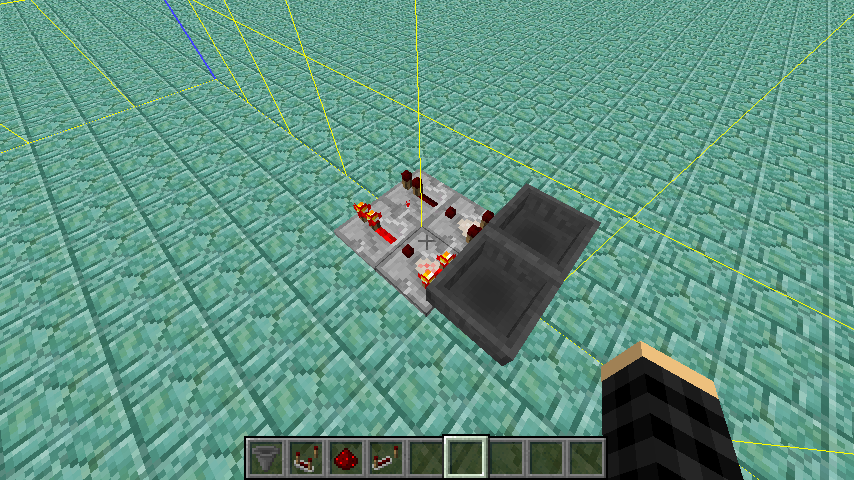
1. Put two hoppers facing each other
2. Put a comparator on one of the hoppers
3.Put a item in one of the hoppers
4. Restart you world of server with the map and check the comparator
Environment
Windows 10 and Java 8 version 43
Linked Issues
is duplicated by2

![[Mojang] Gnembon](../../../data/avatars/users/93709.png)



![[Mod] Neko](../../../data/avatars/users/92901.png)


Created Issue:
Comparators are stuck on previous state
Put the summary of the bug you're having here
What I expected to happen was the comparator would continue working when I reloaded or download a map and opened it
What actually happened was the comparator was stuck on it's previous state when I open a map I downloaded and also reloaded a map on my server
Describe what happened hereSteps to Reproduce:
1. Put a step by step guide on how to trigger the bug here
2. ...
3. ...Environment
Windows 10 and Java 8 version 43

duplicates
duplicates
![[Bot] Arisa](../../../data/assets/gravatar/mustek2.png)

Put the summary of the bug you're having here
What I expected to happen was the comparator would continue working when I reloaded or download a map and opened it
What actually happened was the comparator was stuck on it's previous state when I open a map I downloaded and also reloaded a map on my server
Describe what happened hereSteps to Reproduce:
1. Puta step by step guide on how to trigger the bughere
2. ...
3. ...Put the summary of the bug you're having here
What I expected to happen was the comparator would continue working when I reloaded or download a map and opened it
What actually happened was the comparator was stuck on it's previous state when I open a map I downloaded and also reloaded a map on my server
Describe what happened hereSteps to Reproduce:
1. Put two hoppers facing each other
2. Put a comparator on one of the hoppers
Oops to reproduce it put Two hoppers with a comparator on the side of 1 and a item in one of them
And then restart your server orange single player take it out of your saved folder and put it back in
Put the summary of the bug you're having here
What I expected to happen was the comparator would continue working when I reloaded or download a map and opened it
What actually happened was the comparator was stuck on it's previous state when I open a map I downloaded and also reloaded a map on my server
Describe what happened hereSteps to Reproduce:
1. Put two hoppers facing each other
2. Put a comparator on one of the hoppers
3. Restart you world of server with the map and check the comparator
Put the summary of the bug you're having here
What I expected to happen was the comparator would continue working when I reloaded or download a map and opened it
What actually happened was the comparator was stuck on it's previous state when I open a map I downloaded and also reloaded a map on my server
Describe what happened hereSteps to Reproduce:
1. Put two hoppers facing each other
2. Put a comparator on one of the hoppers
3.Restart you world of server with the map and check the comparatorPut the summary of the bug you're having here
What I expected to happen was the comparator would continue working when I reloaded or download a map and opened it
What actually happened was the comparator was stuck on it's previous state when I open a map I downloaded and also reloaded a map on my server
Describe what happened hereSteps to Reproduce:
1. Put two hoppers facing each other
2. Put a comparator on one of the hoppers
3.Put a item in one of the hoppers
4. Restart you world of server with the map and check the comparator
i can should i also log in then out
Comparators are stuck on previous stateHoppers become stuck on world reload
relates to
Hoppers become stuck on world reload at chunk borders
![[Mojang] Jeb (Jens Bergensten)](../../../data/assets/gravatar/jeb.jpeg) [Mojang] Jeb (Jens Bergensten)
[Mojang] Jeb (Jens Bergensten)I'm not entirely sure if I understand this right. If all hoppers would be running on a global timer now and only attempt to transfer items every 4 ticks, a huge amount of redstone contraptions would break, because they for example rely on getting a 7gt signal from the classic dropper-hopper monostable.
relates to
related to the fix of MC-105560.
hoppers are running on a global timer now, which apparantly only allows them to transfer items every 4gt. This breaks countless redstone contraptions, that rely on precise timings.
Example: classic dropper-hopper monostable (see picture), a widely used component in many redstone contraptions, doesn't give a reliable 7gt signal anymore. Since 16w32 the signal length is random, which breaks countless things.
![[Mojang] Panda](../../../data/avatars/users/41658.png)
I can confirm.
Just going from the (really helpful!) comment by Jeb at MC-105560 you can derive why.
Hoppers only transfer items when the game tick modulo 4 is equal to 0 since the change in 16w32a.
So depending on the gametime it is triggered at you get different results:
4 ticks for gametimes 4*k
5 ticks for gametimes 4*k+1
6 ticks for gametimes 4*k+2
7 ticks for gametimes 4*k+3
(for all k >= 0) 
Please reopen this post and link it as related to MC-105560.
Fixed while maintaining the fix for MC-105560, so behavior for hopper-to-hopper love may still act differently compared to 1.10
That was already said by [Mojang] Jeb (Jens Bergensten):
You can't keep hoppers the same while providing a fix for them getting stuck, the current way is not perfect, but it can't get better without undoing that fix.[Mojang] Jeb (Jens Bergensten) added a comment - 30/Aug/16 10:50 AM
Fixed while maintaining the fix forMC-105560, so behavior for hopper-to-hopper love may still act differently compared to 1.10


The bug still exists and its not a duplicate of MC-105560, its a completely different bug.
Duplicate of
MC-16716How can you tell it's that specific issue?
Please provide screenshots.
Because when I was ma king a map and had my friend down load my world i had two hoppers and a comparitor concted and had a bunch of command blocks and they didnt work so I changed them out for a comand block that had the command "say test" and it dint say test but the item in the hoppers was moving. When I added a new conparitor on ther other hopper it worked. Then I replaced the original comparator and it worked.
*making *download
Again, please provide screenshots.
Ok let me get them but what do u want them of?
Most likely dupe of
MC-12211No it happens even when not in subtract mode
How is it resloved?
FRISCO what do u want the screen shots of
Fvbisco
Of the issue/setup.
It was resolved as Awaiting Response.
Also, don't call me that.
Ok, sorry I was using my phone and it auto corrrected me.
I found a way to deal with this but it seems to now only happen 50% of the time.
The first screenshot is what happens when i close and open my world. And the second picture is showing that there is a item passing between each hopper.
I have attached two screenshots to in a comment FVbisco
Could you make a small video showing what happens with the item?
If you can get the entire issue on video, yes please (if it's too big to upload, then upload to another site, and provide the link here.
it dosent seem to be working but what the item does is go back and fourth between hoppers its a hopper clock
I can confirm this when hopper are placed between 2 chunks. Relate to
MC-105254Can also confirm.
Since this behavior is not consistent, and if you have trouble reproducing this bug, I added a world download in the attached files.This world has a bigger sample of hopper clock, and a command block allow you to reset them.
A world reload can lead to different result. Sometimes, only a few hopper are desynchronized from the others, and on other case, a large amount of hopper are stuck. Hopper also don't need to be between two chunks.
Ok thanks
The bug in this particular case was that the two neighboring hoppers would get almost exactly the same cooldown tick. This meant that instead of hopping the item every ~4 ticks, the item would stay in either hopper 7 or 8 ticks and in the other one 1 or 0 ticks. The comparator is not updated frequently enough to notice this, so it looked stuck.
I've fixed this issue by aligning all hopper ticks to the level's game tick, at a rate equal to half of the hopper's interval (i.e. 4 ticks). Obviously this may have new side effects that I'm sure the community will discover. Especially if a redstone contraption relies on hoppers to update more frequently than every 4 ticks.
[Mojang] Jeb (Jens Bergensten) I've seen a few fix notes by now from you (also on Reddit), not only I do very much appreciate these, thank you very much!
Although it steals a few minutes of your time, I know from own experience that in some bugfixcases the community was asking themself what exactly was the issue now, or how it was fixed/what to expect now as new behaviour, which is also a good thing to know how the game is supposed to work from Mojang's view, so we can look out for anything out of the normal (= bugs).
Thank you again }=)
[Mojang] Jeb (Jens Bergensten) Thank you a lot for the fix notes! Really helpful
As you said there are a few side effects with aligning hoppers with the game tick.
Since hoppers can interact with components that can change in every tick, hoppers will appear to have a bit more or less delay dependent on the time they were triggered.
Many designs that use hoppers for timing will now have 5,6,7 or 8 ticks delay at random and considering random factors in redstone designs is always tricky for the player.
@_Eta740_ pointed out some of these cases on Twitter: https://twitter.com/_Eta740_/status/763452453303967745
The issue comes from the way the hoppers cooldown is reset when another hopper places an item in it.
It only resets the cooldown if it was ready to transfer items already. If the cooldown was almost done before it stays there.
Which can lead to neighbouring hoppers having almost the same cooldown (see Jeb's comment).
Resetting the cooldown each time an item is placed inside the hopper is not really an option, because then hoppers that get fed from two sides would just not transfer anything out.
Potentially an alternative hack-solution for this issue could be to also reset the cooldown to 4 if the hopper was empty before and the cooldown was not done yet.
It's such a specific case that it probably wouldn't affect too many other cases (even though it probably would allow for some kind of "super charged hopper line").
More generally I think that the cooldown is used for two things here:
1. Limiting the hopper to one action every 8 ticks
2. Making sure each item stays for some ticks inside the hopper
Handling the second case on a per stack basis instead would make the timings more predictable (e.g. when a stack was added to an empty slot it can't be moved out for 4 ticks).
Tricky as always with redstone changes.
Thanks again for the fix notes!
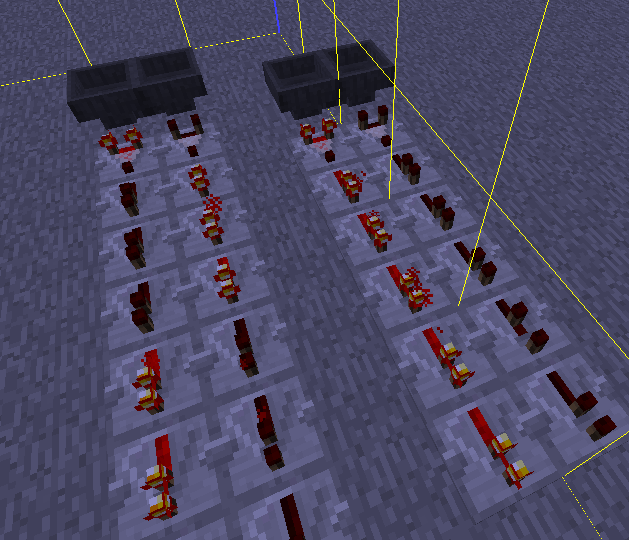
I kindly attached the repercussions of alligning hopper cooldown with global clock (see the attached 1.10 and 1.11 images), This causes, as Panda4994 indicated - dependency of comparator response based on when a hopper receives an item, thus making hopper response time unreliable.
Another possibility I could suggest to solve the issue mentioned in this bug report would be to allign the cooldown of hoppers on chunk load, and then leave them be. This should fix the reported bug, as all hoppers will be loaded aligned to the same central clock when chunks are loaded (in any order), but would keep their response with 1-tick resolution.
I believe this fix has also broken standard item sorters. I'm not sure since the new behavior is so inconsistent, making it hard to reproduce things, but I will investigate further.