 MC-121913
Log files are HUGE (5GB) because Brigadier also logs errors continuously.
The bug
Expected command exceptions (com.mojang.brigadier.exceptions.CommandSyntaxException) are written to the log file, for example when a selector cannot find an entity or when the syntax of a command is wrong. This can cause huge log files (for example 5 GB, see image-2017-11-12-21-12-13-730.png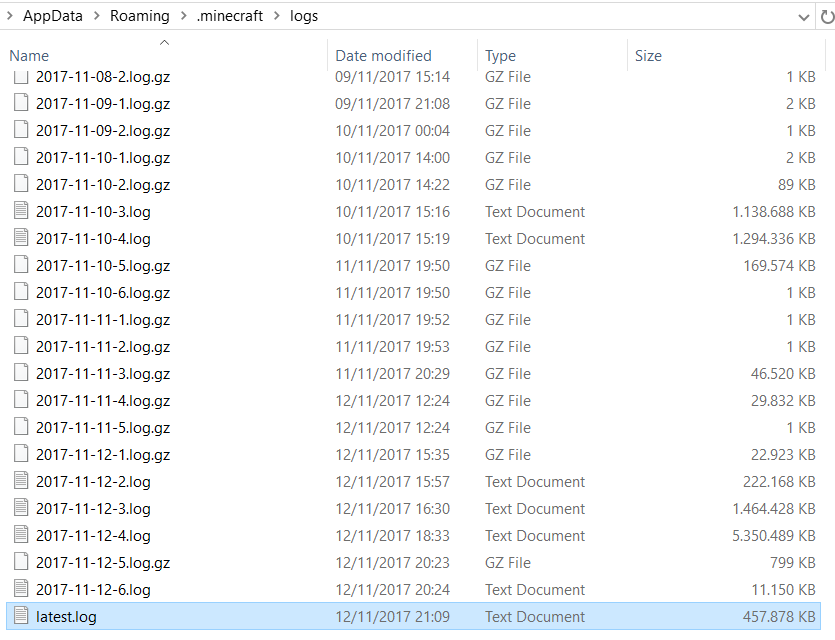 ) when commands are running every tick.
Especially with the command changes most of the previously used commands are now incorrect and cause syntax errors.
These expected exceptions should be normal command feedback and therefore nothing should be logged.
Note: Exceptions happening because a command malfunctions should probably be logged.
Affected situations
functionswas fixed- Commands run in chat (including using written books)
/give @s minecraft:written_book{author:"a",title:"a",pages:["{\"\":\"click\",\"clickEvent\":{\"action\":\"run_command\",\"value\":\"/kill @e[type=item]\"}}"]} - Commands run by command blocks (including minecart command blocks)
/give @s minecraft:written_book{author:"a",title:"a",pages:["{\"\":\"click\",\"clickEvent\":{\"action\":\"run_command\",\"value\":\"/kill @e[type=item]\"}}"]} - Command run when clicking signs
/setblock ~ ~ ~ sign{Text1:"{\"text\":\"click\",\"clickEvent\":{\"action\":\"run_command\",\"value\":\"/kill @e[type=item]\"}}"}
Environment
Windows 10
Linked Issues

Created Issue:
Log files are HUGE (5GB) because brigadier doesn't care about gamerule logAdminCommands
Verbose logging:
Let's take a look at our logs folder in .minecraft:
2017-11-12-4.log 5.350.489 KB (5 GB!)When I open up the log file:
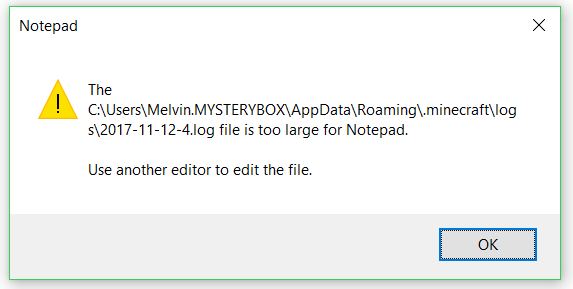
Well then... Let's try Sublime Text (after a good minute or 2):
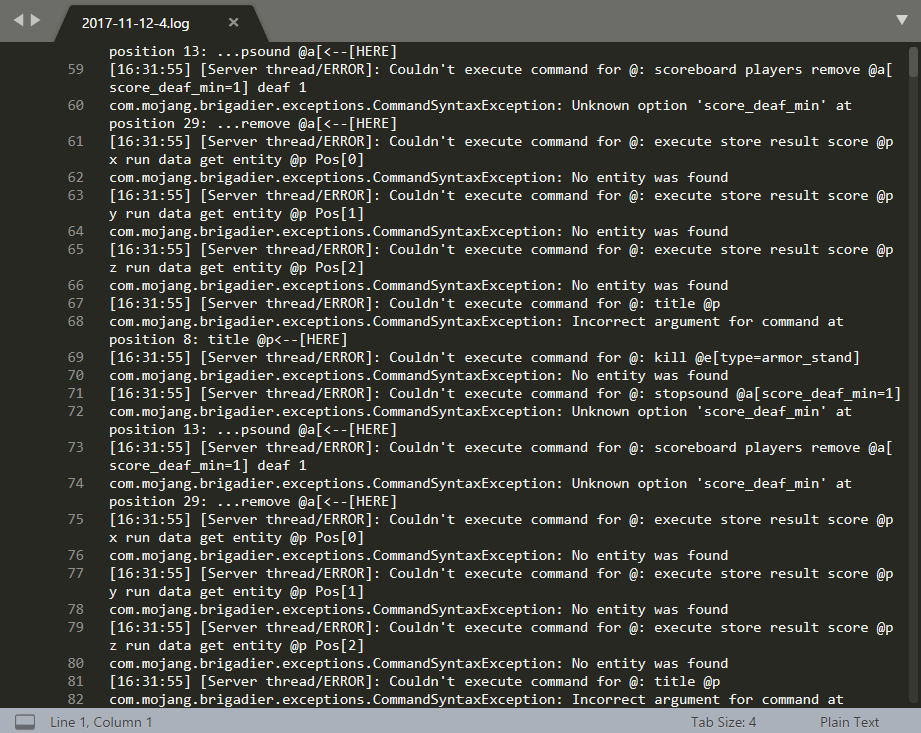
(not in text because it wouldn't allow me to select it)*com.mojang.brigadier.exceptions.CommandSyntaxException is the bad boy! (or girl)*
Explanation:
This is because commands from previous versions are now broken, and if those commandblocks (usually in test worlds) are still on always active and running, they throw a bunch of errors in the log file.Suggested Fix:
I suggest that commandblocks which have ran insuccesfully due to a SYNTAX ERROR, are DISABLED (they will never run again) until a user has interacted with them. (since a syntax error can't be fixed without the command being updated)If this fix is implemented, next time the commandblocks will fail to run due to a syntax error, they will output the error to the log file once, so you can look at it later to see what was wrong, and after that, it will simply block the command from ever running again, unless the player has changed the command in it.
Concluding:
Obviously people wouldn't like their harddisk to get spammed with log messages like this.
So I suggest, not spamming the user with a bunch of errors? Hugs instead maybe?Environment
win10
Attachments3
Log files are HUGE (5GB) becausebrigadier doesn't care about gamerule logAdminCommandsLog files are HUGE (5GB) because Brigadier doesn't care about gamerule logAdminCommands false
Log files are HUGE (5GB) because Brigadierdoesn't care about gamerule logAdminCommands falseLog files are HUGE (5GB) because Brigadier also logs syntax errors continuously.
![[Mod] Pokechu22](../../../data/avatars/users/92931.png)
relates to
![[Mod] Neko](../../../data/avatars/users/92901.png)
win10Windows 10

Log files are HUGE (5GB) because Brigadier also logssyntaxerrors continuously.
![[Mojang] Nathan Adams](../../../data/assets/gravatar/dinnerbone.png) [Mojang] Nathan Adams
[Mojang] Nathan Adams![[Mod] violine1101](../../../data/avatars/users/92858.png)
is duplicated by

Verbose logging:
Let's take a look at our logs folder in .minecraft:
2017-11-12-4.log 5.350.489 KB (5 GB!)
WhenI open up the log file:Well then... Let's try Sublime Text (after a good minute or 2):
(not in text because it wouldn't allow me to select it)*com.mojang.brigadier.exceptions.CommandSyntaxException is the bad boy! (or girl)*
Explanation:
This is because commands from previous versions are now broken, and if those commandblocks (usually in test worlds) are still on always active and running, they throw a bunch of errors in the log file.Suggested Fix:
I suggest that commandblocks which have ran insuccesfully due to a SYNTAX ERROR, are DISABLED (they will never run again) until a user has interacted with them. (since a syntax error can't be fixed without the command being updated)If this fix is implemented, next time the commandblocks will fail to run due to a syntax error, they will output the error to the log file once, so you can look at it later to see what was wrong, and after that, it will simply block the command from ever running again, unless the player has changed the command in it.
Concluding:
Obviously people wouldn't like their harddisk to get spammed with log messages like this.
So I suggest, not spamming the user with a bunch of errors? Hugs instead maybe?The bug
Expected command exceptions (com.mojang.brigadier.exceptions.CommandSyntaxException) are written to the log file, for example when a selector cannot find an entity or when the syntax of a command is wrong. This can cause huge log files (for example 5 GB, see image-2017-11-12-21-12-13-730.png
) when commands are running every tick.
Especially with the command changes most of the previously used commands are now incorrect and cause syntax errors.These expected exceptions should be normal command feedback and therefore nothing should be logged.
Note: Exceptions happening because a command malfunctions should probably be logged.
Affected situations
functionswas fixed- Commands run in chat (including using written books)
/give @s minecraft:written_book{author:"a",title:"a",pages:["{\"\":\"click\",\"clickEvent\":{\"action\":\"run_command\",\"value\":\"/kill @e[type=item]\"}}"]}- Commands run by command blocks (including minecart command blocks)
/give @s minecraft:written_book{author:"a",title:"a",pages:["{\"\":\"click\",\"clickEvent\":{\"action\":\"run_command\",\"value\":\"/kill @e[type=item]\"}}"]}- Command run when clicking signs
/setblock ~ ~ ~ sign{Text1:"{\"text\":\"click\",\"clickEvent\":{\"action\":\"run_command\",\"value\":\"/kill @e[type=item]\"}}"}

also take a look at MC-121913 related to logging and clogging up the log folder with tons of error messages. filling up the disk.
It looks like this report was describing MC-121913, which is not completely fixed. Therefore I am going to revert the changes I did earlier.
Duplicates MC-121913
Confirmed for Launcher version 2.0.1003 in 17w50a thanks to MC-121913

If a command has invalid syntax, exception
com.mojang.brigadier.exceptions.CommandSyntaxException
can be logged. This can be a problem if the command is in a repeating command block. This causes the same error to repeatedly get logged, making the log file gradually get larger.
Example command:
/tellraw @p {"text":"a","hoverEvent":{"action":"show_item","value":"{id:stone"}}
A similar report is MC-121913
With this report it was more of an issue because it was made around 1.13 when many commands changed, likely leading to many syntax errors.
But nonetheless my report seems to be similar at least in regards to the potential for a huge log file if the problem is not noticed.
I'm pretty sure that before, exceptions would still log an error message even if logAdminCommands was set to false. It's just that now, any type of exception, even normal parse exceptions, logs an error (see
MC-121662). Will check.EDIT: Confirmed that that is the case via
MC-101113in 1.12.2, so logging when an error occurs regardless of the gamerule is WAI. However, this is still a problem. I'll link this issue as related toMC-121662.Thanks, it is worth noting that previously, commandblocks never outputted errors to the log files, regardless of any gamerules. But playerbased error messages are always in the log files regardless of gamerules.
It is definitely new that commandblocks output errors to the log. Most notably syntax errors from previously vaild commands.
I'm pretty sure that command-blocks would have logged errors – just only when the command handler behaves incorrectly (e.g.
MC-101113), not when there is a syntax error from the user. The syntax error logging is new and problematic.im fine with command blocks logging syntax errors, but that no entity was found isn't really a syntax error, so it shouldn't be logged
This is not just a problem with proper syntax errors from command blocks that haven't been updated. It's throwing syntax errors on updated commands for "Entity not found". I'm having my log file spammed with
[Server thread/ERROR]: Couldn't execute command for @: execute as 0-0-5750-0-1 run execute as @s[nbt=
{Age:50}] at @s run function wp_pregen:loop
com.mojang.brigadier.exceptions.CommandSyntaxException: No entity was found
Having a command block only run a function when a specific entity exists (or in this case, when the specific entity meets certain conditions) should really not come up as a syntax error, surely.
Would like to emphasize this is not just old commands as stated in the above comment. If a current command fails to for example find an entity with execute as/if/unless/at, it will spam the log and my live server log is now useless because i cannot see anything that is happening cause the text scrolls up so fast. disabling logAdminCommands and commandBlockOutput does not help.
Confirmed for 17w49b
Looks like it's still happening in 17w50a.
At least for commands run in chat (including using written books), in command blocks (including minecart command blocks) and signs.
/give @s minecraft:written_book{author:"a",title:"a",pages:["{\"\":\"click\",\"clickEvent\":{\"action\":\"run_command\",\"value\":\"/kill @e[type=item]\"}}"]}/setblock ~ ~ ~ sign{Text1:"{\"text\":\"click\",\"clickEvent\":{\"action\":\"run_command\",\"value\":\"/kill @e[type=item]\"}}"}Please wait for the next snapshot.
I changed the report and hope it still reflects the problem you are describing good enough, if not, feel free to revert the changes.