 Phssthpok Pak
- phssthpok
- phssthpok
- Europe/London
- Yes
- No
![[Mojang] Jeb (Jens Bergensten)](../../../data/assets/gravatar/jeb.jpeg)
 MCL-421
![[Mojang] Searge (Michael Stoyke)](../../../data/assets/gravatar/searge.png)
 MC-122601
![[Mojang] Georgii Gavrichev](../../../data/avatars/users/22428.png)
![[Mojang] Nathan Adams](../../../data/assets/gravatar/dinnerbone.png)



I have a road system in my single player survival world paved with stone slabs. When trying to ride pigs on the roads, the pig bounces up and down and only moves slowly forward as if it is continually trying to jump up blocks, even though the road is level.
I have reproduced the problem in creative mode and tried it with different types of slab with the same result.
There is no problem if the slabs are in the upper half-block position, only in the lower half-block.
What I expected to happen was...:
Pigs should move in the same way on slabbed surfaces as on top of full blocks.What actually happened was...:
See above.Steps to Reproduce:
1. Make a surface out of stone slabs (in the lower half-block position).
2. Saddle up your pig and get your carrot-on-a-stick out.
3. Ride the pig on and off of the slab surface to see the difference. Switching to third-person viewpoint makes it easier to see what is happening.
Jumping onto a block withotorch on in plays the sound for walking on woodJumping onto a block with a torch on in plays the sound for walking on wood
Jumping down onto a block with a torch on in plays the sound for walking on wood
Jumping down onto a block with a torch on inplays the sound for walking on woodJumping down onto a block with a torch on it plays the sound for walking on wood
The comparator output from a brewing stand is inconsistent between the different slots in the stand.
What I expected to happen was if the top slot in the brewing stand had a full stack of items but the three lower slots were empty, the comparator output would be about a quarter of the full fifteen - say four. This would have been consistent with the comparator output from a chest where, if a third of the slots are full of stacks of items, the output is five.
What actually happened was the comparator output was fifteen. However, if the top slot is empty but one of the lower slots has a water bottle, the output is only four, as expected.
Steps to Reproduce:
1. Place a brewing stand with an adjacent comparator and enough redstone to see the output level.
2. Put a stack of nether wart (for example) in the top slot of the brewing stand's GUI.
3. Check the output level - fifteen.
4. Try again with a single nether wart in the top slot - output is four.
5. Try with nothing in the top slot but a water bottle in one of the lower slots - output is four.This also affected the previous snapshot.
The comparator output from a brewing stand is inconsistent between the different slots in the stand.
What I expected to happen was if the top slot in the brewing stand had a full stack of items but the three lower slots were empty, the comparator output would be about a quarter of the full fifteen - say four. This would have been consistent with the comparator output from a chest where, if a third of the slots are full of stacks of items, the output is five.
What actually happened was the comparator output was fifteen. However, if the top slot is empty but one of the lower slots has a water bottle, the output is only four, as expected.
Steps to Reproduce:
1. Place a brewing stand with an adjacent comparator and enough redstone to see the output level.
2. Put a stack of nether wart (for example) in the top slot of the brewing stand's GUI.
3. Check the output level - fifteen.
4. Try again with a single nether wart in the top slot - output is four.5. Try with nothing in the top slot but a waterbottle inoneof thelower slots - output is four.This also affected the previous snapshot.
The comparator output from a brewing stand is inconsistent between the different slots in the stand.
What I expected to happen was if the top slot in the brewing stand had a full stack of items but the three lower slots were empty, the comparator output would be about a quarter of the full fifteen - say four. This would have been consistent with the comparator output from a chest where, if a third of the slots are full of stacks of items, the output is five.
What actually happened was the comparator output was fifteen. However, if the top slot is empty but one of the lower slots has a water bottle, the output is only four, as expected.
Steps to Reproduce:
1. Place a brewing stand with an adjacent comparator and enough redstone to see the output level.
2. Put a stack of nether wart (for example) in the top slot of the brewing stand's GUI.
3. Check the output level - fifteen.This also affected the previous snapshot.
UPDATE: Having read Dinnerbone's explanation of the algorithm in
MC-6165, the problem appears to be that the top slot is assumed to only be able to hold a single item. If four items are placed in the slot it is calculated as being 400% full, giving an average over the four slots of 100% and hence an output level of fifteen. With anything over four items in the top slot, the brewing stand is calculated as over 100% full and the output is capped at fifteen.
The comparator output from a brewing stand is inconsistent between the different slots in the stand.
What I expected to happen was if the top slot in the brewing stand had a full stack of items but the three lower slots were empty, the comparator output would be about a quarter of the full fifteen - say four. This would have been consistent with the comparator output from a chest where, if a third of the slots are full of stacks of items, the output is five.
What actually happened was the comparator output was fifteen. However, if the top slot is empty but one of the lower slots has a water bottle, the output is only four, as expected.
Steps to Reproduce:
1. Place a brewing stand with an adjacent comparator and enough redstone to see the output level.
2. Put a stack of nether wart (for example) in the top slot of the brewing stand's GUI.
3. Check the output level - fifteen.This also affected the previous snapshot.
UPDATE: Having read Dinnerbone's explanation of the algorithm in
MC-6165, the problem appears to be that the top slot is assumed to only be able to hold a single item. If four items are placed in the slot it is calculated as being 400% full, giving an average over the four slots of 100% and hence an output level of fifteen. With anything over four items in the top slot, the brewing stand is calculated as over 100% full and the output is capped at fifteen.This may be related to
MC-2034- the top slot does not work as expected when shift-clicking items into the brewing stand.
2013-01-13_07.10.21.png
The scoreboard teams join command used to allow a list of player names. e.g.
scoreboard teams join red Aaaaa Bbbbb Ccccc
The new team join command throws an error if a space separated list of player names is supplied. Specifically,
team join red Aaaaa Bbbbb Ccccc
gives "Incorrect argument for command at position 20: ...ods Aaaaa <--[HERE]".
Trying to supply a comma separated list just concatenates the names.
The scoreboard teams join command used to allow a list of player names. e.g.
scoreboard teams join red Aaaaa Bbbbb Ccccc
The new team join command throws an error if a space separated list of player names is supplied. Specifically,
team join red Aaaaa Bbbbb Ccccc
gives "Incorrect argument for command at position 20: ...ods Aaaaa <--[HERE]".
Trying to supply a comma separated list just concatenates the names.
The scoreboard teams join command used to allow a list of player names. e.g.
scoreboard teams join red Aaaaa Bbbbb Ccccc
The new team join command throws an error if a space separated list of player names is supplied. Specifically,
team join red Aaaaa Bbbbb Ccccc
gives "Incorrect argument for command at position 20: ...ods Aaaaa <--[HERE]".
Trying to supply a comma separated list just concatenates the names.
The scoreboard teams join command used to allow a list of player names. e.g.
scoreboard teams join red Aaaaa Bbbbb Ccccc
The new team join command throws an error if a space separated list of player names is supplied. Specifically,
team join red Aaaaa Bbbbb Ccccc
gives "Incorrect argument for command at position 20: ...ods Aaaaa <--[HERE]".
Trying to supply a comma separated list just concatenates the names.
When the entity executing a command function is moved by a tp command within that function, subsequent commands within the same function will still be executed at the original position of the entity. For example, a function containing the following commands:
tp @s ~ 250 ~
{NoGravity:1}
summon minecraft:armor_stand ~ ~ ~when executed by the player will move the player to y=250 but will summon the armour stand at the player's original position.
I can work around this by prefixing the summon command with execute at @s run but this would mean potentially making this change to every command that might possibly follow a tp of the executing entity.
When the entity executing a command function is moved by a tp command within that function, subsequent commands within the same function will still be executed at the original position of the entity. For example, a function containing the following commands:
{{tp @s ~ 250 ~
{NoGravity:1}
summon minecraft:armor_stand ~ ~ ~}}
when executed by the player will move the player to y=250 but will summon the armour stand at the player's original position.
I can work around this by prefixing the summon command with execute at @s run but this would mean potentially making this change to every command that might possibly follow a tp of the executing entity.
When the entity executing a command function is moved by a tp command within that function, subsequent commands within the same function will still be executed at the original position of the entity. For example, a function containing the following commands:
{{tp @s ~ 250 ~
{NoGravity:1}
summon minecraft:armor_stand ~ ~ ~}}
when executed by the player will move the player to y=250 but will summon the armour stand at the player's original position.
I can work around this by prefixing the summon command with execute at @s run but this would mean potentially making this change to every command that might possibly follow a tp of the executing entity.
When the entity executing a command function is moved by a tp command within that function, subsequent commands within the same function will still be executed at the original position of the entity. For example, a function containing the following commands:
tp @s ~ 250 ~
summon minecraft:armor_stand ~ ~ ~Unknown macro: {NoGravity}when executed by the player will move the player to y=250 but will summon the armour stand at the player's original position.
I can work around this by prefixing the summon command with execute at @s run but this would mean potentially making this change to every command that might possibly follow a tp of the executing entity.
When the entity executing a command function is moved by a tp command within that function, subsequent commands within the same function will still be executed at the original position of the entity. For example, a function containing the following commands
:tp @s ~ 250 ~
summon minecraft:armor_stand ~ ~ ~Unknown macro: {NoGravity}when executed by the player will move the player to y=250 but will summon the armour stand at the player's original position.
I can work around this by prefixing the summon command with execute at @s run but this would mean potentially making this change to every command that might possibly follow a tp of the executing entity.
When the entity executing a command function is moved by a tp command within that function, subsequent commands within the same function will still be executed at the original position of the entity. For example, a function containing the following commands
tp @s ~ 250 ~
summon minecraft:armor_stand ~ ~ ~ {NoGravity:1}
when executed by the player will move the player to y=250 but will summon the armour stand at the player's original position.
I can work around this by prefixing the summon command with execute at @s run but this would mean potentially making this change to every command that might possibly follow a tp of the executing entity.
When the entity executing a command function is moved by a tp command within that function, subsequent commands within the same function will still be executed at the original position of the entity. For example, a function containing the following commands
tp @s ~ 250 ~
summon minecraft:armor_stand ~ ~ ~ {NoGravity:1}
when executed by the player will move the player to y=250 but will summon the armour stand at the player's original position.
I can work around this by prefixing the summon command with execute at @s run but this would mean potentially making this change to every command that might possibly follow a tp of the executing entity.
When the entity executing a command function is moved by a tp command within that function, subsequent commands within the same function will still be executed at the original position of the entity. For example, a function containing the following commands
tp @s ~ 250 ~
{NoGravity:1}
summon minecraft:armor_stand ~ ~ ~when executed by the player will move the player to y=250 but will summon the armour stand at the player's original position.
I can work around this by prefixing the summon command with execute at @s run but this would mean potentially making this change to every command that might possibly follow a tp of the executing entity.
When the entity executing a command function is moved by a tp command within that function, subsequent commands within the same function will still be executed at the original position of the entity. For example, a function containing the following commands
tp @s ~ 250 ~
{NoGravity:1}summon minecraft:armor_stand ~ ~ ~when executed by the player will move the player to y=250 but will summon the armour stand at the player's original position.
I can work around this by prefixing the summon command with execute at @s run but this would mean potentially making this change to every command that might possibly follow a tp of the executing entity.
When the entity executing a command function is moved by a tp command within that function, subsequent commands within the same function will still be executed at the original position of the entity. For example, a function containing the following commands
tp @s ~ 250 ~
summon minecraft:armor_stand ~ ~ ~when executed by the player will move the player to y=250 but will summon the armour stand at the player's original position.
I can work around this by prefixing the summon command with execute at @s run but this would mean potentially making this change to every command that might possibly follow a tp of the executing entity.
The bug
Chests, trapped chests and ender chests that were placed in earlier versions of the game do not make their opening sound when opened unless broken and replaced. Note that items inside still exist after upgrading.
How to reproduce
- Create a new single player world in an earlier version (tested with both 1.12.2 and 18w05a)
- Place a chest, trapped chest and ender chest
- Exit and quit the game
- Launch version 18w07c and open the same world
- Opening any of the three chests makes no sound
Note: Chests placed when using 18w07c make the opening sound as normal.
Additional note: I have just discovered that this only happens the first time the world is loaded in the new version. Once it has been saved and reloaded the chests make their sounds as normal.
Spongesdon't soak upflowingwaterSponges placed in flowing water do not soak up water
Dry sponges placed in flowing water (as opposed to water source blocks) have no effect on the water and remain dry.
To reproduce:
- Place a water source block on a flat area and allow it to spread
- Place a dry sponge block in the flowing water at least one block away from the water source
Expected result:
The water surrounding the sponge is removed for several blocks, including the water source so that all the water disappears. The sponge becomes wet.Actual result:
No effect on the water at all. The sponge remains dry.Note: The change from my original title to "sponges don't soak up flowing water" for this bug report made it misleading.
Sponges placed in flowing waterdo not soak up waterSponges placed in flowing water have no effect
Dry sponges placed in flowing water (as opposed to water source blocks) have no effect on the water and remain dry.
To reproduce:
- Place a water source block on a flat area and allow it to spread
- Place a dry sponge block in the flowing water at least one block away from the water source
Expected result:
The water surrounding the sponge is removed for several blocks, including the water source so that all the water disappears. The sponge becomes wet.Actual result:
No effect on the water at all. The sponge remains dry.Note: The change from my original title to "sponges don't soak up flowing water" for this bug report made it misleading.
Dry sponges placed in flowing water (as opposed to water source blocks) have no effect on the water and remain dry.
To reproduce:
- Place a water source block on a flat area and allow it to spread
- Place a dry sponge block in the flowing water at least one block away from the water source
Expected result:
The water surrounding the sponge is removed for several blocks, including the water source so that all the water disappears. The sponge becomes wet.Actual result:
No effect on the water at all. The sponge remains dry.Note: The change from my original title to "sponges don't soak up flowing water" for this bug report made it misleading. If the sponge is placed in the source block then the flowing water is also soaked up. This is not just a case of the flowing water being ignored.
Spongesplaced in flowing water have no effectSponges do not soak up flowing water
Dry sponges placed in flowing water (as opposed to water source blocks) have no effect on the water and remain dry.
To reproduce:
- Place a water source block on a flat area and allow it to spread
- Place a dry sponge block in the flowing water at least one block away from the water source
Expected result:
The water surrounding the sponge is removed for several blocks, including the water source so that all the water disappears. The sponge becomes wet.Actual result:
No effect on the water at all. The sponge remains dry.Note: The change from my original title to "sponges don't soak up flowing water" for this bug report made it misleading. If the sponge is placed in the source block then the flowing water is also soaked up. This is not just a case of the flowing water being ignored.
Dry sponges placed in flowing water (as opposed to water source blocks) have no effect on the water and remain dry.
To reproduce:
- Place a water source block on a flat area and allow it to spread
- Place a dry sponge block in the flowing water at least one block away from the water source
Expected result:
The water surrounding the sponge is removed for several blocks, including the water source so that all the water disappears. The sponge becomes wet.Actual result:
No effect on the water at all. The sponge remains dry.Edit (and facepalm): If the sponge is placed in the source block, the effect should spread to the flowing water but does not. Flowing water is just not affected at all by the sponge.
Yes, that's it.
I'm seeing this too - Linux OS so not limited to Mac. It seems to happen more when I open my inventory - I see random flames flickering around the torches.
I've just been playing SkyBlock and this is really noticeable. Place a single torch and then look over the edge of the island and there are dozens of phantom flames below!
Still occurring in 1.4.5. Makes it hard to see if you're aiming high/low because the arrow is not shown in flight.
Quitting Minecraft and restarting sometimes fixes the problem but not always.
The duplicate bug report
MC-5038suggests that it DOES occur on Windows. It certainly occurs for me on Linux, so it's not just an OSX problem.I don't know whether this is the same or a separate issue but, in the End, endermen seem to be going into "scary mode" for no reason at all. I can switch to peaceful mode and back to clear all the mobs and within a minute or so half the newly spawned endermen are shaking with their mouths open.
Unless they are randomly teleporting into mid-air and taking fall damage, I'm not sure what environmental damage they can be suffering.
The immediate impression is that they are reacting to being looked at by other endermen!
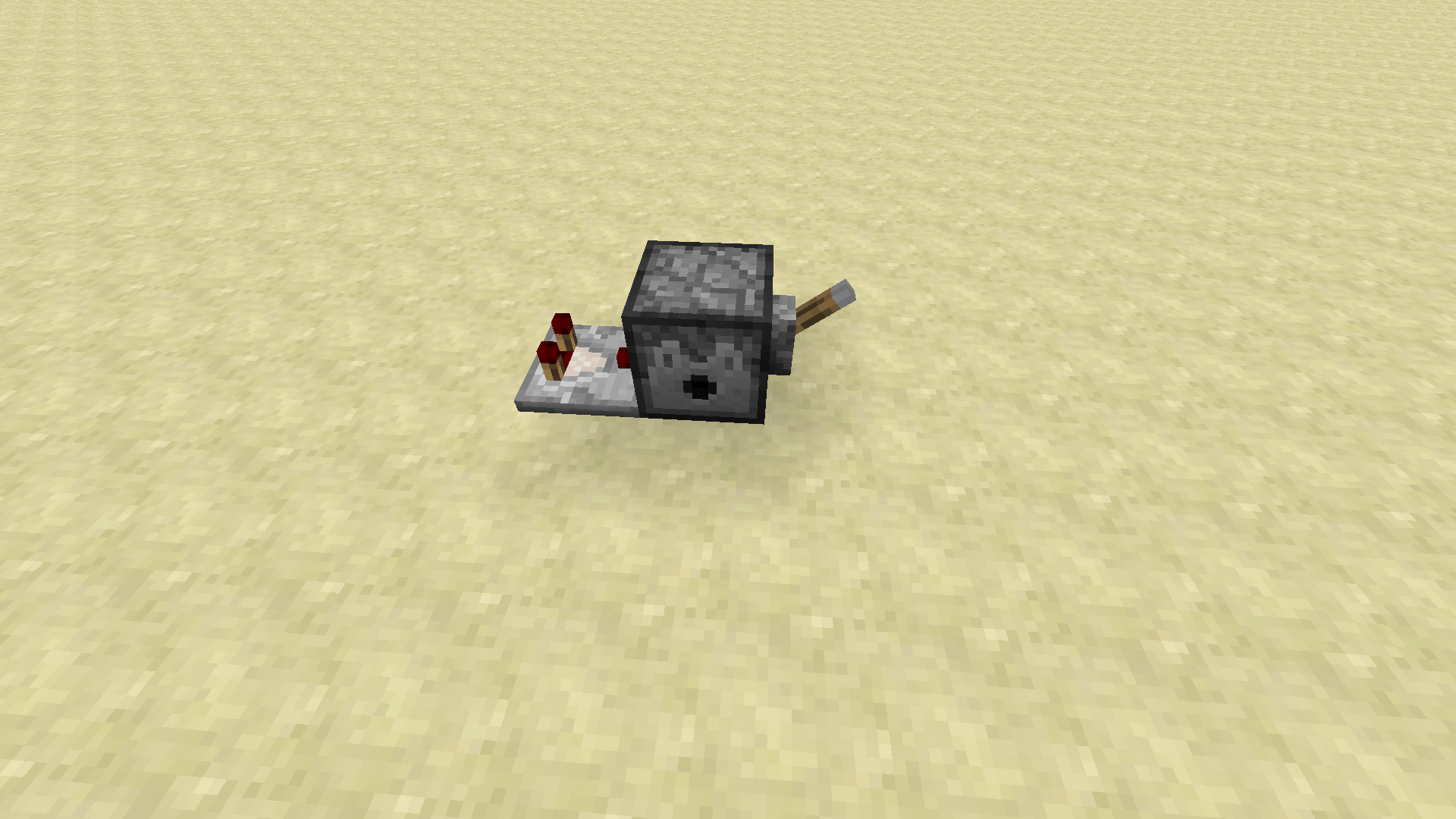
An added complication is that, if a comparator is attached to a dispenser filled with non-stacking items (e.g. potions) the comparator output changes each time an item is dispensed, causing a redstone update that triggers the dispenser again. See screen-shot for example set-up.
If a comparator is placed facing into a dispenser or dropper and a switch is placed on the side then flipping the switch will make the dispenser/dropper fire continuously. Even though the comparator is un-powered, it seems to cause redstone updates every tick.
Thanks for the fix. Unfortunately, the top and bottom parts of the iron bars/glass pane texture does not now show if there are blocks above and/or below them. Don't know if this was deliberate.
Nice to see this has been looked at even with zero votes.
Just noticed whilst checking in 13w09b that the same happens with redstone torches, redstone repeaters and signs.
Also, comparators and hoppers!
I can confirm that this is still happening in 1.5.1. It seems to happen when I've been attacked by a hostile mob - my wolves stand up to come and help me and then stay standing up but act as if still sitting.
Launcher 0.9 (Dev) (through bootstrap 2) started on linux...
System.getProperty('os.name') == 'Linux'
System.getProperty('os.version') == '3.2.0-45-generic'
System.getProperty('os.arch') == 'amd64'
System.getProperty('java.version') == '1.7.0_21'
System.getProperty('java.vendor') == 'Oracle Corporation'
Going to log in with legacy stored username & password...
Loaded 3 profile(s); selected 'Village Info'
Trying to log in...
Delta time to compare resources: 255 ms
Download job 'Resources' skipped as there are no files to download
Job 'Resources' finished successfully
Logged in successfully
Getting syncinfo for selected version
Queueing library & version downloads
Download job 'Version & Libraries' started (8 threads, 1 files)
Finished downloading /home/tim/.minecraft/versions/Village Info/Village Info.jar for job 'Version & Libraries': Couldn't connect to server (responded with 505) but have local file, assuming it's good
Job 'Version & Libraries' finished successfully
Launching game
Unpacking natives to /home/tim/.minecraft/versions/Village Info/Village Info-natives-8217517707160
Launching in /home/tim/.minecraft
Running: /usr/lib/jvm/java-7-openjdk-amd64/jre/bin/java -Xmx1G -Djava.library.path="/home/tim/.minecraft/versions/Village Info/Village Info-natives-8217517707160" -cp "/home/tim/.minecraft/libraries/net/sf/jopt-simple/jopt-simple/4.4/jopt-simple-4.4.jar:/home/tim/.minecraft/libraries/org/ow2/asm/asm-all/4.1/asm-all-4.1.jar:/home/tim/.minecraft/libraries/org/lwjgl/lwjgl/lwjgl/2.9.0/lwjgl-2.9.0.jar:/home/tim/.minecraft/libraries/org/lwjgl/lwjgl/lwjgl_util/2.9.0/lwjgl_util-2.9.0.jar:/home/tim/.minecraft/libraries/net/java/jinput/jinput/2.0.5/jinput-2.0.5.jar:/home/tim/.minecraft/libraries/net/java/jutils/jutils/1.0.0/jutils-1.0.0.jar:/home/tim/.minecraft/versions/Village Info/Village Info.jar" net.minecraft.client.Minecraft Phssthpok 254d86ce9f5033486958270f9b95a56fc93bc7e2 --workDir /home/tim/.minecraft
---- YOU CAN CLOSE THIS LAUNCHER IF THE GAME STARTED OK ----
---- YOU CAN CLOSE THIS LAUNCHER IF THE GAME STARTED OK ----
---- YOU CAN CLOSE THIS LAUNCHER IF THE GAME STARTED OK ----
---- (We'll do this automatically later ;D) ----
Client> Error: Could not find or load main class net.minecraft.client.Minecraft
Game ended with bad state (exit code 1)
Deleting /home/tim/.minecraft/versions/Village Info/Village Info-natives-8217517707160
Still present in 1.6.2.
Still happening in 1.6.1.
Update: Now that Minecraft v1.6.2 has been released, the default profile is picking up the new un-modded version as expected. I'll update again when the mod gets updated for 1.6.2 and I make a new local version.
This is still noticeable in 1.6.2.
Still occurs in 1.6.2.
This may be a duplicate of
MC-16446.Whilst I agree that the "nice to have" comment does duplicate
MC-883, the main point of this bug report is NOT the same asMC-1404.I'm not complaining that the map is not precisely centred on the player. What I'm saying is that, if I craft a new map from scratch and right-click it whilst in one area, then go to another part of my world entirely and change the scale of the map, it should still be centred in the original area.
What actually happens is that the scaled version of the map is centred at approximately the position of the crafting bench used to do the scaling.
It would make sense to either have the scaled version centred at the same point as the original map or to allow empty maps to be scaled and then right-clicked.
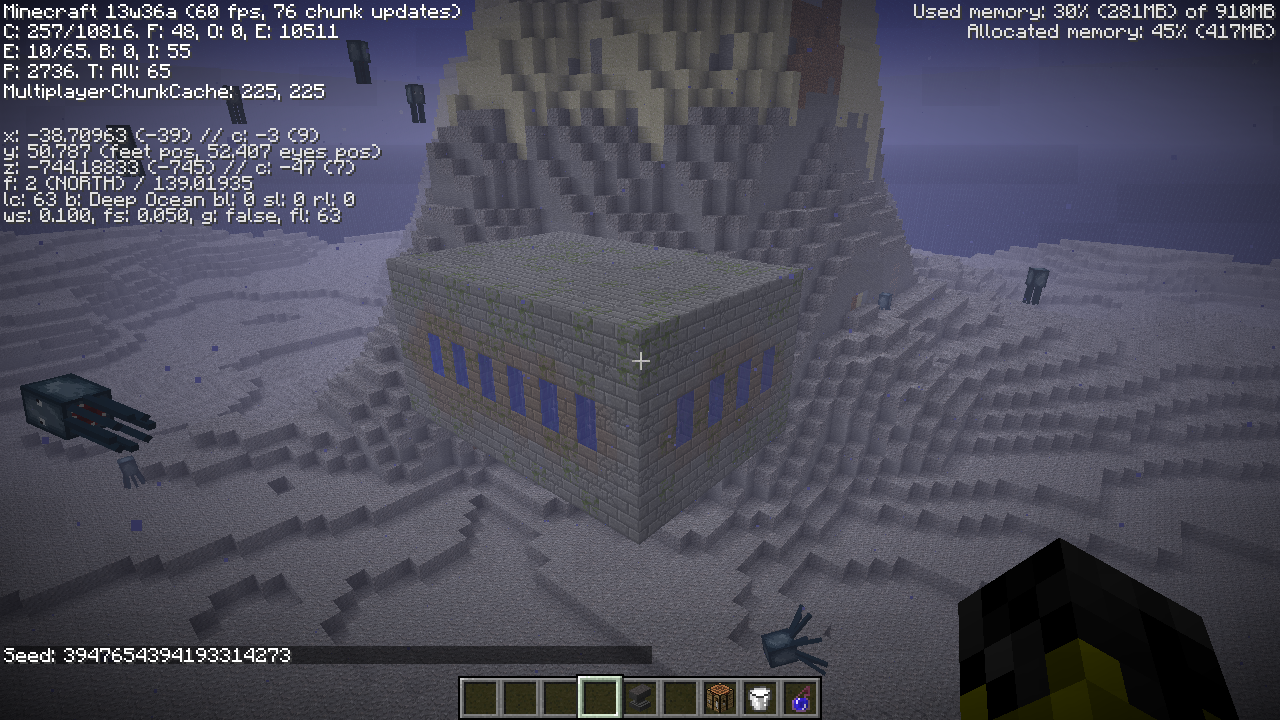
I regenerated this world using 13w36b and the stronghold portal room was still in the same place. However, on further investigation, the rest of the stronghold is there, inside the two island in the background of my screenshot, it just isn't connected to the portal room.
Still present in 13w38c (single player, survival)
Confirmed this still affects version 1.6.4
Also tested in 13w38c - still present.
No longer affects the revised glass pane model in 13w41b but is still present for iron bars.
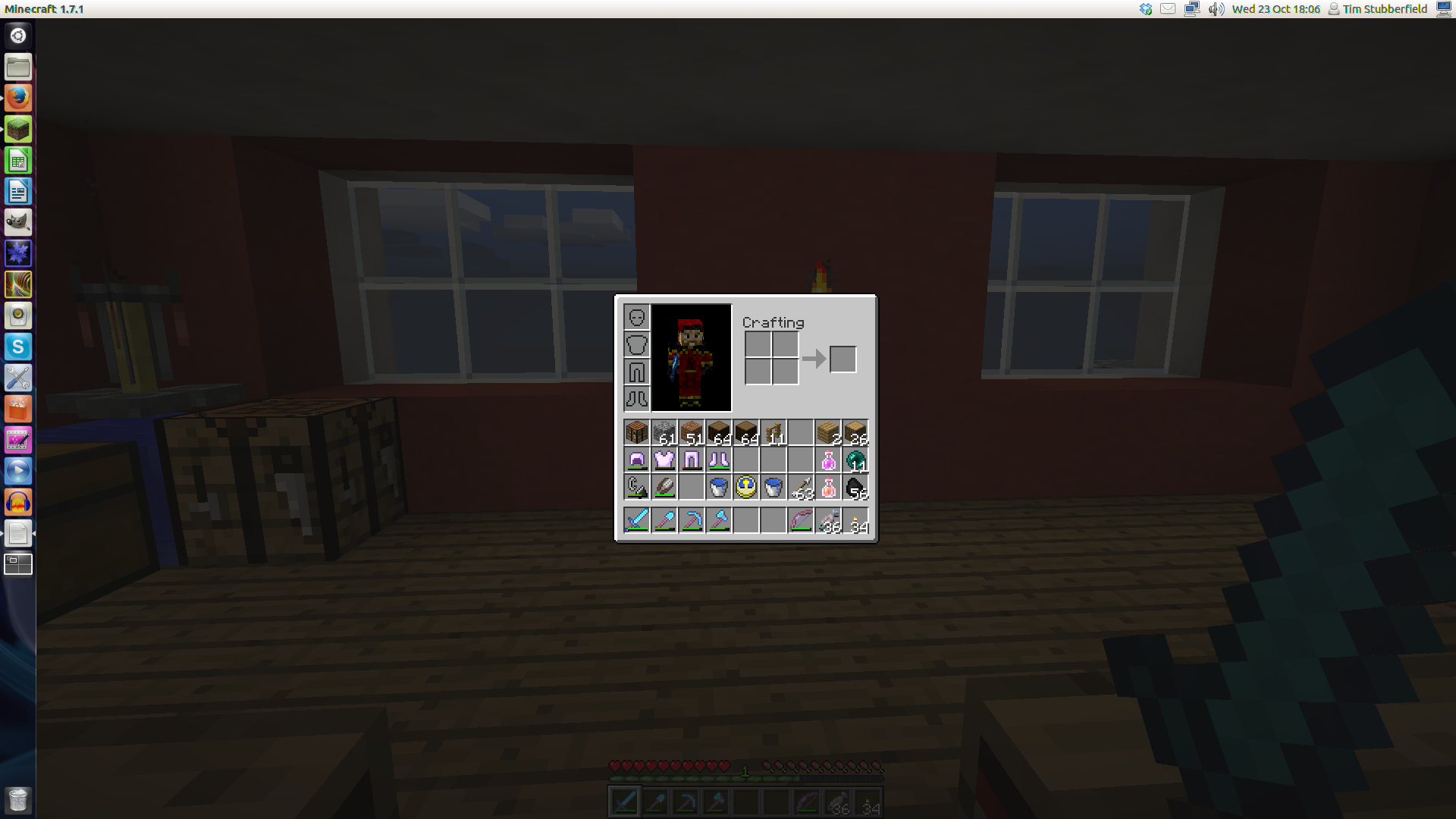
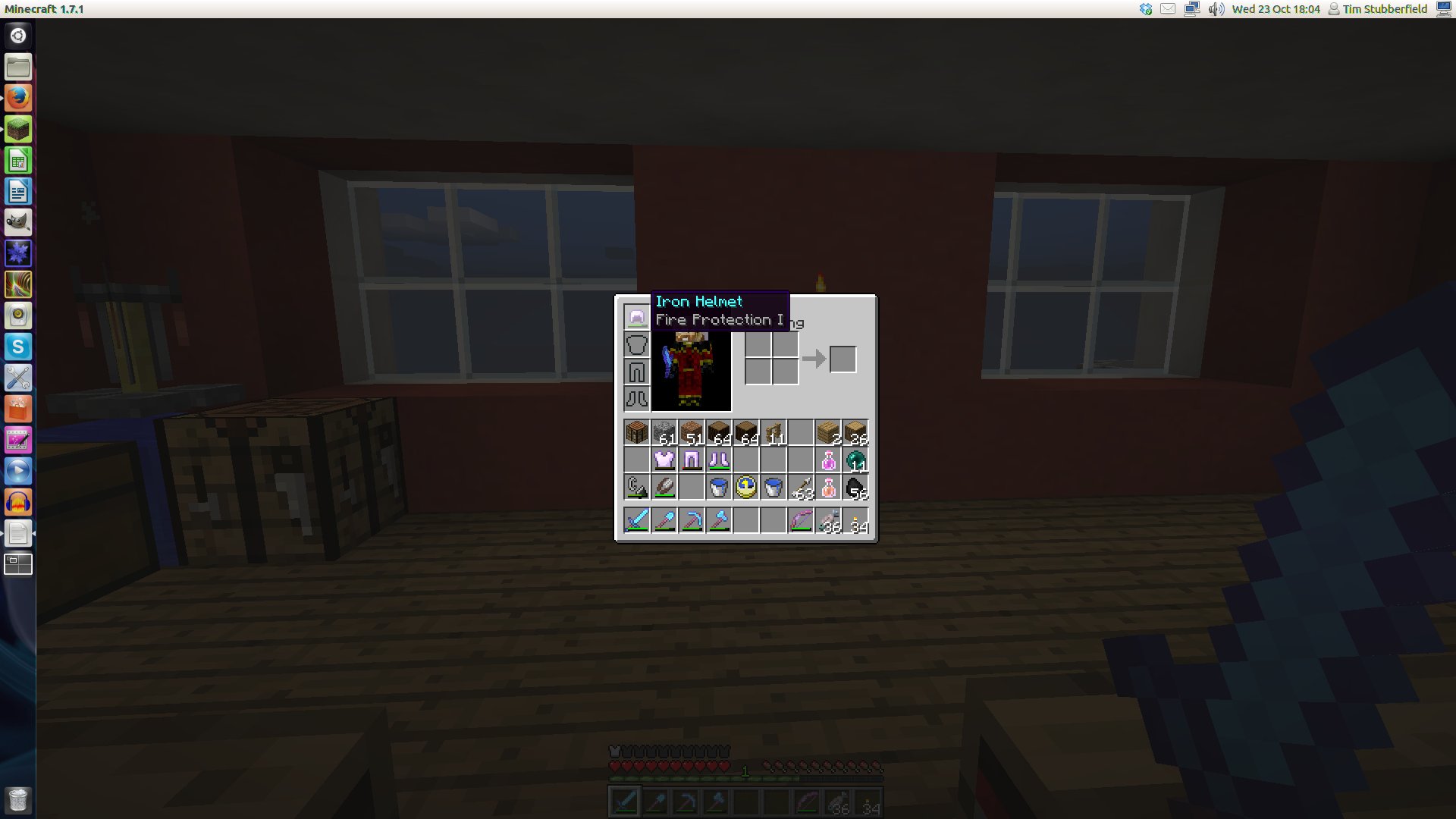
I am seeing this in all the armour slots except for the helmet. It only affects a given slot if there is an armour item in one of the slots above it and then varies depending on the cursor position - see screen shots (unfortunately without the cursor).
This is on a Linux machine (Ubuntu 12.04).
I'm sorry but I don't have the time to test your game for you at the moment. Frankly, the attitude of your comment has me extremely pissed off - I'm not an employee of your company and I don't get paid for reporting bugs in your software. Suggesting that I've filled out the report incorrectly and haven't read the guidelines because I haven't rechecked for the problem every time you release another version is just pathetic.
If you haven't fixed the problem then it isn't fixed. Test it yourself.
This also seems to apply to giving written books using commands. Attempting to use spaces to indent/centre text:
give @s written_book 1 0 {title:"Welcome",author:"Stick God",pages:["[
{\"text\":\"\\n\\n Welcome\\n to\\n ZombieCraft\",\"color\":\"black\"}]"]}
The extra spaces are stripped out and the text in the book is left justified.
It appears to be resolved for me too, though it seems to be ignoring the Resolution setting in the launcher profiles (I have mine set to 1824 by 1026 for recording purposes as, until 1.13 at least, maybe, OBS does not play well with Minecraft's fullscreen mode).
I have the same issue. Linux Mint 17.3, Oracle Java 1.8.0_151.
Can I just double check that this problem has been understood correctly since various other bug reports are being resolved as duplicates of this one.
From what I can tell, this is not a report that user-generated structure files are not being upgraded automatically (which is understandably impossible) but that the structures included with the game (Woodland Mansion, Igloo, etc.) have not been updated to reflect the flattened block data and hence do not generate properly. The image supplied is of a woodland mansion with most of the wood blocks missing.
I understand that putting in an upgrade path for structures is not going to happen but can we at least stop marking bug reports that are specifically pointing out that the Mojang structures don't load properly as duplicates of a this bug which has been marked as Won't Fix.
Having structures that are part of the game not load properly is a bug that will need to be fixed.
This is not just a problem with proper syntax errors from command blocks that haven't been updated. It's throwing syntax errors on updated commands for "Entity not found". I'm having my log file spammed with
[Server thread/ERROR]: Couldn't execute command for @: execute as 0-0-5750-0-1 run execute as @s[nbt=
{Age:50}] at @s run function wp_pregen:loop
com.mojang.brigadier.exceptions.CommandSyntaxException: No entity was found
Having a command block only run a function when a specific entity exists (or in this case, when the specific entity meets certain conditions) should really not come up as a syntax error, surely.
Confirmed for 17w48a
Confirmed for 17w48a
Confirmed for 1.12.2 and 17w48a
This has significant consequences with the new "execute store" command variant since it appears that new values cannot be stored in the Pose data unless it is already different from the default values.
For example, the following command should update the rotation of the targeted armour stand's head (about the y-axis) to the value held in it's as_pose score:
/execute as @e[type=armor_stand,distance=..3,limit=1] store result entity @s Pose.Head[1] float 1 run scoreboard players get @s as_pose
but this only works if the armour stand's head pose differs from the default (and is hence stored in the NBT data).
Similarly, working the other way to copy the NBT data into the as_pose score:
/execute as @e[type=armor_stand,distance=..3,limit=1] store result score @s as_pose run data get entity @s Pose.LeftLeg[0] 1
will throw an error "Can't access element 0, either doesn't exist or parent isn't a list" and set the as_pose score to zero if the left leg is in the default position.
Confirmed for 17w49b
Confirmed for 17w49b
Confirmed for 17w49b
Confirmed for 17w49b
Confirmed for 17w50a
Confirmed for 17w50a
Confirmed for 17w50a
Confirmed for 18w01a
Confirmed for 18w01a
Confirmed for 18w01a
Confirmed for 18w02a
Confirmed for 18w02a
Confirmed for 18w02a
It doesn't look like this is resolved. I have a datapack that works when uncompressed and worked from a compressed version in 17w50a but no longer works compressed in 18w01a and 18w02a. The log shows it being identified and does not report any errors but the functions are not available from within the game.
The datapack .zip file is available here and an example of the game log here.
Confirmed for 18w03b
Confirmed for 18w03b
Confirmed for 18w06a.
It now gives minecraft:lightning_bolt as an option in the tab-complete list of entities for the summon command but returns Unable to summon entity
In 18w07c, using @r[type=... now gives a syntax error "Option 'type' isn't applicable here"
Confirmed for 18w08b
Confirmed for 18w08b
Confirmed for 18w09a
Confirmed for 18w10a
Confirmed in 18w10a
The lava bucket cannot be used to place lava in or against any block that can have the waterlogged state. Clicking and shift-clicking both do nothing.
Confirmed for 18w11a
Confirmed in 18w11a. Do you want me to keep checking this or is it generally accepted that it's going to eventually be marked as Works as Intended?
Confirmed in 18w11a
Confirmed that the error message is now "Unable to summon entity"
Confirmed for 18w14a
Confirmed for 18w14a (but can't add that version to the list for some reason)
Confirmed for 18w20b
Confirmed for 1.13-pre1
I'm not sure if this relates to this problem, but I've noticed in the logs that the game seems to issue these warnings every time:
[09:25:39] [Client thread/ERROR]: Realms module missing
[09:25:43] [Client thread/WARN]: Ambiguity between arguments [teleport, destination] and [teleport, targets] with inputs: [Player, 0123, @e, dd12be42-52a9-4a91-a8a1-11c01849e498]
[09:25:43] [Client thread/WARN]: Ambiguity between arguments [teleport, location] and [teleport, destination] with inputs: [0.1 -0.5 .9, 0 0 0]
[09:25:43] [Client thread/WARN]: Ambiguity between arguments [teleport, location] and [teleport, targets] with inputs: [0.1 -0.5 .9, 0 0 0]
[09:25:43] [Client thread/WARN]: Ambiguity between arguments [teleport, targets] and [teleport, destination] with inputs: [Player, 0123, dd12be42-52a9-4a91-a8a1-11c01849e498]
[09:25:43] [Client thread/WARN]: Ambiguity between arguments [teleport, targets, location] and [teleport, targets, destination] with inputs: [0.1 -0.5 .9, 0 0 0]
[09:25:43] [Client thread/INFO]: Loaded 0 recipes
This example is from the 1.13-pre2 version but I've noticed it in previous snapshots as well.
I have noticed that many heads with textures from skins currently being used by players have also reverted to the default Steve skin on heads already placed in a world. Regenerating the give code for the same player gave a different URL for the skin. For example, the give code I used in the past to get a head with my own skin (Phssthpok), decoded from Base64 contained:
{"textures":{"SKIN": {"url":"http://textures.minecraft.net/texture/49725d625a50497c6494f33fbb7015446ccad135e93152571e2a57926284053"} }}but regenerating the give code now returns:
{"textures":{"SKIN": {"url":"http://textures.minecraft.net/texture/15ed33ea710912d0f90a7a1f0e30e40d421fcd7f962965ac191c7a478f3af0cf"} }}so it would appear that, rather than the skins having been removed from the database, they have been renumbered
Confirmed for 19w12b
I'm getting the "Unable to resolve BlockEntity for ItemStack: minecraft:light_gray_banner" message during world conversion to 1.14
Problem is still present in 1.14
I can confirm this. Similarly, trader llamas created with a summon command despawn instantly
Command used is /summon minecraft:trader_llama ~ ~1 ~ {NoAI:1b,Silent:1b,NoGravity:1b,Variant:3b}
Window also gets wider
OS: Linux Mint 19.2 Cinnamon
Cinnamon Version: 4.2.4
Linux Kernel: 4.15.0-65-generic
Graphics Card: NVIDIA GeForce GT730
I can confirm that there is still a problem here. Using this command:
/execute as @e[type=minecraft:armor_stand,distance=..3] at @s run tp @s ~ ~ ~ facing entity @p
the armour stand's Rotation data gets updated but is not always reflected in the displayed stand.
Unfortunately I have not been able to track down the exact circumstances that cause the problem (yet!)
Edit to add: If you have the command running continuously in a repeating command block (as in
MC-166132) you may not be able to see the problem as it doesn't always occur and may work again the next tick. I suggest running the command manually and checking after each attempt.Well that's mighty odd! I've done a ton of stuff with armour stands and never noticed the graphical glitch before but going back and running the same tests in 1.14.4 does indeed show the same graphical glitch.
I'll add my vote and a comment to
MC-103800.Many thanks.
Confirmed for 1.15-pre3
I've set up a scoreboard and command block to continually display the Rotation[0] value of an armour stand in the sidebar and it appears that this is something to do with the animation of the armour stand being rotated as the internal data for Rotation[0] gets updated properly.
Using execute as @e[type=minecraft:armor_stand,distance=..5] at @s run tp @s ~ ~ ~ facing entity @p to rotate the stand to face the nearest player seems to work when the command is being run every tick by a command block but doesn't work consistently when run manually in chat with the player moving a significant amount between executions.
Confirmed in 20w51a
I'm not sure if this will help as I'm working on a PaperMC server with various plugins but just in case it's of any use...
I was having this issue with testing a 1.16.5 world that I'm preparing to upgrade to 1.17.1. As part of my preparation I ran up the server with the --eraseCache option and it seems to have fixed the problem.
Edit: Or maybe not. It appeared to fix the issue when I first tried it but rerunning the upgrade from scratch with --eraseCache hasn't worked. Sorry if this is a red herring.