 MC-252454
Some items are offset (not centered) on the Creative Menu
Some items, like 'Nether Sprouts', 'Spore Blossom', 'Small / Medium / Large Amethyst Bud' are offset or not centered on the creative menu. (That includes Search Tab and Categories)
Steps to reproduce:
- Open / create a world with creative mode enabled.
- Open the creative menu and find / search for any of the above mentioned items.
Observed Behavior (Observed-1.png):
- Spore Blossom is not centered and offset to the top.
- Small / Medium / Large Amethyst Bud are not centered and offset to the bottom.
- Nether Sprouts are centered, although other similar items (Warped / Hanging Roots, Crimson / Warped Fungus are not.)
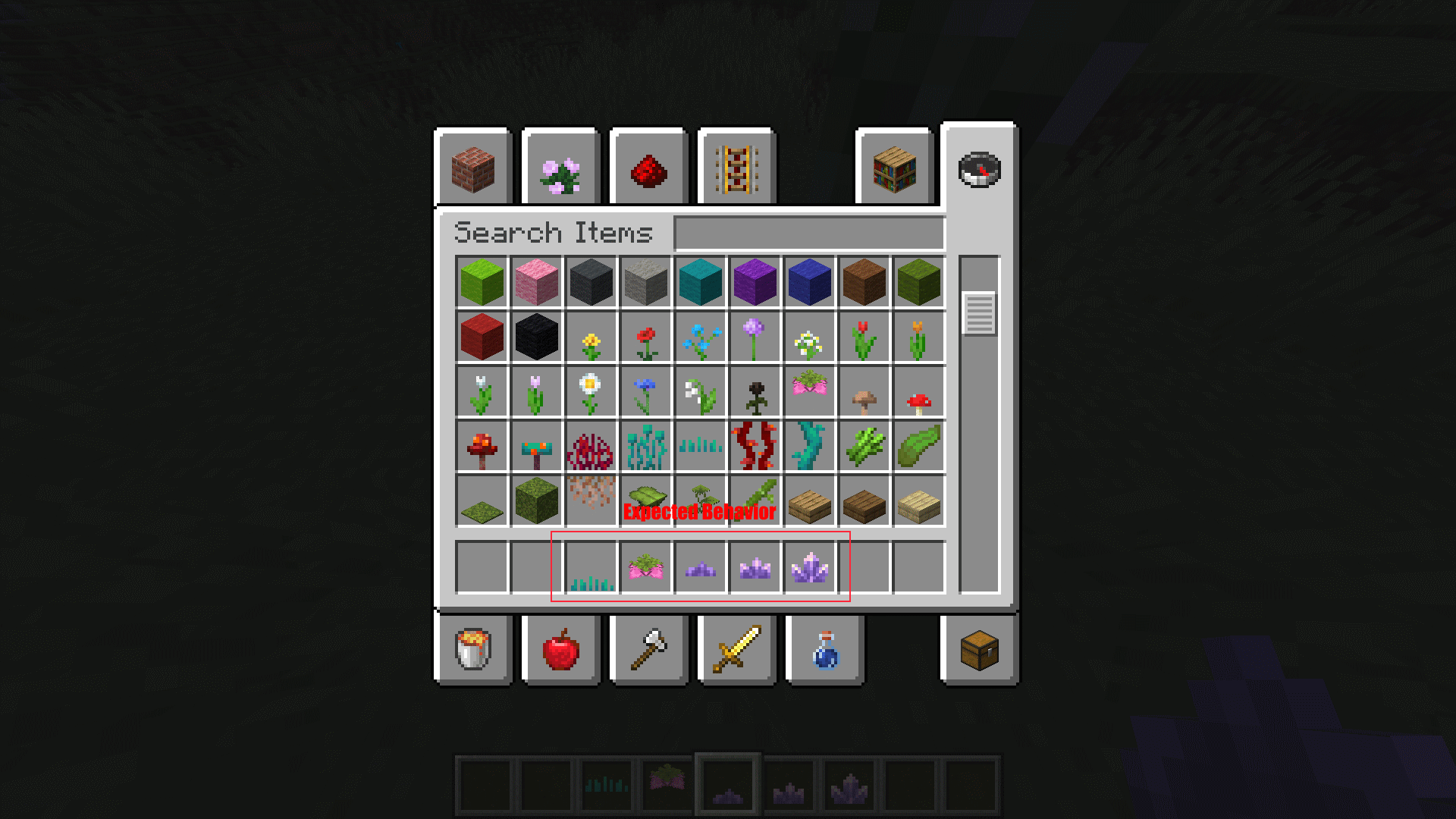
Expected Behavior (Expected-2.png):
- Spore Blossom is centered.
- Small / Medium / Large Amethyst Bud are centered.
- Nether Sprouts are offset to the bottom as other similar items.
Edit: This seems to be caused by the inconsistency of the texture placements on the Creative Menu. Some are offset based of their possible placement in the world (Like all the pressure plates), but some are just centered (Like the Lightning rod and the Big / Small Dreapleaf).
This is a trivial issue, but I think it should be mentioned.


Created Issue:
Some items are not centered or offset on the Creative Menu.
Some items, like 'Nether Sprouts', 'Spore Blossom', 'Small / Medium / Large Amethyst Bud' are offset or not centered on the creative menu. (That includes Search Tab and Categories)
Steps to reproduce:
- Open / create a world with creative mode enabled.
- Open the creative menu and find / search for any of the above mentioned items.
Observed Behavior (Observed-1.png):
- ** Spore Blossom is not centered and offset to the top.
- Small / Medium / Large Amethyst Bud are not centered and offset to the bottom.
- Nether Sprouts are centered, although other similar items (Warped / Hanging Roots, Crimson / Warped Fungus are not.)
Expected Behavior (Expected-2.png):
- ** Spore Blossom is centered.
- Small / Medium / Large Amethyst Bud are centered.
- Nether Sprouts are offset to the bottom as other similar items.
This is a trivial issue, but I think it should be mentioned.
Environment
Java Development Kit v17.0.1,
NVIDIA GeForce GTX 750
Attachments2
Some items, like 'Nether Sprouts', 'Spore Blossom', 'Small / Medium / Large Amethyst Bud' are offset or not centered on the creative menu. (That includes Search Tab and Categories)
Steps to reproduce:
- Open / create a world with creative mode enabled.
- Open the creative menu and find / search for any of the above mentioned items.
Observed Behavior (Observed-1.png):
**Spore Blossom is not centered and offset to the top.- Small / Medium / Large Amethyst Bud are not centered and offset to the bottom.
- Nether Sprouts are centered, although other similar items (Warped / Hanging Roots, Crimson / Warped Fungus are not.)
Expected Behavior (Expected-2.png):
**Spore Blossom is centered.- Small / Medium / Large Amethyst Bud are centered.
- Nether Sprouts are offset to the bottom as other similar items.
This is a trivial issue, but I think it should be mentioned.
Some items, like 'Nether Sprouts', 'Spore Blossom', 'Small / Medium / Large Amethyst Bud' are offset or not centered on the creative menu. (That includes Search Tab and Categories)
Steps to reproduce:
- Open / create a world with creative mode enabled.
- Open the creative menu and find / search for any of the above mentioned items.
Observed Behavior (Observed-1.png):
- Spore Blossom is not centered and offset to the top.
- Small / Medium / Large Amethyst Bud are not centered and offset to the bottom.
- Nether Sprouts are centered, although other similar items (Warped / Hanging Roots, Crimson / Warped Fungus are not.)
Expected Behavior (Expected-2.png):
- Spore Blossom is centered.
- Small / Medium / Large Amethyst Bud are centered.
- Nether Sprouts are offset to the bottom as other similar items.
Edit: This seems to be caused by the inconsistency of the texture placements on the Creative Menu. Some are offset based of their possible placement in the world (Like all the pressure plates), but some are just centered (Like the Lightning rod and the Big / Small Dreapleaf).
This is a trivial issue, but I think it should be mentioned.
![[Mojang] Moesh](../../../data/avatars/users/10122.svg)
![[Helper] Johnibur](../../../data/avatars/users/28381.png)
![[Mojang] Chi Wong](../../../data/avatars/users/18941.svg) [Mojang] Chi Wong
[Mojang] Chi Wong Low
Low![[Mod] ampolive](../../../data/avatars/users/18949.svg)
Some items are not centeredoroffset on the Creative Menu.Some items are not centered / offset on the Creative Menu
Some items are not centered/ offseton the Creative MenuSome items are offset (not centered) on the Creative Menu
![[Mod] markderickson](../../../data/avatars/users/18946.svg)
Java Development Kit v17.0.1,
NVIDIA GeForce GTX 750
![[Mod] Avoma](../../../data/avatars/users/86198.png)
![[Mojang] slicedlime](../../../data/assets/gravatar/slicedlime.jpeg)
![[Mod] Greymagic27](../../../data/avatars/users/92875.png) [Mojang] Chi Wong
[Mojang] Chi Wong
This could be intentional, but I'm making a ticket just to be sure. But the placement of some items actually seems out of place in the Creative Menu.
Nether sprouts are absolutely intended, they got a specific item texture so they are actually visible when held in the hand (as part of a bug fix).
^ (
MC-170930,MC-184620).Can confirm in 1.19.1. This issue isn't environmentally exclusive.
Can confirm in 1.19.2.
can confirm in 24w21b