 MC-65442
Superflat customization does not save presets when using classic item IDs
What I expected to happen was...:
Creating a custom input under Superflat presets (i.e., 2;7,59x1,3x3,2,6:3;1;stronghold,biome_1,village,decoration,dungeon,lake,mineshaft,lava_lake,) to save and load a custom world exactly as specified.
What actually happened was...:
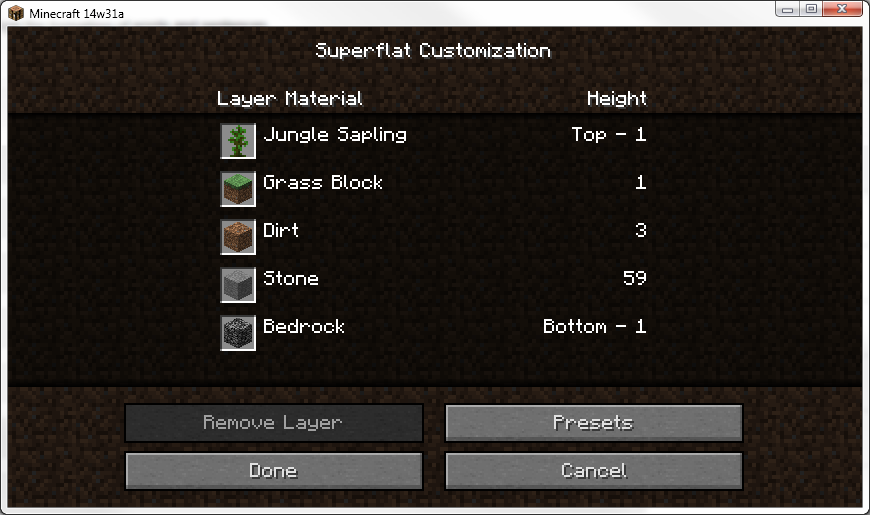
The game will immediately "forget" the custom preset upon clicking the "Done" button, and will revert to "Classic Flat" mode. (Note that the game still recognizes it as a valid input, see Attachment 1.)
Steps to reproduce:
1. From the main menu, select "Singleplayer", then "Create New World", then "More World Options...".
2. Select "Suerflat" from the "World Type:" button and press "Customize."
3: Select "Presets"
4: Type any valid input into the text box along the top of the screen. For example...
2;7,2x3,2,3:2;1;
2;7,59x1,3x3,2,6:3;1;stronghold,biome_1,village,decoration,dungeon,lake,mineshaft,lava_lake
2;7,2x3,33x2;1;village
5: Select "Use Preset", and then "Done."
6: Either select "Create New World" or "Customize" again, and observe how your changes were not saved.
This does NOT reproduce when using the new name system. (3;minecraft:bedrock,32*minecraft:dirt,minecraft:grass;1;village)
Speculation:
Either the classic IDs (2;7,2x3,2;1;village) are being depreciated in favor of the new names (3;minecraft:bedrock,2*minecraft:dirt,minecraft:grass;1;village,) in which case the old IDs should not be accepted as valid inputs, as seen in Attachment 1, or they are not being depreciated and they game won't save them anyway. In either case, something isn't operating as it should.
Environment
Java Standard Edition Version 7 Update 60 (build 1.7.0_60-b19)
Microsoft Windows 7 Professional 64-bit SP1
Intel Core i5 2500K @ 4.0GHz
4.00 GB Dual-Channel DDR3 @ 548MHz (9-9-9-24)
AMD Radeon HD 6870
932GB SAMSUNG HD103SJ
Linked Issues
Attachments1

Created Issue:
Superflat customization does not save presets when using classic item IDs
What I expected to happen was...:
Creating a custom input under Superflat presets (i.e., 2;7,59x1,3x3,2,6:3;1;stronghold,biome_1,village,decoration,dungeon,lake,mineshaft,lava_lake,) to save and load a custom world exactly as specified.What actually happened was...:
The game will immediately "forget" the custom preset upon clicking the "Done" button, and will revert to "Classic Flat" mode. (Note that the game still recognizes it as a valid input, see Attachment 1.)Steps to reproduce:
1. From the main menu, select "Singleplayer", then "Create New World", then "More World Options...".
2. Select "Suerflat" from the "World Type:" button and press "Customize."
3: Select "Presets"
4: Type any valid input into the text box along the top of the screen. For example...
2;7,2x3,2,3:2;1;
2;7,59x1,3x3,2,6:3;1;stronghold,biome_1,village,decoration,dungeon,lake,mineshaft,lava_lake
2;7,2x3,33x2;1;village
5: Select "Use Preset", and then "Done."
6: Either select "Create New World" or "Customize" again, and observe how your changes were not saved.This does NOT reproduce when using the new name system. (3;minecraft:bedrock,32*minecraft:dirt,minecraft:grass;1;village)
Speculation:
Either the classic IDs (2;7,2x3,2;1;village) are being depreciated in favor of the new names (3;minecraft:bedrock,2*minecraft:dirt,minecraft:grass;1;village,) in which case the old IDs should not be accepted as valid inputs, as seen in Attachment 1, or they are not being depreciated and they game won't save them anyway. In either case, something isn't operating as it should.Environment
Java Standard Edition Version 7 Update 60 (build 1.7.0_60-b19)
Microsoft Windows 7 Professional 64-bit SP1Intel Core i5 2500K @ 4.0GHz
4.00 GB Dual-Channel DDR3 @ 548MHz (9-9-9-24)
AMD Radeon HD 6870
932GB SAMSUNG HD103SJ
Attachments1

![[Mojang] Searge (Michael Stoyke)](../../../data/assets/gravatar/searge.png) [Mojang] Searge (Michael Stoyke)
[Mojang] Searge (Michael Stoyke)![[Mod] Torabi](../../../data/assets/gravatar/torabi.png)
is duplicated by
is duplicated by

relates to
Forward resolving to MC-65442, which [Mojang] Searge (Michael Stoyke) has marked "Won't Fix".

Duplicate of MC-65442, which was marked as "Won't Fix" by Searge.
ID numbers are being completely phased out. New presets also use the version 3 not 2.
This means your inputs are not valid.
Proper code format in 1.8 snapshots is
In which case this is still a bug; You see the screenshot I provided? I got that by using the code [[2;7,59x1,3x3,2,6:3;1;stronghold,biome_1,village,decoration,dungeon,lake,mineshaft,lava_lake}}. This scenario should never happen with the input provided. If the code is being depreciated then the game shouldn't recognize the code as valid.
You are asking for Mojang to fix something that they intentionally have moved away from. Why are you using classic ID format? This sort of "bug" report does nothing but waste the devs' time. There may be fragments of the ID coding left in there. Even damage values are still accepted, but come 1.9, no more ID numbers will be recognized. Either this will be marked as "Won't Fix" or "Invalid".
If they don't want to use it anymore, why would the game still recognize it as valid input? Are you implying that it accepting the outmoded input as valid is intentional? Because it shouldn't do that. The game accepting invalid code as valid is a bug,
Perhaps I should rename the bug to "Superflat customization still recognizes and accepts classic ID inputs."
I'm saying it's likely leftover code. I don't see how this is a bug
Yeah, you're right. They should just leave it in there, no point in bringing unintended operation to their attention.
Isn't the whole point of the superflat preset version code to prevent things like this?
As I said, in 1.9 data values will be gone. It will likely be removed then
Confirmed in 1.8-pre3.
Confirmed in 1.8.
Why is this "Won't fix"? Either the method net.minecraft.world.gen.FlatLayerInfo.toString() could convert the legacy input to the new format or the method net.minecraft.world.gen.FlatGeneratorInfo.toString() should not always set 3 as version but instead use the actual version.