 MC-89996
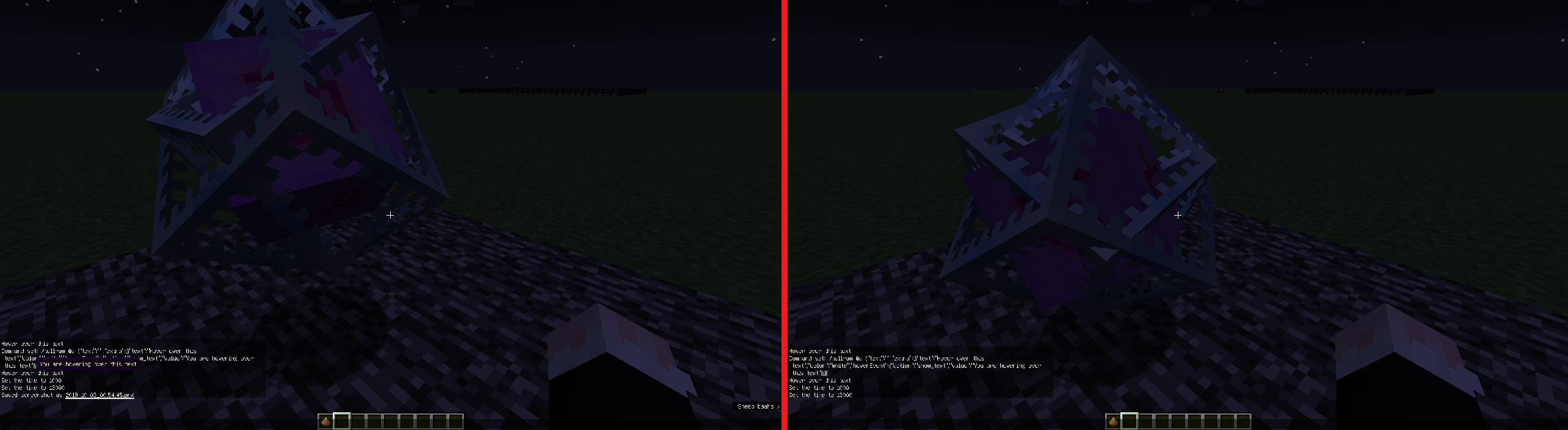
hoverEvent changes lighting for displayed block of minecart and end crystal
The bug
It seems that whenever the game shows the text of an hoverEvent (caused by /tellraw, hovering over an item in the inventory...) it changes the lighting of entities.
Affected entities
- Displayed block of minecarts (darkens)
- Ender crystal (brightens)
How to reproduce
- Place a minecart displaying a block:
Example command
/summon minecart ~ ~1 ~ {DisplayTile:"minecraft:quartz_block",CustomDisplayTile:1b,DisplayOffset:16} - Stand in front of it (South direction; +Z) and look at it (looking North; -Z)
- Use the following command and hover over the text:
Example command
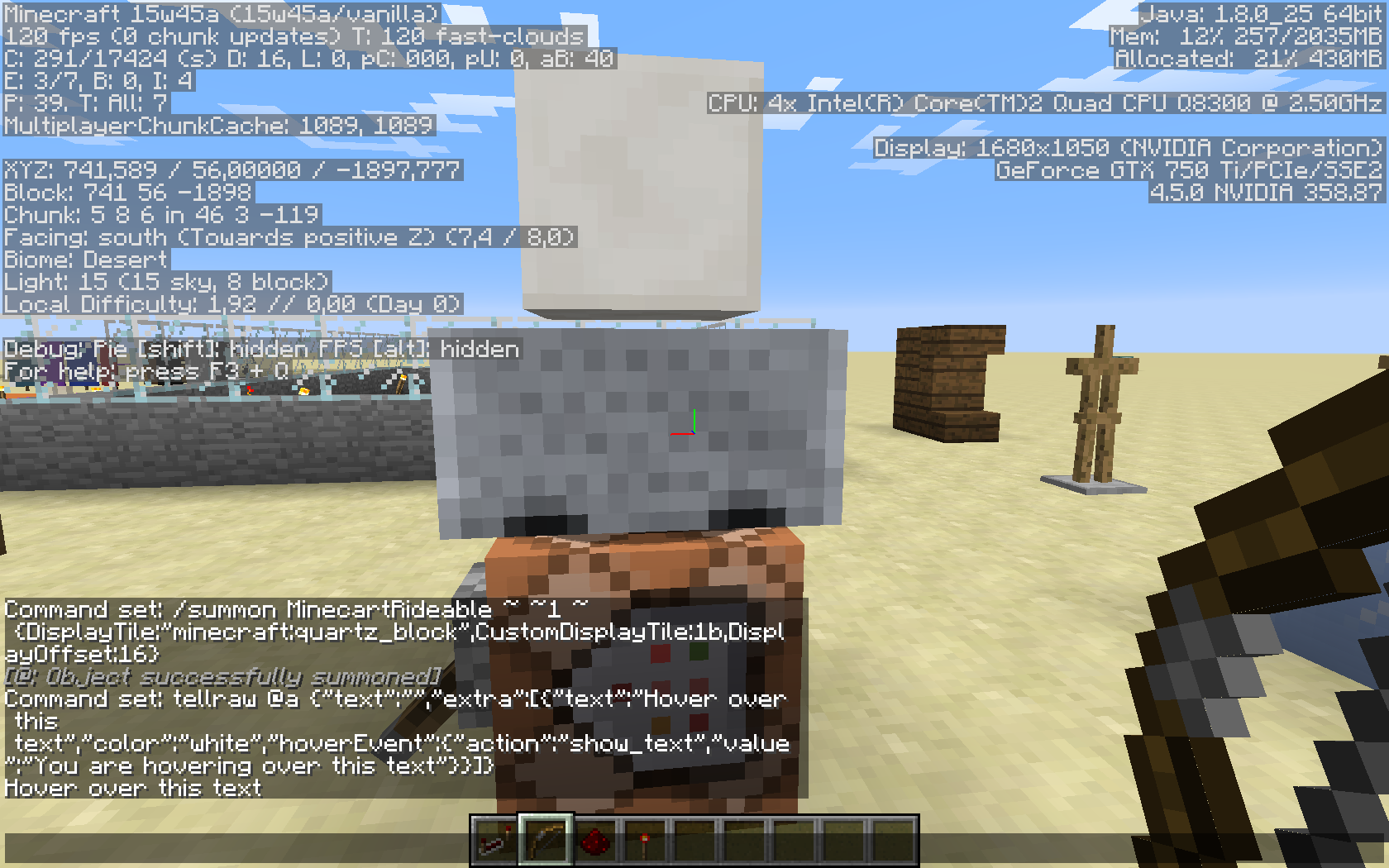
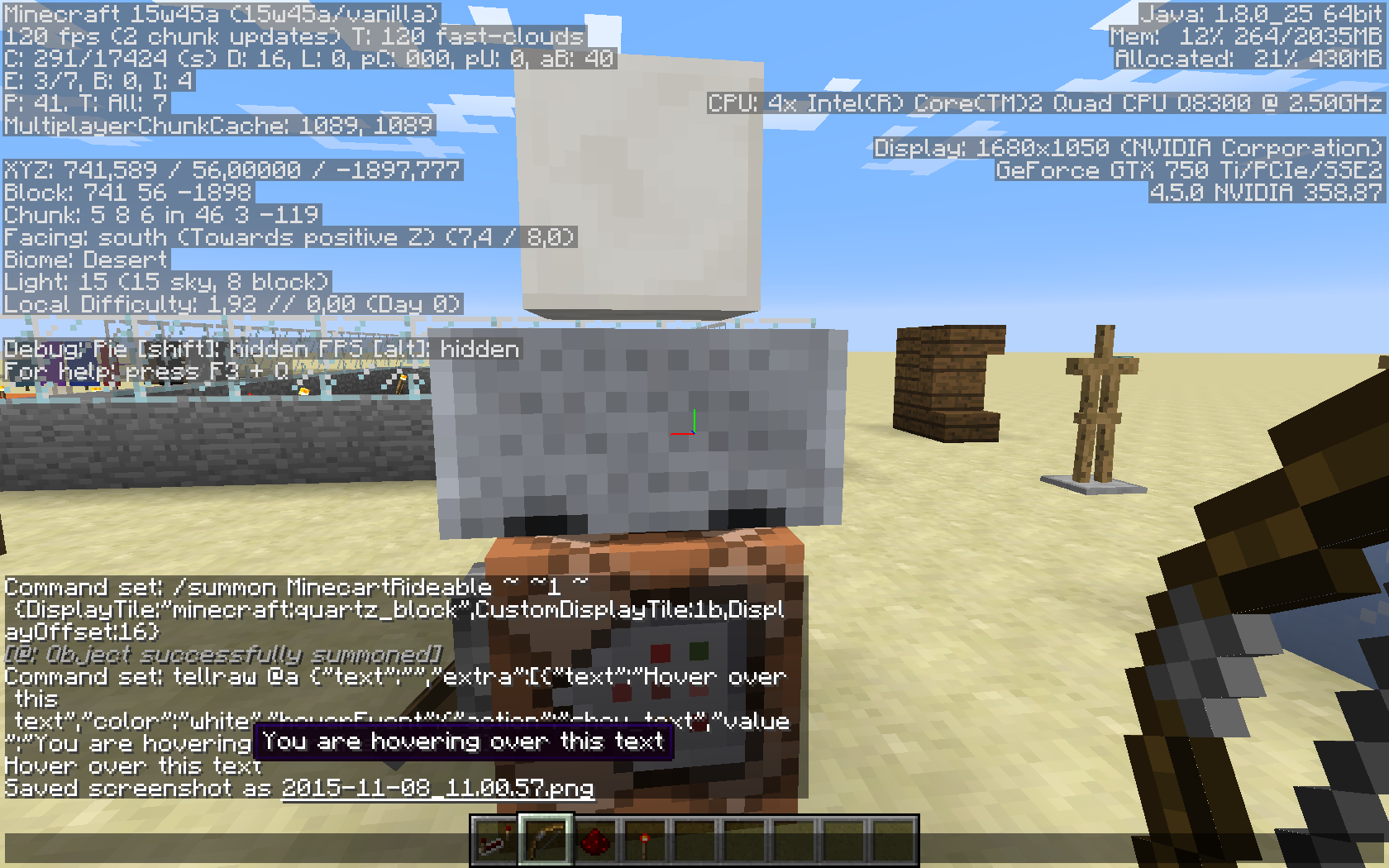
/tellraw @a {"text":"","extra":[{"text":"Hover over this text","color":"white","hoverEvent":{"action":"show_text","value":"You are hovering over this text"}}]}→ You should see that the block being displayed darkens when you are hovering over the message.
Code analysis
The following is based on a decompiled version of Minecraft 1.9 using MCP 9.24 beta.
It looks like the method net.minecraft.client.gui.GuiScreen.drawHoveringText(List<String>, int, int) which calls the method net.minecraft.client.renderer.GlStateManager.enableRescaleNormal() is causing this.
Linked Issues
Attachments8



![[Mod] redstonehelper](../../../data/avatars/users/10122.svg)
![[Mod] Les3awe](../../../data/avatars/users/79847.png)

Created Issue:
Minecart displayed block changes lighting when showing HoverEvent
Relates to:
Description
It seems that whenever you the game shows the text of an HoverEvent (caused by /tellraw, hovering over an item in the inventory...) it darkens the block being displayed in a Minecart.
How to reproduce
- Place a Minecart displaying a block:
Example command/summon MinecartRideable ~ ~1 ~ {DisplayTile:"minecraft:quartz_block",CustomDisplayTile:1b,DisplayOffset:16}- Stand in front of it (South direction; +Z) and look at it (looking North; -Z)
- Use the following command and hover over the text:
Example commandtellraw @a {"text":"","extra":[{"text":"Hover over this text","color":"white","hoverEvent":{"action":"show_text","value":"You are hovering over this text"}}]}You should see that the block being displayed darkens when you are hovering over the message.
Attachments1
Lighting glitch hopper minecart (15w41b).mp4
Relates to:
DescriptionIt seems that whenever you the game shows the text of an HoverEvent (caused by /tellraw, hovering over an item in the inventory...) it darkens the block being displayed in a Minecart.
How to reproduce
- Place a Minecart displaying a block:
Example command/summon MinecartRideable ~ ~1 ~ {DisplayTile:"minecraft:quartz_block",CustomDisplayTile:1b,DisplayOffset:16}- Stand in front of it (South direction; +Z) and look at it (looking North; -Z)
- Use the following command and hover over the text:
Example commandtellraw @a {"text":"","extra":[{"text":"Hover over this text","color":"white","hoverEvent":{"action":"show_text","value":"You are hovering over this text"}}]}You should see that the block being displayed darkens when you are hovering over the message.
Description
It seems that whenever you the game shows the text of an HoverEvent (caused by /tellraw, hovering over an item in the inventory...) it darkens the block being displayed in a Minecart.
How to reproduce
- Place a Minecart displaying a block:
Example command/summon MinecartRideable ~ ~1 ~ {DisplayTile:"minecraft:quartz_block",CustomDisplayTile:1b,DisplayOffset:16}- Stand in front of it (South direction; +Z) and look at it (looking North; -Z)
- Use the following command and hover over the text:
Example commandtellraw @a {"text":"","extra":[{"text":"Hover over this text","color":"white","hoverEvent":{"action":"show_text","value":"You are hovering over this text"}}]}You should see that the block being displayed darkens when you are hovering over the message.
is duplicated by
Minecart displayed block changes lighting when showing HoverEvent (AMD only?)
Minecart displayed block changes lighting when showing HoverEvent(AMD only?)Minecart displayed block, end crystal changes lighting when showing HoverEvent
Description
It seems that whenever you the game shows the text of an HoverEvent (caused by /tellraw, hovering over an item in the inventory...) it darkens the block being displayed in a Minecart.
How to reproduce
- Place a Minecart displaying a block:
Example command/summon MinecartRideable ~ ~1 ~ {DisplayTile:"minecraft:quartz_block",CustomDisplayTile:1b,DisplayOffset:16}- Stand in front of it (South direction; +Z) and look at it (looking North; -Z)
- Use the following command and hover over the text:
Example commandtellraw @a {"text":"","extra":[{"text":"Hover over this text","color":"white","hoverEvent":{"action":"show_text","value":"You are hovering over this text"}}]}You should see that the block being displayed darkens when you are hovering over the message.
Description
It seems that whenever you the game shows the text of an HoverEvent (caused by /tellraw, hovering over an item in the inventory...) it darkens the block being displayed in a Minecart.
Affected entities
- Displayed block of minecarts (darkens)
- EnderCrystal brightens
How to reproduce
- Place a Minecart displaying a block:
Example command/summon MinecartRideable ~ ~1 ~ {DisplayTile:"minecraft:quartz_block",CustomDisplayTile:1b,DisplayOffset:16}- Stand in front of it (South direction; +Z) and look at it (looking North; -Z)
- Use the following command and hover over the text:
Example commandtellraw @a {"text":"","extra":[{"text":"Hover over this text","color":"white","hoverEvent":{"action":"show_text","value":"You are hovering over this text"}}]}You should see that the block being displayed darkens when you are hovering over the message.
Description
It seems that whenever you the game shows the text of an HoverEvent (caused by /tellraw, hovering over an item in the inventory...) it darkens the block being displayed in a Minecart.
Affected entities
- Displayed block of minecarts (darkens)
- EnderCrystal (brightens)
How to reproduce
- Place a Minecart displaying a block:
Example command/summon MinecartRideable ~ ~1 ~ {DisplayTile:"minecraft:quartz_block",CustomDisplayTile:1b,DisplayOffset:16}- Stand in front of it (South direction; +Z) and look at it (looking North; -Z)
- Use the following command and hover over the text:
Example commandtellraw @a {"text":"","extra":[{"text":"Hover over this text","color":"white","hoverEvent":{"action":"show_text","value":"You are hovering over this text"}}]}You should see that the block being displayed darkens when you are hovering over the message.
Minecart displayed block, end crystal changes lighting when showing HoverEventhoverEvent changes lighting for displayed block of minecart and end crystal

Description
It seems that whenever you the game shows the text of an HoverEvent (caused by /tellraw, hovering over an item in the inventory...) it darkens the block being displayed in a Minecart.
Affected entities
- Displayed block of minecarts (darkens)
- EnderCrystal (brightens)
How to reproduce
- Place a Minecart displaying a block:
Example command/summon MinecartRideable ~ ~1 ~ {DisplayTile:"minecraft:quartz_block",CustomDisplayTile:1b,DisplayOffset:16}- Stand in front of it (South direction; +Z) and look at it (looking North; -Z)
- Use the following command and hover over the text:
Example commandtellraw @a {"text":"","extra":[{"text":"Hover over this text","color":"white","hoverEvent":{"action":"show_text","value":"You are hovering over this text"}}]}You should see that the block being displayed darkens when you are hovering over the message.
The reason
It looks like the method net.minecraft.client.gui.GuiScreen.drawHoveringText(List<String>, int, int) which calls the method net.minecraft.client.renderer.GlStateManager.enableRescaleNormal() is causing this.
Description
It seems that whenever you the game shows the text of an HoverEvent (caused by /tellraw, hovering over an item in the inventory...) it darkens the block being displayed in a Minecart.
Affected entities
- Displayed block of minecarts (darkens)
- EnderCrystal (brightens)
How to reproduce
- Place a Minecart displaying a block:
Example command/summon MinecartRideable ~ ~1 ~ {DisplayTile:"minecraft:quartz_block",CustomDisplayTile:1b,DisplayOffset:16}- Stand in front of it (South direction; +Z) and look at it (looking North; -Z)
- Use the following command and hover over the text:
Example commandtellraw @a {"text":"","extra":[{"text":"Hover over this text","color":"white","hoverEvent":{"action":"show_text","value":"You are hovering over this text"}}]}You should see that the block being displayed darkens when you are hovering over the message.
The reason
The following is based on a decompiled version of Minecraft 1.9 using MCP 9.24 beta.
It looks like the method net.minecraft.client.gui.GuiScreen.drawHoveringText(List<String>, int, int) which calls the method net.minecraft.client.renderer.GlStateManager.enableRescaleNormal() is causing this.
Description
It seems that whenever
youthe game shows the text of anHoverEvent (caused by /tellraw, hovering over an item in the inventory...) itdarkens the block being displayed in a Minecart.Affected entities
- Displayed block of minecarts (darkens)
- Ender
Crystal (brightens)How to reproduce
- Place a
Minecart displaying a block:Example command/summonMinecartRideable~ ~1 ~ {DisplayTile:"minecraft:quartz_block",CustomDisplayTile:1b,DisplayOffset:16}- Stand in front of it (South direction; +Z) and look at it (looking North; -Z)
- Use the following command and hover over the text:
Example commandtellraw @a {"text":"","extra":[{"text":"Hover over this text","color":"white","hoverEvent":{"action":"show_text","value":"You are hovering over this text"}}]}You should see that the block being displayed darkens when you are hovering over the message.
The reason
The following is based on a decompiled version of Minecraft 1.9 using MCP 9.24 beta.
It looks like the method net.minecraft.client.gui.GuiScreen.drawHoveringText(List<String>, int, int) which calls the method net.minecraft.client.renderer.GlStateManager.enableRescaleNormal() is causing this.
Description
It seems that whenever the game shows the text of an hoverEvent (caused by /tellraw, hovering over an item in the inventory...) it changes the lighting of entities.
Affected entities
- Displayed block of minecarts (darkens)
- Ender crystal (brightens)
How to reproduce
- Place a minecart displaying a block:
Example command/summon minecart ~ ~1 ~ {DisplayTile:"minecraft:quartz_block",CustomDisplayTile:1b,DisplayOffset:16}- Stand in front of it (South direction; +Z) and look at it (looking North; -Z)
- Use the following command and hover over the text:
Example commandtellraw @a {"text":"","extra":[{"text":"Hover over this text","color":"white","hoverEvent":{"action":"show_text","value":"You are hovering over this text"}}]}→ You should see that the block being displayed darkens when you are hovering over the message.
The reason
The following is based on a decompiled version of Minecraft 1.9 using MCP 9.24 beta.
It looks like the method net.minecraft.client.gui.GuiScreen.drawHoveringText(List<String>, int, int) which calls the method net.minecraft.client.renderer.GlStateManager.enableRescaleNormal() is causing this.
Description
It seems that whenever the game shows the text of an hoverEvent (caused by /tellraw, hovering over an item in the inventory...) it changes the lighting of entities.
Affected entities
- Displayed block of minecarts (darkens)
- Ender crystal (brightens)
How to reproduce
- Place a minecart displaying a block:
Example command/summon minecart ~ ~1 ~ {DisplayTile:"minecraft:quartz_block",CustomDisplayTile:1b,DisplayOffset:16}- Stand in front of it (South direction; +Z) and look at it (looking North; -Z)
- Use the following command and hover over the text:
Example command/tellraw @a {"text":"","extra":[{"text":"Hover over this text","color":"white","hoverEvent":{"action":"show_text","value":"You are hovering over this text"}}]}→ You should see that the block being displayed darkens when you are hovering over the message.
The reason
The following is based on a decompiled version of Minecraft 1.9 using MCP 9.24 beta.
It looks like the method net.minecraft.client.gui.GuiScreen.drawHoveringText(List<String>, int, int) which calls the method net.minecraft.client.renderer.GlStateManager.enableRescaleNormal() is causing this.

![[Mod] tryashtar](../../../data/avatars/users/41963.png)
Description
It seems that whenever the game shows the text of an hoverEvent (caused by /tellraw, hovering over an item in the inventory...) it changes the lighting of entities.
Affected entities
- Displayed block of minecarts (darkens)
- Ender crystal (brightens)
How to reproduce
- Place a minecart displaying a block:
Example command/summon minecart ~ ~1 ~ {DisplayTile:"minecraft:quartz_block",CustomDisplayTile:1b,DisplayOffset:16}- Stand in front of it (South direction; +Z) and look at it (looking North; -Z)
- Use the following command and hover over the text:
Example command/tellraw @a {"text":"","extra":[{"text":"Hover over this text","color":"white","hoverEvent":{"action":"show_text","value":"You are hovering over this text"}}]}→ You should see that the block being displayed darkens when you are hovering over the message.
The reasonThe following is based on a decompiled version of Minecraft 1.9 using MCP 9.24 beta.
It looks like the method net.minecraft.client.gui.GuiScreen.drawHoveringText(List<String>, int, int) which calls the method net.minecraft.client.renderer.GlStateManager.enableRescaleNormal() is causing this.
Description
It seems that whenever the game shows the text of an hoverEvent (caused by /tellraw, hovering over an item in the inventory...) it changes the lighting of entities.
Affected entities
- Displayed block of minecarts (darkens)
- Ender crystal (brightens)
How to reproduce
- Place a minecart displaying a block:
Example command/summon minecart ~ ~1 ~ {DisplayTile:"minecraft:quartz_block",CustomDisplayTile:1b,DisplayOffset:16}- Stand in front of it (South direction; +Z) and look at it (looking North; -Z)
- Use the following command and hover over the text:
Example command/tellraw @a {"text":"","extra":[{"text":"Hover over this text","color":"white","hoverEvent":{"action":"show_text","value":"You are hovering over this text"}}]}→ You should see that the block being displayed darkens when you are hovering over the message.
Code analysis
The following is based on a decompiled version of Minecraft 1.9 using MCP 9.24 beta.
It looks like the method net.minecraft.client.gui.GuiScreen.drawHoveringText(List<String>, int, int) which calls the method net.minecraft.client.renderer.GlStateManager.enableRescaleNormal() is causing this.
![[Mod] Michael Wobst](../../../data/avatars/users/37868.png)
Description
It seems that whenever the game shows the text of an hoverEvent (caused by /tellraw, hovering over an item in the inventory...) it changes the lighting of entities.
Affected entities
- Displayed block of minecarts (darkens)
- Ender crystal (brightens)
How to reproduce
- Place a minecart displaying a block:
Example command/summon minecart ~ ~1 ~ {DisplayTile:"minecraft:quartz_block",CustomDisplayTile:1b,DisplayOffset:16}- Stand in front of it (South direction; +Z) and look at it (looking North; -Z)
- Use the following command and hover over the text:
Example command/tellraw @a {"text":"","extra":[{"text":"Hover over this text","color":"white","hoverEvent":{"action":"show_text","value":"You are hovering over this text"}}]}→ You should see that the block being displayed darkens when you are hovering over the message.
Code analysis
The following is based on a decompiled version of Minecraft 1.9 using MCP 9.24 beta.
It looks like the method net.minecraft.client.gui.GuiScreen.drawHoveringText(List<String>, int, int) which calls the method net.minecraft.client.renderer.GlStateManager.enableRescaleNormal() is causing this.
The bug
It seems that whenever the game shows the text of an hoverEvent (caused by /tellraw, hovering over an item in the inventory...) it changes the lighting of entities.
Affected entities
- Displayed block of minecarts (darkens)
- Ender crystal (brightens)
How to reproduce
- Place a minecart displaying a block:
Example command/summon minecart ~ ~1 ~ {DisplayTile:"minecraft:quartz_block",CustomDisplayTile:1b,DisplayOffset:16}- Stand in front of it (South direction; +Z) and look at it (looking North; -Z)
- Use the following command and hover over the text:
Example command/tellraw @a {"text":"","extra":[{"text":"Hover over this text","color":"white","hoverEvent":{"action":"show_text","value":"You are hovering over this text"}}]}→ You should see that the block being displayed darkens when you are hovering over the message.
Code analysis
The following is based on a decompiled version of Minecraft 1.9 using MCP 9.24 beta.
It looks like the method net.minecraft.client.gui.GuiScreen.drawHoveringText(List<String>, int, int) which calls the method net.minecraft.client.renderer.GlStateManager.enableRescaleNormal() is causing this.
![[Mojang] Nathan Adams](../../../data/assets/gravatar/dinnerbone.png)
It is now MC-89996
Fixed between 15w42 and 15w45a
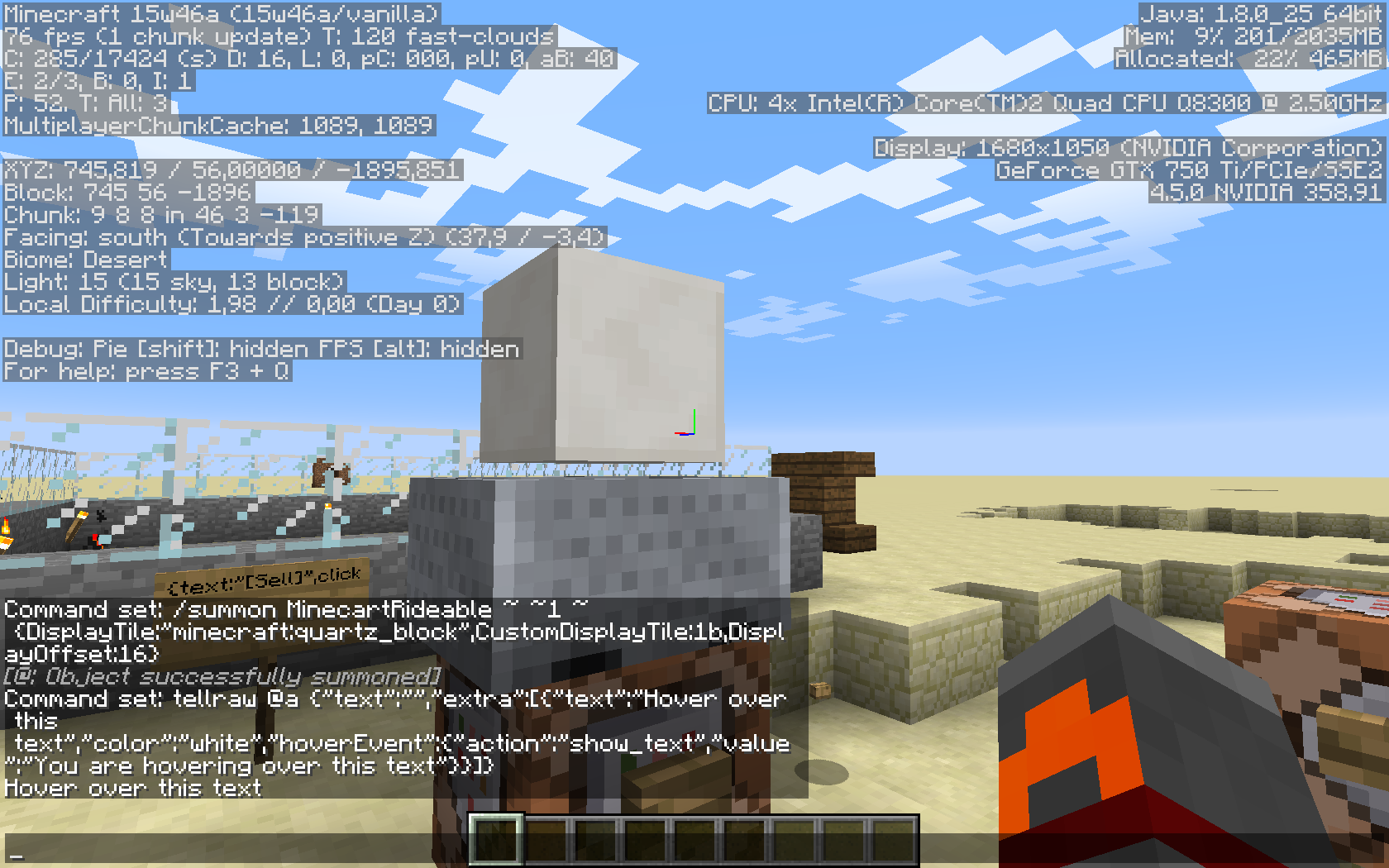
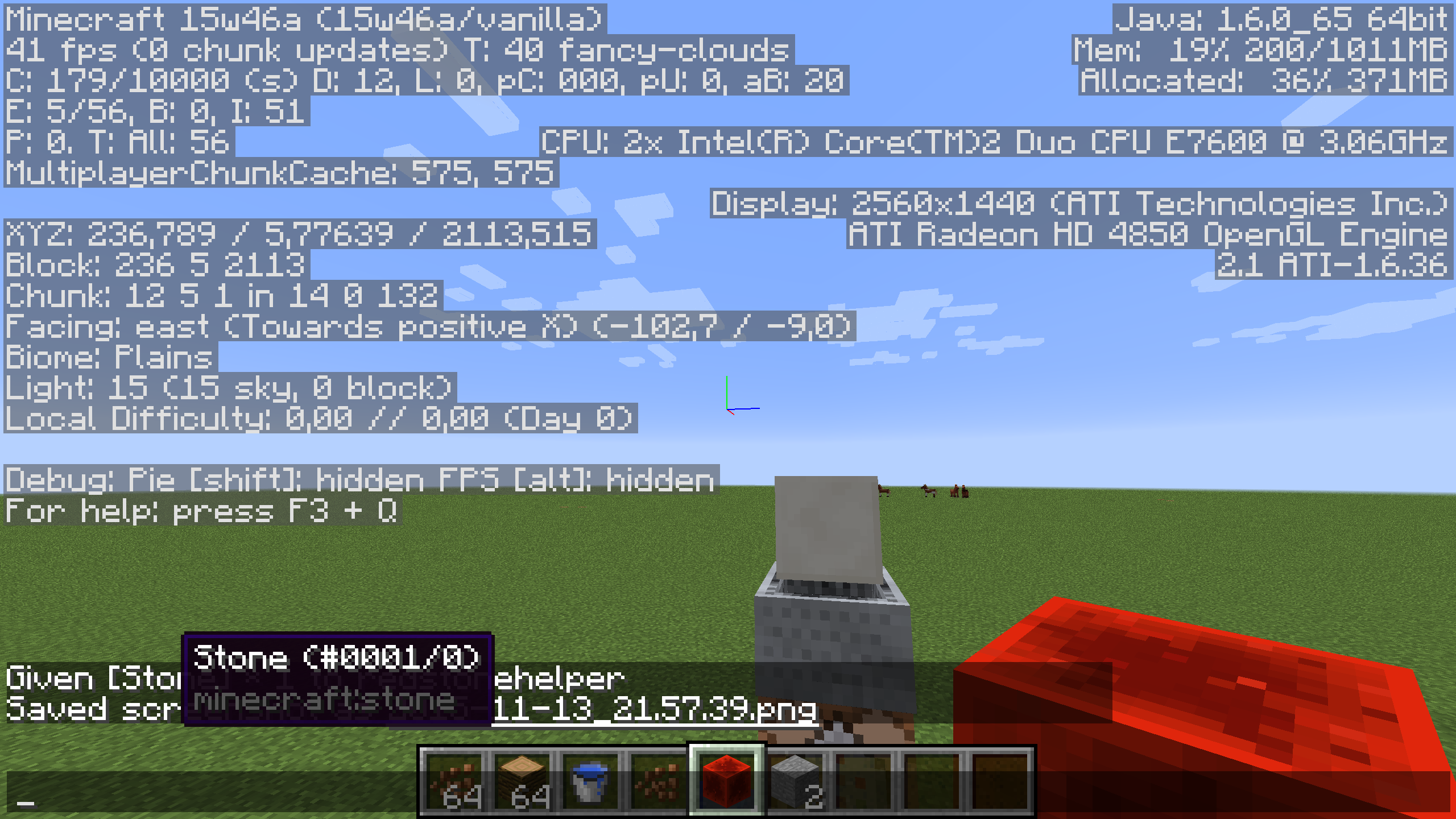
Still happens in 15w46a
Please reopen
Cannot reproduce in 15w46a, see screenshots.
Confirmed not fixed.
Could be graphics card depending? [Mod] redstonehelper and I both have a graphics card from ATI, whereas Kumasasa has one from NVIDIA
Also affect :
GPU : NVIDIA GeForce GTX 650
Drivers : GeForce 359.00
Can confirm.
Also affect the Ender Crystal.
Confirmed for 15w50a
Confirmed for 1.9.3-pre2
Confirmed for 1.9.3-pre3
This issue has been fixed in 19w40a.
