On mac UnsatisfiedLinkError on liblwjgl.jnilib "Reason: image not found"
...After some searching, it seems that this can only really happen on broken java installs. Perhaps try updating/reinstalling it?
[Mojang] Grum (Erik Broes)
----------------------------------------------------------------------------------------------------
To fix: Point 2 of this guide: http://www.minecraftforum.net/topic/1875423-please-read-common-16-issues-and-ways-of-fixing/
----------------------------------------------------------------------------------------------------
When i press "play" in the launcher it opens a new window which immediately crashes. Please help! i am on a macbook running Os x 10.6.8 with an Intel GMA 950 Graphics card. Please help me!
Linked Issues
is duplicated by67
 MC-96506Minecraft not launching on MacDuplicateMC-119395Game keeps on crashing, very aggrivating and I cant find any solution, I am on a mac.Duplicate
 MCL-256Dev launcher is not installing the most recent snapshotDuplicateMCL-291Dev launcher says image not foundDuplicateMCL-324Launcher wont launchDuplicateMCL-350New Launcher Doesn't Load MinecraftDuplicateMCL-371MinecraftDev Launcher opens game then crashes.DuplicateMCL-536Won't Launch (Gameplay Effecting Bug)DuplicateMCL-631Game ended with bad state (exit code 1) MacBook ProDuplicateMCL-670trying to play minecraft 1.6 not working with new laucherDuplicateMCL-679New Launcher Doesn't Let Me Play DuplicateMCL-690Game ended with bad state (exit code 1)DuplicateMCL-705Game ended with bad state (exit code 1)DuplicateMCL-715New launcher fails to open gameDuplicateMCL-753Mac 10.6.8 Minecraft 1.6.1 failure to launchDuplicateMCL-765Minecraft won't launch (1.6) WHAT DO I DO?!DuplicateMCL-773Mac OS X Launcher Bug Image Not FoundDuplicateMCL-797New 1.6 launcher will not work on a Mac OSX version 10.6.8DuplicateMCL-811Minecraft won't open once pressing play on the new launcher Mac OS X 10.6DuplicateMCL-823Game ended with bad state (exit code 1) (Mac Os)DuplicateMCL-845CrashDuplicateMCL-870I cannot open minecraft 1.6.1 after downloading, in the description is the message I get.DuplicateMCL-909New Launcher giving Game Ended in bad state issue, game doesn't start.DuplicateMCL-944The New Minecraft Launcher won't play on Mac OSXDuplicateMCL-974Update to version 1.6.1 to Minecraft will not work. When we download the correct version of the launcher and try to play in the new version, we get an error message.DuplicateMCL-979Mac OS ref. 1.6.1DuplicateMCL-1037I have a Mac OS X version 10.6.3 and i try to log on the new launcher and it almost works then it says it says image not found does this mean i need to do something with java or something is wrong with my system?DuplicateMCL-1096Minecraft "quitting unexpectedly" immediately after launching OS X 10.6.3DuplicateMCL-1157Minecraft's new launcher won't launchDuplicateMCL-11881.6.1 not working?DuplicateMCL-1196game ended with exit code 1DuplicateMCL-1197Minecraft keeps crashing when ever i try to start it!DuplicateMCL-1289Minecraft won't launch DuplicateMCL-1299Minecraft 1.6 for mac not workingDuplicateMCL-1300unable to log into minecraft (MAC)DuplicateMCL-1301Minecraft will not launch at all DuplicateMCL-1302I downloaded the new Minecraft launcher but everytime i click play on the launcher it says "game ended with bad state (exit code 1)" and i cant access or play minecraft DuplicateMCL-1303minecraft will not launchDuplicateMCL-13041.5.1 and 1.5.2 crashing with the new launcher.DuplicateMCL-1316The new minecraft launcher is not working on my mac.DuplicateMCL-1346When I press play on the 1.1.2 launcher the work bench will show up for a very short time and Minecraft won't open.DuplicateMCL-1349My Minecraft 1.6.2 crashes on launch.DuplicateMCL-1357Cannot play update 1.6.2, launcher is installedDuplicateMCL-1367My minecraft launcher keeps crashing when i press the play button!!!DuplicateMCL-1371Minecraft Fails to StartDuplicateMCL-1383Will not Play gameDuplicateMCL-1399Mac Osx 10.6.8 Minecraft crashDuplicateMCL-1424Can't start game 1.6.2 on MacBook with 10.6.8DuplicateMCL-1452Minecraft will not launchDuplicateMCL-1477Minecraft crashes with "exit code 1" upon pressing 'Play' in launcherDuplicateMCL-1488Error message on new launcherDuplicateMCL-1489Minecraft 1.6.2 won't launch on Mac OS X 10.6.8DuplicateMCL-1595When ever I try to play minecraft the game opens than closesDuplicateMCL-1599Minecraft won't start- Game ended with bad state (exit code 1)DuplicateMCL-1676Game ended with bad state (exit code 1)DuplicateMCL-1753Wont let me launch gameDuplicateMCL-1778Mac OS X 10.6.8 - Can't get onto Minecraft - No other thread seems to include Mac's. DuplicateMCL-1920Launcher not working for OSXDuplicateMCL-2250Ignoring visibility rule (Mac)DuplicateMCL-2274Minecraft Launcher won't launch Minecraft.DuplicateMCL-2302Ignoring visibillity rule and showing launcher due to game crash (mac)DuplicateMCL-2303OSX 10.6.8 minecraft won't loadDuplicateMCL-2528Minecraft not launching on Mac OSX 10.6.8DuplicateMCL-2795I have mac OS X. Minecraft downloads. I click play. Minecraft goes. 3 secounds pass. Launcher comes back with no game.DuplicateMCL-3389Cannot launch minecraft 1.8.1DuplicateMCL-3770i have a bug on my mac i cant fix itDuplicateMCL-5125Using incremental CMS is deprecated.Duplicate
Attachments1


Created Issue:
i am on a macbook running os x 10.6.8 with an Intel GMA 950 Graphics card but when i launch the new snapshot it opens the new window but then it immediately closes. I know i will need OpenGl 2.0 and am not sure if i have it.
Linked Issues
is duplicated by17
TRASH-3437
i am on a macbook running os x 10.6.8 with an Intel GMA 950 Graphics card but when i launch the new snapshot it opens the new window but then it immediately closes. I know i will need OpenGl 2.0 and am not sure if i have it.Issue with loading new snapshot(13w16a) on my mac book
When i press "play" in the launcher it opens a new window which immediately crashes. Please help!
When i press "play" in the launcher it opens a new window which immediately crashes. Please help! i am on a macbook running Os x 10.6.8 with an Intel GMA 950 Graphics card. Please help me!
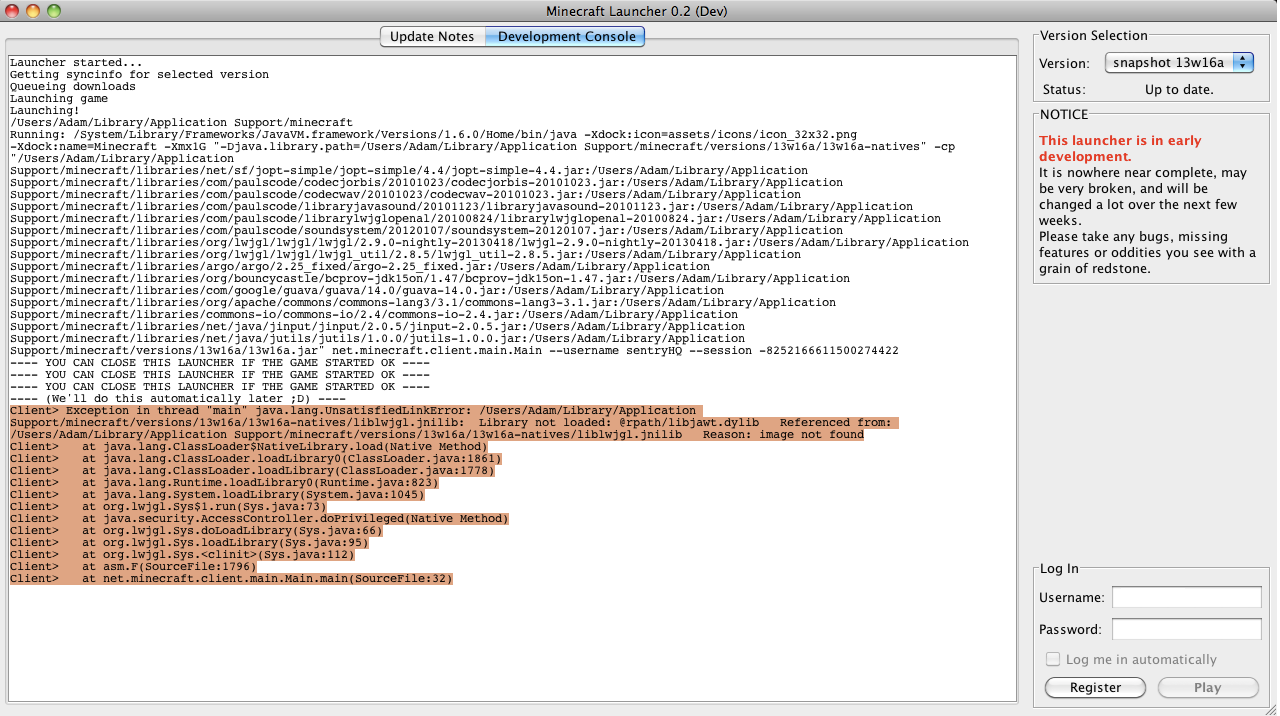
This is the text that comes up when i have attempted to launch
Screen shot 2013-04-20 at 09.45.05.png
 MC-14187 → MCL-137
![[Mojang] Grum (Erik Broes)](../../../data/assets/gravatar/grum.png)

is duplicated by
Issue with loading new snapshot(13w16a) on my mac bookCrash on liblwjgl.jnilib "Reason: image not found"
Crashon liblwjgl.jnilib "Reason: image not found"On mac UnsatisfiedLinkError on liblwjgl.jnilib "Reason: image not found"
is duplicated by
is duplicated by
is duplicated by
is duplicated by
is duplicated by
is duplicated by
is duplicated by
is duplicated by
is duplicated by
is duplicated by

is duplicated by
is duplicated by
is duplicated by
is duplicated by
is duplicated by
is duplicated by
is duplicated by
is duplicated by
is duplicated by
is duplicated by
is duplicated by
When i press "play" in the launcher it opens a new window which immediately crashes. Please help! i am on a macbook running Os x 10.6.8 with an Intel GMA 950 Graphics card. Please help me!
...After some searching, it seems that this can only really happen on broken java installs. Perhaps try updating/reinstalling it?
[Mojang] Grum (Erik Broes)----------------------------------------------------------------------------------------------------
When i press "play" in the launcher it opens a new window which immediately crashes. Please help! i am on a macbook running Os x 10.6.8 with an Intel GMA 950 Graphics card. Please help me!
is duplicated by
is duplicated by
is duplicated by
is duplicated by
is duplicated by
is duplicated by
is duplicated by
is duplicated by
is duplicated by
is duplicated by
is duplicated by
...After some searching, it seems that this can only really happen on broken java installs. Perhaps try updating/reinstalling it?
[Mojang] Grum (Erik Broes)----------------------------------------------------------------------------------------------------
When i press "play" in the launcher it opens a new window which immediately crashes. Please help! i am on a macbook running Os x 10.6.8 with an Intel GMA 950 Graphics card. Please help me!
...After some searching, it seems that this can only really happen on broken java installs. Perhaps try updating/reinstalling it?
[Mojang] Grum (Erik Broes)----------------------------------------------------------------------------------------------------
To fix: Point 2 of this guide: http://www.minecraftforum.net/topic/1875423-please-read-common-16-issues-and-ways-of-fixing/When i press "play" in the launcher it opens a new window which immediately crashes. Please help! i am on a macbook running Os x 10.6.8 with an Intel GMA 950 Graphics card. Please help me!
...After some searching, it seems that this can only really happen on broken java installs. Perhaps try updating/reinstalling it?
[Mojang] Grum (Erik Broes)----------------------------------------------------------------------------------------------------
To fix: Point 2 of this guide: http://www.minecraftforum.net/topic/1875423-please-read-common-16-issues-and-ways-of-fixing/
----------------------------------------------------------------------------------------------------When i press "play" in the launcher it opens a new window which immediately crashes. Please help! i am on a macbook running Os x 10.6.8 with an Intel GMA 950 Graphics card. Please help me!
is duplicated by
is duplicated by
is duplicated by
relates to
is duplicated by
relates to
is duplicated by
relates to
is duplicated by
is duplicated by
is duplicated by
is duplicated by
is duplicated by
is duplicated by
is duplicated by
is duplicated by

is duplicated by
is duplicated by
relates to
is duplicated by
is duplicated by
is duplicated by
relates to
is duplicated by
is duplicated by
is duplicated by
is duplicated by
is duplicated by
is duplicated by
is duplicated by
is duplicated by
is duplicated by
is duplicated by
is duplicated by
is duplicated by
is duplicated by

is duplicated by
is duplicated by

is duplicated by

is duplicated by
Sorry, your issue is MCL-137 which is due to a broken Java installation. I must have mixed up some issues.
Duplicate of MCL-137, please use the search function to see if your bug has already been submitted. Currently over 58% of tickets are being resolved as duplicate.
40th Duplicate of MCL-137, please use the search function to see if your bug has already been submitted. Currently over 57% of tickets are being resolved as duplicate.
41st Duplicate of MCL-137, please use the search function to see if your bug has already been submitted. Currently over 52% of tickets are being resolved as duplicate.
@Adrienn Dominguez:
If your operating system and Java is outdated, this will happen too. But the resolution in MCL-137 is trivial: Update your stuff.
All the tickets containing that message are resolved to MCL-137.

Thank you for your report!
However, this issue is a Duplicate of MCL-137.
This is caused by an outdated or broken Java installation. Please install all available updates in the App Store, then update or reinstall Java.
Quick Links:
📓 Issue Guidelines – 💬 Community Support – 📧 Customer Support – 📖 Game Wiki
Please attach screenshots or the output of the launcher window.
This is all that i can get from the new launcher after i have tried to start up minecraft
Uploaded modified screenshot and removed original to hide username, password length and unnecessary GUI.
Note:
The only thing i can recommend is deleting the following folder:
If that doesn't work (not very likely) could you answer the following:
What kind of mac are you using?
What java version are you using?
– Edit
After some searching, it seems that this can only really happen on broken java installs. Perhaps try updating/reinstalling it?
Any progress on this issue?
Please reopen if any news
Dunno if anyone has given the answer, but I had the an identical issue and updating java fixed it.
Thank you very much.
Well seems like Grum was right:
I am having the same problem HELP!
This seems to be a common bug, i've crossed over multiple users in #minecrafthelp with the same issue and there seems to be no resolution.
http://pastebin.com/3JPeEfEZ
http://pastebin.com/ArmcyTNN
Sure there is. Take Grums advice.
You need Java 1.6 for Mac OS 10.6 update 16. To install, got to launch System Preferences and click on Software Update and click on Check Now. All uncheck everything except Java and click to install. Minecraft is up and running for me now.
For Mac 10.6 users, they must update to 10.6.8 then install Java Update 16.
I have the same problem but i am using it on minecraft 1.6.1 release and the updated new launcher pls help
Macbook pro 2008
Mac os X snow leopard 1.6
Java 6
Pls help i cant join my favorite server cuz of it
NVM i got it im updating it to 1.6.8
well not sure but hope it works
im on a mac running 10.6.3 my minecarft used to be working but now its not help me!
William, follow the steps in this link: http://www.minecraftforum.net/topic/1875423-please-read-common-16-issues-and-ways-of-fixing/
Read point 2.
@william: "Not working" = ?
Game ended with bad state (exit code 1)
Deleting /Users/andrewhuntley-robertson/Library/Application Support/minecraft/versions/1.6.2/1.6.2-natives-1373819439520402000
thats what happended
timothy i wouldn't make sense to update my computer considering ive been able to play on it before with this minecarft
@William: Make a new ticket and attach the complete output of the "Development console" of the launcher
whats a ticket
That's what you're reading.
Ah. See in Jira that's called "issue".
At the top of your screen -> Create Issue