 MCL-226
Launcher waits before webpage is loaded before becoming usable
When starting and have already downloaded latest release. You have to wait 2 - 10 sec for the Minecraft News webpage, depending on server load and internet speed, then the "Loading versions...." is in the drop down box, then you can select the version you want to play and press Play
Launcher 0.7.1 (Dev) (through bootstrap 2) started on windows...
System.getProperty('os.name') == 'Windows 8'
System.getProperty('os.version') == '6.2'
System.getProperty('os.arch') == 'amd64'
System.getProperty('java.version') == '1.7.0_15'
System.getProperty('java.vendor') == 'Oracle Corporation'
Trying to log in...
Logged in successfully
Delta time to compare resources: 1215 ms
Download job 'Resources' skipped as there are no files to download
Job 'Resources' finished successfully
Linked Issues

Created Issue:
Slow at startin before you can start and play the game.
When starting and have already downloaded latest release. You have to wait 2 - 10 sec for the Minecraft News webpage, depending on server load and internet speed, then the "Loading versions...." is in the drop down box, then you can select the version you want to play and press Play
Launcher 0.7.1 (Dev) (through bootstrap 2) started on windows...
System.getProperty('os.name') == 'Windows 8'
System.getProperty('os.version') == '6.2'
System.getProperty('os.arch') == 'amd64'
System.getProperty('java.version') == '1.7.0_15'
System.getProperty('java.vendor') == 'Oracle Corporation'
Trying to log in...
Logged in successfully
Delta time to compare resources: 1215 ms
Download job 'Resources' skipped as there are no files to download
Job 'Resources' finished successfully
![[Mojang] Grum (Erik Broes)](../../../data/assets/gravatar/grum.png)
Slow at startin before you can start and play the game.Launcher waits before webpage is loaded before becoming usable

relates to

Appears fixed in 0.7.2.

relates to
Launcher 1.2.1 is also still affected =/
Same as previous attachment but without an internet-connection.
is duplicated by
![[Mod] Ezekiel (ezfe)](../../../data/assets/gravatar/ezekielelin.jpeg)
When starting and have already downloaded latest release. You have to wait 2 - 10 sec for the Minecraft News webpage, depending on server load and internet speed, then the "Loading versions...." is in the drop down box, then you can select the version you want to play and press Play
Launcher 0.7.1 (Dev) (through bootstrap 2) started on windows...
System.getProperty('os.name') == 'Windows 8'
System.getProperty('os.version') == '6.2'
System.getProperty('os.arch') == 'amd64'
System.getProperty('java.version') == '1.7.0_15'
System.getProperty('java.vendor') == 'Oracle Corporation'
Trying to log in...
Logged in successfully
Delta time to compare resources: 1215 ms
Download job 'Resources' skipped as there are no files to download
Job 'Resources' finished successfullyWhen starting and have already downloaded latest release. You have to wait 2 - 10 sec for the Minecraft News webpage, depending on server load and internet speed, then the "Loading versions...." is in the drop down box, then you can select the version you want to play and press Play
Launcher 0.7.1 (Dev) (through bootstrap 2) started on windows... System.getProperty('os.name') == 'Windows 8' System.getProperty('os.version') == '6.2' System.getProperty('os.arch') == 'amd64' System.getProperty('java.version') == '1.7.0_15' System.getProperty('java.vendor') == 'Oracle Corporation' Trying to log in... Logged in successfully Delta time to compare resources: 1215 ms Download job 'Resources' skipped as there are no files to download Job 'Resources' finished successfully
![[Mojang] Nathan Adams](../../../data/assets/gravatar/dinnerbone.png) [Mojang] Nathan Adams
[Mojang] Nathan Adams![[Mod] Torabi](../../../data/assets/gravatar/torabi.png)
The launcher doesn't appear to actually be crashing. It's just becoming unresponsive while waiting for the page to load/render, which never happens for some reason. This is strongly related to, but not a duplicate of, MCL-226. Fixing either the loading/rendering problem, or the blocking/unresponsiveness issue would solve this.
Anthony Mojica, what happens if you disconnect/disable your internet connection before running the launcher? Does it still become unresponsive? If not, what does it say in the development console tab?
Run the launcher, give it a few minutes, then disconnect your internet while the launcher appears to be frozen. That may make it responsive again (it may take a minute while it waits for the loading to timeout). Then post the contents of the development console tab. We need to figure out what it's doing that it's getting stuck on. My intuition is that it's something like MCL-464, though it's not clear why the window is becoming unresponsive while it's waiting (other than MCL-226).
If redirecting the address using the hosts file makes the Minecraft launcher responsive, then obviously the problem is with the renderer, and possibly the page getting mangled at some point. I actually can't load the page in my browser right now, so I'm not sure.
If the host file workaround works for Anthony Mojica, I think this is probably just a combination of MCL-243 and MCL-226. Fixing either one should fix the problem, though ideally they'd both be fixed.
That indeed seems like an issue, it shouldn't interfere with the normal operation of the launcher.
Same issue here sometimes i get huge times i have to wait:
Confirmed. Neither the versions selection or the play button can be used until the tumblr page loads.
It is still an issue in 0.8.2 and shuld be reopened.
The launcher is way faster than 0.7.* but the version menu is frozen and play button grayed out, until the tumblr page loads, there for you cant start the game until then.
For me the webpage is loaded faster than comparing resources.
Still an issue in Launcher 1.0.6
Is this still a concern in the current Minecraft / Launcher version? If so, please update the affected versions in order to best aid Mojang ensuring bugs are still valid in the latest releases/pre-releases.
In 1.0.10 it displays Play Offline until the thumbr page loads, then Play. Does it not try to authenticate until after the page has loaded?
But some times the Play Offline is grayed out until the page loads and button says Play.
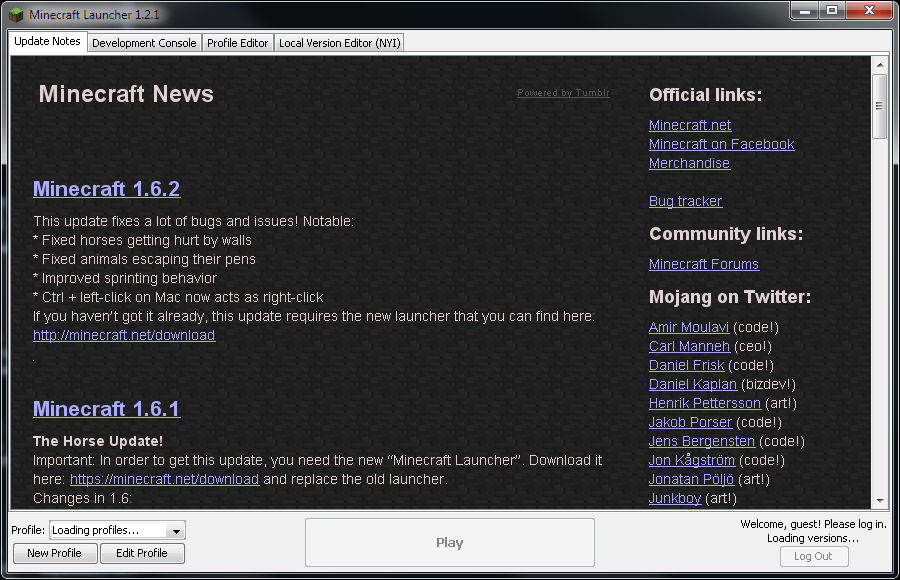
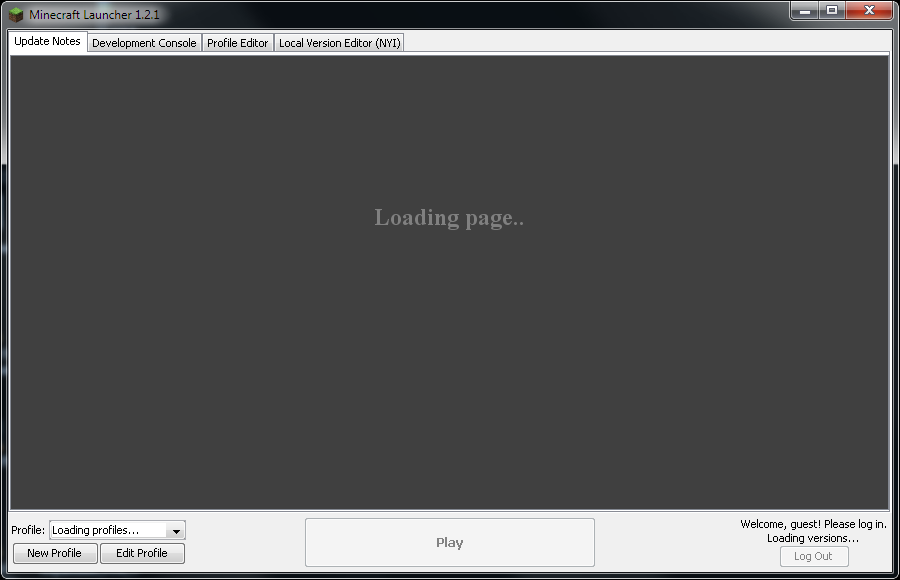
Launcher 1.2.1 is also affected and can't be used (stays unresponsive) until the webpage has fully loaded or has timed-out (see two png attachments).
This is very annoying. I would rather have no patch notes and have the launcher load immediately.
Still a very annoying bug (v1.2.5), especially with bad internet connection. Had this "unresponsive launcher" problem several times the last days
Still present in 1.2.7
This still happens with v1.3.1
Still present in 1.3.4
the same in 1.3.6
No change in 1.3.7
1.3.8 = true
v 1.3.9 - Still waits to load profiles until the website has loded
Can confirm this on v1.3.9 - My whole computer becomes unstable (Audio stops, mouse lags) until the news has loaded (Sticks on this before news has loaded http://media.itsyoda.com/repository/000339.png)
Confirmed in version 1.3.10 with the following environment:
With the environment stated above, I am unable to do anything with the launcher (like edit profiles) until the Tumblr page is fully loaded. Although with 1.3.10, the launcher seems to load faster, this does not fix the issue stated in this issue.
Warm regards, Liam Whitt.
Fixed but only when you have javaFX (you're java 7 or higher, or have manually installed it)
Just to clarify, is the Play button supposed to be greyed out before the webpage loads when you DON'T have the latest version installed yet? I just started up the launcher before I had the latest b snapshot, and then I spam clicked the play button to see if I had to wait for the webpage to load first. I did. I'm on 7u51.
I think that may just be it still loading version information from remote, which coincidentally finished at the same time of the browser page loading.
Alright, I kinda guessed that might be what was happening, but I just wanted to check.