Recurring short-term promotional content in the launcher is untranslatable
The Bug:
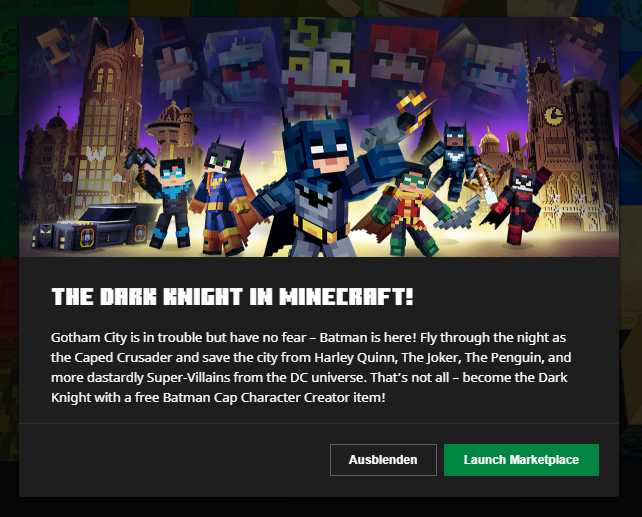
Recurring short-term promotional content in the Minecraft: Java Edition, Minecraft for Windows or Minecraft Legends tab, including buttons such as "Launch Marketplace" (or "Launch Bedrock"), are not translatable.
Steps to Reproduce:
- Set the language to something that is not English (Settings).
- Click on the Minecraft Legends tab.
- Notice the prompt, if one is displayed, and click it.
→  The prompt stays in English, regardless of the language selected.
→ The prompt description stays in English, regardless of the language selected.
Observed Behavior:
The prompt and its description are untranslatable.
Expected Behavior:
The prompt and its description would be translatable.
Notes:
- Attempt to search for the existence of these strings on the official Minecraft Launcher project on Crowdin.
- Take note as to whether or not these prompts and their descriptions are untranslatable.
Linked Issues
is duplicated by20
 MCL-22612The string of text “New skins available in the Launcher!” displayed within the Launcher is untranslatableDuplicateMCL-22613The new skin note description displayed within the Launcher is untranslatableDuplicateMCL-22614The string of text “The Dark Knight in Minecraft!” displayed within the Launcher is untranslatableDuplicateMCL-22616The string of text “Launch Marketplace” displayed within the Launcher is untranslatableDuplicateMCL-22623The string of text "Marketplace Spooky Season!" displayed within the Launcher is untranslatableDuplicateMCL-22624The Marketplace Spooky Season note description displayed within the Launcher is untranslatableDuplicateMCL-22636The string of text “Embark on an Adventure Beyond!” displayed within the Launcher is untranslatableDuplicateMCL-22637The Embark on an Adventure Beyond description displayed within the Launcher is untranslatableDuplicateMCL-22737The string of text “Join the Soccer Celebration!” displayed within the Launcher is untranslatableDuplicateMCL-22738The Join the Soccer Celebration description displayed within the Launcher is untranslatableDuplicateMCL-22770The string of text “Minecraft Marketplace Block Friday Sale!” displayed within the Launcher is untranslatableDuplicateMCL-22771The Minecraft Marketplace Block Friday Sale description displayed within the Launcher is untranslatableDuplicateMCL-22801The string of text “New skins available in Bedrock!” displayed within the Launcher is untranslatableDuplicateMCL-22802The new skin note description for Bedrock displayed within the Launcher is untranslatableDuplicateMCL-22803The string of text “Launch Bedrock” displayed within the Launcher is untranslatableDuplicateMCL-22842The string of text “Master all 4 Elements as the Avatar!” displayed within the Launcher is untranslatableDuplicateMCL-22843The Master all 4 Elements as the Avatar description displayed within the Launcher is untranslatableDuplicateMCL-22886The new year celebration pop-up descriptions are untranslatableDuplicateMCL-22887The "Go to current day" button description in the new year celebration check-in page is untranslatableDuplicateMCL-23256Put Fire out/ Start doesn't translate into GermanDuplicate
Attachments116




![[Mod] Avoma](../../../data/avatars/users/86198.png)


- Unresolved
![[Mod] turbo](../../../data/avatars/users/92867.png) [Mod] turbo
[Mod] turbo- 3
- 3
- Confirmed
- 920090
- Minecraft Launcher
- translatability
2.3.451 (Windows) - 3.7.2 (Win 10/11)
2.3.451 (Windows) 2.3.451 (Mac) 2.3.462 (Windows) 2.3.462 (New Windows App) 2.3.481 (Windows) 2.3.481 (New Windows App) 2.3.508 (New Windows App) 2.3.522 (Windows) 2.3.522 (Mac) 2.3.522 (New Windows App) 2.3.522 (Linux) 2.3.549 (New Windows App) 2.3.562 (New Windows App) 2.3.580 (New Windows App) 2.3.592 (New Windows App) 2.3.619 (Windows) 2.3.619 (Mac) 2.3.619 (New Windows App) 2.3.645 (New Windows App) 2.4.30 (Legacy Windows) 2.4.30 (Win 10/11 App) 2.4.36 (Win 10/11 App) 2.4.39 (Win 10/11 App) 2.4.57 (Win 10/11 App) 2.4.69 (Win 10/11 App) 2.4.79 (Win 10/11 App) 2.4.104 (Win 10/11 App) 2.5.9 (Win 10/11 App) 2.6.10 (Win 10/11) 2.6.14 (Win 10/11) 2.6.16 (Win 10/11) 2.7.12 (Win 10/11) 2.8.2 (Win 10/11) 2.10.24 (Win 10/11) 2.10.25 (Win 10/11) 2.11.15 (Win 10/11) 2.11.24 (Win 10/11) 2.12.2 (Win 10/11) 2.12.17 (Win 10/11) 2.13.7 (Win 10/11) 2.14.12 (Win 10/11) 2.15.19 (Win 10/11) 2.15.23 (Win 10/11) 2.16.12 (Win 10/11) 2.17.13 (Win 10/11) 2.18.2 (Win 10/11) 2.19.10 (Win 10/11) 2.21.26 (Win 10/11) 2.22.14 (Win 10/11) 2.26.2 (Win 10/11) 2.27.11 (Win 10/11) 2.27.19 (Win 10/11) 3.1.13 (Win 10/11) 3.3.13 (Win 10/11) 3.5.17 (Win 10/11) 3.7.2 (Win 10/11)
Created Issue:
The Dark Knight note description displayed within the Launcher is untranslatable
The Bug:
The Dark Knight note description displayed within the Launcher is untranslatable.
Steps to Reproduce:
- Open the Launcher in the version stated.
- Set the language to something that is not English (Settings).
- Click on the Minecraft for Windows tab.
- Click on “The Dark Knight in Minecraft!”.
→
Observed Behavior:
This note description is untranslatable.
Expected Behavior:
This note description would be translatable.
Notes:
- Attempt to search for the existence of this string by using this search filter on the official Minecraft Launcher project on Crowdin.
- Take note as to whether or not the note description is untranslatable.
Attachments1
![[Mod] markderickson](../../../data/avatars/users/18946.svg)
![[MCQA] Zgajak](../../../data/avatars/users/10122.svg)
is duplicated by
is duplicated by
is duplicated by
is duplicated by
is duplicated by
is duplicated by
![[Bot] Arisa](../../../data/avatars/users/43007.png)
is duplicated by
is duplicated by
is duplicated by
is duplicated by
Cherry blossom Biome coming to 1.20.png
The Bug:
The
Dark Knight notedescription displayed within the Launcher is untranslatable.Steps to Reproduce:
- Open the Launcher in the version stated.
- Set the language to something that is not English (Settings).
- Click on the Minecraft
for Windowstab.- Click on “
TheDark Knight in Minecraft!”.→
Thenotedescriptionshouldstay in English, regardless of the language selected.Observed Behavior:
This
notedescription is untranslatable.Expected Behavior:
This
notedescription would be translatable.Notes:
- Attempt to search for the existence of this string by using this search filter on the official Minecraft Launcher project on Crowdin.
- Take note as to whether or not the
notedescription is untranslatable.The Bug:
The Cherry blossom Biome coming to 1.20 prompt description displayed within the Launcher is untranslatable.
Steps to Reproduce:
- Open the Launcher in the version stated.
- Set the language to something that is not English (Settings).
- Click on the Minecraft: Java Edition tab.
- Click on “Cherry blossom Biome coming to 1.20!”.
→
Observed Behavior:
This prompt description is untranslatable.
Expected Behavior:
This prompt description would be translatable.
Notes:
- Attempt to search for the existence of this string by using this search filter on the official Minecraft Launcher project on Crowdin.
- Take note as to whether or not the prompt description is untranslatable.
TheDark Knight notedescription displayed within the Launcher is untranslatableThe Cherry blossom Biome coming to 1.20 prompt description displayed within the Launcher is untranslatable
is duplicated by
The Bug:
The
Cherry blossom Biome coming to 1.20prompt description displayed within the Launcher is untranslatable.Steps to Reproduce:
- Open the Launcher in the version stated.
- Set the language to something that is not English (Settings).
- Click on the Minecraft
: Java Editiontab.- Click on “
Cherry blossom Biome coming to 1.20!”.→
Observed Behavior:
This prompt description is untranslatable.
Expected Behavior:
This prompt description would be translatable.
Notes:
- Attempt to search for the existence of this string by using this search filter on the official Minecraft Launcher project on Crowdin.
- Take note as to whether or not the prompt description is untranslatable.
The Bug:
The Mega Man X DLC prompt description displayed within the Launcher is untranslatable.
Steps to Reproduce:
- Open the Launcher in the version stated.
- Set the language to something that is not English (Settings).
- Click on the Minecraft for Windows tab.
- Click on “Make way for a Mega Man X DLC!”.
→
Observed Behavior:
This prompt description is untranslatable.
Expected Behavior:
This prompt description would be translatable.
Notes:
- Attempt to search for the existence of this string by using this search filter on the official Minecraft Launcher project on Crowdin.
- Take note as to whether or not the prompt description is untranslatable.
TheCherry blossom Biome coming to 1.20prompt description displayed within the Launcher is untranslatableThe Mega Man X DLC prompt description displayed within the Launcher is untranslatable
The Bug:
The
Mega Man XDLC prompt description displayed within the Launcher is untranslatable.Steps to Reproduce:
- Open the Launcher in the version stated.
- Set the language to something that is not English (Settings).
- Click on the Minecraft for Windows tab.
- Click on “
Make way for a Mega Man XDLC!”.→
Observed Behavior:
This prompt description is untranslatable.
Expected Behavior:
This prompt description would be translatable.
Notes:
- Attempt to search for the existence of this string by using this search filter on the official Minecraft Launcher project on Crowdin.
- Take note as to whether or not the prompt description is untranslatable.
The Bug:
The Build a moon rocket in new Artemis DLC prompt description displayed within the Launcher is untranslatable.
Steps to Reproduce:
- Open the Launcher in the version stated.
- Set the language to something that is not English (Settings).
- Click on the Minecraft for Windows tab.
- Click on “Build a moon rocket in new Artemis DLC!”.
→
Observed Behavior:
This prompt description is untranslatable.
Expected Behavior:
This prompt description would be translatable.
Notes:
- Attempt to search for the existence of this string by using this search filter on the official Minecraft Launcher project on Crowdin.
- Take note as to whether or not the prompt description is untranslatable.
TheMega Man XDLC prompt description displayed within the Launcher is untranslatableThe Build a moon rocket in new Artemis DLC prompt description displayed within the Launcher is untranslatable
The Build a moon rocket in new Artemis DLC prompt description displayed within theLauncher is untranslatableRecurring short-term promotional content in the launcher is untranslatable
The Bug:
The Build a moon rocket in new Artemis DLC prompt description displayed within the Launcher is untranslatable.Steps to Reproduce:
OpentheLauncherin the version stated.Set the language to something that is not English (Settings).Click on the Minecraft for Windows tab.- Click on “Build a moon rocket in new Artemis DLC!”.
→
descriptionstays in English, regardless of the language selected.Observed Behavior:
Th
isprompt descriptionisuntranslatable.Expected Behavior:
Th
isprompt description would be translatable.Notes:
- Attempt to search for the existence of this string by using this search filter on the official Minecraft Launcher project on Crowdin.
- Take note as to whether or not the prompt description
isuntranslatable.The Bug:
Recurring short-term promotional content in the Minecraft: Java Edition or Minecraft for Windows tab, including buttons such as "Launch Marketplace" (or "Launch Bedrock"), are not translatable.
Steps to Reproduce:
- Set the language to something that is not English (Settings).
- Click on the Minecraft for Windows tab.
- Notice the prompt, if one is displayed, and click it.
→
→Observed Behavior:
The prompt and its description are untranslatable.
Expected Behavior:
The prompt and its description would be translatable.
Notes:
- Attempt to search for the existence of these strings on the official Minecraft Launcher project on Crowdin.
- Take note as to whether or not these prompts and their descriptions are untranslatable.
The Bug:
Recurring short-term promotional content in the Minecraft: Java Edition
orMinecraft for Windows tab, including buttons such as "Launch Marketplace" (or "Launch Bedrock"), are not translatable.Steps to Reproduce:
- Set the language to something that is not English (Settings).
- Click on the Minecraft for Windows tab.
- Notice the prompt, if one is displayed, and click it.
→
→Observed Behavior:
The prompt and its description are untranslatable.
Expected Behavior:
The prompt and its description would be translatable.
Notes:
- Attempt to search for the existence of these strings on the official Minecraft Launcher project on Crowdin.
- Take note as to whether or not these prompts and their descriptions are untranslatable.
The Bug:
Recurring short-term promotional content in the Minecraft: Java Edition, Minecraft for Windows or Minecraft Legends tab, including buttons such as "Launch Marketplace" (or "Launch Bedrock"), are not translatable.
Steps to Reproduce:
- Set the language to something that is not English (Settings).
- Click on the Minecraft for Windows tab.
- Notice the prompt, if one is displayed, and click it.
→
→Observed Behavior:
The prompt and its description are untranslatable.
Expected Behavior:
The prompt and its description would be translatable.
Notes:
- Attempt to search for the existence of these strings on the official Minecraft Launcher project on Crowdin.
- Take note as to whether or not these prompts and their descriptions are untranslatable.
The Bug:
Recurring short-term promotional content in the Minecraft: Java Edition, Minecraft for Windows or Minecraft Legends tab, including buttons such as "Launch Marketplace" (or "Launch Bedrock"), are not translatable.
Steps to Reproduce:
- Set the language to something that is not English (Settings).
- Click on the Minecraft
for Windows tab.- Notice the prompt, if one is displayed, and click it.
→
→Observed Behavior:
The prompt and its description are untranslatable.
Expected Behavior:
The prompt and its description would be translatable.
Notes:
- Attempt to search for the existence of these strings on the official Minecraft Launcher project on Crowdin.
- Take note as to whether or not these prompts and their descriptions are untranslatable.
The Bug:
Recurring short-term promotional content in the Minecraft: Java Edition, Minecraft for Windows or Minecraft Legends tab, including buttons such as "Launch Marketplace" (or "Launch Bedrock"), are not translatable.
Steps to Reproduce:
- Set the language to something that is not English (Settings).
- Click on the Minecraft Legends tab.
- Notice the prompt, if one is displayed, and click it.
→
→Observed Behavior:
The prompt and its description are untranslatable.
Expected Behavior:
The prompt and its description would be translatable.
Notes:
- Attempt to search for the existence of these strings on the official Minecraft Launcher project on Crowdin.
- Take note as to whether or not these prompts and their descriptions are untranslatable.
is duplicated by
Thank you for your report!
We're tracking this issue in MCL-22615, so this ticket is being resolved and linked as a duplicate.
If you would like to add a vote and any extra information to the main ticket it would be appreciated.
If you haven't already, you might like to make use of the search feature to see if the issue has already been mentioned.
Quick Links:
📓 Bug Tracker Guidelines – 💬 Community Support – 📧 Mojang Support
📓 Project Summary – ✍️ Feedback and Suggestions – 📖 Game Wiki
– I am a bot. This action was performed automatically! The ticket was resolved by one of our moderators, and I left this message to give more information to you.
Thank you for your report!
We're tracking this issue in MCL-22615, so this ticket is being resolved and linked as a duplicate.
If you would like to add a vote and any extra information to the main ticket it would be appreciated.
If you haven't already, you might like to make use of the search feature to see if the issue has already been mentioned.
Quick Links:
📓 Bug Tracker Guidelines – 💬 Community Support – 📧 Mojang Support
📓 Project Summary – ✍️ Feedback and Suggestions – 📖 Game Wiki
– I am a bot. This action was performed automatically! The ticket was resolved by one of our moderators, and I left this message to give more information to you.
Thank you for your report!
We're tracking this issue in MCL-22615, so this ticket is being resolved and linked as a duplicate.
If you would like to add a vote and any extra information to the main ticket it would be appreciated.
If you haven't already, you might like to make use of the search feature to see if the issue has already been mentioned.
Quick Links:
📓 Bug Tracker Guidelines – 💬 Community Support – 📧 Mojang Support
📓 Project Summary – ✍️ Feedback and Suggestions – 📖 Game Wiki
– I am a bot. This action was performed automatically! The ticket was resolved by one of our moderators, and I left this message to give more information to you.
Thank you for your report!
We're tracking this issue in MCL-22615, so this ticket is being resolved and linked as a duplicate.
If you would like to add a vote and any extra information to the main ticket it would be appreciated.
If you haven't already, you might like to make use of the search feature to see if the issue has already been mentioned.
Quick Links:
📓 Bug Tracker Guidelines – 💬 Community Support – 📧 Mojang Support
📓 Project Summary – ✍️ Feedback and Suggestions – 📖 Game Wiki
– I am a bot. This action was performed automatically! The ticket was resolved by one of our moderators, and I left this message to give more information to you.
Thank you for your report!
We're tracking this issue in MCL-22615, so this ticket is being resolved and linked as a duplicate.
If you would like to add a vote and any extra information to the main ticket it would be appreciated.
If you haven't already, you might like to make use of the search feature to see if the issue has already been mentioned.
Quick Links:
📓 Bug Tracker Guidelines – 💬 Community Support – 📧 Mojang Support
📓 Project Summary – ✍️ Feedback and Suggestions – 📖 Game Wiki
– I am a bot. This action was performed automatically! The ticket was resolved by one of our moderators, and I left this message to give more information to you.

Thank you for your report!
We're tracking this issue in MCL-22615, so this ticket is being resolved and linked as a duplicate.
If you would like to add a vote and any extra information to the main ticket it would be appreciated.
If you haven't already, you might like to make use of the search feature to see if the issue has already been mentioned.
Quick Links:
📓 Bug Tracker Guidelines – 💬 Community Support – 📧 Mojang Support
📓 Project Summary – ✍️ Feedback and Suggestions – 📖 Game Wiki
– I am a bot. This action was performed automatically! The ticket was resolved by one of our moderators, and I left this message to give more information to you.
Thank you for your report!
We're tracking this issue in MCL-22615, so this ticket is being resolved and linked as a duplicate.
If you would like to add a vote and any extra information to the main ticket it would be appreciated.
If you haven't already, you might like to make use of the search feature to see if the issue has already been mentioned.
Quick Links:
📓 Bug Tracker Guidelines – 💬 Community Support – 📧 Mojang Support
📓 Project Summary – ✍️ Feedback and Suggestions – 📖 Game Wiki
– I am a bot. This action was performed automatically! The ticket was resolved by one of our moderators, and I left this message to give more information to you.
Thank you for your report!
We're resolving and linking this ticket forward as a duplicate of MCL-22615, as that ticket contains more detailed information and/or has already been triaged by Mojang.
If you would like to add a vote and any extra information to the main ticket it would be appreciated.
Quick Links:
📓 Bug Tracker Guidelines – 💬 Community Support – 📧 Mojang Support
📓 Project Summary – ✍️ Feedback and Suggestions – 📖 Game Wiki
– I am a bot. This action was performed automatically! The ticket was resolved by one of our moderators, and I left this message to give more information to you.
Thank you for your report!
We're resolving and linking this ticket forward as a duplicate of MCL-22615, as that ticket contains more detailed information and/or has already been triaged by Mojang.
If you would like to add a vote and any extra information to the main ticket it would be appreciated.
Quick Links:
📓 Bug Tracker Guidelines – 💬 Community Support – 📧 Mojang Support
📓 Project Summary – ✍️ Feedback and Suggestions – 📖 Game Wiki
– I am a bot. This action was performed automatically! The ticket was resolved by one of our moderators, and I left this message to give more information to you.
Thank you for your report!
We're resolving and linking this ticket forward as a duplicate of MCL-22615, as that ticket contains more detailed information and/or has already been triaged by Mojang.
If you would like to add a vote and any extra information to the main ticket it would be appreciated.
Quick Links:
📓 Bug Tracker Guidelines – 💬 Community Support – 📧 Mojang Support
📓 Project Summary – ✍️ Feedback and Suggestions – 📖 Game Wiki
– I am a bot. This action was performed automatically! The ticket was resolved by one of our moderators, and I left this message to give more information to you.
Thank you for your report!
We're tracking this issue in MCL-22615, so this ticket is being resolved and linked as a duplicate.
If you would like to add a vote and any extra information to the main ticket it would be appreciated.
If you haven't already, you might like to make use of the search feature to see if the issue has already been mentioned.
Quick Links:
📓 Bug Tracker Guidelines – 💬 Community Support – 📧 Mojang Support
📓 Project Summary – ✍️ Feedback and Suggestions – 📖 Game Wiki
The Bug:
The Minecraft for Windows promotional content prompt is missing an apostrophe in "Theres more to explore in Bikini Bottom!", making it grammatically incorrect.
Below is a table I've constructed that highlights this error. You can find information about what the current and expected string is and would be; a link to the appropriate string on Crowdin is missing due to MCL-22615.
Affected Strings:
Before reading the table, please note the following:
- Words colored in GREEN are correct.
- Words colored in RED are incorrect.
| Current String | Expected String |
|---|---|
| Theres more to explore in Bikini Bottom! | There's more to explore in Bikini Bottom! |
Steps to Reproduce:
- Locate the affected strings as listed above in the launcher.
- Take note as to whether or not this string contains a misplaced colon or not.
Observed Behavior:
This string of text is missing an apostrophe.
Expected Behavior:
This string of text isn't missing an apostrophe, making it grammatically correct.
Can confirm.
The prompt no longer exists; cannot reproduce.