 MCL-24379
Demo mode users can no longer access "installation" tab
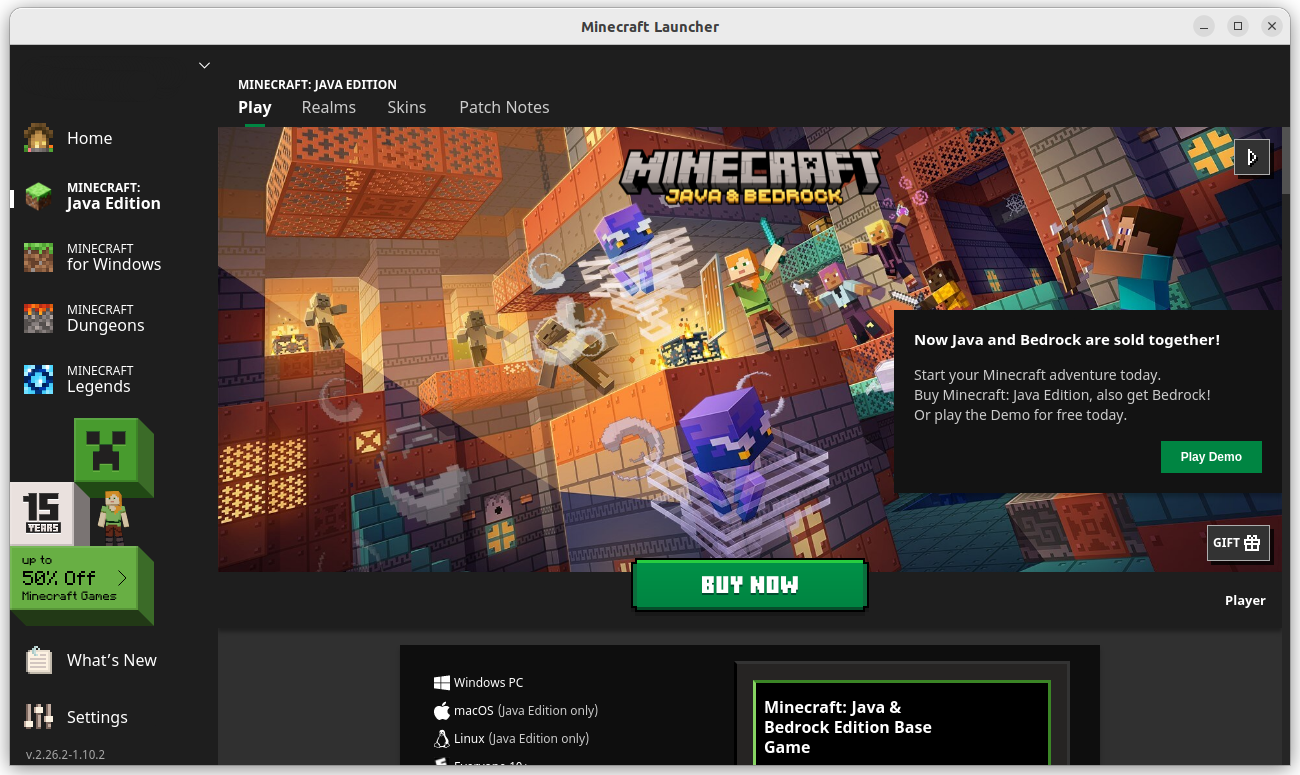
After the v2.26.2 update demo mode users can no longer access "Installation" tab in Minecraft: Java Edition tab, which means you can no longer switch between versions or change the amount of memory Minecraft can access and etc before buying the game
Steps to reproduce:
- Open the Minecraft launcher and login into a Microsoft account that doesn't own Minecraft: Java and Bedrock. (If you don't have one create a new one)
- Switch to Minecraft: Java Edition tab.
- Notice that "Installation" tab is missing.
Expected result:
Just like in versions prior to v2.26.2 the "Installation" tab should be shown for all users, no matter if they own the game or not.
Observed result:
After the v2.26.2 update demo mode users can no longer access "Installation" tab in Minecraft: Java Edition tab, which means you can no longer switch between versions or change the amount of memory Minecraft can access and etc before buying the game.
Notes:
- This is only happening to users that don't own the game.
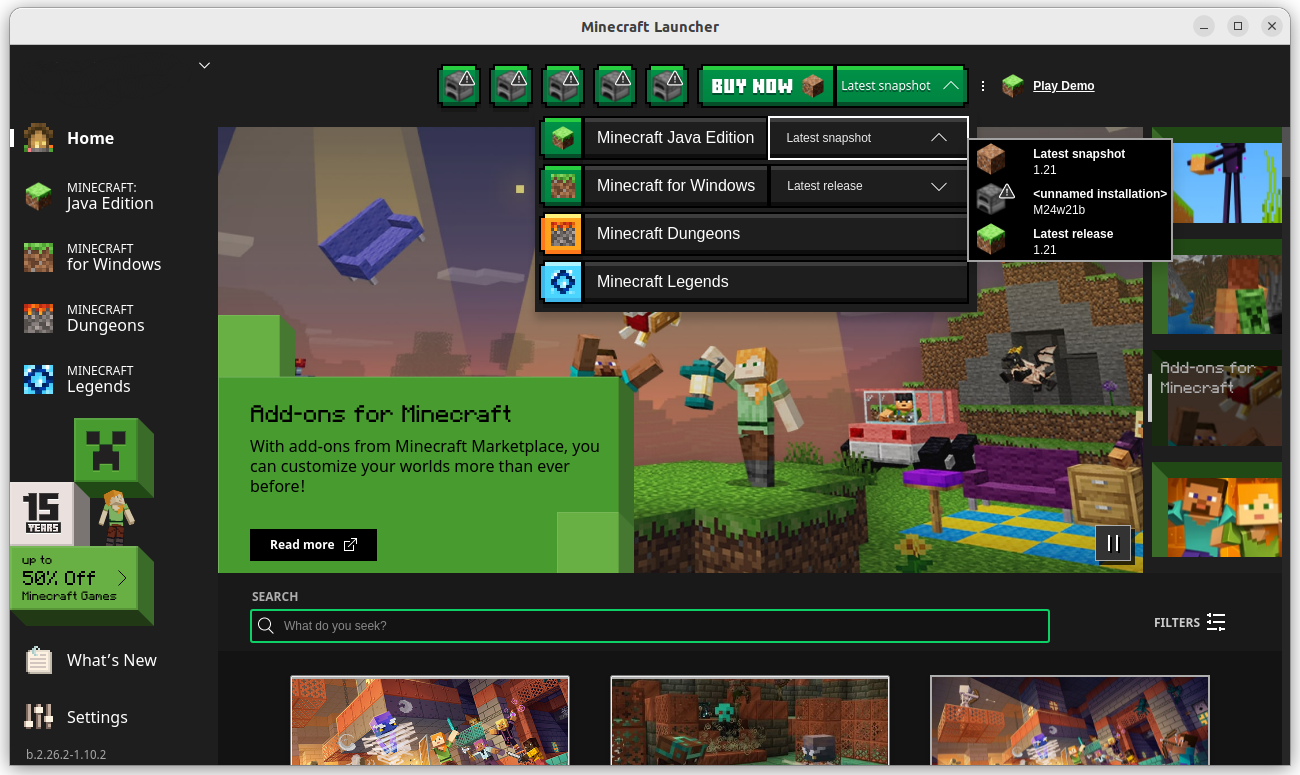
- You can still play snapshots and stable releases by clicking play on the home page, but you can't download old versions, change Minecraft instance folder, change window resolution upon start and change java arguments.
Linked Issues
is duplicated by1



Created Issue:
Minecraft: Java Edition tab no longer has "Installation" tab
Minecraft: Java Edition no longer has "Installation" tab
Steps to reproduce:
- Open the Minecraft launcher
- Switch to Java Editon tab
- Notice that Installations tab is missing
Notes:
This might only happen to users that don't own the game.
Minecraft: Java Edition no longer has "Installation" tab
Steps to reproduce:
- Open the Minecraft launcher
- Switch to Java Editon tab
- Notice that Installations tab is missing
Notes:
This might only happen to users that don't own the game.Minecraft: Java Edition no longer has "Installation" tab before v2.26.2 it had it.
Steps to reproduce:
- Open the Minecraft launcher
- Switch to Java Editon tab
- Notice that Installations tab is missing
Notes:
This might be only happening to users that don't own the game.
Minecraft: Java Edition no longer has "Installation" tab before
v2.26.2 it had it.Steps to reproduce:
- Open the Minecraft launcher
- Switch to Java Editon tab
- Notice that Installation
stab is missingNotes:
This might be only happening to users that don't own the game.
Minecraft: Java Edition tab no longer has "Installation" tab, before v2.26.2 it had it.
Steps to reproduce:
- Open the Minecraft launcher.
- Switch to Java Editon tab.
- Notice that "Installation" tab is missing.
Expected result:
The "Installation" tab should be shown in Minecraft: Java Edition tab.
Observed result:
The "Installation" tab is not shown in the Minecraft: Java Edition tab.
Notes:
This might be only happening to users that don't own the game.
Minecraft: Java Edition tab no longer has "Installation" tab, before v2.26.2 it had it.
Steps to reproduce:
- Open the Minecraft launcher.
- Switch to Java Editon tab.
- Notice that "Installation" tab is missing.
Expected result:
The "Installation" tab should be shown in Minecraft: Java Edition tab.
Observed result:
The "Installation" tab is not shown in the Minecraft: Java Edition tab.
Notes:
This might be only happening to users that don't own the game.
Minecraft: Java Edition tab no longer has "Installation" tab, before v2.26.2 it had it.
Steps to reproduce:
- Open the Minecraft launcher.
- Switch to Java Editon tab.
- Notice that "Installation" tab is missing.
Expected result:
The "Installation" tab should be shown in Minecraft: Java Edition tab.
Observed result:
The "Installation" tab is not shown in the Minecraft: Java Edition tab.
Notes:
- This might be only happening to users that don't own the game.
- You can still play, but not download other versions of Minecraft: Java Edition on the Home page.
v2.21.26.png
![[Mod] Greymagic27](../../../data/avatars/users/92875.png)
![[Bot] Arisa](../../../data/avatars/users/43007.png)
is duplicated by

Please tell me is that happen when we don't own Minecraft?
Minecraft: Java Edition tab no longer has "Installation" tab, before v2.26.2 it had it.Steps to reproduce:
Open theMinecraftlauncher.Switch to Java Editon tab.- Notice that "Installation" tab is missing.
Expected result:
The "Installation" tab should be shown in Minecraft: Java Edition tab.Observed result:
The "Installation" tab is not shown in the Minecraft: Java Edition tab.
Notes:
- This
might beonly happening to users that don't own the game.- You can still play
, but not download otherversionsofMinecraft: Java Edition onthe Home page.After the v2.26.2 update demo mode users can no longer access "Installation" tab in Minecraft: Java Edition tab, which means you can no longer switch between versions or change the amount of memory Minecraft can access and etc before buying the game
Steps to reproduce:
- Open the Minecraft launcher and login into a Microsoft account that doesn't own Minecraft: Java and Bedrock. (If you don't have one create a new one)
- Switch to Minecraft: Java Edition tab.
- Notice that "Installation" tab is missing.
Expected result:
Just like in versions prior to v2.26.2 the "Installation" tab should be shown for all users, no matter if they own the game or not.
Observed result:
After the v2.26.2 update demo mode users can no longer access "Installation" tab in Minecraft: Java Edition tab, which means you can no longer switch between versions or change the amount of memory Minecraft can access and etc before buying the game.
Notes:
- This is only happening to users that don't own the game.
- You can still play snapshots and stable releases by clicking play on the home page, but you can't download old versions, change Minecraft instance folder, change window resolution upon start and change java arguments.
Minecraft: Java Edition tabno longerhas "Installation" tab
![[Mod] turbo](../../../data/avatars/users/92867.png)
![[Mojang] Donuts1000](../../../data/avatars/users/18949.svg)
Thank you for your report!
We're tracking this issue in MCL-24379, so this ticket is being resolved and linked as a duplicate.
If you would like to add a vote and any extra information to the main ticket it would be appreciated.
If you haven't already, you might like to make use of the search feature to see if the issue has already been mentioned.
Quick Links:
📓 Bug Tracker Guidelines – 💬 Community Support – 📧 Mojang Support (Technical Issues) – 📧 Microsoft Support (Account Issues)
📓 Project Summary – ✍️ Feedback and Suggestions – 📖 Game Wiki
I'm unable to reproduce this. Please try reinstalling the launcher.
@Greymagic27 Unfortunately that didn't help. Maybe its only an issue on Linux or with users that don't own Minecraft?
I can't download it, when I activate the launcher this appears and it doesn't install, help
Same can’t change installation name and in general edit it since that tab was removed plz add it back
@Irondog625 Please don't report unrelated issues in the comments, instead create a new issue in the MCL project.
Can you explain why someone who doesn't own the game needs the installation tab? This tab is predominantly used by game owners to be able to configure their installations.
Sorry for late reply. Before if you downloaded the demo version of the game and the performance wasn't great you could try installing mods or allocating more memory to minecraft, now you will need to first buy the game to do those things, and if it still didn't help, you will need to do a refund, which can take up a few days, which can be a bit annoying. This change might have also made it harder to test java editon demo mode specific bugs, since you can no longer access snapshots.
@Donuts1000 to allocating more memory to minecraft for great performance
I too can confirm that it creates an issue.
Mojang, I can't follow the thought process, why a Demo User and a Full Version User would be different in this regard. Being able to set up test sessions is crucial too. At the end of the day, you want to make money, right?
I haven't bought any Minecraft Version yet. And I am very hesitant to do so. After having to put in hours to get the previous launcher the Demo even started, woop the next update got forced onto me. I lost the setup with which 1.20.6 was finally up and running and ready to be tested out. And pouf all gone. So I have to do it all over again with 1.21, just to be able to test a Demo Version of the Game. Not fun.
And the worst part is, this issue goes deeper. After a little research it turns out: losing the access to versions and in conclusion to play worlds too, is sadly very common. Even Full Version Users encountered similar issues several times over the years. They had to put in the effort to get their versions and worlds access back into the launcher installation area via workarounds. Sadly their tutorials couldn't rescue my setup.
Breaking User Installation Lists. Now breaking Installation Tabs. How often will it break in the future again? It makes it hard to have fun. I wait, if the launcher gets fixed or if I have to pass on this purchase. Time will tell.
have a nice week
Workaround specifically for Demo Mode Users (Java)
A. If you are completely new to Minecraft, want to try it out in peace and finally know what all the fuzz is about, here is what you have to do:
1• create a new folder for your Minecraft stuff
2• download the Windows 7/8 Launcher from the Minecraft Net Page, this version is far more stable and doesn't run into conflicts with itself, when you first setup your Microsoft Account for the first time, put a copy of the downloaded Exe in the folder you have created for your Game
if you don't have Java installed yet, Java 17 will be currently fine for Vanilla Playing even with 1.21, you will find links in good tutorials too, you can use customization tools, trying out modded stuff most likely requires higher Java Versions
3• before you start the Launcher in your Game Folder, right click it, go into Properties under Compatibility and activate the Compatibility Mode for Windows 8, that will stop update messages, but not auto-updates entirely, makes a cleaner User Interface nonetheless
4• start the Launcher and let it do it's thing, it will update itself and create some smaller folders
5• you will be prompted to create an Player Account or Login, choose Microsoft, the Mojang isn't an option anymore
6• after you finish, you should be able to navigate to Minecraft Java to Installations and download the Version you want to try out
(after downloading it, the Version should be listed in the Installation List of the Launcher, to make it the Default Version for your Demo Session click on the "Play" Field, it will start the Demo Game)
7• the Launcher will most likely close itself, you can reopen it right away and do your Profile and Launcher Settings, if you haven't yet, keep the launched Game Screen open to prevent a second Launcher Update that messes up your Settings
(make sure that closing the Launcher when starting the Game is enabled, it makes things easier overall)
8• start a Demo World and Save Quit right away without closing the Game entirely, you can now create a shortcut in your Game Folder to the .minecraft Folder
PC File Explorer >> C: >> Users >> your PC Profile Folder >> AppData (Hidden Items enabled) >> Roaming >> .minecraft
make a Backup of the versions Folder and you will have to manage the saves Folder manually in all regards too, importing a Custom World and DataPacks and ResourcePacks is possible
9• whenever you start the Launcher afterwards to play, it is advised to do it offline to prevent that your Setup gets messed up
when the Game runs, you can turn on WLAN or have a LAN Party
B. If you already had the Launcher before this Update and don't have an older manifest.json, an older launcher_profiles.json for example that might can be used to recover your Installation Listings per copy paste methods or don't have any backups whatsoever:
1• make a Backup at least of the versions and saves Folders
2• clear your system from .minecraft and your Gaming Folders to make a fresh Setup like above
3• import your backed up files and you should have your old stuff back in the Launcher
4• whenever you start the Launcher afterwards to play, it is advised to do it offline to prevent that your Setup gets messed up
when the Game runs, you can turn on WLAN or have a LAN Party
Recovery of old Installation Listings for Full Version Users is a little different. I can't help with that as much.
Seems like it got fixed in b.2.27.11 beta