Writing on a sign crashes the game
On the TF300T model, specifically Android version 4.0.3 (stock ROM), entry of text into signs causes the game to hang and then crash. This could possibly have to do with the way the OS handles keyboard input. When Minecraft is started again and the world is re-opened, a blank sign is in spot where I placed it before the crash. I have sent a bug report via Android 4.0's built-in bug-reporting system, but I thought I would mention it here as well.
UPDATE: I have upgraded the firmware to 4.1.1 (still ASUS stock ROM), and signs no longer cause the game to crash. From the comments, I have determined that this is an error specific to Android 4.0.3/.4's virtual keyboard. I was able to update and circumvent this bug, but others may not be so fortunate. Therefore, this issue should not be closed until the problem is fixed for Android 4.0, as I am sure that many devices have not been updated to Jelly Bean.
Linked Issues
is duplicated by18
 MCPE-1271when i try to write on a sign it causing game to close.DuplicateMCPE-1282When type on signs its force closeDuplicateMCPE-1283MCPE is crashing everytime when I write something on a sign!DuplicateMCPE-1411when i try to write a word on a sign it just says "minecraft pocket edition has stopped working "it does that for both survival and creativeDuplicateMCPE-1427Crash when writing on signDuplicateMCPE-1436Sign doesn't work on Android (ICS)DuplicateMCPE-1461Crash on writing signsDuplicateMCPE-1472Signs! NOOOO!DuplicateMCPE-14750.6.0 Sign CrashDuplicateMCPE-14770.6.0 Sign CrashDuplicateMCPE-1525Game crashes on signboardDuplicateMCPE-1537sign bugDuplicateMCPE-1541Signs don't work on android tabletsDuplicateMCPE-1545app crashesDuplicateMCPE-1554Sign crash!DuplicateMCPE-1573When someone joins a game and writes on a sign they crashDuplicateMCPE-1710When I write on a sign crashed MinecraftDuplicateMCPE-1781There is 3 Bugs/virus in my android samsung galaxy tabDuplicate
Attachments1

Created Issue:
Sign Crash
On the TF300 model, specifically, entry of text into signs causes the game to hang and then crash. This could possibly have to do with the virtual keyboard as I do not use a dock or Bluetooth keyboard. I have sent a bug report via Android 4.0's built-in bug-reporting system, but I thought I would mention it here as well.
On the TF300 model, specifically, entry of text into signs causes the game to hang and then crash. This could possibly have to do with the virtual keyboard as I do not use a dock or Bluetooth keyboard. When Minecraft is started again and the world is re-opened, a blank sign is in spot where I placed it before the crash. I have sent a bug report via Android 4.0's built-in bug-reporting system, but I thought I would mention it here as well.
On the TF300 model, specifically Android 4.0.3, entry of text into signs causes the game to hang and then crash. This could possibly have to do with the virtual keyboard as I do not use a dock or Bluetooth keyboard. When Minecraft is started again and the world is re-opened, a blank sign is in spot where I placed it before the crash. I have sent a bug report via Android 4.0's built-in bug-reporting system, but I thought I would mention it here as well.
On the TF300 model, specifically Android version 4.0.3, entry of text into signs causes the game to hang and then crash. This could possibly have to do with the virtual keyboard as I do not use a dock or Bluetooth keyboard. When Minecraft is started again and the world is re-opened, a blank sign is in spot where I placed it before the crash. I have sent a bug report via Android 4.0's built-in bug-reporting system, but I thought I would mention it here as well.
Sign CrashWriting on a sign crashes the game
On the TF300T model, specifically Android version 4.0.3 (stock ROM), entry of text into signs causes the game to hang and then crash. This could possibly have to do with the virtual keyboard as I do not use a dock or Bluetooth keyboard. When Minecraft is started again and the world is re-opened, a blank sign is in spot where I placed it before the crash. I have sent a bug report via Android 4.0's built-in bug-reporting system, but I thought I would mention it here as well.
On the TF300T model, specifically Android version 4.0.3 (stock ROM), entry of text into signs causes the game to hang and then crash. This could possibly have to do with the virtual keyboard as I do not use a dock or Bluetooth keyboard. When Minecraft is started again and the world is re-opened, a blank sign is in spot where I placed it before the crash. I have sent a bug report via Android 4.0's built-in bug-reporting system, but I thought I would mention it here as well.
UPDATE: I have upgraded the firmware to 4.1.1 (still ASUS stock ROM), and signs no longer cause the game to crash. From the comments, I have determined that this is an error specific to Android 4.0.3/.4's virtual keyboard. I was able to update and circumvent this bug, but others may not be so fortunate. Therefore, this issue should not be closed until the problem is fixed for Android 4.0, as I am sure that many devices have not been updated to Jelly Bean.
On the TF300T model, specifically Android version 4.0.3 (stock ROM), entry of text into signs causes the game to hang and then crash. This could possibly have to do with the
virtual keyboard as I do not use a dock or Bluetoothkeyboard. When Minecraft is started again and the world is re-opened, a blank sign is in spot where I placed it before the crash. I have sent a bug report via Android 4.0's built-in bug-reporting system, but I thought I would mention it here as well.UPDATE: I have upgraded the firmware to 4.1.1 (still ASUS stock ROM), and signs no longer cause the game to crash. From the comments, I have determined that this is an error specific to Android 4.0.3/.4's virtual keyboard. I was able to update and circumvent this bug, but others may not be so fortunate. Therefore, this issue should not be closed until the problem is fixed for Android 4.0, as I am sure that many devices have not been updated to Jelly Bean.
On the TF300T model, specifically Android version 4.0.3 (stock ROM), entry of text into signs causes the game to hang and then crash. This could possibly have to do with the way the OS handles keyboard input. When Minecraft is started again and the world is re-opened, a blank sign is in spot where I placed it before the crash. I have sent a bug report via Android 4.0's built-in bug-reporting system, but I thought I would mention it here as well.
UPDATE: I have upgraded the firmware to 4.1.1 (still ASUS stock ROM), and signs no longer cause the game to crash. From the comments, I have determined that this is an error specific to Android 4.0.3/.4's virtual keyboard. I was able to update and circumvent this bug, but others may not be so fortunate. Therefore, this issue should not be closed until the problem is fixed for Android 4.0, as I am sure that many devices have not been updated to Jelly Bean.

is duplicated by

is duplicated by
![[Mod] Ezekiel (ezfe)](../../../data/assets/gravatar/ezekielelin.jpeg)

is duplicated by
is duplicated by
 Johan Bernhardsson
is duplicated by
is duplicated by
is duplicated by
is duplicated by
is duplicated by
is duplicated by
is duplicated by
is duplicated by
is duplicated by
is duplicated by
is duplicated by
is duplicated by
relates to
is duplicated by
is duplicated by
is duplicated by
Duplicate of MCPE-1249, please use the search function to see if your bug has already been submitted. Currently over 50% of tickets are being closed as duplicate.
Duplicate of MCPE-1249, please use the search function to see if your bug has already been submitted. Currently over 50% of tickets are being closed as duplicate.
Duplicate of MCPE-1249, please use the search function to see if your bug has already been submitted. Currently over 50% of tickets are being closed as duplicate.
Duplicate of MCPE-1249, please use the search function to see if your bug has already been submitted.
Duplicate of MCPE-1249, please use the search function to see if your bug has already been submitted. Currently over 50% of tickets are being closed as duplicate.
Duplicate of MCPE-1249, please use the search function to see if your bug has already been submitted. Currently over 50% of tickets are being closed as duplicate.
Duplicate of MCPE-1249, please use the search function to see if your bug has already been submitted. Currently over 50% of tickets are being closed as duplicate.
Duplicate of MCPE-1249, please use the search function to see if your bug has already been submitted. Currently over 50% of tickets are being closed as duplicate.
![[Mojang] Shoghi Cervantes](../../../data/assets/gravatar/shoghicp.jpeg)
Already submitted - MCPE-1249
Thanks.
Duplicate of MCPE-1249, please use the search function to see if your bug has already been submitted. Currently over 50% of tickets are being closed as duplicate.
Don't repost the same bug (MCPE-1540)
Duplicated by MCPE-1249
Duplicate of MCPE-1249, please use the search function to see if your bug has already been submitted. Currently over 50% of tickets are being closed as duplicate.
Duplicate of MCPE-1249, please use the search function to see if your bug has already been submitted. Currently over 50% of tickets are being closed as duplicate.
Duplicate of MCPE-1249, please use the search function to see if your bug has already been submitted. Currently over 50% of tickets are being closed as duplicate.
Please review the guidelines before reporting issues:
- Duplicate of
MCPE-1249,MCPE-608, please use the search function to see if your bug has already been submitted. Currently over 55% of tickets are being closed as duplicate. - One issue per ticket
- This site is for bug reports only. For feature suggestions/changes please use the MineCraft Forums: Suggestions.
I have the same issue with the Pantech burst.
I can confirm this issue.
HTC Sensation XE, Android 4.0.3.
This makes the situation a bit more complex, considering that your devices have completely different hardware, that leads me to believe it is some sort of incompatibility with the virtual keyboard. Jonathan, have you upgraded your phone to ICS?
Same issue,
Samsung Galaxy S2 using Swiftkey and Android 4.0.4.
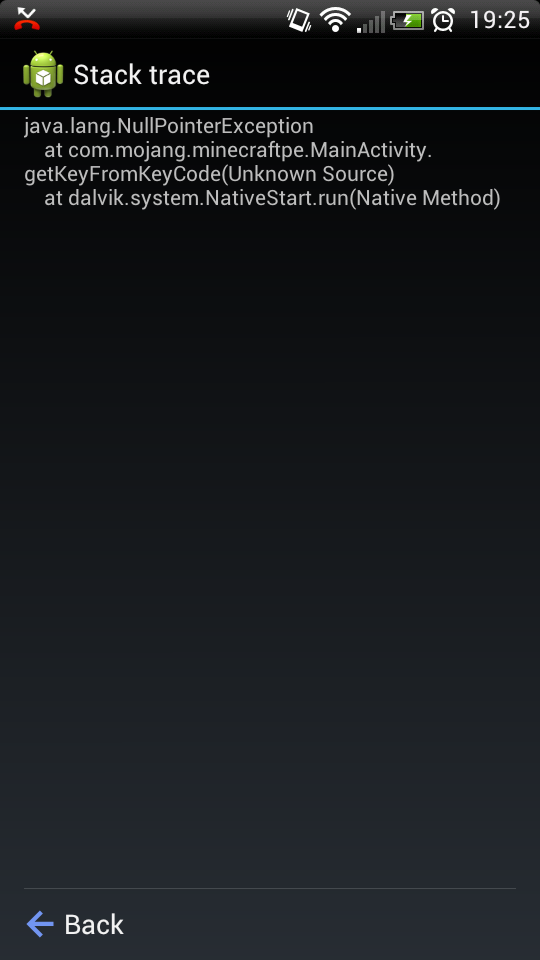
Here is some additional information which might help fix the problem?
https://www.dropbox.com/s/4ri67tm6l8jxh9y/2013-01-30_19-25-45.png
Firmware upgrade (to Android 4.1.1) fixed it for me, but I doubt Jelly Bean is available for everybody else. This is probably an ICS-only issue. My bug report has been updated to reflect this information.
Same issue.
Lenovo A1 running Android 4.0.4.
No Android updates are available.
Same issue on ASUS TF100 running Android 4.0.3 when entering text on signs. No updates available.
I figured this would be a problem for many older devices that just barely made the cut for ICS. I guess I should consider myself lucky that ASUS decided to support my device.
I'm having this issue too.
Device: Sony Xperia P
Android version: 4.0.4
Keyboards tested: Xperia Keyboard and GO Keyboard
According to ASUS support, TF101 tops out at Android 4.0.3. Hoepfully, development can fix this bug for the signs so I can use it.
Confirmed same issue on Evo V Android 4.0.3.
I can't update so I won't be able t write on signs. Is there another way to fix this??
Note:
Anybody here with the issue has Ice Cream Sandwich(4.0.x)
I am pretty sure 0.6.1 is on the way, that should fix the error, the wait is for the updates getting verified by Apple for iTunes and Google for Play.
This is hopefully fixed for 0.6.1 (available for Android users at this moment )!
)!
I can't update my tablet I have the insignia flex tablet. And it still crashes I have 0.4.0 tablet ice cream sandwich.
Never mind
Updating the game to 1.6.1 fixed the issue for me.
This is now a bug for the Kindle Fire HD. It is happening every time you place a sign. This affects 0.7.1
I haven't noticed that?!?Unable to render embedded object: File (I haven't noticed that?) not found.?!
Can this please be re-opened?