 MCPE-12610
Maps show wrong player location
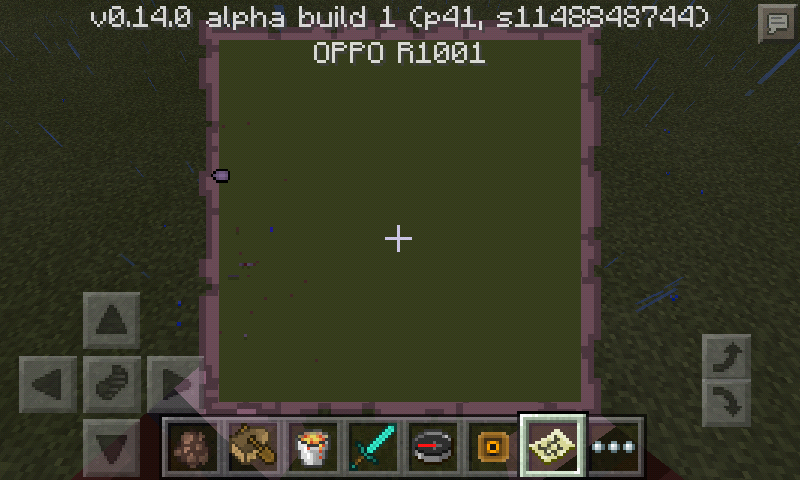
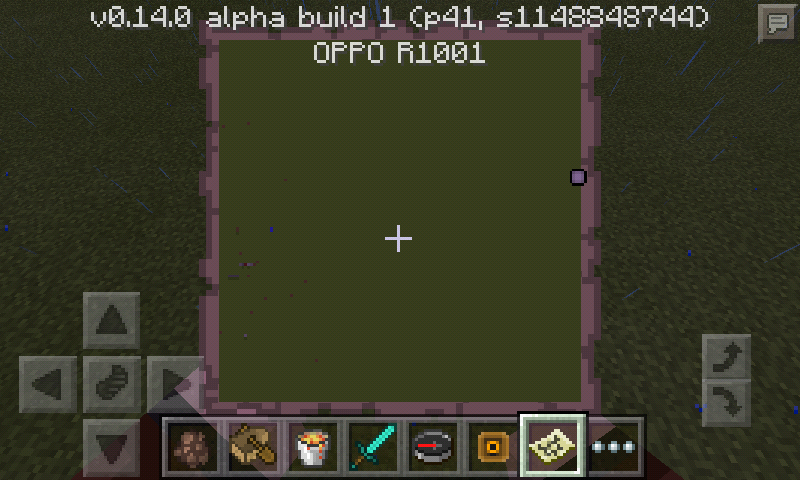
When you closer to the map border, then walk outside the map border, it will show you (the circle arrow when outside the map border) on the wrong location. Ex: I go to the left, the circle arrow pointed on the right.
gatharian added:
After 0.14.0 build 4; The dot on the map that represents you does not move at all, but the map fills out as you move around. By the way, I did NOT upgrade my map in the anvil and the pointer still shows. (see new photo attached)
Linked Issues
is duplicated by4

Created Issue:
Maps show wrong player location
When you is closer to the map border, then walk outside map border, it will show you on the wrong location.
When you
iscloser to the map border, then walk outside map border, it will show youon the wrong location.When you closer to the map border, then walk outside the map border, it will show you (the circle arrow when outside the map border) on the wrong location. Ex: I go to the left the circle arrow pointed on the left.
When you closer to the map border, then walk outside the map border, it will show you (the circle arrow when outside the map border) on the wrong location. Ex: I go to the left the circle arrow pointed on the
left.When you closer to the map border, then walk outside the map border, it will show you (the circle arrow when outside the map border) on the wrong location. Ex: I go to the left, the circle arrow pointed on the right.

relates to
When you closer to the map border, then walk outside the map border, it will show you (the circle arrow when outside the map border) on the wrong location. Ex: I go to the left, the circle arrow pointed on the right.
After 0.14.0 build 4.
The dot on the map that represents you does not move at all, but the map fills out as you move around.
When you closer to the map border, then walk outside the map border, it will show you (the circle arrow when outside the map border) on the wrong location. Ex: I go to the left, the circle arrow pointed on the right.
gatharian added:
After 0.14.0 build 4.
The dot on the map that represents you does not move at all, but the map fills out as you move around.
When you closer to the map border, then walk outside the map border, it will show you (the circle arrow when outside the map border) on the wrong location. Ex: I go to the left, the circle arrow pointed on the right.
gatharian added:
After 0.14.0 build 4.
The dot on the map that represents you does not move at all, but the map fills out as you move around.When you closer to the map border, then walk outside the map border, it will show you (the circle arrow when outside the map border) on the wrong location. Ex: I go to the left, the circle arrow pointed on the right.
gatharian added:
After 0.14.0 build 4; The dot on the map that represents you does not move at all, but the map fills out as you move around.
When you closer to the map border, then walk outside the map border, it will show you (the circle arrow when outside the map border) on the wrong location. Ex: I go to the left, the circle arrow pointed on the right.
gatharian added:
After 0.14.0 build 4; The dot on the map that represents you does not move at all, but the map fills out as you move around. (see new photo attached)
Screenshot_2016-01-29-23-01-56.png
relates to
When you closer to the map border, then walk outside the map border, it will show you (the circle arrow when outside the map border) on the wrong location. Ex: I go to the left, the circle arrow pointed on the right.
gatharian added:
After 0.14.0 build 4; The dot on the map that represents you does not move at all, but the map fills out as you move around. By the way, I did NOT upgrade my map in the anvil and the pointer still shows. (see new photo attached)
relates to
is duplicated by
relates to

is duplicated by

![[Bot] Arisa](../../../data/assets/gravatar/mustek2.png)

is duplicated by
![[Mojang] Mega_Spud (Jay Wells)](../../../data/avatars/users/92696.png)

Thank you for your report! However, this issue was reported earlier as MCPE-12610. Please add a comment summarizing your experience there. Consider doing a search next time, to check if your issue doesn't exist already.
"Duplicate" of MCPE-12610
Duplicate of MCPE-12610
"Duplicate" of MCPE-12610
I have a similar bug it appears after putting a map in an item frame. The only diference is that I then have two cursers (a green one which does not move and the normal white one).
My device: Samsung Galaxy Note 3/ Android Version: 5.0
Edit: I can make multiple green cursors and they do all show up where I placed a map in an item frame. Maybe this is meant to be like this for orientation?
Fixed in 0.14.0 build 5
I also have the same problem the green pointer just point at my location only when put in item frame...the green pointer not even moving when i holding it in my hand...it just stayed there and not moving at all.
The same happens to me but only after 3 or 4 upgrades.
Affects 0.14.0 as of
MCPE-13797Does this bug still appear in 0.14.3? Please respond.
Yes
Please respond and add the current version if you can reproduce this issue.
This ticket has been resolved as 'Cannot Reproduce' as it has not been updated recently (1 year+)