 MCPE-160718
'Old world type' worlds do not render properly
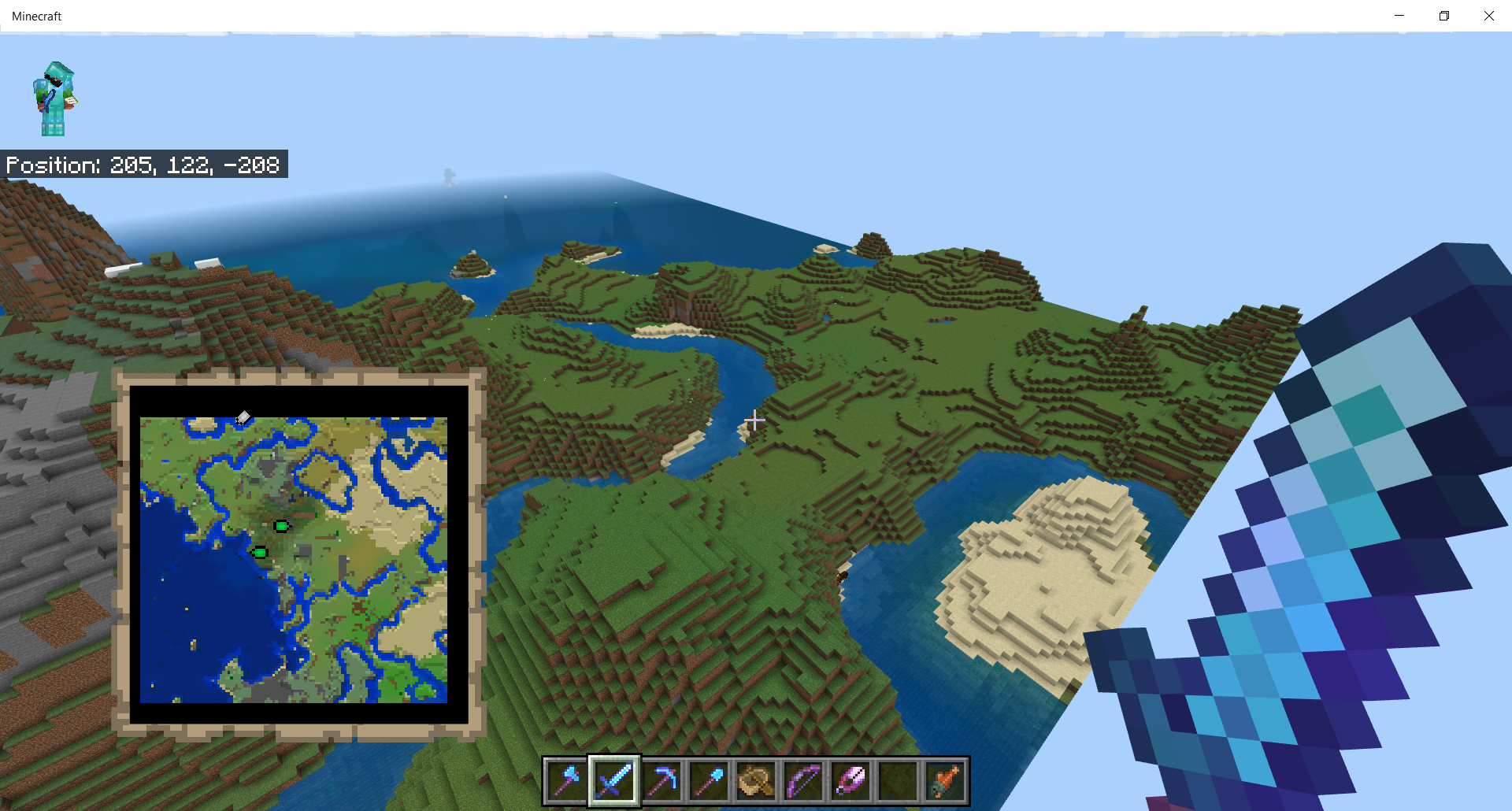
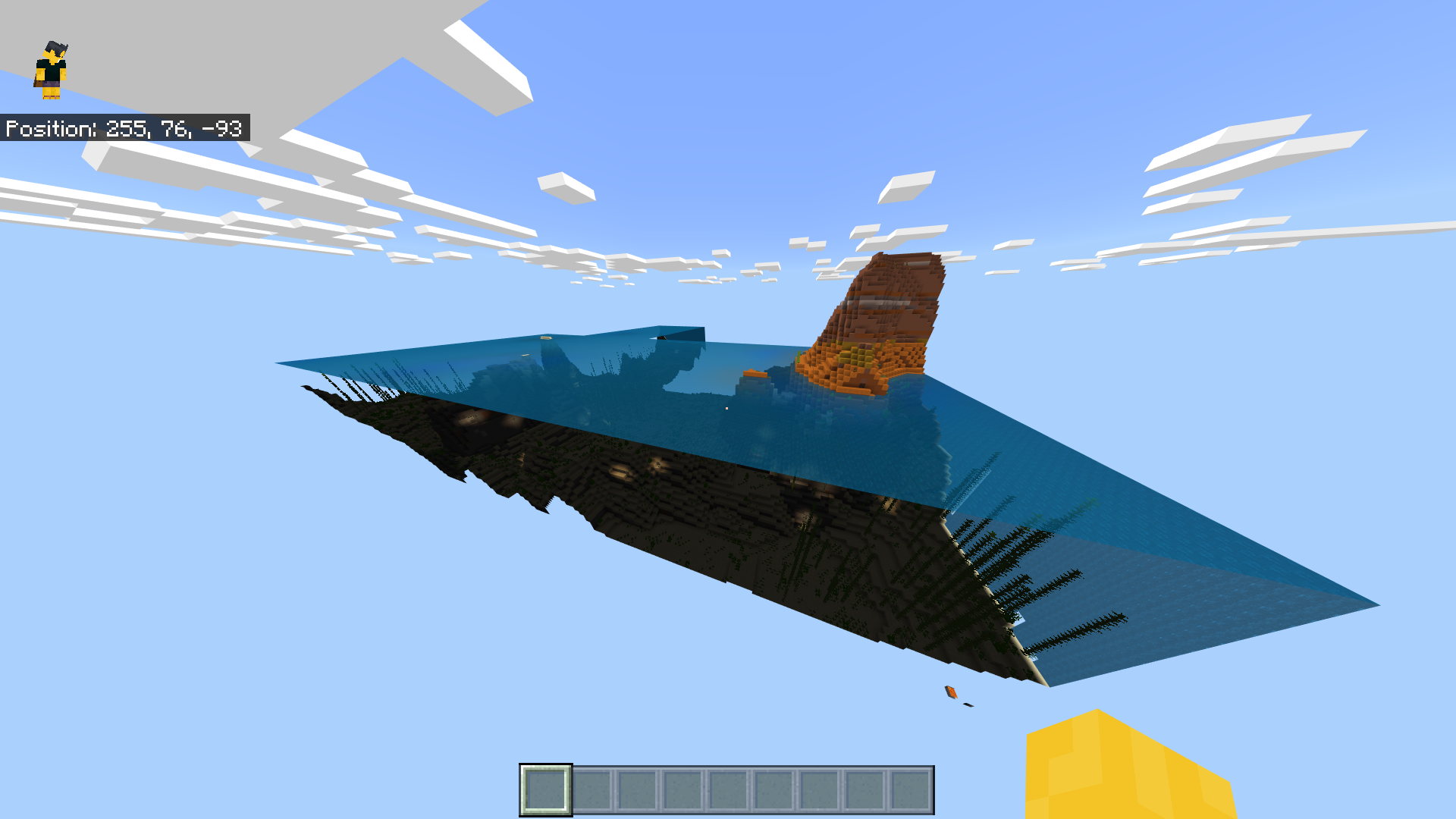
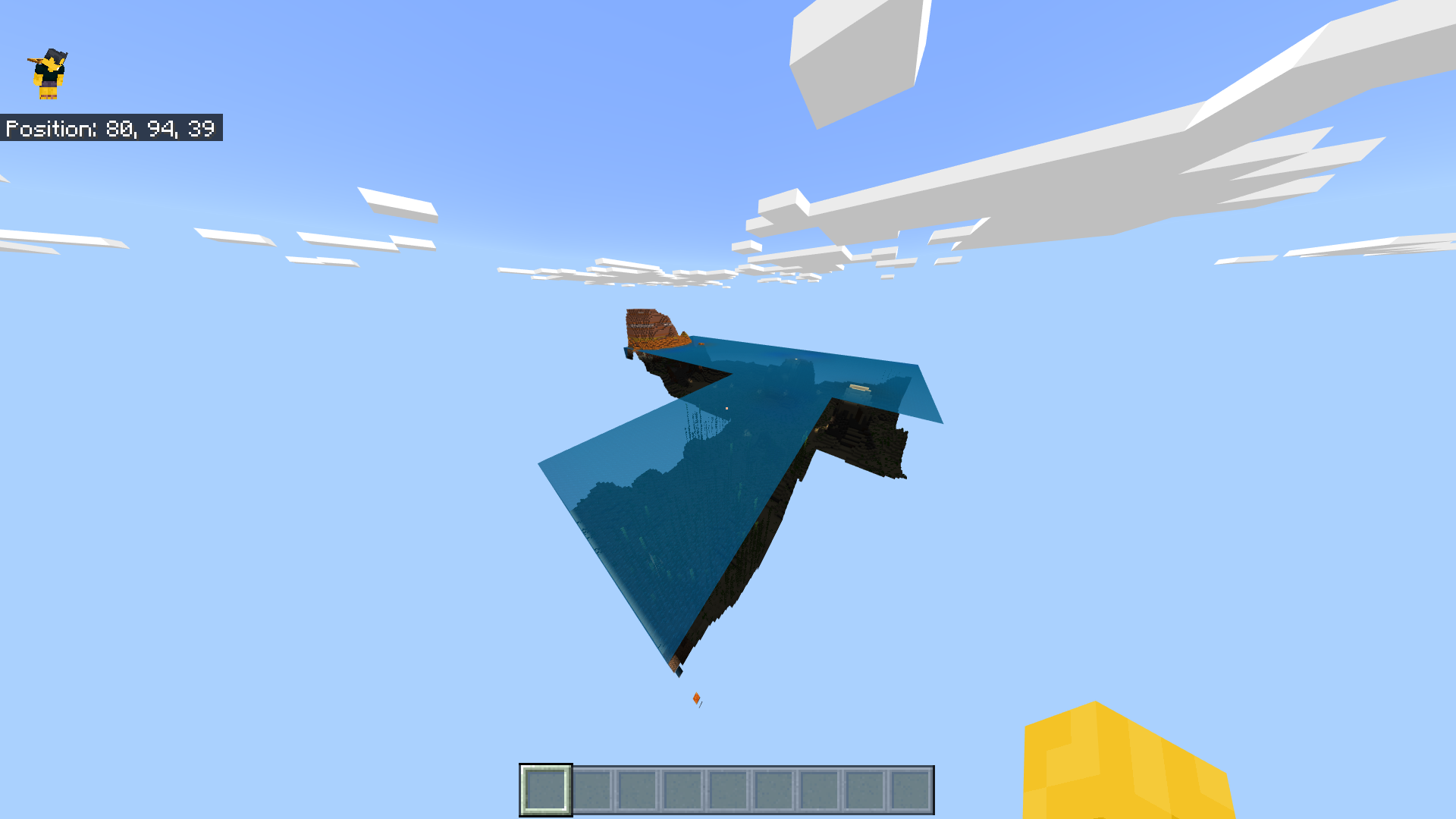
According to the "Old Worlds Types in Minecraft: Bedrock Edition - FAQ," existing worlds will continue to work. As of the 1.19.20 update, 'old world type' worlds no longer render properly. Instead of rendering chunks according to a player's render distance or the entire world if possible, the game only renders certain chunks. The non-rendered chunks still exist; however, they are invisible. Attempting to travel further will cause the player to be stopped by the same world border used to confine an "old" world.
Steps to Reproduce:
- Select an existing world save made with the 'old world type.'
- Select 'Play' to launch the world.
Observed Results:
The world isn't fully rendered with many of the chunks missing. A player cannot pass through areas that were once fully accessible due to the missing chunks messing with the world border.
Expected Results:
The world should render as normal.
Linked Issues


Created Issue:
'Old world type' worlds do not render properly
According to the "Old Worlds Types in Minecraft: Bedrock Edition - FAQ," existing worlds will continue to work. As of the 1.19.20 update, 'old world type' worlds no longer render properly. Instead of rendering chunks according to a player's render distance or the entire world if possible, the game only renders certain chunks. The non-rendered chunks still exist; however, they are invisible. Attempting to travel further will cause the player to be stopped by the same world border used to confine an "old" world.
Steps to Reproduce:
- Select an existing world save made with the 'old world type.'
- Select 'Play' to launch the world.
Observed Results:
The world isn't fully loaded with many of the chunks missing. A player cannot pass through areas that were once fully accessible due to the missing chunks messing with the world border.
**Expected Results:
The world should load as normal.
Attachments4
According to the "Old Worlds Types in Minecraft: Bedrock Edition - FAQ," existing worlds will continue to work. As of the 1.19.20 update, 'old world type' worlds no longer render properly. Instead of rendering chunks according to a player's render distance or the entire world if possible, the game only renders certain chunks. The non-rendered chunks still exist; however, they are invisible. Attempting to travel further will cause the player to be stopped by the same world border used to confine an "old" world.
Steps to Reproduce:
- Select an existing world save made with the 'old world type.'
- Select 'Play' to launch the world.
Observed Results:
The world isn't fully loaded with many of the chunks missing. A player cannot pass through areas that were once fully accessible due to the missing chunks messing with the world border.
**Expected Results:
The world should load as normal.
According to the "Old Worlds Types in Minecraft: Bedrock Edition - FAQ," existing worlds will continue to work. As of the 1.19.20 update, 'old world type' worlds no longer render properly. Instead of rendering chunks according to a player's render distance or the entire world if possible, the game only renders certain chunks. The non-rendered chunks still exist; however, they are invisible. Attempting to travel further will cause the player to be stopped by the same world border used to confine an "old" world.
Steps to Reproduce:
- Select an existing world save made with the 'old world type.'
- Select 'Play' to launch the world.
Observed Results:
The world isn't fully loaded with many of the chunks missing. A player cannot pass through areas that were once fully accessible due to the missing chunks messing with the world border.
Expected Results:
The world should load as normal.
According to the "Old Worlds Types in Minecraft: Bedrock Edition - FAQ," existing worlds will continue to work. As of the 1.19.20 update, 'old world type' worlds no longer render properly. Instead of rendering chunks according to a player's render distance or the entire world if possible, the game only renders certain chunks. The non-rendered chunks still exist; however, they are invisible. Attempting to travel further will cause the player to be stopped by the same world border used to confine an "old" world.
Steps to Reproduce:
- Select an existing world save made with the 'old world type.'
- Select 'Play' to launch the world.
Observed Results:
The world isn't fully loaded with many of the chunks missing. A player cannot pass through areas that were once fully accessible due to the missing chunks messing with the world border.
Expected Results:
The world should
loadas normal.According to the "Old Worlds Types in Minecraft: Bedrock Edition - FAQ," existing worlds will continue to work. As of the 1.19.20 update, 'old world type' worlds no longer render properly. Instead of rendering chunks according to a player's render distance or the entire world if possible, the game only renders certain chunks. The non-rendered chunks still exist; however, they are invisible. Attempting to travel further will cause the player to be stopped by the same world border used to confine an "old" world.
Steps to Reproduce:
- Select an existing world save made with the 'old world type.'
- Select 'Play' to launch the world.
Observed Results:
The world isn't fully loaded with many of the chunks missing. A player cannot pass through areas that were once fully accessible due to the missing chunks messing with the world border.
Expected Results:
The world should render as normal.
According to the "Old Worlds Types in Minecraft: Bedrock Edition - FAQ," existing worlds will continue to work. As of the 1.19.20 update, 'old world type' worlds no longer render properly. Instead of rendering chunks according to a player's render distance or the entire world if possible, the game only renders certain chunks. The non-rendered chunks still exist; however, they are invisible. Attempting to travel further will cause the player to be stopped by the same world border used to confine an "old" world.
Steps to Reproduce:
- Select an existing world save made with the 'old world type.'
- Select 'Play' to launch the world.
Observed Results:
The world isn't fully
loaded with many of the chunks missing. A player cannot pass through areas that were once fully accessible due to the missing chunks messing with the world border.Expected Results:
The world should render as normal.
According to the "Old Worlds Types in Minecraft: Bedrock Edition - FAQ," existing worlds will continue to work. As of the 1.19.20 update, 'old world type' worlds no longer render properly. Instead of rendering chunks according to a player's render distance or the entire world if possible, the game only renders certain chunks. The non-rendered chunks still exist; however, they are invisible. Attempting to travel further will cause the player to be stopped by the same world border used to confine an "old" world.
Steps to Reproduce:
- Select an existing world save made with the 'old world type.'
- Select 'Play' to launch the world.
Observed Results:
The world isn't fully rendered with many of the chunks missing. A player cannot pass through areas that were once fully accessible due to the missing chunks messing with the world border.
Expected Results:
The world should render as normal.
![[Helper] lillybeacon](../../../data/avatars/users/93893.png)
![[Mod] OcelotOnesie](../../../data/avatars/users/43220.png)
is duplicated by
![[MCQA] Bartłomiej Słodkowski](../../../data/avatars/users/18941.svg)
relates to
Minecraft 12_28_2024 7_56_03 PM.png
![[Bot] Arisa](../../../data/avatars/users/43007.png)
Thank you for your report!
We're tracking this issue in MCPE-160718, so this ticket is being resolved and linked as a duplicate.
If you would like to add a vote and any extra information to the main ticket it would be appreciated.
If you haven't already, you might like to make use of the search feature to see if the issue has already been mentioned.
Quick Links:
📓 Bug Tracker Guidelines – 💬 Community Support – 📧 Mojang Support
📓 Project Summary – ✍️ Feedback and Suggestions – 📖 Game Wiki
– I am a bot. This action was performed automatically! The ticket was resolved by one of our moderators, and I left this message to give more information to you.
Thank you for your report!
We're resolving and linking this ticket forward as a duplicate of MCPE-160718, as that ticket contains more detailed information and/or has already been triaged by Mojang.
If you would like to add a vote and any extra information to the main ticket it would be appreciated.
Quick Links:
📓 Bug Tracker Guidelines – 💬 Community Support – 📧 Mojang Support
📓 Project Summary – ✍️ Feedback and Suggestions – 📖 Game Wiki
– I am a bot. This action was performed automatically! The ticket was resolved by one of our moderators, and I left this message to give more information to you.
Can confirm
The problem is happening again with Consoles as well
can confirm on one of my main worlds, rip
In 1.19.21
In 1.19.22
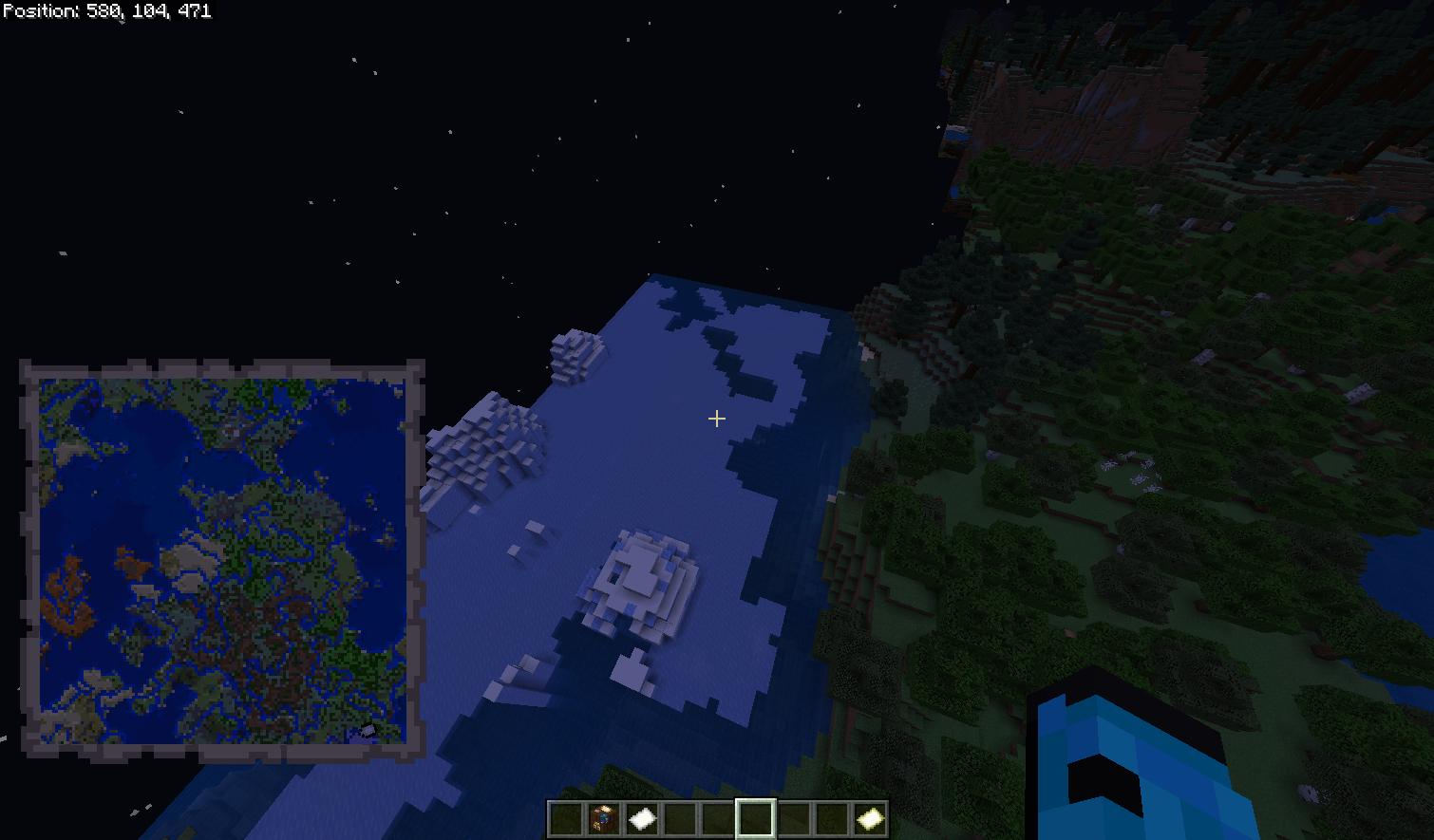
Discovered that using a map will make all of the chunks load normally. If you get rid of the map the chunks will stop rendering again.
In 1.19.30
In 1.19.31
In 1.19.40
In 1.19.50
In 1.19.51
In 1.19.63
From version 1.19.83
The Old Worlds load its normal defined 16 x 16 chunk world (256 x 256)
What the problem is here, is its rendering beyond the borders. Idk why it happens, however opening up a map allows them to continue to load and allows the player to go farther then expected. As much as I like an extended old world, I would prefer these chunks to not load, especially since reloading the world can cause them to unload visually again, and requires a new map (This becomes a real issue in an Old Survival world)
Thank you for your report!
However, this issue has been closed as Won't Fix.
If you'd like to post a suggestion or give further feedback, please visit the Minecraft Feedback Site or choose a link below.
Quick Links:
📓 Issue Guidelines – 💬 Mojang Support – 📓 Project Summary – 📧 Suggestions – 📖 Minecraft Wiki
this seems to have been fixed in a recent version(this is my old survival world)