 MCPE-31014
100% hotbar opacity isn't opaque enough
Attachments1
- Fixed
![[Mod] tryashtar](../../../data/avatars/users/41963.png) [Mod] tryashtar
[Mod] tryashtar- 33
- 12
- Confirmed
- 104135
- Windows
- Windows 10
- accessibility hotbar ui
1.13.0.1 Beta - 1.18.12 Hotfix
1.13.0.1 Beta 1.18.10.26 Beta 1.17.40.23 Beta 1.17.40.21 Beta 1.17.20.22 Beta 1.17.10 1.17.20.20 Beta 1.17.10.20 Beta 1.17.0.50 Beta 1.16.210.56 Beta 1.16.100.53 Beta 1.16.0.51 Beta 1.15.0.56 Beta 1.14.20 Hotfix 1.13.1 1.14.0.2 Beta 1.13.0.9 Beta 1.13.0.6 Beta 1.12.0.11 Beta 1.12.0.2 Beta 1.11.0.10 Beta 1.9.0.0 Beta 1.2.10.2 1.4.3.0 1.4.2.0 1.6.0.5 1.5.0.14 1.7.1 1.7.0 1.9.0 1.10.0 1.11.4 1.12.0 1.14.0 1.14.30 Hotfix 1.16.0 1.16.201 Hotfix 1.16.221 Hotfix 1.17.2 Hotfix 1.17.30 1.17.32 1.18.2 Hotfix 1.18.30.20 Beta 1.18.12 Hotfix- 1.20.50.23 Preview 1.20.50
Created Issue:
100% hotbar opacity isn't opaque enough
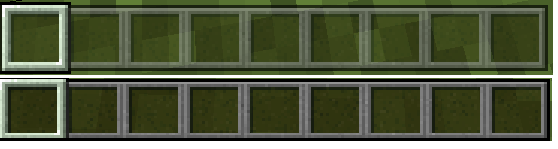
Even with 100% hotbar opacity, the hotbar is still more transparent than Java Edition. See the attached screenshot (top is Bedrock, bottom is Java).
Attachments1
- Unresolved
- Open
- Unconfirmed
- Windows
- Windows 10
- 1.2.10.2
![[MCPE Mod] Celesian](../../../data/avatars/users/81635.png)
![[Mojang] Mega_Spud (Jay Wells)](../../../data/avatars/users/92696.png)
Even with 100% hotbar opacity, the hotbar is still more transparent than Java Edition. See the attached screenshot (top is Bedrock, bottom is Java).
I can't confirm for myself at this time, but I have heard hearsay that implies there is an opacity of 65% defined in the hotbar UI file.
Even with 100% hotbar opacity, the hotbar is still more transparent than Java Edition. See the attached screenshot (top is Bedrock, bottom is Java).I can't confirm for myself at this time, but I have heard hearsay that implies there is an opacity of 65% defined in the hotbar UI file.
The bug
Even with 100% hotbar opacity, the hotbar is still more partially transparent.
Comparison screenshot shows the difference between Bedrock (top, 100% opacity) and Java (bottom).
I can't confirm for myself at this time, but I have heard hearsay that implies there is an opacity of 65% defined in the hotbar UI file.
The bug
Even with 100% hotbar opacity, the hotbar is still
morepartially transparent.Comparison screenshot shows the difference between Bedrock (top, 100% opacity) and Java (bottom).
I can't confirm for myself at this time, but I have heard hearsay that implies there is an opacity of 65% defined in the hotbar UI file.
The bug
Even with 100% hotbar opacity, the hotbar is still partially transparent.
Comparison screenshot shows the difference between
Bedrock (top, 100% opacity) and Java (bottom).I can't confirm for myself at this time, but I have heard hearsay that implies there is an opacity of 65% defined in the hotbar UI file.
The bug
Even with 100% hotbar opacity, the hotbar is still partially transparent.
Comparison screenshot shows the difference between current behavior and expected behavior at 100% opacity.
I can't confirm for myself at this time, but I have heard hearsay that implies there is an opacity of 65% defined in the hotbar UI file.
The bug
Even with 100% hotbar opacity, the hotbar is still partially transparent.
Comparison screenshot shows the difference between current behavior and expected behavior at 100% opacity.
I can't confirm for myself at this time, but I have heard hearsay that implies there is an opacity of 65%defined in thehotbarUI file.
![[Mod] OcelotOnesie](../../../data/avatars/users/43220.png)

I prefer the Java one.

The start and end cap textures on the edges of the hotbar use a lower opacity than intended. These textures still use the old 0.65 alpha value which caused MCPE-31014.
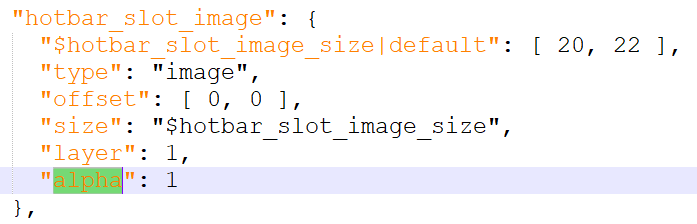
When MCPE-31014 was fixed, the developers set the "alpha" value on hotbar_slot_image to 1, but missed the "alpha" value on start_cap_image. This causes background colors to "bleed through" the edges of the hotbar:
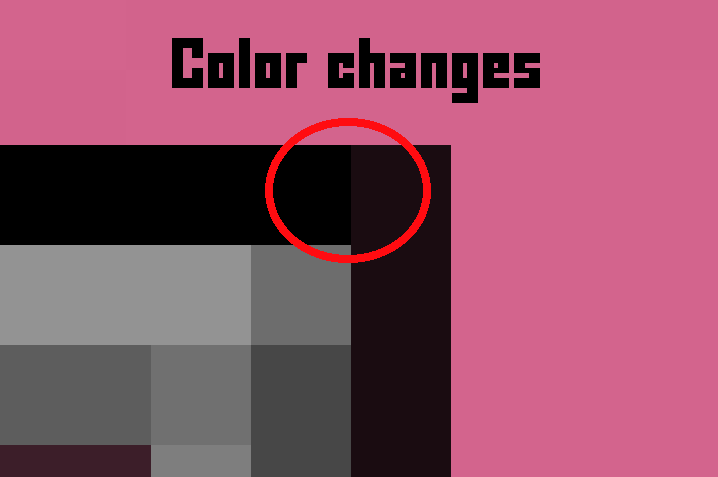
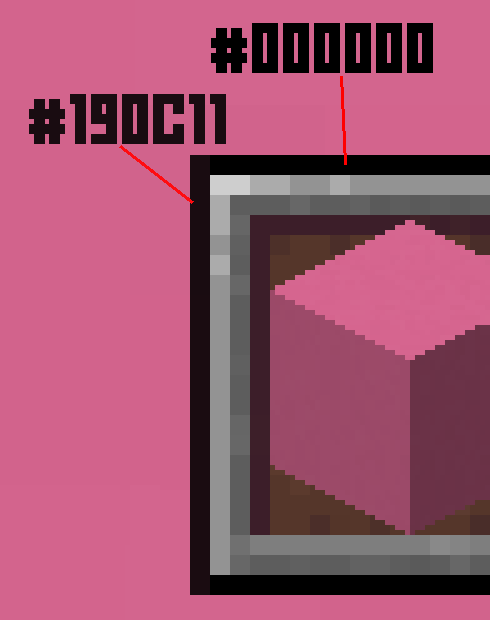
The misconfigued "alpha" value can be clearly seen in hud_screen.json:
Cap Image Element (Alpha = 0.65, Incorrect)

Slot Background Element (Alpha = 1.0, Correct)
Expected Result
The edges of the hotbar use the same opacity as the middle of the hotbar.
Observed Result
The edges of the hotbar are more transparent than the middle of the hotbar.
Confirmed on w10
Not all decisions between the two teams must be the same. This might be intentional.
This is unrelated to Java parity (Java doesn't even have a slider for this). The bug is that the opacity is set to 100%, but the result is not 100% opaque. Screenshots are for comparison.
I don't know it would be console edition. I think there is settings for future transparency i suggest this would be change it better by default to 0% or something.
Affects 1.11.4.
This is intentional, the hotbar was intentionally made more transparent than Java way back in the 0.8.0 update
Affects 1.12.0.
Affects 1.13.0.6 Beta.
This is intentional behaviour as you can do the same on Java through the hotbar.
Nope. This is a bug. I have a fully opaque hot bar.
I prefer the Java one
Affects 1.18.20.27
Affects 1.18.12
i mean im pretty sure this is intentional but if not
affects 1.19.60
Affects 1.20.30
Fixed in 1.20.50.23
I’m 100% sure that this is an intentional bedrock edition exclusive feature, and it was originally added in 0.8.0 and improved around 0.13.0 and looks way better and cleaner than fully opaque hotbar, I this feature should come back to the game.
@angel96444 HUD Opacity in Video Settings.
Caramel Sweet HUD opacity in video settings change opacity of whole HUD, not just hotbar slot texture, and makes it harder to see items in slots since they are also becoming transparent
@angel96444 Changing the HUD opacity does make the items transparent, but as soon as you change items the hotbar becomes opaque again and fades back to the set transparency. When this was originally reported, there was a separate slider for hotbar opacity. They probably removed the separate hotbar opacity slider because of the fading behavior.
Caramel Sweet Yes, and it's weird that it becomes opaque after changing item, and that it affects items in the first place, I think this feature should be reworked or at least they should bring back transparent hotbar, or maybe add a slider that only changes hotbar slots opacity but not whole HUD. I don't get it why people had problems with it in the first place though, like it didn't affect anything except hotbar and looked better imo