Multiplayer restricted skin error
When attempting to join a server, I get a multiplayer restricted skin error even though I am using one of the two default skins that says is usable. Once I select the other skin, I can tap on a server and it will then attempt to connect, but it never does and says a timeout occurred. This happens if I try to connect to my home server or an external one as well.
Linked Issues
is duplicated by20
 BDS-1304I play on a server with other people and sometimes it won’t let me on the server because the skin I'm wearing isn’t available cross-platform. I guess Steve isn’t available cross platform. Please fix this.Duplicate
 MCPE-48573Multiplayer Not WorkingDuplicateMCPE-48714I only use default skins but multiplayer has permanently been disabled on my world due to a “restricted content pack”DuplicateMCPE-48793"Multiplayer game" is disabled won't let you enable and cant use default skins DuplicateMCPE-49552Multiplayer deactivated DuplicateMCPE-49665Multiplayer is disabled and will not turn onDuplicateMCPE-49714Multiplayer and skin glitchDuplicateMCPE-49774Skin Problem in minecraftDuplicateMCPE-50009Skin not allowed in multiplayerDuplicateMCPE-50171Skin restricting multiplayer, why ?DuplicateMCPE-50183Multyplayer is switching off when I'm entering the worldDuplicateMCPE-51041 Skin restriction problem McpeDuplicateMCPE-51961Default skins are "Multiplayer Restricted"DuplicateMCPE-53175Restricted SkinDuplicateMCPE-53910Cannot play multiplayer in Minecraft due to the skin not being allowed even though the basic skins are being used.DuplicateMCPE-54279Multiplayer Restricted SkinDuplicateMCPE-59884My skin is restricted to multiplayer.DuplicateMCPE-61019Multiplayer restricted notif with old mashup packsDuplicateMCPE-67202Restricted multiplayer skinDuplicateMCPE-84086Multiplayer restricted skin fix pleaseDuplicate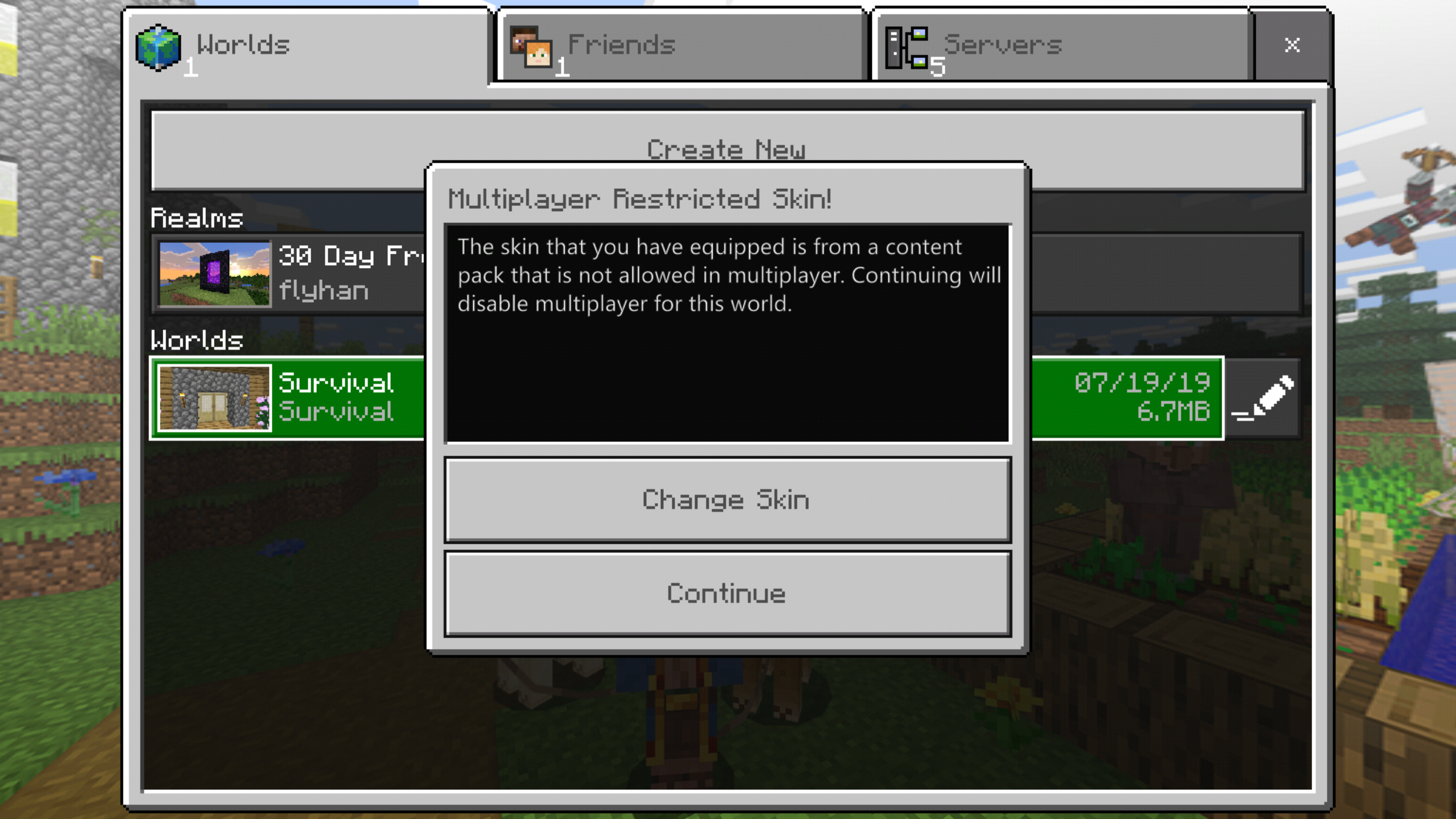



Created Issue:
Multiplayer restricted skin error
When attempting to join a server, I get a multiplayer restricted skin error even though I am using one of the two default skins that says is usable. Once I select the other skin, I can tap on a server and it will then attempt to connect, but it never does and says a timeout occurred. This happens if I try to connect to my home server or an external one as well.

![[Mojang] Mega_Spud (Jay Wells)](../../../data/avatars/users/92696.png)
relates to
![[Mod] Neko](../../../data/avatars/users/92901.png)
is duplicated by
![[MCPE Mod] Celesian](../../../data/avatars/users/81635.png)
is duplicated by
relates to
is duplicated by
is duplicated by
relates to
is duplicated by
is duplicated by
![[Mod] LateLag](../../../data/avatars/users/92884.png)
[Fixed in 1.13] Multiplayer restricted skin error
is duplicated by
is duplicated by
is duplicated by

[Fixed in 1.13]Multiplayer restricted skin error
![[Mod] OcelotOnesie](../../../data/avatars/users/43220.png)
is duplicated by
3.PNG
is duplicated by
![[Bot] Arisa](../../../data/avatars/users/43007.png)
is duplicated by
is duplicated by
Thank you for your report!
We're actually already tracking this issue at MCPE-48494, so we will resolve and link this ticket as a duplicate.
If you would like to add a vote and any extra information to the main ticket it would be appreciated.
If you haven't already, you might like to make use of the search feature to see if the issue has already been mentioned.
Thank you for your report!
We're actually already tracking this issue at MCPE-48494, so we will resolve and link this ticket as a duplicate.
If you would like to add a vote and any extra information to the main ticket it would be appreciated.
If you haven't already, you might like to make use of the search feature to see if the issue has already been mentioned.
Thank you for your report!
We're actually already tracking this issue at MCPE-48494, so we will resolve and link this ticket as a duplicate.
If you would like to add a vote and any extra information to the main ticket it would be appreciated.
If you haven't already, you might like to make use of the search feature, to see if the issue has already been mentioned.
Quick Links:
📓 Issue Guidelines – 💬 Mojang Support – 📧 Suggestions – 📖 Minecraft Wiki
Thank you for your report!
We're actually already tracking this issue at MCPE-48494, so we will resolve and link this ticket as a duplicate.
If you would like to add a vote and any extra information to the main ticket it would be appreciated.
If you haven't already, you might like to make use of the search feature, to see if the issue has already been mentioned.
Quick Links:
📓 Issue Guidelines – 💬 Mojang Support – 📧 Suggestions – 📖 Minecraft Wiki
We're already tracking this issue at MCPE-48494, so I will resolve and link this ticket as a duplicate.
I'm sorry it's taken a while to resolve this problem, but creating a ticket here to complain about it won't accomplish anything useful. The bug tracker only collects technical information about bugs and forwards it to the developers. We're not a feedback site and we don't have a channel for passing your feedback to Community Management, who are the group responsible for concerns of this type.
Quick Links:
📓 Issue Guidelines – 💬 Community Support – 📧 Customer Support – 📖 Game Wiki
Thank you for your report!
We're already tracking this issue at MCPE-48494, so I will resolve and link this ticket as a duplicate.
If you would like to add a vote and any extra information to the main ticket it would be appreciated.
If you haven't already, you might like to make use of the search feature to see if the issue has already been mentioned.
Quick Links:
📓 Issue Guidelines – 💬 Community Support – 📧 Customer Support – 📖 Game Wiki
Thank you for your report!
However, this issue has been closed as a Duplicate of MCPE-48494.
Please add a vote and any new information to the main ticket, which will be updated accordingly.
If you have not, you might like to make use of the search feature before making a new ticket, as it's likely that the issue has been reported already.
Quick Links:📓 Issue Guidelines – 💬 Mojang Support – 📧 Suggestions – 📖 Minecraft Wiki
Thank you for your report!
We're actually already tracking this issue under MCPE-48494.
If you would like to add a vote and any extra information to the main ticket it would be appreciated.
If you haven't already, you might like to make use of the search feature to see if the issue has already been mentioned.
Quick Links:
📓 Issue Guidelines – 💬 Community Support – 📧 Customer Support – 📖 BDS Wiki – 📖 FAQs
Thank you for your report!
We're tracking this issue in MCPE-48494, so this ticket is being resolved and linked as a duplicate.
If you would like to add a vote and any extra information to the main ticket it would be appreciated.
If you haven't already, you might like to make use of the search feature to see if the issue has already been mentioned.
Quick Links:
📓 Issue Guidelines – 💬 Community Support – 📧 Customer Support – ✍️ Feedback and Suggestions – 📖 Game Wiki
Thank you for your report!
We're tracking this issue in MCPE-48494, so this ticket is being resolved and linked as a duplicate.
If you would like to add a vote and any extra information to the main ticket it would be appreciated.
If you haven't already, you might like to make use of the search feature to see if the issue has already been mentioned.
Quick Links:
📓 Issue Guidelines – 💬 Community Support – 📧 Customer Support – ✍️ Feedback and Suggestions – 📖 Game Wiki
Thank you for your report!
We're actually already tracking this issue at MCPE-48494, so I will resolve and link this ticket as a duplicate.
If you would like to add a vote and any extra information to the main ticket it would be appreciated.
If you haven't already, you might like to make use of the search feature to see if the issue has already been mentioned.
Quick Links:
📓 Issue Guidelines – 💬 Community Support – 📧 Customer Support – ✍️ Feedback and Suggestions – 📖 Game Wiki
![[MCQA] Kinga Izdebska](../../../data/avatars/users/18949.svg)
Is it still an issue? Does it happen on dedicated servers exclusively or mayber this ticket describes this issue MCPE-48494?
same problem here but I cant connect to a friends world neither with steve or alex but he can connect to my world
After I got the skin restriction error nobody could join my world that I had created
Is this happening with the default Alex and Steve skins? Also, is this only affecting players on iOS?
Additionally, is this happening because the skins are not quite loaded in fully when starting the game? (If you give the skin time to load in, you should be able to join servers without getting the issue.)
I am on iOS 12.3.1 and get it with my iPhone X and iPad Pro (1st gen).
It happens with both default skins. If I have Alex currently selected I have to select Steve and then try connecting again, although it never connects and always times out or says generating resources and then returns to the server selection screen. Same thing with Steve as the currently selected skin. Then I have to select Alex.
The error message appears right after I tap on any server (my local or external). Then it loads up the interface asking me to select a useable skin. I do let that screen fully load before selecting the other skin.
My devices have always been connected to the internet when I have tried to connect.
I have been having this issue on windows 10 edition and if I give the game time to load the skin in it is still saying that the skin is restricted. Aswell after it said that none of friends are able to join the world.
Just discovered that this issue occurs when I try to play a non-server game as well. However, in that instance, the game will let me continue without having to select a different skin.
Same happened to me but it broke my client. No-one can join my worlds anymore... (Windows 10)
to me its seems to have disabled multiplayer for that world but any other worlds are fine with the multiplayer.
I'm having the same issue as well. so I tried letting the skin load in and then went into the multiplayer world but was still unable to get past the 'locating server' part. Despite giving it up to 5 minutes it still would not join me in.
This is also happening on Android. I was using the Police Ofiicer skin from the packs, but I keep getting the warning. It's even done it to the Ginger and Alaska pack I have. App fully updated
Happening on Bedrock Android after the latest update. That message pops up even when wearing the other skins in the default skin pack that are not the basic Steve or Alex. I think this happens to me when I go into a world too fast when the Xbox Live account is still signing in. Happens with custom skins that I downloaded from a third party website, also with the Minecraft Earth skin, and pretty much anything that is not the original Steve or Alex. This is getting very annoying. Godspeed please.
This occurs on Bedrock Android 1.12 for me as well. After a reinstall of the game, the issue still persists.
Upon trying to enter a world, the popup (image attached to the bug) appears. I've also attached a screenshot showing that I only have the default skins that should be cross-platform compatible.
Viewing the settings for the world, the multiplayer option is ticked on. In the world, however, the multiplayer option is off, grayed out, and cannot be edited. I've also attempted to edit the level.dat file to see if I can force the option to stay on but unfortunately does not work.
For multiplayer worlds with other friends, upon the first load sometimes I receive the same message and cannot join, but after clicking back and re-attempting to join, I can join just fine.
This same thing is happening to me and my fellow minecrafters who join our realm and Minecraft bedrock mobile
Cuando juego Minecraft PE v1.12 con datos móviles se desactiva el modo multijugador. No hay forma que pueda invitar a mis amigos a jugar
This is really getting very stupid. I even get this error when I try to go into a SINGLEPLAYER world. Can't minecraft just have like a different skin wearable for singleplayer and another for multiplayer? That way we never get to see that error again. Should be a viable workaround I guess.
It is the same on iOS, it happens even when I changed my skin to Alex/Steve.
I can confirm it occurs both on Android and Windows. I own both copies.
i am having the same problem with my minecraft win10 version when i tried to join a friend's world
It happens on Android, iOS, Win10 and Xbox One
It happens on Nintendo Switch too
Same issue on Windows 10 trying to connect to Xbox one world.
I just got the game (Windows 10 Bedrock) about a week ago and can confirm I get the same thing for the world I created. It didn't first start to be an issue until a few days ago oddly.
I have the same problèm, i cant join m'y realm beacause m'y skin is not download but i ha e this skin for more one years.. I can't play.😔🙁
Happening with Windows 10 Edition as well! However I can use the base skins
This was reportedly fixed in 1.13.0, which was released on 29/Oct/19. If this is still happening, what version and platform are you using, and what is the exact message text you receive?
v1.14.30 Windows 10.
The Skin that you have equipped is from a content pack that is not allowed in multiplayer games.
Windows 10 Edition Same issue for me
Me and my wife are both having this problem. We are both on xbox one and I'm using the skins from the halo mash up and she is using the skyrim mash up skins. Using 1.14.30 at this moment.
How can it be reprouduced in 1.13.0 and higher?