 MCPE-58510
Lit campfire’s top logs' bottom textures don't render
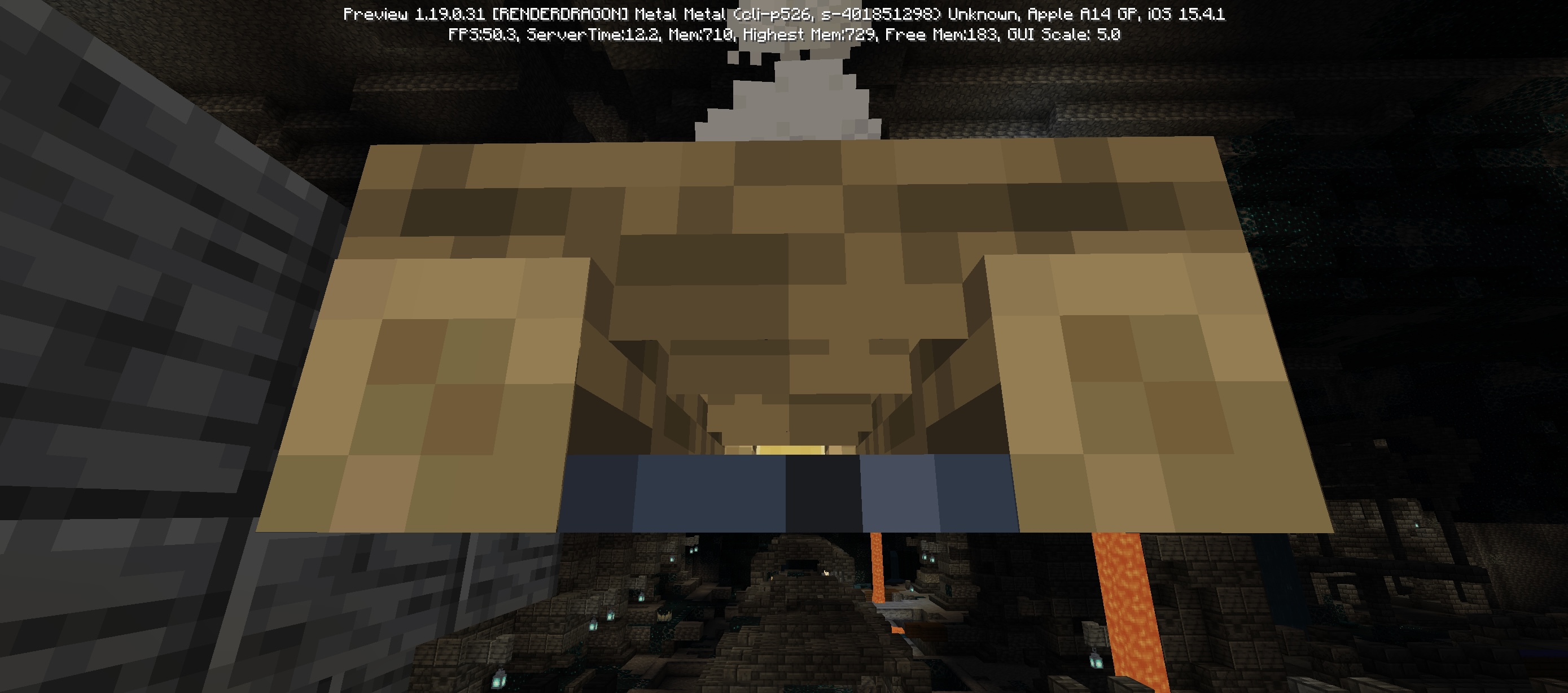
Hello, if you look close to a Campfire Off, you can see that the bottom of logs don't have model, invisible part.
Steps to Reproduce: (from HARYAMC_)
1. Place a campfire (normal or soul, both have the issue).
2. Turn it off by anyway you want.
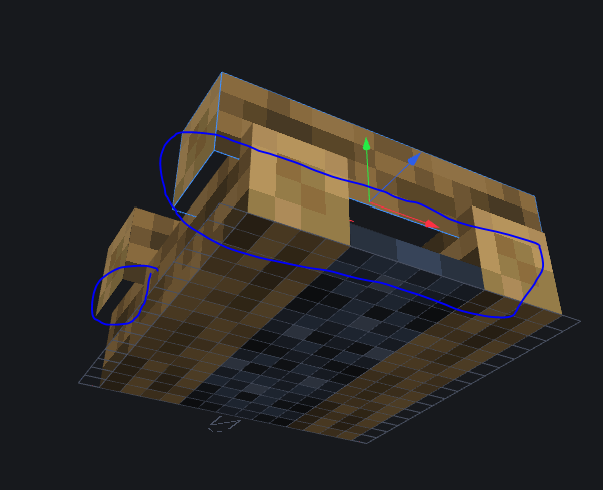
3. Place you camera to the same place where it is indicated on the screen with the blue circle. (Image in the bug report above!)
Observed Results:
The campfire bottom log would have its texture gone without any reason. The log bottom texture desappear with the other log that is at the same height as the other one.
Expected Results:
The log texture should appear for both log.
Way to fix it:
The model must us the right texture place. The model currently use the texture model in with the red part (The red part is used for that lit campfire, developpers forgot to change it when it turns off). To fix this bug, the campfire off model must use the green part instead of the red part.
Linked Issues




- Unresolved
 pulpetti
 Mark Jens
- 15
- 6
- Confirmed
- 387805
- Multiple
- campfire model rendering uv-mapping
1.21.20.23 Preview - 1.21.2 Hotfix
1.21.20.23 Preview 1.19.30.25 Preview 1.19.20.20 Preview 1.19.10.23 Preview 1.19.10.22 Preview 1.19.10.21 Preview 1.19.10.20 Preview 1.18.33 Hotfix 1.18.32 1.19.0.31 Preview 1.17.30.22 Beta 1.17.11 Hotfix 1.16.0.64 Beta 1.14.30.51 Beta 1.14.21 1.14.20 Hotfix 1.14.0 1.16.40 Hotfix 1.16.210 1.18.31 1.19.1 Switch 1.19.0 1.19.2 Hotfix 1.19.20.24 Preview 1.19.11 Hotfix 1.19.22 Hotfix 1.19.50.25 Preview 1.19.41 1.20.0.24 Preview 1.19.81 Hotfix 1.21.2 Hotfix
Created Issue:
Model of Campfire Off
Hello, if you look close to a Campfire Off, you can see that the bottom of logs don't have model, invisible part.
- Unresolved
- Open
- Unconfirmed
- PlayStation
- Version 1.99 Minecraft (PS4 Slim, latest system version)
- 1.14.0
![[Mod] LateLag](../../../data/avatars/users/92884.png)
![[Mod] Asteraoth](../../../data/avatars/users/92886.png)
is duplicated by
![[MCQA] v-weszaj](../../../data/avatars/users/18941.svg)
![[Mod] Umija5895M](../../../data/avatars/users/10122.svg)
Model of Campfire OffCampfire bottom doesn't render correctly.
is duplicated by
![[Bot] Arisa](../../../data/avatars/users/43007.png)
![[Mod] OcelotOnesie](../../../data/avatars/users/43220.png)
![[Mojang] Mega_Spud (Jay Wells)](../../../data/avatars/users/92696.png)
![[Mod] tryashtar](../../../data/avatars/users/41963.png)
Hello, if you look close to a Campfire Off, you can see that the bottom of logs don't have model, invisible part.
Steps to Reproduce: (from HARYAMC_ )
1. Place a campfire (normal or soul, both have the issue).
2. Turn it off by anyway you want.
3. Place you camera to the same place where it is indicated on the screen with the blue circle. (Image in the bug report above!)Observed Results:
The campfire bottom log would have its texture gone without any reason. The log bottom texture desappear with the other log that is at the same height as the other one.
Expected Results:
The log texture should appear for both log.
Way to fix it:The model must us the right texture place. The model currently use the texture model in with the red part (The red part is used for that lit campfire , developpers forgot to change it when it turns off). To fix this bug, the campfire off model must use the green part instead of the red part.
is duplicated by
Campfire bottom doesn't rendercorrectly.Lit campfire’s top logs’ bottom sides doesn't render at all
Lit campfire’s top logs’ bottom sides doesn't renderat allLit campfire’s top logs’ bottom sides don’t render
image-2023-03-13-21-03-26-214.png
Lit campfire’s top logs’bottomsides don’t renderLit campfire’s top logs' bottom textures don't render
Please add the image and any additional information to MCPE-58510. There was no need to create a new ticket.
Thank you for your report!
We're tracking this issue in MCPE-58510, so this ticket is being resolved and linked as a duplicate.
If you would like to add a vote and any extra information to the main ticket it would be appreciated.
If you haven't already, you might like to make use of the search feature to see if the issue has already been mentioned.
Quick Links:
📓 Issue Guidelines – 💬 Community Support – 📧 Mojang Support – ✍️ Feedback and Suggestions – 📖 Game Wiki
Thank you for your report!
We're tracking this issue in MCPE-58510, so this ticket is being resolved and linked as a duplicate.
If you would like to add a vote and any extra information to the main ticket it would be appreciated.
If you haven't already, you might like to make use of the search feature to see if the issue has already been mentioned.
Quick Links:
📓 Bug Tracker Guidelines – 💬 Community Support – 📧 Mojang Support
📓 Project Summary – ✍️ Feedback and Suggestions – 📖 Game Wiki
– I am a bot. This action was performed automatically! The ticket was resolved by one of our moderators, and I left this message to give more information to you.
Does is occur in newly created worlds as well as converted worlds?
Do you have a screenshot of the issue?
Can confirm.
Thank you for your report!
However, this issue has been temporarily closed as Awaiting Response
Is this still an issue in the latest version? If so, please add a comment or update the affected version field.
To make your bug report as effective as possible, please try and include the following steps to reproduce the problem:
If your ticket does not look like the example given here, then it's likely to be closed as incomplete.
This ticket will automatically reopen when you reply.
Quick Links:
📓 Issue Guidelines – 💬 Mojang Support – 📧 Suggestions – 📖 Minecraft Wiki
Still an issue
Steps to Reproduce:
1. Place a campfire (normal or soul, both have the issue).
2. Turn it off by anyway you want.
3. Place you camera to the same place where it is indicated on the screen with the blue circle. (Image in the bug report above!)
Observed Results:
The campfire bottom log would have its texture gone without any reason. The log bottom texture desappear with the other log that is at the same height as the other one.
Expected Results:
The log texture should appear for both log.
Way to fix it:
The model must us the right texture place. The model currently use the texture model in with the red part (The red part is used for that lit campfire, developpers forgot to change it when it turns off). To fix this bug, the campfire off model must use the green part instead of the red part.
Affect 1.18.10
Affect 1.18.12, and 1.19 beta/preview
In 1.18.31 and 1.19.0.31.
Still occuring in 1.19.10.21
Still occuring in 1.19 and 1.19.10.23
Still occuring in 1.19.20.20
Still occuring in 1.19.20.24
Still occuring in 1.19.11
Still occuring in 1.19.30.20
Still occuring in 1.19.21 and 1.19.30.23
Still occurs in 1.19.50 and 1.19.60.23
Still affects 1.19.50 and the latest 1.19.70 preview
Affects 1.19.62 and 1.19.24
Still occuring in 1.19.80 preview and 1.19.63
Still occuring in 1.19.83 and 1.20.10.21
Still occuring in 1.20
Still occuring in 1.20.13
Still affects 1.20.15 and 1.20.30.31